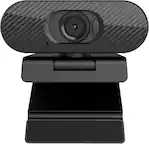
JLab - Epic Cam Webcam - Black
FREE shipping to
More Buying Options
Related Item

Specifications
- Video Resolution2K (1440p)
- Key Specs
- Video Resolution: 2K (1440p) (Refers to the number of pixels, both horizontally and vertically, used to capture the video. The higher the resolution the finer the video detail that can be seen.)
- General
- Brand: JLab
- Model Number: WEPICCAMRBLK124
- Product Name: Epic Cam Webcam
- Color: Black
- Camera
- Video Resolution: 2K (1440p) (Refers to the number of pixels, both horizontally and vertically, used to capture the video. The higher the resolution the finer the video detail that can be seen.)
- Maximum Video Frame Rate: 1080p (Full HD) @ 30 FPS (The maximum frequency at which consecutive images can be captured by a video recording device.)
- Megapixels: 5 megapixels (Measures the amount of graphic resolution that the product can capture.)
- Image Resolution (Display): 2560 x 1440 (Refers to the number of pixels, both horizontally and vertically, used to either capture an image or display it. The higher the resolution the finer the image details.)
- Autofocus: true (Allows the camera to automatically focus through the lens, rather than by adjusting the lens manually.)
- Field of View (Diagonal): 90 degrees
- Features
- Integrated Microphone: true
- Mount Type: Clip-on
- Plug And Play Operation: true (The product can work when first used or connected, without reconfiguration or adjustment by the user.)
- 360 Degrees Rotation: false (The product is capable of turning freely about an axis, incorporating horizontal points of view covering 360 degrees.)
- Connectivity
- System Requirements: Compatible with PC, Mac and Chromebook (The software that a product must have for it to be able to integrate with another product.)
- Connectivity: USB Type A
- Dimensions
- Product Height: 2.2 inches (The out of box height of the item. Height is measured as the vertical distance from the bottom of the item to the top as it would be primarily used or placed.)
- Product Width: 362 inches (The out of box width of the item. Width is measured as the horizontal distance from one side of the item to the other as it would be primarily used or placed.)
- Product Depth: 1.99 inches (The out of box depth of the item. Depth is measured as the distance from the front of the item to the back as it would be primarily used or placed.)
- Product Weight: 166 pounds (The out of box weight of the item.)
- Other
- UPC: 812887017459
Jlab Epic USB Webcam. The Epic HD Webcam gives you pro-level image quality and sound to match whether you’re hopping from video calls or recording the latest installment of your webinar. In addition to high definition video and photos, auto focus, adjustable exposure, and an adjustable zoom will ensure every frame is picture perfect—whether you want to show off your space or keep the other half of your room off camera
- JLab Epic Webcam: HD USB Webcam with 2K Video and auto focus with 15 adjustable exposure settings
- Hi-Definition: With full 2k video, 5 megapixels, and 30 frames per second, this webcam offers fantastic resolution and a crystal clear image for conferencing, live-streaming, vlogging, webinaring, chatting, meeting, teaching, happy-houring, and anything else you can think of.
- Adjustable Controls: Customize your appearance effortlessly! With adjustable zoom and exposure levels, achieve the perfect image and crop. Ideal for presentations or video series. No app required—toggle between 15 settings for a flawless, photo-perfect look in any office or WFH environment.
- Dual Built-In Microphones: The Epic HD Webcam comes with dual built-in microphones so your picture and voice are always perfectly in sync. And they’re omni-directional, so even when you can’t meet in person, your calls and recordings will sound just as natural as if everyone were right there with you.
- Auto Focus: Work from anywhere with ease with Epic Cam. Auto focus spotlights you amidst challenging lighting and shadows, while its wide 90° angle lens captures wider frames for friends, pets, or conference rooms. Say goodbye to background clutter and hello to clear, inclusive video calls.
- Pick your style: No matter what your WFH vibes are, the Epic webcam is designed to fit right in so you and your work can stand out. Interchangeable fabric face plates come in two classic colors so you can match your desk aesthetic – smooth white Mac vibes or darker styles.
- Video your way: The Epic HD Webcam is made to fit into your setup and your style of working. It has a minimal, clip-on design that works with PC, Mac, and Chromebook, so no matter your hardware, it’s always ready to plug-in and go
- 100% RECYCLABLE PACKAGING: JLab was the first major audio brand to have fully recyclable packages when we announced it in 2019. And fully recyclable is a big deal: This means after you open your product, you can put the box directly into the recycling bin and every component of it is recyclable. We looked at every detail to make it 100% recyclable.
- JLab Epic Webcam: HD USB Webcam with 2K Video and auto focus with 15 adjustable exposure settings
- Hi-Definition: With full 2k video, 5 megapixels, and 30 frames per second, this webcam offers fantastic resolution and a crystal clear image for conferencing, live-streaming, vlogging, webinaring, chatting, meeting, teaching, happy-houring, and anything else you can think of.
- Adjustable Controls: Customize your appearance effortlessly! With adjustable zoom and exposure levels, achieve the perfect image and crop. Ideal for presentations or video series. No app required—toggle between 15 settings for a flawless, photo-perfect look in any office or WFH environment.
- Dual Built-In Microphones: The Epic HD Webcam comes with dual built-in microphones so your picture and voice are always perfectly in sync. And they’re omni-directional, so even when you can’t meet in person, your calls and recordings will sound just as natural as if everyone were right there with you.
- Auto Focus: Work from anywhere with ease with Epic Cam. Auto focus spotlights you amidst challenging lighting and shadows, while its wide 90° angle lens captures wider frames for friends, pets, or conference rooms. Say goodbye to background clutter and hello to clear, inclusive video calls.
- Pick your style: No matter what your WFH vibes are, the Epic webcam is designed to fit right in so you and your work can stand out. Interchangeable fabric face plates come in two classic colors so you can match your desk aesthetic – smooth white Mac vibes or darker styles.
- Video your way: The Epic HD Webcam is made to fit into your setup and your style of working. It has a minimal, clip-on design that works with PC, Mac, and Chromebook, so no matter your hardware, it’s always ready to plug-in and go
- 100% RECYCLABLE PACKAGING: JLab was the first major audio brand to have fully recyclable packages when we announced it in 2019. And fully recyclable is a big deal: This means after you open your product, you can put the box directly into the recycling bin and every component of it is recyclable. We looked at every detail to make it 100% recyclable.
Q: What is the field of view for the JLab Epic Cam?
A: This webcam has a 90-degree field of view.
Q: How is the JLab Epic Cam powered?
A: This webcam is powered via a USB Type A connection.
Q: Can I use this webcam with a Mac?
A: The JLab Epic Cam is compatible with PC, Mac, and Chromebook.
Q: Does the JLab Epic Cam have auto focus?
A: Yes, the Epic Cam features auto focus to keep you in focus even with challenging lighting.
Q: Does this webcam include a microphone?
A: Yes, the JLab Epic Cam has dual built-in microphones.
Q: What is the video resolution of this JLab webcam?
A: This webcam has a video resolution of 2K (1440p).
A: Hi Fred, the JLab EPIC USB WEBCAM is not wireless. It is a USB webcam that needs to be plugged into a computer or other device to use.
A: Yes, the JLab Epic Cam Webcam is compatible with the PS5. You can use it for video calls, streaming, or other video-based activities on your console. Please note: While it's compatible, you might need to adjust the settings or use additional accessories for optimal performance, depending on your specific needs and setup.
Compare similar products
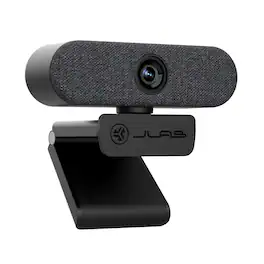
Jlab Epic USB Webcam. The Epic HD Webcam gives you pro-level image quality and sound to match whether you’re hopping from video calls or recording the latest installment of your webinar. In addition to high definition video and photos, auto focus, adjustable exposure, and an adjustable zoom will ensure every frame is picture perfect—whether you want to show off your space or keep the other half of your room off camera
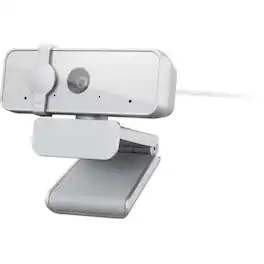
The Lenovo FHD Webcam is powered by a Full HD 1080P 2 Megapixel CMOS camera that allows your friends, family, and colleagues to see you as clear as day, even when they are worlds away. With full stereo dual-mics that are perfect for conferencing or long-distance video calls, they'll be able to hear you loud and clear, every time.

The Z-Edge ZW511 Webcam features a tripod mount, making it ideal for recording and streaming, with an 84-degree wide-angle lens that captures 1080P (1920x1080) videos and images at 30FPS, boasting 2 million pixels for crystal-clear visuals in various environments. It includes auto-focus to eliminate the need for manual focal length adjustments and a built-in high-sensitivity, low-noise microphone for clear, natural sound. This plug-and-play device works with USB 2.0 (no additional drivers required) and comes with a flexible mounting clip suitable for desktops, monitors, laptops, smart TVs, and tripods. It is compatible with WinXP, Win7, Win8, Win10, and other operating systems, supporting major live broadcast platforms, and is easy to use for online teaching, video calls, network calls, portrait collection, and more.

Look, sound, and meet better with Brio 100—a simple and affordable webcam that lets you show your best self in video calls. Full HD 1080p resolution and auto-light balance bring clarity and brightness to your calls, so you look your best. Sound better with a built-in microphone, and get total privacy with an integrated shutter.
| Pros for JLab - Epic Cam Webcam - Black | |||
|---|---|---|---|
| There were no pros for this product— | There were no pros for this product— | There were no pros for this product— | Image Quality, Ease of Use, Setup |
| Cons for JLab - Epic Cam Webcam - Black | |||
| There were no cons for this product— | There were no cons for this product— | There were no cons for this product— | Mounting, Focus, Field of View, Adjustability, Design |
Specs
Reviews
Customer Images
The vast majority of our reviews come from verified purchases. Reviews from customers may include My Best Buy members, employees, and Tech Insider Network members (as tagged). Select reviewers may receive discounted products, promotional considerations or entries into drawings for honest, helpful reviews.
- Rated 5 out of 5 stars
PC Camera
This camera is very vivid and is adaptable for desk or on top of monitor
This review is from JLab - Epic Cam Webcam - Black
CharlesM Posted
- Rated 4 out of 5 stars
Almost Perfect, No Privacy Shutter
JLab almost had the perfect webcam here, the simple setup and on-camera controls are ingenious! The microphones work excellently, and the camera quality is sharp and clear. Low light performance is great, and the inclusion of a second magnetic fabric microphone cover is great for an extra bit of personalization on a truly "work-focused" webcam. It also features a fully articulating ball head, monitor edge mount, 1/4-inch tripod mount, and a very nice, braided USB cable! It's 2K (1440P) resolution gives the Epic Cam an "epic" leg up on most of the other offerings in the ~$100 price point! The only real negatives are the lack of software or software adjustments available with the camera (something akin to "Logi Tune") and the lack of privacy shutter in any capacity, software or hardware! This seems like a glaring design oversight on an otherwise excellent webcam, I have taken to just turning the camera around when not using it but would love to just slide or flip a privacy shutter over the lens. Overall, this is still an excellent webcam that is easy to use and setup. Software and privacy shutter aside, the 2k resolution is incredible to use for Teams calls or streaming after work, while also allowing a laser sharp image when using the physical zoom control! This camera looks equally at home in your office or a gamer streaming setup, while also providing clear images, physical aperture and zoom control, multiple mounting options, and a lot of physical adjustments to get the perfect looks. The lack of software controls can easily be updated later by releasing software and the privacy shutter just leads to creative ways of giving yourself privacy, like turning the camera around or placing a sticky note over it (trusty old sticky note!). For $100, JLab's Epic Cam stands up well against the competition and offers better image resolution versus most others, 2K vs 1080P!
This review is from JLab - Epic Cam Webcam - Black
Mike Posted
- Rated 5 out of 5 stars
Stand Out in the Virtual Crowd
The JLab Epic USB Webcam’s 2K resolution and 30 fps frame rate stands out among the virtual crowd. I was able to use the Epic webcam right out of the box as it arrived just in time for a video meeting. This webcam immediately elevated my video calls by providing high definition video resolution. It was pretty easy to use on apps like Microsoft Teams, Zoom, Google Meet and more. I was impressed when I instantly noticed the increase in camera quality. Connectivity I tested this USB webcam on both PC and Mac with no connectivity issues. I noticed that Microsoft Teams on my PC laptop defaulted to the Epic immediately. Most other times on PC & Mac, any app I used required me to change the camera input manually in just a few clicks, but I still found it easy to plug & play. My PCs have USB ports for a direct plug-in. My Macbook Pro only has USB-C ports so I used a multi-port hub and was able to connect successfully. Mounting & Accessories My work-from-home office environment has a multi-monitor setup, so it’s very convenient to be able to hook up the Epic webcam to my laptop and place the camera anywhere I need. This camera mounts neatly on top of a monitor or laptop by extending the kickstand. I appreciate that it also has a threaded mounting option to use with a tripod or any ¼”-20 threaded mount. If I want to make the camera physically match the ambiance, there are two woven face plates, white and dark gray to choose from which can be changed in a snap. Zoom & Exposure Buttons There are two touch-activated buttons on this webcam. The zoom button rotates through 4 digital zooms gradually getting closer to the center of the view. I prefer to stay in the first two zoom levels since I usually set it up on a monitor right in front of me. The exposure button also has 4 settings gradually getting brighter and more precise exposure control with a long-press of the button. I was initially having some trouble with the exposure, but JLab provided helpful troubleshooting tips and I was able to fix my issue in no time. Natural or LED Lighting Lighting is essential to get the best out of this camera or really any camera, but WFH environments aren’t always equipped with production lighting. Being backlit or being in a low light environment will lower the quality of any camera, the Epic being no exception. My experience was that in very low light scenarios, the exposure button levels were difficult to notice. Some kind of lighting is needed to achieve the highest quality, whether it’s natural light from a window or an LED panel. Final Thoughts I am really enjoying the JLab Epic HD Webcam because it’s easy to use, lightweight, and compact. Simply put, it has better quality than any of my built-in laptop cameras across multiple platforms so it’s an easy upgrade if you’re in the market for a webcam with these specs.
This review is from JLab - Epic Cam Webcam - Black
Sophia Posted