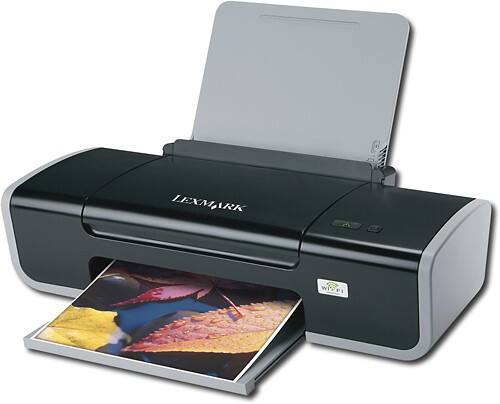
Lexmark - Network-Ready Wireless Inkjet Printer
This item is no longer available in new condition.
See similar items below.
Description
Features
From our expanded online assortment; not available in all Best Buy stores
Fast print speeds up to 25 ppm* in black, up to 18 ppm* in color
To generate documents quickly.
Color resolution up to 4800 x 1200 dpi
To produce clear, vibrant images.
4-ink cartridges
To reproduce a wide range of color shades with true-to-life results.
Prints on envelopes, index cards, post cards and hagaki cards
To suit your business, personal or crafting needs.
100-page document feeder
For unattended printing of multiple-page documents.
USB 2.0 Connectivity
For an easy connection to your computer.
Wireless 802.11b/g compatibility
Allows for cable-free connection options.
*Printer speeds may vary with use. See manufacturer for info on print speeds.
What's Included
Lexmark Network-Ready Wireless Inkjet Printer
4 individual ink cartridges
Owner's manual
Other
- Energy Star CompatibleYes
- <a href="javascript:winopengld('1087340571468','pcmcat38200050027','cat12080')">Print Speed (B&W)</a>Up to 25 ppm (Print speeds vary with use. See manufacturer for info on print speeds.)
- <a href="javascript:winopengld('1087340571541','pcmcat38200050027','cat12080')">Print Speed (Color)</a>Up to 18 ppm (Print speeds vary with use. See manufacturer for info on print speeds.)
- <a href="javascript:winopengld('1087340571577','pcmcat38200050027','cat12080')">Black Printer Resolution</a>Up to 1200 x 1200 dpi
- <a href="javascript:winopengld('1087340571611','pcmcat38200050027','cat12080')">Color Printer Resolution</a>Up to 4800 x 1200 dpi
- <a href="javascript:winopengld('1087340571658','pcmcat38200050027','cat12080')">Media Types</a>Envelope 10, 7.75, 9, B5, C5, DL, 6.75, C6, A4, A5, A2 baronial, A6 card, B5, custom, hagaki card, index card, executive, legal, letter, post card, statement, L, 2L, chokei 3, 4, 40, kagugata 3, 4, 5, 6
- <a href="javascript:winopengld('1087340571743','pcmcat38200050027','cat12080')">Input Paper Capacity</a>Up to 100 sheets
- <a href="javascript:winopengld('1087340571851','pcmcat38200050027','cat12080')">Type of Interface</a>USB 2.0
- <a href="javascript:winopengld('1087340572115','pcmcat38200050027','cat12080')">Total Ink Tanks/Cartridge</a>4 individual ink cartridges
- <a href="javascript:winopengld('1087340572271','pcmcat38200050027','cat12080')">Print Quality</a>For documents
- PC-Free PrintingNo
- <a href="javascript:winopengld('1087340809469','pcmcat38200050027','cat12080')">Duty Cycle</a>Up to 3,000 pages/mo.
- <a href="javascript:winopengld('1087340809515','pcmcat38200050027','cat12080')">Networking Capabilities</a>802.11b/g
- Minimum System RequirementsWindows 2000, XP, XP Professional x64 or Vista, Mac OS X 10.4.4-10.4.x (Intel) or OS X 10.3.x-10.4.x (Power PC)
- UPC734646061438
Customer reviews
Rating 2.5 out of 5 stars with 2 reviews
(2 customer reviews)to a friend
Rated 4 out of 5 stars
Good Stand Alone Printer
Posted .This reviewer received promo considerations or sweepstakes entry for writing a review.Bot this as a replacement for an 11 year old HP Deskjet...which would turn by itself on when a print job was sent to the machine....Other than that the Lexmark was simple to install and works fine as Lexmark does not try to add a bloated amount of software at install......I had started out with a new HP printer but the Sofware that came with that unit caused Internet Explorer 7 to crash every time tried to close browser...I spent almost 2 hours on the phone with an HP tech from India whom tried endless tweaks, uninstall and reinstall operations...Tech kept blaming the browser as source of problem....But after I hung up from HP ( took 4 requests to get tech to stop tinkering from remote control of my PC) I did a system restore and IE 7 went back to normal...Took HP back to the store and got the Lexmark.....I don't currently use the wireless function so can't comment on that issue.
I would recommend this to a friendRated 1 out of 5 stars
Unacceptable
Posted .This reviewer received promo considerations or sweepstakes entry for writing a review.I have this sent up on a home network, I sent a document to the print via wireless, it took more than 5 minutes for the document to print. Please save your money and buy a HP Wireless Printer, much more reliable and worth every penny. I personaly bought one after this, and the print quality was great. DO NOT BUY THIS PRODUCT!!!!!!!!
No, I would not recommend this to a friend
Be the first to ask a question.
We’ll try to get your question answered within 24 hours by a Best Buy customer or brand representative.
Ask a Question