• Visit our Support Center
  • Check your Order Status
  • Shipping, Delivery & Store Pickup
  • Returns & Exchanges
  • Price Match Guarantee

Order & Purchases

  • Check Order Status
  • Shipping, Delivery & Pickup
  • Returns & Exchanges
  • Price Match Guarantee
  • Product Recalls
  • Trade-In Program
  • Gift Cards

Payment Options

  • My Best Buy® Credit Card
  • Pay Your Bill at Citibank
  • Lease to Own
  • Buy Now, Pay Later
  • Best Buy Business Financing

Support & Services

  • Visit our Support Center
  • Shop with an Expert
  • Schedule a Service
  • Manage an Appointment
  • Protection & Support Plans
  • Haul Away & Recycling
  • Contact Us

Rewards & Membership

  • My Best Buy Memberships
  • View Points & Certificates
  • Member Offers

Partnerships

  • Sell on Best Buy Marketplace
  • Advertise with Us
  • Affiliates: Creators & Publishers
  • Best Buy Health
  • Best Buy Education
  • Best Buy Business
  • Partner+

About Best Buy

  • Corporate Information
  • Careers
  • Corporate Responsibility
  • Sustainability
Sign in or Create Account

Get the latest deals and more.


Best Buy appLearn more ›

Share on YouTubeShare on InstagramShare on TikTokShare on FacebookShare on PinterestShare on X

Best Buy Canada

AccessibilityTerms & ConditionsPrivacyInterest-Based AdsState Privacy RightsHealth Data PrivacyDo Not Sell/Share My Personal InformationLimit Use of My Sensitive Personal InformationTargeted Advertising Opt OutCA Supply Chain Transparency Act
In-store pricing may vary. Prices and offers are subject to change. © 2026 Best Buy. All rights reserved. BEST BUY, the BEST BUY logo, the tag design, and MY BEST BUY are trademarks of Best Buy and its affiliated companies.
$(csi.user.businessName)
Skip to contentGo to Product Search
Assistive Survey
Fall Football
Top Deals
Deal of the Day
Gift Ideas
My Best Buy Memberships
Credit Cards
Gift Cards
Trade-In
Best Buy Business
Main Content

CPU Fans & Heatsinks

Filters

Skip To Results

Get it fast

Select Store
55423

Brand

Price

to

Number of Fans Included

Cooling System

Lighting Type

Best Buy

/

Computers & Tablets

/

Computer Cards & Components

/

Fans, Heatsinks & Cooling

/

CPU Fans & Heatsinks

CPU Fans & Heatsinks (1)

Sort by:
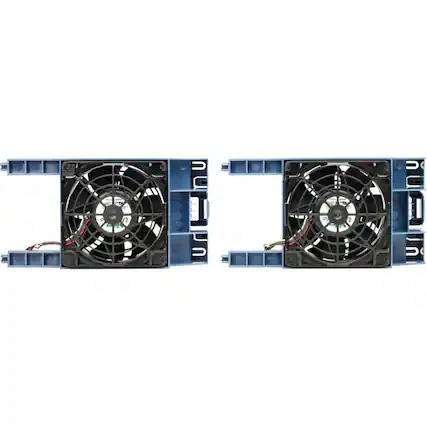
  • Front. HPE Aruba - ProLiant ML350 Gen11 Second CPU Fan Kit - Black.

    HPE Aruba - ProLiant ML350 Gen11 Second CPU Fan Kit - Black

    Not yet reviewed

    Not yet reviewed
    $81.39$8139

    Get it by Fri, Sep 25 • FREE

Sponsored
Sponsored
Sponsored

Purchasing a CPU fan and CPU heatsink

Preventing overheating with CPU fans and heatsinks

Heatsinks, or heat sinks, are essential components in any computer. As computer processing units (CPUs), computer RAM and visual graphics cards send and receive information, they create an incredible amount of heat, which can shut down the system very quickly if it is not directed away from the components. A heatsink is designed to do exactly that—draw the heat away from the computer’s parts and dissipate it into the air.

From there, a computer cooling fan can blow the heated air farther from the components and circulate cooler air in the area. So, a heatsink and fan work in combination with each other as part of a computer cooling system. While some computer components, like graphics cards, come with built-in heat sinks and cooling fans, you many need to buy a separate set for your CPU if you are building a computer or upgrading parts to create the best computer for you.

Choosing the best CPU fan and heatsink for your computer

CPU heatsinks are made using different metals and designs. For instance, one popular heatsink design, called the fin heatsink, increases surface area with thin parallel panels (or fins) to dispel more heat without increasing the heatsink footprint. In terms of material, copper can hold more heat than aluminum can, but copper is also more expensive. In terms of style, you might enjoy a CPU fan and heatsink with RGB lighting if you are building a gaming PC.

A larger CPU cooling fan and heatsink can generally take in more heat (though surface area is what matters most) and dispel it more effectively. With any CPU fan and heatsink, however, you need to ensure that you have the space to install the parts. So, make sure you know what you’re looking for, size-wise. Finally, for the greatest cooling effect even in warm temps, consider a high end liquid-based cooling system. Both air coolers and liquid coolers have pros and cons. So, weigh your options.