A:AnswerHi, BadPa58. You may need to use an adapter that will let you convert a USB-C to a USB A as it may work on this set up. For more details, please get in touch at [email protected].
A:AnswerHi, Jeff. We’ll look into this closely so we can assist you properly. Just send us an email at [email protected] along with a link to this post as our reference.
A:AnswerHi, Jackson. It may not work since the Belkin F4U092 was designed to work with USB-C capable laptops. You )can check this link for more info: (https://www.belkin.com/us/support-article?articleNum=315197).
A:AnswerHi, PWNSP. The Belkin F4U092 was designed to work with USB-C capable laptops. It has been tested for compatibility with the following laptops:
MacBook® with USB-C 3.1 Port
MacBook Pro® 13” with Thunderbolt™ 3
MacBook Pro 15” with Thunderbolt 3
MacBook Pro 15” with Touch Bar™ and Thunderbolt 3
HP Spectre x360 with USB-C 3.1
Dell® XPS 13 with Thunderbolt 3/USB-C 3.1
HP Pavilion x360 with USB-C 3.1
ASUS® ZenBook Flip S with USB-C 3.1
Lenovo® Yoga 910 with USB-C 3.1
Microsoft® Surface® Book 2 with USB-C 3.1
Dell Chromebook™ 3180 with USB-C 3.1
ASUS Chromebook Flip C302 with USB-C
Google Pixelbook™ with USB-C 3.1
A:AnswerHello there. No, the Belkin USB-C Multimedia Hub, F4U092 was designed to work with USB-C capable laptops. It has been tested for compatibility with the following laptops:
MacBook® with USB-C 3.1 Port
MacBook Pro® 13” with Thunderbolt™ 3
MacBook Pro 15” with Thunderbolt 3
MacBook Pro 15” with Touch Bar™ and Thunderbolt 3
HP Spectre x360 with USB-C 3.1
Dell® XPS 13 with Thunderbolt 3/USB-C 3.1
HP Pavilion x360 with USB-C 3.1
ASUS® ZenBook Flip S with USB-C 3.1
Lenovo® Yoga 910 with USB-C 3.1
Microsoft® Surface® Book 2 with USB-C 3.1
Dell Chromebook™ 3180 with USB-C 3.1
ASUS Chromebook Flip C302 with USB-C
Google Pixelbook™ with USB-C 3.1
Check this link to learn more: (https://www.belkin.com/us/support-article?articleNum=315197).
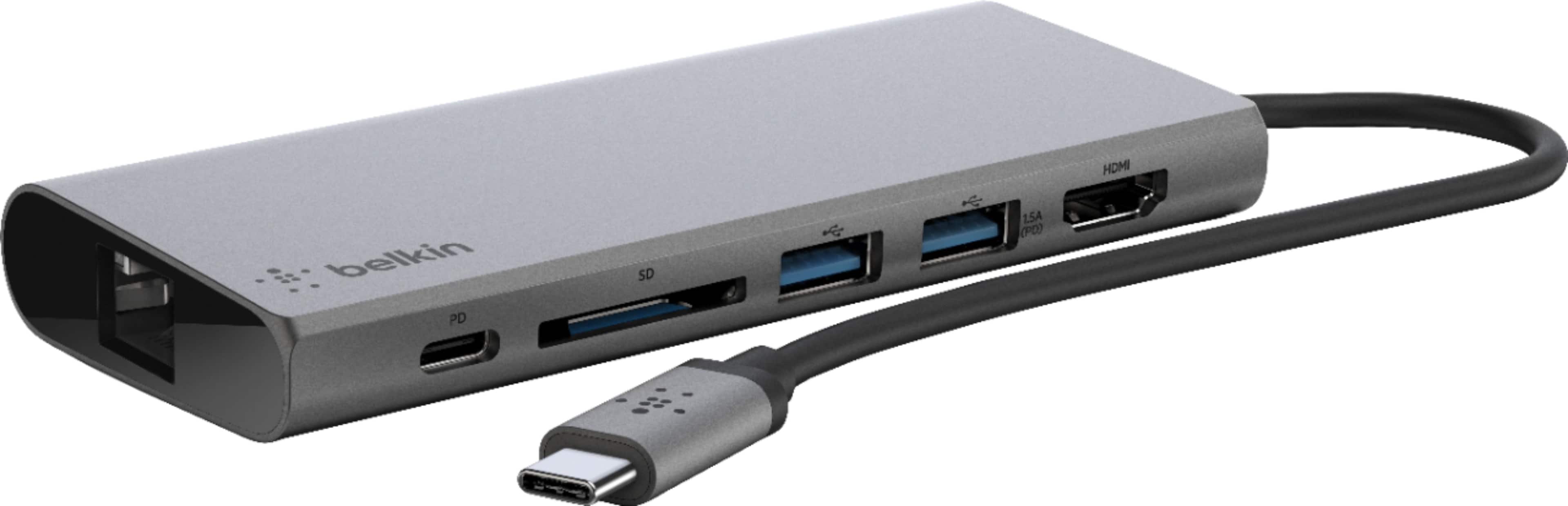
A:AnswerHello, Tegano. Our Belkin F4U092 supports full-size HDMI output supporting up to 4K at 30 Hz, and is designed to work with USB-C capable laptops.
A:AnswerCheck your screen output resolution. You don’t need the hdmi to be powered to send signal. You’re probably sending 4K to a 1080p monitor and it doesn’t like it. Update your monitor if anything.
A:AnswerHi, Nontech. This doesn't have a power supply included and requires using the USB-C power adapter provided with your laptop. For more details, click here: https://www.belkin.com/us/support-article?articleNum=315197.
A:AnswerHello. The Belkin F4U092 was designed to work with USB-C capable laptops, and tested to work with the following laptops:
• MacBook® with USB-C 3.1 Port
• MacBook Pro® 13” with Thunderbolt™ 3
• MacBook Pro 15” with Thunderbolt 3
• MacBook Pro 15” with Touch Bar™ and Thunderbolt 3
• HP Spectre x360 with USB-C 3.1
• Dell® XPS 13 with Thunderbolt 3/USB-C 3.1
• HP Pavilion x360 with USB-C 3.1
• ASUS® ZenBook Flip S with USB-C 3.1
• Lenovo® Yoga 910 with USB-C 3.1
• Microsoft® Surface® Book 2 with USB-C 3.1
• Dell Chromebook™ 3180 with USB-C 3.1
• ASUS Chromebook Flip C302 with USB-C
• Google Pixelbook™ with USB-C 3.1
A:AnswerHi, AbileneTeacher. Please get in touch at [email protected] with your contact details and the link to this post so we can check this out further.