“How do I connect this to my home theater 5.1 surround sound? The HDMI doesn't seem to support this function.”
Answer This Question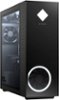
1-2 of 2 Answers
I resolved this by going into sound properties. initially, I was trying to resolve it in windows settings. it is working properly now.
Sorry, there was a problem. Please try again later.It does support 5.1 surround, so I'm not sure what the issue is. Your best option is to contact the HP support team, so they can troubleshoot it with you in real time.
Sorry, there was a problem. Please try again later.
