“do i have to set alarm like normal or does it get the time from ipod..thx...gregg”
Answer This Question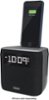
1-3 of 3 Answers
The docking connector is compatible with the Apple Lightning connector found on iPhone 5's and 6's. See photo of Lightning connector. When you connect the iPhone (or iPod Touch) the clock radio can sync its time with your device to update the time. The clock radio also includes a sync button to update the time on the radio. I don't know what model you have for the iPod (Touch?) but it must have a Lightning connector to use with the docking connector on top of the unit. The time to set alarms is through the clock radio settings. On the radio you can choose what audio source you want to use for the alarm (tone, radio or the docked device's audio). I hope that helps.
Sorry, there was a problem. Please try again later.Syncs the clock to your Lightning device in moments.
Sorry, there was a problem. Please try again later.You can do it either manual or by docking your phone. Both ways work so it's up to you. But yeah docking your phone is the easiest way to sync time
Sorry, there was a problem. Please try again later.
