“I can't connect to my JBL. I've tried pressing Bluetooth button + volume down. I've tried resetting it by holding the mute button down as well, the light gets red, it turns off and on again but still.. same problem. Wifi and bluetooth don't work.”
Answer This Question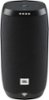
1-2 of 2 Answers
Hi there, thanks for reaching out. You can confirm if doing the reset was successful for you JBL Link 10 when you press the Google Assistant button on top and a voice responds that you need to set up the speaker. It's also possible that when you press the button, you'll only hear beeping noise. If in case that you haven't gone through the set-up yet, please download Google Home App on your device and follow the steps on how to set-up your speaker. Once it's successfully connected to your Wi-Fi network, that's the time that Bluetooth will be activated on the speaker. For more help, you can check out the videos we have on this link: https://bit.ly/2YSglt6.
Sorry, there was a problem. Please try again later.This may not be of much help, but i had trouble too. it wouldnt connect for some reason. I shelved it for a few weeks and attempted it again and it was surprisingly fast and easy to hook up. i think it may have been something with the Wifi/bluetooth issue on my phone that wouldnt connect those few weeks ago for me to initially set it up...it works perfectly now.
Sorry, there was a problem. Please try again later.
