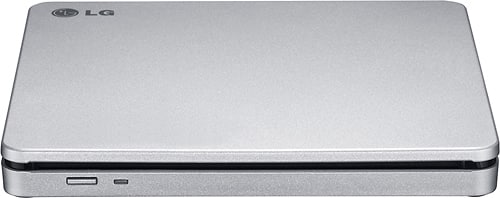
A:AnswerFor this model it still depends on the compatibility so we cannot give any assurance about it.If you have questions or further concerns, please reach out to our support team on Twitter via @LGUSSupport or on Facebook at https://www.facebook.com/LGUSA/.
A:AnswerThe LG - 8x External Double-Layer DVD±RW/CD-RW SuperMulti Blade Drive - Silver, Model # AP70NS50 can be switched to TV Connectivity mode to play files saved on a DVD or CD through the TV, but you cannot record TV programs with it or set a timer for shows. It does not have storage capacity nor does it have timer functionality...^IFV
A:AnswerThe LG - 8x External Double-Layer DVD±RW/CD-RW SuperMulti Blade Drive - Silver, Model # AP70NS50 is compatible with Mac OS X v.10.5.4 or Higher Operating Systems...^IFV
A:AnswerThe LG - 8x External Double-Layer DVD±RW/CD-RW SuperMulti Blade Drive - Silver, Model # AP70NS50 cannot be connected to a VCR to copy VHS tapes to a DVD disc. It connects to a PC/Laptop via USB and gets its power from the USB port. It requires a compatible operating system (Windows 10, Windows 7, Windows 8, Windows Vista™, Windows XP, or Mac OS® X ) and system requirements are a Pentium IV 2.4 GHz or Higher(with USB 2.0) for basic performance (Recommended for optimal performance: Pentium IV 3.2 GHz or Higher) CPU, 56 MB or larger (Recommended: 512 MB). Memory, a Hard Disk Drive with 0 GB or more free space. (The free space needed for writing depends on the quantity of data.) and Video Memory of 64 MB (Recommended: 128 MB)....^IFV
A:AnswerThe owner's manual for the LG - 8x External Double-Layer DVD±RW/CD-RW SuperMulti Blade Drive - Silver, Model # AP70NS50 lists this drive as being compatible with Mac OS X v.10.5.4 or Higher operating systems...^IFV
A:AnswerThe LG 8x External Double-Layer DVD±RW/CD-RW SuperMulti Blade Drive - Silver, Model # AP70NS50 has to be connected to a PC/Laptop via its USB port and it is compatible with Windows 7, Windows 8, Windows Vista™, Windows XP, and Mac OS® X .10.5.4 or Higher Operating Systems. The unit gets its power from the USB port that it is connected to. System requirements for the drive are a Pentium IV 2.4 GHz or Higher(with USB 2.0) for basic performance (Recommended for optimal performance: Pentium IV 3.2 GHz or Higher) CPU with 256 MB or larger (Recommended: 512 MB) memory, a Hard Disk Drive with 20 GB or more free space. (The free space needed for writing depends on the quantity of data.) and Video Memory of 64 MB (Recommended: 128 MB)....^IFV
A:AnswerThe LG - 8x External Double-Layer DVD±RW/CD-RW SuperMulti Blade Drive - Silver, Model # AP70NS50 connects to a PC/Laptop via its USB port. It get's its power from the USB port and it is compatible with Mac OS® X v.10.5.4 or Higher Operating Systems...^IFV
A:AnswerThe TV Connectivity mode for the LG - 8x External Double-Layer DVD±RW/CD-RW SuperMulti Blade Drive - Silver, Model # AP70NS50 allows you to playback files saved on a compatible disc through a TV's USB port, but you cannot record a movie from your TV to the drive. Your TV's USB port is an input. It is not an output...^IFV
A:AnswerThe LG - 8x External Double-Layer DVD±RW/CD-RW SuperMulti Blade Drive - Silver, Model # AP70NS50 does not have an HDMI port on it. It connects via its USB port. It has a TV Connectivity function that allows you to enjoy videos, pictures and music by connecting this it to a TV with USB ports...^IFV
A:AnswerThe LG - 8x External Double-Layer DVD±RW/CD-RW SuperMulti Blade Drive - Silver, Model # AP70NS50 is compatible with Mac OS X v.10.5.4 or Higher, Direct X 9.0 or Higher Operating Systems. It does not come with a software installation disc for Mac OS and you operating system should detect the drive automatically...^IFV
A:AnswerThe LG 8x External Double-Layer DVD±RW/CD-RW SuperMulti Blade Drive - Silver, Model # AP70NS50 is compatible with Mac OS® X .10.5.4 or Higher, Direct X 9.0 or Higher Operating Systems...^IFV
A:AnswerYou cannot connect the LG - 8x External Double-Layer DVD±RW/CD-RW SuperMulti Blade Drive - Silver, Model # AP70NS50 to your car stereo. It requires an operating system...^IFV
A:AnswerYou can use the LG - 8x External Double-Layer DVD±RW/CD-RW SuperMulti Blade Drive - Silver, Model # AP70NS50 as an alternative to the LG Super Multi External 24x DVD Rewriter with M-DISC™ Support. Both are external DVD drives that connect to PC/Laptops via USB and they both have the same system requirements. The GE24NU40 has a higher writing performance at a max speed of 24x...^IFV
A:AnswerHi Serena. 4K Ultra HD Blu-ray disc technology, Blu-ray DVD disc technology, and DVD disc technology are all backward compatible which means each format can play the technologies that preceded it. The technologies are not forward compatible so as a DVD Player, the LG 8x External Double-Layer DVD±RW/CD-RW SuperMulti Blade Drive - Silver, Model # AP70NS50 can play DVDs and CDs, but it cannot play Blu-ray DVDs or 4K Ultra HD Blu-ray DVDs...^IFV