“How do you delete missed calls from the lively flip phone”
Answer This Question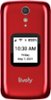
1-3 of 3 Answers
How do I delete all block number from my Lively phone I can't receive message to my phone it say it is full, how do I delete that.
Sorry, there was a problem. Please try again later.Phone>OK>missed calls >OK> down arrow to delete>OK
Sorry, there was a problem. Please try again later.Great question! To delete a missed call from your call history, please follow these simple steps. From the Main Menu select Phone and press OK. Select Call History and press OK. Scroll to the missed call that you wish to delete and press OK. Select Clear From History, Clear Call and then Close and press OK. For more details on the Jitterbug Flip2, please visit the Support page of our website.

 Top 10 Contributor
Sorry, there was a problem. Please try again later.