“How do you delete a contact from the contact list? User Guide only tells you how to add a contact - not delete.”
Answer This Question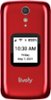
1-2 of 2 Answers
Contacts. Arrow down to contact that you want to delete and hit the Ok button. Arrow down to Edit Contact and hit the Ok button Arrow down several times and select Delete This Contact Make sure that Delete Contact is highlighted and hit the Ok button
Sorry, there was a problem. Please try again later.Great question! To delete a contact on the Jitterbug Flip2 please follow the steps listed below. For immediate support, please contact our Customer Service team at 1-800-733-6632. 1. From the main menu scroll to "Contacts" and press "Ok" 2. Use the Up and Down arrow keys to scroll to the Contact in need of deletion and Press "Ok" 3. Use the arrow to scroll and highlight "Edit Contact" and press "Ok" 4. When in the editing mode there is a menu option titled "Delete This Contact" 5. Use the down arrow key to highlight this menu option and press "Ok" 6. "Are you sure you want to delete this contact?" will appear on the screen with the option to "Delete Contact" or "Cancel" 7. To delete- press "Ok"

 Top 10 Contributor
Sorry, there was a problem. Please try again later.