1-2 of 2 Answers
how doi delete numbers from contact list
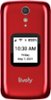
Sorry, there was a problem. Please try again later.Great question. To delete a contact please scroll to the contacts and press ok, use up and down arrow keys to scroll to the contact you wish to delete then press ok, use the arrow to scroll and highlight edit contact and press ok. When editing an existing contact there is a menu option titled: Delete This Contact, use the arrow key to highlight this option and press ok. Then confirm you want to delete the contact. All of these instructions can be found on the user guide that came with the phone.

 Top 10 Contributor
Sorry, there was a problem. Please try again later.