A:AnswerHi sync! It could possibly be a source issue, but if you are hearing an audio delay across all sources/channels and you have a Home Theater System or other speakers connected to your TV, you can access the Audio Delay settings to increase the audio delay. Go to: Settings > Sound > Expert Settings > Digital Output Audio Delay. You may also want to be sure your TV is updated to the latest firmware version, often resolving sync or connection issues.
^Tim
A:AnswerHi Hunter! Absolutely, the AU8000 features built in Bluetooth audio technology allowing you to connect to a wide variety of wireless headsets or speakers via Bluetooth. You can even use the Multi-Output Audio feature to use both TV speakers and Bluetooth headsets simultaneously if you have viewers who want two different volume levels.
^Tim
A:AnswerHi chuck! You do not need to utilize any of the smart features on the TV should you choose not to. The TV will allow you to go straight to your last used source, such as your DISH service, when turning on the TV. You can even turn off the "Auto Launch Smart Hub" feature for quicker access to your external device. Navigate to Settings > General > Smart Features and disable both "Autorun Smart Hub" and "Autorun Last App".
^Tim
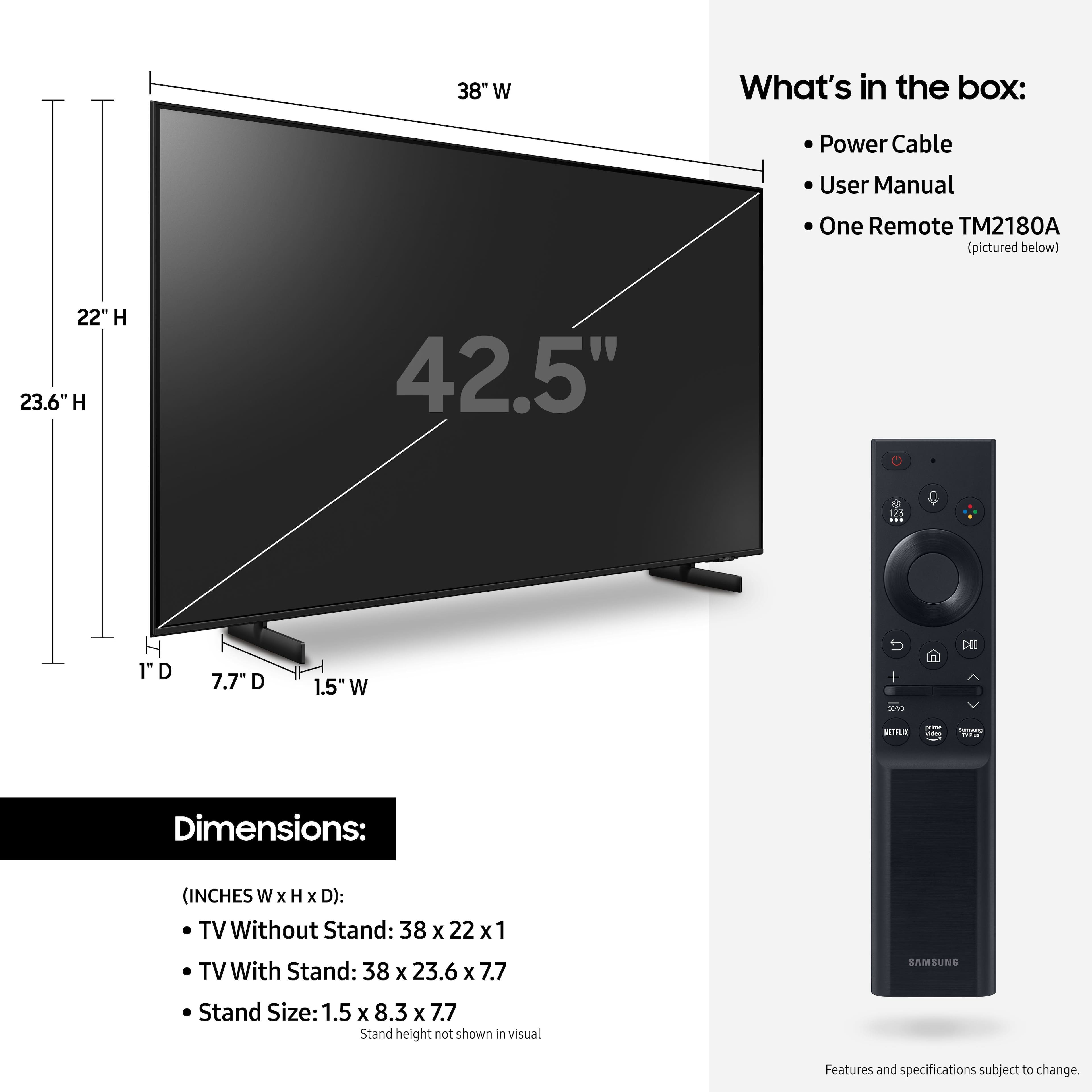
A:AnswerHi Geo! TV's are advertised using the diagonal measurement of the screen. You can often times find the additional dimensions of each TV listed in the product specs. The dimensions of the 43" AU8000 are 38" x 22" x 1" (WxHxD) without the stand and 38" x 23.6" x 7.7" (WxHxD) with the stand attached.
^Tim
A:AnswerDo you have cable as well? need to click on the cable tv icon.
OR, I am trying to cut the cord with cable, just got YouTube TV. I get the tv channels I like with that; 2, 4 7, etc. You can only get local, like for Connecticut, ch 12 by having Cable.
A:AnswerHi MICK! Through the TV itself, the AU8000 does not feature the ability to set a 'wake up timer' or schedule a time for the TV to turn itself on; however, when paired with the SmartThings app on a mobile device, you are able to setup automations or scenes allowing you to set specific times you would like your TV to turn itself on or off.
^Tim
A:AnswerHi Mexipol! This model features a 20w, 2.0ch speaker system with Samsung's Object Tracking Sound Lite. This feature analyses and optimizes the content (e.g. movies, streaming, sports, gaming) to send the sounds to the relevant speakers in your TV, allowing the sound to move with the action on screen. Should you wish to improve the sound quality further, the AU8000 also features Q Symphony allowing your TV speakers and Q Symphony compatible Samsung soundbar to work together, increasing the sound field giving you our most immersive experience yet. Additionally, the AU8000 is compatible with a wide range of screen mirroring solutions, featuring Miracast and Airplay 2 technology built in allowing you to wirelessly mirror your mobile devices. Additionally, you can utilize the "PC on TV" feature to remote access or wirelessly connect to your PC for additional ways to utilize the screen.
^Tim
A:AnswerHi! The 2021 AU8000 features improved picture quality due to a new and improved version of the Crystal Processor 4k, as well as more natural color provided by Dynamic Crystal Color. Aside from the picture quality, you can also take advantage of better audio with Object Tracking Sound Lite and Q Symphony. To top it all off, the AU8000 features our Airslim design giving you our lowest profile line of TVs yet for a TV that looks good on or off. ^Tim
A:AnswerHi Buck! The leg width of the 43" AU8000 is 26.8". The legs are also height adjustable between two positions. In the lower position, you will have a clearance of 1.6" and the raised position gives you 2.6".
^Tim
A:AnswerHi BD! Yes, you can use a Xfinity remote to control the AU8000 TV - depending on the type of remote you are utilizing (eg. Xfinity X1), it may require additional programming steps. You can find programming instructions on your cable provider's website or contacting them directly. Hope this helps!
^Tim
A:AnswerHi! The AU8000 features built in Voice Assistant capabilities with Bixby, Google Assistant, and Amazon Alexa. If your smart devices are connected with either Google Assistant or Amazon Alexa, you can use your voice to control those devices. For an on screen, Smart Things dashboard, allowing you to access your devices through the TV, check out the Q70A QLED TV from Samsung, available at Best Buy.
^Tim
A:AnswerHi Teri7171! The legs for the 43" AU8000 are spaced 26.8" apart and each leg is spaced 5.6" from the edge of the TV. You will need a piece of furniture with at least 27" of width to support this TV. The more space you provide eliminates the possibility for accidental damage from the TV being bumped or knocked off of the table.
^Tim
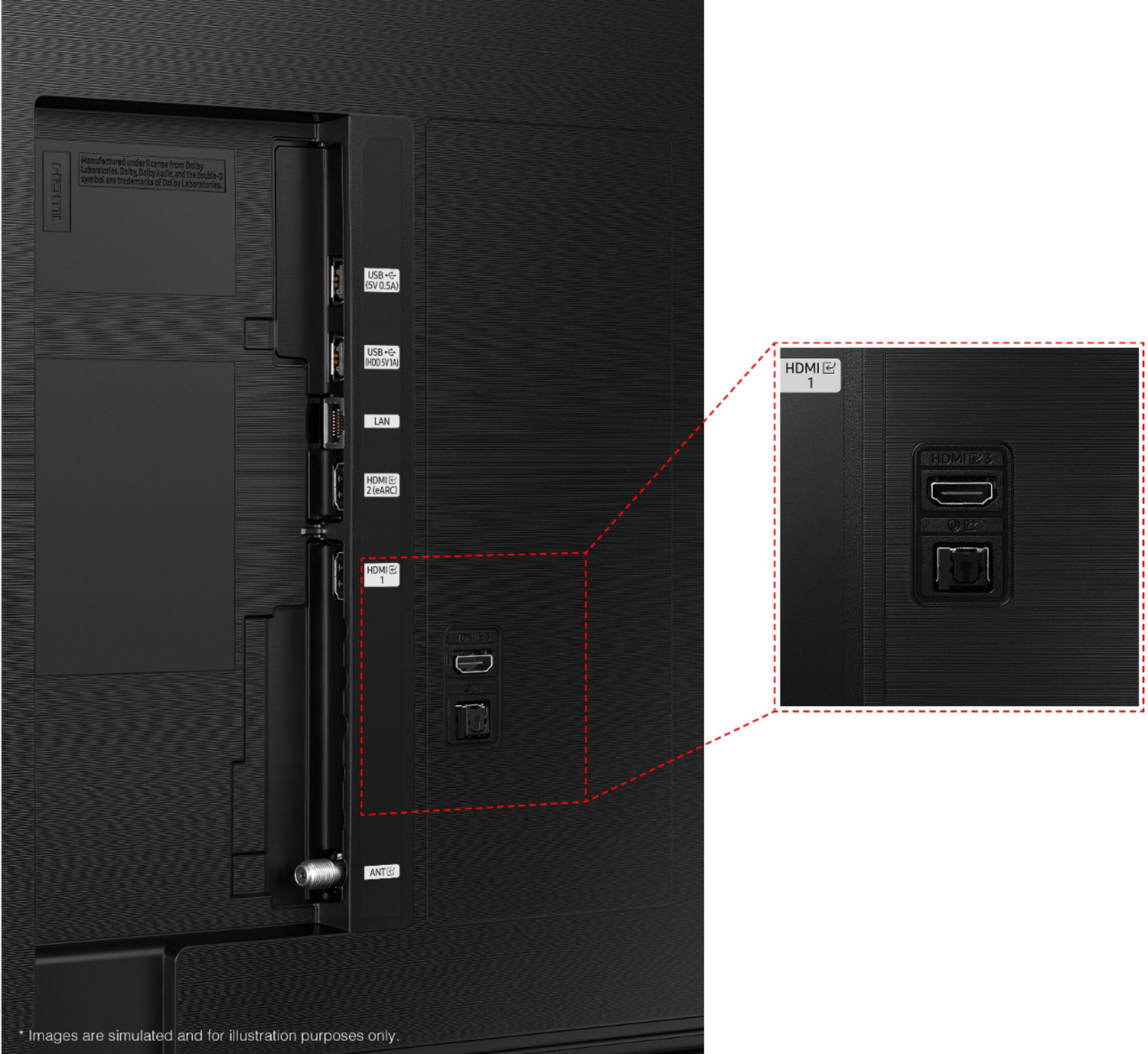
A:AnswerHi MOLLYCAT! The AU8000 features 3 HDMI ports for connecting to external devices, such as a DVR. If your DVR supports HDMI, it will be compatible with the AU8000.
^Tim
A:AnswerHi kdoggin! The AU8000 features 3 HDMI ports for connecting to external devices such as an Amazon Fire device or Roku Streaming solution. Alternatively, you can utilize the built in App Store to access a wide range of streaming apps without the need for an external device.
^Tim
A:AnswerTV does not have any RCA jacks, but has HDMI and DigitalOptical. If your external devices don't have either of these, you can readily get adapters for almost every combination. (I have older but terrific wireless headphones that the base requires RCA jacks, so I got a bluetooth receiver with RCA output jacks, and paired it with the TV very easily. I know that's not video, but the point is, adapters for older devices are out there.)