“My husband just purchased a GearFit2 yesterday and he loves it. The only problem he is having is syncing it up to his phone. We have re-booted the phone and the GearFit, but it still will not sync. Any advice is appreciated. Thank you.”
Answer This Question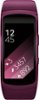
1-4 of 4 Answers
I had the same issue with my first watch. I had to take my laptop to back up my phone and then reset my phone. Once phone was reset, it synchronized. I know it is a lot, but that was the only way mine worked. Take it to the Samsung techs in Best Buy to help you out. My techs at my local store are very knowledgeable.
Sorry, there was a problem. Please try again later.I had to update the app before mine would sync. There are directions online.
Sorry, there was a problem. Please try again later.Most devices such as this use a Bluetooth connection which requires pairing rather than syncing as with wireless. If you haven't tried that, you might look into it. It requires Bluetooth turned on on both devices and one of them should indicate it "sees" the other and is ready to pair. If all else fails, contact support for the GearFit.
Sorry, there was a problem. Please try again later.Congrats on the new device and thanks for reaching out MAD2006! To connect your Gear Fit2 device to a phone, first make sure that it is on the list of compatible mobile devices, which you can find on Samsungs page here: http://www.samsung.com/hk_en/mobile_compatible_list/ . If your phone fits compatibility, follow these steps to connect it to the watch: - Open the Samsung Gear app on your mobile device. (the app is free in the Play Store). - Touch CONNECT TO GEAR. - Touch OK. - If you agree, touch the check mark boxes and touch NEXT. - You have the option to sign into your Samsung account. For this demonstration, touch SKIP. (If you already have a Samsung account added to the mobile device, this step does not display.) We hope all works out. Thanks for being a customer! ^Mel
Sorry, there was a problem. Please try again later.

