1-1 of 1 Answer
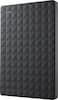
Connect the drive to a vacant USB port using the included cable. Once automatically detected, follow the on-screen prompts, permitting the drive to be formatted. By using the external hard drive on Xbox One, all prior data is erased. 1. Connect your external hard drive to an Xbox One USB port. An on-screen pop-up will display. 2. Select Format storage device. 3. Enter a name for the drive using the on-screen keyboard. 4. Select Install new things here to automatically install future games on this drive. 5. Select Format storage device. Now configured for Xbox One, future games and apps automatically install to your external drive.
Sorry, there was a problem. Please try again later.
