A:AnswerHi db,
Thank you for the inquiry! We're sorry to hear that. If it doesn't work, there might be a problem with the hard wire connection or the speaker itself. To further assist you, please contact our product support.
https://us.esupport.sony.com/support/s/support-contact
Regards,
David
A:AnswerThis system is very confusing. You need to set it up with a television set to program it. In order to get all your speakers to work, push the factory reset, then don’t use the set up microphone that come with the unit. I have 4 speakers and subwoofer speaker along with the receiver in our outdoor entertainment area and you can now hear everything from every speaker.
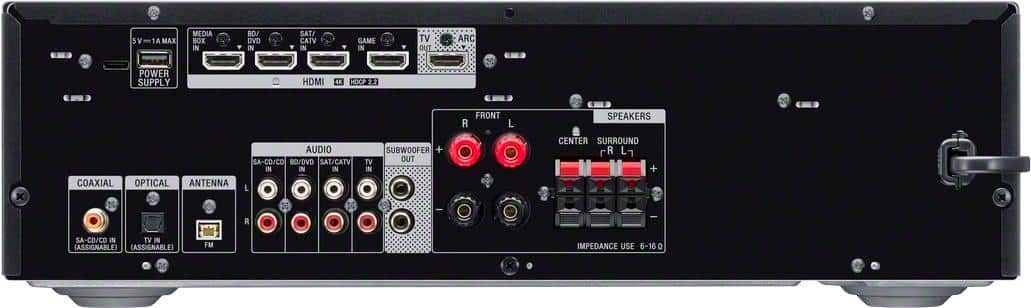
A:AnswerDon't know about the ARC feature, but I can tell you that there is no hookup for a standard old-school turntable (one with a ground wire). If your turntable has been purchased within the last 10 years or so, it should have its own phono stage/preamp, and you should be able to connect the turntable's RCA outputs to any of the RCA audio input jacks that you are not using.
A:AnswerYour TV connects to the amp with HDMI cable. Whatever audio received by the TV will go through the amplifier when connected correctly and chosen. There is a "coax in" jack on the back, but I can't speak to it, I don't use it.
A:AnswerHi Kjohnson,
Thanks for the inquiry! Unfortunately, you cannot connect a turntable to this AV receiver via Bluetooth connection.
Regards,
David
A:AnswerI got this information from page 24 of the Operating Instruction manual-- To connect a turntable that only has a Phono output jack, you need to connect a phono equalizer (not supplied) between the turntable and the receiver. I plan to add a turntable soon as I have around 700 LP's from the 70's through the late 80's, so soon I'll be trying to do the same thing you are. You can also google the same question or look up the same reciever on YouTube to see if any of the YouTube videos are any help. Good Luck and Cheers.
A:AnswerI don't know why it wouldn't, if the speaker in question has a red and black speaker wire terminal in the back, attach black wire from left speaker to left speaker output on the back of the receiver and the the red wire from right speaker output on the reciever to the the red wire terminal on the back of the right speaker, it should work This information can be found in any receiver manual under speaker installation.
A:AnswerYes, on the STR-DH590 I would think that it would connect to Alexa as it has blue tooth connectivity. I haven't done this. I use it with an older Bose System surround sound via a sound HDMI connection. Set up was easy and the unit retains its settings. The unit is easy to use and I'm well please with it. This unit replaced an Denon AVR2309C1 that worked well but was difficult to use.