A:AnswerIf you have any questions regarding product (availability, Pricing or Promotions) either in store or online, contact Walmart directly by clicking on the "Contact Us" link under "Help" at the bottom of the page and an associate will be happy to assist.
http://www.walmart.com/cservice/cu_comments_online.gsp?cu_heading=8
A:AnswerYes, the editing and noise filtering is provided by the software as a post-capture adjustment that has to be done on the computer. However, track determination was not effective for most of the albums I captured. I had to use another software suite that permitted threshold adjustment for silent points between tracks. Even so, I still had to do some manual selection of tracks.
Yes, the software is compatible with WinXP. Captured albums on a DellD630 laptop that had WinXP Pro installed.
A:AnswerI would go with any decent powered speakers (also called Active speakers). I have the Bose Companion 3 Series II speakers and the turntable sounds amazing with these. (Bose no longer sells the Companion 3 - they insist that the Companion 20 are a good replacement, but the 20 series do not have a separate subwoofer and hence do not sound as loud as the Companion 3. I would just buy the Companion 3 from Amazon or something similar - you'll probably get a good deal since they're discontinued.)
If you don't need the high sound quality that Bose offers, even a pair of Klipsch or high-end Logitech active speakers should sound pretty decent.
A:AnswerYou can return it with all its parts within 15 days. It's a cheap turntable, but will do okay if it's being used with an average receiver, and first-issue records aren't important.
A:AnswerThe output is not amplified. Your speakers would have to be self-powered and amplified. I would recommend feeding the output to a receiver or at least a preamp before hitting speakers.
If going through USB, your speakers need to be compatible with the computer of choice. I would recommend amplified speakers here, too.
A:AnswerThe output of the turntable is at phono level, which means it requires at least a preamp to bring the signal to a standard line input level. You can listen to it on your computer provided the speakers are amplified. Most internal audio cards in a computer will not be able to amplify the phono level to a discernable level.
If you are using amplified speakers, check your audio mixer on the computer. Make sure you have installed the driver for the USB feed and it is enabled in the mixer. Make sure that input signal is not muted by default.
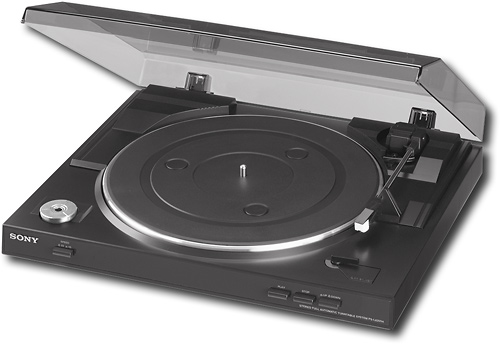
A:AnswerFrom the Sony parts center - the Sony part number for the replacement stylus is 9-885-117-75.
http://esupport.sony.com/US/perl/model-accessories.pl?mdl=PSLX300USB&XID=M:sidenav:esupport
A:AnswerHi Dairon, To connect the turntable to an audio system, you may need to use a connecting cable that supports phono/line out terminal. Here is the link to its manual: https://docs.sony.com/release//Manual_3198123161.pdf -Jerome
A:AnswerConnect the turntable to your PC first using the included USB cable. Download a free software program such as Audacity which will allow you to play the music out through your Bose speakers. Google the instructions on how to do this. Very quick & easy to set up and sounds great!
A:AnswerThey have to be self-powered speakers (like the Bose Companion speakers) for what you described to work. Self-powered speakers have the audio amplifier built in. If you don't have self-powered speakers (like the Bose 201s or 301s) you need to plug the turntable into a stereo receiver and then connect your speakers to the receiver. The good news is your receiver doesn't need a Phono input, an Aux input will do. This is because the Sony turntable has a built-in preamp.

















