Customer Ratings & Reviews
- Model:
- 910-005131
- SKU:
- 5870706
Rating by feature
- Value
Rating 4.5 out of 5 stars
- Quality
Rating 4.8 out of 5 stars
- Ease of Use
Rating 4.8 out of 5 stars
Customers are saying
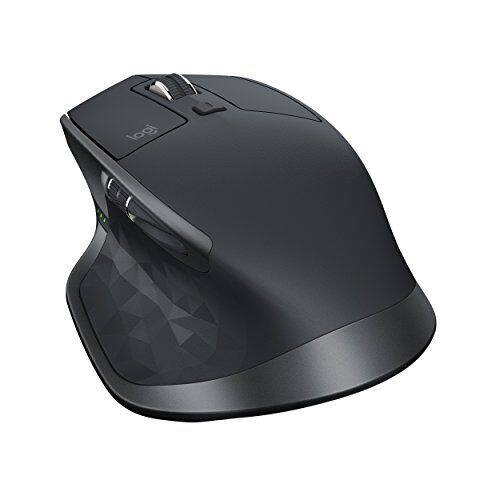
Customers are positive about the MX Master 2S Wireless Laser Mouse's battery life, comfort, and scroll wheel, with many praising its exceptional performance in these areas. They also appreciate the mouse's size and surface compatibility, finding it well-suited for various hand sizes and surfaces. While some find the price a bit high, the overall feedback highlights the mouse's precision and responsiveness. A few users noted concerns about the weight and software, but these were less frequent than positive comments.
This summary was generated by AI based on customer reviews.
- Pros mentioned:Multi-device
Ergonomically Perfect
Posted .This reviewer received promo considerations or sweepstakes entry for writing a review.I've been using the Logitech 510 for over 3 years. Although it was a great mouse simple mouse, it was time to retire it. Also, my hands are not as young as they used to be so I needed a more mouse that was more ergonomic. as I was getting a lot of fatigue in working on the desktop several hours a day. I was actually on the fence for on the MX Master 2S for the longest time but was put off by the price and was actually content with the m510. However this came on sale and I snatched it up and wow... it was night and day difference in my productivity work flow. Also, like the MX Anywhere, you can pair this up to 3 devices which is perfect as I have a PC for gaming, a Mac for video editing and travel, and I have a work laptop. Pairing and switching in between devices is so easy to do. No more unplugging receivers or dongles. The mouse is shaped perfectly for my hands and is very responsive not only in productivity software such as Office, but it's great for gaming as well. I'm quite happy in using this to play a few hours of Overwatch and Apex Legends daily. Also I want to note that the side scrolling wheel is a blessing especially for huge spreadsheets such as Excel. On top of all that, there are no batteries to mess with, this thing is rechargeable and it can last up to two months. If you are looking for looking for the perfect mouse, this is it right here!
I would recommend this to a friend 
Still No Suitable MX Revolution Replacement
|Posted .This reviewer received promo considerations or sweepstakes entry for writing a review.Still No Suitable MX Revolution Replacement Pros -Flow multi-computer functionality -Tracks on most surfaces -Bluetooth and USB connectivity -Click to free spin scroll wheel -Buttons configurable for individual applications Cons -Thumb buttons are too far back and uncomfortable -No side-scroll on main wheel -Not all buttons are fully configurable -Thumb wheel is smooth scroll only and has no click button -Documentation sorely lacking -Connecting mouse to multiple computers is not intuitive -Bluetooth connection seems laggy Overall I've used Logitech's older MX Revolution for over ten years. It's my gold standard as far as productivity mice go. Battery life is excellent, it's comfortable for hours on end, and the amount of customizable buttons are fantastic. I've been hoping to find an adequate update and replacement for it, but Logitech seems more interested in shooting themselves in the foot on their MX line. The Performance MX used the same body mold but ditched the thumb wheel and half the thumb controls. Now the MX Master brings back the thumb wheel but in a very different body shape. Sadly neither of these mice stack up to the original. The Master isn't uncomfortable to use, but it changes your regular grip a lot. Instead of comfortably and naturally resting your hand on the mouse, the higher and steeper rear slope arches your hand back so your wrist rests on the desk. The thumb controls are poorly placed, especially for those with larger than average hands. The Front and Back buttons are so far back they're under my thumb joint, not the pad. Considering most people use the Back button more than all other thumb controls combined, I can't help but wonder what Logitech was thinking with this arrangement. The Forward button is stacked above the Back button in a wedge formation and is half the size, making it trickier to use than necessary. One more button is on the floor of the thumb rest. The main scroll wheel is the same Logitech has used for years. It's well-weighted and can shift from click-to-click to free spin mode if you spin it fast enough. In a long document or web page it's great to flick it and let it spin to quickly get to the top or bottom of the page. Unfortunately it does not tilt for horizontal scrolling. The thumb wheel, the signature feature of the older Revolution, is back, but is now a fully revolving wheel instead of a forward/back tilting toggle. Unfortunately it's in free spin only without any clicking stops. This is great if you want a redundant scroll wheel for documents and web pages. Those of us using it for more specific tasks, like cycling through web browser tabs and Excel worksheets, miss the click stops. Unlike the Revolution, you can't click the scroll wheel as an extra button. The configuration software is fairly good in that you can program the buttons to different tasks and keystrokes, even having application specific customization. Unfortunately not all the buttons can be customized in every way ( i.e. the thumb wheel can't be used for keystrokes or keyboard shortcuts ). The big feature with the MX Master is the new Flow functionality that lets you use a single mouse and Logitech keyboard with up to three computers on the same network. It makes the separate computers function more like multiple monitors on a single computer and actually works pretty well. Setting it up isn't easy as the documentation is all but non-existent. The first computer was practically automatic, but the second and third took a lot of experimentation. To connect the mouse over Bluetooth, I first had to connect it over the USB receiver then go through the pairing operation. Repeat three times for three different computers. If you don't want to use flow, you can still switch the mouse between them using a toggle button on the underside. Initial connection to the computer still isn't quick though. The Flow software seems to have high overhead. I often saw lag and jumpy mouse behavior, especially over Bluetooth. The mouse itself is no more impressive than any number of competing models, most costing less. The Flow features are the main attraction here, and Logitech's own studies show only about 10% of people simultaneously work across two computers anyway. If they'd simply remake the Revolution with a new sensor to work on glass, they'd have an instant hit on their hands. Instead they seem more interested in reinventing the scroll wheel.
No, I would not recommend this to a friend- Pros mentioned:Scroll wheel
Nice mouse for content creation and everyday use!
Posted .This reviewer received promo considerations or sweepstakes entry for writing a review.This is a very comfortable mouse with a nice grip. With Logitech Options software you'd be able to modify the buttons and do the Flow up to 3 computers. I had problem pairing the mouse with my laptop which runs on windows 7; probably a compatibility issue. So I use the Unifying receiver on my laptop and connect it to my desktop (Win 10) via Bluetooth. Just make sure you press the device number button on the mouse for a free one and it starts blinking and then you'll be able to connect it. I wouldn't recommend this mouse for gaming but you can still use it for gaming occasionally. The scroll wheel make a ratchet sound but you can also use free spin or use it interchangeably by enabling the SmartShift on the software. The horizontal scroll and gesture button come in handy.
I would recommend this to a friend - Pros mentioned:Comfortable
Great Mouse
Posted .This reviewer received promo considerations or sweepstakes entry for writing a review.This mouse is comfortable to use. It is bluetooth capable so it will without the use of the dongle. I am using it on my MacBook Pro 2017 with touch bar. There hasn't been any delay or lag with using the mouse. I tried the magic mouse 2 from Apple but found that it was too flat for my liking. This does not have that issue. The original price of the mouse was $99.99 but I was able to do a price match and got it for a great price. I would have gotten it at the original price since it was the same as the magic mouse 2 space gray that I returned. If you need a great mouse that will work with the MacBook Pro but don't want the magic mouse 2 then I would suggest this mouse. There will not be any regrets.
I would recommend this to a friend I like it... but......
Posted .This reviewer received promo considerations or sweepstakes entry for writing a review.There's always a "but", right? First, I will start off with the fact that I have been using the logitech G700 for years. Sadly, they don't make it anymore. I have multiple, and was using one for work. I like the feel and the macros/programmable buttons. I needed to replace the one I use for work, as it is failing (getting the double-click, etc). Since it's work, I don't need 13 programmable buttons, like the G700. I saw the MX Master 2S in the store, and it felt similar to the G700. It's got two programmable buttons, plus a programmable thumb wheel, which is just about all I need for work. The push for me was that, like the G700, it switches from wired to wireless on the fly. Got it home, set it up with the Logitech Options, and had a go at programming the buttons. All was great! I programmed the two side buttons for copy and paste, and the thumb wheel was programmed to change desktops in Win 10. My jubilation ended when I plugged that mouse into my work computer. We are not allowed to download software to the computer, and it would seem that the MX Master 2S needs the Logitech Options to function. Great sadness. I suspect that this is due to the Logitech Flow option, despite the fact that I didn't enable Flow. I will continue to use this for my personal computers, and I do like the feel and function. The main scroll wheel function is fantastic, with hyper fast scrolling when you just need to get to the bottom of a document or page (or top, for that matter). I Logitech Flow will be useful, as I am often transferring items between my desktop and laptop..... so much easier than using a thumb drive, or send a file via email. Nice mouse, nice feel, just will have to continue my search for a mouse to replace my G700 at work.
I would recommend this to a friendGood but not Great
Posted .This reviewer received promo considerations or sweepstakes entry for writing a review.I bought this mouse based on a lot of positive reviews. I generally do not like wireless mice but since I have a new iMac I thought id keep it wireless. As many reviews have stated the ergonomics of the mouse are very good, and it tracks accurately for general daily use. The main two issues are input lag after 10 seconds of resting and the scroll wheel feels way cheap. I think it’s a little over priced if you compare the build quality of mice from Corsair. I know it’s for a more production type of user and not a gamer, but I don’t think any user likes delays when trying to interact with their computer.
No, I would not recommend this to a friendWrist comfort a convenience
Posted .This reviewer received promo considerations or sweepstakes entry for writing a review.I bought this mouse along with a supportive mouse-pad to help with what I think may be the beginning of carpal tunnel syndrome. It definitely helps. What I didn't expect was how much I loved the variable scroll wheel, how helpful the side scroll is for web dev and photo editing or that it would also replace the mice on my other computers. The ability to switch computers at the touch of a button is something I always needed but did not realize it. Same for using the two small side buttons for copy and paste. This one small purchase has changed my work flow for the better and saved me some pain too yay!!! It was totally worth the $99 I paid for it, but right now it's 20 dollars cheaper. If you're looking at it, you should buy it.
I would recommend this to a friend- Pros mentioned:Comfortable
Great multi functioning mouse
Posted .This reviewer received promo considerations or sweepstakes entry for writing a review.I got this mouse because I wanted something that was really comfortable in my hand and had multi function options. I've found that this mouse helps my hand and wrist not get so tires for those long days that I'm on the computer. I do wish the part that rest in the palm of your hand was a little bit wider but that is my personal preference.
I would recommend this to a friend - Pros mentioned:Comfortable
Great Lazer Mouse
Posted .This reviewer received promo considerations or sweepstakes entry for writing a review.Works great, no problems with changing settings and it is comfortable to use.
I would recommend this to a friend - Pros mentioned:Comfortable
Wonderful mouse
Posted .This reviewer received promo considerations or sweepstakes entry for writing a review.This mouse is SO comfortable! I love the side scroll wheel as well.
I would recommend this to a friend - Cons mentioned:Ergonomics
Don't get if you use Back button with websites
Posted .This reviewer received promo considerations or sweepstakes entry for writing a review.TERRIBLE idea to replace the easy to use "back" button with a horizontal scroll knob. This mouse has a lot of neat tricks but even if I get used to the button issue I'll probably end up hurting my hand. It's an impossible placement with both forward and back buttons a sliver of them former selves stacked on top of each other. You've got to make a "V" with your thumb to use the button which is far further back. This is a top feature for me and it works great on every other Logitech mouse but this one. I can't believe they tested this on more than one person or perhaps the testers don't use web browsers.
No, I would not recommend this to a friend Excellent Mouse
Posted .This reviewer received promo considerations or sweepstakes entry for writing a review.Definitely the best mouse I have ever used. Lots of customization but if you just need a basic mouse it is great too! Love the full size of it.
I would recommend this to a friendWOOT WOOT
Posted .This reviewer received promo considerations or sweepstakes entry for writing a review.What a great mouse for productivity! Would buy 10 of these if I need them
I would recommend this to a friendWaste of money
Posted .This reviewer received promo considerations or sweepstakes entry for writing a review.Worked great for about 40 days. Then it started skipping which got worse. It just stops working and looses connection ( changes from connected to pairing in Windows 10)while I'm using it. It takes 30 or 40 seconds to get it back. All computer settings for power management are turned off so it is not the computer. Mouse is 18 iches from computer HP Omen I7 7700. Many complaints on Logi's forums but no help from Logi. MS wireless mouse has no problem. Last Logi I will ever purchase.
No, I would not recommend this to a friendMouse review
Posted .This reviewer received promo considerations or sweepstakes entry for writing a review.This mouse is great when it's working that's why I continue to purchase it. I've used a few of the MX versions and I love the hand control position and button locations. my issue is with the durability of the product. I've had 2 of the MX2's and I am trying my luck with the MX3. I love it if it would just last a little longer.
I would recommend this to a friendAmazing mouse poor ergonomics
Posted .This reviewer received promo considerations or sweepstakes entry for writing a review.the mouse has poor design on the back arc, which causes pain due to the angle you hold the mouse, picked up today, and returning tomorrow will pick up the MX 2S anywhere
No, I would not recommend this to a friendCheaply Made; No Customer Service Available
Posted .This reviewer received promo considerations or sweepstakes entry for writing a review.mouse broke after only 12 months and Logitech offers no repair options -- only hours spent reading support pages that won't fix this hardware failure. don't waste your time and money on this mouse!
No, I would not recommend this to a friendRefurbished
Posted .This reviewer received promo considerations or sweepstakes entry for writing a review.I didn’t even got to test the mouse. Bought it full price to give as a gift and received a refurbished item with the box cut and open.
No, I would not recommend this to a friend