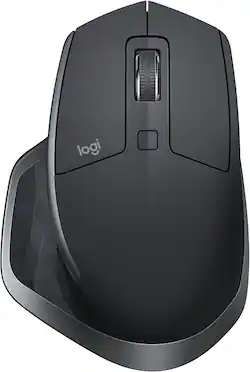
Logitech - MX Master 2S Wireless Laser Mouse - Graphite
- Key Specs
- Maximum Sensitivity: 4000 dots per inch (Mouse sensitivity is measured in dots per inch (DPI). The higher the DPI, the more sensitive the mouse is and may be more useful for high-density pixel screens. Lower DPI typically means more precision and accuracy in mouse movement.)
- Number of Buttons (Total): 7
- General
- Product Name: MX Master 2S Wireless Laser Mouse
- Brand: Logitech
- System Requirements: Windows® 8 or later Mac® OS X 10.10 or later (The software that a product must have for it to be able to integrate with another product.)
- Model Number: 910-005131
- Features
- Mouse Type: Standard
- Performance
- Mouse Operation: Button(s)
- Handedness: Ambidextrous
- Tracking Method: Laser (There are several types of computer mice, optical and laser being among the most common. Optical mice detect less detail and provide more precise and accurate movement. Laser mice detect more detail and can be used on a wider variety of surfaces, but are more sensitive to small movements.)
- Maximum Sensitivity: 4000 dots per inch (Mouse sensitivity is measured in dots per inch (DPI). The higher the DPI, the more sensitive the mouse is and may be more useful for high-density pixel screens. Lower DPI typically means more precision and accuracy in mouse movement.)
- Number of Buttons (Total): 7
- Number of Thumb Buttons: 1
- Connectivity
- Wireless Connectivity: Radio Frequency (RF) (The manner in which a device sends data to another device over a short distance without the use of wires or cables.)
- Maximum Wireless Range: 30.8 feet
- Operating System Compatibility: Windows, Mac
- Power
- Mouse Power Source: Battery-powered
- On/Off Switch: true
- Rechargeable Battery (Mouse): true
- Charging Interface(s): Micro-USB (The connection for transmitting power to charge the device.)
- Dimensions
- Product Height: 1.9 inches (The out of box height of the item. Height is measured as the vertical distance from the bottom of the item to the top as it would be primarily used or placed.)
- Product Width: 3.4 inches (The out of box width of the item. Width is measured as the horizontal distance from one side of the item to the other as it would be primarily used or placed.)
- Product Weight: 0.145 kg (The out of box weight of the item.)
- Warranty
- Manufacturer's Warranty - Parts: 1 year
- Manufacturer's Warranty - Labor: 1 year
- Other
- UPC: 097855131034
Ensure maximum comfort from this Logitech mouse. The precise ergonomic design ensures you stay comfortable throughout the day even if you're a power user, and the additional side button lets you create a custom setup. Smooth gliding is assured from this Logitech mouse thanks to the low-resistance base that slips over any surface.
- Darkfield Laser Tracking works on virtually every surface, even glass: This technology creates a micromap of the smallest possible details to allow tracking on shiny surfaces and clear glass (at least 4mm thick).
- Logitech Flow technology: Seamlessly control up to three computers with one mouse and copy-paste text, images and files between them (Mac and Windows PC only).
- 2.4GHz wireless connection: This mouse connects to your computer using a wireless USB receiver and works up to 33 feet away.
- 7 buttons: Provide access to frequently used commands and functions for powerful control.
- Maximum of 4000 dpi: Lets you find the perfect sensitivity.
- Compatible with most Windows and Mac computers: Works across a wide array of computers.
Whats Included
- Logitech MX Master 2S Wireless Laser Mouse
- USB wireless receiver
A: Yes the functions all work on the Mac platform. It does not come with a disk for software, you simply download it from the Logitech website. Its super easy to set up.
A: Wireless only. It is "Wireless" And it has a USB cord to connect to your PC for charging and/or use.
A: I would not purchase this mouse for a left handed person
A: check the charger you are using. if plugged into the computer and it fell asleep then your USB ports may fall asleep as well and it was not actually charging all night long. Use a wall outlet charger like you would for a cellphone or check computer settings and make sure your computer never goes to sleep or hibernates while charging.
Q: Is this mouse good for gaming?
A: No, there are better gaming mice than this for less, it is heavy and not a lot of hotkey buttons. Really good for drafting
Q: Does the mouse have a compartment to store the usb receiver?
A: No it does not have a compartment for the USB receiver. It sounds like you're looking for a more portable mouse that would have that feature. I'd recommend the G304 LIGHTSPEED
A: The iPad is great for quick artwork and now a days its even easier to use. If you really want to become a pro then a Mac Laptop or Desktop is the way to go. You can do almost all the same things with a PC desktop and Laptop as well
Q: Logitech - MX master 2s mouse Is it compatible MacBook Air,2017 ?
A: Sure. It works very well. If you install the software Logitech Opetions, the mouse can be easily switched between different Macs, even within Windows PC.



















