Customer Ratings & Reviews
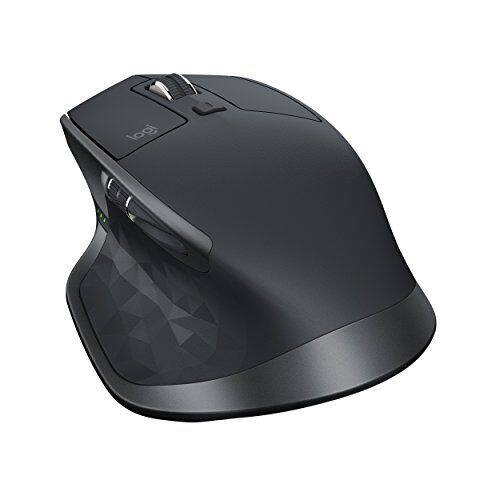
- Model:
- 910-005131
- SKU:
- 5870706
Rating by feature
- Value
Rating 4.5 out of 5 stars
- Quality
Rating 4.8 out of 5 stars
- Ease of Use
Rating 4.8 out of 5 stars
Customers are saying
Customers are positive about the MX Master 2S Wireless Laser Mouse's battery life, comfort, and scroll wheel, with many praising its exceptional performance in these areas. They also appreciate the mouse's size and surface compatibility, finding it well-suited for various hand sizes and surfaces. While some find the price a bit high, the overall feedback highlights the mouse's precision and responsiveness. A few users noted concerns about the weight and software, but these were less frequent than positive comments.
This summary was generated by AI based on customer reviews.
- Pros mentioned:Comfortable, Scroll wheel
Best Performance Mouse
||Posted . Owned for 3 weeks when reviewed.This reviewer received promo considerations or sweepstakes entry for writing a review.I had thought about upgrading from my old Logitech laser mouse and looked into buying this mouse. After waiting for a sale I saw it online for only 38$. After a couple days of use it’s safe to say that this is an excellent mouse. This mouse can change the scroll fell by a button, is very comfortable to use and works well on many types of surfaces like glass, wood or a mouse pad. I would recommend this mouse to anyone to last more than 4 years.
I would recommend this to a friend - Pros mentioned:Customizable
“Daddy what kind of spaceship mouse is that?”
||Posted .This reviewer received promo considerations or sweepstakes entry for writing a review.Is what my 4 year old who notices everything said when he saw the new item on my desk. The kid might have been on to something, because this thing is pretty out of this world. This is like my 3rd Logitech MX series, (Lost one and keep another in my backpack for on the go) but this time I went for the big dawg. I’m glad I did, everything about it is smooth. That’s the best way I can describe it. Also, I previously didn’t care much about the customizable buttons and such, but they really do enhance the user experience. Once you buy one of these, it’ll be hard to go to a standard mouse. (Which is why I keep the smaller version with me for on the go). I have it programmed for my work laptop and personal, so switching devices is a simple as a flick of a button.
I would recommend this to a friend - Pros mentioned:Multi-device
Was Slow Responding But Now Its Good
||Posted . Owned for 1 year when reviewed.This reviewer received promo considerations or sweepstakes entry for writing a review.Not sure what I have done exactly but with my last Mac it had the slightest latency compared to the Apple Mouse. I just got a new M1 Mac mini and didn't install the Logitech Software so I dunno if that has anything to do with it or maybe a firmware update fixed it in the past. Its a great mouse and nice to have extra buttons for quicker navigating. Also really cool that it can connect to 3 devices and you can switch between multiple computers like I do.
I would recommend this to a friend Perfect choice for any multitasking PC activity.
||Posted .This reviewer received promo considerations or sweepstakes entry for writing a review.Working on a triple monitor setting requires an efficient mouse. Mx Master 2s has that capability of flawlessly cover the entire working space with a minimal gesture on the mouse pad. The wheel can scroll a long webpage or document with a blazing fast speed. The back and forward buttons are very convenient located and fully customizable. Battery life impression is still pending (69 days left). For some reason if you plan to use it on a laptop you might have to disable the touchpad from Windows/settings/devices.
I would recommend this to a friendAwesome Mouse
||Posted .This reviewer received promo considerations or sweepstakes entry for writing a review.I work from home and I'm on a computer for 40+ hours a week so I'm quite demanding of a keyboard and mouse. For years I have depended on Logitech keyboards and mice. The mouse comes with the Logitech universal USB wireless connector which supports several Logitech devices. I'm using one of those with both a Logitech mouse and keyboard.
I would recommend this to a friend- Pros mentioned:Comfortable, Customizable, Multi-device

Greatest Mouse...Ever!
|Posted .This reviewer received promo considerations or sweepstakes entry for writing a review.I never thought I would be excited about a mouse, but I am =-D. Initially, I thought the price was too high, but it is worth every penny. In the box, you get the laser mouse, USB cable and a dongle. personally, I'm not a fan of dongles, so i was very happy to see that I didn't need it, because, if you already have bluetooth on your computer it will pair. Other things I liked; How comfortable it fits in my hand, I can use it on any surface and it works, it doesn't interfere with bluetooth headphones, The scroll wheel is as smooth as butter and super precise with the touch of a button, The Logitech options software is super easy to use and it allows you to customize the extra buttons, You can use it on multiple computers and it works great! If you work from home on multiple computers, you need this mouse.
I would recommend this to a friend - Pros mentioned:Battery life, Comfortable
OMG this mouse is Amazing!!
|Posted .This reviewer received promo considerations or sweepstakes entry for writing a review.First off the last mouse I used was for about 6 or 7 years, The mouse I had was a Razer DeathAdder and that mouse pales in this day in age. it was also on its last leg dealing with years of click abuse with games. The MX Master 2S completely blows that mouse away and this is perhaps the best mouse I ever used let alone from Logitech. It's so much to this product that I don't know where to start. I guess I should start off with the incredible build quality because that deserves a standing ovation, this MX 2S is perfectly designed with a build that is out of this would. It not only feels weighted in the hand but EXTREMELY comfortable. The mouse doesn't feel flimsy at all that's for sure. Speaking of comfortable, I can not stress this enough but this mouse is insanely comfortable in the hand. I have been using this mouse for hours and I just can't stop holding it. I don't know what it is but MX 2S is sculpted so perfectly in my big hands. its shape contours smoothly which also support the thumb. Crazy enough as your hand use the mouse it feels natural with every button reachable. There is even a hidden button where your thumb rest! Where your thumb rest on this mouse have a spiderweb or diamond shaped pattering to keep the solid grip in the hand. The design of the mouse is nice with sliver accents along the scroll wheel, Actually the design really shows how mature Logitech have grown over the years. So far I tried using the mouse on different surfaces and it works even on GLASS. yes it works on glass and it works so well. DPI is 4000 so its more then enough for precision and accuracy for me. Logitech "Flow" technology is where you can use this mouse on three different computers and/or macs at one. While I haven't tired this on a mac it works seamless on a windows PC. I was able to copy and paste items to each computer I had a Gaming desktop and a laptop. If this isn't next level technology I don't know what is?! You can tell logitech worked very hard on this one feature and honestly if they keep working on it this could be something I would want on all their future mouse products. While you can't drag and drop windows to another PC and it takes a 1 second delay to the next PC...if they can keep working on this feature its going to be AMAZING! (There is also a button under the mouse where you can switch between PCs) MX Master 2S wireless mouse so it takes a charge via Micro USB but it charges really fast. They claim it last up to 70 days without a charge. That is something I have yet to test as I haven't had the product for 70 days. You can connect the mouse through Bluetooth or using Logitech own receiver, Bluetooth works just fine and used the mouse on a android tablet with no issues. There is three led indicators on the side of the mouse so you always know what battery life is left. The its about 7 clickable buttons on the mouse and with the software from logitech you can customize the buttons. They are hyper responsive and give a satisfying click to them. Using the scroll wheel on Microsoft edge is beautiful sight to be seen (especially on a G-sync / Freesync monitor) giving you the SMOOTHEST scrolling you could ask for on a PC. Side to side scrolling is equally as good. This high preforming mouse is one of the best mouse I ever used and I don't find any fault with them yet. As for gaming it works just fine played L4D2, CS GO, and Killing Floor 2 just to see how it preforms and it was just fine. Seeing how its good with gaming as well to me its multipurpose. I happen to enjoy this mouse and I honestly have never felt or anything better. I am very please with the way Logitech handled this product that's packed with features. I recommend downloading the software from Logitech website because there is so much more you can do with customizing the buttons. I would indeed recommend to anyone with a Windows PC period. This is the mouse to get!
I would recommend this to a friend - Pros mentioned:Comfortable, Multi-device
Best Mouse I Have Ever Owned!
|Posted .This reviewer received promo considerations or sweepstakes entry for writing a review.Logitech is having a banner year in my house! First I bought my wife a nice compact Bluetooth mouse for her laptop that she absolutely loves. Next I bought the Logitech Spotlight Presentation Remote and that has made my presentations so much better and easier. There isn't a presentation where someone (usually many someones) doesn't come up and ask me where I got that cool little device. Now with the MX Master 2S, I have hit the trifecta this year in awesome and useful gadgets! I have always been a fan of Logitech products, from joysticks back in my flight sim days, to the endless progression of mice I have owned over the last several decades, and to the headset I used to narrate videos. Logitech has never let me down but until this year it has always been a satisfying yet rarely surprising relationship. This year with the Spotlight and now the MX Master 2S, Logitech has surprised me twice. My work computer has a dual monitor set-up with one in landscape mode and one turned on its side in more of a portrait mode. This is because I am often switching between really long text documents and projects that require a lot of landscape to dock toolboxes and such. While I am well aware of the fact that many mice have had the ability to do side scrolling (and in fact the Logitech mouse that this is replacing had that ability), nothing has done it as well or as fluidly as the MX Master 2S. That combined with the 'hidden' gesture button under where your thumb rests, has really made my workflow so much better. I also really like the fact that it can be linked to several different devices through a mix of Bluetooth or Unifying receivers and you can easily switch with a press of a button on the bottom of the mouse. I did try to use the new Flow ability that lets you be connected to multiple devices and to move files between them which would be an absolute godsend if I could make it work in my office but unfortunately all of the computers have to be on the same wireless network and my desktop is on a wired connection and has to be for access to several network devices that I need. That being said, I think I'm going to take this mouse home over the weekend and try it with my iMac and laptop to see how well it works. If it is as 'magical' as the Spotlight remote was when I first used it, I'm going to be giggling like a little schoolgirl which would probably come off as creepy as that sounds. Another feature that I really appreciate is that it is rechargeable and the micro USB port is on the front of the device (perhaps Apple could take a cue from this and actually make the mouse still useable when charging rather that forcing it to be on its side). I am also loving how comfortable this mouse is. For the last decade at least I have gone more towards smaller more portable mice and it has been a long time since I have used a full sized mouse, but MAN does it feel so much better! That, and my wrist doesn't hurt as much at the end of the day. While I probably will stick with my smaller MX Anywhere mouse for my laptop (not a huge fan of trackpads), I am definitely getting another one of these for my iMac at home. The Magic Mouse ain't nothing compared to this champ. I'm sorry if this review has been just a constant love-fest on this device. I usually try to point out some flaw in a device so that the maker can get honest feedback and also to help out those thinking of purchasing the device, but really, I can't think of a single thing that I am even remotely unhappy about with this thing. It is by-far the best mouse I have ever owned for a computer bar-none. This is a no-brainer if you are looking for a new mouse for your computer. I just wish I had gotten this or its predecessor sooner. Why are you still reading this? It's Over, Go Home. Just buy it already! Go Home! (Obligatory Ferris Bueller reference without the need to see me in a bathrobe.)
I would recommend this to a friend - Pros mentioned:Battery life
A classic, revisited
|Posted .This reviewer received promo considerations or sweepstakes entry for writing a review.BLUF: The Logitech MX Master is a timeless classic. A big, heavy, solid mouse with reliable buttons, a switchable scroll wheel (clicky or smooth), works with three computers, supports Bluetooth and the Unifying receiver. May be too big for some hands. Intro: I've been using the original Logitech MX Master mouse for about two years now - it was pricey, but so, so worth it. I've used the MX Master with Windows and macOS, MacBooks, Dells, Bluetooth and Unifying receiver - the MX Master has been unstoppable. After two years of daily use (often 10-12 hours per day) my original MX Master is still going strong. When I saw that Logitech was coming out with a new version, I had to try it out! Bluetooth pairing/connection: This is the most noticeable improvement over the original MX Master for me. The original had some kind of a strange issue with macOS, where you'd have to re-pair the mouse a couple of times with the computer to get it to connect reliably...the mouse would actually show up more than once in the macOS list of Bluetooth devices. The MX Master 2s does not seem to have this issue - it paired quickly, and stays paired reliably. Bluetooth range is good enough working reliably from 10 feet away (as far away as I could see the pointer moving on my laptop screen). The 2s no longer has a separate "Connect" button for reconnecting to Bluetooth hosts; one simply long-presses the device selector button now. Since this is an activity I typically do once or twice a year, not an issue for me. Mouse pointer movement: This is what the mouse is for, right? The 2s appears to be, if anything, a little smoother than the original MX Master. While I usually use a mousepad (mainly to keep the bottom of my mice clean), the 2s works smoothly on every surface in my office, from the carpet on the floor to the metal cabinets to my window (yes, it works on clear glass!). Pointer movement seems to be a little smoother than the original MX, which was already excellent; Logitech has changed the surface sensor design on the 2s, as visible in my photo of the bottom of the two mice below. The MX Master touches the table in four places, with harder plastic sliding surfaces along those points; it slides smoothly on most surfaces (even glass). Button layout/tactile response: The buttons on the 2s are *identical* to the buttons on the original MX Master. I can't feel any differences between them - if nothing else, since my original MX Master has been in use for two years, it's a credit to how durable this mouse design is. The top left/right buttons have a very light feel, little resistance to being pressed, with smooth travel and no sense that things are binding when you press them. The "thumb" button - the one you push down with your thumb, built into the thumb rest - is harder to press, and has very short travel. This is probably intended to minimize accidental button presses, but it will definitely tire your thumb out. The "forward/back" buttons are honestly too small for my liking and too close together (I have big fingers), so I don't use them as often as I used the ones on older mice. That said, the travel on them is smooth, and the action is light enough that your thumb doesn't get tired pressing them. Scroll wheels: The top scroll wheel can be configured to "click" as it's turned, or to spin freely. In free-spinning mode, the wheel is nicely weighted and will spin for a few seconds on its own without binding or wobbling. The top scroll wheel feels a little better on the 2s than on my original MX Master. I've never really been able to make good use of the side scroll wheel...just couldn't figure out what the point of it was; it can be customized to perform many functions, but I usually wind up disabling it because I trigger it inadvertantly. Software support: To really make good use of Logitech's mice/keyboards/trackpads, you have to install the Logitech Options software on macOS or Windows. The MX Master is no different in this respect - while you will get basic use of the many buttons without extra software, Logitech Options allows you to customize the behavior of all of the buttons and scroll wheels on the mouse. The current version of Logitech Options works smoothly and transparently. Comfort: This is a tricky issue - mouse comfort is a very personal thing. The MX Master is *big* - it's the biggest mouse I've ever used, by a wide margin. It's taller, wider and longer than any other mouse I own (and I own about 20, going back to the Macintosh SE). I have fairly large hands, so I find the MX Master to be comfortable to move, click and use all day long; I've let my co-workers try it, and some have said it gave them hand cramps due to its size. Best advice I can give here is try it in the store before you buy it. Because it slides very smoothly, you don't really need to *grip* it - it's more like guiding it as it glides across your desk. A fabric mousepad is recommended for smoothest mousing. Battery Life: The MX Master has a built-in Lithium-Ion battery, which recharges using a standard Micro-USB cable. Takes 2-3 hours to charge when fully depleted; a charge seems to last 2-3 months for me. There's a 3-LED battery level indicator on the thumb-side. Conclusion: The MX Master is a great mouse, *if* the size works for you. While the side scroll wheel seems gimmicky, the other mouse controls are solid, smooth and durable. It's highly recommended by many review sites and individual reviews, and my experience with the original MX Master has been great.
I would recommend this to a friend - Pros mentioned:Battery life
Scroll Your Own - Mega Mouse with the Most Options
|Posted .This reviewer received promo considerations or sweepstakes entry for writing a review.The Logitech MX Master 2S is a premium quality wireless laser mouse with the versatility to satisfy the most demanding applications. LIKES 1- Tracking is exceptional on any surface. I tried a Allsop mousepad (see photo), wood desk, glass, paper & leather. Same precise tracking on all surfaces. 2- This is a large, ergonomically designed mouse & it is very comfortable in my size XXL hand. The mouse is offered for right hand use only. Note the size in my photos compared with the Apple Magic Mouse 2. 3- The extreme flexibility of being able to configure the buttons for your specific needs is a great benefit. 4- The button on top, directly behind the wheel, changes the functionality of the wheel from individual clicks to continuous silent spin. This is very handy for scrolling through large documents quickly. 5- The charging port is on the front of the mouse, enabling operation during charging. 6- Master Power switch on the bottom enables all power off mode, which will greatly save battery life when you are not planning on using it for several days. It also keeps the mouse from waking the computer if your cat decides to bump the mouse in the middle of the night. 7- The gliding surfaces are extremely low friction, so smooth movement with precise control is a breeze. 8- Appearance: The fit and finish are first rate & make a statement: this is a top quality product! The color is ideal & blends with any computer. 9- Connection flexibility using either Logitech Unifying Receiver or Bluetooth adds further versatility. 10- Long Battery Life - Logitech claims 70 days on a full charge. DISLIKES: 1- Wake-up lag for 1/2 second after mouse rests for 10 seconds or more. Once you move the mouse & experience this lag, there is no further delay until the mouse rests again, after which the lag occurs again. This is a major issue & is very frustrating. Mine is Bluetooth connected to the latest Mac Pro desktop operating MacOS Sierra 10.12.5 (latest OS). 2- Forward / Backward buttons above the thumb are small & I press backward when trying to press forward; however this is a very minor issue. 3- Computer selector 1 - 2 - 3 is located on the bottom of the mouse. Because my use of 2) computers requires very frequent switching, I find it easier to keep 2) mice on my desktop, rather than pick up one mouse & switch it from underneath each time I want to switch back and forth. 4- The Right / Left Click buttons are loud, compared with the other Logitech mice I own & the Apple Magic Mouse 2. 5- Battery is non replaceable. When it no longer holds a charge, recycle this mouse & buy a replacement (same with Apple Magic Mouse 2). 6- I prefer a charging cradle to sit this mouse on when not in use, as other Logitech mice & Harmony Remotes include, rather than keeping a charging wire on the desk just to charge it, as needed. SUMMARY: I love the appearance, feel & flexibility of this super versatile mouse! I would rate it 5 stars, were it not for the wake up lag. I will continue to run additional tests & will connect via the Logitech Unifying Receiver. I will post any new developments.
I would recommend this to a friend - Pros mentioned:Battery life, Customizable
Long battery life and great feeling mouse
|Posted .This reviewer received promo considerations or sweepstakes entry for writing a review.For quite some time, I’ve been using an Apple Trackpad instead of a mouse for my navigation needs. I love being able to use the gestures and I don’t like it when I have to move away from something that isn’t intended for use with an Apple computer. This option may have changed slightly when I started working with this incredible mouse from Logi. The MX Master wireless mouse v2 is an incredible device. First of all, this mouse is rechargeable. That has been my #1 issue with wireless mouses for many years — they all require batteries to be changed out. This one does not. It’s 100% rechargeable via Micro USB (cable included). In addition to it being rechargeable, a full charge will last approximately two months with regular use of the mouse. Now, since I’ve not had the mouse for two months, I can’t really speak to that battery life, but I do know that it’s not died since I’ve started using it. The MX Master feels great in your hands. It’s a full-size mobile mouse and since I’ve only used trackpads for the past few years, I wasn’t sure how I would like it, but I can say that it’s been a welcome change. The buttons are all located in an easy to reach place and I found out quickly that I wouldn’t lose my gestures completely since there is sort of a touch pad built into the thumb rest. The utility app provides more options for customization, but you don’t necessarily need it to enjoy using the MX Master. It connected via Bluetooth and you have the option of completely using Bluetooth or by using the tiny USB dongle that is included. Either option gets you a quick connection. I didn’t have any issues with my 2016 MacBook Pro connecting to the mouse with Bluetooth. The nice thing about the receiver is that it sits completely flush with the USB port it’s residing in. I think the MX Master is a good investment no matter how you decide to use it.
I would recommend this to a friend - Pros mentioned:Battery life, Multi-device
well shaped mouse with neat features
|Posted .This reviewer received promo considerations or sweepstakes entry for writing a review.I was excited to try this new Logitech MX Master 2S mouse. I had heard some good things about it and I wanted to see what all the excitement was about. The shape is very comfortable in your hand and it has a pretty good weight to it. It doesn't feel cheap and the weight makes it feel substantial. I love the internal battery so now I don't have to search for replacement batteries for my mouse anymore. They claim that the battery will last 70 days on a full charge, but obviously I have not had it that long to fully test that part out. It has what they call "darkfield" tracking and it works pretty good. I generally use a mouse pad, but I have tried it out on my glass table and white tile surfaces in my house and it works well. I have two laptops connected to it now (mouse supports 3 total), one with the included receiver and the other via BlueTooth. If you install the logitech flow software you can then copy and paste files, pictures, and images between computers by simply moving the mouse over to it. Let me explain that part though....I have my two laptops sitting next to each other and both have the flow control software. They are both on the same wifi network as well. I can simply move the mouse all the way to the right on my 1st laptop and the mouse will magically move to the 2nd computer and start controlling that, if I need to control computer 1 again I just move the mouse all the way to the left and I am good to go. This allows you to copy and paste any files from one system to the other by simply selecting the file to copy and then move the mouse to the other computer and paste it there. Over all I am very impressed with this mouse so far and the amount of buttons on it is great, it even has a battery indicator so you know if you need to charge up again.
I would recommend this to a friend - Pros mentioned:Battery life, Comfortable
The best mouse on the market
|Posted .This reviewer received promo considerations or sweepstakes entry for writing a review.I got this mouse last night and have spent a full working day using it and I must say, this is the best peripheral I've ever used, and I haven't even used it to its Max potential! The size and weight are perfect in my hand and really comfortable, even after 9 hours. This is the first mouse where it feels exactly the same regardless of what surface I use it on. I've used it on a white board my wood desk, paper, cork and a mousepad. After playing around I'm throwing away my mousepad, I don't need it. The scrolling and tracking both work precisely out of the box. The default setting is a little tight for my liking. I recommending downloading Logitech Options and running configuration through there. Unfortunately the piece de resistance for this mouse, multiple computer control, requires a newer version of Bluetooth than my current machines have which is a little disappointing given that they are two and three years old. As I didn't play with this feature I can't say for certain, but it looked like the button to switch computers was on the bottom? Poor design if true, hopefully I'm wrong. The Unifying option on the USB is really handy -- I have a travel mouse I take on trips and I can sync that, my keyboard and this new mouse all to the same controller. I've only had it one day so I can't realy comment on battery life, but its still showing "Full" and took next to no time to charge. Hopefully a sign of good things to come. I'm really fond of the size and shape of this mouse, but it does have a drawback -- it doesn't travel well. At this price point many won't want to think about getting an additional mouse for travel.
I would recommend this to a friend - Pros mentioned:Multi-device, Scroll wheel
Best Mouse you can get for Productivity
|Posted .This reviewer received promo considerations or sweepstakes entry for writing a review.Great Mouse for productivity. Some of my favorite features are: 1. Main scroll wheel - Button behind scroll wheel switches from wheel from individual clicks to free scrolling. Great when trying to move through large documents or long web pages. 2. I love the ability to switch between up to 3 devices by simply pressing a button on the bottom of the mouse, this is truly fantastic. At home I will use this between my laptop and desktop. 3. Secondary scroll wheel on the side is configurable, default is horizontal scroll. Is great when working with large images. 4. Gesture button is a feature I have never had on a mouse before and it is also very useful. A single press bring up the application switcher, Holding it down and moving down, shows the desktop, holding it down and moving left or right organizes your selected window. Great when you have a cluttered desktop screen. 5. Tracking is excellent on all surfaces I have tried including my pant leg, wood desk top, mouse pad, white reflective cardboard surface, and even glass! 6. Aesthetics and ergonomics are also top rate. There is no way to look at this mouse and not see that it is premium product. It is also very comfortable in the hand, perhaps heavier than the wired mouse it is replacing, but still not at all cumbersome. I have always used Logitech mice and keyboards, because their products are simply the best, and this mouse continues that tradition. Only downsides for this product are it's cost -- $100 (MSRP) for a mouse is not cheap!
I would recommend this to a friend The Wireless Mouse Perfected
|Posted .This reviewer received promo considerations or sweepstakes entry for writing a review.As a writer and researcher, I spend most of my work days in front of two monitors and two computers scrolling through long documents and reports. I previously used a Logitech keyboard/mouse combo - which I loved and didn't think could possibly get any better. That is, until I discovered the MX Master S2. For those who are serious about productivity and multitasking, this is the new pinnacle of wireless mouse technology. PROS: - Easy setup. The mouse connected to both of my Windows computers (one desktop and one laptop) via Bluetooth. The real power of this mouse is in the Logitech Options program (free download on Logitech's website), which allows you customize the buttons, pointer speed, scrolling direction, and so much more. - The Flow feature really surprised me -- I wasn't expecting it to work as well as it does. After installing the Options program on both computers and ensuring that both are on the same network, this mouse has essentially combined both of my machines into one dual-monitor setup. Just like if you had two displays side-by-side, if you move the cursor through the right side of one screen to the other, the cursor passes over to the other computer on the opposite side. You can even copy text and files on one machine, move the cursor over to the other machine, and paste them. There is a slight delay when pasting, especially with large files, but it's so much more convenient than emailing or swapping an external drive. - Incredibly comfortable. The ergonomic shape and thumb rest really make this mouse easy to use for hours on end. It may sound weird, but I actually look forward to holding this mouse because it feels so comfortable. - Possibly my favorite feature: the different scrolling modes used by the center scroll wheel. You can choose from either ratchet (a slight "click" feedback while scrolling) or freespin, which allows you to spin the wheel as fast as you want, and it will keep scrolling until you stop it. Freespin is perfect for when I need to scroll through 300-page reports. - The mouse seems to work on practically any surface. I've tried a wooden desk and even a clear glass desk - both worked flawlessly. - Long battery life. Logitech claims 70 days on a full charge. The battery is rechargeable via USB cable, so you don't have to worry about having spare batteries lying around. CONS: - The forward/back buttons near the thumb area seem just a bit too small. On several occasions, I've accidentally hit the "forward" button when I meant to hit "back." Not a huge deal - I'm sure I will get used to it. OVERALL: For me, the MX Master S2 is the perfect wireless mouse. Anyone who considers themselves a "multitasker" or who works in front of multiple computers should strongly consider this mouse. Even if you're not a power user or multitasker, this mouse still offers incredible battery life, comfort, and customization options. HIGHLY RECOMMENDED!
I would recommend this to a friend- Pros mentioned:Comfortable, Customizable
Well-thoughtout Mouse
|Posted .This reviewer received promo considerations or sweepstakes entry for writing a review.This mouse has some great features. It is very customizable, and comfortable. I replaced my work mouse with this and am very happy I did. Putting 8-9 hours of use a day on it, and its the little things that add up to make it great. For instance, the scroll wheel's two modes of clicking or free scrolling are great. What makes it better is that if you flick the wheel, it automatically switches to the free spinning mode, then back to clicking when you stop it. The default button settings have been great too. The thumb button will show all open apps in Windows 10, and the horizontal scroll and forward/back buttons are in a comfortable space as well. Pros: Comfortable, great features, customizable Cons: May be a bit large for some users
I would recommend this to a friend - Pros mentioned:Battery life, Comfortable
Perfect mouse for everyday use
|Posted .This reviewer received promo considerations or sweepstakes entry for writing a review.This mouse replaces my performance mx which I have been using for years. The Mx master 2s is very comfortable to use and while it feels sturdy, it is not heavy. The scroll wheel will switch from clicks to smooth scrolling automatically which is awesome. The side scroll wheel is a great addition as well. The battery life has been very good. I have been using it for a few days now and I have not had to charge it yet. I like that it uses the unifying receiver as I also have a logitech keyboard and being able to program the buttons is good too. I am currently using it for work and will probably need to get one for home use as well.
I would recommend this to a friend This mouse is a joy to use.
|Posted .This reviewer received promo considerations or sweepstakes entry for writing a review.I absolutely love this mouse, but it kinda threw me for a loop when I first started using it. I first started using this mouse while I was on a break at work. I didn’t have internet access at the time, so I just hooked up the mouse to my computer via Bluetooth and went to town with it. I did some light graphic design work with it, and I marveled at the smoothness of the side scroll wheel and the comfortable ergonomics (Side note: this mouse is clearly designed for right-handed people. This is fortunate for me, but maybe not so much for you). At first I thought that the thumb pad wasn’t seated properly, but then I discovered that it was in fact another button. After about fifteen minutes of use, I was very impressed with the mouse. I then went home to download the Logitech configuration software to try out flow and to see what options were available for remapping buttons. This is where things got weird. Upon connecting to the internet and downloading the software, my button mapping changed without notice. Suddenly, the side scroll button no longer performed a vertical scroll, it was strictly horizontal. The thumb pad button stopped performing an “alt+tab” application switcher and instead opened Windows 10’s task view (which to be fair, I greatly prefer). After taking some time to re-acclimate myself to the mouse’s new default button mapping, I still love this mouse; but I have some caveats. I’m not loving the top scroll wheel. The side scroll wheel has a wonderful oily smooth feel to it that makes for a very comfortable scroll. The top wheel has a “clicky” feel to it that reminds me of a playing card stuck between bicycle spokes. It isn’t terribly smooth, and if you scroll too fast; it feels like a ball bearing drops into place and the scrolling suddenly accelerates. I suspect that this was designed intentionally as a “feature” and is not a design flaw. I’m not loving it though. Ironically, you can’t remap the side scroll to scroll vertically after downloading the configuration software. This is a shame since (as counterintuitive as it may seem with it being on the side) it was by far the superior scrolling experience. The thumb pad button is a really nice touch, but I don’t like how far up on the button you have to press to trigger a click. I get that this was probably done intentionally to prevent accidental clicks, but it makes pressing the button somewhat difficult. I do love Windows task view though, and I appreciate having a single button to trigger it. The forward and back buttons are awkwardly positioned so that they overlap each other in a “yin / yang” style shape. It’s easy enough to feel along the button to determine where to press, but if you’re working quickly it seems like an unnecessary opportunity for a mis-click. I almost never use these buttons on a mouse, so it doesn’t really impact me all that much. I may still remap these buttons to work as volume control though. The ergonomics are just awesome. This mouse is very comfortable in the hand. I love the larger size of the mouse, but I do have to acknowledge that this diminishes its portability quite a bit. The mouse came with very sparse instructions (a single sticker on the mouse itself illustrating how to turn it on and how to switch between devices). The mouse can pair with up to three devices via Bluetooth or the included USB dongle. Pairing was triggered the moment that I turned the mouse on, and it was largely intuitive. That being said, I do worry some about being able to change out connected devices down the road (i.e. what’s the process for swapping out Bluetooth device number 2 while keeping 1 and 3?). Logitech Flow is far more awesome than I’d expected. I’d thought it was just a nifty way to copy on one computer and paste on another. I had no idea that it integrated so seamlessly. Using Logitech Flow, you can set it up to automatically switch from one computer to another just by going to the edge of the screen. This is great if you want to pair a laptop and desktop together for a pseudo dual monitor display. They also claim that certain keyboards will automatically switch over when your mouse switches from one computer to another. Best of all, this works on both Mac and PC. If your workflow requires that you work on both platforms simultaneously, you no longer have to have two separate sets of mice and keyboards for each computer and you can copy and paste freely between each machine. I really wish I’d had this at work back when I was juggling two machines. All in all, I am VERY impressed with this mouse. If you do any kind of design work, this mouse is a no brainer.
I would recommend this to a friend- Pros mentioned:Multi-device
I would give it more stars if possible
|Posted .This reviewer received promo considerations or sweepstakes entry for writing a review.This thing is a monster! If you are an avid PC gamer, a person who uses a mouse for long periods of time, or just a person who wants a sleek and stylish peripheral device THIS IS FOR YOU. The only con was my initial pairing via the included dongle (Bluetooth was a breeze) did not happen correctly (Windows 7 Home Premium). I went to the Logitech website and easily manually downloaded the correct driver; after which everything worked flawlessly. I tried two other different Windows version PCs we have and the pairing was seamless. Once paired, I was able to customize button features, scrolling speed, and of course mouse movement speed(s). The first thing I noticed that I feel merits a response is the fact that the mouse worked on my glass desk top, with no mouse pad under it. I do find the response is superior with a proper mouse pad but unless you are gaming, a mouse pad is not necessary. The ergonomic feel of this mouse is like Butter! your hand will just melt into it. The North and South page scrolling wheel feels finer and smoother than my other (like quality) mouse. East and West scroll wheel is normal and very agreeable. The click action of the L/R mains is very ordered and coherent while gaming showing the dominant 2.4 GHz response time. Equally so, for normal PC operating but this is not normally something I think about while opening a workbook page or PDF. The MX is just flat awesome. It is powerful, convenient, and beautiful.
I would recommend this to a friend Feels like a part of my hand
|Posted .This reviewer received promo considerations or sweepstakes entry for writing a review.I've always used Logitech mice on my work computers and were happy with them, my latest one was Performance Mouse MX and I thought it's the ideal. When I've got this brand new MX Master 2S I realized it's a significant improvement! It feels very nicely in hand, I don't get tired after a whole workday with it. Tracking speed is perfect - mouse reacts to the slightest movement on any surface I've tried it on, including a glass table. Controls: 2 buttons on top for left/right click, wheel between them which acts like a middle button too, in addition to that - wheel has 2 modes - "free fly" is when you spin it - it will continue spinning (and scrolling) until you stop it is very handy for the long documents when you need to scroll fast, and the second mode - is when wheel actually clicks in at stops - letting you scroll just a couple lines at a time for precision scrolling. In the "click mode" - you could still spin the wheel real hard and it will continue spinning until you stop it by hand, and then switch back into the "click" mode. That makes switching between modes very easy. Left side of the mouse had horizontal scroll wheel which is handy while working with the wide documents (drawings, diagrams, large excel sheets), forward/back buttons for the easy browser navigation and an extra "gesture" button just under the thumb - holding that button and moving mouse in a certain direction would be considered as a "gesture" allowing you to have 4 extra actions to assign. For example - holding the gesture button and moving the mouse down - minimize all windows (show desktop). This makes mouse extremely functional! Connections - mouse would work with either PC or Mac and it's capable of using Logitech's Unifying receiver OR just the bluetooth connectivity. If you already have a Logitech keyborad for example - using Unifying receiver technology is a no brainer, but if you don't like a little USB dongle occupying a port on your laptop - bluetooth connectivity works about the same. This mouse is capable of pairing to 3 different receivers and there is a button at the bottom of the mouse to select the computer you need. Software - the new MX Master 2S mouse does not work with the SetPoint software that I used to but requires a brand new "Logitech Options" software to support all functions. You can certainly use it with no software at all - just as a basic mouse with the wheel. Couple negative points: battery inside of the mouse is not user replaceable, so when it dies (when it's unable to hold the charge anymore) - you would be stuck with using your mouse as "corded" or just replace the whole thing. Another minor thing - top buttons of the mouse seem to click real loud. Louder than any other mouse I had before. Overall - it's an ideal choice for me, feels great, allows me to do a lot more than just a regular mouse.
I would recommend this to a friend