Customer Ratings & Reviews
- Model:
- 910-005131
- |
- SKU:
- 5870706
Customer reviews
Rating 4.8 out of 5 stars with 1118 reviews
(1,118 customer reviews)Rating by feature
- Value4.5
Rating 4.5 out of 5 stars
- Quality4.8
Rating 4.8 out of 5 stars
- Ease of Use4.8
Rating 4.8 out of 5 stars
Customers are saying
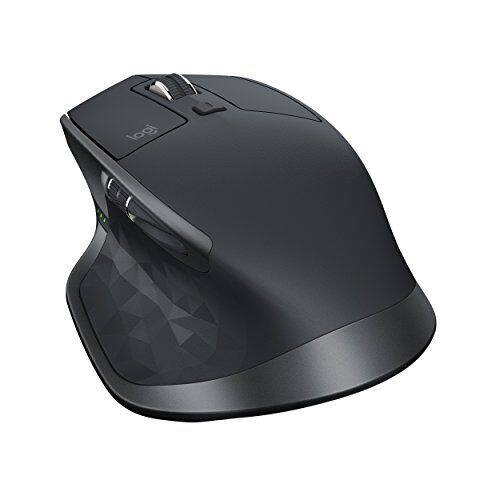
Customers are positive about the MX Master 2S Wireless Laser Mouse's battery life, comfort, and scroll wheel, with many praising its exceptional performance in these areas. They also appreciate the mouse's size and surface compatibility, finding it well-suited for various hand sizes and surfaces. While some find the price a bit high, the overall feedback highlights the mouse's precision and responsiveness. A few users noted concerns about the weight and software, but these were less frequent than positive comments.
This summary was generated by AI based on customer reviews.
- Pros mentioned:Customizable, Multi-deviceCons mentioned:Pricey
Rated 5 out of 5 stars
Still working great after a year
||Posted .This reviewer received promo considerations or sweepstakes entry for writing a review.The best desktop mouse ever... + one mouse for multiple systems + multiple connectivity options + customizable buttons to suit individual needs + working while charging thru USB - Pricey - not good for travel
I would recommend this to a friend - Pros mentioned:Comfortable, Scroll wheel
Rated 5 out of 5 stars
Little Pricey, But a Great Mouse
||Posted .This reviewer received promo considerations or sweepstakes entry for writing a review.I really like this mouse. I started getting into 3d modeling and decided to upgrade my mouse. I replaced my Logitech MX Anywhere mouse with this one and it's quite a bit bigger but is very comfortable to use. The Logitech Options software makes it really easy to configure the buttons to suite your needs, plus you can setup different configurations per application. I really like the thumb wheel which I use for zooming in an out (feels like I have more control over the zoom than using the normal scroll wheel). The SmartShift feature is cool but I use the scroll wheel in it's free spin mode most of the time. I haven't tried the Flow feature to switch between computers yet so I can't comment on how well that works. Overall, I would recommend this mouse.
I would recommend this to a friend - Pros mentioned:ComfortableCons mentioned:Pricey
Rated 4 out of 5 stars
Excellent Bluetooth mouse
||Posted .This reviewer received promo considerations or sweepstakes entry for writing a review.With the trend in the industry to move from a few USB-A ports to less USB-C ports, I have decided to move to a Bluetooth mouse which will save me one USB port as a side effect. I have done some research on various brands and models of Bluetooth mouses, some of them were too small for my hand, and some others requires an unified receiver that one still needs to permanently occupy a USB type A port, which would be a deal breaker for me. Fortunately, I found this MX Master 2S which fits my hand. It do come with an unified receiver but it works just fine when using Bluetooth exclusively. Overall, the mouse is comfortable to use, and works on different surfaces. There are a few downsides: 1) Price is a little bit high. Always check if BestBuy would price match with a competitor. 2) The initial setup may require using the unified receiver for once, and macOS would recognize a keyboard from it, which is not very intuitive. I didn't see a problem after setting up the first laptop. 3) Charging requires a cable. Logitech doesn't seem to like Qi standard for their other mouses (a charging mouse pad is a no no to me because it would be awkward to carry it around) by the way. 4) Warranty is short (1 year) and battery is not replaceable.
I would recommend this to a friend - Pros mentioned:Battery life, Scroll wheel
Rated 5 out of 5 stars
Great mouse for productivity.
||Posted . Owned for 1 year when reviewed.This reviewer received promo considerations or sweepstakes entry for writing a review.I’ve used this mouse for a year and love how it feels. The tracking is accurate and the scroll wheel being able to spin freely helps getting through documents and webpages quickly. The side wheel helps with navigating in wide spreadsheets. My only complaints are that the vertical arrangement of the back/forward thumb buttons is unintuitive (I always hit forward when I mean back), and the charge port is micro USB instead of USB-C. It’s not a huge issue since the battery lasts about a month with daily use.
I would recommend this to a friend - Pros mentioned:Multi-device
Rated 5 out of 5 stars
Great mouse! Great features and feels well made.
||Posted . Owned for less than 1 week when reviewed.This reviewer received promo considerations or sweepstakes entry for writing a review.I recently bought a Logitech MX Master 2S mouse from Best Buy because I have two computers that I want to share one mouse for. I've used an older Logitech MX Master mouse (not 2S) for a similar set up for years and it's worked well, so when I needed another one it was a no-brainer to me to get the latest version of the MX Master. What I don't love: - Like the older MX Master, the button to toggle through which computer the mouse is connected to is on the bottom of the mouse. That means you have to pick the mouse up to push the button. While not the end of the world, it is a little bit of a pain if you change frequently. But I want the convenience of having a single mouse for two computers without cluttering my desk with an additional mouse. Works great! And now, the MX Master 2S is even better because its Flow feature lets you change computers by just moving your mouse pointer off to the far left or right of the screen. You don't have to press any buttons, and it works great! That eliminates the one negative with this mouse. What I love: - MX Master 2S looks and feels like the MX Master. That's a good thing, because the original MX Master is a great mouse. It feels solid, not cheap, and I cannot tell by look or feel any difference between the MX Master and the MX Master 2S, but there are changes "under the hood." I've read that the wireless pairing is improved, but it's been so long since I paired my original MX Master that I don't remember how it went. No problems pairing the 2S though -- very fast, very easy! - Rechargeable. This is one of the things I love about the MX Master, and so far I love it just as much with the 2S. I know some prefer replaceable batteries, but I like that the MX Master generally lasts several weeks to a couple of months on a charge. I have had it die on me suddenly, but as soon as you plug it in it starts working again, so you can use it while it's charging. Then it's good for weeks again. I've only charged the new 2S once so far, and that was several days ago, so I don't know how long the charge will last yet. The orginal MX Master lasts anywhere from 3 weeks to 2 months for me, and I'll be very pleased if the 2S lasts as long. I've read that the 2S lasts even longer. - Price. The 2S is pricey at $99.99, and I was debating whether I should get it or not. Then it went on sale and I got it for $69.99. I feel the quality and features make it worth that price. - The Flow feature that I discuss above. It really does "flow." It does not feel jagged and no hiccups. So far, works great every time. Overall, I love that Logitech took a great product and made it even better.
I would recommend this to a friend - Pros mentioned:Customizable
Rated 4 out of 5 stars
GREAT MOUSE
||Posted .This reviewer received promo considerations or sweepstakes entry for writing a review.I am so impressed with this mouse!! It is extremely customizable and it really helped to improve my efficiency. The horizontal scroll wheel on the side is great for video editing as well as photoshop or Lightroom!!! The only issue I had with this mouse was that it’s my second one. The first mouse I had wouldn’t scroll properly so I had to return it and get another one. But on the bright side Best Buy was very helpful and got me a replacement.
I would recommend this to a friend - Pros mentioned:Multi-device
Rated 5 out of 5 stars
Perfect mouse for content creation
||Posted .This reviewer received promo considerations or sweepstakes entry for writing a review.If you're a content creator, this mouse is a dream come true. The side scroll wheel is brilliant, the ergonomics are fantastic, and the customization is great, I couldn't ask for more in a mouse. Also links to 3 PC's and this mouse can even work on glass surfaces.
I would recommend this to a friend - Pros mentioned:Battery life, Comfortable, Multi-device
Rated 5 out of 5 stars
Perfect Mobile Mouse
||Posted .This reviewer received promo considerations or sweepstakes entry for writing a review.Long battery life, easy connectivity to multiple devices and comfortable for extended use. Highly recommend if you need a bluetooth connected mouse.
I would recommend this to a friend - Pros mentioned:Comfortable
Rated 5 out of 5 stars
great feeling mouse
||Posted .This reviewer received promo considerations or sweepstakes entry for writing a review.This is what my wife bought as she started learning why we gamers buy quality equipment. She didn't want a full-on gaming mouse, as this is the style she's used to, but she loves it, for gaming and browsing it's very comfortable tochold and use for hours.
I would recommend this to a friend - Pros mentioned:Battery life
Rated 5 out of 5 stars
Great Mouse for all you needs
||Posted .This reviewer received promo considerations or sweepstakes entry for writing a review.The Logitech Master MX2 is over all an amazing product. It's a full hand mouse. It's very comfortable and smooth on most surfaces. The laser picks up any non clear surface. This mouse also features multi-tasking. It has the memory for three computers that you can switch between. It is super useful when working between my editing desktop and my two laptops that I use. It's almost a seamless transition with only needing a 30 seconds to a minute for the new connection most of the time. The buttons are programmable and very useful. I use this mouse for editing videos and audio, gaming, and every day use items. The left and right mouse buttons are smooth and don't require a lot of force. The scroll wheel has some awesome features in it. There is a button right below that allows you to switch between a fast scroll and slow scroll. If turned on you will feel obvious stops during the scroll but when scrolling fast enough it disengages and will scroll as fast as you make it. There is also a left and right scroll wheel on the left side making it easy to move the bottom scroll bar when you have one. The two buttons on the side are very useful when you properly program them using the software. The software is easy to use and makes programming the mouse easy. There are also buttons on the thumb rest that have the same amount of features as every other button plus some extra. The battery life is as promised when using this mouse. I charge it every two months and have yet to fully run out of power. It blew away my expectations in this area and I am so happy to have something I don't have to worry about plugging in at the end of every day or replacing batteries every one or two weeks when left on in my bag. The overall quality of the make is first class. You can tell that the money you spent was well worth it. With such an amazing sensor I can use on my counter, desk, bed, couch, where ever I need I can't complain. I also own a Razer Mamba Wireless mouse for the same price and honestly, this one is so much better. I love it for all of its versatility and use. Only problem I see is that if I set my mouse on something and it can hit the quick change button on the bottom. Frankly that's my only complaint.
I would recommend this to a friend - Pros mentioned:ComfortableCons mentioned:Pricey
Rated 4 out of 5 stars
Great, But Expensive Mouse
||Posted .This reviewer received promo considerations or sweepstakes entry for writing a review.I originally had the Logitech MX Ergo Plus, but the Left Click button kept sticking. I had the Geek Squad protection plan so I was able to return it with NO issues. I prefer a trackball mouse but Best Buy did not have an Ergo Plus in stock so I went with the MX Master. The programmable features on the mouse are similar to the Ergo so I felt right at home with the feature set. It is a comfortable mouse and I don't have any wrist fatigue. The price was about the same as I paid for the Ergo so I can't really complain about that. Overall I would recommend this mouse to someone who wants the programmable features. Besides that fact save your money and get a regular priced standard mouse that is comfortable to your hand. Best Buy has mice set up for customers to play with. As stated before this is a comfortable mouse so it has that box checked.
I would recommend this to a friend - Pros mentioned:Comfortable
Rated 5 out of 5 stars
Very Comfortable
||Posted .This reviewer received promo considerations or sweepstakes entry for writing a review.This mouse is very comfortable to use. I like that is does not require batteries. It can be charged by using the USB connected to the computer but I like hooking it up to my charging station overnight. It's ready to go in the morning!
I would recommend this to a friend - Cons mentioned:Ergonomics
Rated 3 out of 5 stars
Great fit Nice feeling wheel. Expensive
||Posted .This reviewer received promo considerations or sweepstakes entry for writing a review.great fit for my hand. nice feeling wheel. nice charging mechanism...no more batteries needed. BUT is is hard to see how much juice there is left until you are dead. Not a big deal but for some....... Lots of options on the mouse but horizontal scroll bars are not easy to get to. Maybe for a very petite hand but not mine. Not stupid but pairing this mouse up is not intuitive at all and the instructions are horrible. I am so sick of mouse's that do not have a sensitivity control on the right sided clicker. I thought for the $95 that I paid for the MX Master 2S that it would be built so that I would not spend 30 mins -1 hr of my day at work fixing accidental right side clicks. I don't use this to game..just for work and am using this all day. It has a nice feel but not a $100 feel to it. Otherwise this would have been rated a 4..would have rated it a 5 if the left side controls where put in a place that people of all hand sizes could easily get to. Even the bug square button on the top seems unnaturally too far away and find myself looking down at it to push. I really like the shape and feel but that is very subjective anyways.
I would recommend this to a friend - Pros mentioned:Comfortable, Customizable
Rated 4 out of 5 stars
Excellent Mouse
||Posted .This reviewer received promo considerations or sweepstakes entry for writing a review.I had just purchased a Logitech keyboard, and wanted to get a wireless mouse that would share the same dongle that the keyboard used. Given that I spend hours at a time working on my computer, I wanted a mouse that was comfortable and performs well. This one easily meets and exceeds those requirements. I haven't spent much time toying with all the configuration options that are available, but in the future I expect to delve into those options and get good use out of them. I have one complaint holding me back from giving this mouse a 5 star review: 1) the button under the thumb is very awkward for me to use. Based on this, I wonder if the trackball version of this mouse might have been a better option for me. I think this is a matter of personal preference and I certainly would recommend this mouse to anyone in the market for a high quality product.
I would recommend this to a friend - Pros mentioned:Comfortable
Rated 4 out of 5 stars
Great mouse but.........
||Posted .This reviewer received promo considerations or sweepstakes entry for writing a review.The MX Master 2s is a great mouse. it is very comfortable to use for extended periods of time but it does have have times when the mouse will be unresponsive. Logitech suggests turning off the bluetooth on your PC. The PC doesn't have Bluetooth on it. i ended up buying a bluetooth receiver and it is much better. i think it was getting interference on the 2.4 Ghz that the reciever uses.
I would recommend this to a friend - Pros mentioned:Comfortable, Customizable
Rated 5 out of 5 stars
Game-changer
||Posted . Owned for 1 month when reviewed.This reviewer received promo considerations or sweepstakes entry for writing a review.This mouse is extremely comfortable (see how it feels for yourself at a store), and the customizable buttons are a great feature. What I love most are the scrolling wheels. The main scroll-wheel has the natural click between each turn, but if you scroll it quickly, the mechanics in the mouse transform it into a smooth scroll for easy, endless scrolling. The horizontal scroller is at your thumb, and that's been very helpful for me in Tweetdeck, Trello, and Excel.
I would recommend this to a friend - Pros mentioned:Multi-device
Rated 5 out of 5 stars
Best Mouse EVER
||Posted .This reviewer received promo considerations or sweepstakes entry for writing a review.This mouse is beautiful and functional. I use it between my Desktop PC and my Surface Pro, the flow works well and is a huge help when coping and pasting between programs. This is the best mouse I have purchased.
I would recommend this to a friend - Pros mentioned:Comfortable
Rated 5 out of 5 stars
Great Ergonomic Mouse
||Posted .This reviewer received promo considerations or sweepstakes entry for writing a review.I really like the feel of this mouse, I use a g502 for gaming but this one for editing and i love the way it feels after using it for extended periods of time there is no hand fatigue that comes with this mouse.
I would recommend this to a friend - Pros mentioned:Comfortable, Multi-device
Rated 5 out of 5 stars
Great multi-device mouse!
||Posted . Owned for 11 months when reviewed.This reviewer received promo considerations or sweepstakes entry for writing a review.It is incredibly comfortable in my hand, has a great weight to it, and feels really solid. It was also super simple to setup. It started working the second I turned it on without having to sync with the unifying receiver. While I don’t see it replacing my gaming mouse, it worked well for my work pc and my MacBook (love being able to connect multiple devices!)
I would recommend this to a friend - Pros mentioned:Comfortable
Rated 5 out of 5 stars
Great mouse
||Posted .This reviewer received promo considerations or sweepstakes entry for writing a review.It was painful to shell out $100+ for a mouse, but it’s well worth it in the long-run. This mouse is comfortable, convenient for travel, and works well. You can also program buttons which is handy!
I would recommend this to a friend