Customer Ratings & Reviews

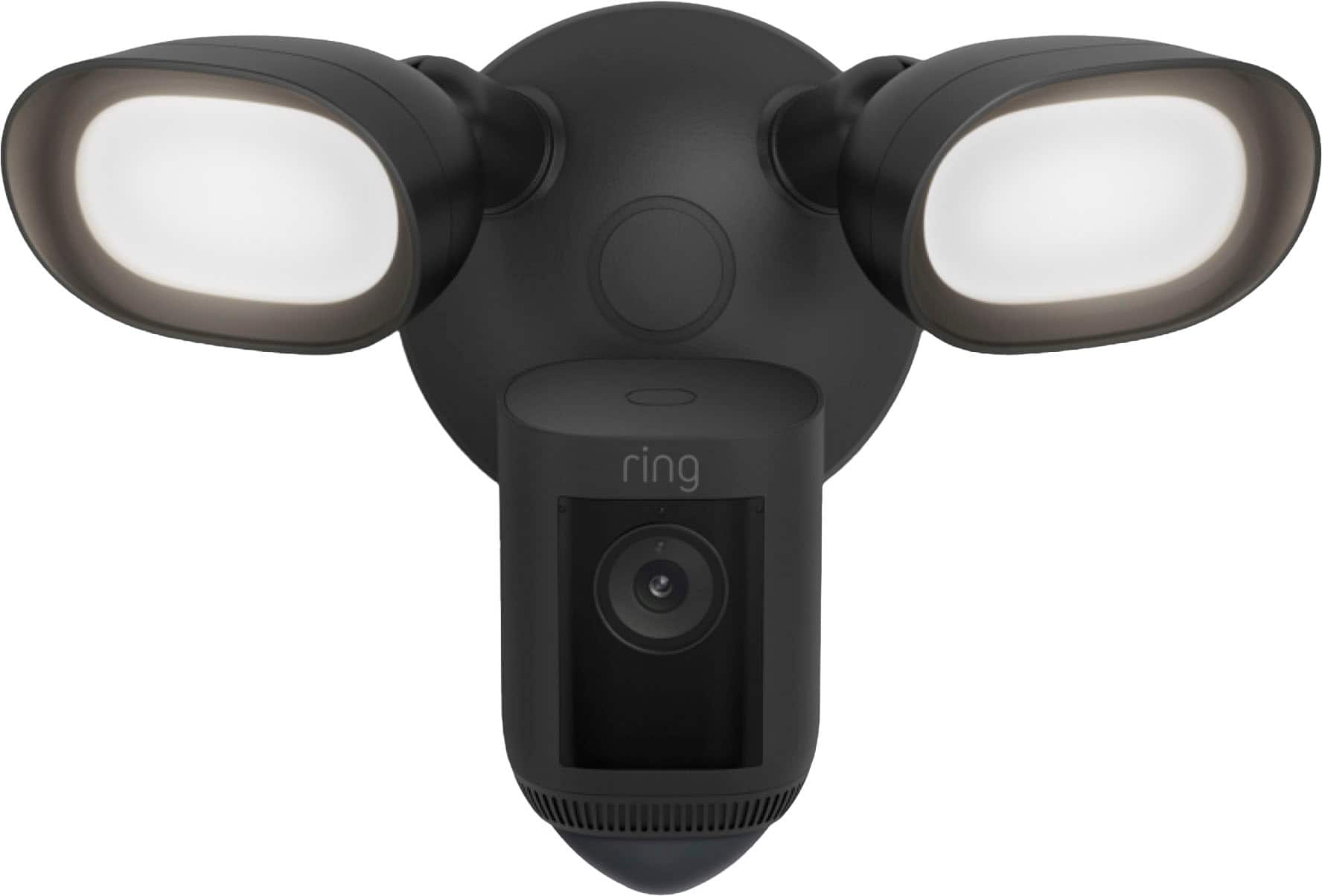


- Model:
- B0CG6RXMNV/B08FCWQWDZ
- SKU:
- 6456123
Rating by feature
- Value
Rating 4.6 out of 5 stars
- Quality
Rating 4.7 out of 5 stars
- Ease of Use
Rating 4.7 out of 5 stars
Customers are saying
Customers love the Floodlight Cam Pro for its great camera quality, ease of use, and overall performance. Many appreciate the adjustable light brightness, effective motion detection, and easy installation. While some find it a bit pricey, the night vision and wide field of view are also well-received.
This summary was generated by AI based on customer reviews.
Great floodlight cam.
||Posted .This reviewer received promo considerations or sweepstakes entry for writing a review.This is a fantastic floodlight cam. I have been using this for a year and it has been super reliable and very useful.
I would recommend this to a friendterrible design
||Posted . Owned for 2 months when reviewed.This reviewer received promo considerations or sweepstakes entry for writing a review.Terrible design. We got these professionally installed 20ft up on our second story. When the connection fails (and it will), you need to climb up a ladder and physically push a button on the camera to reset it. Where do they think you put a floodlight, on the ground floor?
No, I would not recommend this to a friendBrand response from Ring
Posted .Hello Mike,
We understand how important it is to have the proper instructions for installation purposes. We would like to ensure that you have a seamless setup experience.
The Floodlight Cam Pro works great at about nine feet above ground level with the motion sensor parallel to the ground. From this height, your Floodlight Cam Pro can cover a wide visual area, as well as capture HD video of visitors' faces. It will capture clear video of visitors' faces and cover a wide visual area. You'll be more likely to capture the events you want to know about and be notified as soon as they happen. More information on mounting our floodlight cam's can be found here: https://support.ring.com/hc/en-us/articles/360000124983-Proper-Positioning-for-Your-Floodlight-Cam.
Ring Community launched in March 2019 to help deliver the most current news and educational information to our neighbors. It is our first peer-to-peer community forum, giving our customers the ability to help one another and share their feedback/experiences with Ring. Please reach out at https://community.ring.com/ if any additional information is needed regarding your Floodlight Cam concern.
Thank you,
Antonio from Ring
Not Reliable
||Posted . Owned for 2 months when reviewed.This reviewer received promo considerations or sweepstakes entry for writing a review.If security is important to you, than you'll want to look for a different system. This Ring Floodlight Cam Pro will disconnect itself from my network for no apparent reason which means it won't capture videos in a reliable manner. Also, when it does capture a video, it often only captures the first couple of seconds and then the remainder of the video is a frozen still image so you have no idea of what actually happened. Not impressed with Ring!
No, I would not recommend this to a friendBrand response from Ring
Posted .Hi Musiclistener. I understand that being able to rely on your Floodlight Cam Pro is key to your peace of mind and sense of security. The concerns you're describing could be due to the strength of the wifi connection that your Floodlight Cam is receiving. I'd recommend reviewing the troubleshooting steps in our Help Center article here: https://support.ring.com/hc/en-us/articles/217271526-Understanding-RSSI-Values-and-Wifi-Signal-Strength. Improving the wifi strength will prevent the Floodlight Cam from disconnecting as well as improve some video quality concerns. We also have some additional video quality troubleshooting steps here: https://support.ring.com/hc/en-us/articles/205348254-Poor-Video-Quality-Troubleshooting. If these suggestions don't help, you can browse the Ring Community at https://community.ring.com/ to interact with other neighbors. All the best, Ashley from Ring.
DO NOT BUY THIS
||Posted . Owned for 1 month when reviewed.This reviewer received promo considerations or sweepstakes entry for writing a review.DO NOT BUY THIS PRODUCT. IT IS CRAP. I purchased a ring doorbell camera, a camera for my side yard and this. While the other two products are working well, this one isn't. The installation was relatively easy, wired to where my old floodlight used to be. The setup and connection to wifi was fine. But every time the wifi goes down (Spectrum was offline yesterday for hours), I spend days trying to reconnect this device to my wifi. Today it still won't connect. This has happened repeatedly. Now i have to uninstall it and return it, which is a major pain. SAVE YOURSELF SOME HEADACHE AND AGGRAVATION. DO NOT BUY THIS.
No, I would not recommend this to a friendBrand response from Ring
Posted .Hello Jack,
We appreciate you sharing your user experience with us regarding the Ring Floodlight Camera. We understand how important it is for your device working as intend. The Ring Floodlight Camera was intended to provide you with peace of mind in your home security, so you can rely on consistent alerts 24/7. Rest assured, we are here to provide you with a solution to your concern.
After reading your review, it seems that you are having trouble with your Ring Floodlight Camera connecting to your wifi. If this is the case, we recommend power cycling the device. To power cycle, turn off power to the device for 30 seconds and then turn the power back in. Once this is done, your device should reboot and work as intended. If the issue persists, we’d suggest reviewing this helpful article for network changes you can make to ensure your device has a solid connection consistently: https://support.ring.com/hc/en-us/articles/360023559372-Fixing-Your-Devices-Falling-Offline-Repeatedly-by-Adjusting-Your-Router.
Additionally, if you have not already, please check out our Ring Community forum where other Ring users, like yourself, have an open discussion platform to share their experiences, as well as solutions to issues experienced: https://community.ring.com/.
Thank you, Jamila with Ring.
Great Security Camera
||Posted . Owned for 1 week when reviewed.This reviewer received promo considerations or sweepstakes entry for writing a review.I love this item . At night when the light comes on you cannot see that their is a camera there .
I would recommend this to a friendNever buy from Best Buy again.
||Posted . Owned for 3 months when reviewed.This reviewer received promo considerations or sweepstakes entry for writing a review.It keeps coming on and going off every few minutes even though there is no movement. Absolutely the worst purchase I have ever made at Best Buy and now according to the website it is too late to return it. All I can do now is take it down and throw it away and know that I've wasted over $200.
No, I would not recommend this to a friendBrand response from Ring
Posted .Hi JamesH. Thank you for taking the time to share your experience with us. The Ring Floodlight Cam Wired Pro was designed to capture motions based on your specifications to help keep your home secure. We can definitely assist you with this today, and we are confident we can find the correct settings for your home’s environment.
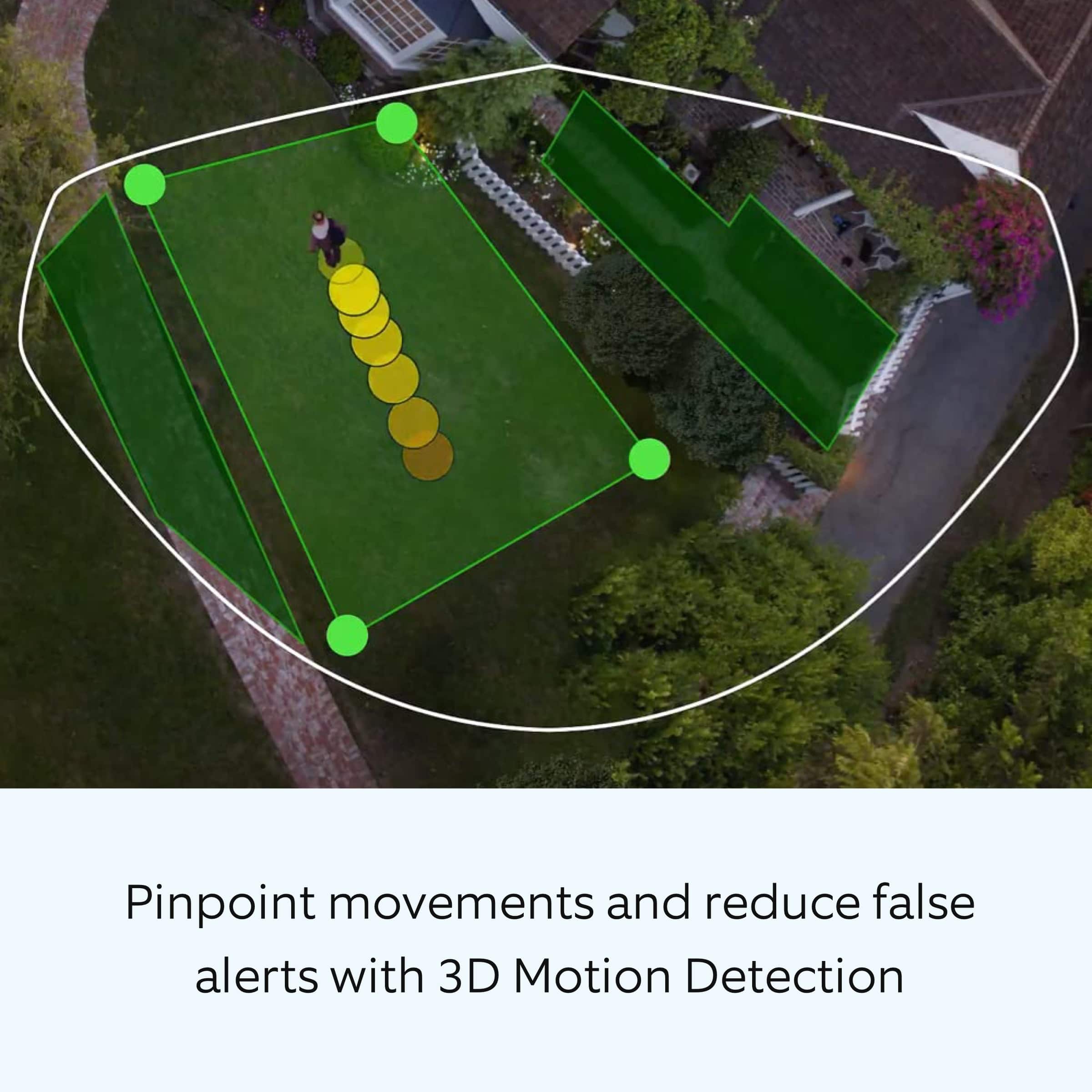
It sounds like the device is not performing as expected. The Ring Floodlight Cam Wired Pro has Advanced Motion Detection, Customizable Motion Zones and Customizable Privacy Zones that are controlled from the Ring app. In addition, the Floodlight Cam Wired Pro has advanced features including radar-powered 3D Motion Detection, Bird’s Eye View for more precise motion alerts, Audio+, a 110db security siren, dual-band wifi, is compatible with Amazon Sidewalk and an array microphone that limits sound detection. It is important to ensure that you have the proper motion settings in place for your environment. This includes reducing the "Motion Sensitivity" and setting the "Motion Frequency" to "Regularly" or "Periodically" in the Ring app to avoid getting excessive motion alerts. To optimize your motion zones and ensure that the device will detect accurately, please follow these steps:
Open the Ring app.
Tap the menu (≡) on the top left.
Tap Devices.
Tap the relevant device.
Tap Motion Settings.
At the top, tap Edit Zones or scroll down to tap Camera Motion Zones.
Note: If you are using a battery-powered device, you may need to toggle on Advanced Motion Detection under Advanced Settings before you can add customizable Motion Zones.
To adjust an existing Motion Zone: tap the Zone you want to adjust, then drag the points of the Zone to do so. Tap Save.
To add a new Motion Zone: tap Add Zone and drag the points of the Zone. Tap Save.
Accuracy in motion detection can also be improved by enabling Smart Alerts for people only in your Ring app.
To enable Smart Alerts:
Tap the menu (≡) on the top left.
Tap Devices.
Tap the device that you want to adjust.
Tap Motion Settings.
Tap Smart Alerts.
Tap Enable Feature.
Tap Continue.
Select the notification options that you want for Person and Other Motion.
You'll see a video camera where you can select or de-select recording and a bell icon to represent alert notifications.
After you've adjusted your settings tap Done.
If any additional information is needed regarding your Ring Floodlight Cam Wired Pro question, please reach out to our community team. The Ring Community is our first peer-to-peer community forum, giving our customers the ability to help one another by sharing their feedback and experiences with each other.
Sincerely,
Melissa from Ring.
BAD, HORRIBLE Product!
||Posted . Owned for 1 month when reviewed.This reviewer received promo considerations or sweepstakes entry for writing a review.I would put this in the NEGATIVE column if I could. The light randomly comes on without any motion. It detects people but not until they are halfway through my yard. Unfortunately I missed the ridiculous return time frame Best Buy has and now have a camera I pd $249 for but is back in the box! Do NOT buy!
No, I would not recommend this to a friendBrand response from Ring
Posted .Hello LetTheFinBegin.
Thank you for taking the time to share your experience with us.
We understand how important it is for your Ring Floodlight Cam Wired Pro to function consistently and reliably, so you are alerted to any wanted or unwanted activity in or around your home. The features and technology provided by the Ring Floodlight Cam Wired Pro are incredibly valuable and help provide you with peace of mind about your home security. We are here today to provide you with solutions that will assist you in finding the best device settings for your home’s environment.
It sounds like the motion detection is not working as expected. Here are a couple of things we recommend checking:
Set up and customize your camera motion zones for your Ring devices. Camera Motion Zones can help you detect motion in the areas that matter the most to you and reduce the number of "false" motion alerts (such as cars driving by). By drawing your camera motion zones to exclude high-traffic areas like public paths and roads, you can increase your Ring device's effectiveness.
Make your Ring device's view as clear as possible. Motion detection can sometimes trigger "false" alerts because of moving trees, lightning, the rising or setting sun, reflections off a shiny object, headlights, shadows, and more. To reduce false alerts, adjust your motion zones, remove shiny objects, cut back tree branches that create moving shadows, or angle your device to avoid the sun.
Ring Community was launched to help deliver the most current news and educational information to our neighbors. This online forum is divided into four categories: Product Boards, Ring Updates, Tips + Tricks, and a Moderators’ Corner. The Product Boards are where you can begin new topics with your questions or feedback; there is also a search option that helps you find topics that have already been posted by other neighbors.
All the best,
Nicole from Ring.
Great Cam
||Posted . Owned for 8 months when reviewed.This reviewer received promo considerations or sweepstakes entry for writing a review.Better material than previous models looks more and feels more strong for the hard weathers
I would recommend this to a friendGreat Camera, easy install
||Posted . Owned for 2 weeks when reviewed.This reviewer received promo considerations or sweepstakes entry for writing a review.This was a goid addition to oir doorbell and the sync between the 2 devices were seamless.
I would recommend this to a friendHome safety
||Posted . Owned for 1 month when reviewed.This reviewer received promo considerations or sweepstakes entry for writing a review.Unbelievable clarity and definition. The technician explained the operation in depth.
I would recommend this to a friendPtz camera
||Posted . Owned for 3 weeks when reviewed.This reviewer received promo considerations or sweepstakes entry for writing a review.Could not install due to lack of power outlet at location you must have a power source close to camera location
I would recommend this to a friendBrand response from Ring
Posted .Hi Mario.
We understand the importance of a seamless setup process so that you can begin using your Ring Floodlight Cam Wired Pro right away. The features and technology provided by the Ring Floodlight Cam Wired Pro are incredibly valuable and help provide you with peace of mind about your home security. We can definitely provide you with more information regarding the installation concern mentioned in your review.
It sounds like the device is not functioning as expected. Floodlight Cam Wired Pro has "Advanced Motion Detection," "Customizable Motion Zones" and "Customizable Privacy Zones" that are controlled from the Ring app. In addition, the Floodlight Cam Wired Pro has advanced features including radar-powered "3D Motion Detection," "Bird’s Eye View" for more precise motion alerts, Audio+, a 110db security siren, dual-band wifi, is compatible with Amazon Sidewalk, and an array microphone that limits sound detection. Installation by a qualified electrician may be required in your area.
We have included the installation instructions here for the Ring Floodlight Cam Wired Pro: Your Floodlight Cam Wired Pro must be installed on a 4“ round UL listed weatherproof electrical box. Make sure the power is turned off at the circuit breaker before beginning installation.
Next, follow these steps to start the setup process in the Ring app: Open the Ring app. Tap the menu (≡) on the top left corner of your dashboard. Tap "Set Up a Device." Follow the instructions in the Ring app. When prompted, scan the QR code on the back of the device.
Rotate both the lights outward if you are mounting the Ring Floodlight Cam Wired Pro on an eave or overhang. Rotate one light downward if you’re mounting it to a wall. Choose your screws. Select a set of screws that fit your junction box from the bags marked A through F. Save a screw from either bag B or C for one of the following steps: Bag A: standard screws that fit most junction boxes Bag B and C: longer screws for recessed junction boxes Bags D, E, and F are best for older boxes with smaller screw holes. Attach the metal mounting bracket. Secure the metal mounting bracket with the screws you selected in the previous step.
Install the plastic mounting plate by following these steps:
1. Pull gently from the opening of the plastic plate to free it from the fixture, then feed your power wires through the opening.
2. If you’re installing on a wall, the "UP" arrow should point up when your wires have been fed through the mounting plate.
3. If you’re installing under an eave, the arrow should point toward the wall.
4. Insert one of the screws from Bag B or C into the center hole, then tighten to secure. Hang up your Floodlight Cam Wired Pro by following these steps: Locate the nylon strap on the back of your Floodlight Cam Wired Pro light fixture and loop the buckle at the end over the hook on the mounting plate. Make sure that the buckle and hook are secure before releasing the light fixture. Warning: If you cannot easily identify the wires coming out of your junction box, have difficulty with them, or are uncomfortable in any way, consult a licensed electrician. The green wire on the Floodlight Cam Wired Pro is the ground wire. With the power still turned off at the breaker, use a wire nut from the bag marked G to connect the green wire coming from the junction box. The white wire on the Floodlight Cam Wired Pro is a neutral wire. Use another wire nut from the bag marked G to connect the white (neutral) wire coming from the junction box. The black wire on the Floodlight Cam Wired Pro is a hot wire. Use another wire nut from the bag marked G to connect the black wire from your Floodlight Cam Wired Pro to the black (hot) wire from your junction box. Give all three wires a gentle tug to make sure they’re secure. Mount the fixture. Tuck the wires into the junction box, then align the two holes on the light fixture with the threaded posts on the plastic mounting plate. Slide the light fixture onto the posts and push it firmly into place. Secure the fixture using two of the hex cap nuts from Bag G over the ends of the threaded posts. Remove the reversible bit from the included screwdriver and use the handle to tighten the hex cap nuts. Now that your Floodlight Cam Wired Pro is installed, you can turn the power back on at the breaker. The lamps on your Floodlight Cam Wired Pro will flash once it’s powered on. Once your Floodlight Cam Wired Pro is installed, follow the set-up instructions in the Ring app.
We invite you to reach out to our community if any additional information is needed regarding your Ring Floodlight Cam Wired Pro. The Ring Community is our first peer-to-peer community forum, giving our customers the ability to help one another by sharing their feedback and experiences with each other.
Thank you,
Melissa from Ring.
Garbage
||Posted . Owned for 5 months when reviewed.This reviewer received promo considerations or sweepstakes entry for writing a review.Garbage The light turns itself on with out any motion I have called ring support more times than I can count There solution is powering it off does no good light stays on all night even when it is in the off mode Do not buy ring products there garbage and there support is even worse
No, I would not recommend this to a friendBrand response from Ring
Posted .Hi Yogi.
Thank you for taking the time to share your experience with us.
We understand how important it is for your Ring Floodlight Cam Wired Plus to function consistently and reliably. The Ring Floodlight Cam Wired Pro was designed to activate based on your specific needs. We want to ensure your device is working as intended by providing you with solutions to resolve the concern you mentioned in your review.
It sounds like you have some concerns with the lights on your device. If your device is remaining on all night, you may need to adjust your light schedule in the Ring app. Follow these steps to set up or edit a light schedule for your Ring Floodlight Cam Wired Pro:
Open your Ring app.
Tap the three lines on the top left.
Tap Devices.
Tap the Floodlight Cam or Spotlight Cam that you want to adjust.
Tap the Device Schedule tile.
If you do not see a Device Schedule tile, refer to instructions at the top of this page to make sure your Ring app is updated.
Tap Light Schedules
Follow the prompts in the app to schedule times when you want your security camera lights off or on.
Customize the name of the schedule.
Set a start and end time like dusk and dawn.
Select certain days of the week for the light schedule to be active.
The Ring app will alert you if there is a light scheduling conflict with a previously established schedule for that particular device.
You’ll have the option to keep the new schedule or change it.
Visit our support center for more information.
Ring Community was established to assist in providing our neighbors with the most recent news and instructional material. Four sections make up this online forum: Ring Updates, Product Boards, Tips & Tricks, and a Moderators' Corner. You can start new topics on the Product Boards with your questions or suggestions; a search function will assist you in locating subjects that other neighbors have previously posted.
All the best,
Nicole from Ring.
Best camara
||Posted . Owned for 1 week when reviewed.This reviewer received promo considerations or sweepstakes entry for writing a review.I have one in the garage and another one in my back yard clear and good sensors
I would recommend this to a friendGreat camera light but bad customer service
||Posted . Owned for 3 weeks when reviewed.This reviewer received promo considerations or sweepstakes entry for writing a review.Was on sale but out of stock so I ordered 2 white ones with free shipping. I received black so I returned them to the store which by then had 2 white ones in stock. The store would not exchange for white evenly because they were no longer on sale. Great light bad store.
I would recommend this to a friendBrand response from Ring
Posted .Hi BeckS.
Thank you for taking the time to share your experience with us.
We understand the importance of a seamless purchasing and setup process so that you can begin using your Ring Floodlight Cam Wired Pro right away. The features and technology provided by the Ring Floodlight Cam Wired Pro are incredibly valuable and help provide you with peace of mind about your home security. We are eager to address the issue you raised in your review and provide you with a resolution today.
It sounds like you are satisfied with the Ring Floodlight Cam Wired Pro, but you have some concerns with your customer service experience. In this particular case, we'd suggest you reach out to Best Buy's customer service: 1-888-237-8289 or https://www.bestbuy.com/services/triage/home. We are confident that they will be able to provide you with a resolution to this concern.
Ring Community was established to assist in providing our neighbors with the most recent news and instructional material. Four sections make up this online forum: Ring Updates, Product Boards, Tips & Tricks, and a Moderators' Corner. You can start new topics on the Product Boards with your questions or suggestions; a search function will assist you in locating subjects that other neighbors have previously posted.
All the best,
Nicole from Ring.
Safe Buy
||Posted .This reviewer received promo considerations or sweepstakes entry for writing a review.This is an awesome purchase! Good Price! Great Quality! Protection!
I would recommend this to a friendCamera
||Posted . Owned for 1 month when reviewed.This reviewer received promo considerations or sweepstakes entry for writing a review.Nice camera and the lighting is very bright. I would repurchase again.
I would recommend this to a friendTechnical Issues with Ring Cam Wired
||Posted . Owned for 3 weeks when reviewed.This reviewer received promo considerations or sweepstakes entry for writing a review.The lights do not function properly neither is the sensor. The camera lens is blurry when looking at the video
No, I would not recommend this to a friendBrand response from Ring
Posted .Hi FransiscoR.
Thank you for taking the time to share your experience with us. We understand the need to have your Ring Floodlight Cam Wired Pro record clear and concise videos so that you can effectively monitor your home. The features and technology provided by the Ring Floodlight Cam Wired Pro are incredibly valuable and help provide you with peace of mind about your home security. We can definitely provide you with more information regarding the concerns mentioned in your review.
It sounds like the device is not performing as intended. Ring devices require high-speed internet to bring you crisp, clear video and audio. Poor network connectivity can affect the performance of your Ring device. We are happy to share some troubleshooting steps to help you diagnose and fix common video issues that you may be experiencing with your camera.
Check the Device Health section of your Ring application to ensure the device’s RSSI is within an acceptable range. The recommended range for optimal performance is 0 to -60 for the RSSI. Turn off your mobile device's cellular data and connect to the same wifi network as your Ring device. Open the Ring app. Tap the menu (☰). Tap “Devices.” Select your device. Trigger an event on your Ring device. This could mean pressing the button on a doorbell or activating the motion sensors on a camera. Answer the event and examine the resulting video.
We have listed some possible outcomes from this test here:
1. The footage is crisp and clear.
If your video appears good when next to the router, the issue may be caused by a disruption in between your router and your Ring device’s normal location. To fix this, try moving your device closer to the router or extending your wifi signal with a wifi extender like the Ring Chime Pro.
2. The footage is heavily pixelated.
If you’re seeing heavy pixilation, even next to the router, this may be due to slow wifi speeds. Ring devices with 1080p video require at least 1 Mbps upload and download speeds, though 2 Mbps is recommended for optimal performance. In addition to ensuring that you have sufficient wifi speeds, you will also want to check the signal strength of your device. A poor wifi signal can cause connectivity with your Ring device to be unreliable.
The Ring Floodight Cam Wired Pro was designed with adjustable motion and light settings. Follow these steps to toggle off and on the switch for "Motion-Activated Lights" in the Ring app: Open the Ring app. Tap the menu (☰). Tap "Devices." Select the Ring Floodlight Cam Wired Pro that you want to adjust. Select "Device Settings." Select "Light Settings." Toggle off and then on the switch for "Motion-Activated Lights." We also recommend increasing the "Light Sensitivity" and adjusting the "Motion Zones for Lights."
We invite you to reach out to our community if any additional information is needed regarding your question. The Ring Community is our first peer-to-peer community forum, giving our customers the ability to help one another by sharing their feedback and experiences with each other.
Thank you,
Melissa from Ring.
Good spotlight!
||Posted . Owned for 3 months when reviewed.This reviewer received promo considerations or sweepstakes entry for writing a review.Good spotlight! Good spotlight! Good spotlight! Good spotlight!
I would recommend this to a friendGreat one
||Posted . Owned for 9 months when reviewed.This reviewer received promo considerations or sweepstakes entry for writing a review.Wow great decision to buy this. The fact it is wired works well
I would recommend this to a friendFlood light
||Posted . Owned for 1 week when reviewed.This reviewer received promo considerations or sweepstakes entry for writing a review.Best Buy is the worst please don’t ever contact me.
No, I would not recommend this to a friend