Customer Ratings & Reviews

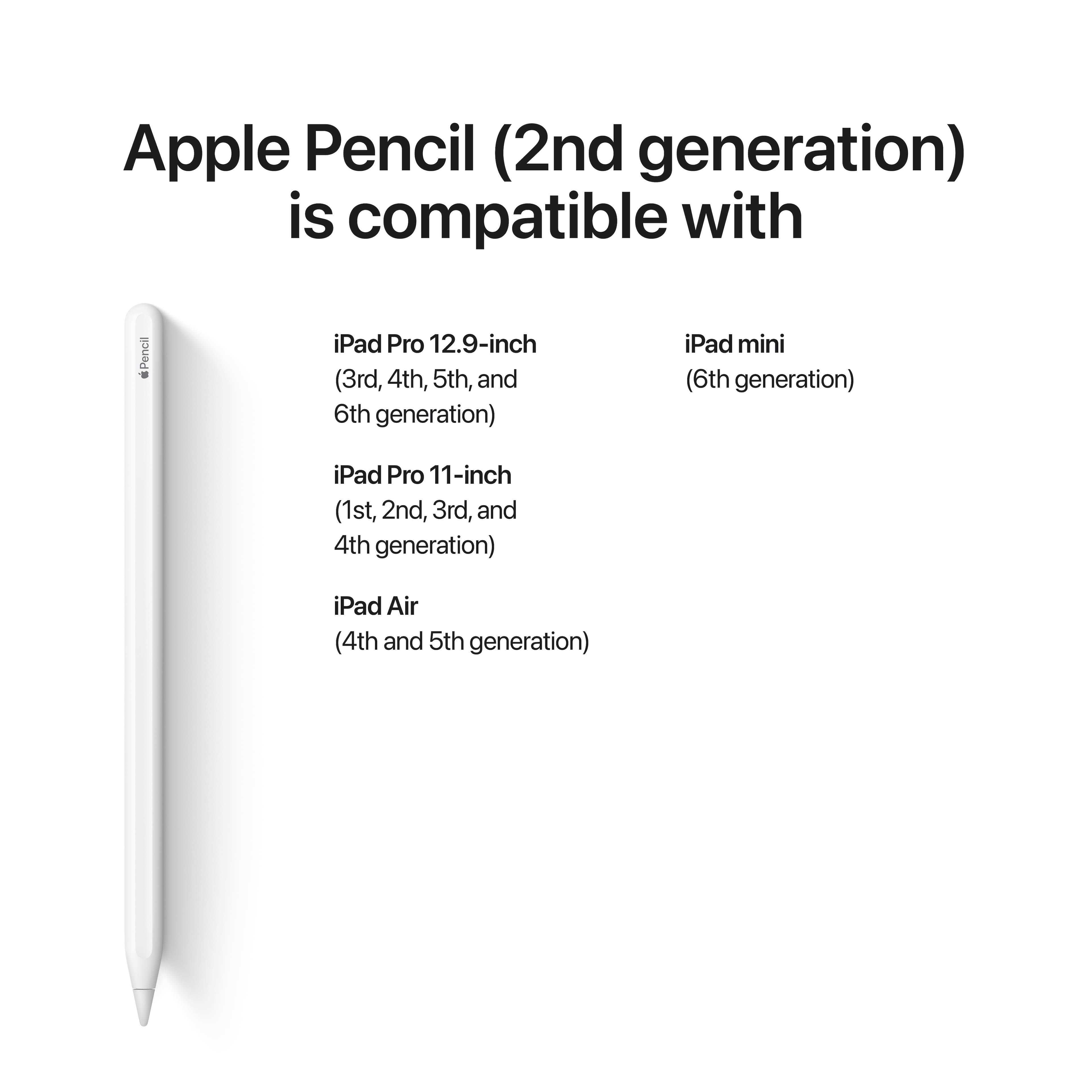
- Model:
- MXN43AM/A / MU8F2AM/A
- |
- SKU:
- 10754976
Customer reviews
Rating 4.8 out of 5 stars with 28975 reviews
(28,975 customer reviews)Rating by feature
- Value4.5
Rating 4.5 out of 5 stars
- Quality4.8
Rating 4.8 out of 5 stars
- Ease of Use4.8
Rating 4.8 out of 5 stars
Customers are saying
Customers recognize the product's exceptional ease of use, strong overall performance, and convenient charging. They also highly value its compatibility, good battery life, and accuracy, making it great for drawing and note-taking. However, the price is a notable drawback for many. Some users have also experienced issues with the tip's durability, connection problems, and its physical size.
This summary was generated by AI based on customer reviews.
- Pros mentioned:Charging
Rated 5 out of 5 stars
A great tool for artists.
||Posted .This reviewer received promo considerations or sweepstakes entry for writing a review.I own an original Apple Pencil for my old iPad Pro. This one us superior in many ways. Being able to charge via a magnetic hold on the side of the iPad is a game changer. I alway felt like I would lose the cap to my old Pencil. I no longer am worried about that. This feels great in my hand. Drawing on the iPad is so much fun.
This review is from Apple - Pencil (2nd Generation) - White
I would recommend this to a friend - Pros mentioned:Charging, Ease of use
Rated 5 out of 5 stars
Much better than Generation 1!
||Posted . Owned for 1 year when reviewed.This reviewer received promo considerations or sweepstakes entry for writing a review.This pencil is so much better than the first generation! Easy to use, and works well. It is so nice that it charges straight from the iPad!
This review is from Apple - Pencil (2nd Generation) - White
I would recommend this to a friend - Pros mentioned:Ease of use
Rated 5 out of 5 stars
Best solution for note taking
||Posted . Owned for 3 months when reviewed.This reviewer received promo considerations or sweepstakes entry for writing a review.Easy to use and very helpful for note taking ! Way better than any3rd party option
This review is from Apple - Pencil (2nd Generation) - White
I would recommend this to a friend - Pros mentioned:Charging
Rated 5 out of 5 stars
Better than the first generation
||Posted .This reviewer received promo considerations or sweepstakes entry for writing a review.This new generation of apple pencil has many advantages over its predecessor. First, it charges on the side without trying to find the original charger or plugging into the end. Secondly, it has a flat side so it doesn't roll everywhere. Lastly, it has the capability to change settings (pencil to eraser) with a tap. These features alone are worth their weight in gold.
This review is from Apple - Pencil (2nd Generation) - White
I would recommend this to a friend - Pros mentioned:Battery life, Ease of use
Rated 5 out of 5 stars
Love it
||Posted . Owned for 1 week when reviewed.This reviewer received promo considerations or sweepstakes entry for writing a review.Love the Apple Pencil and the new iPad Pro, mind blown
This review is from Apple - Pencil (2nd Generation) - White
I would recommend this to a friend - Pros mentioned:Charging, Overall performance
Rated 4 out of 5 stars
Of course it's good, it's Apple. (and expensive.).
||Posted . Owned for 1 month when reviewed.This reviewer received promo considerations or sweepstakes entry for writing a review.I had to get the Apple Pencil after the 2nd malfunctioning $30 version broke. I still think the price is way too high... but I can say that it does work better and can do more things than the generic knock-offs. Charging on the magnetic strip of the iPad and the "Scribble" feature are both very nice. That said... I dropped it the second day after purchasing and it too stopped working. I had to purchase a set of replacement nibs. Thankfully, that solved the problem, but added another $20 bucks to my purchase. It's a good product, but treat it very gently.
This review is from Apple - Pencil (2nd Generation) - White
I would recommend this to a friend - Pros mentioned:Compatibility
Rated 5 out of 5 stars
Apple Pencil ( 2nd Generation)
||Posted . Owned for 7 months when reviewed.This reviewer received promo considerations or sweepstakes entry for writing a review.The Apple Pencil is the smartest thing invented. It is very compatible and realizable when it comes to taking notes or drawing for fun. I would recommend this product 10/10.
This review is from Apple - Pencil (2nd Generation) - White
I would recommend this to a friend Rated 5 out of 5 stars
6 months review
||Posted . Owned for 2 months when reviewed.This reviewer received promo considerations or sweepstakes entry for writing a review.Apple nailed this product. My son used this for entire high school and using it in collage. Bought a second one for collage and he uses it extensively for write and drawing on his iPad Pro.
This review is from Apple - Pencil (2nd Generation) - White
I would recommend this to a friend- Pros mentioned:Compatibility, Ease of use
Rated 5 out of 5 stars
This is a must!
||Posted . Owned for 4 months when reviewed.This reviewer received promo considerations or sweepstakes entry for writing a review.If you own the newer iPad Pro, I would highly recommend purchasing one. It makes the experience of the iPad Pro that much better and feels great when note taking and combined with specific screen protectors to mimic the pencil on paper feel. I really enjoy the simplicity of the pencil attaching magnetically/charging on the side of the iPad.
This review is from Apple - Pencil (2nd Generation) - White
I would recommend this to a friend - Pros mentioned:Battery life, Charging
Rated 5 out of 5 stars
Pencil for ipad
||Posted . Owned for more than 2 years when reviewed.This reviewer received promo considerations or sweepstakes entry for writing a review.The pen works great with the iPad Air and has a great battery life . I also think the charging while connected to the iPad is a great benefit !
This review is from Apple - Pencil (2nd Generation) - White
I would recommend this to a friend - Pros mentioned:Charging
Rated 3 out of 5 stars
Don’t Get For Just Note Taking
||Posted . Owned for 3 weeks when reviewed.This reviewer received promo considerations or sweepstakes entry for writing a review.After a month of use. Regular paper and pencil works just fine for notes although you won’t be able to organize and label important sections of your notes neatly. I’ve been using the Apple Pencil mainly to take notes. The Apple Pencil is great if you want to digitize your notes. Note taking has also been an upgrade for me since I can now color code notes and highlight digital documents. I’m able to take as many notes as I want without worrying about wasting paper. I can organize and file them accordingly for each topic and find them in a pinch. Although the $129.99 price is quite a lot for a stylus. Might be better to use notebook and paper. My classmates are having no troubles using paper and pencil, just uploading a photo of their notes and work is the only problem since our class website doesn’t take HEVC/HEIF photos (the standard format iPhones take photos and videos). Overall, I kind of do and don’t regret buying the Apple Pencil. It’s quite expensive and just using normal paper and pencil for class can achieve almost the same results. I feel that it’s worth buying if you’re a digital artists or if it was $99.99 like the first first gen. Some stuff about the Apple Pencil after a month of use •Matte design feels better than the first generation for sure •The magnetic design is a very nice thing to have since you don’t lose it and it charges every time it’s connected •Made the mistake of using the pencil while I still had just a light amount of motor oil still on my finger. It stained the pencil of course, but it disappeared after a few days of normal use. •Been using GoodNotes and Files to write and it doesn’t always write where the tip is at, usually off by just a minuscule amount but enough to throw me off, but I do have a glass screen protector on the tablet which is most likely the cause.
This review is from Apple - Pencil (2nd Generation) - White
I would recommend this to a friend Rated 5 out of 5 stars
Simple
||Posted .This reviewer received promo considerations or sweepstakes entry for writing a review.Apples signature simplicity in design and functionality are on full display here. As a student who takes notes in class and a pilot who is frantically writing down instructions and information in the air, the Apple Pencil 2nd gen has been huge in my organization in situations I already use my iPad. Highly recommend!
This review is from Apple - Pencil (2nd Generation) - White
I would recommend this to a friend- Pros mentioned:Battery life, Ease of use
Rated 5 out of 5 stars
10/10
||Posted . Owned for 1.5 years when reviewed.This reviewer received promo considerations or sweepstakes entry for writing a review.Has been such a great purchase since purchasing! Great for notes in college and also personal use such as digital planning. Very easy to use and keep charged
This review is from Apple - Pencil (2nd Generation) - White
I would recommend this to a friend Rated 5 out of 5 stars
Apple pencil
||Posted . Owned for 5 months when reviewed.This reviewer received promo considerations or sweepstakes entry for writing a review.I love my Apple Pencil it makes taking notes so much easier only down side is that it can be easily misplaced
This review is from Apple - Pencil (2nd Generation) - White
I would recommend this to a friend- Pros mentioned:Charging
Rated 5 out of 5 stars
iPad Pro pen
||Posted . Owned for 1 week when reviewed.This reviewer received promo considerations or sweepstakes entry for writing a review.How convenient it is to charge your pen on my iPad Pro!!! I love my pen. I don’t have to have it in different places. It’s always with my iPad pro
This review is from Apple - Pencil (2nd Generation) - White
I would recommend this to a friend - Pros mentioned:Battery life
Rated 5 out of 5 stars
Good product
||Posted .This reviewer received promo considerations or sweepstakes entry for writing a review.The Apple Pencil works smoothly and pairs instantly with my iPad. It feels natural when writing or drawing, and the pressure sensitivity is excellent. Battery life lasts long and charges quickly. Definitely a must-have for creatives and note-takers!
This review is from Apple - Pencil (2nd Generation) - White
I would recommend this to a friend Rated 5 out of 5 stars
Best price
||Posted . Owned for less than 1 week when reviewed.This reviewer received promo considerations or sweepstakes entry for writing a review.Best Buy offers the best price for the Apple Pencil (2nd gen) and has frequent sales on it. This is my second pencil (purchasing it as a gift) and again, Best Buy had the best deal on it! If you're someone who plans to use their iPad to take notes and draw the Apple Pencil is a must!
This review is from Apple - Pencil (2nd Generation) - White
I would recommend this to a friend- Pros mentioned:Overall performance
Rated 5 out of 5 stars
I love it!
||Posted .This reviewer received promo considerations or sweepstakes entry for writing a review.Great price and works like new. You cant even tell that it was used. No lagging, looks new, came with extra tips and works exactly like it should.
This review is from Apple - Pencil (2nd Generation) - White
I would recommend this to a friend - Pros mentioned:ChargingCons mentioned:Price
Rated 5 out of 5 stars
better than the first gen
||Posted . Owned for 3 weeks when reviewed.This reviewer received promo considerations or sweepstakes entry for writing a review.Having both apple pencils and this one is way better, in terms of usability and the way it charges. The downside is only applicable to the iPad Pro series and a tad expensive. Overall it is valuable only if you really work with arts, otherwise, don't splash your money. You can spend the money to buy AirPods or other accessories.
This review is from Apple - Pencil (2nd Generation) - White
I would recommend this to a friend - Pros mentioned:Ease of use
Rated 5 out of 5 stars
Great purchase
||Posted . Owned for 3 weeks when reviewed.This reviewer received promo considerations or sweepstakes entry for writing a review.Love it works great you can see and feel the quality of the product very light weight and easy to use on my new iPad Pro wanted to upgrade all my devices before the new year
This review is from Apple - Pencil (2nd Generation) - White
I would recommend this to a friend