Customer Ratings & Reviews
- Model:
- ASW-USB3-25
- |
- SKU:
- 3459621
Customer reviews
Rating 4.4 out of 5 stars with 2708 reviews
(2,708 customer reviews)Rating by feature
- Value4.3
Rating 4.3 out of 5 stars
- Quality4.5
Rating 4.5 out of 5 stars
- Ease of Use4.4
Rating 4.4 out of 5 stars
Customers are saying
Customers find value in the easy-to-use feature and fast data transfer of the Data Transfer Cable. They appreciate its compatibility and cloning capabilities, making it perfect for cloning drives. While some customers find the software lacking and the price expensive, overall, customers are pleased with its performance and functionality.
This summary was generated by AI based on customer reviews.
- Cons mentioned:Price
Rated 4 out of 5 stars
Good but pricey!
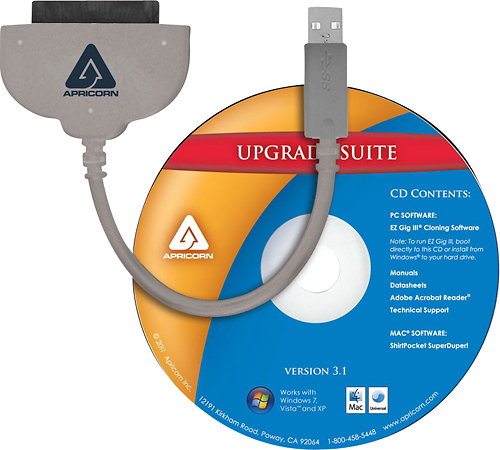
||Posted .This reviewer received promo considerations or sweepstakes entry for writing a review.Apricorn - Data Transfer Cable - Gray Apricorn ASW-USB3-25 Data Transfer Cable - SATA - 2.50 - USB - SATA is a good quality product, made of very solid and durable materials, but it is very high-priced (comparable products are sold for less than ½ price) it comes ready to go with an old version of the software on a useless data media. It's obsolete when you open the package (NOT RETURNABLE) but can be downloaded from Internet and it is free. Overall a good cable, useless obsolete software and expensive product!
No, I would not recommend this to a friend - Cons mentioned:Price
Rated 3 out of 5 stars
Average product
||Posted .This reviewer received promo considerations or sweepstakes entry for writing a review.I purchased this to clone my Sony VAIO laptop's disk to an SSD from Intel, so that I can replace with SSD. Connecting the SSD and then to laptop was an easy thing. It is not plug and play - my Win 8.1 Pro did not recognise it as an external drive. However, the included CD has the s/w and the latest version can always be downloaded from their website. I downloaded the same and started the cloning process. The wizard was pretty easy to use and the whole cloning process didn't take much time - I had only 90GB data. I swapped the drives and started the laptop with the SSD in. Here comes the surprise - the laptop reports that it is a corrupted drive and cannot boot! Even after multiple attempts at cloning resulted in the same result. Finally I had to use my recovery disk and reinstall to factory settings - resulting in losing all apps that I had previously installed and had to download the Win 8.1 update again. I believe it may be because of the multiple hidden partitions that Sony has on their disks for recovery. So - three drawbacks: 1. The cloning was not perfect 2. doesn't work without the dedicated s/w - cannot use as a external drive adapter for regular use. 3. Very expensive for a one time use product
No, I would not recommend this to a friend - Pros mentioned:Ease of use, Speed
Rated 5 out of 5 stars
Great product!!!
||Posted .This reviewer received promo considerations or sweepstakes entry for writing a review.It is a great product, easy to use. Just plug and play. I used it to cloned my OS from HDD to SSD of my new Toshiba radius laptop. My laptop is way lot faster now.
I would recommend this to a friend - Pros mentioned:Ease of use, Performance, Usb
Rated 5 out of 5 stars
Plug and play
||Posted .This reviewer received promo considerations or sweepstakes entry for writing a review.I need to replace my HDD with an SSD. I got the cable. I Plugged it into the laptop then on the new SSD. I installed the software and it was so easy to copy the drive. I coped a larger partition to a smaller on and it worked seamlessly. I then installed the new SSD and it work without errors on first bootup. The whole process from SSD in hand to finish was less than an hour.
I would recommend this to a friend - Pros mentioned:Data transfer, Ease of use
Rated 5 out of 5 stars
Perfect
||Posted .This reviewer received promo considerations or sweepstakes entry for writing a review.Does as designed. Transfered all my data from my old HDD to my new one and it was a breeze. Didnt try the softeware for cloneing but will in future.
I would recommend this to a friend - Pros mentioned:Data transferCons mentioned:Price, Software
Rated 4 out of 5 stars
Does the trick
||Posted .This reviewer received promo considerations or sweepstakes entry for writing a review.Don’t get caught off-guard when acquiring a new HDD or SSD. It’s a bit pricey and the software isn’t much help. However, the adapter enables you to format, initialize and burn data to your new drive before installing it.
I would recommend this to a friend - Pros mentioned:Data transfer
Rated 4 out of 5 stars
Hardware works
||Posted .This reviewer received promo considerations or sweepstakes entry for writing a review.The hardware (data transfer cable) works well however had issues with the included data transfer software as after recognizing the replacement hard drive the data transfer failed just before it would start. Attempted to use with different computers with no success however with a different cloning software the cable worked well. Would recommend only at a lower price point as the software didn't add any value to my ownership of product in the examples I attempted to utilize it.
I would recommend this to a friend - Cons mentioned:Software
Rated 5 out of 5 stars
Worked perfectly
||Posted .This reviewer received promo considerations or sweepstakes entry for writing a review.The cord worked great while the pack in software was rather useless. I used super duper for the internal hard drive swap that I used this for.
I would recommend this to a friend - Pros mentioned:Data transferCons mentioned:Compatibility
Rated 4 out of 5 stars
It works
||Posted .This reviewer received promo considerations or sweepstakes entry for writing a review.Was able to transfer days off a failing hard drive, would like an adapter to use with desktop hard drives also
I would recommend this to a friend - Pros mentioned:Ease of use, Performance
Rated 5 out of 5 stars
Fast and efficient
||Posted .This reviewer received promo considerations or sweepstakes entry for writing a review.I purchased this product to transfer my system for 1TB to a 2TB drive. It was very easy to use and cloned my system very efficiently.
I would recommend this to a friend - Pros mentioned:Ease of use
Rated 5 out of 5 stars
Must have for SSD Data transfer
||Posted .This reviewer received promo considerations or sweepstakes entry for writing a review.Solid, well built cable. I tried the cheap route with my outboard HDD eSATA cable but the SSD would not wake up. Plugged this cable in and instant ON. Perfect. Software, meh, for a total end to end clone it will do the job. Doing bits and pieces and selecting files, do that before or after transfer. Just select clone and let er rip. Go get a cold one if you have USB2 like me, I know upgrade. Its in the works, but the SSD and new RAM will hold me over for a little while longer.
I would recommend this to a friend - Pros mentioned:Data transfer, Ease of use
Rated 5 out of 5 stars
Easy to use for anyone.
||Posted .This reviewer received promo considerations or sweepstakes entry for writing a review.Allowed me to clone my hard drive effortlessly and in about 45 minutes my new ssd drive was installed and working flawlessly.
I would recommend this to a friend - Pros mentioned:Data transfer, Ease of use
Rated 5 out of 5 stars
Excellent drive swap kit
||Posted .This reviewer received promo considerations or sweepstakes entry for writing a review.Everything needed is included. Easy and fast data transfer. Works perfect and makes drive swapping and transfer a piece of cake!!
I would recommend this to a friend - Pros mentioned:Ease of use, Performance
Rated 4 out of 5 stars
Easy to use
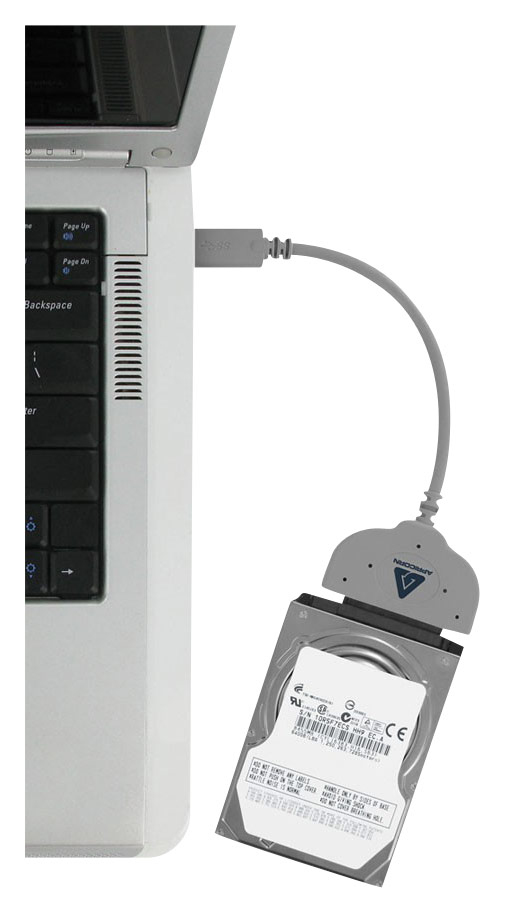
||Posted .This reviewer received promo considerations or sweepstakes entry for writing a review.I can't speak to the software or utilities that came on the CD, I didn't need to use them. Once I installed the new hard drive in my laptop and got Windows7 installed, I plugged in the transfer cable into the USB port, connected the old drive and Windows7 recognized the old drive and I was transferring files in minutes. Performance is very good. Te drive appears in Windows just as another drive and using Explorer is quick and easy for moving the files from the old drive. Once completed with transfer, I reformatted the old drive and I have a drive I can use to backup files. This is not a "everyone must have" product, it's truly for those that need to capture data from a old or previously installed drive. If you are looking for a way to backup data from your primary drive, buy an USB drive.
I would recommend this to a friend - Pros mentioned:Data transfer, Ease of use
Rated 5 out of 5 stars
Works Great
||Posted .This reviewer received promo considerations or sweepstakes entry for writing a review.Used it to move all programs and data from an old Mac Pro to a new one and it could not have been easier or worked better.
I would recommend this to a friend - Pros mentioned:Data transfer, Ease of useCons mentioned:Power
Rated 5 out of 5 stars
Fast, easy, and works great I bought this to
||Posted .This reviewer received promo considerations or sweepstakes entry for writing a review.I bought this to copy the contents of the HDD on my laptop onto an SSD. I use Norton Ghost at work over Ethernet or disk-to-disk. This was faster, easier, and required no configuration. Only works with notebook HDDs or SSDs because of the power USB3 can supply. I highly recommend it.
I would recommend this to a friend - Pros mentioned:Data transfer, SpeedCons mentioned:Price
Rated 4 out of 5 stars
Excellent Way to Upgrade Hard Drive
||Posted .This reviewer received promo considerations or sweepstakes entry for writing a review.Bought this to upgrade size of hard drive in a laptop. Made the job easy and quick. Swapped out hard drive after complete and booted up with absolutely no issues. If cost was more reasonable, would have given 5 stars.
I would recommend this to a friend - Pros mentioned:Data transfer, Ease of use
Rated 5 out of 5 stars
Best data transfer program
||Posted .This reviewer received promo considerations or sweepstakes entry for writing a review.This product was easy to use, and fast, It made transferring from one hard drive to another a snap.
I would recommend this to a friend - Pros mentioned:Data transfer, Ease of use
Rated 5 out of 5 stars
Works Great
||Posted .This reviewer received promo considerations or sweepstakes entry for writing a review.Simple to use the software and was able to transfer all my files onto the new drive fairly easily. Works great.
I would recommend this to a friend - Pros mentioned:Ease of use
Rated 5 out of 5 stars
Worked perfectly.
||Posted .This reviewer received promo considerations or sweepstakes entry for writing a review.Found out I had to purchase this cable for the drive I also bought @ BB after I got home. Would have been nice to know this was needed prior to drive purchase, but shame on me for not doing my homework by going to the manufactures site and reading the install manual to figure out the steps required. Used the cloning software that came with the cable (ran it right from the CD, no need to install) and everything worked seamlessly, easy and fairly quick.
I would recommend this to a friend