Apricorn - Data Transfer Cable - Gray
- Key Specs
- Cable Length: 0.21 feet
- Connector Type (End 1): USB
- Gender (End 1): Male
- Connector Type (End 2): USB Type A
- Gender (End 2): Male
- In-Wall Rated: false
- General
- Product Name: Data Transfer Cable
- Brand: Apricorn
- Model Number: ASW-USB3-25
- Color: Gray
- Connectivity
- Cable Type: USB
- Cable Length: 0.21 feet
- Product Type: Cable
- Connector Type (End 1): USB
- Gender (End 1): Male
- Connector Type (End 2): USB Type A
- Gender (End 2): Male
- Environmental
- In-Wall Rated: false
- Other
- UPC: 708326913003
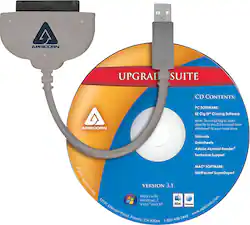
Apricorn ASW-USB3-25 Data Transfer Cable - SATA - 2.50" - USB - SATA
- Compatible with 2.5" Serial ATA hard drives and solid state drives: For a simple connection to your laptop (drive not included).
- USB 3.0 connector: Lets you connect a Serial ATA drive.
- Up to 5 Gbps data transfer rates: Ensure fast data manipulation for smooth operation.
- Bus-powered: For efficient use.
- Upgrade suite software CD-ROM: Includes EZ Gig IV with Data Select Cloning software for PC and ShirtPocket SuperDuper for Mac.
Whats Included
- SATA Wire 3.0 Hard Drive Upgrade Kit
- Upgrade suite software CD-ROM
A: I have used it to transfer Windows 10 from mechanical drives to SSD drives on 3 different computers. I also used it to transfer Windows 7 on another laptop. Works great.
A: This is only meant for laptop drives. I found out you need a Hard Drive dock for 2.5”/3.5” SATA drives. It has a AC plug because the USB alone doesn’t have enough power for a desktop drive.
A: Yes, that’s exactly what I used it for. That’s assuming the hard drive that you are trying to get the data off of still works.
A: This cable and software is used to clone a hard drive. It doesn't care what version of windows you are using. It can clone your W7 hard drive or your W10 hard drive.
Q: so can I use this cable for a desktop Hard drive ? or it's only for a laptop?
A: As long as it is a 2.5 inch drive and has a SATA connection. I used it on my desktop to upgrade my HDD to an SSD.
A: Yes, if the new drive is a 2.5" SSD or HDD. This cable just connects the new drive to a USB port and then you use the included software to duplicate the existing drive on to the new one. After the duplication, you shut down the computer, swap drives and power it back up.
Q: Can I use this to clone my notebook hard drive to a tower PC?
A: This can be used to clone 1 hard drive to another, HOWEVER, you will still need special software. If you are looking to just move your documents/pictures/bookmarks/ect to the tower already running an existing operating system, there are much easier ways than by cloning. Also keep in mind, the installed drivers on the laptop may not work on the tower. It is best to consult with a professional to ensure a successful transition.