Customer Ratings & Reviews








- Model:
- PA27JCV
- SKU:
- 6620167
Rating by feature
- Display Quality
Rating 4.6 out of 5 stars
- Ease of Use
Rating 4.5 out of 5 stars
- Features
Rating 4.4 out of 5 stars
Customers are saying
Customers are positive about the ProArt 27" 5K IPS Professional Monitor's color accuracy, connectivity, and port count. The high resolution and adjustability were also well-received. Conversely, customers expressed disappointment with the speaker quality and desired a higher refresh rate.
This summary was generated by AI based on customer reviews.
- Pros mentioned:Color accuracy
Mac Display? Absolutely.
||Posted .This reviewer received promo considerations or sweepstakes entry for writing a review.I was looking for a compatible external display for my iMac, that didn’t compromise the clarity you get with a Retina display. After 3 tries, I have finally found a monitor that gives Apple a run for its money, and saves you some. It is super close to the native colors of a Mac. I love it!!!
I would recommend this to a friend - Pros mentioned:Adjustability, Color accuracy, Port countCons mentioned:Speaker quality

Amazing 5K clarity and color reproduction
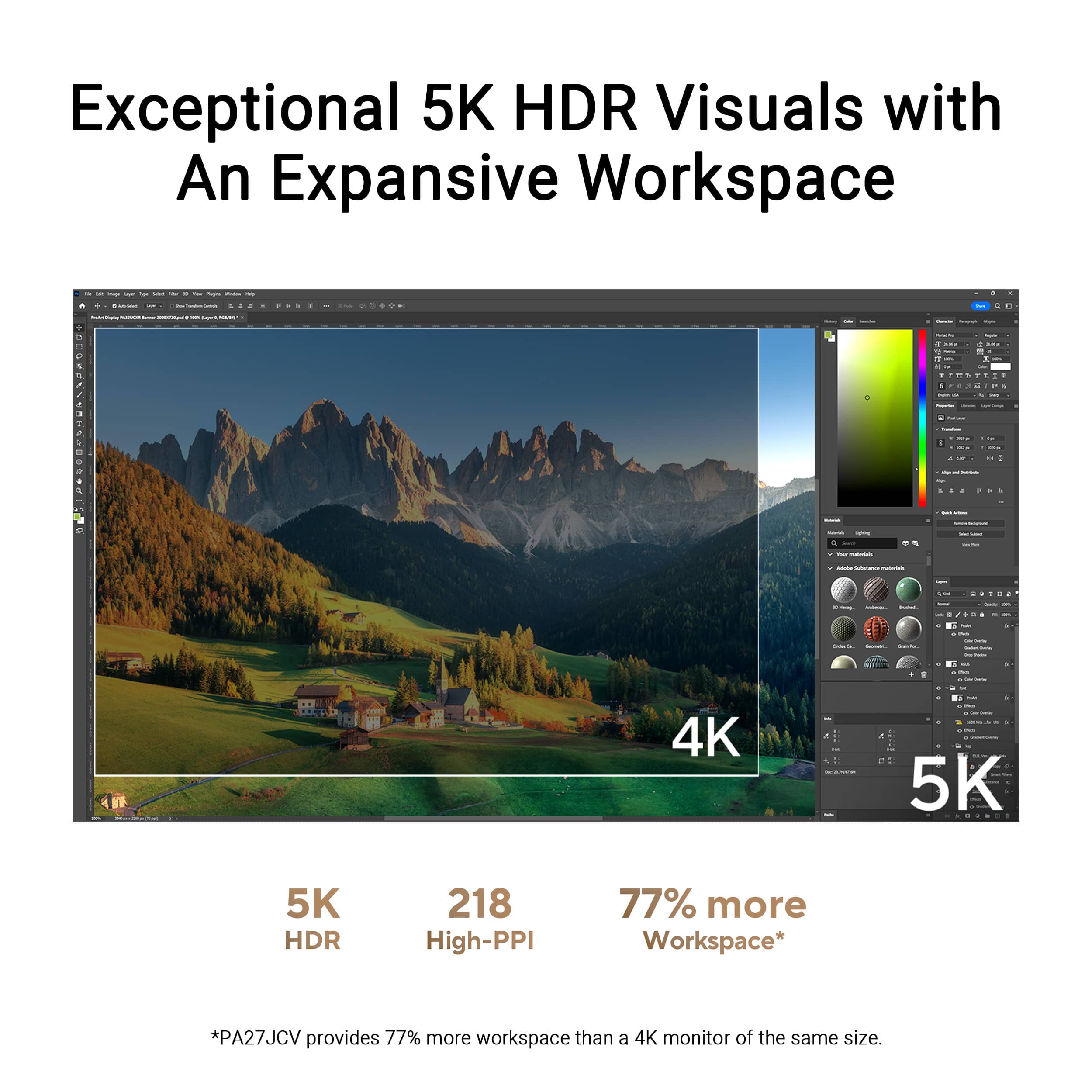
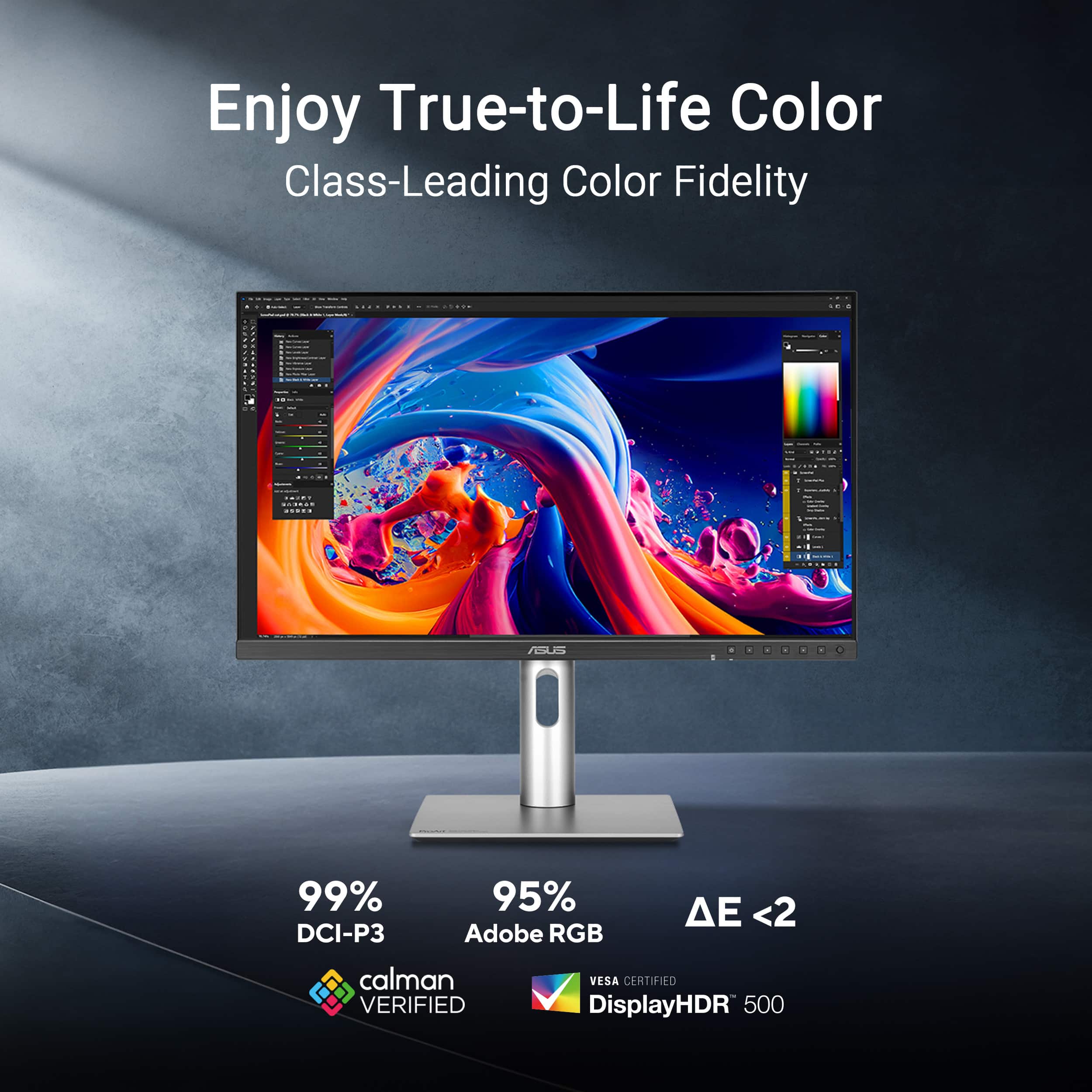
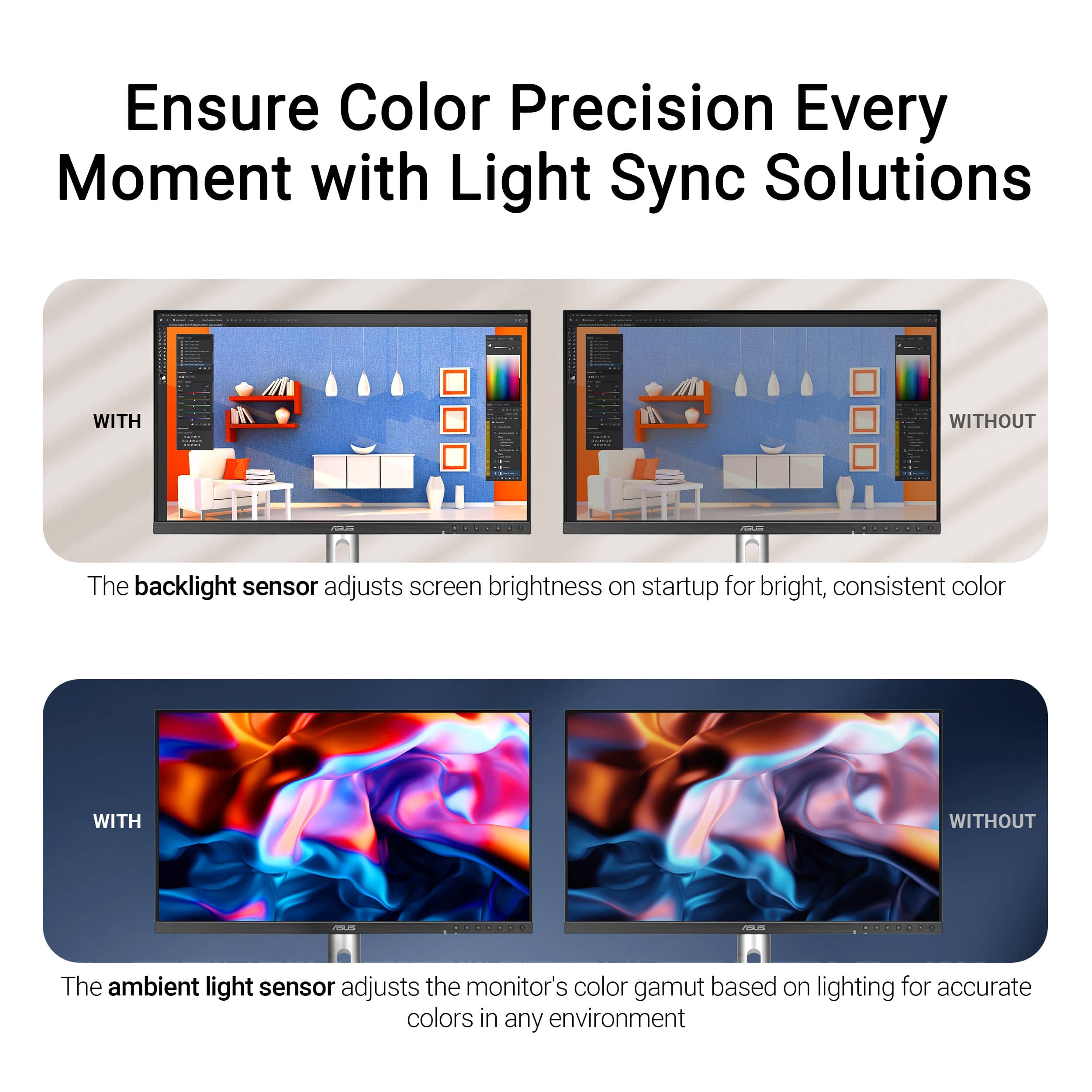
|Posted .This reviewer received promo considerations or sweepstakes entry for writing a review.This ASUS ProArt 5K 27" monitor is a beauty. As a content creator and home office user, I was blown away by the precise clarity and color detail provided by the 218 PPI pixel density. While I'm working on my projects the text is sharp, the images are detailed, and the color is accurate. The LuxPixel technology is a great way to minimize and reduce glare and reflection while I'm working on my projects. This also allows for a nice and wide 178 degree viewing angle. Calman Verified with factory calibration works really well for me right out of the box. Color critical photographers or videographers will appreciate the accuracy of the depth of color. The monitor is easy to use with minimal borders and an easy to use joystick button for menu navigation. The ProArt 5K will support HDR10 and DisplayHDR 500, which gives a nice wide dynamic range for all your HDR content. The display type is an LED display, with an IPS panel. The refresh rate is 60Hz, and it has a 5ms response time. In regards to the ports and plugs, there is USB-C with 96 watt power delivery which helps for data and video transmission. 1 DisplayPort 1.4 over USB-C, 1 HDMI 2.1 (a cable is provided in the box), 3 USB-A 3.2, 1 USB-C, 1 USB-C 3.2. There is also a headphone jack, but this also comes with built in speakers. The speakers are good and work adequately, but I prefer having an upgraded external speaker setup for my home office needs. Another nice feature is built in Auto KVM that allows for switching between 2 connected PC's with a single keyboard and mouse. This is great for multi-tasking especially when you're juggling different types of projects. I like the stable stand with a metallic silver base and neck as it securely keeps the monitor in place. The monitor will tilt, swivel, and pivot from portrait to landscape mode. The height adjustable neck is very easy to move up and down for your needs. The backlight sensor and ambient light sensor can be helpful to keep pace with the light conditions in your working space. And another nice feature that I have appreciated is the TUV Eye Care that keeps a flicker free and ultra low blue light technology on the monitor screen. Overall, I really like this monitor for its true niche of content creation and photo/video editing. I think artists will appreciate the colors and precision, but I honestly feel that anyone can benefit from a screen as sharp and precise as this 5K ProArt monitor by ASUS.
I would recommend this to a friend - Pros mentioned:Adjustability, Connectivity
Configure ASUS ProArt 27" 5K Monitor to Your Needs
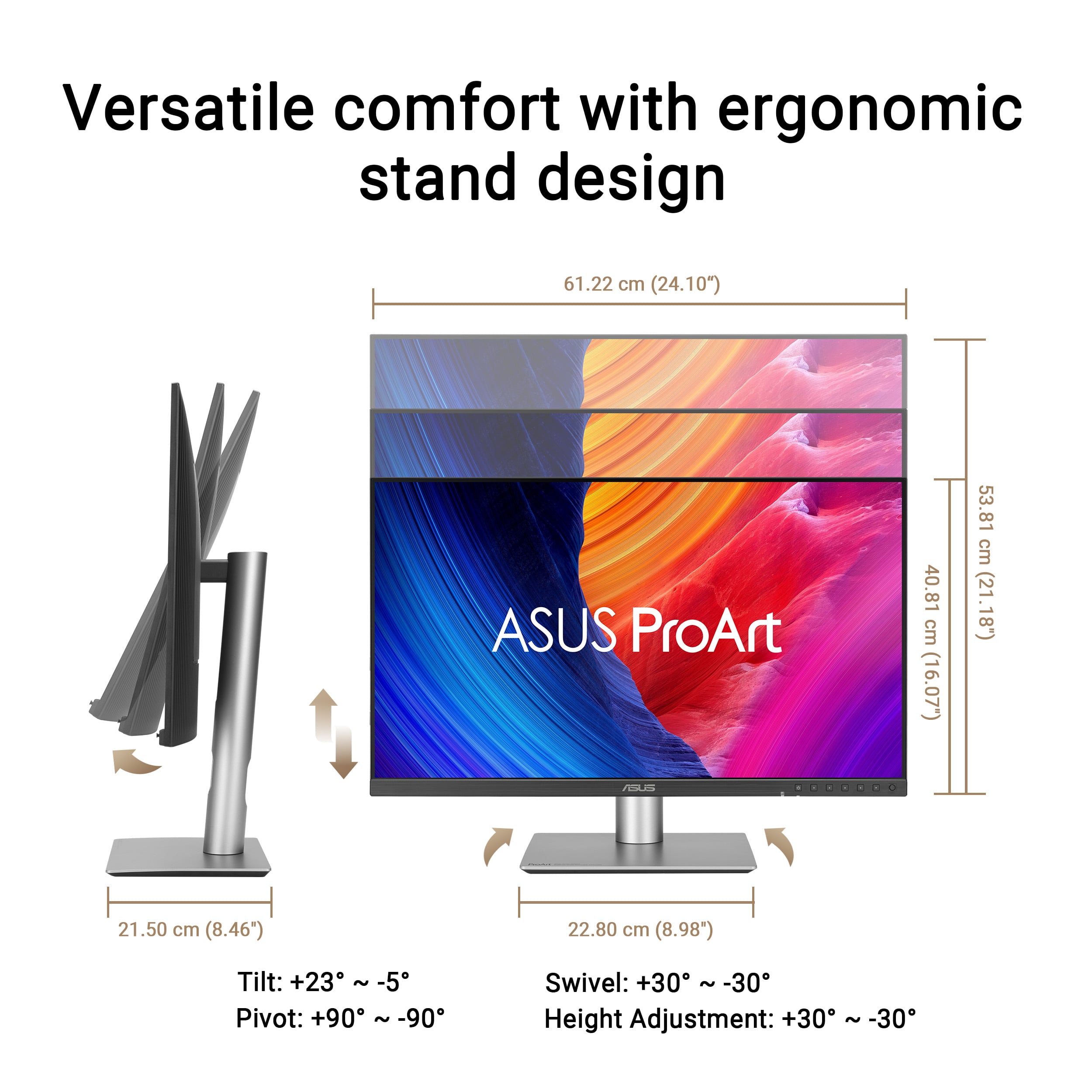
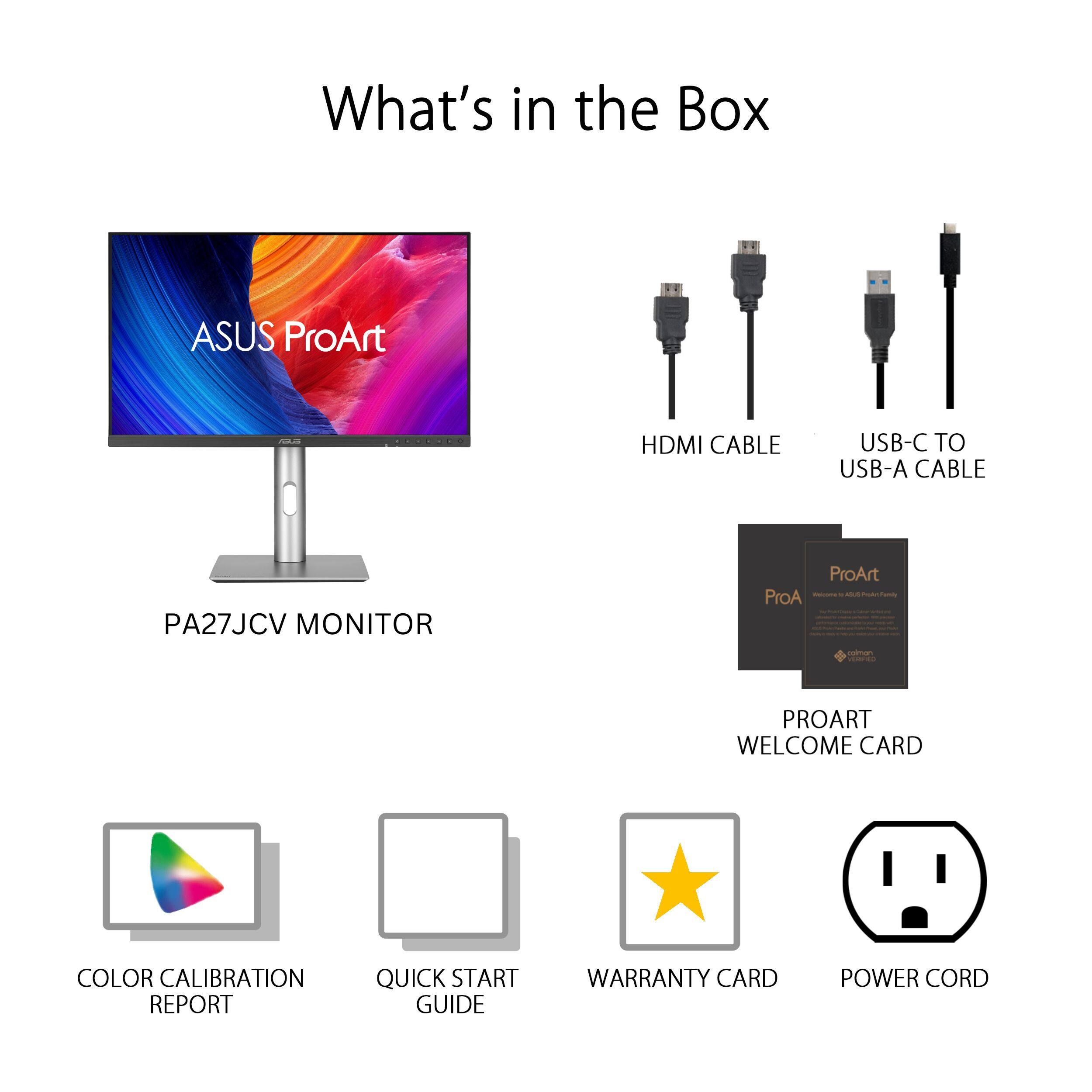
|Posted .This reviewer received promo considerations or sweepstakes entry for writing a review.The ASUS ProArt 27-inch 5K IPS LED Professional Monitor is just that—a large, flat 5K monitor that is an excellent display for content creators, graphic designers, photographers, and others who want a configurable high-definition display. Unboxing the ASUS PROArt 27-inch Monitor was quick. It ships in a sturdy tuck-flap box with a molded recycled paper insert that holds the parts in place. The monitor screen and adjustable stand components ship in protective plastic envelopes. This monitor is fairly intuitive to set up. You can use the stylish metal stand or use the VESA screen mount holes on the back. The stand has three parts; the base, the adjustable column, and the plate that fits into the back of the monitor. No tools are required to assemble the stand and attach it to the monitor. Use the included HDMI or USB-C cable to connect the monitor to your computer, or use your own cable with the DisplayPort. Plug the power cord into a standard A/C outlet on your power strip, and the white indicator light glows. Use the on-screen menu to configure the ASUS Pro Art Monitor's settings. Use the joystick on the bottom right corner of the monitor's frame to move through the menu. Choose the source, either HDMI or USB-C; the color profile, and much more. I tested the monitor with the provided USB-C cable and The Adobe RGB setting on a MacBook Pro 16-inch laptop. Though this monitor has a native resolution of 5120 x 2880 pixels, the actual resolution is lower if you want to mirror your laptop (or have the laptop mirror the ASUS 27-inch ProArt Display. Pros: • The Monitor has a native resolution of 5120 X 2880 pixels, or 5K. • The User can configure (adjust) the ProArt monitor from eight different presets, and configure palette, brightness, and more settings for the chosen preset. This allows flexibility for content creators, graphic designers, photographers, and others who require a high-res monitor. • The User can adjust the monitor height, tilt, and swivel. The monitor also pivots ±90 degrees for Portrait mode. • A small bezel on three sides and a larger bezel on the bottom make the monitor appear nearly frameless. • The high resolution allows more on-screen content, such as two large windows or two+ pages of content side-by side. • The monitor has a choice of many different ports on the back of the monitor; three options for connecting the display; multiple USB ports including one powered USB-C where you can connect other devices; an earphone jack. Cons: • The setup instructions consisted of diagrams only, and the diagrams were very small. For a more detailed explanation of the monitor's features and setup, you must download the User Manual from ASUS. • The Joystick and controls for the onscreen menu are nearly invisible; I found the joystick by accident. When you press the joystick, icons appear onscreen above each of the monitor's control buttons. • The onscreen menu apparently works only with the joystick and control buttons; it would be much easier if the User could also adjust settings using a mouse or other input device with dedicated ASUS software. • The User may need to reduce the resolution for readability on the ASUS ProArt Monitor and/or the attached computer's screen. Overall Assessment: The ASUS ProArt 5K IPS LED Professional Monitor is a powerful tool for content creators, graphic designers, photographers, and others who need a high-resolution display. It is highly configurable to meet the needs of different types of users. It has a sturdy, adjustable stand with height, tilt, swivel and pivot capabilities. I can envision using this monitor to stream content and screen movies in a small space. I suggest that you download and read the User Manual to understand all of its many capabilities.
I would recommend this to a friend - Pros mentioned:Color accuracyCons mentioned:Refresh rate, Speaker quality
Excellent 5K monitor for MacOS
|Posted .This reviewer received promo considerations or sweepstakes entry for writing a review.I own an Apple Studio Display monitor for my M4 Max Mac Studio system and was looking for a second monitor. From my corporate desk job days where I had a second monitor, I remembered that I’m more productive with 2 monitors. Finally, we have some alternatives to Apple in the 5K monitor category. Asus throws its hat into the ring with this ProArt 27" IPS LED 5K Monitor with HDR and HDMI 2.1. I hooked the Asus monitor up via the HDMI 2.1 port, as I did not want to use a precious Thunderbolt 5 port up on my Mac. I initially tried daisy chaining the Asus to the Studio Display via a Thunderbolt 4 cable but that did not work. 5K is key for 27” monitors because MacOS requires 5K, not 4K, to have proper retina display resolution. 27” 4K monitors are just a little blurry on MacOS. This Asus monitor doesn’t get as bright as the Studio Display, reaching 400 nits compared to the Studio Display’s 600 nits. However, the quality of the picture displayed is just as good as the Studio Display’s at the native resolution of 2560 x 1440. Unfortunately, just like the Studio Display, the refresh rate is only 60 Hz. The built in speakers are not that good. They don’t remotely approach the quality of the Studio Display’s 6 speaker, spatial audio, Dolby Atmos speakers. There is no built in video camera either, unlike the Studio Display. The build quality is also nothing remarkable. It is basic black plastic. Nothing to write home about on the aesthetic side. Neither bad nor good. On the plus side, the bezels are thin and the included stand does allow for up and down and full rotation, unlike the stand included with the Studio Display. Another nice feature is the built in KVM switch. This allows the Mac to be hooked up via Thunderbolt and a PS5 or Xbox hooked up via HDMI. Asus claims this is a HDR monitor and I played a few 4K HDR videos on YouTube and they looked fine. I don’t understand how this is claimed as an HDR monitor at 400 nits, while Apple doesn’t make an HDR claim for the Studio Display at 600 nits. Overall, this is an excellent monitor for the value. It is half the price of the Studio Display with the same picture quality. The key differences being it is less bright and it has a matte finish. It would have been nice if the finish were glossy instead of matte, because matte finishes are a little bit duller than glossy finishes. Competition and choice is always good, and I’m glad Asus is giving Mac owners a viable alternative to Apple in the 5K monitor space.
I would recommend this to a friend Bought 2 - May 2025 - Both died Jan 26
||Posted . Owned for 8 months when reviewed.This reviewer received promo considerations or sweepstakes entry for writing a review.Got vertical lines (that's how it starts, then the monitor just dies) in month 8. Stay away there's an obvious design/manufacturing problem. Nice monitor when it did work but why gamble with your money if the product can't last a year. Both monitors died within 3 weeks of each other. Good news is that they have a 3 yr warranty, bad news is that you have to wait a month before you get the replacement.
No, I would not recommend this to a friendBrand response from ASUS Answers
Posted .Dear JohnK,
Thank you for sharing your experience with the ASUS PA27JCV Professional Monitor. We sincerely apologize for the vertical line issue and the frustration caused by both monitors failing within a short period of time. This is not the quality we strive to provide, and we regret the inconvenience you’ve experienced.
To further investigate the problem and explore possible repair or replacement options under the warranty, we recommend contacting our support team directly at https://www.asus.com/us/support/callus/. Our team will be glad to assist you and ensure this matter is addressed appropriately.
Your feedback will also be passed along to our product tea for further evaluation.
We stand behind our products and continuously strive to improve our products and processes to achieve customer service excellence. For more information, email us at customerloyalty@asus.com and include the case number "N2504036675-0003" as a reference. We will do our best to resolve your case quickly. Your feedback is very important to us and enables us to improve our support channels. Thank you for choosing ASUS.
Best Regards,
Chantae
ASUS Customer Loyalty US Support
- Pros mentioned:Color accuracy, Connectivity, Port count
Stunning 5K Graphics at an affordable price
|Posted .This reviewer received promo considerations or sweepstakes entry for writing a review.PRODUCT ASUS - ProArt 27" 5K IPS LED Professional Monitor Model: PA27JCV SUMMARY REVIEW I’m transitioning from a 32 inch monitor for my everyday work from home monitor to this ASUS ProArt 27 inch 5K monitor. I was worried that the size would be a letdown, but honestly it feels more natural (the 27 inch) and the 5K real estate is amazing. I was blown away by the color and clarity and crispness of everything. IMPRESSIONS The build quality is great for this price point. It is not 100% metal, who cares? I don’t need my monitor to look like a hot rod on the outside if it performs like one on the inside, which it does. Setup/assembly was easy, with no issues. The parts all felt strong and good quality. Out of the box the monitor is “pre-calibrated” and of course you can fine tune it to your environment and usage. Disclaimer, I’m not a graphics artist, but the colors and everything seemed spot on out of the box, rich and vibrant. The monitor looked great at any angle and was not overly glossy or reflective. FEATURES For me, the winning feature is included USB-C (display port) connectivity which I prefer over HDMI and traditional Display Port. I also like that ASUS still included the “legacy” ports for added flexibility and allowing for connecting more than one system. PRO’s - Video Ports (HDMI, Display Port, USB-C) - USB Hub (3 Ports Type A, Plus 1 Port USB-C) - Buttons on the front for easy access / fine tuning - KVM capability (2 systems, 1 monitor) - Earphone Jack and Built in Speakers - Rotating Stand for Portrait Mode - HDR 500 (very bright) with ambient light sensor to automatically dim - Built in Power Supply (no bricks) - Dedicated On / Off Power Switch The speakers are not going to win any awards for audio quality, but I already have my own dedicated sound bar, which I prefer anyway. It is nice they are there in a pinch. I like the fact that the controls are on the front instead of behind the monitor. This makes it much easier when you complete the initial setup and fine tune settings. NOTE: This is not a high-speed gaming monitor, it only supports 60p and 5ms. MY USE In general, this is my everyday monitor for boring work stuff and the added 5K real estate is a big help. However, every so often, I need to process and edit large 4K video files and 25MP photos. With the built in KVM I can just fire up my graphics editing computer and be off and running with the 5K monitor. It looks fantastic! RECOMMENDATION This is a huge step up in quality over my older but similarly priced 4K monitor. If you are thinking about 4K take a closer look at 5K. I think you will be very impressed. I recommend this monitor for all professional uses.
I would recommend this to a friend - Pros mentioned:Color accuracy, ConnectivityCons mentioned:Speaker quality
Gorgeous monitor
|Posted .This reviewer received promo considerations or sweepstakes entry for writing a review.This Asus ProArt arrived in thoughtfully designed packaging; the monitor was well-protected. Having worked from home for years, I’m used to frequently upgrading my setup. Currently, I use a 45" curved OLED screen that I’m generally very happy with. However, the main drawback of my OLED monitor is text clarity—despite adjusting ClearType settings, text still appears blurry with rough edges. This Asus ProArt, a 27" display, is truly a state-of-the-art monitor. Its build quality is impressive, even though it’s primarily made of plastic—it feels premium and well-constructed. The stand is well weighted and keeps the monitor stable without any wobble. Its modern, sleek, and minimalist design also takes less desk space, which I appreciate. I personally invest in devices that perform well through work, gaming, and media, and this monitor meets all those needs. Regarding its 60Hz refresh rate, most of my gamers are locked to 60fps, which this monitor handles perfectly. It delivers vivid, accurate colors, making 4K videos look stunning. I connected my ROG Ally handheld gaming device to it, and both gaming and movie watching were fantastic experiences. I also appreciate the wide range of connectivity options, especially the USB-C port that allows for charging and data transfer with a single cable. The on-screen settings menu is user-friendly, and the built-in auto KVM feature is a great addition, allowing me to control two devices with a single keyboard and mouse. One minor downside for me is the matte screen finish. I personally prefer a glossy finish, as matte screens sometimes create a light-dimming appearance. Nevertheless, the vibrant color reproduction compensates for this, honestly it competes with other high-end monitors out there in the market but at a more affordable price. In addition to its 5K resolution, premium build quality, it has an ergonomic design with flexible viewing angles. Lastly, while the monitor does have built-in speakers, the audio quality is quite low, so I managed to use external speakers instead. Still, it’s nice that speakers are included at all.
I would recommend this to a friend - Pros mentioned:Color accuracy, Port count, Resolution
Amazing Color Accurate 5K Monitor
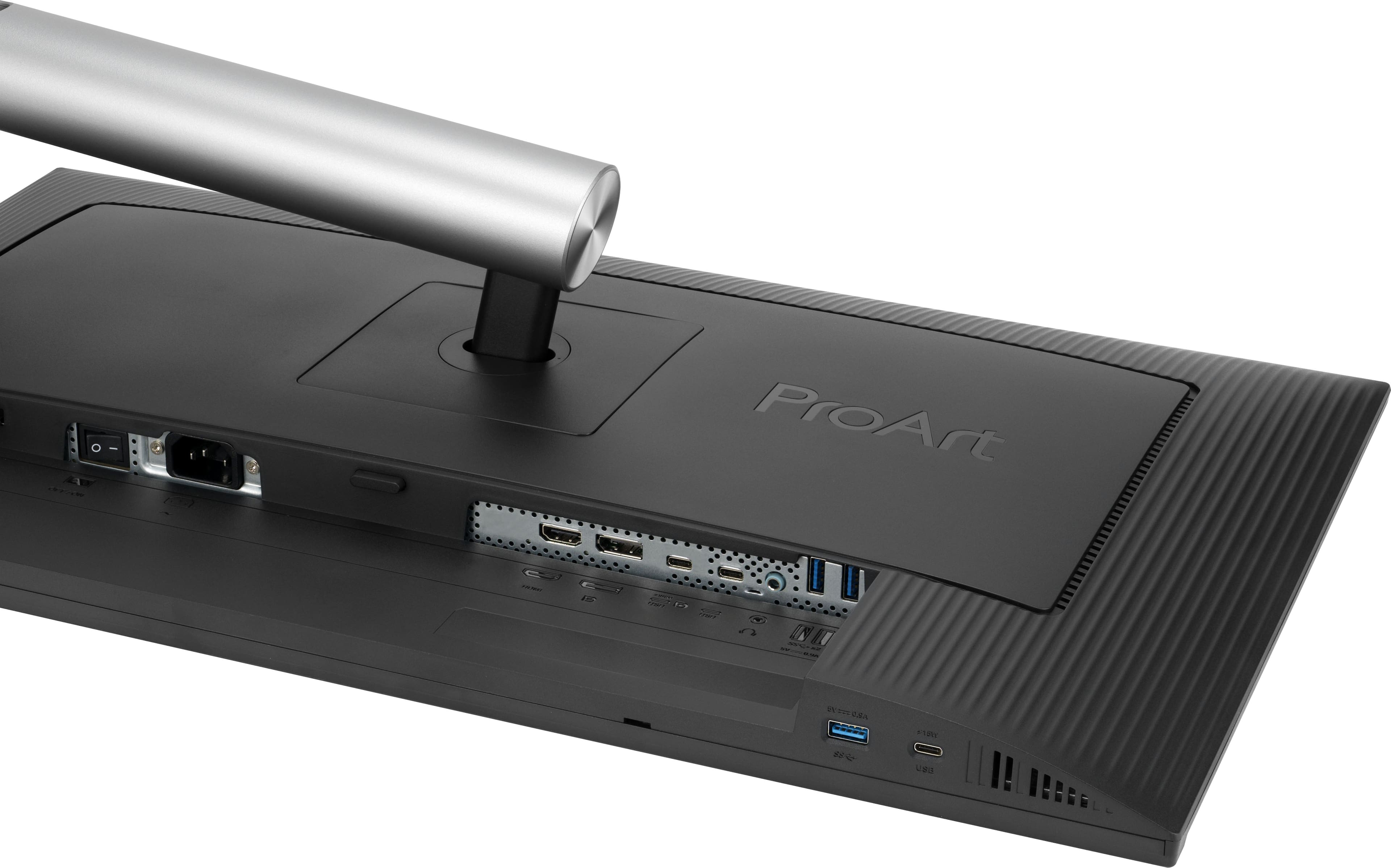
|Posted .This reviewer received promo considerations or sweepstakes entry for writing a review.ASUS has another hit with the ASUS Pro Art 5K 27” monitor. ASUS’ Pro Art series of monitors over the past couple of years have impressed me each year. With this monitor, ASUS stepped it up to 5K and still has color accuracy that is top notch. Color ASUS advertises the color accuracy of this monitor as being less than 2 delta E. The Calman Verified sheet that came with my monitor shows 0.71 for sRGB and 0.50 for DCI-P3. This shows with my photos. The true to life colors I see when displaying them on this monitor. I have also noticed how much better the color looks with my color graded BRAW and ProRes RAW video files. The colors stand out better on this monitor than they do on my 4K monitor. Physical Features The sides and top of the screen has a narrow border and at the bottom the bezel is about 1”. Not quite edge to edge on the top and sides, but it is very narrow. It looks good. The bottom of the monitor is where the physical buttons and joystick is. The buttons are easy to access and use. I can also set two shortcuts if I wish to do so. The monitor plus sand has just a little weight to it, but not bad at all. The stand is wide enough that the monitor doesn’t feel like it might fall over when the monitor is oriented vertical. The monitor can pivot left to right and has a good range. It can also be moved up or down. When vertical and horizontal I can tilt the monitor back or tile it forward to suite my needs. The range of motion is more than I need, but I’m happy that I have that to adjust the monitor just the way I want it. Ports There are a lot of ports on it. There are 3 USB-C ports, 3 USB-A ports, a 3.5mm headphone jack, a full size HDMI port, and a full size Display port. One of the USB-C ports is also a display port and the monitor supports up to 96W over USB-C. I’m using the monitor with my Mac mini M4 connected to a Thunderbolt 4 port via the USB-C display port. Over that port the monitor receives video out from the Mac as well as audio out. I have one of the shortcut buttons on the bezel set to volume so I can quickly change the volume using the joystick. Using the 3.5mm headphone jack for output to my headphones helps me to keep my headphone cable off to the side and out of the way when I’m not using them. It’s a cleaner look than plugging them into my Mac mini’s front 3.5mm headphone jack. Resolution ASUS stepped up the resolution to 5K. Everything is crystal clear. From photos to text. It all looks good on it. Text is incredibly smooth and easy on the eyes. I like using it when editing my photos on it and I also like using it in vertical orientation with Pages and Notes. Final Thoughts This monitor is color accurate and very clear. The Pro Art 5K is helpful to anyone editing photos. Though it shouldn’t seen to be limited to only that. Video editing, desktop publishing, digital art, and numerous other applications will benefit from it. ASUS has been doing good work with their Pro Art series and now they made it even better. With the 5K resolution, the numerous ports, physical orientation adjustments, ASUS had done an amazing job with this monitor. I would recommend it to anyone looking for a 5K color accurate monitor.
I would recommend this to a friend - Pros mentioned:Adjustability, Color accuracyCons mentioned:Refresh rate
Great for Productivity and Photo editing
|Posted .This reviewer received promo considerations or sweepstakes entry for writing a review.Unboxing - the monitor was nicely packaged and extremely easy to set up. I just attached the base to the telescoping arm, tightened the screws and done with set up. I must say I love the adjustments that can be made with this monitor. The height, tilt and portrait to landscape features allow you to adjust based on preference. I’m on the shorter side and I don’t have an adjustable height desk so I have to lower the monitor pretty low to prevent neck strain. However, with this monitor the height is low enough that I was able to adjust accordingly. Another great feature is the screen size it perfect for the average size desk depth of 25-27inches without it being too large with sitting too close. Also, because of the screen size I was able to have three open windows at the same time to help with productivity. I currently have 3 monitors because of this but this one allowed me to have the same number of windows open. The graphics and color was very vibrant and clear and text sharpness. The monitor did very well when using all office programs - Word, Excel, One Note and Visio. There was no lag when moving windows or when streaming movies or work web meetings. The teams meetings were very clear as well. When adjusting the display using the monitor controls it was intuitive and easy to adjust the settings. The 5K resolution would have been awesome but due to limitations of my graphics card on my laptop I wasn’t able to test it out. I was able to test Minecraft on it and again the resolution was great but the only things with this monitor is that its 60hz refresh rate. Overall, it you are looking for a versatile monitor for photo editing, productivity, streaming and using as an all in one because of limited in the office, I highly recommend this monitor because its large enough to handle multiple screens and use as a TV in an office or dorm room. Also, great monitor for stock intensive programs.
I would recommend this to a friend - Pros mentioned:Color accuracy, Port countCons mentioned:Speaker quality
Displays very close to actual colors!
|Posted .This reviewer received promo considerations or sweepstakes entry for writing a review.This monitor is actually kind of great, but it does have a few flaws that keeps it from being totally perfect for me. I’m an avid picture taker and also create and design a lot of colorful documents and presentations. The way the ASUS 27” ProArt 5K HDR Monitor displays colors is one of the closest I’ve ever seen the colors be to the actual ones intended when printed! The exception being that the blacks displayed are not as deep as they should be. It comes with all the port types I need (USB-C, USB-A, HDMI, DisplayPort) and even comes with the cords. The instructions, or the lack thereof, leaves a lot to be desired, but assembling the monitor only took a few minutes. It rotates from portrait to landscape easily when the pedestal is at its tallest setting. Consider the glare factor when setting up and placing the monitor up because it doesn’t block it very well. It comes with internal speakers, but they don’t sound good at all, so I suggest using external speakers if you’re planning to watch video content on it. Overall, if you’re an artistic creator, then this monitor could be a good fit! I’ve been able to connect my desktop, laptop and cameras with minimal issues. My Apple devices have taken a lot more work trying to get them to connect to the monitor so I found it way less aggravating to move those files to another medium that can be hooked up. If ASUS could get the quirks worked out, this ProArt monitor would definitely be worth it!
I would recommend this to a friend - Pros mentioned:Color accuracy, Port countCons mentioned:Speaker quality
Great as a second monitor
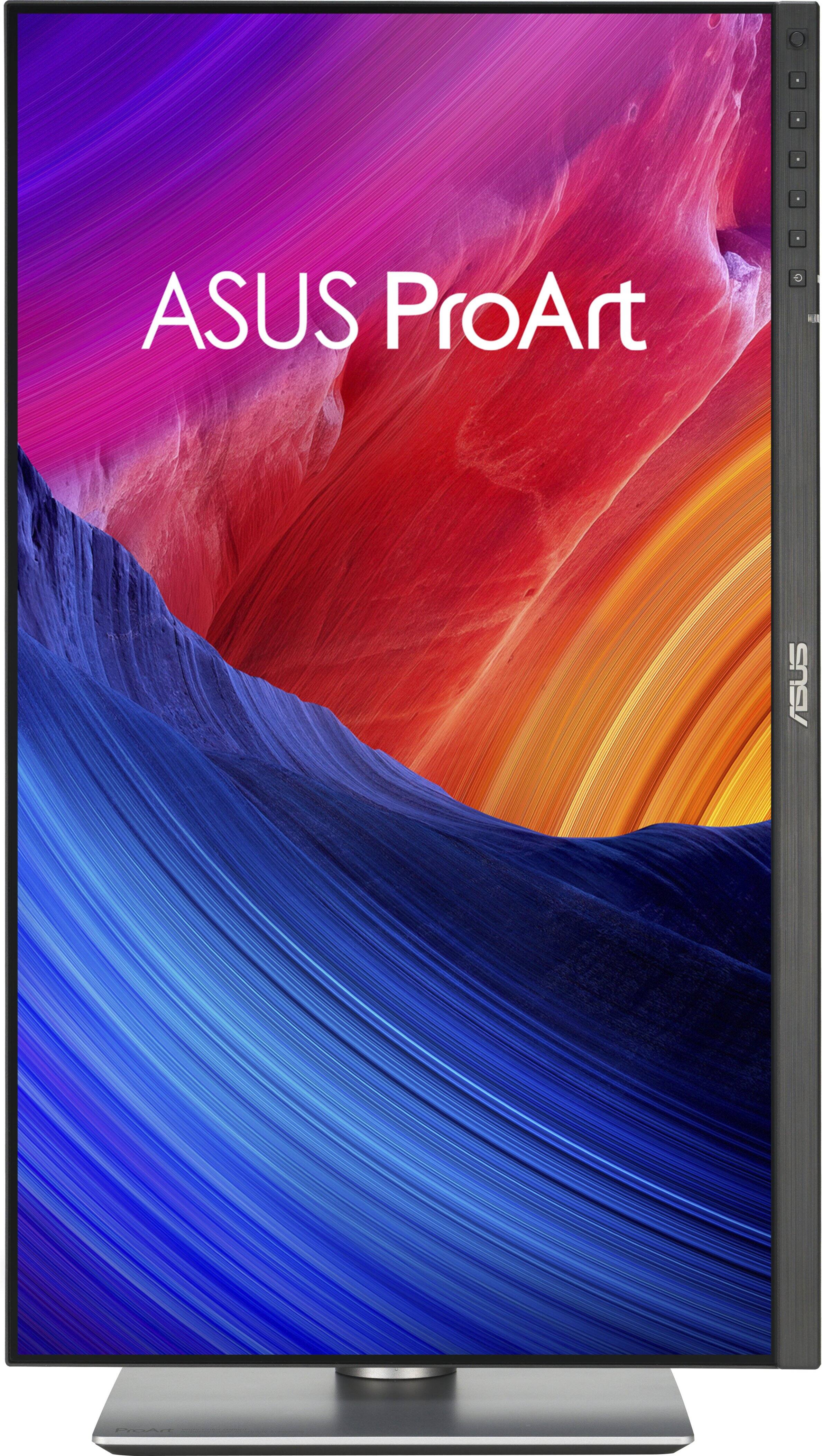
|Posted .This reviewer received promo considerations or sweepstakes entry for writing a review.This review is written from the perspective of a Mac OS user. As a content creator who edits both photo and video on a daily basis, it is crucial to have a monitor that is not only detailed and sharp, but also boasts a high resolution for today's demanding media creation. The ASUS ProArt 5K display is a good first step in the right direction for a monitor that wants to compete with the high end Apple Studio Display as a more affordable option for Mac users. While the ASUS ProArt gets many things right, it falls short in a few key areas that I am hoping will be corrected in the next generation of ProArt displays. ***PROS*** The ASUS ProArt is a very beautiful looking high resolution display panel. It is bright and sharp, and boasts 218 PPI pixel density, which matches the Apple Studio Display. This monitor comes pre-calibrated (Calman Verified) right out of the box, and even comes with the calibration certificate so you can see your results for Gamma, sRGB, and DCI-P3 color accuracy. This is a big win for me, as my profession relies on color and image accuracy for final delivery. The blacks and whites, along with 10-bit color depth, and up to 1.07 billion (yes billion), colors make the ProArt display a fantastic addition to my content editing workflow. I am seeing a level of detail that is literally double that of my old QHD display. With the higher resolution and color range, my mirrorless camera images, drone photos, and videos are popping like I’ve never seen before, making color grading even easier, and more precise. The ProArt also uses what ASUS calls a LuxPixel anti-glare coating on the display screen itself, which does a great job of minimizing glare, while also looking extremely bright, vivid, and highly detailed. The ProArt has several ports on board, including 3xUSB-C, 3xUSB-A, 1xHDMI, 1xDisplayPort, and even a headphone input. One of the USB-C ports on the back is rated for 96W power delivery, so this would be the one to use with a laptop to charge it while in use if running on battery power. Out of all of the available ports, 1xUSB-C and 1xUSB-A are located on the bottom edge of the monitor, making it easy to hook up various devices without having to move the monitor to find an open port on the back. The fact that ASUS have chosen to include this many ports on a monitor is very welcome, and will come in especially handy when using it as a second monitor with a laptop. The ProArt can also be used in vertical display mode if you choose to do so. The buttons on the front bezel, and the on-screen menu system work well together, are easy to use, and intuitive. The monitor stand is also very sturdy and it is easy to adjust the viewing angle to your personal preference. ***CONS*** While the ASUS ProArt has some positives, there is certainly some room to grow with the next generation. I was really excited to jump from a QHD monitor to 5K on my Mac Mini, as this is the resolution that Mac prefers, but I quickly found out that it wasn’t going to work as expected. As of writing this review, I have not found an easy way to simply scale the display resolution appropriately for text in the Mac display settings. I know the more expensive Mac studio monitor will scale correctly, but the ProArt has trouble scaling text and icons when selecting the full 5K resolution. There are ways to upscale the desktop icons in accessibility settings, as well as resizing the desktop dock, but it still leaves popup windows, drop down lists, and menu bars looking extremely small. There are several resolution options available in display settings ranging from 1152x648 (which no-one will ever use), all the way up to 5K 5120x2880. I have found that I can use 3072x1728 (which is one setting below 5K) semi-comfortably when running applications from my Mac Mini, but again, when selecting full 5K resolution, everything just becomes WAY too small for comfort. This is why I believe it will be a great secondary monitor for programs such as DaVinci Resolve, Lightroom, and Photoshop, which are my apps of choice for daily work. These apps allow you to take advantage of having two displays in your workflow, making it easier to use the ProArt as a secondary monitor in its full 5K resolution for the image editing portion of your software window. There is an ASUS monitor settings app available called DisplayWidget Center, but it is currently only available for Windows. I am currently using the BetterDisplay app on my Mac, but it also doesn’t allow for proper text scaling when using 5K resolution. It would be nice to see ASUS fully embrace the Mac platform since this is a 5K monitor, and release their app for Mac OS. Maybe then, we will be able to scale correctly. Lastly, the display does have speakers, but I would only use them for system sounds, or in a pinch if there was no other choice. They are easily the most thin sounding monitor speakers I have ever heard. Since ASUS have included a headphone jack, I would have rather seen them design this without speakers and upgrade a different part of the monitor specs. ***IN CONCLUSION*** The ASUS ProArt 5K display is an excellent looking display. By that, I mean that whatever is being displayed on the screen looks amazing to my eyes. I can’t yet comment on how it displays a windows based machine, but I am sure it will also look amazing, and may even scale up to 5K more appropriately for text and menu items. Until then, I will be using this as a secondary editing monitor in my workflow, and will definitely enjoy it for that purpose. If you have a chance to see this on display at a local Best Buy, I highly recommend you take a look with your own eyes.
I would recommend this to a friendBrand response from ASUS Answers
Posted .Dear MrShinyCadillackness,
Thank you for sharing your comments regarding the ASUS ProArt Display 5K PA27JCV Professional Monitor. We understand that the design of the product didn't meet your full expectations, and we sincerely apologize for that as we do understand your concerns. We are committed to providing our customers with the highest-quality products and we will forward your review to our Product team for review.
We stand behind our products and continuously strive to improve our products and processes to achieve customer service excellence. If you require any further assistance, please email us at customerloyalty@asus.com and include the case number "N2505002964-0002" as a reference. We will do our best to resolve your case quickly. Your feedback is very important to us and enables us to improve our support channels. Thank you for choosing ASUS.
Best Regards,
Chantae
ASUS Customer Loyalty US Support
- Pros mentioned:Color accuracyCons mentioned:Refresh rate
Great for Creatives, but Not a One-Monitor Solutio
|Posted .This reviewer received promo considerations or sweepstakes entry for writing a review.As a creative professional, I've struggled with finding the best possible monitor to cover all my needs. I usually have my MacStudio connected as well as a gaming tablet. So, for gaming, I want a high refresh rate and for photography and video editing, I want premium color accurancy. For both activities, I need the highest possible brightness level to help with fine details. My current monitor is a 4K display and while it's been fantastic, I've been interested in upgrading to a 5K display. There are a handful of options in the market, but some are extremely pricey. This ASUS ProArt has very similar specs to more expensive competitors, but is it ideal for my purposes? Refresh Rate Since I would like to have at least a 120Hz refresh rate for gaming, the 60Hz refresh rate that this monitor has is less than ideal. That said, the 60Hz refresh rate is more than adequate for photo and video editing. I don't do a lot of motion graphics work, but if I did, a higher refresh rate might be beneficial for that type of work, too. For basic non-gaming use, 60Hz is great. At this time, there are no 'true' 5K monitors that offer more than 60Hz refresh rate for consumers. Bezel In general I like the look of the ASUS display, but there is one annoying feature -- the bottom bezel. There is a very thin bezel around the top and sides but the bottom of the screen has the ASUS logo and the control buttons on it. While it's nice to be able to see the buttons on the front, to me, it's distracting and honestly, just plain ugly to have that size of a bezel on the bottom. I would much rather see something more subtle. Colors and Brightness This is one area that I really pay close attention to. I plugged my MacBook Pro into the ASUS monitor while my MacStudio was plugged into my 4K display. The 4K display's colors appeared richer and had truer blacks than the ASUS monitor appeared to have. While the ASUS monitor was brighter, it ended up feeling a bit washed out. That said, I think it's important to point out that the ASUS monitor is designed for accuracy and prescision while my 4K monitor is an OLED panel and is meant for that 'wow factor'. Connectivity As far as connection ports go, the ProArt offers three options — DisplayPort 1.4 (1), HDMI 2.1 (1), and USB-C, which also provide 96W power delivery. ASUS only included a USB-C and HDMI High-speed cable with the monitor, so I used the HDMI cable as my primary connector. It worked fine, but I did notice that the ProArt didn’t scale icons and text as well as my 4K monitor did. Final Thoughts The ASUS ProArt is a solid display choice for creative professionals. It has great color accuracy and comes calibrated from the factory. For me, since I have multiple purposes for my monitor, I will likely use this as a secondary monitor when I need to do color correction on photos or videos.
I would recommend this to a friend - Pros mentioned:Color accuracy, Port count
Mighty 5K monitor from ASUS
|Posted .This reviewer received promo considerations or sweepstakes entry for writing a review.The ASUS PA27JCV 5k Monitor is squarely aimed at those who would like an Apple Studio 5K Retina display but do not want to dole out that kind of money. This ASUS monitor definitely performs and the color accuracy is suburb right out of the box. It was easy to assemble without any tools. The stand consists of a small footprint base and a one-piece pole support that has a decent size cable management hole towards the bottom (perhaps a bit low, as it does not do a good job hiding cables unless you have the monitor very close to the lowest point on the stand). If you are looking at aesthetics, then perhaps the much more costly Apple Studio Display makes sense. The monitor proves however that for image quality and performance the ASUS PA27JCV 5k Monitor certainly excels. The monitor has a multitude of ports including a built-in auto KVM to be able to seamlessly switch between multiple input sources. And those inputs are numerous including on the back an HDMI 2.1 port, a DisplayPort 1.4, two USB-C ports, a headphone jack, and two USB-A 3.2 Gen 1 ports. Also, on the left side button section of the monitor there are a USB-C 3.2 Gen 1 and a USB-A 3.2 Gen 2 ports. I used this monitor with a Macbook and a PC notebook. I have to admit I am mostly a Windows person and used the monitor with Windows 11 most often. However, given how Macs scale video, a 5k monitor really is the best choice as the typical 4k monitor leads to some compromises with scaling. It performed well with either Operating system. The bezel contains a small joystick style button on the right bottom of the bezel used to navigate through the monitor’s menu system. Also, with a number of preset buttons, given they are not overly prominent on the frame it is sometime difficult to use them. ASUS also has a Windows utility that I have yet to download that helps control the monitor. The monitor is calibrated right out of the box and contains an individual calibration report that was created prior to the monitor being packaged. Color gamut performance is stellar and scored 95% or higher in DCI-P3, Native, BT.2020. The only thing I noticed in letterboxed content there was white bleed through on the edges of the panel. After all this is not an OLED monitor and appears to have some local dimming features in an attempt to display a deep contrast and inky blacks you would be typically see in an OLED monitor. Having an LG OLED monitor you can plainly see the differences, however there are also some things with an OLED monitor lead to some compromises with, including brightness. With the ASUS PA27JCV you do not have to make those compromises as this display does 400 nits and peaks at about 500 nits in HDR mode. Since this not really considered a gaming monitor due to the max frame rate of 60 hertz. This monitor is a major component of my video editing rig and is perfect for near reference color grading for your future content creation. Overall, there are not many misses in the ASUS PA27JCV 5k Monitor, it does Macs well and pays attention to the Windows crowd too. >>> Pros >> solid IPS panel, good pixel density (218 per inch) >> built in KVM switch >> multitude of ports >> calibrated out of the box >> 3yr warranty >> physical buttons >> Windows management app <<< Cons << would be great with double the refresh rate << cable management port could be higher up on stand << physical buttons are hard to see << no Thunderbolt ports
I would recommend this to a friend - Pros mentioned:Color accuracy, Port count
A Photo Editor's Lower Cost Calibrated 5K Dream
|Posted .This reviewer received promo considerations or sweepstakes entry for writing a review.The ASUS ProArt Model PA27JCV 5K IPS LED Professional Monitor brings 5120 x 2880 dpi densely packed pixels, Calman certified factory-calibrated color gamuts with outstanding color accuracy, excellent brightness and a 1500:1 high contrast ratio at a relatively affordable price. If you have ever walked into a store to evaluate televisions that are all running the same pictures and you notice that one screen looks just slightly green and another looks a little bit yellow and the next one is totally different, then you can't really tell what the original picture is supposed to look like. This is where a calibrated screen really makes a difference. As an graphics and photo artist who wants to be able to create and reproduce images that are what-you-see-is-what-you-get, this calibrated monitor ensures that when you choose a particular color for a drawing or change the tone, brightness and / or contrast of a photo it will really be what you chose and, therefore, will give you true to color prints on a high-end printer. This well-built Asus PA27JCV monitor has a sturdy and easily assembled stand and a fully adjustable screen that even goes a full 90 degrees up and down! It has multiple connectors: DisplayPort v1.4, HDMI 2.1 x 1, DisplayPort over USB Type-C (upstream 1), USB Type-C (upstream 2). (I am using the HDMI port on my current setup.) It has multiple USB ports (3 x USB 3.2 Gen 1 Type-C 3 x USB 3.2 Gen 1 Type-A) and can be set up to run on two computer inputs (KVM). It boasts 5 color temperatures and 10 color preset modes so that you can work with confidence in any graphics application. In my opinion, this monitor was made specifically for graphic and photo artists and definitely not for gamers. The response time on the PA27JCV is 5ms and the refresh rate is 60Hz on its sharp, beautiful screen, which is great for artists, but not so much for gamers. I think this is a great monitor and am pleased to use it. Another fine ASUS product!
I would recommend this to a friend Promising but came defective
||Posted .This reviewer received promo considerations or sweepstakes entry for writing a review.Very promising but mine came defective. I had black dot in my screen. Attached is the pic.
No, I would not recommend this to a friendBrand response from ASUS Answers
Posted .Dear Aaron,
It's our sincere regret to hear that you received a defective monitor, and we apologize for any inconvenience this may have caused you. This is not the quality of products we aim to provide. If you are still within the return window, we recommend contacting the place of purchase for an exchange or return. Please rest assured that if you cannot gain resolution when contacting the place of purchase, we will be glad to provide further assistance.
We do stand behind our products and continuously strive to improve our products and processes to achieve customer service excellence. For more information, email us at customerloyalty@asus.com and include the case number "N2504036675-0001" as a reference. We will do our best to resolve your case quickly. Your feedback is important to us and enables us to improve our support channels. Thank you for choosing ASUS.
Best Regards,
Chantae
ASUS Customer Loyalty US Support
- Pros mentioned:Color accuracy
Love This Monitor
|Posted .This reviewer received promo considerations or sweepstakes entry for writing a review.I absolutely love this monitor. The color is lifelike, vibrant and perfectly reproduced. Refresh is prefect. I love the controls on the front of the display, they are easy to reach and navigate. The menu 'joystick' is a little wonky, it does not perform in the way you would expect. Minor learning curve. To bring up the menu you touch the joystick, push to the right to enter the menu. The joystick does not maneuver until you enter the menu pushing to the right. The initial popup is more of a description of each button. A bad picture is attached to the review. Setup could not be easier. I had the monitor base and support attached in seconds and the cables connected in minutes. I was up an running in less than 10 minutes. My only issue was lacking a display port cable. The monitor comes with HDMI and USB type C cables. There is also a power cable included. Your connection options are HDMI (1), USB-C (1 display, 2 for other connections), 3USB, 1 headphone/sound. There is KVM support with the monitor, I have not attempted that setup yet since I don't have perms on my work laptop. There is also a power button on the back of the monitor, if the front power does not work then It is highly recommended to download the display widget center, it allows you to control your monitor from the keyboard, change settings, etc without using the on monitor buttons. Personally I like the out of box settings. The monitor is just fantastic top to bottom. If you are in the market for a great monitor, this is a great choice.
I would recommend this to a friend - Pros mentioned:Color accuracy
I love asus
|Posted .This reviewer received promo considerations or sweepstakes entry for writing a review.This monitor is absolutely crisp and ability to keep up is the surprising opposite. You will need a string computer or laptop. Don’t plug in an old 1999 computer and expect to get that 5k colorism. I really like the setup and packing in the box. They did a really good job in the Asus box but fedex not so much. It did not come with any damages so I was happy. It took me only 10 minutes to put it together by myself which I suggest getting a hand when you mount it to a wall which I didn’t I used the stand. It came with all the cords it needed to attached to my laptop which is running windows 11. Once I went to displays and it recognized it immediately. Now personalizing it is completely all you preference. Make sure you start simple and you can up and add more details as you start opening items. I will say my eyes are light sensitive and I found myself turning down the saturation which of course people wonder why get a 5k but it’s my eyes! Over all I really like this monitor and I’m a huge Asus fan.
I would recommend this to a friend - Pros mentioned:Adjustability, Color accuracy, Resolution
Excemonito
||Posted .This reviewer received promo considerations or sweepstakes entry for writing a review.A very bright screen with excellent resolution. Highly adjustable angle- and height-wise. Great in combination with a laptop. Multiple connections possible and use as a USB hub is cool.
I would recommend this to a friend - Pros mentioned:Color accuracy, Port count

Apple Level Screen Without The Pricetag
|Posted . Owned for 1 month when reviewed.This reviewer received promo considerations or sweepstakes entry for writing a review.[Employee of bestbuy] Upgraded from an Apple Thunderbolt Display and the ASUS ProArt 5K blows it away. Sharper image, far better color accuracy, modern ports, and HDR make everything look incredible. It’s the perfect pro‑level replacement—familiar 27” size, but a massive leap in clarity and performance.
I would recommend this to a friend - Pros mentioned:Color accuracy, Resolution
Excellent Monitor at a Reasonable Price.
||Posted .This reviewer received promo considerations or sweepstakes entry for writing a review.I bought this display to process my photograhs for printing on metal. The colors come pre calibrated by Calman Verification. As a result the colors are extremely close to what I see on the screen, when printed. I really love this display. The colors during processing, are bright and crisp, and the 5K resolution makes pictures really pop! Would definitely recommend this display to any professional, or serious photographer.
I would recommend this to a friend