Customer Ratings & Reviews
- Model:
- PA27JCV
- |
- SKU:
- 6620167
Customer reviews
Rating 4.6 out of 5 stars with 44 reviews
(44 customer reviews)Rating by feature
- Display Quality4.6
Rating 4.6 out of 5 stars
- Ease of Use4.4
Rating 4.4 out of 5 stars
- Features4.4
Rating 4.4 out of 5 stars
Customers are saying
Customers are enthusiastic about the ProArt 27" 5K monitor's color accuracy and build quality. The monitor's connectivity and port count are appreciated for their flexibility and workspace organization. Some customers wish the refresh rate was higher.
This summary was generated by AI based on customer reviews.
- Pros mentioned:Build quality
Rated 5 out of 5 stars
Great alternative to Apple Studio Display
||Posted .This reviewer received promo considerations or sweepstakes entry for writing a review.I bought two. I wanted 5k for my Mac, due to the scaling issue within MacOS, but didn't want to spend the money on two Apple Studio Displays. The test is very sharp and not as tiring on my eyes when staring at it all day. This fits the bill. Stand feel premium compared to other monitors I've had. I am using this for productivity, not for gaming and not for video/photo editing.
I would recommend this to a friend Rated 5 out of 5 stars
first 5k monitor and won't go back ...
||Posted .This reviewer received promo considerations or sweepstakes entry for writing a review.I used to have 4K monitor with my Mac, changing it to the 5K made a huge difference. the ratios are exactly same as the laptops built-in monitor but more importantly its easy on eyes, I'm spending at least 5-6 hours a day in front the monitor and I can clearly see the difference.
I would recommend this to a friend- Pros mentioned:Color accuracy
Rated 3 out of 5 stars
Satisfied but no more
||Posted .This reviewer received promo considerations or sweepstakes entry for writing a review.I have always used Mac but never before a Mac mini. This means I’ve never put any thought at all into screens and just took them for granted. I was very disappointed with my 22 inch generic monitor. There was glare from a nearby window and funky looking text. It was bad enough that I started to do research and this monitor is what I came up with. The text is sharp and looks like I’d expect on Mac and the glare from the window is gone. Visually I’m completely happy. The mediocre rating is because of issues with the USB ports. It seems only one of them works and supplies power. The Internet says there are settings that will solve this problem but when I tried those settings, they made no difference. Because the monitor really has substandard internal speakers, I needed to add an external speaker that charges with USB. There is basically one port to do the job which means the monitor has to connect to the computer via HDMI. I have a functioning screen with an adequate external speaker and am satisfied but feel Asus could’ve done a much better job.
I would recommend this to a friendBrand response from ASUS Answers
Posted .Dear Jonathan C,
Thank you for sharing your comments regarding the ASUS ProArt Display 5K PA27JCV Professional Monitor. We understand that it didn't meet your full expectations, and we sincerely apologize for that as we do understand your concerns. We are committed to providing our customers with the highest-quality products and we will forward your review to our Product team for review.
To further investigate the problem you're experiencing with the USB port, we recommend contacting our support team at https://www.asus.com/us/support/CallUs.
We stand behind our products and continuously strive to improve our products and processes to achieve customer service excellence. For more information, email us at customerloyalty@asus.com and include the case number "N2505002964-0001" as a reference. We will do our best to resolve your case quickly. Your feedback is very important to us and enables us to improve our support channels. Thank you for choosing ASUS.
Best Regards,
Chantae
ASUS Customer Loyalty US Support
- Pros mentioned:Color accuracy
Rated 5 out of 5 stars
ASUS - ProArt 27" 5K IPS LED Professional Monitor
||Posted .This reviewer received promo considerations or sweepstakes entry for writing a review.Great value for the money. Monitor is crisp and clear and has great color control.
I would recommend this to a friend - Pros mentioned:Color accuracy
Rated 5 out of 5 stars
Works great
||Posted . Owned for 1 month when reviewed.This reviewer received promo considerations or sweepstakes entry for writing a review.This screen works well. The color palatte is excellent. The colors are not quite as vibrant as our old iMac, but more than serves our purposes.
I would recommend this to a friend - Pros mentioned:Port count
Rated 5 out of 5 stars
Worth the price.
||Posted .This reviewer received promo considerations or sweepstakes entry for writing a review.Works well with macbook air. the usb hub is very helpful in keeping workspace organized. Very well priced.
I would recommend this to a friend - Pros mentioned:Color accuracy
Rated 5 out of 5 stars
Pro Art Display
||Posted .This reviewer received promo considerations or sweepstakes entry for writing a review.Very good looking monitor, brightness is excellent
I would recommend this to a friend Rated 5 out of 5 stars
Quality with Crispness!
|Posted . Owned for 2 weeks when reviewed.This reviewer received promo considerations or sweepstakes entry for writing a review.Absolutely stunning 5K clarity—every pixel pops. Perfect for photo editing with true-to-life detail!
I would recommend this to a friendRated 5 out of 5 stars
Nice 5K monitor - Love it
||Posted .This reviewer received promo considerations or sweepstakes entry for writing a review.I really love how much it was in terms of display, quality and viewing angle.
I would recommend this to a friendRated 5 out of 5 stars
Screem
||Posted . Owned for 3 weeks when reviewed.This reviewer received promo considerations or sweepstakes entry for writing a review.Its very good,fast,quality graphics,take anywhere you want to go for any reason
I would recommend this to a friendRated 5 out of 5 stars
Excellent monitor
||Posted . Owned for 1 month when reviewed.This reviewer received promo considerations or sweepstakes entry for writing a review.Excellent monitor; no problems; I had a Samsung before and nothing but problems, now I am good
I would recommend this to a friendRated 5 out of 5 stars
Great Color
||Posted .This reviewer received promo considerations or sweepstakes entry for writing a review.Excellent color balance for professional application
I would recommend this to a friend- Pros mentioned:Color accuracy, Connectivity, Resolution
Rated 5 out of 5 stars
Great Choice for Features, Performance & Price
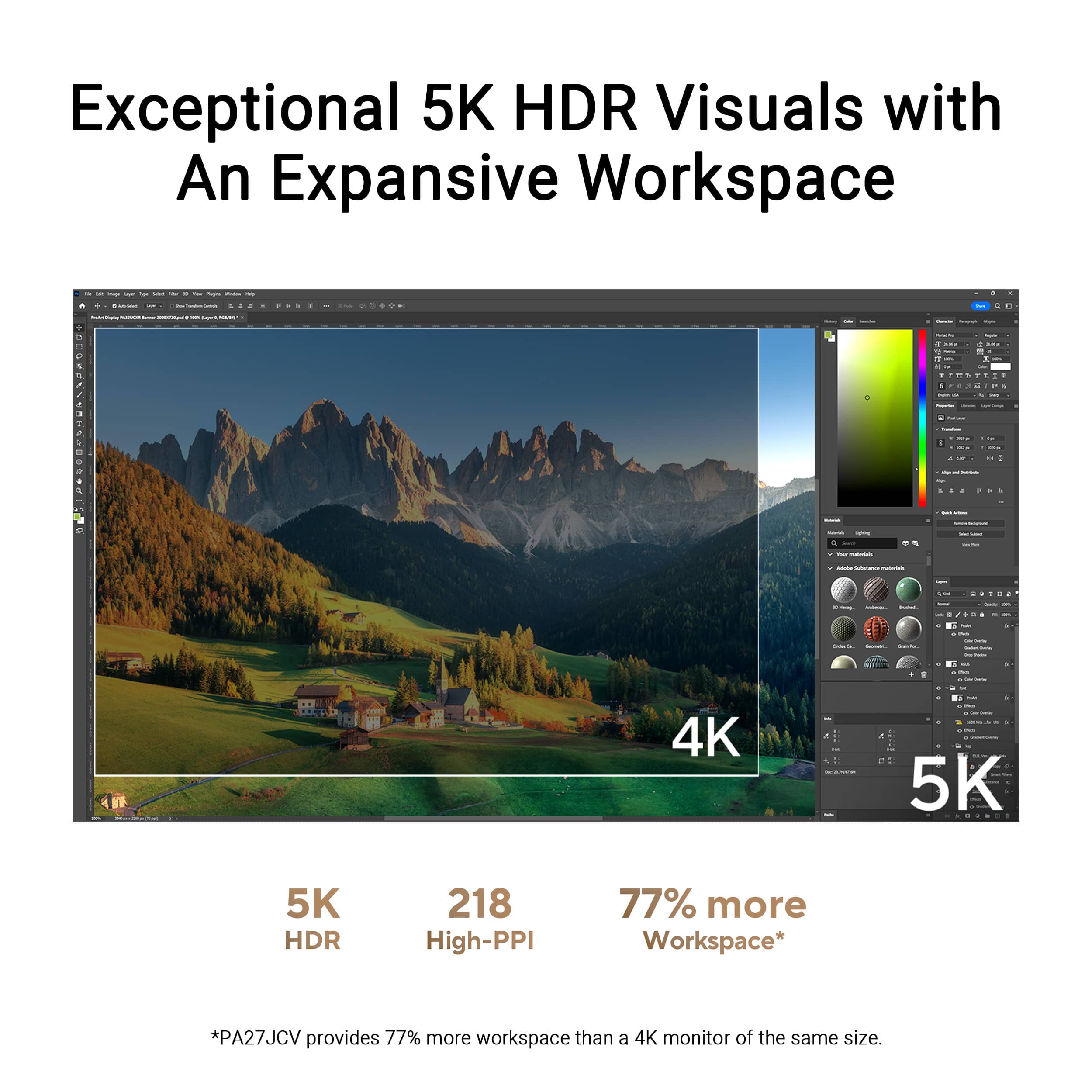
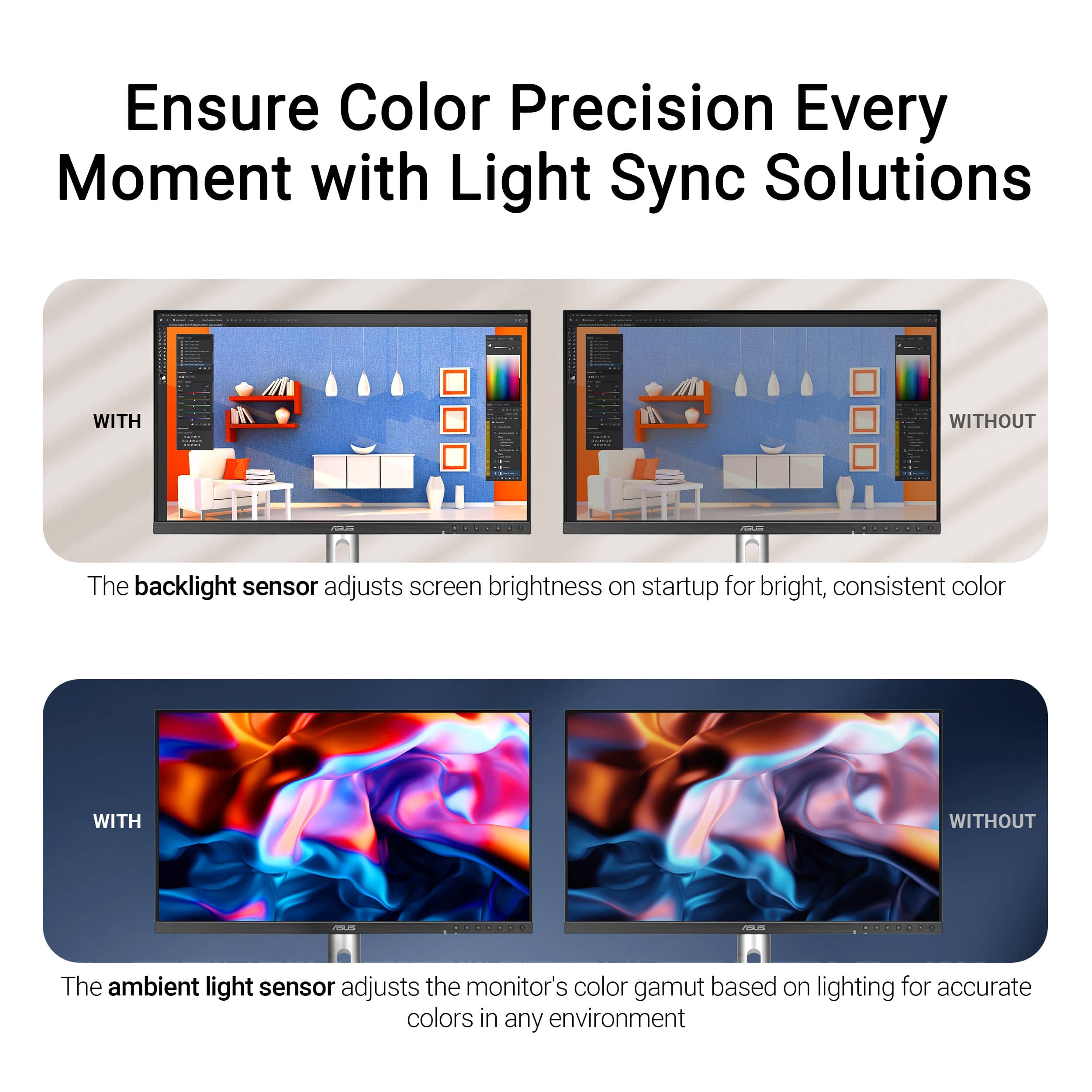
|Posted .This reviewer received promo considerations or sweepstakes entry for writing a review.Choosing the right monitor can be overwhelming, especially if you're like me and upgrading from a 10-year-old Dell Ultrasharp. The ASUS ProArt 27", however, ended up being an impressive choice - especially at its price point. DESIGN Design-wise, it looks like an average run-of-the-mill monitor. While reasonable, I feel that the bezels could be a little thinner, like what Dell does with some of their high-end monitors. The chin makes this somewhat less attractive, with the ASUS branding and all of the control buttons on the front side. Again, I feel that this could have been mitigated with touch-capacitive buttons or, even better, a button knob on the back side with an on-screen menu display. This would have helped eliminate the large chin and buttons on the front side. I'm nitpicking, but after all, it is something we have to look at day after day. The cable management slot is quite low, making it less effective for hiding cables, which is a priority for me. CONNECTIVITY You can connect your computer to the ProArt 27 in multiple ways, including HDMI, DP, or USB-C. If you're using USB-C, it also supports 96-watt power delivery, which should support most laptops. Note that I have a Surface Laptop Studio 3, and while it does power it slowly, it requires 120W for optimal performance. If you have one with a dedicated GPU, you'll want the Surface Connect power cable as well. Side note, I do appreciate the easy-access USB-A and USB-C ports at the bottom of the chin on the left-center of the screen for easily connecting peripherals. There's also a headphone jack and integrated speakers. Don't get too excited, though; the speakers aren't much to write about. In fact, they're more of a courtesy than anything. Your phone will sound better than the speakers in this monitor. You will definitely want to get an external speaker setup, which is a shame because I feel that for a few bucks more, they could have gotten better quality speakers and really made this monitor a standout product. SCREEN/RESOLUTION/PERFORMANCE This is where you are really spending your money. The screen has a perfectly matted surface that deflects the light effectively. Contrast comes at a cost, so if you like super glossy screens, this is not for you. If that’s the case, you may want to overcompensate via the soft settings. With a max resolution of 5120x2880, this is a standout 5K monitor boasting 218 PPI, which I believe is the same density as the Apple Studio Display. While the ProArt only reaches 500 nits peak brightness, it's more than adequate for typical indoor settings. Speaking of settings, if you're truly a designer and/or worried about color calibrations, one feature this monitor boasts is an ambient light sensor that automatically adjusts the monitor's colors and brightness. This is something I highly recommend turning off in the monitor's hardware settings via the OSD. Color-wise, this is almost on par with the Apple Studio Display, but one gripe I have is the light bleed from the LEDs along the outer sides of the panel. It creates a slight blooming effect on dark backgrounds. With that said, dark backgrounds simply will not be as rich on this monitor as on some other higher-end LED monitors and certainly not any OLEDs. At a 60Hz refresh rate, it's perfect for productivity and graphic design work but not ideal for gaming. For that, you'll want something with a high refresh rate, like 120Hz or faster. OVERALL Considering the stunning 5K resolution at this price point, the ASUS ProArt 27" is hard to beat when compared to something like the Apple Studio Display. Oh, and the built-in KVM is also a bonus in my book if you have a desktop and laptop setup (or simply two computers in general). Are there better options on the market? Sure, but those typically come with a higher price tag. In terms of value per dollar, this is hard to beat. Coming from an 11-year-old Dell UltraSharp monitor, the ProArt is quite an upgrade in every way imaginable, and I am so happy I get to use this as my daily driver. I'm sure you'll be happy with it as well.
I would recommend this to a friend Rated 1 out of 5 stars
KVM - not worth it
||Posted .This reviewer received promo considerations or sweepstakes entry for writing a review.Avoid purchasing this monitor if you need a built-in KVM, especially for use with Apple devices. While the Apple Studio Display lacks a KVM—which might make this monitor seem like a tempting alternative—the KVM functionality here is unreliable for daily use with Macs. MacBooks connected via USB-C are often not detected when plugged in, and a Mac connected permanently via HDMI does not wake from sleep via keyboard or mouse. There has been no meaningful support response to fix these issues.
No, I would not recommend this to a friendBrand response from ASUS Answers
Posted .Dear Scotty,
Thank you for your feedback regarding the ASUS PA27JCV monitor. We’re sorry to hear about the issues you’ve experienced with KVM functionality and connectivity on Apple devices. We understand how frustrating this can be and apologize for the inconvenience. To further investigate the reported issue, we recommend contacting our support team directly at https://www.asus.com/us/support/CallUs.
We stand behind our products and continuously strive to improve our products and processes to achieve customer service excellence. For more information, email us at customerloyalty@asus.com and include the case number "N2504036675-0002" as a reference. We will do our best to resolve your case quickly. Your feedback is very important to us and enables us to improve our support channels. Thank you for choosing ASUS.
Best Regards,
Chantae
ASUS Customer Loyalty US Support
- Pros mentioned:Build quality, Color accuracy, Connectivity
Rated 4 out of 5 stars
Great 5K display but still not perfect.
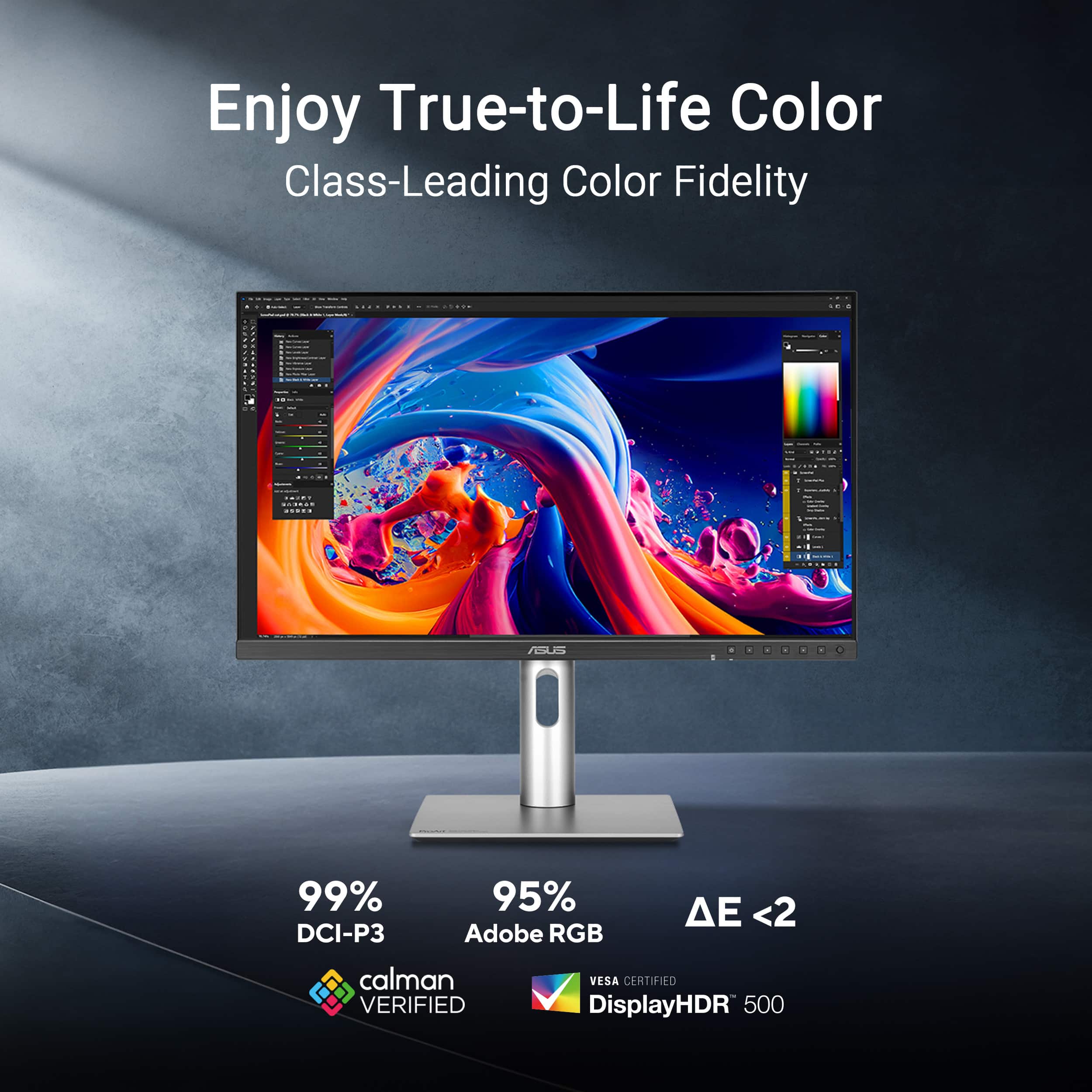
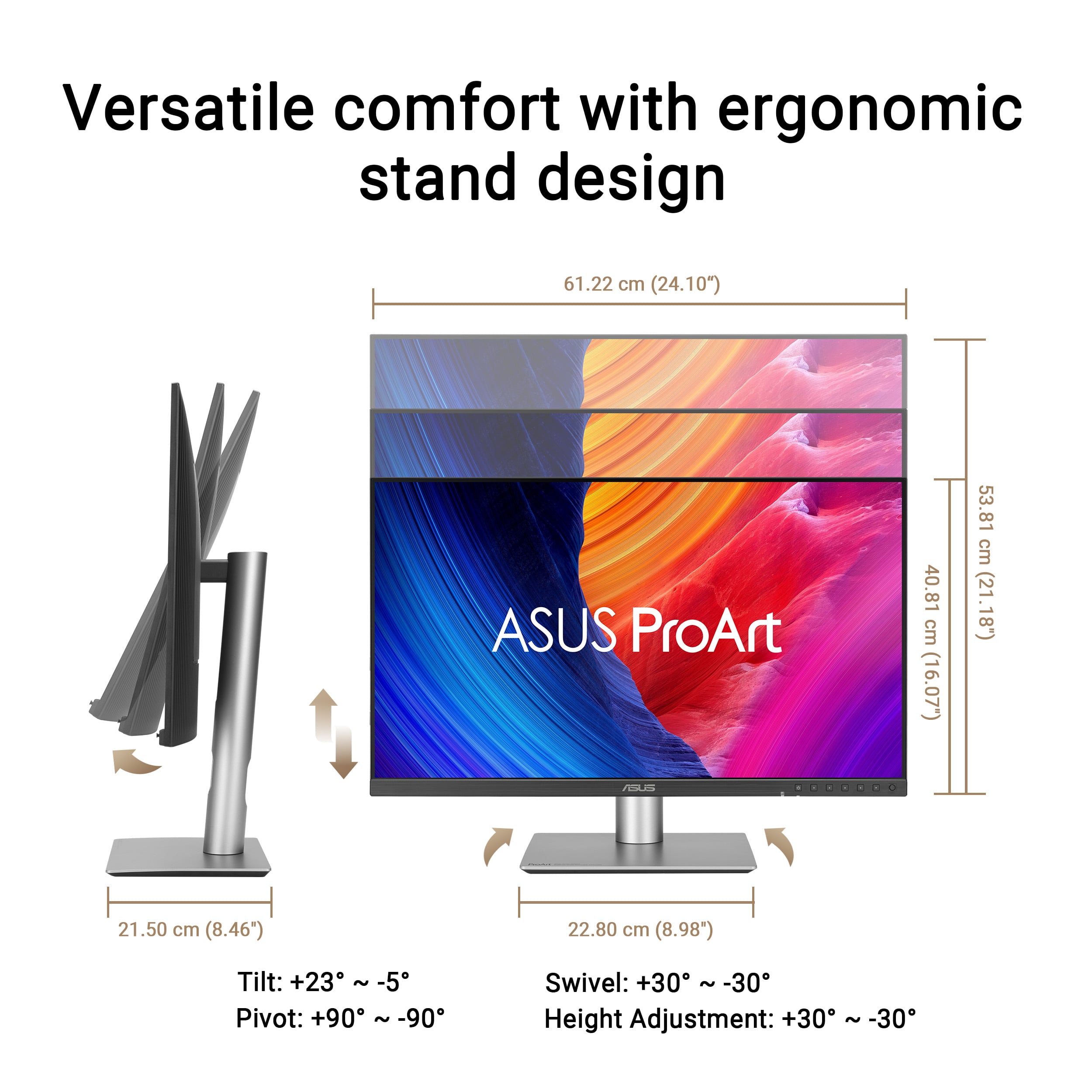
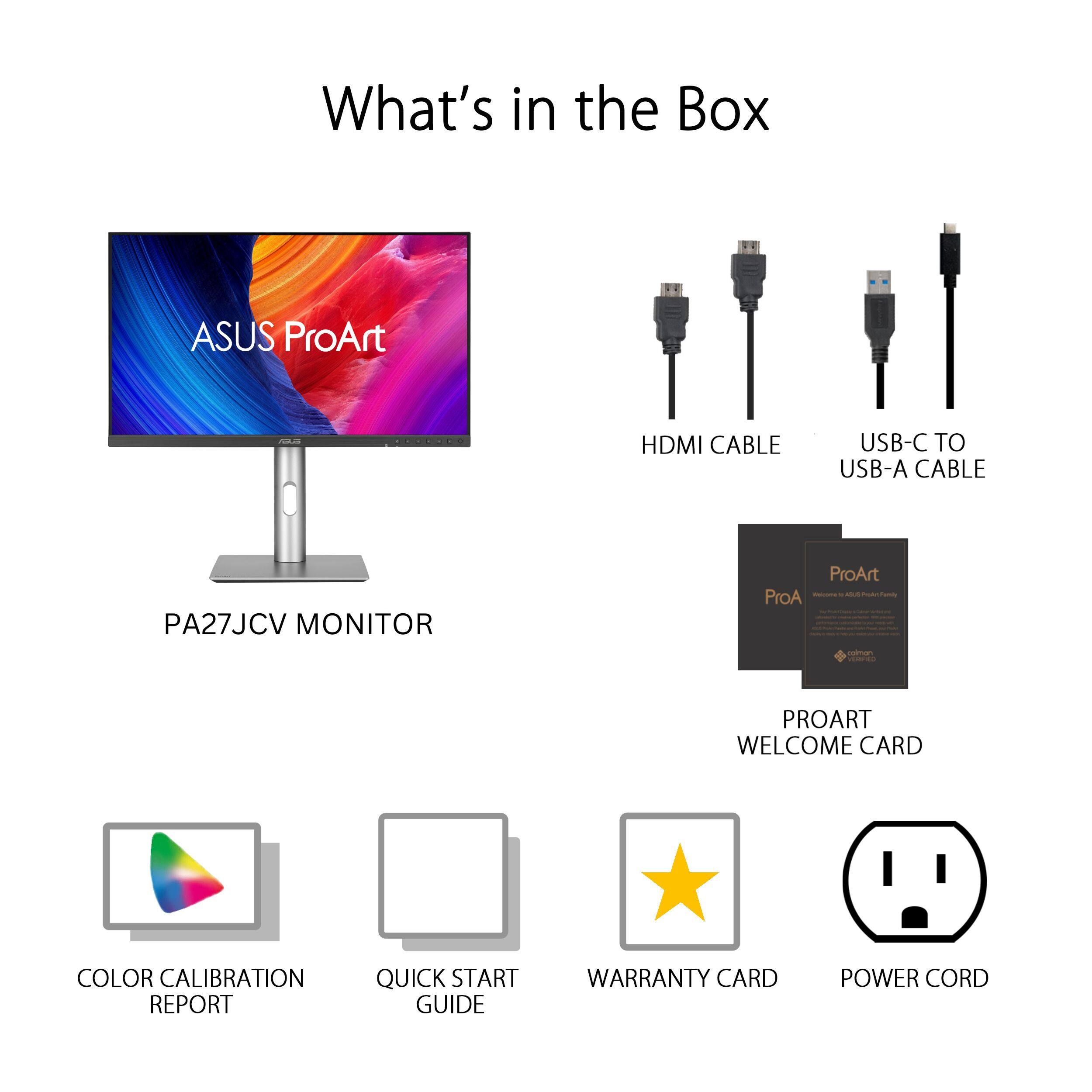
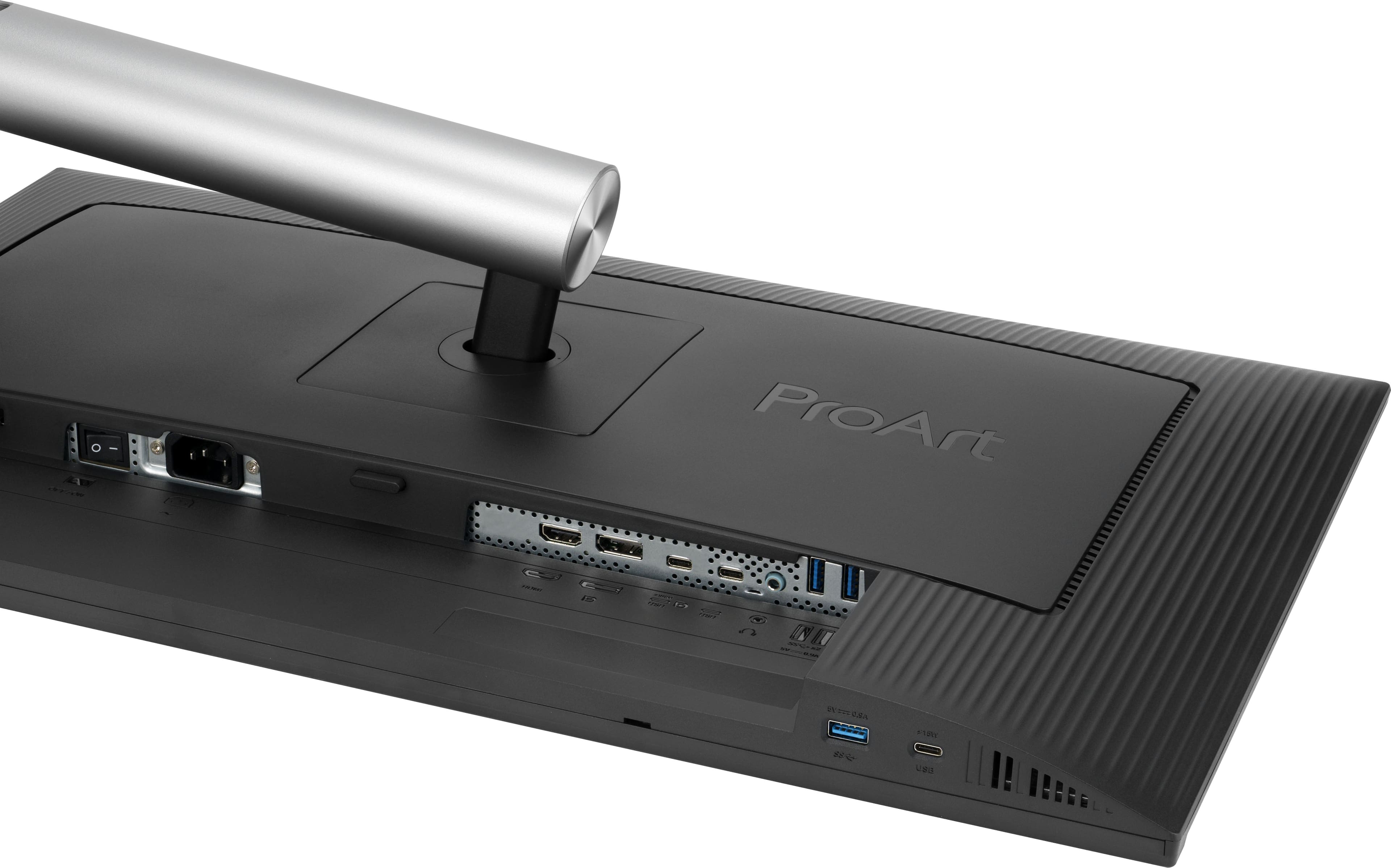
|Posted .This reviewer received promo considerations or sweepstakes entry for writing a review.I am an owner of the previous 4K Asus ProArt 4K PA279 display and other than Apple laptop connectivity and firmware update issues, it has served me well. Now Asus has this 5K display out at a relatively affordable price as compared to other well-known 5K displays. I do graphic design all day and I was excited to upgrade my existing 27" screen to 5K for added clarity/resolution. This new Asus PA27 5K monitor is Calman verified and was professionally calibrated before shipping (a Calman verification certificate is included). I love this feature very much as it allows for accurate color representation. That's very important to my profession, so I gave this Asus ProArt PA27JCV monitor a try. The monitor was very well packed in its box and set up took about 5 minutes max. The box included the monitor pieces that need to be assembled, a HDMI 2.1 cable and a USB C Display Port cable along with the power cable and a polishing cloth for the screen. The look of the display is altered a bit from the previous version. It has a curved back and it's very reminiscent to the last Intel iMac models from several years ago. Essentially, it's more curved and less boxy. There is a metallic base (plastic), a matching cylindrical metallic arm (plastic) and the monitor itself is made from black plastic. It's not actual metal like the more expensive 5K monitors out there but Im totally fine with these build materials. It looks very nice regardless. The screen has a matte finish versus a glossy finish which I typically prefer. The monitor screen can be raised and lowered, titled up and down and side to side or rotated vertically to be a portrait monitor if needed. It has all the flexibility you'll probably need. It was easy to fine tune it to the right viewing height for my workstation. It has quite a few connectivity options on the back: (1) Display Port 1.4, (1) HDMI 2.1, 91) USB C Display Port with 96watt pass through, (1) USB C, (2) USB A 3.2 SuperSpeed, (1) 3.5mm headphone plug. The left underside of the monitor has a USB C 15watt port and a USB A 3.2 port that can also power plugged in devices. Luckily, I just needed to use the USC Display Port to get my laptop connected in a flash. There are built in 2W speakers but honestly, they were not that impressive. I will be using external speakers. After connecting the USB C Display Port cable, I simply arranged the display via my laptop's display setup and was up and running very quickly. Firstly, this is a 10-bit edge lit LED monitor with a 5ms response time. It does offer HDR if you want to use it. I did elect to use the HDR feature for added pop. Im not sure if that affects the color accuracy but I'll try it for a while to see. Surprisingly, the contrast ratio is not as impressive as I thought it would be. It's only 1500:1. The brightness wasn't as dramatic either. It only provides 600 peak nits of brightness in HDR mode but in standard mode (SDR), it's 400 nits of brightness. My initial impression was it looked a bit dim but I am sure I'll adjust to it. Asus states the monitor color volume as 100% DCI-P3 and the pixel density is a very high 218ppi. With all that being said, I did notice the increased resolution from my previous monitor but it wasn't dramatic. Actually nothing in this new monitor was a really noticeable shift from the older Asus 4K monitor. I will keep tweaking the internal settings via the control buttons located on the front of the monitor and see if I can refine anything further. It's not bad whatsoever but again, not as dramatic an improvement as I had hoped. Overall, this Asus PA27JCV is a very fine 5K monitor and is much more affordable that most of the other 5K monitors out there. Set up was easy, build materials are just fine and I see a slight improvement in actually clarity while using it. This new 5K monitor has a matte finish which I typically prefer but I think it may diffuse the resolution a bit. I also have another personal desktop all-in-one computer with a glossy 5K screen and it seems to be sharper. I guess it's a bit of a trade off with finer detail or less reflectivity. TBH, if you already own an Asus ProArt 4K monitor, I'm still not sure the improvements warrant upgrading. I have enjoyed the previous 4K monitor very much and Im sure this new 5K version will be a fantastic addition to my design tools as well. It's not perfect, but it will work out very well for my needs and Im excited to see if I can refine it further.
I would recommend this to a friend - Pros mentioned:Build quality, Color accuracy, Connectivity
Rated 5 out of 5 stars
Color accurate monitor for photo/video work & more
|Posted .This reviewer received promo considerations or sweepstakes entry for writing a review.The ASUS ProArt line is marketed as being for creative professionals and this is certainly a great monitor for creative uses - but it's also a great general purpose monitor as well. Is it right for you? Read on to find out! First off, the basics. This is a 27" "5K" LED monitor - that's 5120x2880 or about 40% more pixels than the standard 4K resolution (3840x2160), with the extra pixels making for a VERY sharp and clear picture and the ability to see quite a bit of what you're working on when dealing with high resolution images or video. Connectivity is easy too with DisplayPort 1.4, HDMI 2.1 and USB-C inputs (when using USB-C, the monitor can also act as a USB hub and can provide up to 96W of power as well to charge a laptop). Keep in mind that to prove a high resolution display, you'll need to have a device capable of high end connectivity as well. The monitor is Calman Certified a comes with a full pre-calibration (with the read-out) including a delta E of < 2 so it's highly color accurate and appropriate for professional work. The monitor comes with an appropriate pre-set as well as all manner of adjustments - both automatic and manual to ensure appropriate brightness and ease of use in all types of scenarios / settings (along with a coating that manages reflections for even more accurate usages). So it's clearly well suited for editing photos or videos in a way that is very true to how prints will come out and how an audience will experience the video - in short, it's great for professional work a market in which it competes with Apple albeit at a MUCH more reasonable price point. For general purposes, this is a great monitor as well - the picture is very clear and sharp, even if you lower the resolution (driving 5K resolution isn't easy - and gaming at 5K would be very challenging for even a high end PC) - conveniently 1080P or 1920x1080 is the same ratio as this monitor so you can display 1080P or 4K video without distortion. The monitor is limited to 60Hz, but with the extreme color accuracy and dynamic brightness of HDR10, the picture is amazing in all manner of scenarios from gaming to consuming media / watching videos to more day to day internet browsing and office work. I love having the controls on the front of the screen as they are much easier to use than those on the back. The monitor is very well-built and should prove to be very durable in normal use. I do like that there's no external power "brick" like some monitors, just a standard power cord, and that the monitor comes with a very sturdy stand that allows for easy height and angle adjustment. So if you're in the market for a high-end monitor that can do double duty as a professional color-accurate display AND a more general purpose monitor as well, this is a great monitor to check out. Sure, it's a bit pricier than other 27" monitors out there, but the Calman Certification and combination of features make for a very competitive package and actually a value when compared to similarly featured and calibrated displays.
I would recommend this to a friend - Pros mentioned:Build quality, Color accuracy, Connectivity
Rated 5 out of 5 stars
Stellar product.
|Posted .This reviewer received promo considerations or sweepstakes entry for writing a review.I have had the opportunity to review many monitors and this was absolutely stands out for a few of the features. The look of the monitor itself, is extremely sleek and minimalistic which is a big bonus for me. The touch of metal at the base and stand with the black bezel is very modern and sleek. The monitor itself is 27" and the screen is a whopping 5K! The sRGB color accuracy is fantastic and extremely noticeable with my Mac Pro. The monitor is a two way so you can use it vertically or horizontally. I tested it in both positions and will end up keeping it vertically which I really enjoyed. The monitor can also be raised at many different heights which is very helpful. It also has USB-C for display which is unreal and this was the first time I got to enjoy that feature on a monitor. It works flawlessly. I tested this monitor watching 4K content, looking at high resolution photos (WOW is all I can say to that), light gaming and general work. In all facets of use the monitor is extremely impressive. The colors are really photo accurate and I had to look up what made the the "LuxPixel" technology so incredible. Asus actually defines it really well with between how anti-glare + low light reflection works to enhance the viewing. The monitor has a few built in light sensors which adjust the display based off of lighting in your surrounding area, which I did actually test by moving the monitor from a well lit office into a basement. It was very impressive how well this feature worked. This might be the best monitor to buy if you are in need of something smaller then 32" and not curved. I absolutely see this being perfect for the type of person who loves to look at high res images, photo editors, video editors and movie watchers. Great monitor and a great price.
I would recommend this to a friend - Pros mentioned:Color accuracy, ConnectivityCons mentioned:Refresh rate
Rated 5 out of 5 stars
Excellent 5K monitor for Less Than Other Options
|Posted .This reviewer received promo considerations or sweepstakes entry for writing a review.To find a 5K monitor for less than $100 can only be found with others go on sale. This monitor packs all the visual quality and flexibility for less than $800 without being on sale. I have used other 5K monitors (both PC and Mac) and this one is as quality as those. Pros: * Quality screen with 218 pixels per inch. Also includes HDR 10 for additional quality. * Stand works very well and adjusts up and down as well as tilt. Works as well as other similar models. * Has a KVM switch included to switch between two monitors. Very nice addition. * Several connection options (USB C at 98w delivery, display port 1.4, HDMI, 3xUSB 3.2 generation 2) It doesn't have thunderbolt. * Many settings and customizations to tweak it. Cons * Only 60hz refresh rate (but did not see a big issue when gaming) * Thunderbolt connectivity would have been a good option I have been using the display port for connection but haven't used the HDMI but I am sure the quality still stands. Overall this is an excellent monitor that is well worth the price
I would recommend this to a friend - Pros mentioned:Color accuracy, Connectivity
Rated 5 out of 5 stars
A Monitor That Far Exceeds Expectations
|Posted .This reviewer received promo considerations or sweepstakes entry for writing a review.In short: If you’re looking for a solid, high-quality screen with limited glare, for light gaming and any work from Office-based products to graphic design, look no further. The KVM switch and ability to daisy chain multiple screens together makes this a highly versatile monitor (NOTE: Please check your computer’s specifications to make sure it’s compatible). I would definitely recommend this monitor to a friend. Compared to other 5K monitors, this price point is modest. If you would like more details, please read on. From the moment of unpacking, it was apparent that Asus put thought into every aspect of this monitor. The monitor has a VESA compatible for mounting or use on monitor arms, but it also comes with a very versatile mount that requires no tools. Up, down, tilt, rotate. Whatever you need to do to make this monitor comfortable for you, the provide mount is capable. I also like that I don’t have to find a place for some obnoxious brick on the power cord. The straight-line power to the monitor makes it easier for placement. For those not familiar with KVM (Keyboard, Video, Mouse) switches like the one built into this monitor, it’s a pretty helpful feature for households or businesses with multiple computers. For us, we have a desktop computer that is used a fair bit. But we also have a docking station for the laptops our family uses. Having a KVM switch allow for just one plug in and whichever computer we’re using instantly has access to the monitor(s), keyboard, mouse, audio, and any other peripherals connected to the KVM switch. It’s a spacer saver, a time saver, and more importantly a money saver! Along with the KVM abilities, the monitor comes with a USB-C Thunderbolt port, which provides all of the capabilities that come along with Thunderbolt. It also has a standard 1/8” audio jack, making it easy to attach stereo speakers to the system. There are built in speakers as well that are useable, unless you’re an audiophile like myself. But the crème de la crème of this monitor is it’s 5K quality, color precision, anti-glare projection, and the innate ability to seem larger that it’s 27” should be. All of this pairs well for those that want to complete video/photo editing tasks. But the crispness and 60fps capability also lend it to being a worthy monitor for movie watching and light gaming. While utilizing Picture-in-Picture and watching Netflix inset while working on office work, the small picture still produces high quality. Again, this monitor packs a punch and exceeds its price point. I would recommend this monitor to any friends that want to upgrade their current setup.
- Pros mentioned:Color accuracy, Resolution
Rated 5 out of 5 stars
Calibrated to perfection right out of the box.
|Posted .This reviewer received promo considerations or sweepstakes entry for writing a review.This is the third monitor I’ve reviewed through the Best Buy Tech Insider program, and so far, it’s easily the best-looking one. I’ve used monitors in the past that leaned more toward entertainment features, with built-in apps and menus. The ProArt PA27JCV takes a different approach. It’s a professional display that focuses on what matters most: resolution, screen space, and color accuracy. And it does those things very well. Packaging ASUS provided an appreciative unboxing experience. The box includes a "Welcome to ASUS ProArt" card, VIP member notice, CalMAN Verified color calibration report for your actual unit, microfiber cloth, ultra high speed HDMI cable, VESA mount, and the monitor. Everything was tightly packed, present in a clean, high-quality fashion right off the bat. Setup Setup was a breeze. It took less than five minutes to unpack and plug in. I plugged it into my ASUS TUF Gaming F15 laptop using HDMI since it does not have a DisplayPort. I saw some banding in my wallpaper initially and thought that it might have been something to do with the display, but it turned out to be something amiss with the image itself. With a little tweaking, the display was sharp and even. Picture Quality Resolution The 27-inch 5K UHD screen is incredibly clear. I used it to view a movie with HDR and a lot of fast motion, and it handled it beautifully. No tearing of the screen, and the amount of detail was exceptional—everything from lighting to skin to background textures. With a 60Hz refresh rate, it's not designed for high-speed gaming, but for content viewing and creative use, it's well up to the task. Color Accuracy This monitor comes pre-calibrated with a Calman Verified report tailored to your model. The colors are genuine and similar at different profiles like sRGB, Adobe RGB, DCI-P3, and BT2020. It is a smooth transition between them, and all modes work decently. Support for HDR10 also adds a feeling of depth, preserving highlights and leaving shadows deep without exaggeration. Audio and Connectivity The speakers are functional, but the sound is thin. That’s expected on a display built for visuals, not audio. I’d recommend adding external speakers or a soundbar if sound matters to your setup. The HDMI 2.1 port allows for high-quality audio passthrough, which is a plus. However, be aware that there is only one HDMI input, so if you’re juggling multiple devices, you’ll need to plan around that or use a switch. Conclusion The ASUS ProArt PA27JCV is an excellent choice for creatives, editors, and professionals who require solid visuals without intrusions. It omits unnecessary bells and whistles and excels where it matters most: resolution, color, and construction. From initial setup to everyday usage, it does not falter. Out of all the monitors I tested, this THE most impressive. 5/5
I would recommend this to a friend