Customer Ratings & Reviews
![Sure, here is the corrected and grouped text from the image:
**Top Row:**
- ESC F1 F2 F3 F4 F5 F6 F7 F8 F9 F10 F11 F12 Del PgUp PgDn
**Number Row:**
- 1 2 3 4 5 6 7 8 9 0 - = + Num / *
**QWERTY Row:**
- Q W E R T Y U I O P [ ] \
**A Row:**
- A S D F G H J K L ; '
**Z Row:**
- Z X C V B N M , . /
**Bottom Row:**
- Caps A S D F G H J K L ; '
**Function Row:**
- Ctrl Fn Alt Spacebar Alt Fn Ctrl
**Number Pad:**
- 7 8 9 Home 4 5 6 1 2 3 End 0 . Ins Del
**Additional Keys:**
- Num / * - + PgUp PgDn
**Special Keys:**
- ROG (logo)](https://pisces.bbystatic.com/image2/BestBuy_US/images/products/c34127b6-95eb-4602-b8da-dfaa20d4e2b1.png)
![Sure, here is the corrected and grouped text based on the image:
**Top Row:**
- Esc
- F1
- F2
- F3
- F4
- F5
- F6
- F7
- F8
- F9
- F10
- F11
- F12
- Del
- PgUp
- PgDn
**Second Row:**
- ` ~ 1 ! 2 @ 3 # 4 $ 5 % 6 ^ 7 & 8 * 9 ( 0 ) - _ + = [ { ] } | : ; " ' < , > . ? /
**Third Row:**
- Caps
- Q W E R T Y U I O P [ { ] } | : ; " ' < , > . ? /
- A S D F G H J K L ; : " ' < , > . ? /
- Z X C V B N M , < > ? /
**Fourth Row:**
- Ctrl
- Fn
- Alt
- Spacebar
- Ctrl
- Fn
**Right Section:**
- Num
- 7 8 9
- 4 5](https://pisces.bbystatic.com/image2/BestBuy_US/images/products/cc54d055-5e2c-4bd9-a5f7-9d58e17dab3a.png)
![Sure, here is the corrected and grouped text from the image:
**Top Row:**
- EX
- F1 F2 F3 F4 F5 F6 F7 F8 F9 F10 F11 F12
**Second Row:**
- Del PgUp PgDn
**Third Row:**
- 1 2 3 4 5 6 7 8 9 0 - = + Backspace
**Fourth Row:**
- Tab Q W E R T Y U I O P [ ] \
**Fifth Row:**
- Caps A S D F G H J K L ; ' Enter
**Sixth Row:**
- Shift Z X C V B N M , . / Shift
**Seventh Row:**
- Fn Ctrl Alt Spacebar Alt
**Eighth Row:**
- Num 7 8 9 + Home
- 4 5 6 - PgUp
- 1 2 3 - PgDn
- 0 . / Del
**Right Side:**
- End
**Bottom Row:**
- RUG](https://pisces.bbystatic.com/image2/BestBuy_US/images/products/7d29ae66-bd61-4183-8658-8177ec52a3fe.png)
![Sure, here is the corrected and grouped text from the image:
**Top Row:**
- ESC F1 F2 F3 F4 F5 F6 F7 F8 F9 F10 F11 F12 Del
**Number Row:**
- 1 2 3 4 5 6 7 8 9 0 - = Backspace
**QWERTY Row:**
- Q W E R T Y U I O P [ ] \
**A Row:**
- A S D F G H J K L ; '
**Z Row:**
- Z X C V B N M , . / Caps Lock
**Function Row:**
- Shift Fn Ctrl Win Alt Spacebar Alt Ctrl
**Number Pad:**
- 7 8 9 + 4 5 6 - 1 2 3 0 . Enter
**Additional Keys:**
- Insert Home Page Up Page Down Delete
**Special Keys:**
- Print Screen Scroll Lock Pause
**Media Keys:**
- Volume Up Volume Down Mute
**Other Keys:**
- ROG
**Color Indicators:**
- RGB
**Logo:**
- ROG (Republic of Gamers)](https://pisces.bbystatic.com/image2/BestBuy_US/images/products/9a2b7317-e97c-4f32-b78b-6275d3197eb3.png)
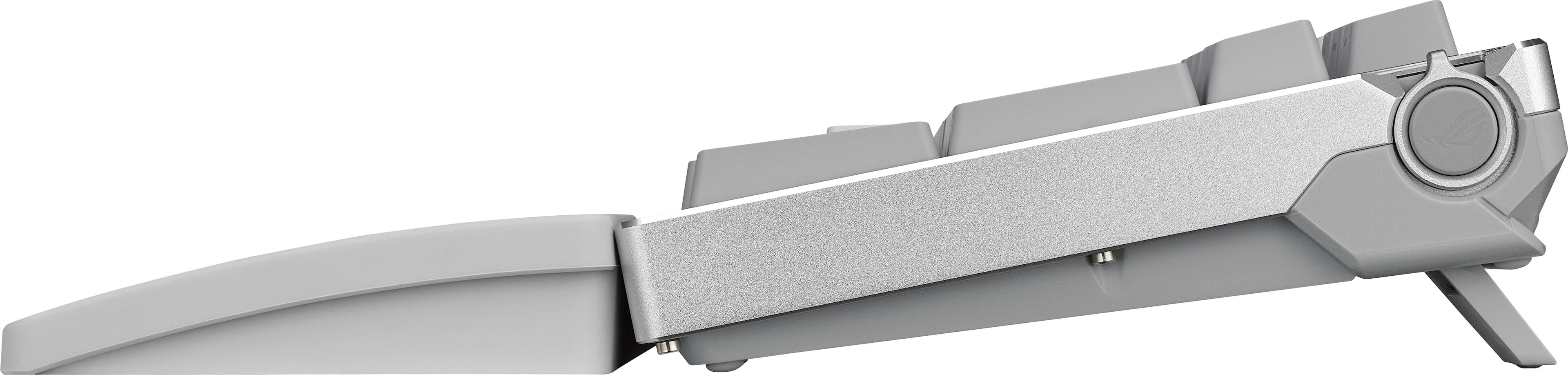
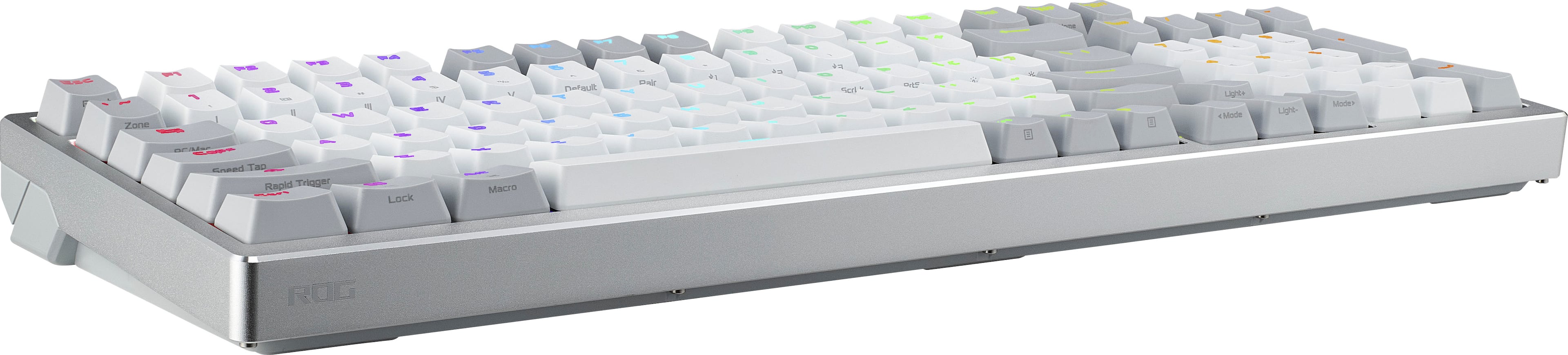
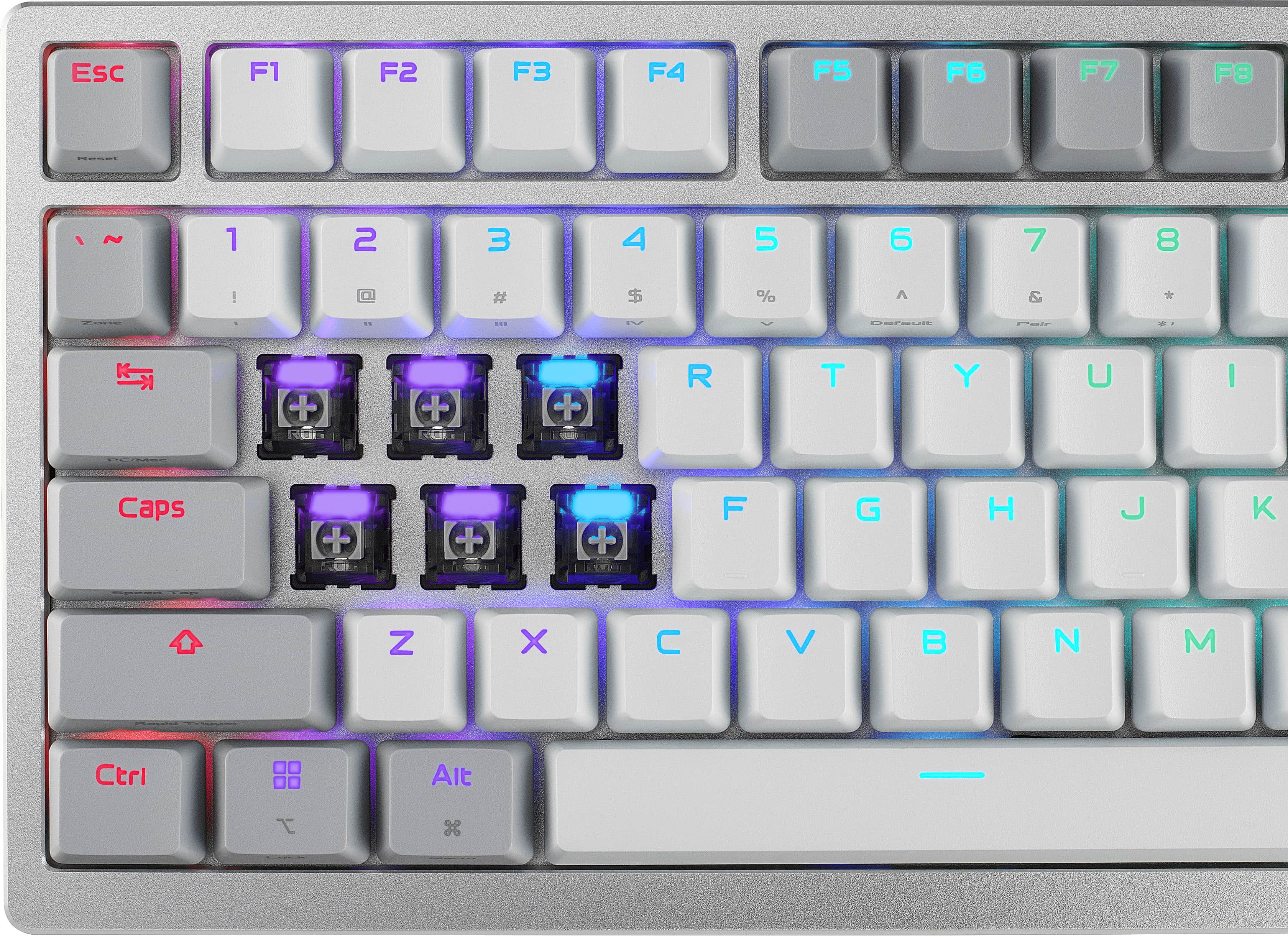
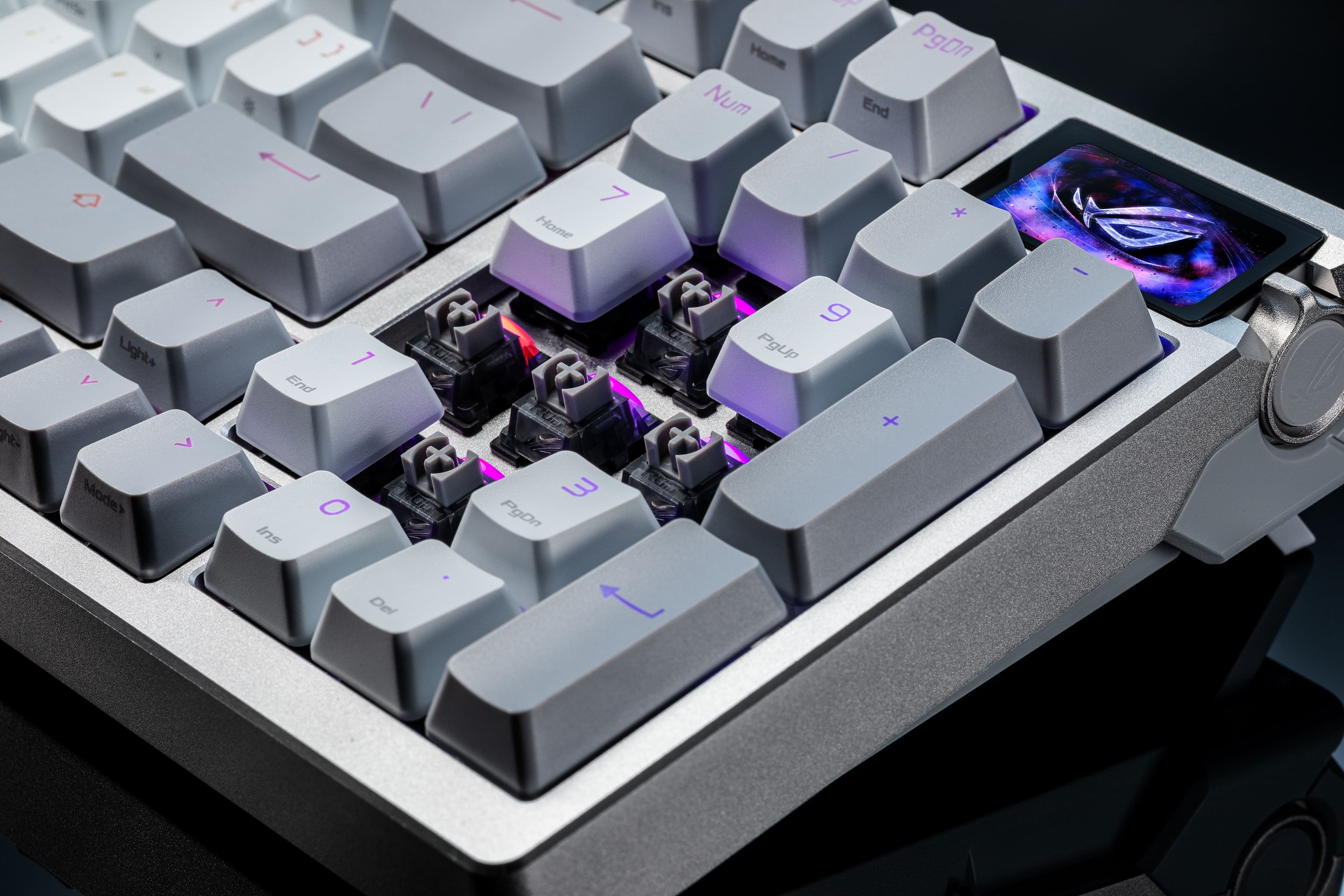
- Model:
- M901 ROG AZOTH 96 HE/WHT/HFXV2
- SKU:
- 12582473
to a friend
Solid board - if you're willing to overpay
||Posted . Owned for 1 week when reviewed.This reviewer received promo considerations or sweepstakes entry for writing a review.I really wanted to love this but it's just not quite good enough to justify the MSRP cost. I'm leaving this at 4/5 stars because it is pretty high quality overall if you can get it at a good price, I just can't seem to give this a full recommend. And I'm also assuming they will fix the bluetooth issue I mention below. Otherwise it's unusable completely. Overall, it's pretty difficult to find a full-size keyboard with the Hall effect technology. I also like the screen and dial, which I really have become used to because of the ease of use to turn the volume up and down primarily during games. The biggest issue I've had is actually connectivity via bluetooth. Perhaps this will be fixed with further firmware updates. But I use my MacBook Pro for work during the day via bluetooth and then have the dongle connected to my PC for gaming. But every time I turn off my MacBook Pro, the connection is lost. This is frustrating because when starting up MacOS you have to type in your password. I had to get another keyboard out each time to type in the password. I have done full resets/firmware updates/etc. It does the same thing with Windows -- but I have the camera vision that unlocks the computer so I can at least re-connect the bluetooth via mouse. There are a variety of premium features included on this board that are with every premium board these days - swappable switches, etc. But I just can't find anything that makes this unique or premium enough for $359. The Rog Extreme is more well-built and I felt like that board- - even without the Hall effect -- was more responsive. And the Rog Falcata has Hall effect and is now around $250. And I think the last version (non Hall effect) of this keyboard is around $125 now, which is what I would recommend if you need the 96% layout.
I would recommend this to a friend
Fantastic build, great sound, highly customizable
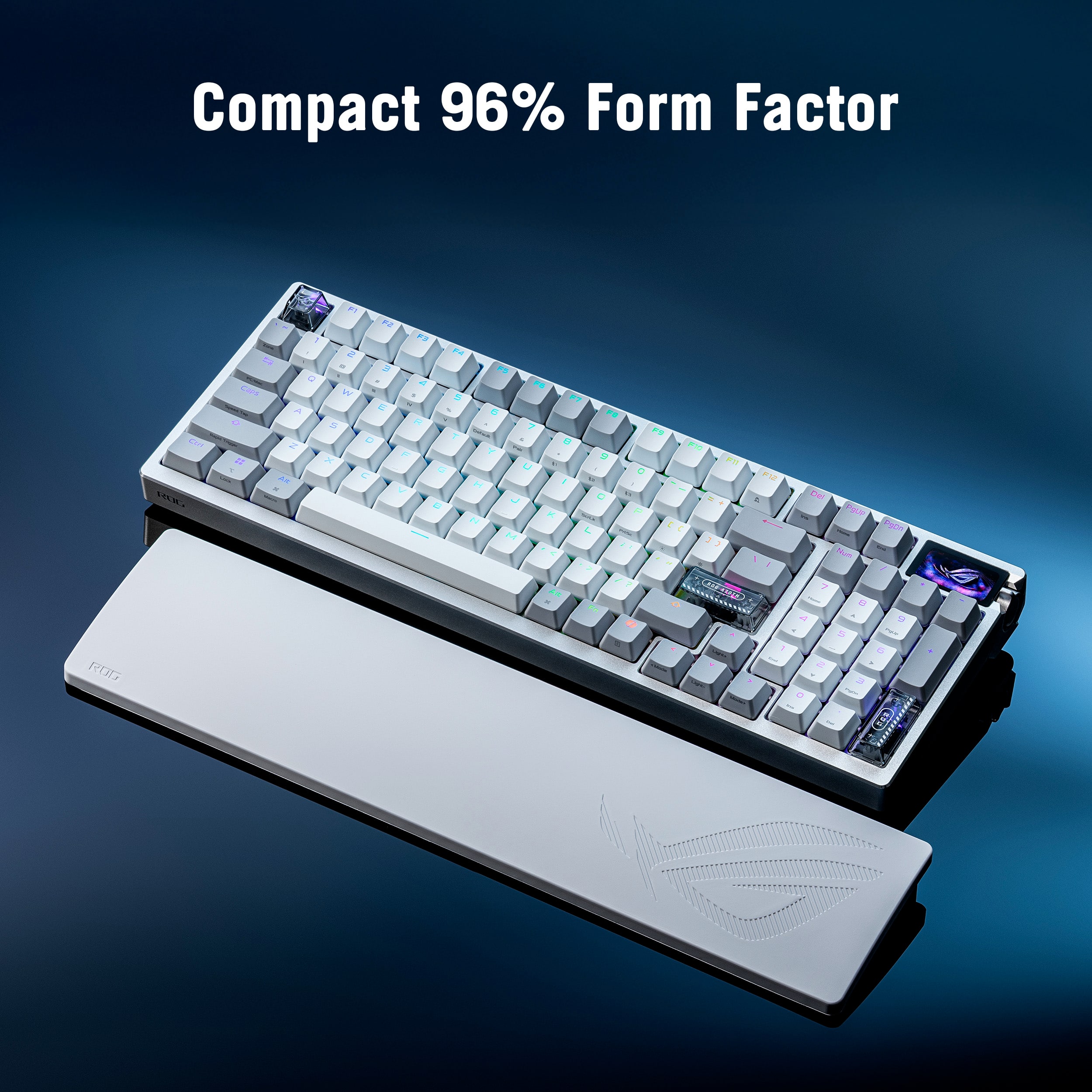
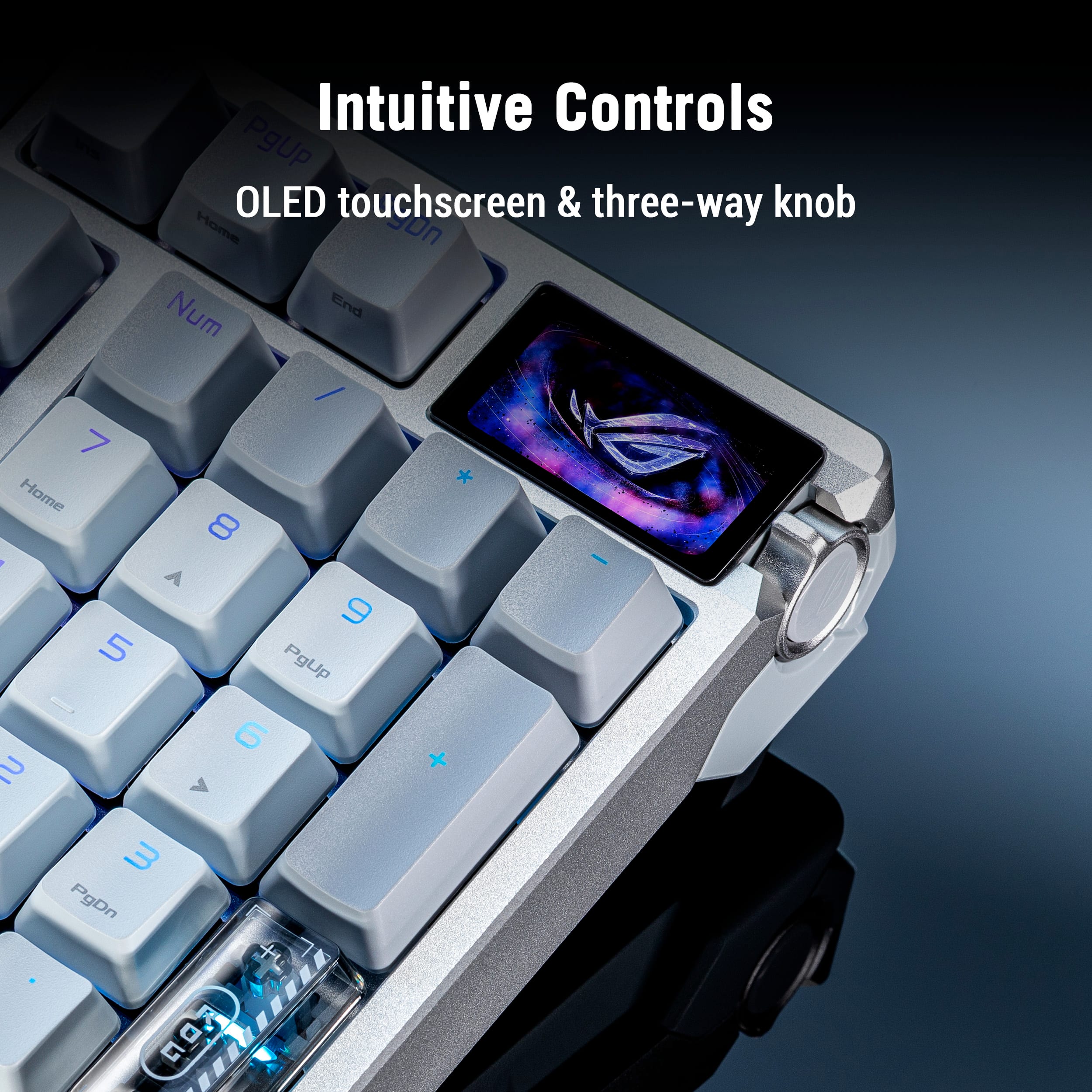
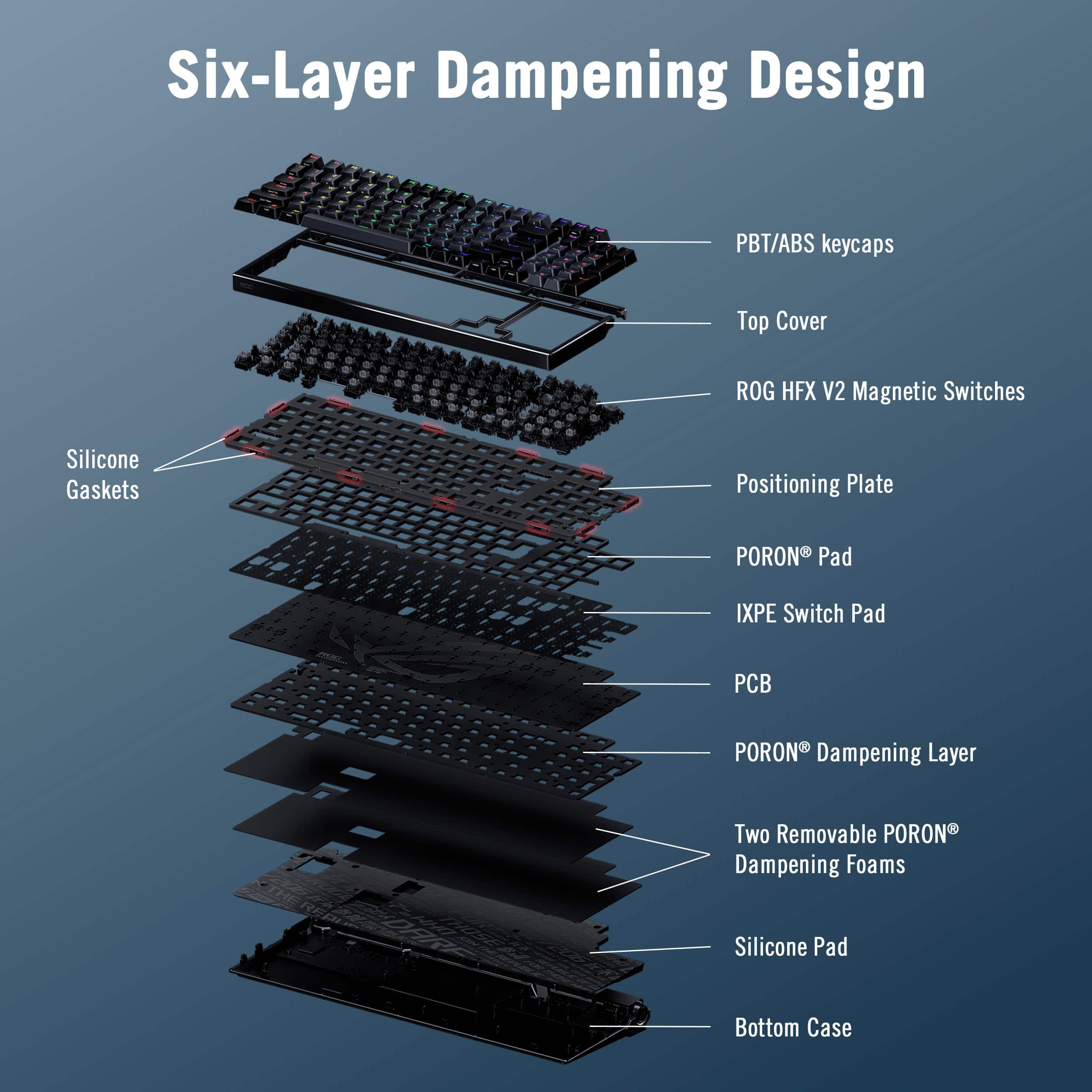
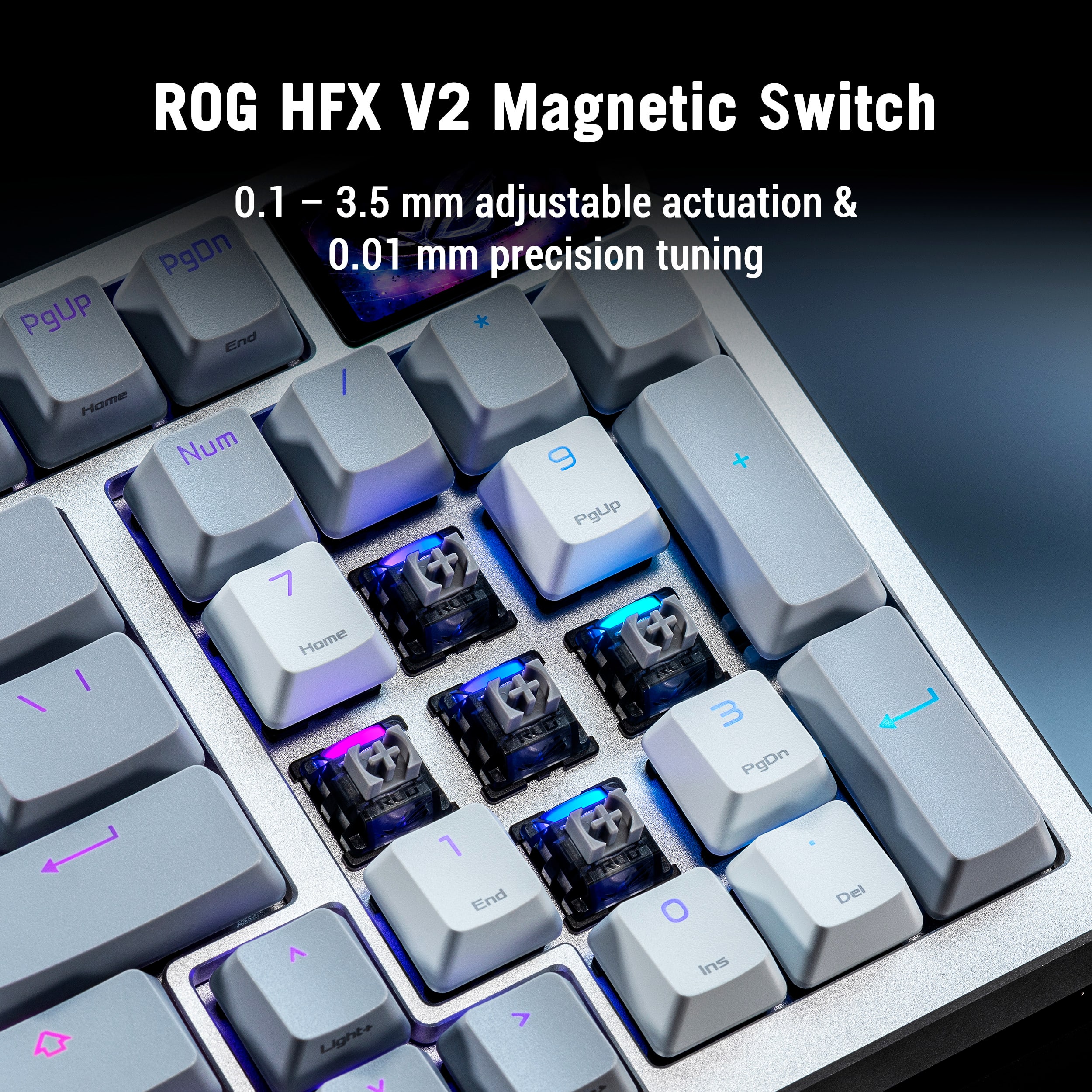
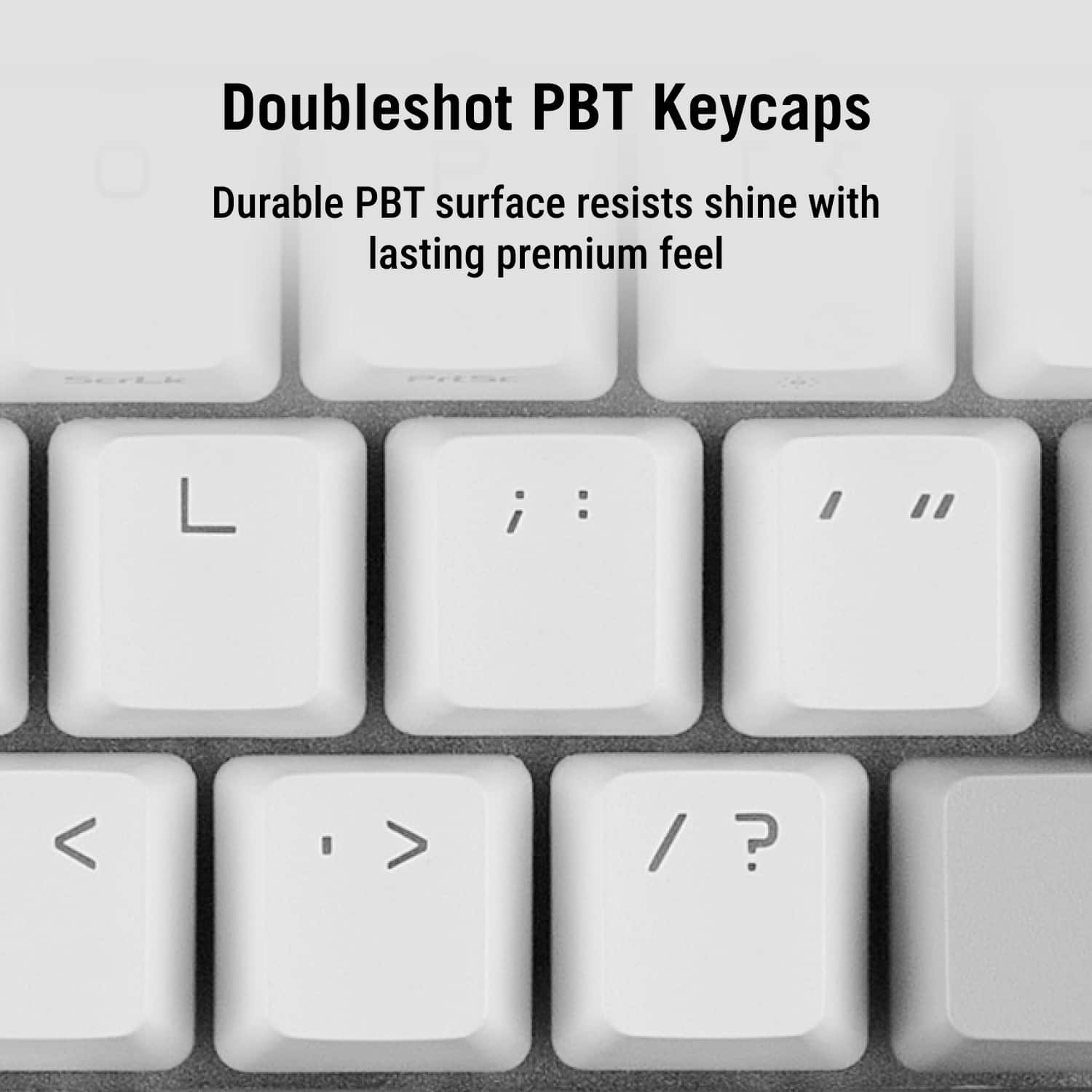
|Posted .This reviewer received promo considerations or sweepstakes entry for writing a review._____ *Pros: -Premium look and feel. -Excellent build quality. -Highly fine-tuned adjustable actuation (0.1mm to 3.5mm) for each key. -Offers high-tech options to give competitive edge in games (Rapid Trigger, Speed Tap, 8000Hz polling rate). -Has full number pad. -Excellent sound dampening and pleasant marbly sound. -Excellent battery life. -Three connection modes (wired/USB-C, Bluetooth, and 2.4GHz wireless/dongle) -OLED touchscreen is cool. -The Gear Link web app is responsive and easy to use. _____ *Neutral: -It’s pretty heavy and thick. Not very portable. -The Gear Link web app is not 100% stable. -The 96% condensed form-factor takes some time to get used to. -No dedicated Macro keys. -Awkward location for the Del key. _____ *Cons: -Gear Link could not set my custom GIFs – not even the included presets === Build Quality and Design === Upon unboxing, I couldn’t help but be very impressed by the presentation, the feel, the heft, and the sound of the Asus ROG Azoth keyboard. I have gone through many gaming keyboards before, premium or not, but none were as nice and full featured as the Azoth. The first thing that got my attention was the solid metal feel and heft of the device. The top frame is made of machined aluminum, and it provides the Azoth with a solid and durable feel and structural rigidity. The bottom panel is made of plastic but it’s a nice and dense plastic that doesn’t feel cheap, which is fine because the plastic will lead to stronger signal transmission for the 2.4GHz SpeedNova wireless dongle. The quality feel continues as you move on to the keys – they’re made from PBT doubleshot plastic which resists wear and “shining” over time better than standard/regular ABS. The Azoth sounds great, too. Thanks to its six-layer dampening system, use of PORON foam, and a bottom layer silicone pad, the keystrokes don’t make the annoying metallic ping sounds and instead produce non-echoey and marble-like “thocky” sound which I found to be very soothing and pleasant. With metal being used exactly where it counts and the inclusion of high-tech materials, the ROG Azoth is on the heavy side, weighing 3.07 lbs (~1.4 kg). This weight will make the keyboard less portable and convenient to lug around, but I think the trade-off is totally worth it as you get 96% the layout of a standard keyboard and you get a full-size number pad which is necessary for productivity tasks. \ The ROG Azoth is 96% the size of a standard keyboard and I highly appreciated the full-size number pad that comes with it since that means I can use the keyboard not only for games but productivity as well. Due to its condensed form factor, it took me a while to get used to the awkward placement of the Del key and the location of the zero (0) on the number pad. Out of the box, the keyboard was too sensitive for regular productivity activities, so I had to access the Gear Link web app and adjust the actuation level higher to prevent accidental keystrokes. All in all, the ROG Azoth exudes quality and high premium-ness, justifying its high cost. === How is the customization? === I eschewed the resource-heavy Armoury Crate app and relied heavily on the Gear Link web companion app for customization. Gear Link was reliable, responsive, and worked well except for one thing – every single time I tried to load a custom animation onto the OLED display – preset or custom – Gear Link would get stuck in the loading setting phase, and my changes were not loaded nor saved. I waited up to 30 minutes but nothing happened so I was forced to close the browser tab and initiate a new Gear Link session. Besides the above issue, Gear Link worked just fine for the other options such as setting actuation point and dead zone levels and Rapid Trigger and Speed Tap customizations, which admittedly, are far more important and crucial than a somewhat gimmicky OLED animation screen. The actuation points can be changed in increments of 0.01mm increments, and they can be individually applied to every single key, which is awesome. Befitting a keyboard at this price level, the ROG Azoth offers a healthy and high level of customization that offers gamers a real competitive edge. === How does it perform in games? === The ROG Azoth did not disappoint or cause me any grief during both my short and long gaming sessions. Once I discovered and dialed in the most comfortable and balanced actuation level settings for my hands and body, it was supremely comfortable and responsive. The 8000 Hz polling rate is a nice option to have for twitchy and fast-paced FPS titles, but I’m not sure it’s worth the extra battery life hit. Thanks to the Rapid Trigger and Speed Tap functions, movement-heavy action games will see the most benefit, such as Split Fiction, Cyberpunk 2077, and fast-paced FPS games. By adjusting the Rapid Trigger setting, you can make your game character feel more responsive and less sluggish and improve movement precision. And Speed Tap, which controls how the keyboard handles simultaneous pressing of opposing directional inputs (e.g. A & D), results in smoother and continuous character movement that can mean the difference between life or death in a competitive match. === Is it worth the coin? === Yes. The ROG Azoth is an excellent keyboard for gamers who is willing and wanting for finely tuned customization options, premium feel and build quality, and pleasant sound acoustics. It’s a 5-Star Win!
I would recommend this to a friendThe Ultimate Hybrid Keyboard
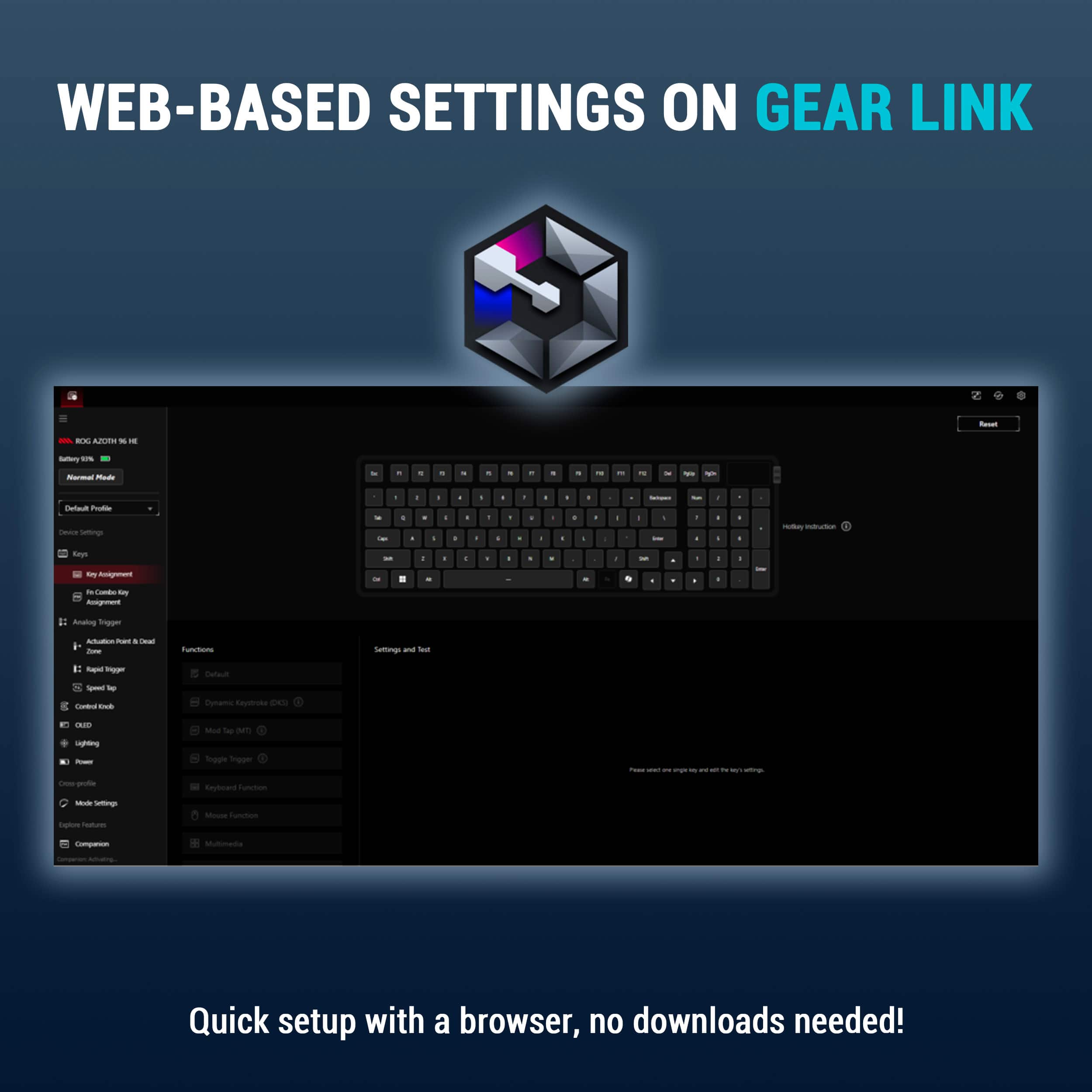
|Posted .This reviewer received promo considerations or sweepstakes entry for writing a review.----- SUMMARY ----- Verdict: Since unboxing the ASUS ROG Azoth 96 HE, it has completely monopolized my desk space, and for good reason. Finding hardware that can keep up with a chaotic schedule is rare. Between building data pipelines during the day, sinking into a heavy RPG session at night, and navigating life with a toddler and a six-month-old, my equipment needs to be incredibly adaptable. The Azoth 96 HE is a triumph of modern peripheral engineering that manages to bridge the gap between an enthusiast-grade typing board and an ultra-competitive gaming peripheral without breaking a sweat. It justifies its premium price tag by effectively being two world-class keyboards in one: a heavily dampened, highly efficient productivity tool by day, and an uncompromising, lightning-fast gaming board by night. If you can stomach the cost, it is a flawless addition to the desk. Pros: - Ideal 96% layout with full numpad - Durable metal frame and PBT keycaps - Quiet acoustics with six-layer dampening - Adjustable magnetic switches for work and play - Reliable tri-mode connectivity with 8K polling - Integrated OLED screen and control knob - Lightweight web-based software utility Cons: - High premium price point ----- DETAILS ----- Design & Build Quality: The 96% layout is, in my opinion, the absolute sweet spot for a desk peripheral. Ultra-compact 60% boards look great until you actually need to input numerical data and realize you've handicapped your workflow. This layout retains the full numpad, which is strictly non-negotiable for writing complex SQL queries and wrangling a data warehouse all day, while only taking up marginally more space than a Tenkeyless board. The physical construction is absolute tank-tier. It features a premium metal top frame and robust doubleshot PBT keycaps that won't shine or wear down over time. More importantly, ASUS implemented a walled-stem switch design. If you live anywhere prone to dry, pervasive dust (like the Phoenix desert), this physical barrier keeps grit out of the delicate switch housings, extending the board's lifespan. But the real star of the build is the acoustic engineering. It uses a specialized silicone gasket mount paired with six distinct layers of internal dampening, including PORON foam and an IXPE pad. The result is a deeply satisfying, cushioned typing feel that absorbs high-pitched switch ping. It's so well-dampened that I can hammer away at my keys late at night without waking the girls or disturbing the cat's fourteenth nap of the day. Switches & Performance: The defining technical achievement of the Azoth 96 HE is the hot-swappable ROG HFX V2 Magnetic Switches. Instead of traditional metal contacts, these utilize Hall Effect sensors to measure magnetic flux, providing a fluid, analog input. Practically, this gives you total mechanical control. You can dial in the actuation point anywhere from a deliberate 3.5mm down to a hair-trigger 0.1mm. During working hours, I keep the actuation deep to prevent accidental typos in my data models. When the workday ends and I boot up Cyberpunk 2077 or Fallout, I drop it to 0.1mm, making the keys feel telepathically responsive. On the competitive side, the board supports an 8000Hz polling rate, dropping input delay to a microscopic 0.125ms, alongside Rapid Trigger and Speed Tap functionality. Speed Tap automatically prioritizes your latest keystroke when two opposing directional keys are pressed, completely eliminating the sluggish deceleration gap in fast-paced shooters. Features & Connectivity: Wireless gaming peripherals used to be notoriously unreliable, but ASUS’s Tri-Mode connectivity is rock solid. You can swap seamlessly between standard Bluetooth (perfect for juggling a work laptop and personal rig), wired USB-C, and the ultra-fast 2.4GHz SpeedNova wireless protocol. The biggest quality-of-life feature, however, is the 1.47-inch full-color OLED touchscreen paired with a tactile three-way control knob. You can view real-time system metrics or battery life, but more importantly, you can use the knob to adjust your magnetic actuation points and media controls on the fly without ever alt-tabbing out of your current window. If you do want to dive into complex macros, ASUS implemented "Gear Link." This is a lightweight, web-based settings utility that entirely circumvents the need to install bloated background software on your machine. I especially appreciate this being browser-based because it means I don’t have to plead with our work IT and security team to download a non-essential app that would almost certainly get denied. Battery Life: Powering an 8000Hz polling rate alongside an OLED screen and per-key RGB lighting is a heavy lift, but the battery endurance here is highly respectable. Under absolute maximum load (8K wireless polling, screen on, and RGB blazing), you can expect roughly 36 to 40 hours of continuous use. In real-world terms, this usually gets me through a full week of use and sometimes two. The actual longevity depends on how many days I work from home and how much time I actually have to game in the evenings. While there are more efficient modes that can extend this further, the 40-hour mark is a fair expectation for anyone wanting to use the high-performance features. ----- WHAT'S IN THE BOX ----- 1 x M901 ROG AZOTH 96 HE 1 x Wrist Rest 1 x USB-C to USB-C Cable 1 x USB-C to USB-A Adapter 1 x USB Dongle Extender 1 x ROG Keycap & Switch Puller 3 x ROG-themed Keycaps 1 x Ctrl Keycap 1 x ROG Sticker Set 1 x Quick Start Guide 1 x Warranty Card
I would recommend this to a friendVery happy with my purchase!
||Posted . Owned for 2 weeks when reviewed.This reviewer received promo considerations or sweepstakes entry for writing a review.Amazing keyboard, marbly sounds straight out of the box and the web based software is great.
I would recommend this to a friendAmazing Wireless HE KB, Extra Software Optional!
|Posted .This reviewer received promo considerations or sweepstakes entry for writing a review.I wanted a wireless mechanical keyboard for a minimalist gaming setup. I was debating between a few options I’ve used in the past when I saw ASUS was releasing the ROG Azoth 96 Hall-Effect Gaming Keyboard. It fit my requirements plus came with a cool little Touch LCD screen, so I picked one up. Pros: - Simple Plug & Play, with adjustable settings onboard via LCD touch display. - Fully wireless with up to multiple weeks of battery life on a single charge. - Smooth, Linear, & silent Hall-Effect switches. - Hot-swappable Switches compatible with many third-party options. Cons: - Link Gear is flagged as a dangerous program browser. Out of the Box: One of my favorite features of any PC Accessory is Plug-&-Play functionality, no software or updates need to just get to playing. I just plugged the ROG Azoth in and got started, just make sure the mode switch on top of the keyboard is set to the right mode. ASUS does one better with the ROG Azoth by designing the keyboard in a way that allows the settings to be adjusted via the onboard Touch LCD screen or the built-in keyboard short cuts. The Touch LCD Screen stands out as one of the most unique features. Other keyboards have added touch screens to the keyboard, but I think the ROG Azoth makes the most use of the added display by enabling customization of the different keyboard settings via the display with the 3-way nob. Even adjusting the key actuation is possible via the onboard display, which makes add-on software less necessary. Honestly, I used the keyboard without software for days, and didn’t feel like I was missing anything. Included in the box is the ROG Azoth keyboard, USB Dongle stored in the top of the keyboard, a rubberized palm rest, USB-C cable, Key Extractor, and spare/alternative keys. Software: ASUS choose to use a new software for the ROG Azoth called Link Gear, a shift from the standard approach of using Armory Crate. As mentioned, Link Gear is not needed to get started and is a browser-based tool. The downside here is most Browser security will see it as a security risk as it changes configurations on your hardware, but it is safe to use. Link Gear is very easy to navigate, with all the feature options listed out in a left side column and the keyboard or feature in the center of the page. Customizable features include Key Assignment (mapping), Function Keys, Key settings, lighting, and power. Under the Key Settings called Analog Trigger, the Actuation Point can be adjusted for a range between 0.1mm to 3.5mm. Deadzones, where key input will not be registered, can be set at both the top and bottom of a key press. Additionally, there is the Rapid Trigger and Speed Tap features, but you will want to ensure these are allowed per the game’s terms of use. Rapid Trigger allows for rapid repeated inputs of a key without fully releasing the key before registering the next input, as in key tapping. Similarly Speed Tap allows for multiple key inputs to layer over each other without canceling out the prior input, such as left and right movement. With Speed Tap on, pressing “A” to move left and then pressing “D” will allow you to instantly move right while the “A” key is still pressed. Then releasing the “D” key will return the movement to the left if the “A” key is still pressed. It’s a near feature, but as mentioned is software enabled which can be seen in some online games or tournaments as cheating, so check with each games Terms of Service. Build & Feel: The ROG Azoth is built solid, with a premium feel all around. The top faceplate is metal and wraps around the sides of the keyboard, making the top and sides feel strong and solid. The bottom is a hard plastic with a design, which feels good in the hands. I usually have an issue with the plastic bottoms of keyboard due to the feel leaving a cheap or brittle impression, but ASUS made great material choices to eliminate that concern all together. Typing is amazingly smooth and linear; the keys feel soft yet firm with almost no wobble from side to side. This is achieved through multiple layers of dampening; ASUS has a visual breakdown of the 6 layers of dampening on their website which can be adjusted if you want a louder and harder feel to your typing. I was very impressed as this provides a level of customization found usually found only in hobbyist keyboards. The sound of typing isn’t completely quiet, there is a muted click, but it is far from the normal click-clack of most mechanical keyboards. Initially while setting up the keyboard, I was slightly concerned about how hard the rubberized palm rest felt at first, it is not as soft or plush as many other palm rests. But I found it to raise my wrists to the perfect height to comfortably type, while having just enough give that my palms could rest on it without getting sore for hours at a time. Switches: The included Hall-Effect switches are pre-lubricated and housed in 6 layers of dampening, providing a very smooth press with minimum noise for a mechanical keyboard. The biggest benefit of Hall-Effect switches is the adjustable actuation points that can be customized between 0.1mm up to 3.5mm. Additionally, dead zones can be set to not register key inputs, enabling quicker key activation which can be enhanced even further when paired with Rapid Trigger. Even if you don’t love the included ROG HFX V2 switches, the ROG Azoth is Hot-Swappable with switches that can be swapped out for many third-party switches like Cherry MX, Gateron, or Kailh. Same for the keycaps if you prefer a different look or feel. Battery Life: I’ve used other wireless mechanical keyboards in the past, with one of the biggest downsides being the limited battery life, most often only lasting about 1 day of use. The ROG Azoth has an amazing battery life thanks in part to the power savings settings. By default, the ROG Azoth will enter sleep mode after being idle for 3 minutes, which puts the keyboard into a low power mode which can be exited with a quick press of any key. This helps greatly extended the battery life. I’ve only charged the battery once so far and after 5 days of use the battery level has just dropped below 70%. This was with only lite gaming use, so your results will vary. Conclusion: If you are looking for a wireless Hall-Effect keyboard with no corners cut, then the ASUS ROG Azoth is a solid contender for you. Offering multiple ways to connect, onboard customization via the Touch LCD display that will make you wonder why you even need extra software, and a battery that can last weeks due to the smart power saving options, ASUS went all out for the ROG Azoth. I can confidently say, I’ll be using and enjoying the ROG Azoth for the foreseeable future.
I would recommend this to a friendA Highly Customizable 96% Hall Effect Keyboard
|Posted .This reviewer received promo considerations or sweepstakes entry for writing a review.The ASUS ROG Azoth 96% Wireless Magnetic Hall Effect RGB Gaming Keyboard with Hot-Swappable ROG HFX V2 is one of the most versatile keyboards I have used in some time. I’ve spent a lot of time with magnetic hall effect keyboards with owning both 60% and 75% layouts, and while I loved the performance, I always felt like I was sacrificing productivity in not having arrow keys or a number pad. So seeing a 96% layout with a number pad finally get the Hall effect treatment was exactly what I’d been looking for. Right out of the box, ASUS gives you a complete package. You get the keyboard itself, a nice silicone wrist rest, a keycap puller, switch puller, a braided USB-C to USB-C cable, a dongle extender, USB-A to USB-C converter, a USB-A wireless dongle, and even extra clear keycaps for the spacebar, enter, and escape keys. It feels like a premium unboxing experience and sets the tone for what you’re getting. Setup was refreshingly simple. ASUS doesn’t make you install Armory Crate for customization instead, they offer a web based client called Gearlink. That alone was a huge win for me. No more background processes, no bloated software, just open your browser and start customizing. This was a big selling point for me, because my work computer blocks all software downloads, so I wouldn't be able to fully utilize the customization that the keyboard has to offer if I had to download software. On the GearLink web page you can create up to five custom profiles, and I immediately set up two profiles, one for work productivity and one for gaming. The level of customization here is honestly on another level. You can tweak key assignments, Function key layers, analog triggers, actuation points, dead zones, rapid trigger, speed tap, the control knob, OLED display, RGB lighting, and even power management. With the Hall effect switches, the actuation adjustment is where things get really interesting. For typing, I prefer a deeper actuation point around 3.0mm to avoid accidental presses. But for gaming, I drop it down to about 0.3mm and for critical keys like WASD and the spacebar for that near instant response. You can also customize the OLED Screen with your own GIFs or use ASUS’s built in animations. Rapid trigger is one of the standout features here. Instead of relying on a fixed reset point like traditional mechanical switches, Rapid Trigger instantly resets the key the moment you begin to release it. That means you can reactivate the key much faster because there’s no need to travel all the way back up to a set reset point. In fast paced games like COD or CS it translates to noticeably quicker movement inputs and tighter control, it genuinely improves responsiveness. The touch OLED screen is another feature that I initially thought was a gimmick but it’s actually incredibly useful. It displays real time system info like CPU usage, shows your active profile, connection modes (Bluetooth, wireless, or wired), battery life, and whether you're on PC or Mac mode. On top of that, you can control the RGB brightness, media playback, volume, and even adjust actuation points or toggle rapid trigger directly from the keyboard. That’s huge for making quick in-game adjustments without tabbing out. Typing on this keyboard feels fantastic. The ROG HFX V2 magnetic switches have a satisfying, “thocky” sound profile and a smooth keystroke thanks to the Hall sensor design. The gasket mount has a six layer damping system that really does its job in reducing vibration and ping sounds. It feels cushioned without being mushy. From a build standpoint, ASUS struck a balance I actually prefer. The aluminum top plate gives it a premium, sturdy feel, while the plastic bottom keeps the weight manageable and allows it to get the wireless 8k pulling rate. In my opinion fully aluminum boards can sometimes feel overbuilt and heavy for daily desk use and this one hits a nice middle ground. Connectivity is another strong point. You’ve got tri-mode support with wired USB, Bluetooth, and 2.4GHz wireless along with ROG SpeedNova technology. It supports pairing with up to 3 devices through Bluetooth, which is perfect if you’re switching between a work laptop, personal PC, or even a tablet. Both wired and wireless modes support up to an 8K polling rate, which is greatest for competitive gaming. If I had to nitpick, the only real adjustment I've had with this keyboard has been the smaller regular sized zero key on the number pad due to the 96% layout compression. It’s not a dealbreaker, just something your muscle memory will have to adapt to over time. Pros: 96% layout with number pad + Hall effect switches Extremely customizable actuation Rapid trigger Web based Gearlink software OLED screen for quick customization Premium build with excellent sound dampening Tri-mode connectivity Comfortable wrist rest included Hot swappable magnetic switches Cons: Smaller “0” key on number pad takes time to adjust Plastic bottom may disappoint full aluminum keyboard enthusiasts High level of customization may feel overwhelming at first Price point Overall, this keyboard nails it for what I’ve been looking for in a single keyboard that can seamlessly handle both productivity and gaming without compromise, where I can switch profiles on the fly, while not having to use a dedicated app to do so. It’s easily one of the most versatile and customizable keyboards I’ve used. And I highly recommend giving this keyboard a go.
I would recommend this to a friendA premium beast for both gaming and productivity
|Posted .This reviewer received promo considerations or sweepstakes entry for writing a review.Right out of the gate, the ASUS ROG Azoth 96 HE comes packaged in that classic ASUS ROG presentation that just feels premium before you even get your hands on the keyboard itself. Inside the box, ASUS really hooks you up with everything you need to personalize and tinker. You get both a switch puller and keycap puller, along with a few ROG clear keycaps to swap in if you want to change up the aesthetic. I did give the clear caps a shot for a bit, and while they look clean, I ended up going back to the stock PBT doubleshot keycaps because they just matched my overall setup better. ASUS also includes a wrist rest, and honestly, it’s one of the better ones I’ve used. It lines up perfectly with the keyboard and has this soft rubber feel that makes longer sessions way more comfortable. The keyboard itself is an absolute beast. It has a hefty, solid build that immediately gives off that premium, no-compromise vibe. I’ve spent a lot of time using smaller 65% and 70% boards, and I thought that was my sweet spot, but this 96% layout completely changed my mind. It gives you that compact feel while still keeping the functionality needed for productivity, which is huge for me since I’m not just gaming, I’m also working and creating. Having that extra functionality without going full-size is a perfect middle ground. What really sets this keyboard apart is how much control you have, and how easy it is to access it. The OLED onboard screen paired with the three-way control knob is incredibly intuitive. Being able to adjust actuation points on the fly is honestly a game changer. I can dial it in super sensitive for gaming, then back it off when I’m typing up something longer to avoid accidental presses. For someone like me who tends to be a little heavy-handed on the keys, that feature alone is worth it. Rapid trigger is just as easy to toggle with a quick FN/Shift combo, and it definitely adds that extra responsiveness when you need it. Typing and gaming on this board feels fantastic. The magnetic switches aren’t your traditional mechanical feel, but they get very close while offering a smoother, more controlled experience. The multi-layer gasket design gives it a satisfying sound and feel right out of the box, and while you can customize it further, I’ve been perfectly happy sticking with the factory tuning so far. ASUS clearly knew what they were doing here. The RGB lighting shines through the doubleshot PBT caps beautifully, and you can go as subtle or as flashy as you want. Adjustments are easy directly on the board, but there’s also an online companion interface if you want to fine-tune things even more without downloading extra software, which is a nice touch. Performance-wise, it’s flawless, inputs are fast, precise, and consistent whether I’m gaming or typing at full speed. If I had to call out one downside, it’s definitely the price. This isn’t a budget keyboard by any means, and it’s not something everyone will justify. But if you’re deep into gaming, productivity, or just appreciate high-end gear and a clean, cohesive setup, it absolutely delivers. For me, it was the final piece in my full ROG desktop build, and it tied everything together perfectly. ASUS really nailed it with this one, and it’s easily become my favorite keyboard I’ve ever used.
I would recommend this to a friendA Versatile Powerhouse W/ Frustrating Software
|Posted .This reviewer received promo considerations or sweepstakes entry for writing a review.PROS: - The build quality is really solid, featuring an industrial color scheme that naturally fits into a lot of different environments. Nothing feels cheap or loose, and it has a metal top plate that gives it a perfect weight—not too heavy, but not too light either. The PBT doubleshot keycaps also feel great to type on. As they aren’t too smooth but not too textured either. - The hot-swappable Hall Effect switches have zero wobble. The best I’ve tried up to this point. I specifically want to highlight how good the switch design is regarding looks, stem design, and LED size. They are probably the best I've seen while still providing good, though not great, RGB color accuracy and brightness. - The magnetic switches are incredible for gaming because they add a ton of benefits, like the ability to change each key to a different height and immediately reset without having to let the key go all the way up (which is huge). Features like Rapid Trigger (dynamic reset points) and Speed Tap are super helpful if you don't naturally have those skills, though they might get you banned in certain games. - Acoustically, the keyboard leans toward a "thocky" sound (a deep, low-frequency typing sound rather than a high-pitched click), which is good, and it sounds better the more you use it. It isn't 100% there yet, and the loudness might still annoy people in the same room, but nothing sounds "tingy." But I think adding more lube will be required for the best sound/feel. They also did a really good job on the spacebar—I didn't have to do anything to fix it, which is usually a common problem. It is very low and bassy. - The OLED screen is a nice addition, and the multifunction dial (allowing you to move up, down, inward and on the side) lets you make a lot of easy customizations in a small area. The touch screen itself, is helpful because it can provide a lot of data. And when switching profiles or similar it will notify you which I like a lot. You are able to customize it through the software. - Having the ability to easily toggle between wireless 8k, wired 8k, and standard Bluetooth via a switch on the top right is much appreciated. I’m a fan of 8,000 Hz. Though I'm unsure if it's true 8,000 Hz for both polling rate and key scanning, or just one of the two. It also fully supports MacOS (FN + Tab), which will confirm on the OLED screen. Which works just as well as an actual switch. - The front underside of the keys has a lot of the special functions printed on them. This is incredibly helpful because it means you don't have to memorize what they do. - The included switch puller and keycap puller are probably the best I’ve seen included with a board, and arguably the best I’ve seen sold separately. CONS: - Despite using analog switches, there is no true analog function (the ability to mimic the gradual, pressure-sensitive movement of a controller joystick). To me, this eliminates half the reason to get an analog keyboard in the first place. While it might come in a future update, I review things as they are right now, not what they will be. - Typing on it feels a bit stiff because the gasket mount (internal shock-absorbing material meant to flex) isn't great out of the box. You can remove some of the padding but then that can change the sound too. The keys aren't as smooth as some other hall effects I’ve tried, so if I'm being picky, it could use a bit more factory lube to reach that ideal feel. Or you’ll have to do it yourself which is time consuming. - The layout is mostly great for a 96% board, except for the Del, Page Up, and Page Down keys placed in the upper right. I would have preferred them smashed closer to the numpad and placed on the right side or in between. That said, after looking at the overall shape, it might have been the best choice all things considered. - The software is nice to have on the web, but I'd give it a B since it isn't all that intuitive and still has a way to go. - It seems like you can only use a single lighting profile without the ability to stack effects or adjust individual RGB keys—or if you can, it wasn't straightforward so I missed it. - While all the primary keys light up evenly and custom shine-through keycaps look good, the secondary keys are not backlit. Furthermore, turning on "Zone Performance" mode turns off the lighting completely. Because it's a black and grey keyboard, you won't be able to see the keys at all if you are in a dark room. OVERALL: Overall, I think this is a great keyboard. This keyboard has a ton of features and functions. You get wireless, an OLED screen, multimedia controls, and Bluetooth. Making this board much more versatile than many of the others out there. As most of the time when you pack all that in certain things don't work as well or sound as good. But that isn't the case here. Making it a strong contender for your next keyboard. As it's an excellent choice.
I would recommend this to a friendGreat gaming keyboard with tons of app-free config
|Posted .This reviewer received promo considerations or sweepstakes entry for writing a review.Highlights: * Amazing out of box experience * Solid construction that stays put while you bang away on it * Can be used wired, bluetooth or low-latency wireless with supplied dongle * Small OLED display with a unique selector dial * No software to install - keyboard hosts its own configuration web UI * 95% keyboard size - includes inverted “T” and full Numpad. * Lighting effects * Tons of key configuration including dead zones and actuation points * Includes a comfy and supportive wrist rest that doesn’t slide around Considerations: * Very heavy so not great for a mobile kit * Missing the traditional navigation keys (Home/End, PgUp/PgDn, etc.) * No ambient light sensor - need to adjust brightness manually * Keyboard defaults to gaming settings which are too “twitchy” for normal typing Out of the box, the ROG Azoth 96 HE makes a great first impression. Solid, well-built, and with just the right amount of tactile click. But don't expect to plug it in and start typing. This keyboard needs to be configured before it really works for you, and how much tweaking you'll need depends a lot on your typing style. Coming from a standard mechanical board, I found myself getting a flood of extra characters in everyday typing because the keys were far too sensitive out of the box. Adjusting the actuation point and dead zone sorted that out pretty quickly though, and the process was painless. You just pull up the Gear Link configuration tool as a web page in Chrome (it needs to be a Chromium-based browser since it relies on Web Serial), tweak your settings, and you're good to go. If you want to squeeze a bit more out of the configuration software, there are two optional utilities available for download, but honestly, they're not needed for 95% of what the keyboard can do. Through the Gear Link website you can record macros that respect timing requirements, and even capture a diagnostic log if you're running into issues. Nice to have, but most people will never need to go that far. The OLED screen is an interesting touch. It's kind of fun to watch your keys-per-second as you type, and it does give you useful feedback when you're changing keyboard settings. But if I'm being honest, after the novelty wears off it's more of a gimmick than anything else. Cool to show off; just not something you'll find yourself relying on day to day. One thing that genuinely annoyed me is the lack of dedicated Insert, Home, and End keys. You have to hit a function key combo to get to them, mapped to Del, Page Up, and Page Down. For general use it's a minor inconvenience, but if you play games that make heavy use of all six of those keys it gets old fast. At the end of the day, this is a very nice keyboard to type on, and if you're into competitive action games it could genuinely give you an edge. But is it for everyone? Definitely not. It takes time to set up, has a learning curve, and the price reflects that it's aimed at enthusiasts rather than casual users. If that's you, you'll probably love it. If not, there are simpler options that will serve you just as well.
I would recommend this to a friendNice almost full sized keyboard.
|Posted .This reviewer received promo considerations or sweepstakes entry for writing a review.I think I am becoming a keyboard hog. This bad boy is pretty nice. Looks good, feels good, sounds good (first time I noticed the sound of the keys). My time has been in front of a keyboard more and more lately and I find myself enjoying the heck out of this one. Putting the controller aside while I played with this keyboard and found myself not missing the controller. Did this keyboard bring me back to my basic gaming roots? Yes, yes it did. It is a bit louder than the keyboards that I am used to using but I don't mind. Reminds me of the old beige keyboards that had the AT connector to the motherboard. It's a pro for me but it might be a con for others. Being a reformed gamer who is getting back into it I found this to be a very pleasant experience. Palm rest, multiple ways to connect to your rig (wireless that is low latency, Bluetooth and USB-C cable). They didn't ignore those Mac folks either. 😉 The OLED screen is a nice touch. Customizing this keyboards screen is pretty slick. It can tell you how fast you are typing (I am not revealing a thing about my speed 😂) I definitely recommend giving this a shot if you are looking to pick up a new keyboard.
I would recommend this to a friendAwesome New Keys / Granular Control Limited
|Posted .This reviewer received promo considerations or sweepstakes entry for writing a review.TLDR: Pricey, but the new Magnetic Switches are Amazing. The OLED display adds little to the keyboard, unlike Asus' competitors. PROS Huge 8000Hz polling rate for gaming 96% Size is ideal Magnetic Switches are top-notch Quiet actuation, yet extremely satisfying Perfect (for me) RGB backlighting CONS Gear Link Software is meh High price point Extremely limited OLED functionality Limited Control Knob functionality INITIAL SET-UP / GEARLINK After an easy to obtain firmware update, the ROG Azoth uses the Gear Link web interface for configuration. While it is OK, it doesn't allow full customization options like Asus' competitors' software. It gets a majority of what you would want to tweak, but still doesn't allow for full, fine-grain levels of adjustment that I desire. For example, to save some battery, I am perfectly happy working with a polling rate of 250Hz for typing. Unfortunately, I haven't found a way to enable full 250Hz polling. While you can switch between 3 different built-in modes, there isn't a full custom option where I can set the RGB lighting and adjust polling rates independent of the modes. Is it user error? Possibly. If so, it isn't easily or readily apparent. I get why Asus is using Gear Link. It allows you to take your keyboard with you and fine tune it on other systems without the need of installing a full software customization suite. However, there are still tweaks that are not available with Gear Link that are available with others' software. GAMING & DESIGN Aside from the OLED display, I love nearly every aspect about this keyboard. It looks and feels extremely high-end. These new HFX V2 Magnetic Switches are now the gold standard for which I will judge others' keyboards. While I love those clicky mechanical keys, when it comes to gaming, they now pale in comparison. Mechanical keys, once the standard by which other keys and keyboards have been judged, Asus has effectively rewritten the book and judgement criteria. Not only do they offer a premium, muted mechanical feel, when it comes to gaming, these new Magnetic Switches are game changers. Unlike true mechanical keys, the HFX V2 Magnetic Switches don't require a full depress & release to cycle. Asus' magnetic switches reset as soon as they begin getting released. Additionally, the keys themselves, especially the ASDW keys can be programmed to reduce the amount of travel required before actuation. Users are no longer limited to pre-defined mechanical key travels, Asus' new switches can be programmed to down to .1mm increments, making gaming almost unfair. Not to mention with them not needing a full release to cycle, keyboard gaming is noticeably more accurate and precise. Almost too precise, as I've had to reprogram my brain to fully utilize the new style of key. It's quite remarkable. OLED DISPLAY / CONTROL KNOB This is my one true disappointment in the Azoth. Yes, the OLED display is full color and beautiful to look at, but it is small and serves limited purpose. At least at this point in the development. I have an OLED keyboard from another huge gaming manufacturer and while their OLED display is only monochrome, it is FAR more useful than the ROG. For starters, I am a huge believer in monitoring my systems' vitals while gaming. This is something Asus' competition does far better. The Azoth is only able to monitor CPU voltage, nothing more as far as system vitals are concerned. My other keyboard will display real-time CPU / GPU utilization and temperature, as well as time, date, etc. The Azoth is EXTREMELY limited in its abilities. Even if paired with an Asus gaming desktop or laptop. I could understand if I was trying to retrieve hardware information from a competitors' CPU/GPU combination, but the inability to monitor system vitals from an actual Asus platform is unacceptable. I feel the same can be said with the Control Knob. Yes, it is nice to have and has a good number of features. For example, it can be used for Media Playback, adjust switch actuations & sensitivity, Keyboard and OLED brightness, etc. but I still feel the primary competitor does the Control Knob better. Here is my main rub why. If say typing a review, I usually set the Control Knob for System Volume or Media Track. That way I can listen to some tunes or have the latest Formula 1 or MotoGP race streaming in the background. However, if I change my mind and want to adjust keyboard brightness or change my OLED display, I can't program my Control Knob to cycle between functions. To change between functions, I'm forced to go into the Gear Link interface and switch functions. My other keyboard can be programmed so that when I push in on the Control Knob it will switch to a different function and when that function changes, the rotary part of the Control Knob changes accordingly. It is a much smoother and more integrated set-up. FINAL THOUGHTS Do I like the new Azoth 96 HE? Yes, it has an excellent form factor. I have absolutely no complaints about the keyboard, layout, or build quality. I've been fortunate to have been able to review gaming keyboards from nearly every manufacturer over the years and this one stands proud. Head and shoulders above the others. The new ROG HFX Magnetic Switches are awesome! Is the Azoth 96 HE perfect? No. The OLED and control knob feel half-baked and poorly integrated at this point in its introduction. I know from experiencing others' offerings that the OLED and Control Knob can be better implemented and far more user friendly. I'm hoping Asus further refines the display and control knob making them more functional. Lastly, I would like more granular control of the keyboard itself. While the keyboard offers 3 ways to connect (RF, USB-C, and Bluetooth) I would like the ability to set aspects of the keyboard manually. For example, as I type this review using the RF receiver, I don't need the full 8000Hz polling rate. However, I'm limited at what I can do. I can lower the polling rate by switching to a different mode like Zone or Power-Saving. But, I dislike those modes as well, as they disable the RGB backlighting. Something I really appreciate in dimly lit rooms. Please add a Full Custom Mode. RECOMMENDED
I would recommend this to a friendSturdy and Highly Customizable
|Posted .This reviewer received promo considerations or sweepstakes entry for writing a review.For the last week, I've been testing the ASUS ROG Azoth 96% Gaming Keyboard. Overall, I’ve found it to be a sturdy, highly customizable gaming keyboard packed with cool, unique features. The combination of compactness and functionality makes it an excellent daily driver for work or play. I personally think a 96% keyboard is the sweet spot in keyboard form factor. I like that there's still a numpad and all the rarely used keys are gone. The keyboard is solidly constructed, and key presses sound clean and thocky. Also, there are no echoes or pingy sounds coming from the chassis. It also provides better ergonomics. This is because I don't have to move my hands as far to press the number keys. Speaking of keys, they're nice to type with; they don't wiggle and have good feedback pressure, all of which contributes to reducing accidental key presses. As for features, I'll start with the Hall effect switches. Using the web app, I can configure my switches to my preferred actuation point, essentially saving milliseconds of gaming response time. However, I don't like that it requires an active internet connection just to adjust my local hardware settings. I like that the backlighting is bright and features individual key light customization. My personal favorite lighting effect to use is "Ripple." There are multiple convenient connectivity options: Bluetooth, USB-C, and wireless via a super-fast 8k polling rate dongle. Finally, the tiny built-in touchscreen OLED display and 3-way knob are really cool features. It displays and allows users to change volume settings, keyboard brightness, lighting effects, and key actuation points. With all that said, I really like this keyboard and would recommend it.
I would recommend this to a friendIt’s great but it’s a pricey
|Posted .This reviewer received promo considerations or sweepstakes entry for writing a review.If you want the best, love asus and are willing to pay up then this is the keyboard for you. Personally this is the best gaming keyboard i have used thus far. From the lighting to the little oled screen and most importantly, the gaming performance! Switches are a perfect balance of feel and sound and are built to last for years. I’m not the best when it comes to playing FPS games like bf6 and warzone while using a keyboard but having this keyboard does help me learn(still getting the hang of it) had no issues with input lag everything felt nice and responsive with its high polling rate. Wireless connection is stable and battery life is amazing, tho it does take a few hours to charge but you charged it once and should last about a week or longer if you play a few hours at a time. Software is easy to use to customize the keyboard,bind keys,change lighting and update firmware no issues whatsoever using the web based feature. Palm rest feels comfortable and is made nicely just like the keyboard itself. It’s heavy and study. Oled screen is cool you have the ability change almost any setting on the keyboard itself after you connect to the PC, won’t work before. Asus includes extra keycaps(see pics) and the needed tool as well. I switched them out and it looks even more beautiful. I recommend but I had to take a star away because yes you get everything you want and need but the price is a bit out of most gamers reach. But again if you have the budget then definitely pick this up you won’t regret it. I want to note that even if you aren’t a keyboard and mouse user, you can just buy this for the aesthetics alone. Several of my friends said it’s the best looking keyboard they ever seen and they’re right lol. Good luck and happy gaming!
I would recommend this to a friendBest Gaming Keyboard. Period.
|Posted .This reviewer received promo considerations or sweepstakes entry for writing a review.I just built a monster PC: Astral 5080 in white, Ryzen 9800X3D, 32GB 6400 z5 Royal, you get the picture. I needed a new, high-end, gaming keyboard to match my setup and the ROG Azoth 96% fit the bill. The 96 HE is an ABSOLUTE MONSTER. Yes, it has a premium price tag but it is worth every penny. FEEL/SOUND: The Azoth excels at almost everything including the sound and feel of each keystroke. I personally think the keystroke travel is a touch more than I would like, but after using the Azoth for a week, I can say that concern has mostly vanished. The feel of this keyboard is incredibly refined and I would wager that it's tuned perfectly for 90% of gamers. It's not obnoxiously loud but it's also not quiet, it has a great balance thanks to the 7+ layers that make up this keyboard. BUILD: The ROG Azoth is built like an absolute tank, it is easily the heaviest keyboard I've ever used. This is thanks to the 7+ layers mentioned above. There's multiple foam layers, silicone layers, and IXPE Switch Pad layers all for the sake of making sure this keyboard sounds and feels perfect. You will also find a spot for the USB dongle, a USB-C port on the back for wired use, and sitch to quickly swap between USB and Bluetooth, thoughtful touches that show ROG actually listened to what gamers want. APP/SOFTWARE: The Armoury Crate software gets a bad rap and honestly, some of it is deserved, it's a chunky install and can feel bloated. But once you're in it, the functionality is genuinely impressive. You get full control over your lighting, macro programming, and most importantly, the Hall Effect settings. You can dial in your actuation points per key if you want to go that deep, or just leave it at the defaults which are already solid out of the box. Rapid Trigger is where things get really interesting for competitive players, you can set it as low as 0.1mm which is absurd in the best way. If you're coming from a traditional switch keyboard, the difference in fast paced games is immediately noticeable. USB REPORT RATE: The Azoth 96 HE supports up to 8000Hz polling rate which, a year or two ago, would have sounded like marketing nonsense. At this point though, the hardware is there to back it up, especially if you're running something like an X3D chip where CPU bottlenecks aren't your problem. Is 8000Hz a night and day difference from 1000Hz? Probably not for most people. But if you're already spending this kind of money on a keyboard, you're probably the type that wants every edge possible, and ROG gives it to you. VERDICT: Bottom line, if you're building or already running a high end setup and you want a keyboard that actually keeps pace with the rest of your rig, the ROG Azoth 96 HE is it. It's not cheap, it's not for everyone, but if it's in your budget? Just buy it.
I would recommend this to a friendThis is one of the best examples of a gaming KB
|Posted .This reviewer received promo considerations or sweepstakes entry for writing a review.PROS Great 96% layout with a full number pad Sturdy metal, weighty frame, and durable keycaps Adjustable switches for different uses Reliable connection options Handy screen and control knob Easy-to-use online software SO-SO Typing experience is cramped compared to similar-sized keyboards Quiet typing (which can also be a negative to some) No knobs for volumes (which I love) CONS Higher price point WHAT'S IN THE BOX M901 ROG AZOTH 96 HE Wrist Rest USB-C to USB-C Cable USB-C to USB-A Adapter USB Dongle Extender ROG Keycap & Switch Puller ROG-themed Keycaps (3) Ctrl Keycap ROG Sticker Set Quick Start Guide Warranty Card I've been using a similar-sized keyboard from a competitor for the last year, and decided to check out the ASUS due to me being a huge fan of the brand and their ROG series (My CPU, gaming laptop, and many other accessories are from them). Since I started using this Azoth 96 HE keyboard, I've had mixed feelings about it regarding what I'm used to. Gaming keyboards often come down to personal preference, as different people have different likes and dislikes. Personally, I appreciate a keyboard that excels both in gaming and writing. I believe that most keyboard manufacturers should aim for a design that offers the best of both worlds. This Azoth is more like 95% gaming keyboard and 5% lifestyle. This gaming keyboard is an impressive piece of technology, offering a fast, efficient experience. Although it comes with a premium price tag, it truly delivers a quality and fluid gaming experience that most gamers seek. Gamers, especially streamers, have many different accessories on their desks, so they need smaller keyboards due to space constraints. They also look nice and clean on a desk setup. This keyboard layout features a full number pad, which is excellent for those who use the keyboard for work. However, it lacks some "extra" keys that you might find on more crowded keyboards. The Azoth is built to last, with a solid metal top and replaceable keycaps that resist wear and tear. It's also fairly weighty, which I appreciate when playing games and typing in general, as I don't have to worry about it sliding around, even in tense situations. This keyboard is quiet. It's great for family members who may get annoyed by the constant clicking from other keyboards. However, as a writer, I miss the clicking sounds when using this as a lifestyle keyboard. It's a personal preference, but for a mostly gaming keyboard, silence is generally wanted. You can easily switch between bluetooth, a wired connection, or a super-fast wireless option. The small touchscreen and control knob allow you to view important information, such as battery life, and adjust settings on the fly. Additionally, you can create custom commands that enhance your gaming experience significantly once you explore them. Regarding battery life, I haven't tested it extensively as I prefer to keep it wired. However, other reviews indicate a two-week battery life with average use, though this may vary depending on your gaming habits. One standout feature of the Azoth is its unique switches, which can be changed out without tools. Instead of traditional metal components, these use sensors to detect key presses, providing a more responsive experience. You can adjust how sensitive the keys feel, which is great for different situations. Deeper presses for work and quicker reactions for gaming. It has an incredibly fast response time, which is ideal for fast-paced games. It's a very customizable keyboard, which is always welcomed when you're switching from gaming to lifestyle use.
I would recommend this to a friendFlagship Done Right
|Posted .This reviewer received promo considerations or sweepstakes entry for writing a review.The Asus Rog Azoth 96% isa high end keyboard that comes loaded with features for someone who is serious about their technology. First off this keyboard is heavy as it comes in just under 3lbs. which i appreciated because I do not want a keyboard moving or sliding around while I'm gaming. Which the keyboard does have anti slip feet pads you and some you can able on the wrist rest. The PROS: Super quiet- Dampened Excellent wireless Latency OLED screen THE CONS: Honestly none? This keyboard is worth its flagship status for ASUS, I have put this keyboard through the gambit. I typed, played games and threw every thing I could to see how it would react. Coming from a pure wired keyboard that was of similar price point. This reacted faster, the travel depth was very minimal, my last showed 3.4/5 mm depression. The sound is muted by layers of sound absorbing materials, two of them can be removed as preference on how you like your keyboard to feel. Plus the customizable crystal keys with the dedicated backlights is stunning. This keyboard is an achievement in keyboards, the screen is bright and vivid, the control knob is intuitive. The Ten keyless being wrapped din to the side is smart and I liked it. I played WoW, COD, Arc Raiders and BF6.Every single game responded fast and zero latency issues. The polling rate hit higher than my traditional wired in some cases which surprised my. Lastly, from a multi use perspective, I wrote 68 pages over 2 days on a my book and my hands weren't fatigued or annoyed with the usual click clak from my old keyboard.
I would recommend this to a friendA high end gaming keyboard with numpad
||Posted . Owned for 2 months when reviewed.This reviewer received promo considerations or sweepstakes entry for writing a review.Works great, battery doesn't last that long due to hall effect and RGB so get the usb cable ready near you.
I would recommend this to a friendIm not sure about the cost
||Posted . Owned for 1 month when reviewed.This reviewer received promo considerations or sweepstakes entry for writing a review.I own the Strix Scope II and like it so much i figured i would buy the upgrade. While it’s expensive, I thought if typing and gaming felt better it was worth it. When i opened the keyboard I was impressed by the weight and overall feel. I was happy to hear the keyboard did not require armory crate. The app was responsive and worked well enough. The real issue was the typing. I dont know how to explain it, but it just felt off. Compared to the Strix Scope it was mushy, but that wasnt the problem. I was missing key strokes and started to wonder why it was three times the price i paid for the Strix Scope. I understand the adjustable switches, but hall effect keyboards are not rare these days. Overall i was just not that impressed for the price.
No, I would not recommend this to a friendBrand response from ASUS Answers
Posted .Dear Valued Customer,
Thank you for sharing your experience with the ASUS ROG Azoth 96 HE Gaming Keyboard. We’re pleased to hear that you appreciated the build quality, weight, and the convenience of not requiring Armory Crate, as well as the responsiveness of the app. However, we sincerely apologize that the typing experience did not meet your expectations, especially when compared to your Strix Scope II.
Your feedback regarding the feel of the switches, missed keystrokes, and overall value perception is very important to us. We will ensure that your comments are passed along to our product team for further review.
We stand behind our products and continuously strive to improve our products and processes to achieve customer service excellence. If you require any further assistance, please email us at customerloyalty@asus.com and include the case number "N2604011992-0002" as a reference. We will do our best to resolve your case quickly. Your feedback is very valuable to us, and it enables us to improve our support channels. Thank you for choosing ASUS.
Best Regards,
Chantae
ASUS Customer Loyalty US Support
Mostly good
||Posted . Owned for 1 month when reviewed.This reviewer received promo considerations or sweepstakes entry for writing a review.I love the weight and feel of the keyboard. I don't like the way they have you set it up. for example Razer has an app dedicated to your keyboard and other peripherals but Asus wants you to use a website which has almost no features. to get more features you can download an app but it is still very limiting compared to what Razers app allows you to do. The touch screen OLED isn't very easy to use either. I was trying to change the lighting on my keyboard and only two of the options actually worked the other ones were broken somehow. I think there are about 10 total to chose from. I also think they should offer a 100% keyboard with OLED, I'm not sure why this one isn't so it takes a little bit to get used to from the 100%.
I would recommend this to a friendBrand response from ASUS Answers
Posted .Dear KEVIN,
We appreciate your preference for a 100% keyboard with OLED and your feedback on adapting to the current layout. Your feedback on both the hardware and software is crucial. Please consider submitting your detailed suggestions directly through the feedback function within Armoury Crate or by emailing us at customerloyalty@asus.com. This allows our product and software teams to directly review your valuable input for future improvements. Please copy a link to this post as a reference.
Thank you for choosing ASUS!
Best Regards,
Adrian
ASUS Customer Loyalty – US Support
Monster keyboard with a price to match.
|Posted .This reviewer received promo considerations or sweepstakes entry for writing a review.The ROG Azoth 96 HE is a the union of between "hardcore gaming keyboard" and "luxury typing feel." The 96 HE is larger, smarter version of the original Azoth equipped with magnetic (Hall Effect) switches. This keyboard has to be the nicest and heaviest keyboard I have ever used. The 96 in the name eludes to the layout that gives you a full number pad but squished everything together so the board is only about an inch wider than a tenkeyless keyboard. I have used TKL boards and they may have their place due to the complact size, but for data entry work a Num pad is a must for me. This layout is posied to be the most practical currently on the market. The typing experience is super smooth with a dampened feel similar to Cherry Reds or Speed Silvers(though I dont have much experience with Silvers). A lot of keyboards that sound like cheap plastic clicking on a table, the 96 HE has six layers of foam and padding. It sounds deep and SOLID right out of the box. Because the switches are magnetic, you can customize how far you have to press a key before it registers. You can make your movement keys (WASD) and arrow keys ultra-sensitive for gaming, but keep your typing keys "deeper" so you don’t make typos while typing. The screen sounded a bit gimmicky but I did find it useful for checking the boards battery life or PC temps at a glance without opening software. Plus you can put GIFs on it (ok. that's a big gimmick). The first thing you notice when you start gliding your fingers across the board and start hammering the keys is that the 96 HE is heavy and stays put. The metal top frame feels expensive, and the stabilizers are excellent. Have not noticed any rattles or clatter. This keyboard is a tank and could be used as a weapon. ASUS’s wireless devices are some of the best in the business. You have option of wired, Bluetooth or 2.4ghz rf and it's lag-free. the battery has been going strong the week I've had it while keeping the RGB lighting at a reasonable level. The elephant in the room is the price tag. At around $350–$400, it is eyewateringly expensive for any piece of computer kit let alone a keyboard. The ROG logo and the OLED screen are no doubt contributing factors of driving up the $$. But the build quality and features can justify the high cost. ASUS recently introduced a web-based Gear Link to avoid their bloated Armoury Crate software, however deeper customization still feels clunky. The Non-Standard Layout of the keys are slightly squashed to fit the numpad, so finding custom third-party keycap sets will likely be a headache. But then your adding more to the cost of an already costly product. The wrist rest, while a substantial block is still a basic silicone slab. With the price that this board commands and the magnetic switches would've been a baller move to include a magnetically attached rest. If you have the budget and want one keyboard to do everything (except be cheap) while looking amazing there is really no place else to look on the mainstream side of keyboards. I would consider this the Apex board at the moment.
I would recommend this to a friend