Customer Ratings & Reviews
![Sure, here is the corrected and grouped text from the image:
**Top Row:**
- ESC F1 F2 F3 F4 F5 F6 F7 F8 F9 F10 F11 F12 Del PgUp PgDn
**Number Row:**
- 1 2 3 4 5 6 7 8 9 0 - = + Num / *
**QWERTY Row:**
- Q W E R T Y U I O P [ ] \
**A Row:**
- A S D F G H J K L ; '
**Z Row:**
- Z X C V B N M , . /
**Bottom Row:**
- Caps A S D F G H J K L ; '
**Function Row:**
- Ctrl Fn Alt Spacebar Alt Fn Ctrl
**Number Pad:**
- 7 8 9 Home 4 5 6 1 2 3 End 0 . Ins Del
**Additional Keys:**
- Num / * - + PgUp PgDn
**Special Keys:**
- ROG (logo)](https://pisces.bbystatic.com/image2/BestBuy_US/images/products/c34127b6-95eb-4602-b8da-dfaa20d4e2b1.png)
![Sure, here is the corrected and grouped text based on the image:
**Top Row:**
- Esc
- F1
- F2
- F3
- F4
- F5
- F6
- F7
- F8
- F9
- F10
- F11
- F12
- Del
- PgUp
- PgDn
**Second Row:**
- ` ~ 1 ! 2 @ 3 # 4 $ 5 % 6 ^ 7 & 8 * 9 ( 0 ) - _ + = [ { ] } | : ; " ' < , > . ? /
**Third Row:**
- Caps
- Q W E R T Y U I O P [ { ] } | : ; " ' < , > . ? /
- A S D F G H J K L ; : " ' < , > . ? /
- Z X C V B N M , < > ? /
**Fourth Row:**
- Ctrl
- Fn
- Alt
- Spacebar
- Ctrl
- Fn
**Right Section:**
- Num
- 7 8 9
- 4 5](https://pisces.bbystatic.com/image2/BestBuy_US/images/products/cc54d055-5e2c-4bd9-a5f7-9d58e17dab3a.png)
![Sure, here is the corrected and grouped text from the image:
**Top Row:**
- EX
- F1 F2 F3 F4 F5 F6 F7 F8 F9 F10 F11 F12
**Second Row:**
- Del PgUp PgDn
**Third Row:**
- 1 2 3 4 5 6 7 8 9 0 - = + Backspace
**Fourth Row:**
- Tab Q W E R T Y U I O P [ ] \
**Fifth Row:**
- Caps A S D F G H J K L ; ' Enter
**Sixth Row:**
- Shift Z X C V B N M , . / Shift
**Seventh Row:**
- Fn Ctrl Alt Spacebar Alt
**Eighth Row:**
- Num 7 8 9 + Home
- 4 5 6 - PgUp
- 1 2 3 - PgDn
- 0 . / Del
**Right Side:**
- End
**Bottom Row:**
- RUG](https://pisces.bbystatic.com/image2/BestBuy_US/images/products/7d29ae66-bd61-4183-8658-8177ec52a3fe.png)
![Sure, here is the corrected and grouped text from the image:
**Top Row:**
- ESC F1 F2 F3 F4 F5 F6 F7 F8 F9 F10 F11 F12 Del
**Number Row:**
- 1 2 3 4 5 6 7 8 9 0 - = Backspace
**QWERTY Row:**
- Q W E R T Y U I O P [ ] \
**A Row:**
- A S D F G H J K L ; '
**Z Row:**
- Z X C V B N M , . / Caps Lock
**Function Row:**
- Shift Fn Ctrl Win Alt Spacebar Alt Ctrl
**Number Pad:**
- 7 8 9 + 4 5 6 - 1 2 3 0 . Enter
**Additional Keys:**
- Insert Home Page Up Page Down Delete
**Special Keys:**
- Print Screen Scroll Lock Pause
**Media Keys:**
- Volume Up Volume Down Mute
**Other Keys:**
- ROG
**Color Indicators:**
- RGB
**Logo:**
- ROG (Republic of Gamers)](https://pisces.bbystatic.com/image2/BestBuy_US/images/products/9a2b7317-e97c-4f32-b78b-6275d3197eb3.png)
- Model:
- M901 ROG AZOTH 96 HE/WHT/HFXV2
- SKU:
- 12582473
to a friend
Good but not worth the price
||Posted . Owned for 1 month when reviewed.This reviewer received promo considerations or sweepstakes entry for writing a review.Great if you have the money for it. Has 8k polling that you can set to any of the keys you want which saves battery, you can swap the switches I believe, it sounds great for an he. Again, if you have disposable income go for it but not worth the price lmo.
I would recommend this to a friend
individual key weight customization is amazing
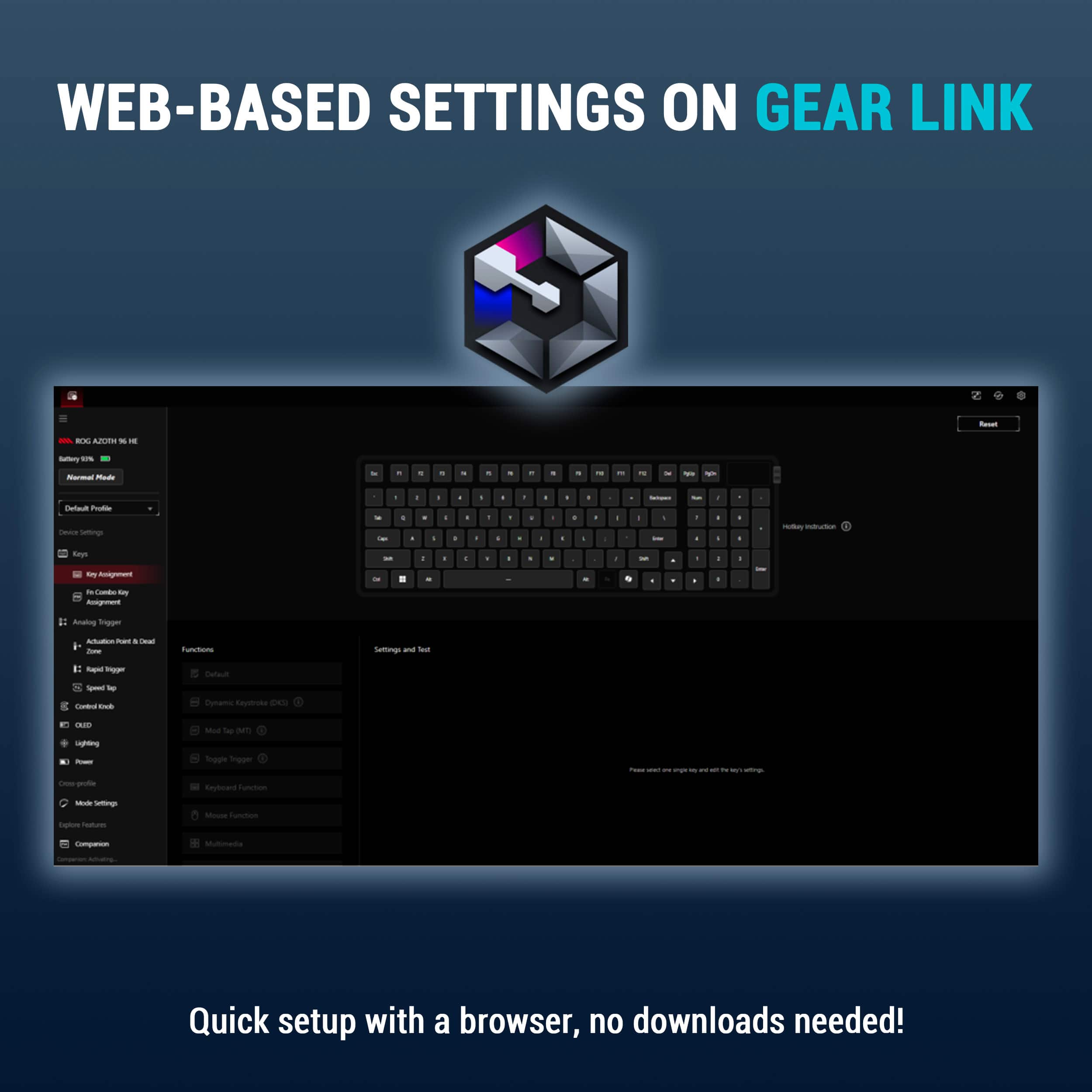
|Posted .This reviewer received promo considerations or sweepstakes entry for writing a review.This is the keyboard you set to your preferences versus adjusting to the sensitivity of the keyboard. When I first unboxed the keyboard and plugged it in, I could hardly touch the keys without causing it to register a j, semi-colon, or k; apparently, I have a heavy right hand. The applications to adjust the keyboard settings are web based so no application needs to be installed, which I absolutely love. You can install two different background apps that help support outlook notifications on the screen and such, but you don’t need to install anything for the keyboard to work and to adjust settings, which is really nice for utilizing the keyboard with my work computer. I first adjusted the general ‘weight of the keys’ or how much you had to depress the key in order for it register; then I went back through and adjusted individual keys like back space, tab and some of the numbers that I always miss a stroke on when I am typing because I don’t hit them hard enough. Then I changed others like the caps lock that I will accidentally hit to need to be bottomed out before registering. This has made my typing experience absolutely amazing for work and home. So, this has turned into my new keyboard for everything at my desk and with the different connection options it has made it extremely easy. It is wireless, wired, and Bluetooth; and Bluetooth allows up to three different devices that you can switch between. So, I have my android tablet on Bluetooth one, my apple tablet on Bluetooth 2 and my folding phone on Bluetooth 3. I played with the wired and wireless to my gaming computer and the wireless is flawless for gaming. But then I switched to wireless to the work computer and wired to my gaming computer just so I don’t have to reconfigure my connections every time switch between what I am doing. For gaming it is extremely responsive and for me I can’t tell the difference between wired and wireless while gaming with this. I set the knob on the side to control volume as that is my preference, but it can be customized to a few different settings. The keyboard is solid, when you set it down it isn’t going anywhere, and the rubber wrist support is solid as well, they aren’t connected but they also don’t move on my desk and the whole keyboard is just extremely well designed from my perspective.
I would recommend this to a friendWow, high end gaming keyboard!
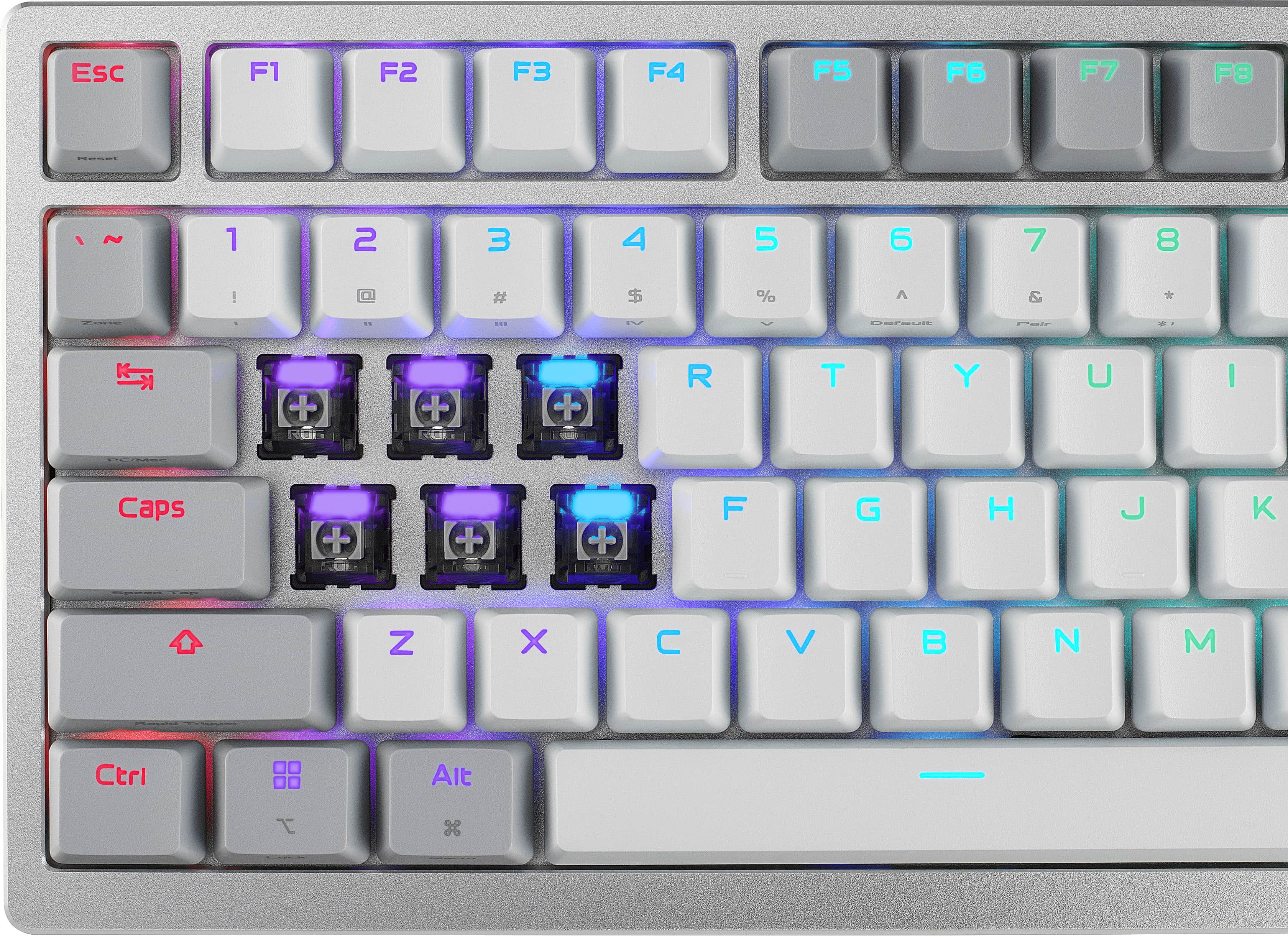
|Posted .This reviewer received promo considerations or sweepstakes entry for writing a review.This product is possibly the most luxurious keyboard I have ever put fingerpads to. Yup, you heard me, luxurious. The weight of the box upon initially receiving it was unbelievable. The tactile feel, the sounds, the screen, the programmability and integration with software, are all top shelf. Gear Link, the programmable platform to accompany this keyboard is very effective, but still has a few small bugs. The feel and materials are quite heavy and well made the metal top cover is an extra perk. The hot swappable switches with customizeable key depth is a neat feature but not something I've played with yet. I'm still finding ways to use the 3 way control knob, but it's very useful and customizeable. Prior to this keyboard I had attempted to switch to ten keyless, and I'm so happy to be back! Multiple connection types between wireless, bluetooth, and wired, round out a very full feature set. The included comfortable wrist rest takes up more space than I want it to, but it's VERY comfortable. My only issue with this keyboard, and it's probably justified, is that the value is a bit ofa struggle at this price point, but the feature set seems to justify the price.
I would recommend this to a friendBest keyboard so far!!!
||Posted . Owned for 2 weeks when reviewed.This reviewer received promo considerations or sweepstakes entry for writing a review.Premium keyboard all around. Keys are buttery smooth
I would recommend this to a friendThe best Keyboard
||Posted . Owned for 1 month when reviewed.This reviewer received promo considerations or sweepstakes entry for writing a review.The best with HE keys you can get. Also tri mode is good
I would recommend this to a friendSuper Keyboard, OLED Touchscreen Display is Great
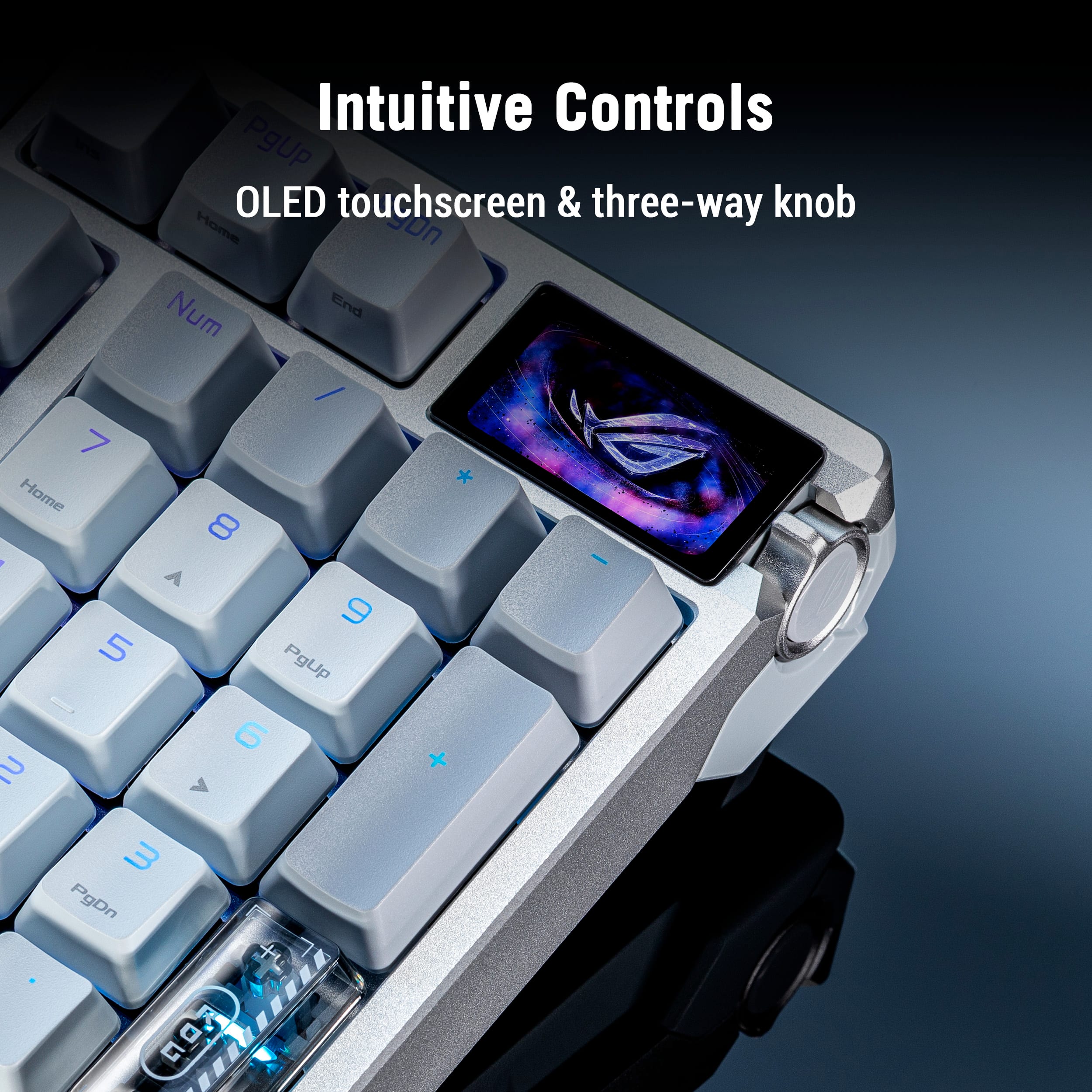
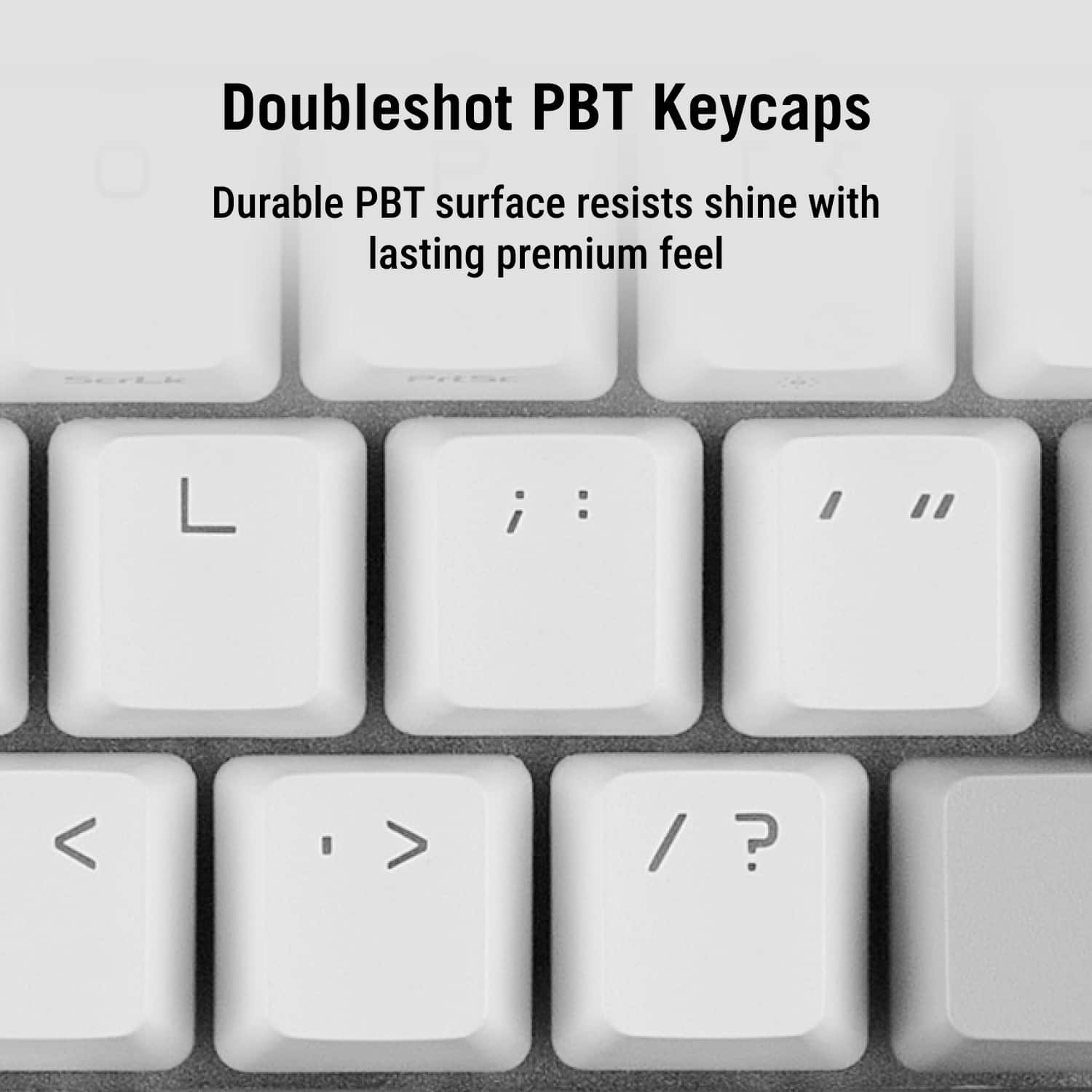
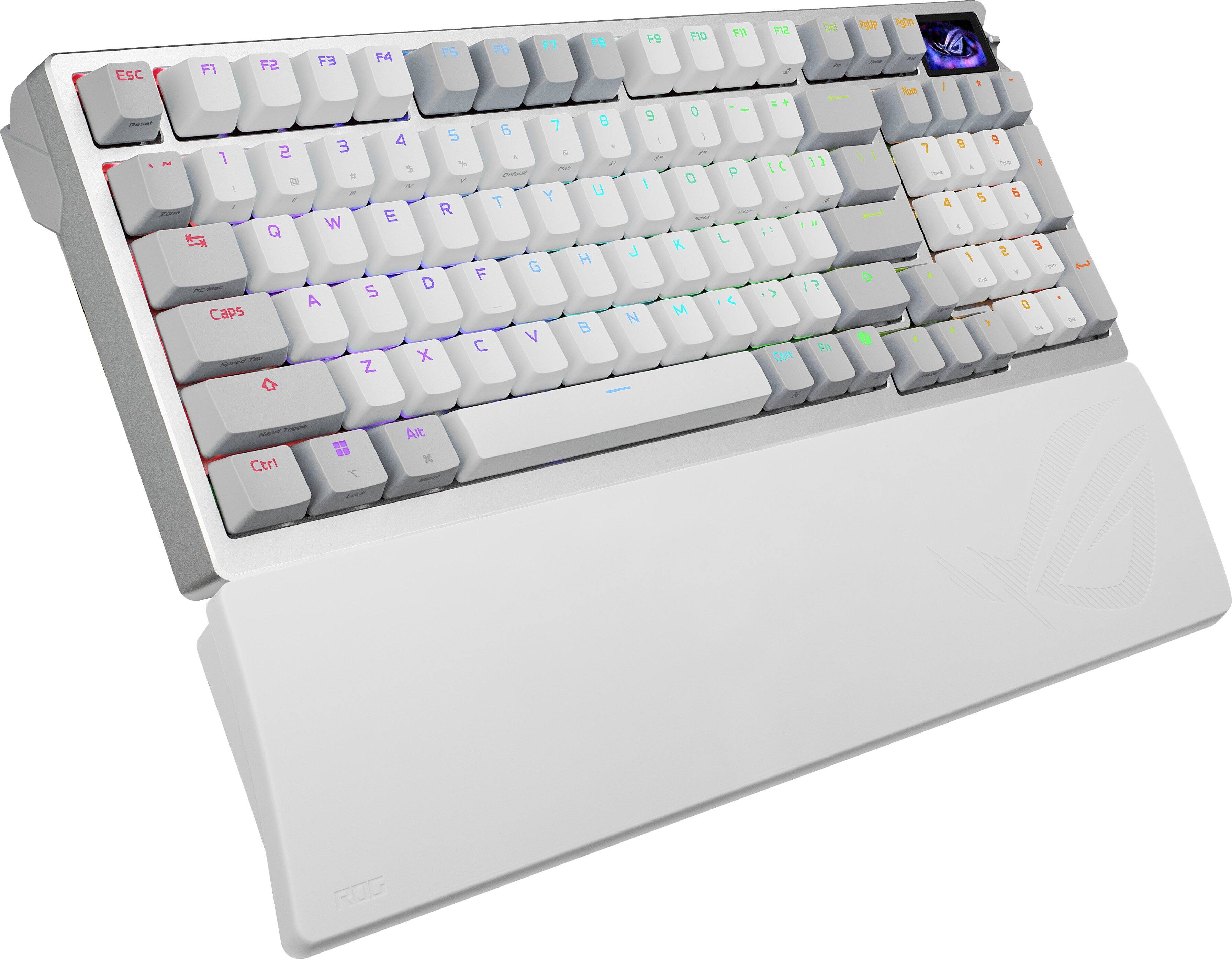
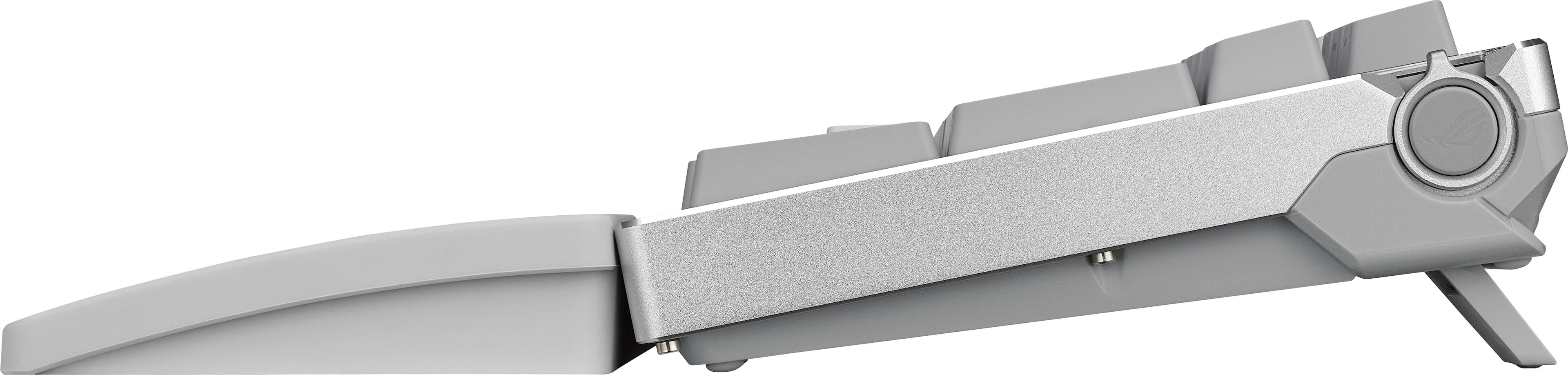
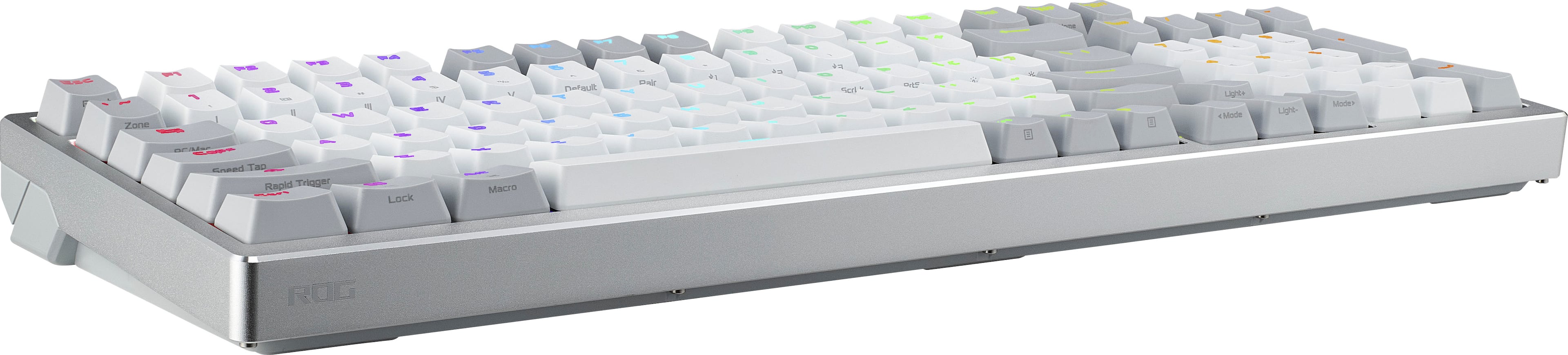
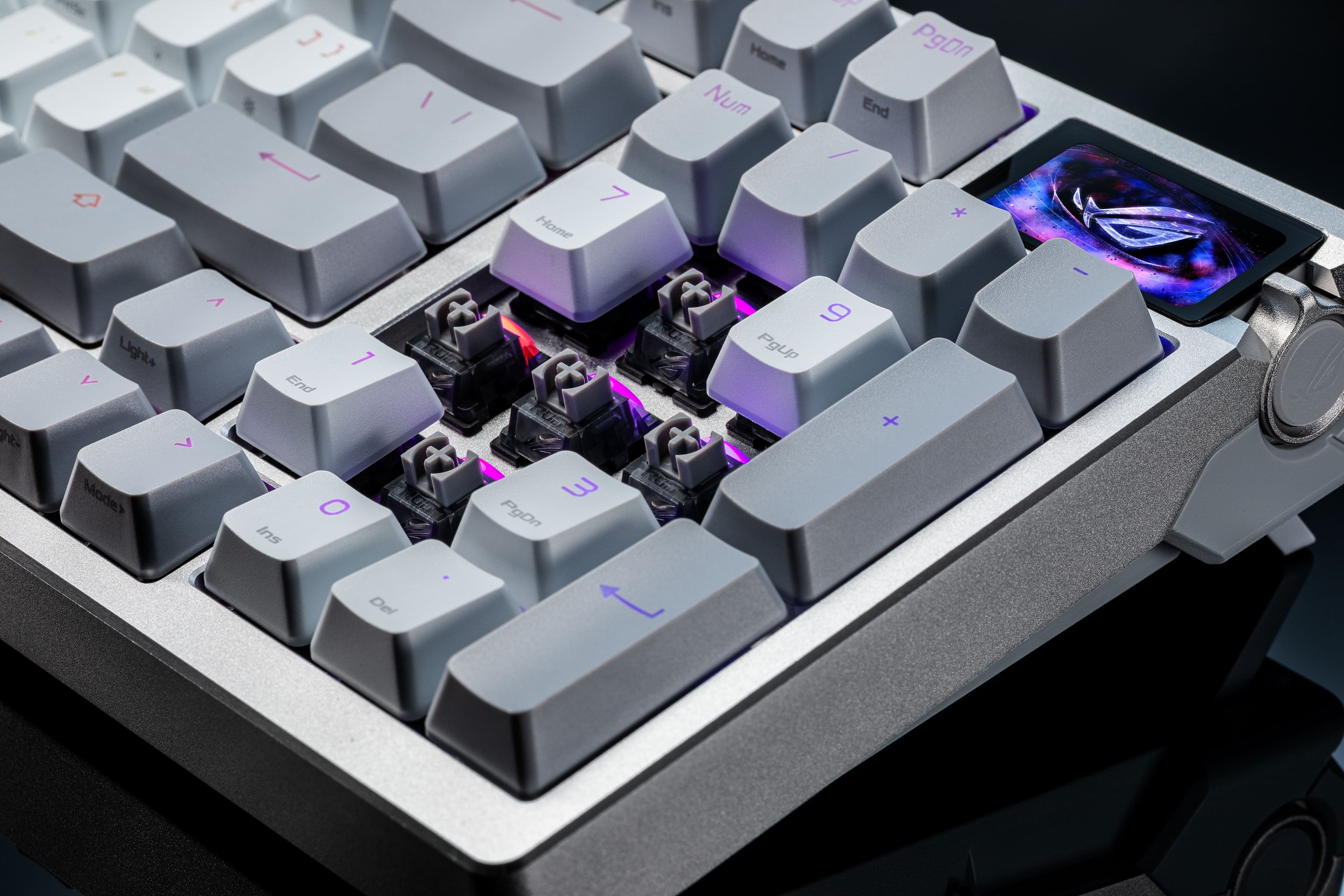
|Posted .This reviewer received promo considerations or sweepstakes entry for writing a review.This ROG Azoth 96 HE gaming keyboard is just simply outstanding. It's fully customizable but two features really stand out for me. One, an OLED touchscreen with a status bar, and second, a combo Control Knob and Function Switch Button giving the ability to customize settings on the fly right from the keyboard. (I'll get into those a little further down.) It has a high quality build with a metal frame with 3 tilt positions. The keyboard has tri-mode connectivity (wired, wireless, and Bluetooth) and it is able to connect to 5 devices. It's 8K polling rate is by wired or wireless connection. Use Bluetooth connections for non-gaming devices as the polling rate would probably be no more than 125 Hz. The switches are hot-swappable magnetic HE ROG HFX V2 switches. Magnetic HE (Hall Effect) type switches are what allows adjustment of the actuation (trigger) points of the keys and the hot swappable means you can pull a single switch and replace it without even turning off or disconnecting the keyboard. The keycaps are the very durable double-shot PBT. The app Gear Link is used to customize the keyboard and is browser based rather than downloadable, making it very easy to switch devices without having to download and install an app on every device. With the Gear Link browser window, you can change key assignments, key combos, actuation point & dead zones, rapid trigger settings, OLED options, control knob options, lighting and power options. There's also what's called Companion apps, one labeled Keyboard, the other labeled Utility. They're needed to enable some of the OLED screen options. One other setting available is labeled Mode Settings. There are three settings which balance power consumption and polling rates. In Normal Mode polling rates are 250 Hz when idle and 8K Hz when pressed, but individual keys can be selected to always be 8K Hz. The Zone Mode most keys act like in Normal Mode, but common gaming keys are always 8K Hz, keyboard lighting is turned off, and the OLED brightness is reduced. In Power Saving Mode all keys are set to 250 Hz, and the keyboard and OLED lighting is turned off. Now for the best parts (to me) of this keyboard - the OLED touchscreen is 1.625" wide and .875" tall on the upper right of the keyboard. It has a vertical status bar on the left-hand side that displays icons for six of nine possible options- Cap Lock, Num Lock, Connection Status, Battery Status, Rapid Trigger, Mac/PC Mode, Profile, Speed Tap, and Scroll Lock. There are five OLED screen effect display options to select from through the Gear Link browser window app- Image, Date/Time, Laptop Battery, Hardware Information, and KPS (keystrokes per second). The Date/Time, Laptop Battery, and Hardware Info options require the Companion apps. The Image option is the default and displays an animated image that can be changed by swiping up or down. There's a set of six ROG images, other custom images, or you can upload your own images. The KPS option displays your keystrokes per second in real time and the Max KPS you've hit in that session. The Hardware Info option only shows CPU voltage. The status bars still show regardless of which display option is active. Alongside the OLED screen incorporated into the side edge of the frame are a lever like Control Knob and Function Switch Button. Pressing the button you can change between functions- System Volume, Media Track, Actuation Point, Rapid Trigger Sensitivity, Keyboard Brightness, OLED Brightness, or Customize (create macros on the fly!). The Control Knob is used to change the setting of the selected function and is moved Up, Down, or Depress, and what it does depends on the active function. The active function and Control Knob actions are shown as icons on a vertical status bar on the right-hand side of the OLED screen. The box says per key RGB LEDs but with the Gear Link browser app the RGB lighting options are whole keyboard only, at least on my PC. I'm not sure if that's because I'm on an ASUS ROG PC with the Aura Creator app for customizing RGB lighting. A keyboard is displayed in the Gear Link Lighting tab, but it is not active, only preset whole keyboard options can be selected. I can only do per key RGB lighting through my Aura Creator app. Again, this may be due to my particular setup. Included with the keyboard are a wrist rest, USB-C cable, USB-C to A adapter, a USB dongle extender, keycap puller, switch puller, 3 ROG themed keycaps, 1 Ctrl keycap, warranty book, quick start guide, and ROG sticker. This keyboard is expensive but it's high-quality and has all the gaming functionality needed. But the OLED touchscreen display is what really sealed the deal for me. I love it.
I would recommend this to a friendMajor software issues
||Posted . Owned for 1 month when reviewed.This reviewer received promo considerations or sweepstakes entry for writing a review.I uploaded a custom GIF to the keyboard (368x194, 24 fps, ~7.5 sec, total frames < 180—all specs taken directly from the ASUS guide). It was the exact same GIF I had previously uploaded to my Azoth Extreme, which features the exact same screen. The very same file. In Gear Link and on the Azoth Extreme, the GIF plays back perfectly; however, on the Azoth 96 HE, it lags severely. All my other custom GIFs lagged in exactly the same way. I then placed the two keyboards side-by-side so their screens were next to each other and compared the factory-preloaded GIFs (there are only 6 of them in total; all—with the exception of the dark purple ones—are identical). On the Azoth 96 HE, they played back more slowly. I reset all settings to factory defaults several times, but it made absolutely no difference. I connected the keyboard to a different PC, but—unsurprisingly—that didn't help either. Nothing worked at all. Another issue: the settings for text macros and website shortcuts periodically just stop working. Yet, if you open Gear Link, all the macros are clearly visible there. It looks as though everything is configured correctly, but it simply doesn't function. I’ve already returned two of these keyboards. The one-star rating here is merely to grab attention. If they fix all these issues, it will be a 4/5 product (very dim backlighting). And a couple of other points that aren't important to me, but might matter to you. No reviewer will tell you about these: 1. The software isn't exclusively cloud-based. To use the companion app, you have to download and install it directly onto your PC. If you're using a work laptop where installing third-party software is prohibited, you won't have access to text macros, website shortcuts, or certain screen customization settings. 2. There is no gamepad emulation mode.
No, I would not recommend this to a friendBrand response from ASUS Answers
Posted .Dear Vladik299792458,
Thank you for sharing your detailed experience with the ROG Azoth 96 HE Gaming Keyboard. We sincerely apologize for the issues you encountered, including lagging GIF playback, inconsistent macro functionality, and the differences you observed compared to the Azoth Extreme.
Your feedback is very valuable to us, and we will ensure it is passed along to our product team for further review.
If you still have the device and would like further assistance, we kindly recommend contacting our ASUS Support Team directly at https://www.asus.com/us/support/callus/. Our specialists can investigate the situation in detail and provide guidance on possible solutions or repair options.
We stand behind our products and continuously strive to improve our products and processes to achieve customer service excellence. For more information, email us at customerloyalty@asus.com and include the case number "N2604003174-0001" as a reference. We will do our best to resolve your case quickly. Your feedback is very important to us and enables us to improve our support channels. Thank you for choosing ASUS.
Best Regards,
Chantae
ASUS Customer Loyalty US Support
My favorite gaming keyboard so far!
|Posted .This reviewer received promo considerations or sweepstakes entry for writing a review.When it comes to gaming accessories, and specifically gaming keyboards Asus is always at the top of my list. And here again they prove their gaming accessory dominance. The keyboard itself looks amazing. Very solid build, perfect haptics and overall typing feel. And of course the gaming performance cant be matched. I really like the new mini OLED screen that shows system info and has other customizable settings as well. Its nice to be able to just glance over at it and get the relevant info you need without having to pause whatever you doing. Especially during hectic gaming. And of course this has it where it counts. Gaming is amazing and with all the customizable aspects of this keyboard you can tweak things to be YOUR perfect keyboard. And being able to adjust the actuation of the keys is a game changer. (Pun intended). You can adjust the actuation to meet your needs if you want super quick response its just a setting away. Overall this is easily the best gaming keyboard I have ever had. And I highly recommend it to anyone serious about their gaming performance. Love it!
I would recommend this to a friendA Great Feeling Keyboard
|Posted .This reviewer received promo considerations or sweepstakes entry for writing a review.Intro: Get this keyboard and these are the reasons why. Build Quality: I’m not sure what this is made from, but it is very heavy and has the feeling of something very well made, not the cheap plastic of most other keyboards. It comes with a heavy wrist rest made from heavy duty rubber that also feels like it is made from great materials. The Keys: This is the best-selling point. The keys are stable and don’t move to the sides at all. They are very quiet. I’ve had a few different keyboards, and these are the quietest and best feeling keys. They have your typical vertical movement, but you can select the actuation point which is a great feature that I am so thankful for, but more on that later. When typing, I rarely make any mistakes, I think partly because of the adjustable actuation point. There are functions written on the front of some of the keys and can be used by using the Fn key. The writing on the front of the keys for the functions is very small and hard to see. This has your co-pilot key. The keys are lighted and there are several different patterns you can select from either using the software or the OLED screen. The patterns are typical for an RGB gaming keyboard. Wrist Rest: The wrist rest is made from stiff heavy rubber. It does not slide around. One thing worth pointing out is that there is no cushion if that is your thing, however the firm smoothness of it feels good and better to have it than not. The OLED Screen: This is more of a gimmick than something useful that you can’t live without. First off, there is a animated background that defaults to the ROG logo. But you can change the background to some of the other canned ones or use your own. All the indicators are very small and are somewhat hard to see. On the left side of the screen, there are indicators that are used to display caps and num lock. There are no caps lock or num lock indicators on the keys themselves. There is a battery indicator. On the right side there is an indicator based on the function you have set for the dial on the right. By pressing the dial button, you can change what the dial does. This changes the indicators on the right side of the screen that describe what the dial does. The dial can change a bunch of different settings, but they can also be changed in the software which is probably where you are going to do it, not on the screen. The only two uses I have found for the dial (and screen indicator) are the volume and multimedia controls. Those are ones that you can cycle through when pressing the dial button. There are no keys available for those functions, so you have to use the screen. The button and up/down control feel fine, what you might expect, but nothing that will blow your mind. This is a touch screen but only allows you to change the background and view the current keys presses per second so not very useful. Connection: You have three options for connecting the keyboard to your computer, USB, Bluetooth, and the dongle. I have tried all three and they work flawlessly. The wireless connections and very stable with no lost connections. For the dongle, all you have to do is plug in the dongle and switch it to dongle mode. Configuring Bluetooth is typical as in any other Bluetooth device and works right away. There is a switch on the back to switch it to Bluetooth mode. The USB connection is made with the included USB cable, or you can use any USB-C cable. Just plug it in, change the switch to USB mode and it just works. The battery is changed through the USB-C port. You can charge it by plugging it into the computer or through a dedicated USB changer. Replacement Caps: The unit comes with a few replacement caps (return and esc) and a tool to replace them. I tried and had the hardest time pulling them off, even with the tool and the help from YouTube videos. I’m not sure if it is just hard or I was doing something wrong. Anyway, I was finally able to replace them, and all was well. Software: First off, the software is done through the browser so there is nothing to install. I love that. The software connected to the keyboard every time without any problems. You just must make sure the keyboard is not asleep. If it is, just wake it up and the software automatically connects to it without any human interaction. The following settings are available… Key assignment: Allows you to set individual keys to: • Default • Dynamic Keystroke: didn’t notice any difference • Mod Tap: Changes the time between when the key is pressed and the action takes place • Toggle Trigger • Keyboard function: Sets the key that is mapped to another key • Mouse function: Maps a mouse button to a key • Multimedia: Maps a key to a multimedia function • Quick action: Maps a key to any of these functions: Copilot, show desktop, switch apps, close apps, cut, copy paste • Disable: disables the key Fn Combo Key Assignment: Has the same settings as above except requires pressing the Fn key with the other key Actuation Point and Dead Zone per key or global: • Sets actuation in mm – love this feature since I tend to press adjacent keys when typing making mistakes and this completely solves that • Top Dead Zone in mm • Bottom Dead Zone in mm Rapid Trigger: Sets the downward location in which the key starts continuously triggering Speed Tap: Sets the key binding of the A and D keys Control Knob: Sets the function of the knob to the right of the screen. This does the same thing as pressing the knob button to set its functionality. The available functionality is: • System Volume • Multimedia • Actuation Point • Rapid Trigger Functionality • Keyboard Brightness Adjustment • OLED Brightness Adjustment • Switch Lighting Effect OLED: Sets the following: • Brightness • Background animation (canned or custom) • Background static image (canned or custom) Lighting: Changes the RGB lighting which is typical of the lighting effects on other keyboards. You can change the different settings of each type of lighting effect. The lighting effects to choose from are soft of uninteresting. Power: This allows you to change the following settings: • Shows current battery percentage • Allows you to set the battery percentage when the keyboard goes into low power mode • Sets what the keyboard should do when it goes into low power mode: Turns off key RGB lighting and OLED screen, or dims key RGB lighting and OLED brightness • Sets the time the keyboard goes to sleep between 1 and 10 minutes Mode Settings: • Normal: By default, all keys are set to smart power-saving mode (using a polling rate of 250 Hz when idle and switching to 8K Hz when pressed). This mode balances performance and power saving. You can also set certain keys to always use 8K Hz. • Zone: Enabling Zone mode sets the polling rate of frequently used gaming keys to 8000 Hz, while the remaining keys are set to smart power saving mode (polling rate is 250 Hz when idle, and 8000 Hz when pressed). To improve performance in Zone mode, the keyboard lighting is turned off, and the OLED brightness is reduced to provide the best gaming experience. Note: The list of frequently used keys is customizable. • Power Saving: Enabling power saving mode sets the polling rate of all keys to 250 Hz and turns off the keyboard lighting and OLED display to reduce power consumption. You can also update the dongle and keyboard firmware, but I was not able to successfully do this. Conclusion: This is my favorite keyboard after having several different ones. The keys feel amazing. The software is done through the browser, so you have it install anything. The build quality is excellent. There are plenty of settings that allow you to customize them, and noteworthy the hall effect keys. I really hope you decide to buy one.
I would recommend this to a friendReference Keyboard
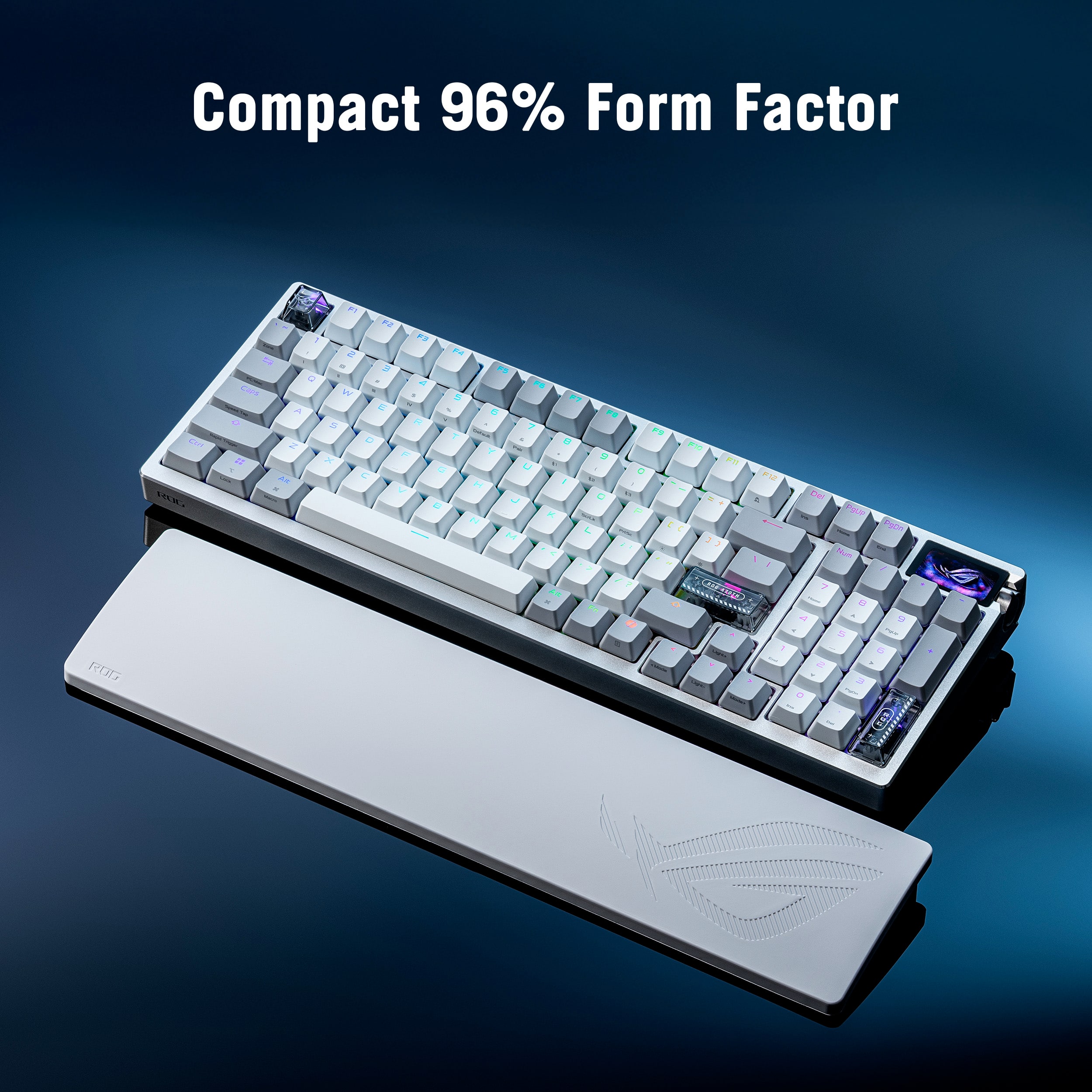
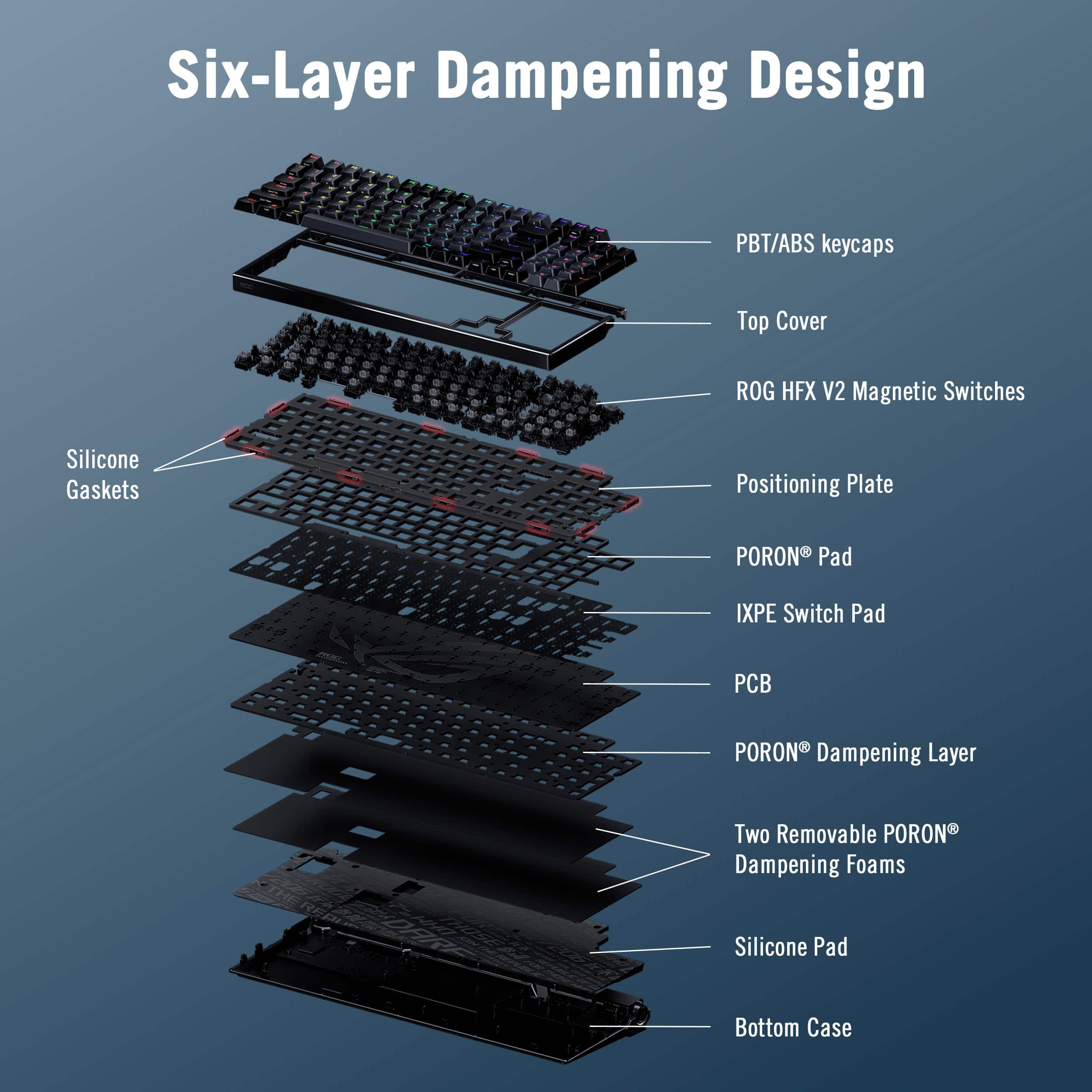
|Posted .This reviewer received promo considerations or sweepstakes entry for writing a review.This is one of a kind keyboard, it is a powerhouse keyboard for serious gamers. I never thought I would say that however I find that this ASUS ROG Azoth gaming keyboard is one of best. Let me explain why I think so. First of all, let me state that the big elephant in the room for this ASUS keyboard would be its price tag. I wanted to mention it in the very beginning of this review as a few of budget cautious buyers may be put off by it. However the technological advancements and features of this keyboard may sway you to buy this keyboard and experience it. Here are a few features that stood out for me at first: - Top-tier magnetic switches - Ultra‑low latency - OLED display + control knob - Premium build and adjustability Another great point is this gaming keyboard has a compact layout that still includes a number pad. Being a wireless keyboard, it performs amazingly well in connectivity thanks to its Tri-Mode connectivity. If wireless connectivity is not your thing, get it connected via USB-C cable and you are set to play for hours. The standout enhancement for user experience is the built-in 1.47-inch full-color OLED touchscreen (yes, you heard it right - OLED!), which works in tandem with a tactile three-way control knob. This sophisticated hardware pairing serves as a dedicated command center in my opinion, allowing you to monitor critical battery levels or real-time system metrics at a glance. Even more significantly, the tactile knob provides a seamless interface to modify media settings and fine-tune magnetic actuation points instantly. This level of direct hardware control optimizes workflow and gaming performance by eliminating the disruptive need to click away from your active window to access software configurations for example. It is simply satisfying to turn that knob in general. Typing long reports, executing commands or gaming on this keyboard is a joy to me. The auditory profile of this keyboard is a direct result of its sophisticated internal construction (excellent build!). Thanks to its comprehensive six-layer dampening system, which integrates high-quality PORON foam with a precision-engineered bottom layer silicone pad, the typing experience is remarkably refined. These specific materials work together to eliminate the annoying high-pitched sounds often associated with mechanical boards. Instead, the keystrokes produce a pleasant flow of "clickety clackety melody". This ASUS ROG Azoth keyboard stands out in its build quality and is one of the best keyboards I have ever experienced. Your gaming experience will be elevated to the next level.
I would recommend this to a friendA New Fave For Me!
|Posted .This reviewer received promo considerations or sweepstakes entry for writing a review.I rarely find myself impressed with gaming keyboards...they often leave me feeling like the "cool factor" is dimmed by the tedious software and updates required to make things work. The ASUS - ROG Azoth 96% Wireless Magnetic Hall Effect RGB Gaming Keyboard with Hot-Swappable ROG HFX V2 Switches immediately impressed me with its plug and play simplicity. Of course that isn't the top concern for many but for me it was a huge positive. As a gaming keyboard, which is of course what this is, it is top tier in my book. The swappable switches, the OLED Touchscreen, the built-in three-way knob, the quality build, and the seamless connectivity to all devices I have tried quickly made this the best gaming keyboard I have ever used and actually want to continue to use. For non-gaming use I still enjoy it although the one glaring thing that stands out to me in that use scenario is what typically would be a huge positive in gaming...the quiet keyboard...feels a little lacking for those of us that enjoy the feedback clicking sounds you get when typing words. It ultimately is a preference thing of course and isn't such a huge deal that it makes me not want to use it for non-gaming tasks...it just take a little time for me to get used to when using it for my writing tasks. Overall, this is perhaps the best wireless gaming keyboard I have ever used with the most robust customizable experience and excellent battery life to fit my personal needs.
I would recommend this to a friendMy Perfect Keyboard
|Posted .This reviewer received promo considerations or sweepstakes entry for writing a review.[PROS] Solid Build Quality and Design: From the frame to the switches, this device is built very soundly in its design. It's a mixture of metal and plastic, but its still sturdy. I'm a fan of how the layering of pads makes the sounds tolerable and keystroke responses fluid. The OLED screen is sized appropriately, and has a very vibrant with icons that display the most important info. Excellent Battery: I don't have the bandwidth to game for hours, but I have been using it also for work productivity. After several days, I have yet to drain the battery completely. Cohesive Blend of Accuracy & Latency: Gaming on the ROG Azoth has been pure joy. Because of the layout, I'm able to able to have comfortable hand placement and not trigger inadvertent actions. Furthermore, my shooting and striking skills were definitely quicker than usual across various games. I'm not saying I'm a better player now, but the way this keyboard registers input is pretty nice especially in wired mode. Simplistic Tuning: I was able to do a number of adjustments and actions via the dial connected to the screen. Whether its adjusting actuation or lighting, I don't feel bogged down to go directly to a program. Speaking of that, changes can be made through the web-based app which is very easy to use. The interface of Gear Link is very intuitive and flows well. I was able to get extended customization that wasn't available through the on-keyboard screen. [CONS] Minor complaint: Despite being comfortable, the wrist rest is a lint magnet. Debris catches into the engraved logo which makes it harder to remove without a compressed air can or small brush. Furthermore, I did wish for it to have been cushion based instead of silicone, but I can deal with it. [CONCLUSION] A keyboard can only do so much, but the ROG Azoth does everything necessary for me. It scores an A+ for me in the departments of design, battery life, and overall performance. I would highly recommend it.
I would recommend this to a friendBeautiful customizable keyboard
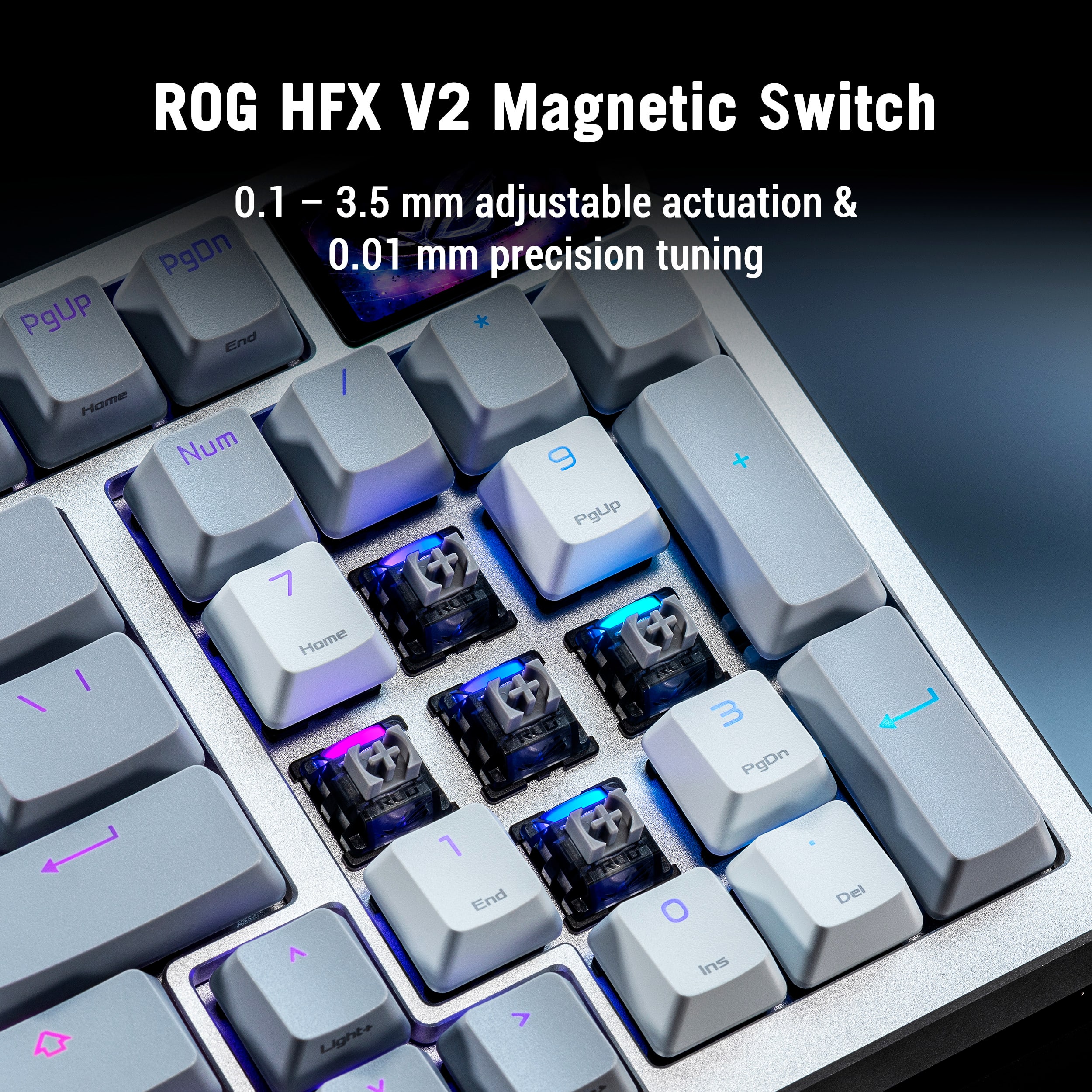
|Posted .This reviewer received promo considerations or sweepstakes entry for writing a review.OVERALL Impressive keyboard. It has an adequate build quality in a brushed aluminum top casing and plastic bottom. While I would have liked, considering it's price point, a matching aluminum bottom case, the shell holds firmly with zero flex. It offers tri-mode connectivity using either a USB-C cable, 2.4Ghz dongle, or Bluetooth connection. It arrives with a keycap puller made of plastic, which feels to be fairly well made, a switch puller made of metal, and a silicone wrist rest. With the keycap puller, the only issue I've had with this was fitment on keys such as ESC where it was just too tight to fit between the keycap and the frame, I had to resort to my wire style keycap puller. When it fits, and there is no issue, this keycap puller feels suitable for the job. The switch puller just works with any switch. The wrist rest has adequate weight making it a good companion as it doesn't slide easily. No extra switches come with the keyboard, which from my experience seems to be fairly standard with many other hot swap keyboards. The OLED display is a nice touch to visually see some changes as they are being made to volume, media controls, point in increments of 0.1mm, and RGB brightness. Overall, it's a nice keyboard that touches on multiple areas to make it customizable to the most demanding needs. SOFTWARE Unlike other mechanical keyboards that rely on some downloadable software to make changes to settings and RGB of the keyboard. This one's a little different relying on a web based software (Gearlink) that you don't need to download. Adjustments are easy and self explanatory. It allows controlling RGB of the keyboard through it's 10 different RGB profiles, just no custom RGB profiles able to take full advantage of a per key RGB. Adjustable actuation from 0.1mm to 3.5mm in increments of 0.01mm can be fine tuned through Gearlink. Additionally, dynamic keystroke or DKS can be configured from within the same software BUILD Arrives with 1.4mm - 1.6mm doubleshot shine-thru PBT keycaps. ROG HFX V2 switches with a 0.1 - 3.5mm actuation and 0.01mm adjusting increments. They arrive pre-lubed making each key press feel smooth without ping. To gauge battery levels, I first used the keyboard in a wireless 2.4Ghz state with default RGB mode and 100% brightness. That gave me slightly over 30hrs of runtime, which seems to me like a very good result. Using more conservative settings and battery saver modes will increase this by significant values. You at least won't be draining it in a single gaming session. CONCLUSION Nevertheless, I really like this keyboard! The aesthetics are nice, wrist rest is well throughout and heavy that it won't slide around while in use. The Web based software has it's pros and cons, but at least doesn't force another software to be installed just to manage your keyboard. Pricing might be the biggest factor to consider presently as you may not find enough value of coming from a similar keyboard or prior generation. All in all, this has significant features and enough value. This is worth 4.5-stars.
I would recommend this to a friendExcellent gaming keyboard with great features
|Posted .This reviewer received promo considerations or sweepstakes entry for writing a review.I am no stranger to mechanical keyboards. I have built close to a dozen keyboards myself, as well as used multiple store-bought mechanical keyboards. Needless to say, I'm a fan of them in general. I've read about newer HE (hall effect) keyboards using magnetic switches and I've always wanted to try one. I was pleasantly surprised when I got a chance to test this new ASUS Rog Azoth 96 model. The build quality is heavy and very solid. It has a good amount of weight to it due to the metal frame and multiple layers of insulation. Keycaps are PBT, RGB lighting is good and fully customizable. Volume wheel and quick settings in the upper right with the oled screen is a nice touch. I love how you don't need to install any 3rd party software on your PC to customize the keyboard. Everything is done through a web interface, which is convenient. I also enjoyed the fact you can adjust the actuation point of the keys. Since the switches are magnetic, you don't have to bottom out a key in order for it to register. I preferred setting a deeper actuation point for typing, roughly 3mm. But setting it to 1.5-2mm was crazy responsive while gaming. Overall I would say this is an excellent, fully feature mechanical gaming keyboard that most mechanical keyboard enthusiasts would like.
I would recommend this to a friend