Customer Ratings & Reviews

- Model:
- GS-BE18000
- SKU:
- 6618204
Rating by feature
- Setup
Rating 4.4 out of 5 stars
- Range
Rating 4.5 out of 5 stars
- Signal Strength
Rating 4.6 out of 5 stars
Customers are saying
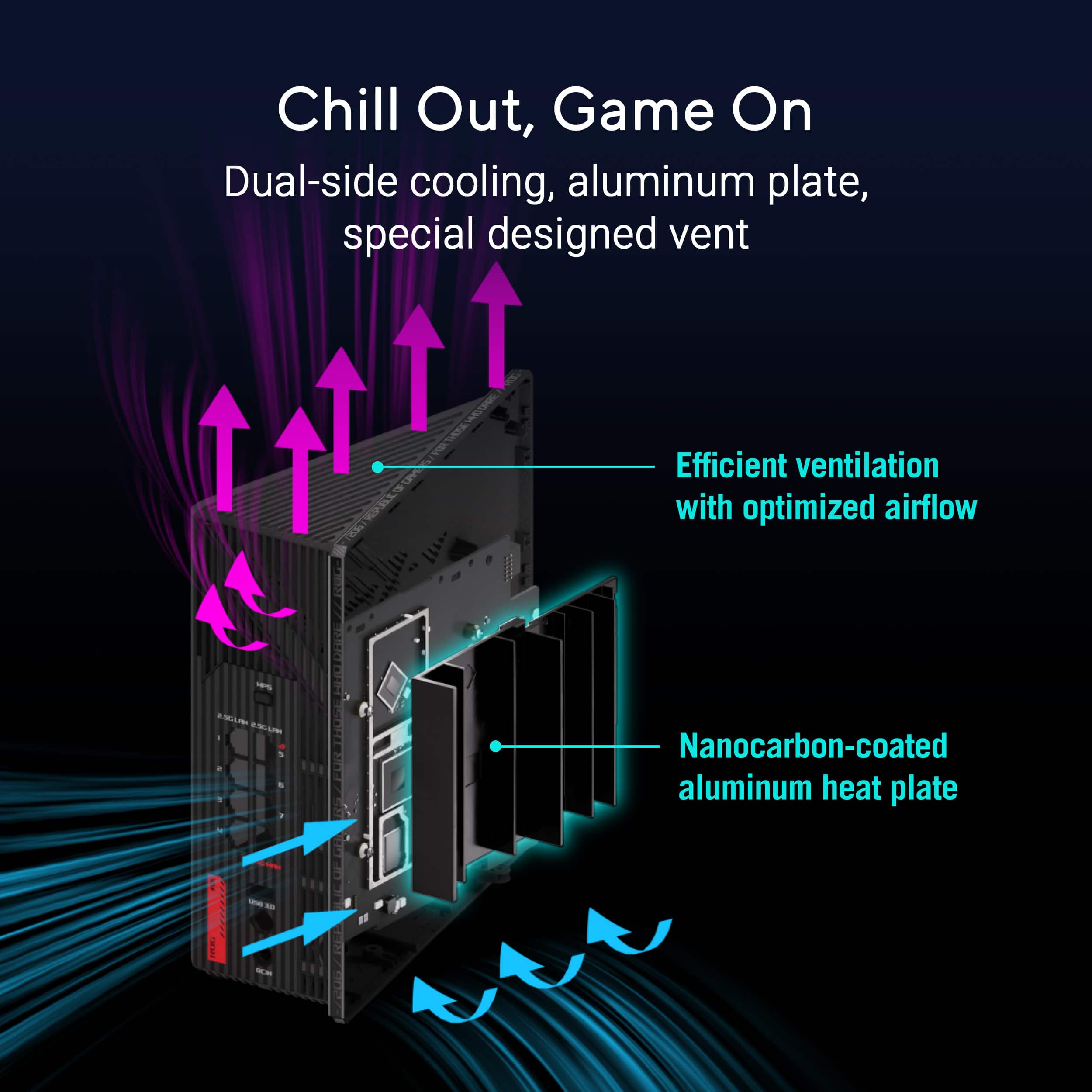
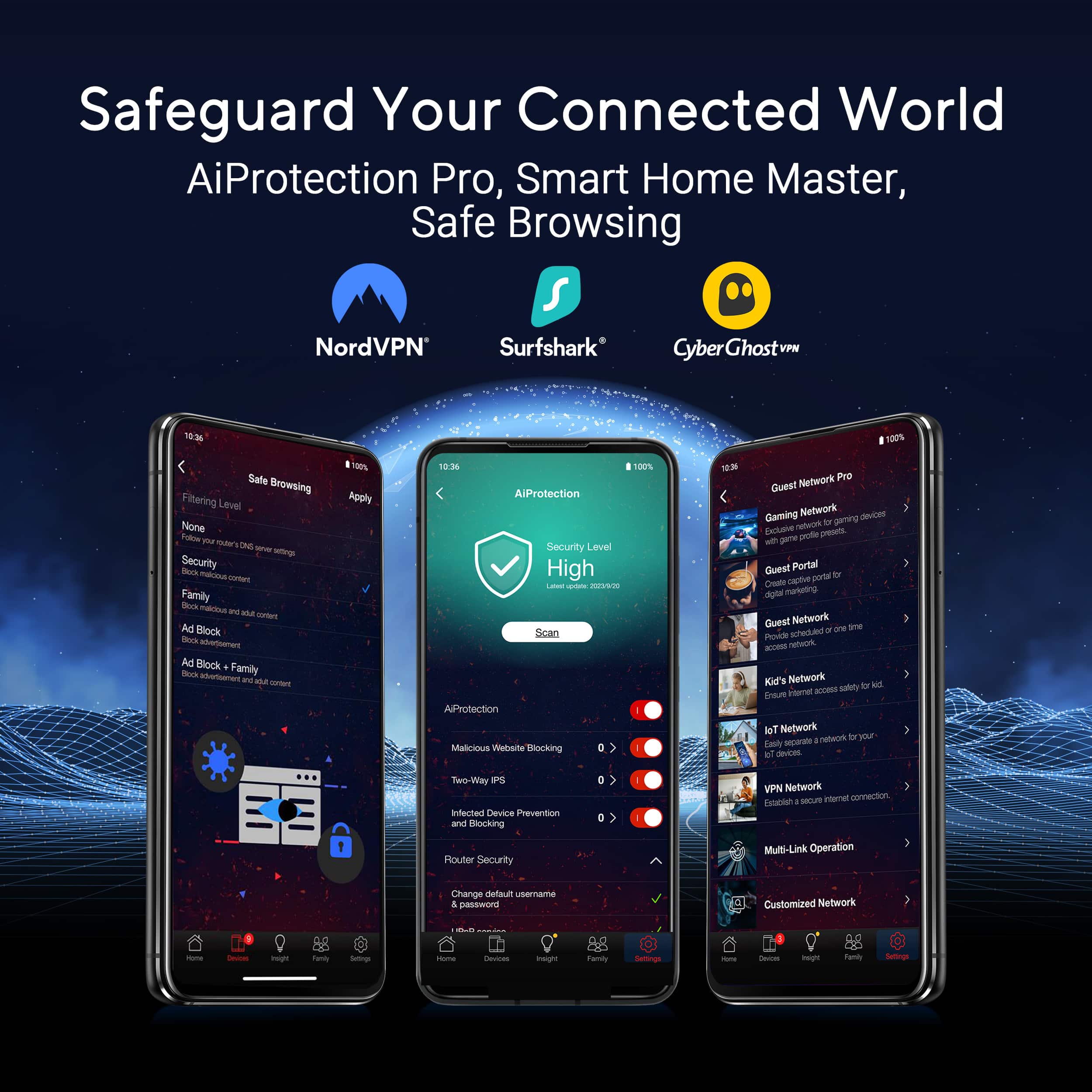
Customers commend the ROG Strix GS-BE18000 for its exceptional connectivity, overall performance, and cool design. Users appreciate the great speeds and the generous number of ports available. Furthermore, the router's signal strength, built-in security features, range, and coverage are well-received, with some customers also expressing satisfaction with its size.
This summary was generated by AI based on customer reviews.
- Pros mentioned:Connectivity, Speed
Excellent Router!
||Posted . Owned for 2 weeks when reviewed.This reviewer received promo considerations or sweepstakes entry for writing a review.I’ve been using the ROG Strix GS-BE18000 for a few weeks now, and I’m honestly blown away. This thing is a monster when it comes to speed and reliability. I upgraded from a WiFi 6 router, and the difference is night and day — everything from gaming to streaming to file transfers feels instant. My whole house gets full coverage, and I haven’t had a single dropout since installing it. As a gamer, I love the dedicated gaming ports — I plugged in my PC and console, and the router automatically prioritizes traffic, so no more lag spikes or random disconnects mid-match. Plus, setup through the ASUS Router App was super easy, and I really appreciate the built-in AiProtection security for peace of mind. The only small thing missing is a 10 Gbps port, but the multiple 2.5 G ports more than make up for it in my setup. Overall, this is hands-down the best router I’ve ever owned. It’s fast, stable, and future-proof — perfect for gaming, streaming, and smart home setups. If you want top-tier performance and reliability, the GS-BE18000 is absolutely worth it.
I would recommend this to a friend - Pros mentioned:Speed

Great for Lan and Wi-Fi
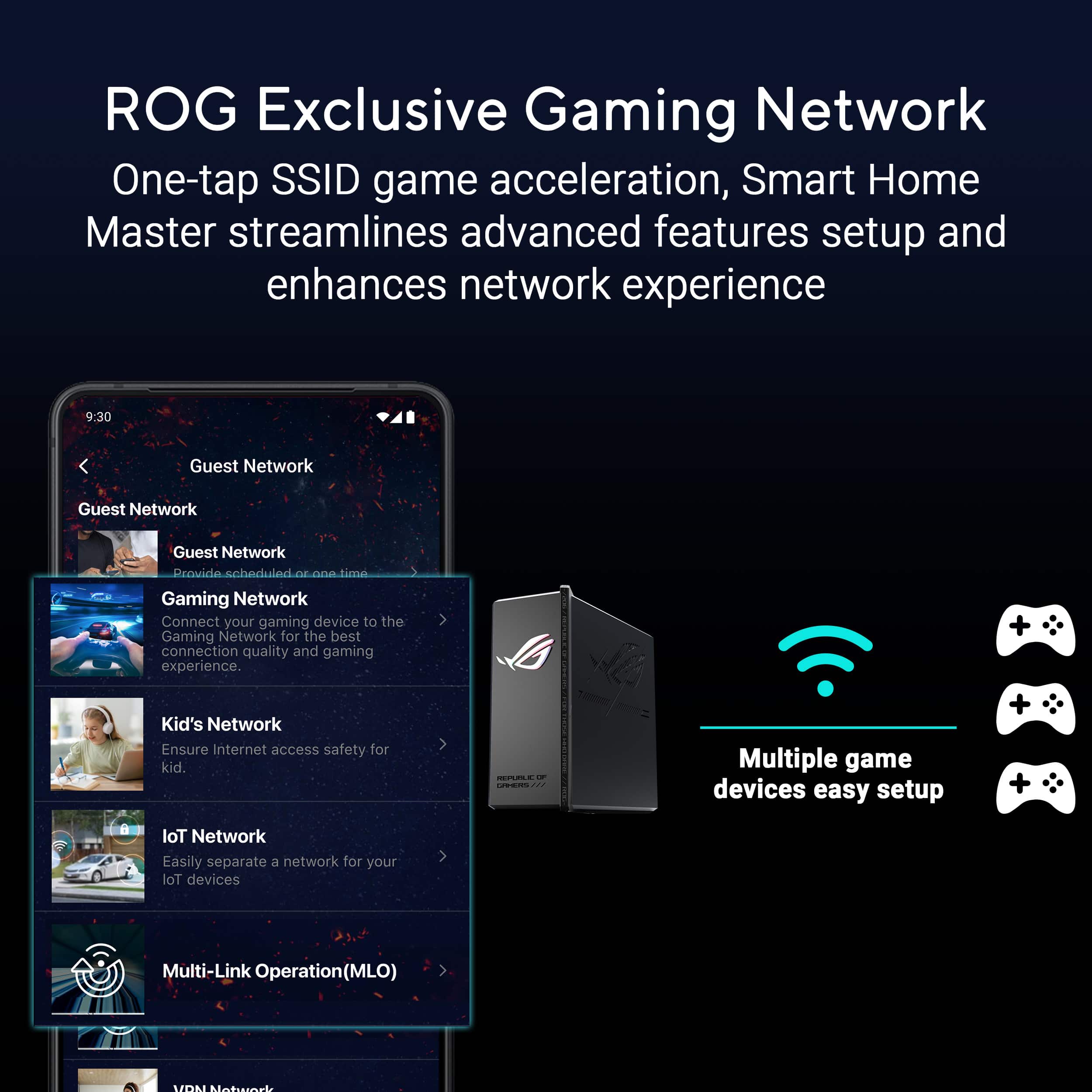
|Posted .This reviewer received promo considerations or sweepstakes entry for writing a review.I am super impressed with this router. Not only was it fast and great for Lan, but it was also great for Wi-Fi as well. My kids always insist on plugging their consoles in directly. I personally like to be plugged in directly for myself, but I run my cable out of the way. My kids do not, so the cables they use are across the floor. I set this up and disconnected them and so far, they have not complained about lag. It has a few Lan ports and a couple are dedicated just for gaming. This seems to keep the speeds up. Other routers I would have to set my PC to have priority. If I did not, if wife would hop on and start a movie I would get mad lag spikes. So far, I have not gotten that. My favorite future with this though is that the antennas are inside. My last couple routers have antennas on the outside and those are always somehow getting bumped and even broken. The router was easy to setup. I just scanned the QR code for my iPhone, downloaded the app and followed the instructions. I will admit that it wanted me to scan a QR code on the router (this same QR code is also on a sticker that has the default passwords). However, for some reason I would then get a message that would say unable to connect. Did this a couple times for each QR code. I then selected to manually connect and that worked for me. This just had me go to my phone Wi-Fi settings and connect. From there I was able to continue with setting up. It notified me of a firmware update, and so I updated that completed setting up. The app itself has a few options, and it recognized I had a phone and allowed me to prioritize phone for gaming. you can also change the color of the logo as it is RGB so a very nice touch. Doing a speed test with my phone, I got just under double the speed for download compared to my other router and the same speed for upload. I ran this a couple times, as well as ran it a couple times with my other router and then reran it a couple more times. Hopefully I can show a picture from each. The picture was the lowest number I got with this router and the highest number from my other router. But download I got on the lowest end 631 Mbps and upload was 10.9 Mbps, and for my older router I got, 361 Mbps for download and 11.2 Mbps for the upload. Overall, I am pleased with this router and recommend if you are a gamer and live in a place that has other gamers as well.
I would recommend this to a friend - Pros mentioned:Design, Overall performance
Fast, Stylish, and Surprisingly Simple
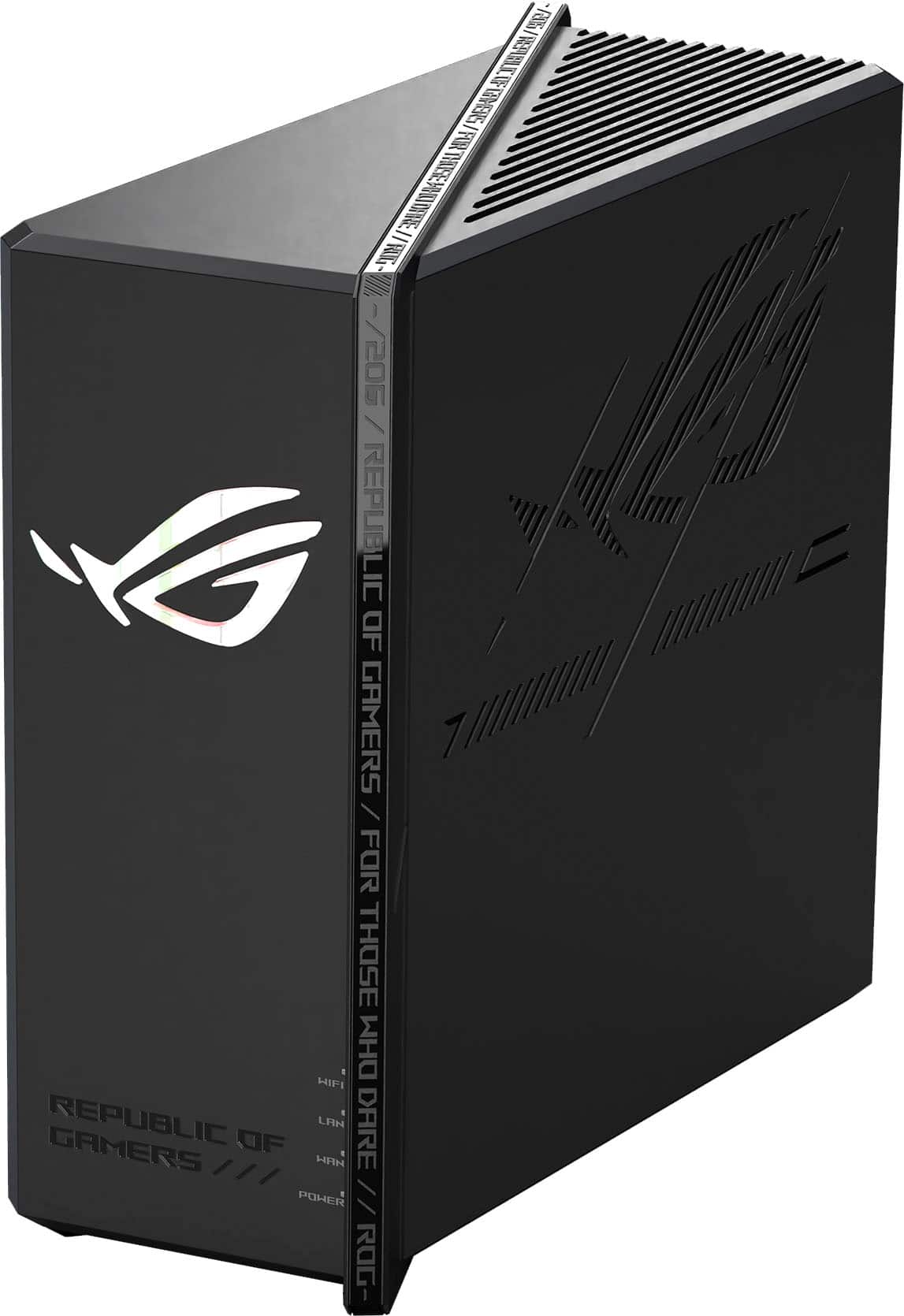
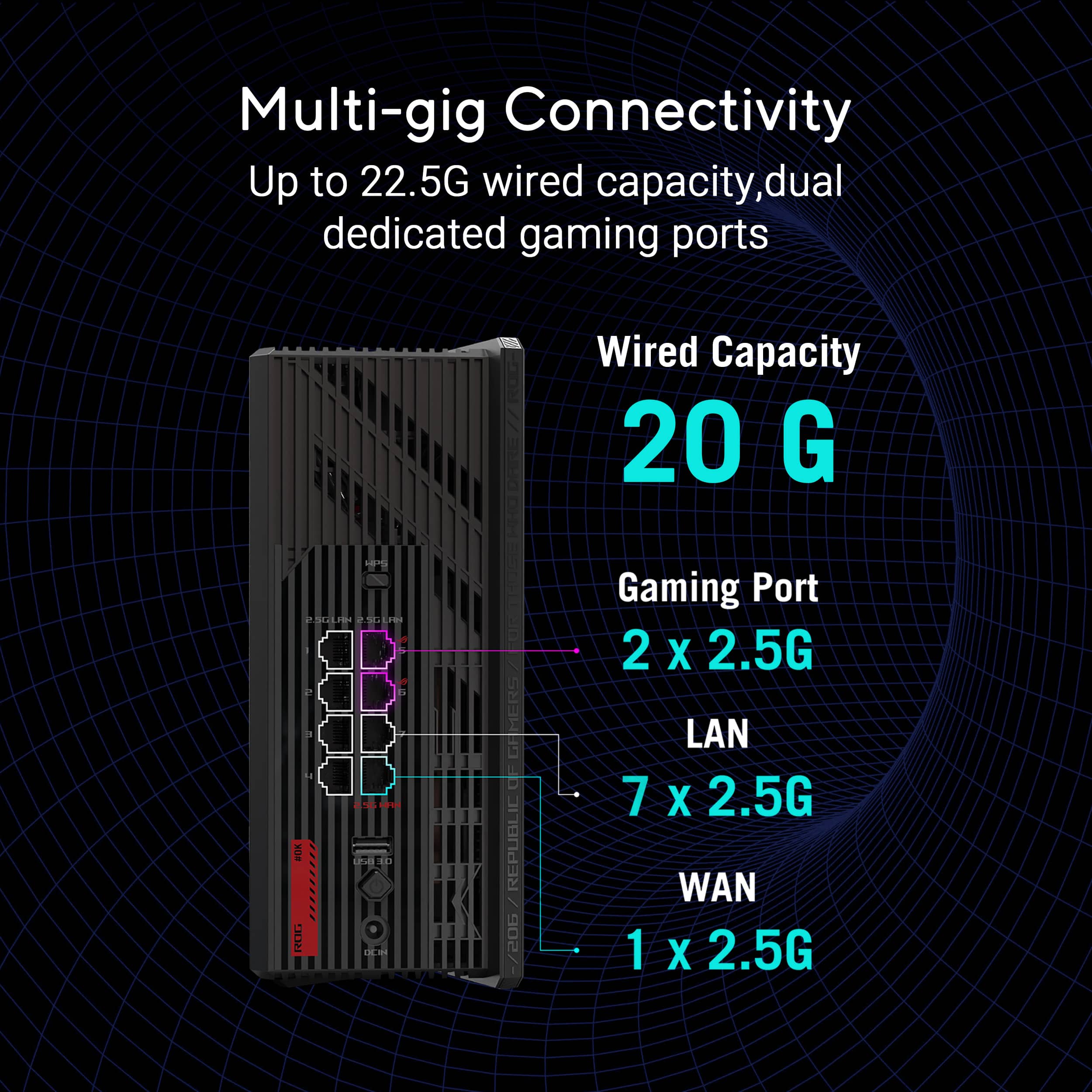
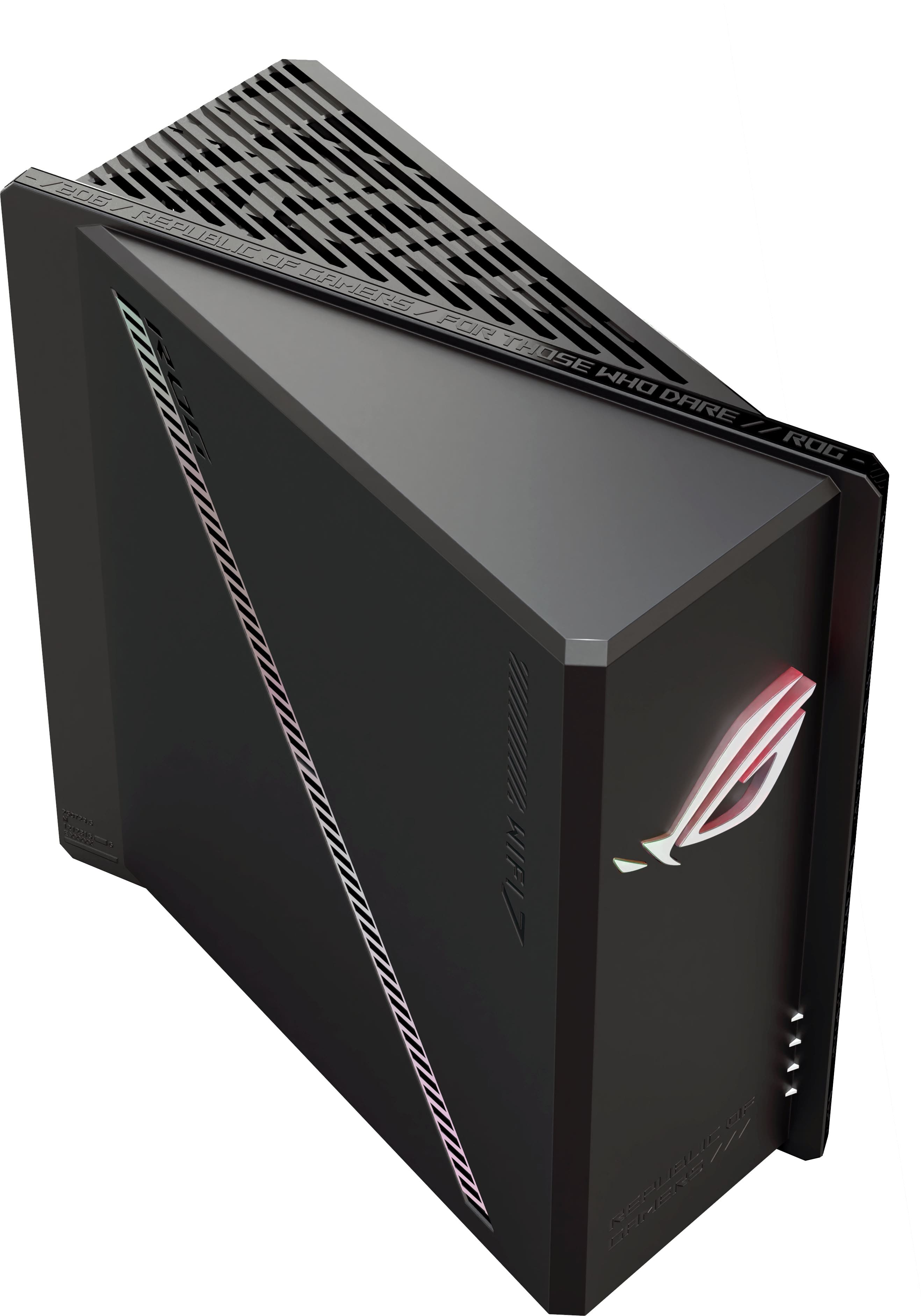
|Posted .This reviewer received promo considerations or sweepstakes entry for writing a review.The box the router comes in a branded just like other ROG devices. It’s primarily black with red accents. It gives a very premium feel to the setup. The content of the box include the router, a CAT6 cable, the power adapter and some paper work including the default WiFi and Login information. I was surprised at how large the power adapter is because it takes up more than one outlet on a power strip (depending on the type of power strip). The setup was straightforward and if you have set up routers before, it’s easy. The router comes equipped with 8 Ethernet ports (one of them is the WAN port), which is helpful for connecting multiple devices. I also have a network switch since I have so many devices, but the 7 Ethernet ports for connectivity is definitely an upgrade from the 5 I used to have. It’s generally plug-and-play for setup. I did have to download the ASUS app to work through the for advanced configurations, but it wasn’t difficult to get setup. I updated the firmware during setup and was good to go. I really like the design of this router. It looks like a mini PC box and it’s very easy to reach all the ports on the back. The only thing I don’t like is the size of the power adapter, but the router itself looks really cool. Normally I try to hide my routers, but this one deserves to be seen and I’m currently trying to figure out how to rearrange things so that it can be out for show. I didn’t have any issues with the performance of the router. WiFi signals were strong throughout my house and I found the connection to be consistently good while I was gaming. I have Fiber internet and thought my connection was better using this router over my previous one. Not all my devices are WiFi 7 compatible, but it seemed to do a good job with managing the individual devices as well as my smart devices that have to have a 2.4 Ghz network connection. I didn’t experience the random rebooting glitch that some other users have reported. The ASUS ROG Strix router is a slick, high-speed Wi-Fi 7 router that looks just as good as it performs. I’ve been very happy with its performance overall and if you want a fast, reliable router with some personality, this one’s worth a look.
I would recommend this to a friend - Pros mentioned:Connectivity
Outstanding performance, excellent features
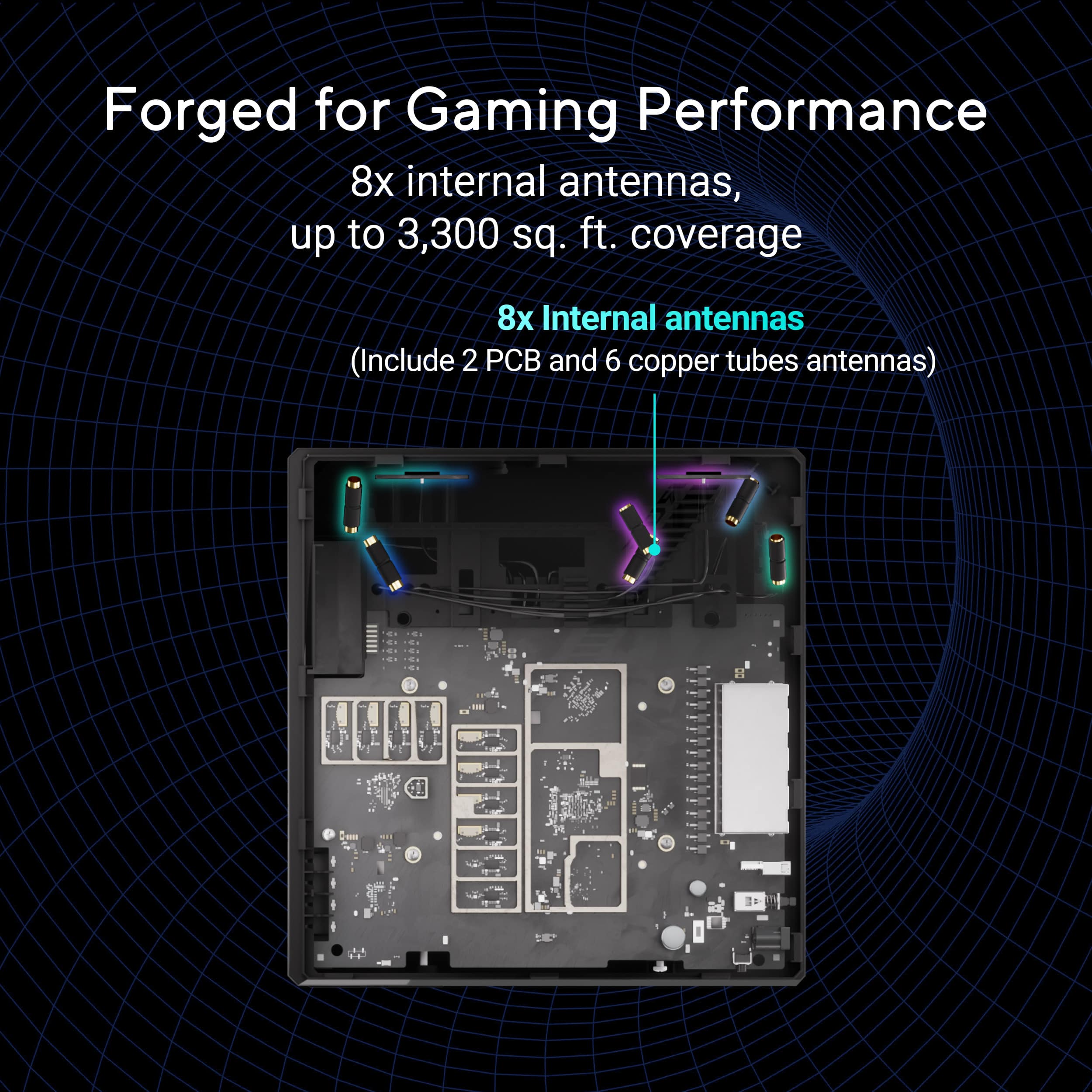
|Posted .This reviewer received promo considerations or sweepstakes entry for writing a review.This ROG Strix router is an excellent router in general, but also became an outstanding upgrade to my home network, with great software and hardware that doesn't take as much space as other gaming routers. Connectivity and ease of use are great, and I have noticed excellent performance, both wired and wireless. - Hardware The vertical design of the router is a nice change from traditional, horizontal routers. This design takes up much less space and makes fitting into your setup much easier. I have the router located in my game room, as I prefer to keep my gaming PC and consoles connected wired for maximum performance. It seems more and more routers are offering fewer wired ports, so I am happy that the ROG Strix has enough to suit my needs. The front lighting is also a nice touch. I do wish that it was maybe something other than the logo on the front, so it could be further customized, but it's still cool, and the different lighting effects look good. They can also be turned off entirely. - App and software The app for the router is one of the best I have ever used for a router. Offering suggestions to improved individual devices, or your the entire network itself. It shows realtime data transfer speeds, to help determine your network usage, as well as all currently connected devices. It also has built in speed testing which is nice to have all in one place. There's also advanced setup options if you need to do some port forwarding, or any other things specific for your setup. The coolest thing about the software so far for me has been identifying some older CAT5 cables I was still using as a potential bottleneck on some of my devices. The router has already managed to block two potentially harmful websites, and notifies me each time a problem is discovered. - Performance The performance both wired and wireless has been far above the other routers I have used. I have been very pleasantly surprised at how much of a difference I am seeing while using this router in both speed and coverage. Pros: easy setup, excellent performance, smaller footprint, great software Cons: a bit larger than other routers, I would like other options besides just the logo as the lighting options on the front.
I would recommend this to a friend - Pros mentioned:Connectivity
Good performance with an impressive feature set
|Posted .This reviewer received promo considerations or sweepstakes entry for writing a review.I’m impressed with this router. After hooking up the GS-BE18000 and getting some basic setup done, I updated the firmware. I don’t do this with a lot of equipment unless I’m experiencing some sort of problem, but anything related to network security should be updated frequently. The setup process was simple. I plugged it into my wired network and powered up. I had some issues getting the app to work, so I connected my laptop via ethernet and followed the included instructions. Initial options for network setup include options to act as a primary wireless router, a wireless repeater, a wireless access point, a media bridge, or an Asus AiMesh node. I wanted this to act as an access point for my existing network, so that’s the way I set it up. You’re given the option to combine or separate your 2.4ghz, 5ghz, and 6ghz WiFi signals into different SSIDs, and also provided an opportunity to set up an IoT network for all your smart home devices. This device replaces an existing access point in my living room, which is central to my home and connects a variety of both wireless and ethernet devices. The GS-BE18000 includes a total of eight 2.5Gb port with one dedicated to the WAN connection and two specified as high-priority “gaming” ports. I used remaining ethernet ports to a PC media server and gaming rig, PlayStation 5, and the TV itself. Enough ports are provided that you could easily use this to set up at your gateway to distribute ethernet across your home. Wireless range is better than average. It’s got a higher reach than the relatively new TP-Link Deco it replaces, but it’s not astonishingly good. Wireless connections seem solid and it’s fast enough that it saturates my gigabit internet. While it’s got a very “gamer” centric appearance, it’s not overwhelming, and the giant RGB logo can easily be set to a dim color or shut off completely. It’s a lot more classy-looking sitting on an entertainment center than one with a half-dozen antennas sticking out of it, and you’d have a hard time making it look out of place. There’s also a USB 3 port on the back that can be used for a variety of functions, from media storage to a time machine backup location to a samba share. You can also use this port to connect a phone for cellular access to the router, should the need arise. In the configuration interface, it’s easy to get lost. There are so many different configuration options available that it’s almost staggering, but at the same time, little of it is necessary to get successful functionality out of the device. It’s easy to set up NAT for outside access, or assign specific IP addresses to specific devices, for example. It also features things like Alexa integration, which I’ll admit is a little beyond me. I can’t fathom a situation in which I’d want to tell Alexa to manage something on my router, but if you’re the kind who likes to be able to turn a guest network on and off with your voice, Asus has you covered here. You can also set parental controls and family groups if you want to restrict hours or usage, and there appear to be content filters available as well, though I haven’t tested any of this. The amount of features, both gaming and otherwise, that have been crammed into this device is very impressive, and I’m looking forward to digging deeper into it when I have more time. But for now, it’s been a very solid addition to my home network, and I’d recommend it to anyone looking for a reliable device with good performance.
I would recommend this to a friend Great router, great features, great app!
|Posted .This reviewer received promo considerations or sweepstakes entry for writing a review.I've paid little attention to most of the wifi routers I've had before. All of my previous ones were provided by my ISP when they were setting up my internet for the first time. Only recently have I started to care about the features of a router, the ease of use when you want to change settings, the reliability of the signal, things like that. So take my input with a grain of salt. I'm not a major power user. There's a number of features this router has that I didn't use, and didn't know how to use. I like to game, I like to stream shows, I like to stream myself playing games to my friends in Discord, and I have an external storage drive connected to my router so I can access the storage from whatever device I feel like. My use case isn't particularly heavy. With that said, I have to say, I was impressed with this router. It's easy to set up. You do need to download and install an app, but you don't need to make any sort of account on it to access the features the router has. You can also use the web GUI things to access the same features you can in the app, so whatever you prefer, you have plenty of options for controlling things. That said, I believe the app may be the only way to update the firmware on the router, and from some of the other reviews, it seems the update is necessary for it to function properly. As for the router's functionality, well, it's a wifi router. It has a strong signal everywhere in my apartment (although it's only a 1 bedroom), the speeds are consistent on every device that doesn't have issues themselves, and the wired connection I have has been rock solid. You can set up a VPN through a variety of servers - I have yet to test this, although I want to. I'm a little worried about doing something wrong or messing something up though. As it's a gaming router, you can prioritize the signal for your gaming devices, to avoid high ping and such. You can set it up to work with Alexa, adjust firewall settings, control which frequency signals it'll broadcast, have a separate network for guests, stuff like that. The app allows you to see a number of things in real time, like the router's CPU and RAM usage, the devices connected to the network, network traffic. You can adjust the color of the RGB light on the front of it, as well as make it change colors, have a breathing pattern, or be turned off entirely. You could certainly buy a more affordable router and get a good experience, but I think this is still a great option if you want a high-end router whose settings you can tweak and customize to your needs and liking. I don't anticipate I'll need a new router for a long time, even if I upgrade to gigabit internet, and that's more than enough for me.
I would recommend this to a friendGreat step into the multi-gig world
|Posted .This reviewer received promo considerations or sweepstakes entry for writing a review.TLDR: Great router that has nearly everything under the sun, including gaming mode for your gaming devices. However, like other reviews have said, it requires a firmware update (available as of 07/2025) to remain stable. Once the firmware is installed, it’s a rock-solid option for Wifi 7 households. I ordered the Asus ROG Strix GS-BE18000 based on two main factors: Lots of 2.5gbps ports, and fast Wifi 7 with newly-released AFC (automated frequency coordination). One of those factors was great, the other in a work-in-progress (more later). I’ll start with the design: I personally like the squared off “shoebox” look with not-so-subtle RGB lighting. It really fits the ROG Strix gaming theme that the brand is known for in gaming circles. Having internal antennas makes the router look more like furniture and less like a spider (my previous AX11000 is guilty of the later). The router has 7 LAN ports and 1 WAN port, all operating at 2.5gbps. This is a logical step-up from previous gen routers if you don’t need the higher-end 5 and 10gbps ports, all while keeping costs down. My only gripe with the design is that the power cable has an ugly, large wall wart plug rather than a normal plug with power brick, making it hard to hide behind furniture and/or fit into a backup power supply with close plugs. Poor oversight there, tbh. Performance wise: I’m very happy with near-and-moderate range speeds on Wifi 7. I have an internet plan that maxes out at approx. 1.5gbps. My near (within 15 feet, no walls) nearly maxed out my plan speeds on my laptop and phone (phone was marginally faster). At moderate distance (20-30ft + a few thin walls), I was able to maintain about 900mbps download and full upload speeds (40mbps). However, moving beyond that distance, or introducing things like exterior walls slowed the speeds down dramatically. At about 35ft, but through several thin walls and an exterior wall, I was only getting about 300mbps/40mbps. Both of my devices maintained the Wifi 7 connection though without reverting back to slower Wifi standards. Once you activate gaming mode, and point the router to the gaming device, it will intelligently steer additional bandwidth to that device, and well as work some magic to reduce Ping times for faster responses. In my testing, it was easy and straightforward to set up, even if my games didn’t feel too much difference. If you’re a competitive gamer, or even a pro gamer, this feature might mean the difference between a win and a loss though. Just food for thought. AFC impact: This feature should allow for location info to be sent to a server that then dictates how much power the 6Ghz band can use, thus impacting speed and range. It’s not active by default, but it’s easy to do in the “Wifi” menu of the router’s software interface. Enabling it the first time ended up with a ‘connection to server error’. I re-enabled AFC and this time it worked, but came back with low-power mode (the default power mode of the router), rather than Standard Power Mode (which is actually the higher power mode). There’s nothing I could find to override the mode, so that’s that. In my limited use, AFC didn’t benefit me. Maybe it will someday, as it updates it’s results daily. Other features that I liked about the router are Asus’s great software interface and plethora of options and customization (including the RGB lighting, which is also defeatable). VPNs, guest networks, IoT networks, VLANs, port forwarding, built-in security and custom DNS servers are all awesome to have even if you don’t use them now. Setup was excellent. I was able to setup the router using their preferred method of scanning a QR code, downloading their app, then searching and finding the router and proceeding to setup. You have the option of fast or advanced setups, and if you opt for fast you can be said and done within 5 minutes. Give the router a name and change the admin password, then change the network name and give it a password…and you’re done. Smooth! The setup also provides you a quick and easy way to scan for available Asus AI-Mesh nodes to create a mesh network. I didn’t use that here, but I have in the past and it works so easily. Overall, I feel like this is a great router for a one- or two-story home up to about 3500sqft that doesn’t sprawl too far side-to-side. It’s strong enough to cover that size home without dead zones without the need for a mesh network. At release, I feel like $500 is a pretty steep price, but it’s not unheard of for upper tier routers these days. And the Wifi speeds and the plethora of 2.5gbps ports will be future proof for at least the next 10 years for the average consumer. I’d definitely recommend this to my friends or family, especially if they could get it on sale.
I would recommend this to a friend- Pros mentioned:Speed
Happy with this router with some downsides.
||Posted . Owned for 3 weeks when reviewed.This reviewer received promo considerations or sweepstakes entry for writing a review.I’ve been using the ASUS ROG Strix GS-BE18000 Tri-Band Wi-Fi 7 Gaming Router for a while now, and overall it’s a solid, high-performance router with a few tradeoffs worth noting. Setup was mostly straightforward through the app and web interface, and the gaming-focused features are easy to find and configure. Firmware updates installed smoothly, and once everything was running, wired and wireless speeds were excellent. On a Wi-Fi 7–capable device, throughput and latency are impressive, especially for gaming and large downloads. The interface also gives a good level of control for users who like to tweak settings, traffic priorities, and security options. The meshing feature works, but it took more time and patience to set up than expected. Pairing nodes wasn’t quite as seamless as advertised, and I had to retry the process and reposition units before the mesh stabilized. Once connected, performance across nodes was consistent, but the onboarding experience could be more polished. One downside is signal strength compared to routers with large external antennas. Despite the strong internal hardware, coverage per node didn’t reach quite as far as some external-antenna models I’ve used before. In medium to large homes, you’ll likely want at least one additional mesh node to eliminate weak spots. Design-wise, it looks great if you like the gaming aesthetic — bold, angular, and very “ROG” — but it’s not exactly subtle. Build quality feels premium, and it runs reliably under load without random drops or overheating. Overall, the ASUS ROG Strix GS-BE18000 is a fast, feature-rich Wi-Fi 7 router that delivers strong performance and good software controls. Just be prepared for a slightly longer mesh setup process and somewhat shorter range than external-antenna competitors.
I would recommend this to a friend A Router For Uninterrupted Gaming
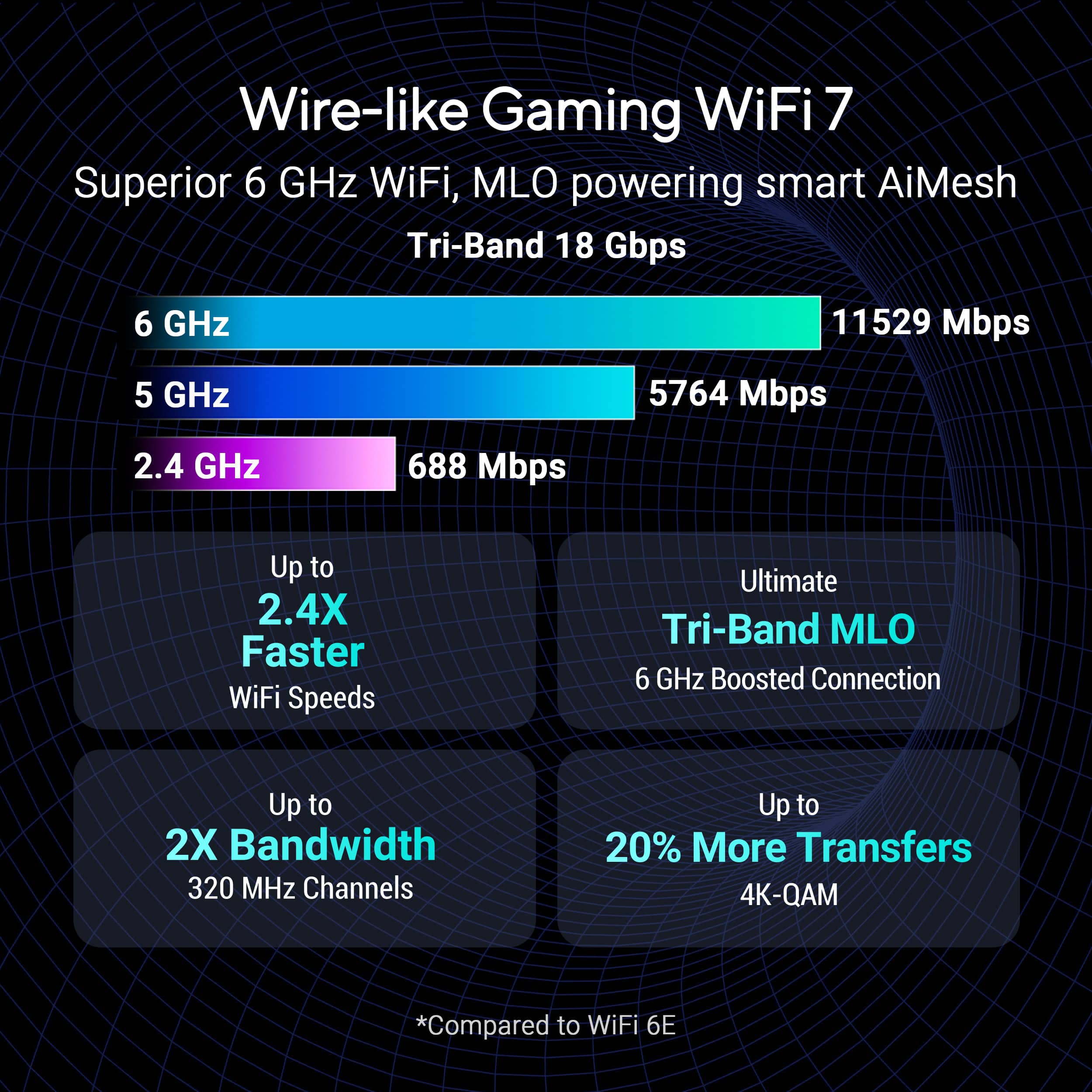
|Posted .This reviewer received promo considerations or sweepstakes entry for writing a review.For years, I've been running a pretty solid Wi-Fi 6 setup and honestly, I thought I was set. But recently my network congestion started to become worse. Between my PC gaming, my wife's WFH video calls and kids streaming 4K content and the absurd number of smart home devices we've accumulated, seems like my old router was unable to take the burden. I notice random lag spikes or a bit of buffering on the living room TV. When i got to try out this future proof ASUS Strix Wi-Fi 7 monster i was really impressed. Unboxing this thing feels like an event. The packaging is premium, as you'd expect from the Republic of Gamers (ROG) line. But the router itself wow It’s big. Make sure you have the shelf space for it. It looks less like a piece of network equipment and more like a futuristic piece of alien technology. The unique angular black design with the signature ROG Aura RGB lighting is awesome and You can customize or turn off the lights, but I have to admit, having it subtly pulse in my office is pretty cool. The build quality is fantastic. It feels dense and well-constructed. Around the back, the port selection is where things get serious. You have Seven 2.5Gbps Lan ports and One 2.5Gbps Wan port. This is a massive step up from the standard gigabit ports on most routers and is a clear sign that this device is built for next-generation speeds, both wired and wireless. I was expecting a bit of a complicated setup given the number of features but I was pleasantly surprised I used the ASUS Router app on my phone and it guided me through the basics in about 10 minutes It recognized my internet connection, let me set my SSID, Passwords and updated its firmware. For anyone who just wants to get online, its that easy. Of course, the real fun is in the web interface. If you're a tinkerer, this is your paradise. The ROG-themed dashboard gives you everything from real-time traffic analysis to in-depth security settings. The "Game Boost" features are front and center, allowing you to prioritize gaming traffic with a single click. You can set up a dedicated gaming port activate a mobile game mode and fine tune QoS settings to an insane degree. It can be a little intimidating if you're a beginner, but the defaults are solid, and the most important features are easy to find. Performance is where the GS-BE18000 really justifies its existence. Wi-Fi 7 and MLO I recently upgraded my main PC with a Wi-Fi 7 card to really test this. Wi-Fi 7's headline feature is Multi-Link Operation (MLO), which basically lets a device connect to the 5 GHz and 6 GHz bands at the same time. The result isn't just raw speed its incredible stability I transferred a 100GB file from my NAS to my PC wirelessly, and the speeds were insane. It was faster than a wired gigabit connection. It’s mind boggling. Gaming This is where the magic happens. Before, I’d occasionally get those frustrating micro stutters or ping spikes, especially if someone else started streaming a 4K movie. With this router, that's completely gone. My connection to game servers feels rock solid. My ping in competitive shooters is consistently low and, more importantly stable. The router’s QoS is so effective at prioritizing my game data that it feels like I have a dedicated internet line just for my PC. My house is about 3,100 sq. ft. with a basement and a backyard. My old router left a couple of weak spots in the corners of the house. This Strix router covers every single inch with a powerful signal. I get blazing fast speeds on the 6 GHz band throughout the main floor, and the 5 GHz and 2.4 GHz bands reach the patio and basement with no problem. The signal is just incredibly robust.To get the true benefit of Wi-Fi 7 and features like MLO, you need Wi-Fi 7 devices. As of right now (August 2025), those are still becoming mainstream. Your older laptops, consoles and most smartphones will connect just fine and will still benefit from the routers powerful hardware and better coverage, but they won't unlock those top tier Wi-Fi 7 speeds. The ASUS ROG Strix GS-BE18000 is an absolute awesome piece of engineering. It's a preview of the future of home networking. The performance is staggering, the feature set is exhaustive, and the stability it brings to a congested network is a game changer. This router is for the enthusiast, the hardcore gamer who demands zero compromises, with a gig internet plan and a home NAS, or anyone who wants to build a network that will be ready for the next five to seven years of technological advancement. It's an investment, for sure. But if you fit into that target audience and have the hardware to leverage its power, it's a phenomenal one. It has single handedly eliminated every network related headache I had before My home network is just smoother, faster, and more stable. For me, that was worth every penny.
I would recommend this to a friend- Pros mentioned:Connectivity
NOT WHAT I WAS EXPECTING!!!
|Posted .This reviewer received promo considerations or sweepstakes entry for writing a review.If you have come across my reviews for other Asus products, you already know that I am a big Asus fan and usually very excited about when it comes to testing out Asus products, unfortunately this router did not fare the same. So, I have been testing out the new Asus ROG Strix GS-BE18000 Wi-Fi 7 router for a few days now and I was a little disappointed. While looking at the specs for this new router, it should have blown my current Wi-Fi 7 setup right out the water but instead my speeds were cut in half and I wanted to give this a fair shot and tired running test on multiple Wi-Fi 7 devices with wired/wireless connection with the same results. Fortunately, as I set up the router, which was pretty simple whether you’re using the Asus app or Web based setup, I was immediately guided to the new firmware update and did not encounter the infinite reboot issue that other users experienced. Over the few days I have tired everything from messing the MLO settings to QoS and even different scenario option which seemed to help a little but did not make an overall improvement. I understand that going wireless you do end up with speed degradation but even my wired connection suffered the same fate. This router offers some very impressive features such being able to connect a wireless USB dongle or phone to the USB port on the router to serve as backup in case your isp is down, which honestly my current setup does not offer. The router offers 7 muti-ports with 2 gaming ports, 20 gig wired capacity, a 2.0 Quad-Core processor, AI-Mesh Compatible, and honestly a really cool-looking router overall, but looks and specs don’t cut it if it can’t provide the speeds that I am paying for. Overall, as it stands as much as it pains me to say this, but I cannot recommend it at this time. I hope in the near future, after some firmware updates this router can be used to its full potential.
No, I would not recommend this to a friendBrand response from ASUS Answers
Posted .Dear Hmirza,
Thank you for your comment.
We do understand your disappointment with this router and the inconvenience this may have caused if you are experiencing unstable or slow wireless connection speed. To resolve this, place the router in the center of the area you want to cover, avoid placing the router near metal objects, electronic devices or direct sunlight, position the router on a flat, hard surface and halfway between the floor and ceiling. Additionally, dense building materials, such as gypsum, concrete walls and planks can affect Wi-Fi signal penetration. Additionally, check if the PC or device connecting to the router is working properly and within range to the router, the router is within 30 feet to the ISP's modem, if not wired with a network cable, and ISP's internet service or connection is working properly or stable. Legacy devices may not work properly with WIFI-7, please check updates for these devices. Also, try connecting this manually to either 2.4GHz or 5GHz. Should you need further assistance with the product, please email me at cl-rodel@asus.com and I would be more than happy to help. Or you are most welcome to call Product Support Hotline at: 1(888) 678-3688. Also, you can chat with an ASUS live support agent from the link: https://www.asus.com/us/support/article/1135/.
Thank you for choosing an ASUS product.
Regards,
Rodel
ASUS Customer Loyalty
- Pros mentioned:RangeCons mentioned:Setup process
Major Upgrade
||Posted . Owned for 1 week when reviewed.This reviewer received promo considerations or sweepstakes entry for writing a review.A bit of difficulty with the initial setup. ASUS tech support responded immediately and guided me thru each troublshooting step until the issues were resolved. Since that point, the router has performed flawlessly. WIFI reaches areas in my house that previously needed an extension with WIFI 5 and is now much faster with zero drop or lag.
I would recommend this to a friend - Pros mentioned:Overall performance
Great router.
||Posted .This reviewer received promo considerations or sweepstakes entry for writing a review.This router works great. I purchased a competitor router and had to return it as I couldn't get anything to connect to it. While I was there, I picked this up. Setup was easy and only took a few minutes to have all of my stuff up and running. The range is pretty good too, I have a few items in my detached garage in my back yard and the signal is pretty strong with those items too. I run multiple computers, a couple TVs, and a few smart home hubs through this router and the connection is strong with everything.
I would recommend this to a friend Great gaming router with Nice lights.
|Posted .This reviewer received promo considerations or sweepstakes entry for writing a review.Looking for a gaming router with cool LED and customizable features? Look no further. This Asus ROG router does the trick. Setup was a super cinch. Downloaded the app. Followed the step by step instructions and I was in. Software via Google play app was easy to use. Nice customizable features. Easy to navigate and look at the different features. Also modes like gaming, streaming, work from home etc are all easy to pick. LED affect is easy to use. I was getting full throttle withy LAN connection and via WiFi I was getting about 1.5GBE download. Gaming with heavy video and testing on 4K was no issue. Also restricted use was easy to toggle if you have kids. Overall nice additions to my network. I am running 2 GBE via fiber. So this router was able to handle almost full throttle. If you are looking for a gaming router with all.of these features. This will definitely fit your needs. Nice job ASUS. As always ROG puts out great gaming products that are attractive and functional at the same time.
I would recommend this to a friend- Pros mentioned:Connectivity, Overall performance
Works well
||Posted . Owned for 2 months when reviewed.This reviewer received promo considerations or sweepstakes entry for writing a review.Joined my set mesh network with in minutes, helps being able to hard wire with having the modem right there. Highly recommend this to anyone even if your not a gamer it works really well for every day use
I would recommend this to a friend - Pros mentioned:Range
Initially buggy. Working great now!
||Posted . Owned for 1 month when reviewed.This reviewer received promo considerations or sweepstakes entry for writing a review.Purchased this router as an upgrade. I was interested in having more wired lan ports and this router delivers. I initially had issues with setup and the Router connecting to my modem. After some time I was able to get it up and running. It then did an update and the network became unstable. I would get ports by disconnecting randomly. I did a Google search about the issue and it was suggested that the router be reset after the update. I reset the router back to factory settings and did setup again without any issues. My ports are no longer disconnecting randomly and the router seems to be functioning flawlessly. The Ai Mesh works great with my old router extending the range of the network and having better signal through out the home.
I would recommend this to a friend Huge upgrade from Netgear
||Posted . Owned for 1 month when reviewed.This reviewer received promo considerations or sweepstakes entry for writing a review.I replaced a Netgear Orbi + satellite with this and a ZenWiFI BD5 satellite and couldn’t be happier. It’s much easier to configure, nothing is behind a paywall (security-wise), and the app doesn’t require an account to use. Plus AFC really boosts range. I live in a 3 level townhouse and get great coverage throughout, the satellite is for outdoor cameras which are on the other side of concrete from the router. Setting up an IoT network was simple, I love that I can have a 2.4 GHz IoT network and a mixed guest network in addition to the main network. There are plenty of ports on the back too. I don’t have a single complaint about this router which is honestly surprising. My experience with routers over the last 25 years has been filled with many frustrations. This is such a great router that I gave one to my son for his birthday and have been recommending it to everyone at work. And now I’m recommending it to you too!
I would recommend this to a friend- Pros mentioned:Speed
Asus GS-BE18000 Router - Outstanding Technology
||Posted . Owned for 1 week when reviewed.This reviewer received promo considerations or sweepstakes entry for writing a review.This router is awesome. The dedicated gaming ports increased my kill rate on my PS5 for Battelfield 6 online multi-player. If you are gaming online this is a must have router. Don't wait. I have Spectrum 1Gbs service and I was amazed when I ran a Speedtest on my phone and was pulling 850-over 1G bytes/second download and close to 50mbps upload. Also having 7- RJ45 hardwire ports allowed me to hardwire everything I could plus I still have an open port for expansion. This is one of those consumer products that I would tell everyone you have to have this...it's incredible!
I would recommend this to a friend - Pros mentioned:Design, Speed
Good router
||Posted . Owned for less than 1 week when reviewed.This reviewer received promo considerations or sweepstakes entry for writing a review.The app works great, the wifi connection is fast. It looks amazing and provides great connection
I would recommend this to a friend - Pros mentioned:Range, Speed
Amazing
||Posted . Owned for 1 month when reviewed.This reviewer received promo considerations or sweepstakes entry for writing a review.This thing is amazing. I was able to extend my range and by changing some setting make my wifi faster as well
I would recommend this to a friend - Pros mentioned:Design
Insane Speeds and Powerhouse Performance
||Posted . Owned for less than 1 week when reviewed.This reviewer received promo considerations or sweepstakes entry for writing a review.This router is a monster! Setup was fast and easy — the app walks you through everything step-by-step. I’m using it with multiple devices including a gaming PC, consoles, and smart home gear, and it handles everything without breaking a sweat. The Wi-Fi 7 speeds are insane — I’m getting over 2 Gbps on my compatible devices. The signal range is excellent, covering my entire house with zero dead zones. The design is sleek and very ROG-style, which fits perfectly with my setup. The interface is also great for advanced users — tons of customization for QoS, gaming modes, and network optimization. ✅ Pros: Super-fast Wi-Fi 7 speeds, strong range, easy setup, awesome app controls ⚠️ Cons: Pricey, but absolutely worth it for high-end performance
I would recommend this to a friend