Customer Ratings & Reviews
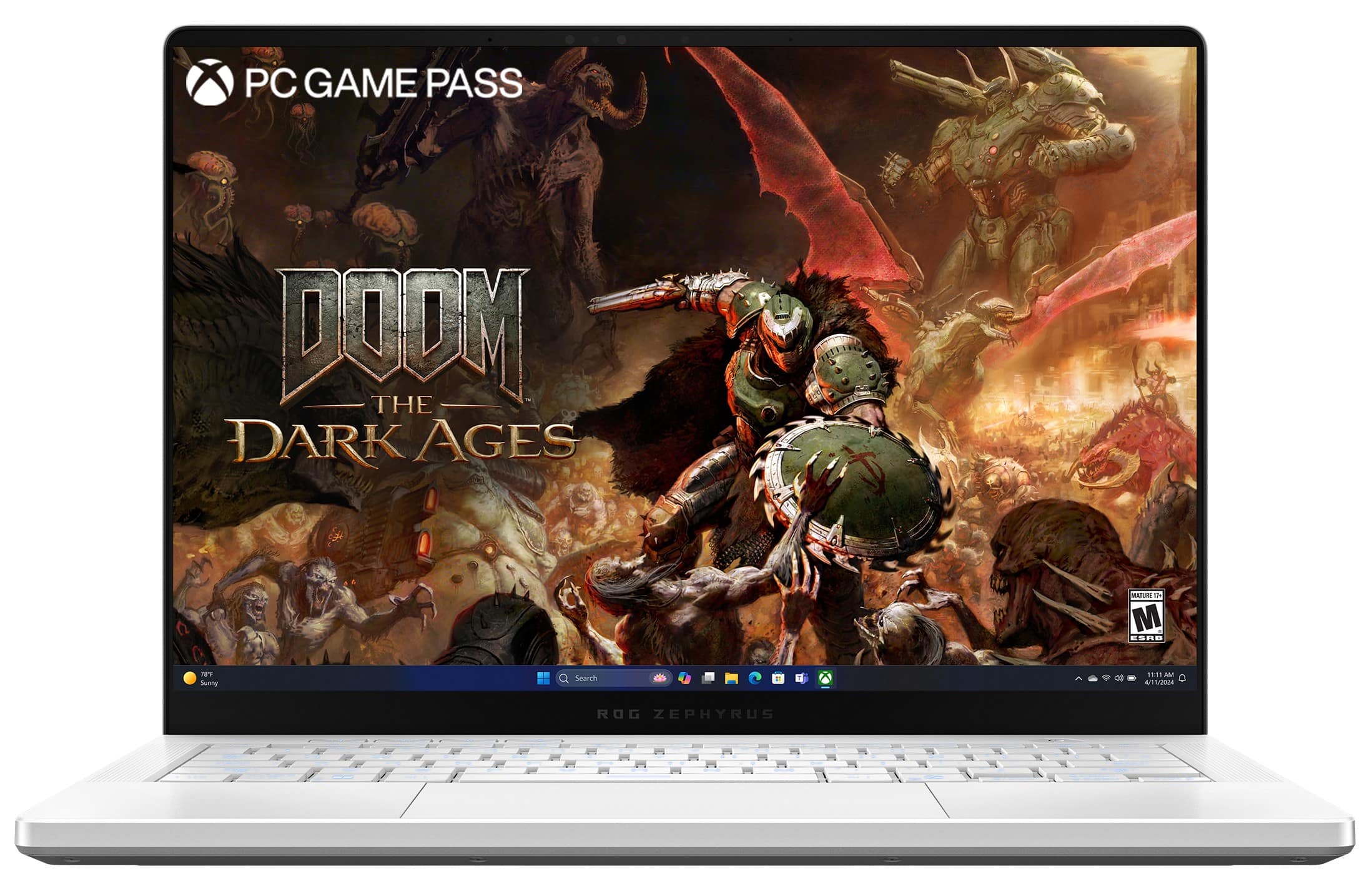

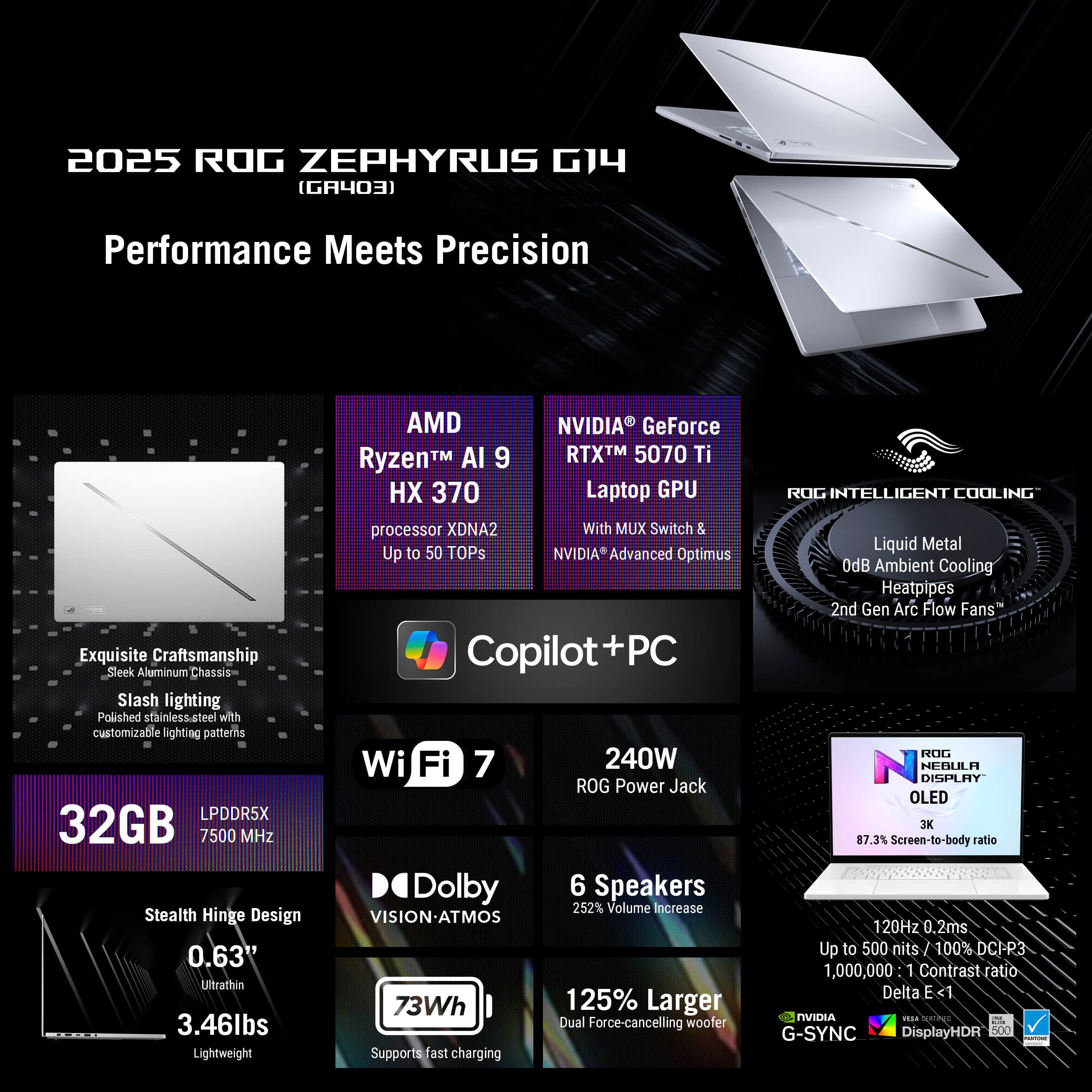
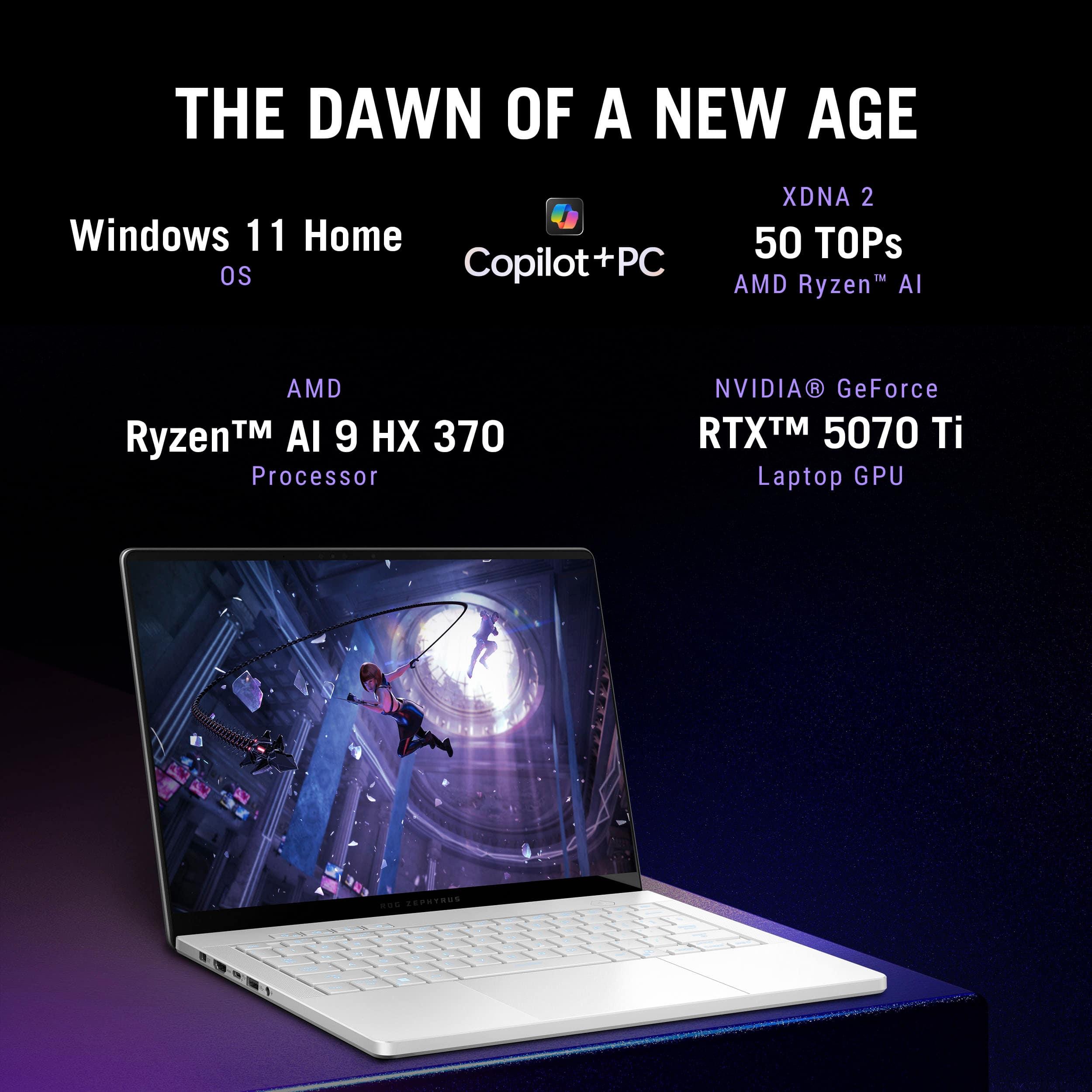

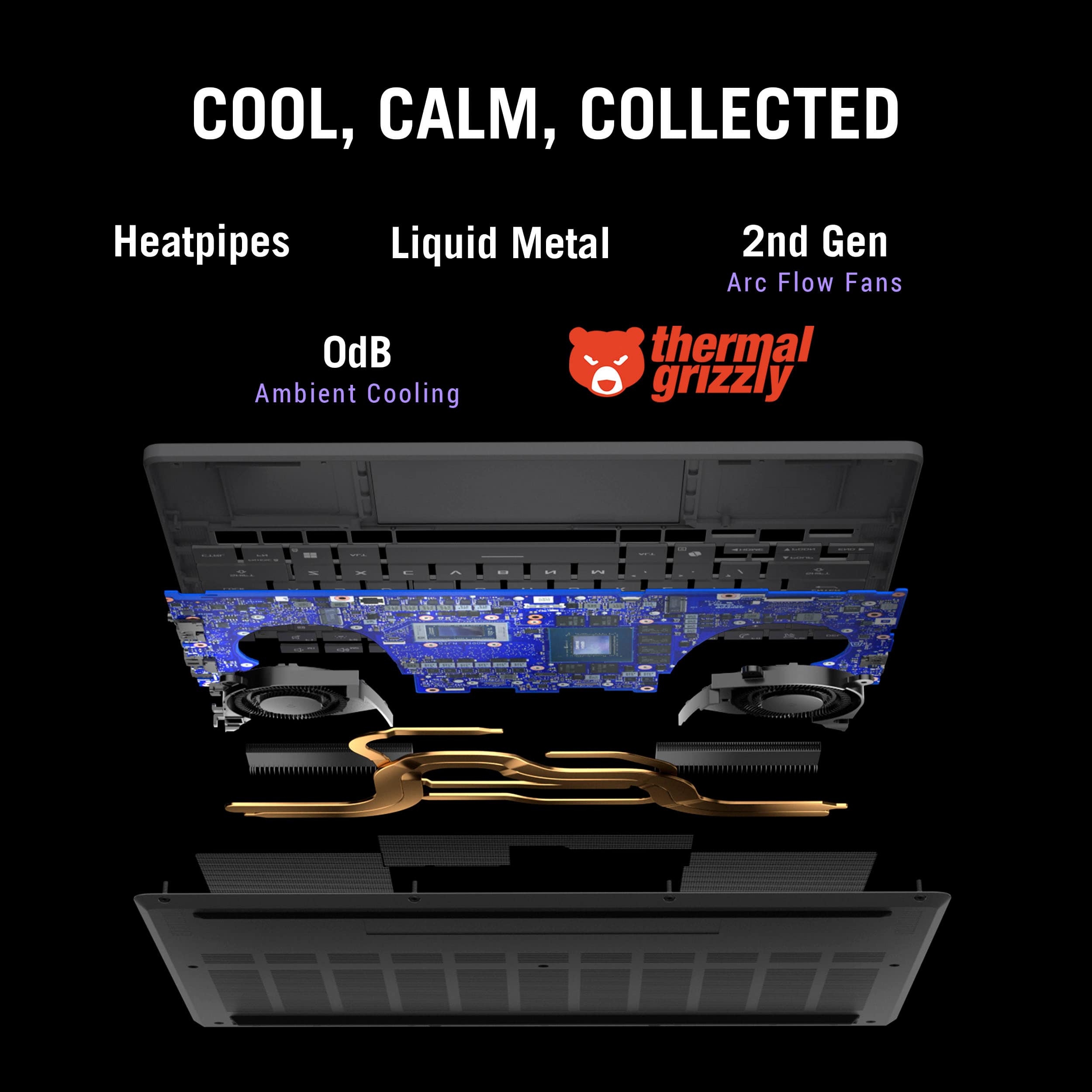





















- Model:
- GA403WR-G14.R95070TI
- SKU:
- 6613954
Rating by feature
- Battery Life
Rating 4.1 out of 5 stars
- Speed
Rating 4.8 out of 5 stars
- Display
Rating 4.8 out of 5 stars
Customers are saying
Customers love the ROG Zephyrus G14 for its phenomenal build quality and portability. Many are impressed with the battery life, gaming performance, processor speed, and OLED screen quality. However, some customers have expressed concerns about fan noise and heat dissipation. A few customers mentioned the screen size may be too small and the port count is limited.
This summary was generated by AI based on customer reviews.
- Pros mentioned:Overall performance, Processor speed
Great laptop 95% of the time
||Posted . Owned for 1 month when reviewed.This reviewer received promo considerations or sweepstakes entry for writing a review.I’ve been using the Asus ROG Zephyrus G14 with the RTX 5070 Ti for les than a month now, and overall it’s a very good laptop. Performance is strong — handling modern games and creative tasks smoothly thanks to the Ryzen AI 9 HX processor paired with the RTX 5070 Ti GPU. What’s not ideal: Stability issues — 5% of the time the unit I have has shut itself about 10 times so far due to random problems (system resets, occasional glitches) out of nowhere as in not necesarily gaming, or task intensive things, just iddle or watching youtube. This isn’t something you typically see in most reviews, so it feels like it might be specific to my device. if it keeps going this month i might just trade it back in
I would recommend this to a friendBrand response from ASUS Answers
Posted .Dear PaulC,
Thank you for choosing the ASUS GA403WR gaming laptop and for sharing your feedback with us. We sincerely apologize for the stability issues you’ve experienced; unexpected shutdowns and system resets are not the level of reliability we strive to deliver.
To help resolve the problem, we recommend following the steps outlined in our FAQ guide linked below. If the issue continues, please contact our support team at https://www.asus.com/us/support/CallUs so we can assist you further or arrange repair service if necessary.
We stand behind our products and continuously strive to improve our products and processes to achieve customer service excellence. For more information, email us at customerloyalty@asus.com and include the case number "N2505028230-0017" as a reference. We will do our best to resolve your case quickly. Your feedback is very important to us and enables us to improve our support channels. Thank you for choosing ASUS.
Best Regards,
Chantae
ASUS Customer Loyalty US Support
[Windows 11/10] Troubleshooting - Automatic Shutdown/Restart Issues - https://www.asus.com/support/faq/1046480/
- Pros mentioned:Overall performance
At this price it should be flawless...
||Posted . Owned for 2 weeks when reviewed.This reviewer received promo considerations or sweepstakes entry for writing a review.My return window ended yesterday and today my laptop randomly restarted... i got a notification that the system encountered a problem and needed to restart and just shut off on its own but didn't restart. I tried turning it back on and nothing the screen was just off but i could hear the fans running really light, i unplugged it and after a while the fans stopped but still nothing, would not turn on at all. After a google search on how to force shut down I held the power button down for 10 sec and finally was able to get it to shut off completely apparently. After finally getting it to turn back on it seems fine. I day trade and luckily had just gotten out of a trade this could've been really bad given all of my tasks were just ended. Also the build quality could be better the bottom cover is bulged towards the front to where you can see inside which again that should not be the case in a laptop at this price point in my opinion. I can say it does run smoothly when it wants, even tho it'll have some micro stutters here and there when not plugged in which for now I'm thinking can be fixed with some tunning, but overall I am a bit disappointed after what just happened with the restart today and really hope the problem doesn't persist. Now I'm wondering if i should bring it in for a diagnostic, and seeing what my options are to move forward. Now the part where if i would recommend it.. it is a good running laptop and does run very well even with alot of tasks running, and it does tick alot of boxes as far as performance, screen resolution, and gaming, which is definitely a plus. In conclusion I'd say go for it if you can get it on a sale, I would not recommend it at full price.
I would recommend this to a friendBrand response from ASUS Answers
Posted .Dear ALFREDO,
Thank you for sharing your experience with the ASUS GA403WR gaming laptop. We apologize for the unexpected restart and startup issue, and we understand how disruptive this can be, especially during critical tasks.
We’re glad to hear the device is currently functioning, but based on your description, we recommend doing a System Diagnosis via the MyASUS app to ensure system stability. Your feedback regarding build quality and performance is appreciated and will be shared with our product team.
We stand behind our product and we continuously strive to improve our products and processes in order to achieve customer service excellence. For more information send us an email at customerloyalty@asus.com and provide the case number "N2505028230-0009" for reference. We’ll do our best to provide a quick resolution to your case. Your feedback is important as it helps with improvements to ASUS Support channels. Thank you for choosing ASUS.
Best Regards,
Chantae
ASUS Customer Loyalty US Support
MyASUS - System Diagnosis - https://www.asus.com/support/faq/1045716/
- Cons mentioned:Noise level
Good for windows only
||Posted .This reviewer received promo considerations or sweepstakes entry for writing a review.It's good, but not a good option for Ubuntu or linux unless you are using the very latest distro, like Ubuntu 25.04. Other distros break. Also, I have been hearing high-pitched sounds from it.
I would recommend this to a friendBrand response from ASUS Answers
Posted .Dear Jose,
Thank you for your feedback regarding the ASUS GA403WR laptop. We sincerely apologize for the issues you've encountered, particularly with Linux compatibility and unexpected high-pitched noises. Your insights will be passed along to our development and engineering teams to help improve future compatibility and user experience.
To investigate the high-pitched noise further, we recommend reaching out to our support team at https://www.asus.com/us/support/CallUs.
We stand behind our products and continuously strive to improve our products and processes to achieve customer service excellence. For more information, email us at customerloyalty@asus.com and include the case number "N2505028230-0006" as a reference. We will do our best to resolve your case quickly. Your feedback is very important to us and enables us to improve our support channels. Thank you for choosing ASUS.
Best Regards,
Chantae
ASUS Customer Loyalty US Support
- Cons mentioned:Heat dissipation
Asus laptop
||Posted . Owned for 3 weeks when reviewed.This reviewer received promo considerations or sweepstakes entry for writing a review.Heats up too fast. My son uses it for school and gaming.
No, I would not recommend this to a friendBrand response from ASUS Answers
Posted .Dear Smarttv,
We regret to learn that you are experiencing overheating issues. To troubleshoot this issue, we recommend following the steps in the FAQ below. Should the issue persist, please contact our support team at https://www.asus.com/us/support/CallUs to further investigate the problem or assist with repairing the device.
We stand behind our products and continuously strive to improve our products and processes to achieve customer service excellence. For more information, email us at customerloyalty@asus.com and include the case number "N2505028230-0008" as a reference. We will do our best to resolve your case quickly. Your feedback is very important to us and enables us to improve our support channels. Thank you for choosing ASUS.
Best Regards,
Schottky
ASUS Customer Loyalty US Support
FAQ: Troubleshooting - Overheating and Fan issues https://www.asus.com/support/faq/1015064/
Buggy
||Posted .This reviewer received promo considerations or sweepstakes entry for writing a review.Buggy AMD drivers keep causing this BRAND NEW device to BSOD. I can't stand Windows!
No, I would not recommend this to a friendBrand response from ASUS Answers
Posted .Dear Jayteebae,
We regret the inconvenience caused by persistent BSODs on your new ASUS GA403WR laptop, attributed to AMD driver instability. This falls short of the high performance standards we strive to uphold. To address the issue, please refer to our system troubleshooting guide linked below. If the issue continues, please contact our support team at https://www.asus.com/us/support/CallUs so we can assist you further.
We stand behind our products and continuously strive to improve our products and processes to achieve customer service excellence. For more information, email us at customerloyalty@asus.com and include the case number "N2505028230-0007" as a reference. We will do our best to resolve your case quickly. Your feedback is very important to us and enables us to improve our support channels. Thank you for choosing ASUS.
Best Regards,
Chantae
ASUS Customer Loyalty US Support
[Windows 11/10] Troubleshooting - Blue Screen Errors in Windows (BSOD) - https://www.asus.com/support/faq/1042499/
- Pros mentioned:Overall performance, PortabilityCons mentioned:Heat dissipation, Noise level
Its not what you think, whether good or bad
||Posted .This reviewer received promo considerations or sweepstakes entry for writing a review.These are often sold as gaming laptops. they are NOT gaming laptops. They are mixed use/creator laptops Firstly, they come pre-installed with studio drivers, not game ready drivers. Secondly, they prioritize looking like a macbook, and being portable over performance or thermals. Positives: - excellent speakers, - excellent screen - Good performance for pro work (editing) - generally feels premium Negatives: - runs absurdly hot - throttles, despite very low gpu and cpu wattage offering - fans are legitimately the most annoying fans i have ever heard on a laptop Conclusions: If you NEED a relatively premium laptop that can offer a reasonably powerful gpu, while prioritizing portability over performance, this works. Just be aware of the heat and fain noise even in basic windows tasks
No, I would not recommend this to a friendBrand response from ASUS Answers
Posted .Dear Beau,
Thank you for your detailed feedback on the ASUS GA403WR gaming laptop. We appreciate your insights and are glad to hear you’ve had a positive experience with the speakers, display, and overall performance for creative work. We sincerely apologize for the concerns you've encountered regarding heat, throttling, and fan noise. Your feedback is important and will be shared with our product team for review.
To help address thermal and fan-related issues, we recommend reviewing the steps in the troubleshooting guide linked below. If the issue continues, please contact our support team at https://www.asus.com/us/support/CallUs so we can assist you further or arrange repair service if necessary.
We stand behind our products and continuously strive to improve our products and processes to achieve customer service excellence. For more information, email us at customerloyalty@asus.com and include the case number "N2505028230-0011" as a reference. We will do our best to resolve your case quickly. Your feedback is very important to us and enables us to improve our support channels. Thank you for choosing ASUS.
Best Regards,
Chantae
ASUS Customer Loyalty US Support
[Windows 11/10] Troubleshooting - Overheating and Fan issues - https://www.asus.com/us/support/faq/1015064/
- Cons mentioned:Port count

Performance Doesn't Meet Expectations. OK Though!
|Posted .This reviewer received promo considerations or sweepstakes entry for writing a review.To be clear, I know what I am doing with tech like this, I went to school for it. Nothing I reference below is “user error” or ignorance. Calling tech support for me is the LAST Option on my list. I can usually fix all of my issues with mostly anything by myself, including removing soldered on chips and components from boards and replacing them on my own. Even with the impressive spec list on this machine it is "still just a laptop" and feels very "limited" compared to a desktop with "lesser specs and components." That said, I REALLY, REALLY wanted to like this one. I thought this was going to be an easy 5 star item based on my experience with my Asus TUF F15 from last year which I loved, and still do. Maybe I hyped it up too much in my own head while waiting for it to arrive. I was looking forward to getting my hands on it like a kid waiting for Xmas morning to arrive. I had last year's ASUS TUF F15 (FX507VI) 16GB, Intel I7, 15.6 inch, 144hz with the RTX 4070 but experienced semi frequent crashes while playing certain game titles. So, I was really looking forward to getting this G14 as an “upgrade” in my hands, especially with the access to more RAM. Truth be told, any graphics settings past 1080p WITH A MONITOR CONNECTED and this thing will shut itself down and “auto reboot” into windows like I just turned on the power, not just crash the game and make me relaunch it. When I had “crashes” with the same game(s) on the F15 TUF laptop, the game would shut down and leave the laptop running normally. This one boots me completely out of Windows into a fresh boot cycle. This G14 is really “software” quirky. I am even getting Windows Display Properties Errors now after weeks of dealing with it. For the first 3 days I could not get 3 different sets of gaming headsets to work….no microphone. No one could hear me. Then I randomly opened “copilot AI” software and talked to it….THEN my headsets magically started working in game. Very Odd! Also, to this very day, every time I turn on the laptop (stays connected to a monitor, Sony Invision M2 , 27 inch 160Hz) it ALWAYS switches my display settings back to “extend” instead of where I had it set to previously, “mirror.” Just a ton of quirky-ness that is super annoying to deal with, especially on a “premium gaming laptop.” Why Windows will not leave my Display Settings at “mirror” and constantly flips it back to “Extend” is beyond me. I found myself getting frustrated with this machine more than once and going back to my Asus TUF F15 not just for the bigger screen but because it didn't fight with me every step of the way to accomplish simple things and to play a game. I have run troubleshooters and all sorts of research and even contacted ASUS at one point about the microphone not working and I waited longer than I should have to write this review in hopes that I would discover that IT WAS ME that was causing the errors somehow or that I was overlooking something simple, but I can’t say that at all. This thing is just quirky and I have a suspicion it is one of the many software titles to control graphics and processing that are bouncing off of each other. This comes with Armory Crate, NVIDIA software as well as ASUS software and AMD software all meant to control the same settings and some of the settings inside all of these titles are also natively controlled by Windows, which just adds more confusion to the mix. I can’t prove it, it is just a hunch that there are too many software titles trying to fight for control of the same parts of the system at the same time. Since I am talking about “negatives” kind of….I am going to mention right here that there are not enough USB ports on the machine for a gaming machine and there is no physical Ethernet port either so everything must be connected via WIFI. If I want to run a hard line will need to get a separate USB to Ethernet Adaptor and then again…I am out of USB access ports on the machine and forced to use a USB Hub….Actually, multiple hubs just so I can have my Basics Connected when running an external monitor, a wired gaming controller and a Headset Dongle and that leaves no room for a wired mouse, external keyboard, hard drive or anything else, without running multiple USB hubs or unplugging other stuff to make room. This is very annoying and very anti-productive in my opinion. The machine comes with 2 USB A ports, and 2 USB C and they are stacked very close together so using adaptors is sometimes not an option because everything won’t fit side by side. That's only 4 I/O ports in total. The only other ports on the machine are the HDMI out, the proprietary power input and a headphone jack. Again…NO ETHERNET PORT! I get that this is a laptop and it is meant for “mobility” but no Ethernet Port on a GAMING PC is a huge miss in my book. I mention this because I have noticed some major Latency discrepancies between other WiFi Laptops I have and this one. For some reason this laptop is always marking 60-130ms when all my other machines are marking 20-40ms both with and without this machine connected to the same WiFi. I HAVE TO use the WiFi 6G that is included with this one to get a connection that I can use…but the latency is still an issue. WITHOUT A MONITOR CONNECTED: This laptop is BEAUTIFUL! Everything looks amazing on the 3K OLED Screen and the details are {Chef’s Kiss}. BUT processing is still jittery and gameplay is herky jerky. For Example I have NVIDIA “optimized” and the game settings “auto config to system” and even with being on the “performance” side of the scale I am still not getting smooth frames with movement whilst in-game. I mean this is a 5080 With “AI” and it still can’t handle a fairly normal game like Fortnite with the above mentioned settings??? The settings are not even close to being maxed out and it is still jerky. BTW, ALL TESTING WAS DONE IN “TURBO” MODE except for when I used it on battery and not plugged in. I guess my main complaint here is the graphics card and the capability of it. AND that this was my experience in Turbo Mode! Even with the extra RAM and the Ryzen 9HX with AI it is still a chore for the machine to handle Fornite on 3k with the NVIDIA graphics set to OPTIMIZED which is only bar 3 on a bar scale of 35!!! BUT for everything else, non-gaming related, this laptop is a MONSTER! Daily tasks are nothing for this thing. Video editing is not a struggle. Video playback is beautiful on the included 3K OLED. The OLED really is stunning when not struggling with jittery controller to in game translation. I would recommend this for any sort of content creator for an On The Go or primary machine. It has saved me time and frustration in that aspect. Calling on apps and multitasking are not an issue for this one. If you are a keyboard and Mouse gamer then I can see how this would be a great option for you. The “W” key has a bump on it to locate it without looking to aid in WASD movement and the F and J Keys are also bumped for standard productivity typing. Cant speak for battery life as I run this off the plug full time but the little I did have it on battery it seems to eat batter pretty quickly in “standard” mode. The Backlight on the keyboard and the programmable light pattern on the back of the screen are cool features and the backlight on the keyboard is completely necessary because white keys on Silver is REALLY hard to see and not the best idea…but it looks cool. I can see a ton of people being really happy with this machine but if you are like me and expected this to do what I explained already then you will be as disappointed as I am. This is not something I would tell someone to run out and get if they plan on running a monitor off of it for gaming and also it is not that great at 3K for Fortnite with Nvidia set at 3 of 35. Turing it down to 1080p alleviates it a little bit but again there is the WIFI lag that I do not have to deal with on my other machines. This one is very “hit and miss” for me, but to be fair, I am sure a ton of people will be happy with it. I just expected WAY more performance based on the hype, the specs, the RAM, The Ryzen 9HX AI, The RTX 5080 with AI and all that. Too much messing around and it still doesn’t “feel right.”
I would recommend this to a friend Compact Powerhouse/Desktop Replacement with Issues
|Posted .This reviewer received promo considerations or sweepstakes entry for writing a review.The ASUS - ROG Zephyrus G14 14" 3K OLED 120Hz Gaming Laptop is clearly a compact, powerhouse that can be YOUR desktop replacement - when paired up with external peripherals & a gaming monitor. Setup and Initial Impressions: Initializing Windows 11 was as typical as it can be, from a Microsoft standpoint. I did experience a couple of incidents during portions of the unattended setup that resulted in the unit getting stuck in some kind of Modern Standby state (be it Sleep or something else...) where I was forced to do the proverbial 'hold down' the power button to force a hard reset. Having owned several different Asus/ROG models, this was a first. Once personalized & fully updated (software, drivers and BIOS), the unit did seem to stabilize and operated in full-Ryzen speedy form, but that was 5 days into my review period. Compared to my 4-year-old ROG Advantage Edition, this 2025 ROG Zephyrus G14 feels quick & responsive no matter what I threw at it or used it for. The OLED display is vivid & consistent, corner-to-corner. The weight of the unit screams quality as does the smooth action of the flip-up, screen hinges. I'm not a huge fan of the flat, chicklet key caps commonly found on 14-inch laptops, but these are good, surprisingly satisfying and easy to type on. The RGB backlighting of the keys works but nothing to write home about. That's admittedly a matter of personal taste - but I've seen better. There are no ports on the rear of this laptop but that's Ok. On something this compact, I've fine with it. The USB-4 and multiple USB 3 ports are plentiful and ALL meet their specified capabilities. I used a Sandisk Pro external SSD Pro and ATTO transfers speeds were top shelf. I would have preferred a full-sized SD card slot vs. the micro slot, but space in a 14-inch platform does naturally present constraints! The proprietary power port is great and much better than a barrel connection. The only real big complaint I have about this particular platform, in terms of design points, is the location of the Status LEDs located on the bottom edge of the display. What was Asus engineers thinking? What good is having a power state, AC power connection and storage indicators all in a position you cannot see from the front? Oops! The track pad is spacious, glass treated and something I really like. One of the best I've touched! The Platinum White aesthetic has nuanced contrasts to it, which I've grown to like. This machine doesn't scream Gamer vibe and would be fine for work environments. Gaming Experience: Although one can game "AAA" titles on this 14-inch display and they do render very nicely I might add, the real power of the ASUS - ROG Zephyrus G14 is the marriage between the Ryzen 9 Ai processor & the 5070 Ti GPU. This gets back to using this little beast as a desktop replacement rig. It can do it! The memory is up to the task, and you can add a 2nd internal SSD. Not much to dislike here. Sure, some will complain about soldered Dimms but IMHO, 32 GBs of high-speed memory is more than adequate for most consumers, and I didn't find it holding me back in any noticeable way. The stuff I'm not so happy or enthusiastic about: I'll mention the goofy position of the status LEDs again for completeness, but more importantly - this 2025 Zephyrus G14 suffers from the same old thing that plagues all Asus laptops - - their software immaturity. ROG Live, Asus Software Manager and A-Crate all generated multiple errors in the Windows Reliability History logs + those early incidents of "looked dead" situations that forced me to force Hard Resets with the power button. I've done nothing out of the ordinary, other than initializing my Microsoft accounts and updating all the typical Windows Store apps, Asus Apps and applying all Windows Updates, like anyone would do. I've installed no additional software that could bugger-up things or cause conflicts - and yet - here we go again Asus. Error Event & Reliability History logs are KEY areas of the entire Experience and that aspect of this laptop needs a bunch of fine tuning. The logs are peppered with "stop working" incidents. Moving on, I do wish to focus on the hard & fast specs of this machine that were important for me to test out. This includes Cinebench, ATTO speeds and WiFi connectivity. All of which were measured in Performance mode: Cinebench - This Zephyrus keeps a close pace with my 5950 X570 desktop and is the primary reason I can recommend this laptop as a desktop replacement candidate. 2300+ multi-core, 2000+ single core scores... consistently. No big swings or variance. Pretty rock solid in fact. ATTO - USB-4 speeds reached max speed transfer speeds for both reading & writing, on my Sandisk Pro external - pretty much in line with the performance I get on Thunderbolt ports; both for Mac and PC (Alienware M18). Thumbs up! USB 3 ports also achieve their specified maximums with the same external device. Nice job Asus! WiFi 7 - This is an area needing some immediate polish & fine tuning as I routinely experience throughput throttling for both download & upload - on the power brick. Not so good Asus! It's all over the place with this laptop, even when just 6 feet away from my Router. I could only hit the rated ISP speeds like once or twice out of 10 tests; most results came in at around 50 to 60 % of the speeds I pay for. Overall, I like how compact & powerful the ASUS - ROG Zephyrus G14 14" 3K OLED 120Hz Gaming Laptop presents itself and generally performs. It just needs more work. (updates & such) This is a machine I can look forward to traveling with... Pros: Compact, stylish, solid and dense. Nice aesthetic overall Undeniable OLED display goodness Electrical ports all meet their specifications The fans seem pretty tame to me, so I don't understand the complaints coming from others The ventilation arrangement also seems very good, and the keyboard area stays comfortable Excellent track pad! Capable keyboard even though I prefer what Lenovo does TBH and the backlighting is meh Fast little Ryzen/Nvidia machine and to me, the 5070 Ti is the sweet spot Ai features are powerful and there for those that rely upon them Cons: Hard resetting required during setup and early use - even after updating everything (It's worth noting that Ai didn't assist in this regard, which is kind of funny) Software and error logs, par for the course with Asus & ROG. Not a good look! Pretty much useless positioning of the status LEDs Inconsistent WiFi 7 performance with some hard throttling for no good reason The top-cover LED light strip is about as useful as the Status LEDs. Bling is whatever though... I was surprised to find the ProArt Control Panel missing from this machine if for no other reason that the OLED Care functionality is missing from what is provided and that it came with Nvidia Studio drivers on it - making the case that this could be both a gaming rig & a content creation platform (Asus Vivo machines come with that bit of important software) Micro SD slot Considering the price point and what you get in return, I can still recommend this laptop for many use cases, as long as one knows what they are getting into. The combination of this Ryzen 9 and 5070 Ti is something to behold! Come on Asus, finish the job on this one and make it shine! I'd give it 3.5 Stars if allowed ; )
I would recommend this to a friendWant to love, but not at this price
||Posted . Owned for 1 month when reviewed.This reviewer received promo considerations or sweepstakes entry for writing a review.I really want to like this laptop, but it feels too finnicky. Its a nice design, sleek exterior and build feels decent. Unfortunately feels like some of the ASUS software holds the computer back from being really great. For the price, I would expect more overall
No, I would not recommend this to a friendBrand response from ASUS Answers
Posted .Dear JoelL,
Thank you for sharing your experience with the ASUS GA403WR Gaming Laptop. We’re pleased to hear that you appreciate the sleek design and build quality, but we sincerely apologize that the software experience has not met your expectations. We understand how important smooth performance and reliability are, especially at this price point, and regret any frustration this has caused.
To further investigate the issues you’ve encountered, we recommend contacting our support team directly at https://www.asus.com/us/support/callus/. Our specialists will be glad to assist with troubleshooting and provide guidance to help improve your experience.
We stand behind our products and continuously strive to improve our products and processes to achieve customer service excellence. For more information, email us at customerloyalty@asus.com and include the case number "N2505028230-0023" as a reference. We will do our best to resolve your case quickly. Your feedback is very important to us and enables us to improve our support channels. Thank you for choosing ASUS.
Best Regards,
Chantae
ASUS Customer Loyalty US Support
- Pros mentioned:Portability
Great when it works.
||Posted . Owned for 1 month when reviewed.This reviewer received promo considerations or sweepstakes entry for writing a review.Its amazing to be putting so much performance into such a slim form factor rivaling with the macbooks. But asus need to figure out what’s going on with their firmware business on wake, the computer cant figure to stay on dgpu or igpu and stutters even on light load games like league with discord in the bkg. It consistently crashes after a few minutes of play. Once it reboots, business as usual.
No, I would not recommend this to a friendBrand response from ASUS Answers
Posted .Dear Gchow03,
Thank you for choosing the ASUS GA403WR gaming laptop and for sharing your experience. We sincerely apologize for the inconvenience caused by the stability and GPU switching issues you’ve described. This is not the level of performance we aim to deliver.
To assist with troubleshooting, we recommend following the steps outlined in our FAQ guide linked below. If the issue continues, please contact our support team at https://www.asus.com/us/support/CallUs so we can assist you further or arrange repair service if necessary.
We stand behind our products and continuously strive to improve our products and processes to achieve customer service excellence. For more information, email us at customerloyalty@asus.com and include the case number "N2505028230-0018" as a reference. We will do our best to resolve your case quickly. Your feedback is very important to us and enables us to improve our support channels. Thank you for choosing ASUS.
Best Regards,
Chantae
ASUS Customer Loyalty US Support
[Windows 11/10] Troubleshooting - Resolving System Error Messages or Unresponsiveness (Freeze/Black Screen/White Screen during usage) - https://www.asus.com/support/faq/1038855/
[Windows 11/10] How to set the application as the discrete graphics used - https://www.asus.com/support/faq/1044213/
- Pros mentioned:Overall performance
unfinished product with unique advantage
||Posted . Owned for 1 month when reviewed.This reviewer received promo considerations or sweepstakes entry for writing a review.it is light, powerful, beautiful product. however it has usb c charging issue when battery protection mode is on. and i got bluescreen every day, which is a shame.
No, I would not recommend this to a friendBrand response from ASUS Answers
Posted .Dear Vista1984,
Thank you for your comment.
We certainly understand your disappointment and the inconvenience this may have caused if you are experiencing USB-C charging issue when battery is in protection mode and blue-screen-of-death issues. We recommend connecting the AC adapter while using USB-C charging and ensure this laptop is running with the most current BISO version. The blue-screen-of-death will be resolved typically, by ensuring Windows, drivers, BIOS, games and applications are up to date. Updates for this laptop are available at: https://rog.asus.com/us/laptops/rog-zephyrus/rog-zephyrus-g14-2025/helpdesk_download/ .
ASUS is an ISO certified company, as a result, all products go into a strict quality manufacturing standard. All ASUS products undergo intensive quality control testing and inspections that ensure each one is trouble-free. Issues you are experiencing wirth this laptop are random. ASUS provides warranty coverage for the product. We recommend you send the product in for service to determine if this is a hardware issue so this may be resolved immediately. An RMA number is required to send it in for service. For RMA details, please go to: https://www.asus.com/us/support/article/818/. If you need more information or further assistance with the warranty for the product, please email me at cl-rodel@asus.com and I would be more than happy to help. Or, you are most welcome to call Product Support Hotline at: 1(888) 678-3688. Also, you can chat with an ASUS live support agent from the link: https://www.asus.com/us/support/article/1135/.
Thank you for choosing an ASUS product.
Regards,
Rodel
ASUS Customer Loyalty
- Cons mentioned:Heat dissipation
For light gaming at home
||Posted . Owned for 7 months when reviewed.This reviewer received promo considerations or sweepstakes entry for writing a review.Life battery only lasts a couple of hours. I ran 2 oldschool RuneScape clients on it and the computer was running at about 95°C. I like the lugging on it and it works well when plugged in but I wouldn’t rely on it without a power source.
No, I would not recommend this to a friendBrand response from ASUS Answers
Posted .Dear TannerB,
We are sorry to hear about the concerns you’ve experienced with your ASUS GA403WR Gaming Laptop, particularly the limited battery life and high operating temperatures while running multiple clients. We sincerely apologize for the inconvenience this has caused.
To assist with troubleshooting, we recommend following the steps outlined in our FAQ guide linked below. If the issue persists after completing these steps, please contact our support team directly at https://www.asus.com/us/support/callus/ so we can assist with further diagnostics or provide warranty service if necessary.
We stand behind our products and continuously strive to improve our products and processes to achieve customer service excellence. For more information, email us at customerloyalty@asus.com and include the case number "N2506022409-0019" as a reference. We will do our best to resolve your case quickly. Your feedback is very important to us and enables us to improve our support channels. Thank you for choosing ASUS.
Best Regards,
Chantae
ASUS Customer Loyalty US Support
[Windows 11/10] Troubleshooting - Short Battery Life (Rapid Battery Drain): https://www.asus.com/support/faq/1043914/
[Windows 11/10] Troubleshooting - Overheating and Fan issues: https://www.asus.com/support/faq/1015064/
- Cons mentioned:Noise level
It’s good but not for Gaming
||Posted . Owned for 2 weeks when reviewed.This reviewer received promo considerations or sweepstakes entry for writing a review.The computer is fine, but for gaming a console or a desktop PC is a much better option. Gaming on a laptop isn’t ideal because they tend to get noisy and don’t offer the same performance as a desktop.
No, I would not recommend this to a friendBrand response from ASUS Answers
Posted .Dear SMCab,
Thank you for sharing your feedback regarding the ASUS GA403WR Gaming Laptop. We are pleased to hear that the computer performs well overall. However, we sincerely regret that your gaming experience did not meet expectations, particularly with concerns about noise levels and performance compared to a desktop or console.
To help optimize your experience, we recommend following the steps outlined in our FAQ guide linked below. If the issue persists after completing these steps, please contact our support team directly at https://www.asus.com/us/support/callus/ so we can assist with further diagnostics or provide warranty service if necessary.
We stand behind our products and continuously strive to improve our products and processes to achieve customer service excellence. For more information, email us at customerloyalty@asus.com and include the case number "N2505028230-0022" as a reference. We will do our best to resolve your case quickly. Your feedback is very important to us and enables us to improve our support channels. Thank you for choosing ASUS.
Best Regards,
Chantae
ASUS Customer Loyalty US Support
[Windows 11/10] How to optimize your gaming experience: https://www.asus.com/support/faq/1046445/
Eh, probably good
||Posted . Owned for 2 weeks when reviewed.This reviewer received promo considerations or sweepstakes entry for writing a review.Build quality is fantastic, never had a problem with that. My main issue was mainly with the wifi card, wifi connection would be lost and I’d have to go to device manager to manually reset it every 30 minutes to an hour. The screen would also black out randomly, and it wouldn’t turn back on even when pressing the power button. Same thing would happen while the screen was awake, everything would freeze, you wouldn’t be able to use your cursor or keyboard, and the power button would become unresponsive. A few times, when the laptop should’ve been in sleep mode, the battery completely drained despite there being no heavy applications open. I tried updating to all the latest drivers, yet these three issues still persisted. I’m sure I probably got a defective model, yet my experience was a little disappointing considering how much money I spent.
I would recommend this to a friendBrand response from ASUS Answers
Posted .Dear ErnieL,
Thank you for taking the time to share your experience with the ASUS GA403WR gaming laptop. We’re pleased to hear that you are satisfied with the build quality, but we sincerely apologize for the issues you’ve encountered with Wi‑Fi connectivity, screen blackouts, system freezes, and unexpected battery drain. This is not the level of product quality we strive to provide, and we regret the inconvenience caused.
To address the problems you described, we recommend updating the BIOS. Before starting the update, please back up any important data, as the process may reset your current settings, applications, or files. Ensure that the device remains plugged in throughout the update, and avoid closing the lid until the procedure is complete. Detailed instructions are available in the FAQ guide linked below.
If the issue persists after completing the update, we recommend contacting our support team directly at https://www.asus.com/us/support/callus/ so we can assist further with advanced diagnostics or warranty service.
We stand behind our products and we continuously strive to improve our products and processes to achieve customer service excellence. For more information, send us an email at customerloyalty@asus.com and provide the case number "N2505028230-0021" for reference. We’ll do our best to provide a quick resolution to your case. Your feedback is important as it helps with improvements to ASUS Support channels. Thank you for choosing ASUS.
Best Regards,
Chantae
ASUS Customer Loyalty US Support
How to update BIOS in Windows - https://www.asus.com/support/faq/1008276/
- Cons mentioned:Heat dissipation
Great laptop loud fans shuts down
||Posted .This reviewer received promo considerations or sweepstakes entry for writing a review.Very occasionally shuts down and heats up without anything running
No, I would not recommend this to a friendBrand response from ASUS Answers
Posted .Dear Reviewer,
Thank you for sharing your experience with the ASUS GA403WR Gaming Laptop. We’re sorry to hear that the device occasionally shuts down and heats up even when no demanding applications are running, and we apologize for the inconvenience this has caused.
To address the issue, we recommend following the steps outlined in our FAQ guide linked below. If the issue continues, please contact our support team at https://www.asus.com/us/support/CallUs so we can assist you further or arrange repair service if necessary.
We stand behind our products and continuously strive to improve our products and processes to achieve customer service excellence. For more information, email us at customerloyalty@asus.com and include the case number "N2505028230-0015" as a reference. We will do our best to resolve your case quickly. Your feedback is very important to us and enables us to improve our support channels. Thank you for choosing ASUS.
Best Regards,
Chantae
ASUS Customer Loyalty US Support
[Windows 11/10] Troubleshooting - Automatic Shutdown/Restart Issues - https://www.asus.com/support/faq/1046480/
[Windows 11/10] Troubleshooting - Overheating and Fan issues - https://www.asus.com/support/faq/1015064/
Disappointing
||Posted .This reviewer received promo considerations or sweepstakes entry for writing a review.I’m fairly disappointed in this laptop. Full disclosure, I’m coming from an M2 MacBook Air, and I had purchased this because I need it to run AutoCAD (with some x86 Windows-only plugins) for work. It’s not been enjoyable. The battery life is terrible even with the dedicated GPU turned off, there are lots of little bugs that are annoying, and the build quality is not what I would expect for a $2,000+ laptop. (Every time I click the trackpad it creaks, and the button of the laptop is not flush with the rest of the body). I’ve been spoiled with my MacBook, and I expected better. The display is good, but the upgrade to OLED is more minor than I would have expected.
No, I would not recommend this to a friendBrand response from ASUS Answers
Posted .Dear Paul,
We're so sorry to hear you're disappointed with your new ASUS laptop, especially coming from an M2 MacBook Air. We understand that switching platforms can be challenging, and it's frustrating when a new device doesn't meet your expectations, particularly after investing over $2,000. To help improve battery life, try checking for any unnecessary applications running in the background. Also, could you tell us more about the bugs you've been experiencing? If you need any further assistance, please feel free to contact me at customerloyalty@asus.com, and I will do my best to help you. I am here to assist our customers with our products and am dedicated to bringing a resolution to all issues they may encounter. Please copy a link to this post as a reference.
Thank you for choosing ASUS!
Best Regards,
Adrian
ASUS Customer Loyalty – US Support
Not user friendly
||Posted . Owned for 2 weeks when reviewed.This reviewer received promo considerations or sweepstakes entry for writing a review.Not user friendly. Have not been successful with connecting to any monitors, even when directly plugged in. For these reason, I do not recommend this laptop.
No, I would not recommend this to a friendBrand response from ASUS Answers
Posted .Dear Karla P,
Thank you for sharing your experience with the ASUS GA403WR Gaming Laptop. We sincerely apologize for the difficulties you’ve encountered when trying to connect an external monitor. We regret the inconvenience this has caused and appreciate you bringing it to our attention.
To help resolve the issue, we recommend following the steps outlined in our FAQ guide linked below. If the issue continues, please contact our support team at https://www.asus.com/us/support/CallUs so we can assist you further.
We stand behind our products and continuously strive to improve our products and processes to achieve customer service excellence. For more information, email us at customerloyalty@asus.com and include the case number "N2505028230-0020" as a reference. We will do our best to resolve your case quickly. Your feedback is very important to us and enables us to improve our support channels. Thank you for choosing ASUS.
Best Regards,
Chantae
ASUS Customer Loyalty US Support
[Windows 11/10] Troubleshooting - External Display Connection Issues - https://www.asus.com/support/faq/1047158/
ROG can’t handle serato
||Posted .This reviewer received promo considerations or sweepstakes entry for writing a review.Battery life is poor, sometimes only 2-3 hours. Struggles with dj software, which is surprising consistently the processors memory and dedicated graphics processor
No, I would not recommend this to a friendBrand response from ASUS Answers
Posted .Dear Susan,
Thank you for sharing your experience with the ASUS GA403WR Gaming Laptop. We sincerely apologize for the inconvenience caused by the shorter battery life and the performance issues you’ve encountered while running DJ software.
To assist with troubleshooting, we recommend following the steps outlined in our FAQ guide linked below. If the issue continues, please contact our support team at https://www.asus.com/us/support/CallUs so we can assist you further or arrange repair service if necessary.
We stand behind our products and continuously strive to improve our products and processes to achieve customer service excellence. For more information, email us at customerloyalty@asus.com and include the case number "N2505028230-0016" as a reference. We will do our best to resolve your case quickly. Your feedback is very important to us and enables us to improve our support channels. Thank you for choosing ASUS.
Best Regards,
Chantae
ASUS Customer Loyalty US Support
[Windows 11/10] Troubleshooting - Short Battery Life (Rapid Battery Drain) - https://www.asus.com/support/faq/1043914/
Cool but unstable
||Posted . Owned for 1 week when reviewed.This reviewer received promo considerations or sweepstakes entry for writing a review.The operating system was unstable and kept crashing repeatedly, causing frequent interruptions and making the device difficult to use.
No, I would not recommend this to a friendBrand response from ASUS Answers
Posted .Dear Cjp1,
We understand how incredibly frustrating and disruptive an unstable operating system and frequent crashes can be. This significantly impacts usability and is not the experience we want for our users. Try the following troubleshooting Step:
- Update All Drivers & OS: Ensure your operating system and all device drivers (especially graphics, chipset, and critical system drivers) are fully updated to their latest versions.
- Run System Diagnostics: Utilize built-in diagnostic tools (e.g., Windows Memory Diagnostic, sfc /scannow in Command Prompt) to check for corrupted system files or hardware issues.
- Check Event Viewer: After a crash, open the Event Viewer (Windows search for "Event Viewer") and navigate to Windows Logs > System or Application to identify critical errors that might pinpoint the cause.
Please reach out to me at your earliest convenience and I'll be sure to provide any answers and/or resolutions to your product issues as quickly as possible. You can reach me at customerloyalty@asus.com. Please copy a link to this post as a reference.
Thank you for choosing ASUS!
Best Regards,
Adrian
ASUS Customer Loyalty – US Support
Underwhelming performance
||Posted .This reviewer received promo considerations or sweepstakes entry for writing a review.I use this laptop for organizing me music libraries i use for Djing. There seems too be major lag whenever rekordbox is in use which does not speak to well for amount of memory and the late gen processor.
No, I would not recommend this to a friendBrand response from ASUS Answers
Posted .Dear Adrian,
We apologize for the performance issues you are experiencing with your ASUS GA403WR gaming laptop while using Rekordbox. To help address the lag, please review the troubleshooting steps outlined in our FAQ guide linked below. If the problem persists after following those steps, we recommend contacting our support team at https://www.asus.com/us/support/CallUs so we can further investigate the issue and provide additional assistance.
We stand behind our products and continuously strive to improve our products and processes to achieve customer service excellence. For more information, email us at customerloyalty@asus.com and include the case number "N2505028230-0014" as a reference. We will do our best to resolve your case quickly. Your feedback is very important to us and enables us to improve our support channels. Thank you for choosing ASUS.
Best Regards,
Chantae
ASUS Customer Loyalty US Support
[Windows 11/10] Troubleshooting - System is running slowly - https://www.asus.com/support/faq/1042398/