Customer Ratings & Reviews
- Model:
- USBBT500
- SKU:
- 6428133
Rating by feature
- Value
Rating 4.6 out of 5 stars
- Quality
Rating 4.6 out of 5 stars
- Ease of Use
Rating 4.7 out of 5 stars
to a friend
Customers are saying
Customers consistently note the USB-BT500 Bluetooth 5.0 Adapter for its ease of use and reliable Bluetooth connectivity. Many appreciate its performance, compatibility, range, and reasonable price. However, some users have reported experiencing lag and issues with signal strength.
This summary was generated by AI based on customer reviews.
Connection issues
||Posted . Owned for 1 month when reviewed.This reviewer received promo considerations or sweepstakes entry for writing a review.It keeps disconnecting the devices. It connects for a while, then bam mid game it disconnects controller
No, I would not recommend this to a friendBrand response from ASUS Answers
Posted .Dear Valued Customer,
It's unfortunate to hear that it disconnects very often. This is absolutely not the kind of experience we want any of our customers to have. Have you tried to re-install the driver? I'm happy to assist you, feel free to reach out to me at customerloyalty@asus.com and provide this link for reference. I'll do my best to provide a quick resolution to your case. Your feedback is important as it helps with improvements to ASUS Support channels
Thank you for choosing ASUS!
Best Regards,
Jamalie,
ASUS Customer Loyalty US Support
No good
||Posted . Owned for 1 month when reviewed.This reviewer received promo considerations or sweepstakes entry for writing a review.Waste of money. The instructions are basically useless
No, I would not recommend this to a friendBrand response from ASUS Answers
Posted .Dear RhondaL,
We do understand the inconvenience this may have caused.
The device is plug and play, just verify if the PC meets its system requirements and if it does, check if the latest chipset driver was installed for the computer. If you need a quick setup guide, please download it at: https://www.asus.com/networking-iot-servers/adapters/all-series/usb-bt500/helpdesk_manual/?model2Name=USB-BT500. If need If you need further assistance, please email me at cl-rodel@asus.com and I would be more than glad to help. Or, you are most welcome to call Product Support Hotline at: 1(888) 678-3688. Also, you can chat with an ASUS live support agent from the link: https://www.asus.com/us/support/article/1135/.
Thank you for choosing an ASUS product.
Regards,
Rodel
ASUS Customer Loyalty
Useless
||Posted . Owned for 3 months when reviewed.This reviewer received promo considerations or sweepstakes entry for writing a review.Broke after 2 weeks and signal was lousy. I would not recommend
No, I would not recommend this to a friendBrand response from ASUS Answers
Posted .Dear RubyR,
We certainly understand your disappointment and the inconvenience this may have caused.
All ASUS products undergo intensive quality control testing and inspections, and are built to last, this is a random problem. If the Bluetooth adapter stop working, please verify if the Bluetooth device is still working properly. It working properly, please check inside Settings if the device is still paired and connected. Also, please try to connect it to another USB port in order to determine it's not the USB port issue.
If you need further assistance with the product, please email me at cl-rodel@asus.com and I would be more than happy to help. Or, you are most welcome to call Product Support Hotline at: 1(888) 678-3688. Also, you can chat with an ASUS live support agent at: http://bit.ly/AsusLiveChat.
Thank you for choosing an ASUS product.
Regards,
Rodel
ASUS Customer Loyalty
Bad
||Posted . Owned for 1 year when reviewed.This reviewer received promo considerations or sweepstakes entry for writing a review.Literally disintegrated after a few months. Weird.
No, I would not recommend this to a friendBrand response from ASUS Answers
Posted .Dear Matt,
We certainly understand your disappointment and the inconvenience this may have caused.
All ASUS products are in compliance with industry's quality standard and each one undergoes intensive quality control testing and inspections, and are built to last, this is a random problem.
If you need further assistance with the product, please email me at cl-rodel@asus.com and I would be more than happy to help. Or, you are most welcome to call Product Support Hotline at: 1(888) 678-3688. Also, you can chat with an ASUS live support agent at: http://bit.ly/AsusLiveChat.
Thank you for choosing an ASUS product.
Regards,
Rodel
ASUS Customer Loyalty
Driver issue
||Posted .This reviewer received promo considerations or sweepstakes entry for writing a review.The driver would not install correctly. Once installed, I received a "driver error".
No, I would not recommend this to a friendBrand response from ASUS Answers
Posted .Dear Ifaircloth, I'm sorry to hear that you're having an issue installing the driver and I'll be happy to help you with this. Could you confirm what operating system you're using? Also, were multiple USB ports tested on the device displaying the error or a different device? the If you have any other concerns you can email us at customerloyalty@asus.com and we will explore every possible avenue to address the issue the best way we can. Your feedback is important as it helps with improvements to ASUS Support channels. Thank you for choosing ASUS! Best Regards, Jonelle, ASUS Customer Loyalty US Support
Not working
||Posted . Owned for 3 weeks when reviewed.This reviewer received promo considerations or sweepstakes entry for writing a review.Not working and cant return as they have 15 days return policy
No, I would not recommend this to a friendBrand response from ASUS Answers
Posted .Dear Aaabbbb,
It's regrettable to hear that the network adapter is not working. Is it unable to connect to a wireless network? Have you tried to re-install the driver? Please refer to the FAQ below. For further troubleshooting, feel free to reach out to me at customerloyalty@asus.com and provide this link for reference. I'll do my best to provide a quick resolution to your case. Your feedback is important as it helps with improvements to ASUS Support channels.
Thank you for choosing ASUS!
Best Regards,
Jamalie,
ASUS Customer Loyalty US Support
Troubleshooting - https://www.asus.com/us/support/FAQ/1043965/
Wifi assistance
||Posted . Owned for 3 weeks when reviewed.This reviewer received promo considerations or sweepstakes entry for writing a review.Found out it wasn't what I needed to resolve my problem. Returned the item to Best Buy.
I would recommend this to a friendBrand response from ASUS Answers
Posted .Dear Valued Customer,
We appreciate you sharing your feedback on this model, We're sorry to hear about the unfortunate experience you had. For more information send a tweet or direct message to our Official ASUS North America Support twitter at AsusHelpUS. Also, we would recommend that you use the Asus Router App, go to "Settings", "System Settings" then "Feedback" and send feedback to us. We’ll do our best to provide a quick resolution to your case. Your feedback is important as it helps with improvements to ASUS Support channels. Please copy a link to this post as a reference.
Thank you for choosing ASUS.
Best Regards,
Joan
ASUS Customer Loyalty US Support
not happy
||Posted . Owned for 1 month when reviewed.This reviewer received promo considerations or sweepstakes entry for writing a review.it does not appear to see my blue tooth speaker at all
No, I would not recommend this to a friendBrand response from ASUS Answers
Posted .Dear DirtyCouture,
We do apologize for the inconvenience you are experiencing with your Bluetooth adapter. We do value our customers and take negative customer service experience very seriously. Have you tried disabling any previous Bluetooth drivers? Please attempt the steps from the FAQ below.
For more information send us an email at customerloyalty@asus.com and provide the link of this review for reference. We’ll do our best to provide a quick resolution to your case. Your feedback is important as it helps with improvements to ASUS Support channels. Please refer to this case number (N2106009214-0009) for us to better assist you.
Thank you for choosing ASUS.
Best Regards,
Ramon
ASUS Customer Loyalty US Support
Troubleshooting - https://www.asus.com/support/FAQ/1043965/
Terrific solution if your computer lacks Bluetooth
Posted .This reviewer received promo considerations or sweepstakes entry for writing a review.It doesn't get much easier. I plugged it into a usb cable as I am streaming to speakers in another room, so the cable gives it better coverage. Windows 10 immediately recognized it and installed drivers, so I did not have to download any. My system now immediately enabled Bluetooth in my system settings, and from the computer, I was quickly able to identify and pair with the speakers. I have been streaming Pandora from my phone, and I had read that Pandora via a computer browser had a much higher bit rate than a phone app. Had to get details, but I tried it out using my laptop and it sounded better. Hmm. So, my desktop computer did not have BT, so hence I bought this and achieved the same effect. The music sounds much better, and this little guy works perfectly. For the price, what is not to love. Now I have BT 5.0 (not sure if it's any higher than this) for under 20 bucks US> Thanks Best Buy for having this in stock.
I would recommend this to a friendWaste of Money
||Posted . Owned for 1 month when reviewed.This reviewer received promo considerations or sweepstakes entry for writing a review.Product did not work for me. Smart ready?... Yeah right
No, I would not recommend this to a friendBrand response from ASUS Answers
Posted .Dear Valued Customer,
We certainly understand the inconvenience this may have caused if the Bluetooth adapter didn't work.
To successfully make it work, the computer should meet the system requirements of the adapter and ensure the PC is running with the most current OS and chipset driver update. Also, verify if the Bluetooth device that is trying to be connected is working properly.
If you need further assistance with the product, please email me at cl-rodel@asus.com and I would be more than glad to help. Or, you are most welcome to call Product Support Hotline at: 1(888) 678-3688. Also, you can chat with an ASUS live support agent at: http://bit.ly/AsusLiveChat.
Thank you for choosing an ASUS product.
Regards,
Rodel
ASUS Customer Loyalty
Faulty and unreadable
||Posted . Owned for 1 month when reviewed.This reviewer received promo considerations or sweepstakes entry for writing a review.Cheap quality, didn't even work, faulty and unreadable
No, I would not recommend this to a friendBrand response from ASUS Answers
Posted .Dear Valued Customer,
I'm truly sorry to hear that the adapter is faulty. This is absolutely not the kind of experience we want any of our customers to have. Is the driver able to install? Have you tried to use different USB ports? For further troubleshooting, feel free to reach out to me at customerloyalty@asus.com and provide this link for reference. I'll do my best to provide a quick resolution to your case. Your feedback is important as it helps with improvements to ASUS Support channels.
Thank you for choosing ASUS!
Best Regards,
Jamalie,
ASUS Customer Loyalty US Support
Bluetooth
||Posted .This reviewer received promo considerations or sweepstakes entry for writing a review.I returned this product because it did not fix my issue.
No, I would not recommend this to a friendBrand response from ASUS Answers
Posted .Dear Valued Customer,
It's unfortunate to hear about your experience with the adapter. I will be letting the related department know about the issues you are experiencing for continuous improvements to the product line. If you have any concerns, feel free to reach out to me at customerloyalty@asus.com and provide this link for reference. I'll do my best to provide a quick resolution to your case. Your feedback is important as it helps with improvements to ASUS Support channels.
Thank you for choosing ASUS!
Best Regards,
Jamalie,
ASUS Customer Loyalty US Support
Good BT adapter.
Posted .This reviewer received promo considerations or sweepstakes entry for writing a review.Bought this little guy to replace my current BT USB adapter that would lose connection to my Xbox one controller even if it was within 4ft line of sight of the adapter. Got it home downloaded the drivers from Asus, inserted the adapter, installed the software, and restarted my PC. After it restarted I connected my phone, an Xbox one BT controller, then my new Xbox Series X/S controller. I had zero issues connecting the devices. I did have issues removing an old device but that is not this adapters fault, I had to install my old adapter to uninstall the old device then reinsert this adapter and do another restart. It's worked flawlessly since then. I have read that the Xbox series X/S controllers have issues with this adapter but for me it just worked. It's a good device I hope that I can get a couple of years use out of this adapter,
I would recommend this to a friendWorks well
Posted .This reviewer received promo considerations or sweepstakes entry for writing a review.I got this so I could use a PS5 controller on my PC without having to use a wire, does what it says it does
I would recommend this to a friendAsus BT500 USB Bluetooth adapter
Posted .This reviewer received promo considerations or sweepstakes entry for writing a review.Purchased the BT500 Bluetooth Adapter as a replacement for an older and lesser known chinese brand USB adapter for a desktop unit that was malfunctioning and had no recent driver update. Purchased online and the local store had the product ready for pickup within an hour. Price was comparable to a well-known "Prime" retail website. Asus documentation was complete and easy to understand. Getting the correct driver from the Asus website was quick and painless as was installation of the software. A minor issue was encountered that the driver of the previous BT adapter was interfering with the functioning of the BT500 adapter after installation - make sure you completely remove the previous adapter and drivers and do a restart before installing this product (physically installing the adapter and installing the drivers). There may be one or two rounds of restarting to complete the installation process, but I had no issue afterwards (the exception being the issue mentioned above which I had to dig it out of the Registry by uninstalling in the Windows 10 Settings/Apps menu). Have used with wireless headphones and the synch up was quick and easy. BT range has been fantanstic - it reaches from one side of the house to the other. Would highly recommend this product.
I would recommend this to a friendI can now use my BT headset on my older laptop
Posted .This reviewer received promo considerations or sweepstakes entry for writing a review.My work laptop's built-in BT 4.0 hardware renderd my nice BT headphones useless for meetings (very short range and awful audio quality that would contsantly cut in and out). The headphones always work great for calls on my phone, so it's a laptop deficiency. The Fortune 500 company I work for never does laptop refreshes and the proper wireless office-style headsets cost $100s , so I decided to try something else. With this BT 5.0 adapter, the BT headphones now work great on my laptop. Getting consistent connectivity and great range. Just disable the built-in BT hardware, plug-in the USBBT500, and re-pair.
I would recommend this to a friendGood For Audio
Posted .This reviewer received promo considerations or sweepstakes entry for writing a review.Great For Sound Out For Headphones Via Bluetooth. Some Headphones will be able to utilize a separate channel for a microphone as well, this will be down to the Headphones not the adapter. Also to the people using this for controllers, Bluetooth will always have latency as far as standard connections go, The Microsoft Xbox controller adapter for roughly 5% more will get you a latency free connection just like on an Xbox, but those are only compatible with Xbox one/ series controllers
I would recommend this to a friendVery Good !
Posted .This reviewer received promo considerations or sweepstakes entry for writing a review.Very easy to use, works well. Able to use wide array of Bluetooth devices,
I would recommend this to a friendGreat small form factor Wi-Fi adapter
Posted .This reviewer received promo considerations or sweepstakes entry for writing a review.Awesome adapter. The small form factor is great because it doesn’t take up a lot of space and clears other usbs plugged into the back of my computer.
I would recommend this to a friendPlug "N' Play Baby!
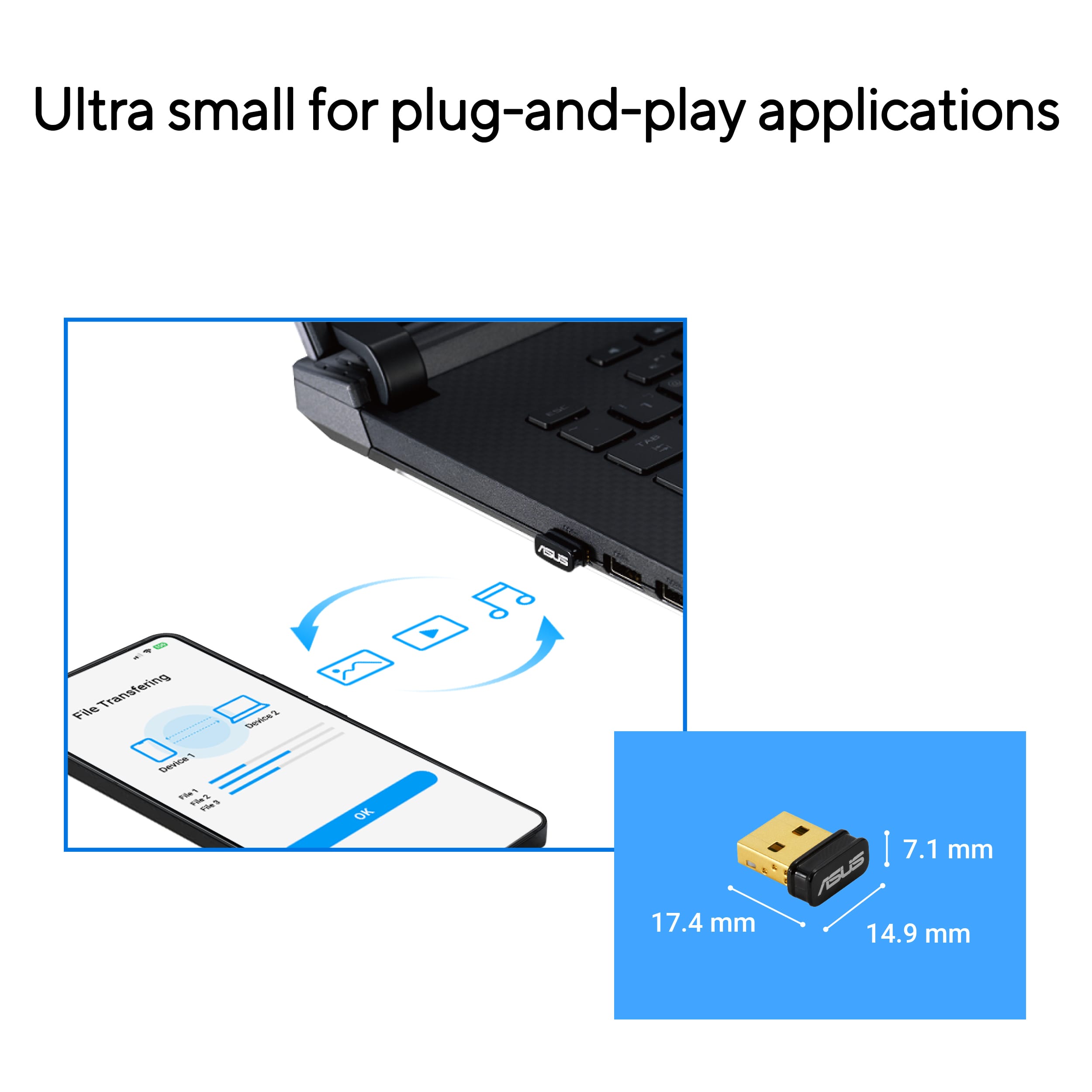
Posted .This reviewer received promo considerations or sweepstakes entry for writing a review.One of the first USB Bluetooth adapters I ever purchased was an AZIO 2.0 with a small blue light showing operation, and it was a bit bulkier than this one by ASUS. It still works perfectly after many years. I also have two old Di Novo keyboards that have their long stick 2.0 type USB Bluetooth adapters. In my kitchen, I have another touch screen computer that had no Bluetooth. Since I wanted to add a Microsoft Sculpt mouse to it, I purchased this ASUS adapter - it works perfectly. This ASUS 5.0 adapter is vert small - almost makes one wonder how it could work being so tiny. I just plugged it into the Windows 10 computer and it was instantly installed. Only seconds later it was paired with the new Sculpt mouse. Couldn't be happier - it works like a charm.
I would recommend this to a friend