Customer Ratings & Reviews
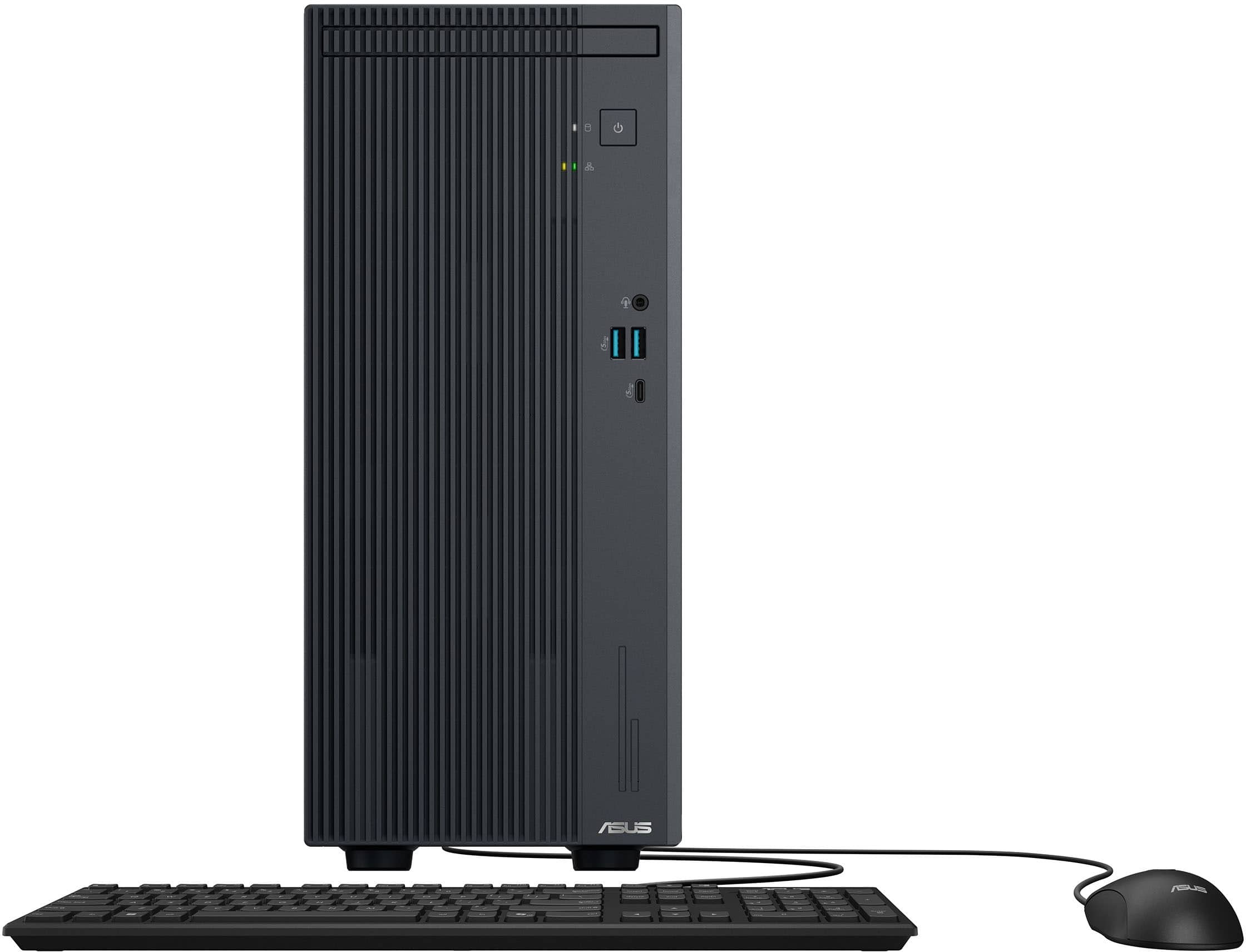




- Model:
- V500MVC-I51TB
- SKU:
- 6613706
Rating by feature
- Value
Rating 4.7 out of 5 stars
- Quality
Rating 4.7 out of 5 stars
- Ease of Use
Rating 4.7 out of 5 stars
Customers are saying
Customers enjoy the product's excellent overall performance, speed, compact size, and quiet operation. They also appreciate its solid connectivity, ample storage capacity, light weight, and efficient heat dissipation. However, some customers have noted limitations regarding port selection and the lack of included accessories.
This summary was generated by AI based on customer reviews.
- Pros mentioned:Noise level, Size, Speed
Excellent computer, fast and quiet
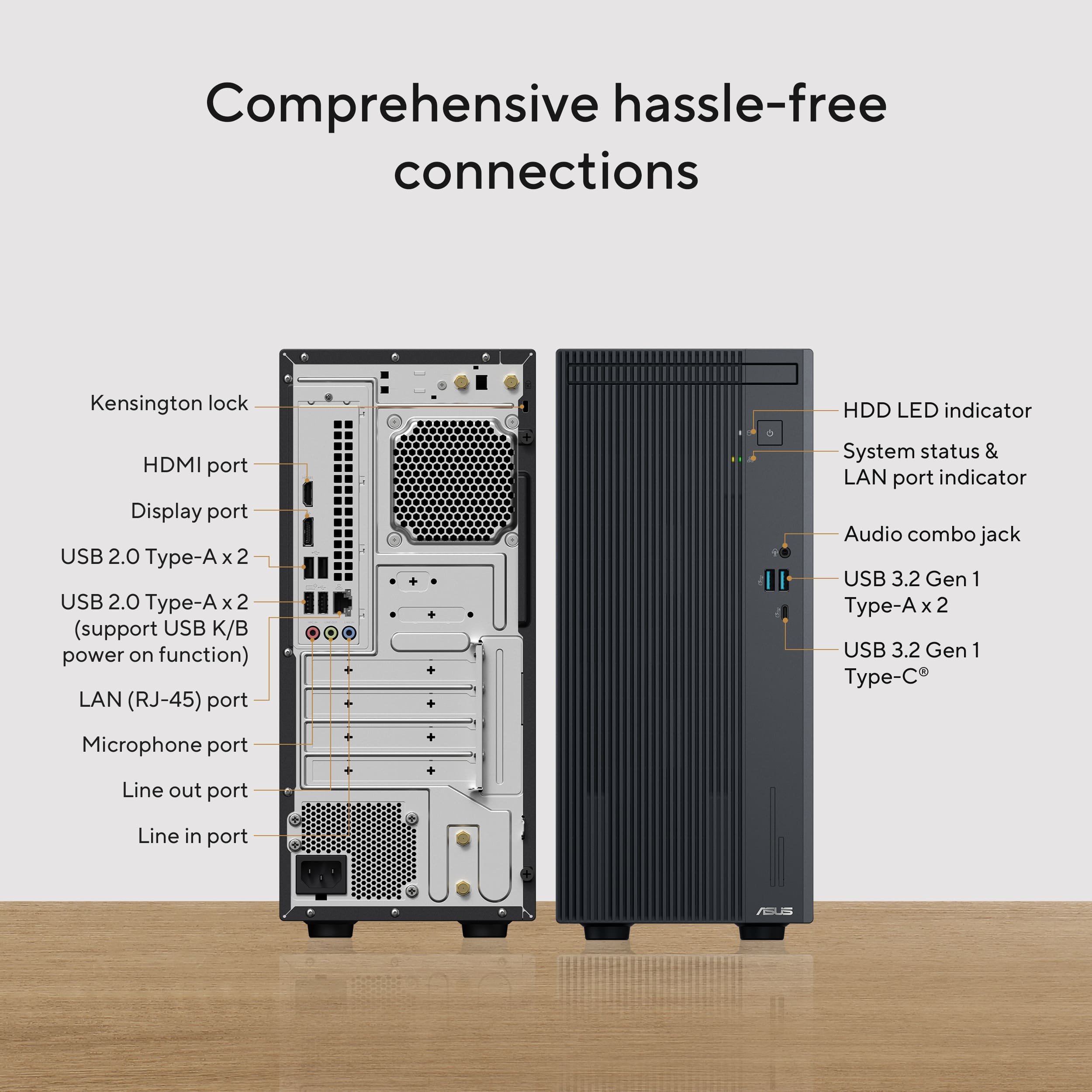
||Posted . Owned for 2 weeks when reviewed.This reviewer received promo considerations or sweepstakes entry for writing a review.I'm very happy with this purchase. The computer has a modern and elegant design, takes up little space, and operates very quietly. The Intel Core i5 processor makes everything run quickly, from everyday tasks to more demanding programs. It boots up in seconds and doesn't freeze. It also has several USB ports and a headphone jack on the front, which is very convenient. Ideal for work, study, or home use. Without a doubt, excellent value for money. I highly recommend it!
I would recommend this to a friend Behind the scene fast
||Posted . Owned for 3 weeks when reviewed.This reviewer received promo considerations or sweepstakes entry for writing a review.Great speed no matter how many applications are in use. I use it at work to update website info, pull up contact info from one program for use in other programs. Great for Publisher & all Microsoft apps, Adobe apps, and all the websites for real estate - DocuSign, MLS, etc... I also design programs, brochures, flyers, social media ads. Nothing I work on slows this machine down.
I would recommend this to a friend- Pros mentioned:Overall performance

Everyday pc
|Posted .This reviewer received promo considerations or sweepstakes entry for writing a review.[Employee of bestbuy] Computer is great! Very fast and responsive. I bought it for my parents as an upgrade and they love it!
I would recommend this to a friend - Pros mentioned:Noise level, Overall performance, Size

Solid home machine with bumped up specs
|Posted .This reviewer received promo considerations or sweepstakes entry for writing a review.Asus makes a huge number of different laptops and desktop computers. What’s nice about them is that they don’t make just one type of machine for all users. I’ve used several of their gaming laptops and desktops, and they’ve always performed quite well. My rating on this machine is based on what (and who) this computer is targeted for, and how well I believe it performs in that role. For people that aren’t sure about what computer to choose, this particular machine is perfect for general and typical use that most people will use for things like web browsing, using Office programs, sending email or looking at photos. This is not a machine for gaming. It’s not a machine for video editing. And it’s not going to do well with intense engineering programs like several of the CAD modeling programs. As a general machine, it does very well. This particular one comes with an intel Core i5 processor, 16GB of memory, and a 1TB solid state drive. And not only an SSD, but an M.2 SSD. So right off the bat it’s a machine that’s decently equipped to handle a lot of standard demands well. I haven’t noticed any lag or delay when using it, mostly because of the three items mentioned above. On top of that, if you really find that you would like more RAM or storage, you can upgrade the memory to 64GB. It comes with 16GB which is actually on one card. In theory you should just be able to add another 16GB compatible memory card in the available empty slot, to double the size to 32GB. There’s also an additional M.2 slot if you want to add additional storage. The graphics are (as are typical for this class of machine) integrated into the mother board. So, no separate graphics card with mind blowing specs, however you won’t need something like that unless you’re really stressing out the video with things like games or video editing. The graphics look just fine on my 2K 24” monitor. Nothing looks spectacular, but also nothing looks bad. There is an available PCIe slot (one), but I can’t really think of a specific use for it other than a very basic video card. Anything more than that is going to really take a bite out of the somewhat small power supply. But again, this is not a gaming machine. It comes with a variety of connections including a Display Port, an HDMI connection, a whole lot of USB ports (including a USB-C port) and standard audio jacks. It also has wireless network (Wi-Fi 6) and Bluetooth. Although not specifically mentioned in the specs, it also has an RJ45 (1Gbe) network jack. Although it doesn’t come with a monitor (do any anymore?), it does also come with a wired keyboard and mouse. My current wireless keyboard and mouse worked just fine with it. The case itself is very cool looking. I have black, but the photos of the white model look very cool as well. It’s a stylish look whichever one you get. It’s small size make it very easy to find a place for, we keep this one inside a cabinet in our desk and there is room to spare. There is a place for a CD-ROM drive, although this one did not come with one. It’s possible that’s an option that can be selected if you order it through Asus. On the inside, I couldn’t believe how small the motherboard is. There’s only one fan that serves a dual purpose of keeping both the processor and the internal machine cool. Time will tell if this particular strategy works out in the long run. Really, there’s a lot of empty space on the inside. In my opinion, Asus machines have always held up well, and I hope that this one will be no different. This is a good choice for a basic machine. It comes equipped with bumped up memory and a solid state drive, and a decent intel CPU to boot. And on top of everything else… it’s very quiet. So, perfect for home.
I would recommend this to a friend - Pros mentioned:Overall performance
Retired
||Posted . Owned for 3 weeks when reviewed.This reviewer received promo considerations or sweepstakes entry for writing a review.I bought Asus desktops @ best buy last month so far so good love it. I recommend to everyone
I would recommend this to a friend - Pros mentioned:Overall performance
My ASUS - V500 Desktop - Intel Core i5 - 16GB
||Posted . Owned for 2 weeks when reviewed.This reviewer received promo considerations or sweepstakes entry for writing a review.ASUS - V500 Desktop - Intel Core i5 - 16GB Memory - 1TB SSD - Dark Gray is an Excellent Product.
I would recommend this to a friend - Pros mentioned:Overall performance
Very fast
||Posted .This reviewer received promo considerations or sweepstakes entry for writing a review.Pretty fast. Smooth easy to use . We like it office likes if
I would recommend this to a friend - Pros mentioned:Overall performance
Desktop
||Posted . Owned for 3 weeks when reviewed.This reviewer received promo considerations or sweepstakes entry for writing a review.Good product. Does what it's supposed to. Easy to set up.
I would recommend this to a friend - Pros mentioned:Noise level, Overall performance, Storage capacity
Practical for Home or Office
|Posted .This reviewer received promo considerations or sweepstakes entry for writing a review.Bottom Line: This is a low-to-mid-tier desktop that is great for typical office or home use. Its small form factor, quiet operation and good venting make it a “set and forget” kind of computer. No glaring RGB lighting or deafening fans, just a simple straight forward computer that can pretty much handle whatever you throw at it. I included a photo of this desktop next to my Asus Rog Gaming desktop so you can see how much smaller it is. Overall I’ve been very happy with the design and its performance. Components and Upgradeability: Asus uses the Intel i5 13420H which is listed as a laptop processor however many manufacturers are now using this processor in mini towers. In this mini tower it runs cool and uses less power without sacrificing much in performance so I think it’s a good choice. There is 16 gb of DDR5 memory that is rated for 5600mhz however the processor limits the memory speed to 5200 mhz which is still fast. The NVMe drive is a 1tb gen 4 which is a ton of storage for most users. If that isn’t enough there is a second NVMe M2 slot available for someone who wants to add a second NVMe M2 drive. There are four USB-A type 2 ports and one USB-C port for connecting external peripherals. It has both a HDMI port and a Display port along with audio jacks. It supports Wifi 6 and Bluetooth so it has good wireless connectivity. The only downside is that this build does not have a dedicated video card and due to the chassis size and 180 watt power supply the available upgrade options are limited. I would not recommend installing a video card, instead if you need better graphics order the Asus model with the video card already installed. Keep in mind that the integrated Intel graphics capabilities that are included do a good job. I was able to watch 4k videos and perform typical office functions without any display or graphics issues. For the typical user this pc has everything you need, the lack of a dedicated video card would only affect someone who is into high end gaming or graphics work. After setting up the system and upgrading all the software I ran it through some benchmarks below. Just as importantly I did several long file transfers while doing some browsing and typical office stuff. At no point in this process did the processor show any heat issues nor did the fans get loud enough to distract me. Geekbench 6 Single Core Score = 2306 Multi Core Score = 9222 Open CL Score = 9853
I would recommend this to a friend CPU system
||Posted .This reviewer received promo considerations or sweepstakes entry for writing a review.Super light in weight has a lot of usb port great for work form home
I would recommend this to a friend- Pros mentioned:Noise level, Size, Speed
So dang quiet and fast
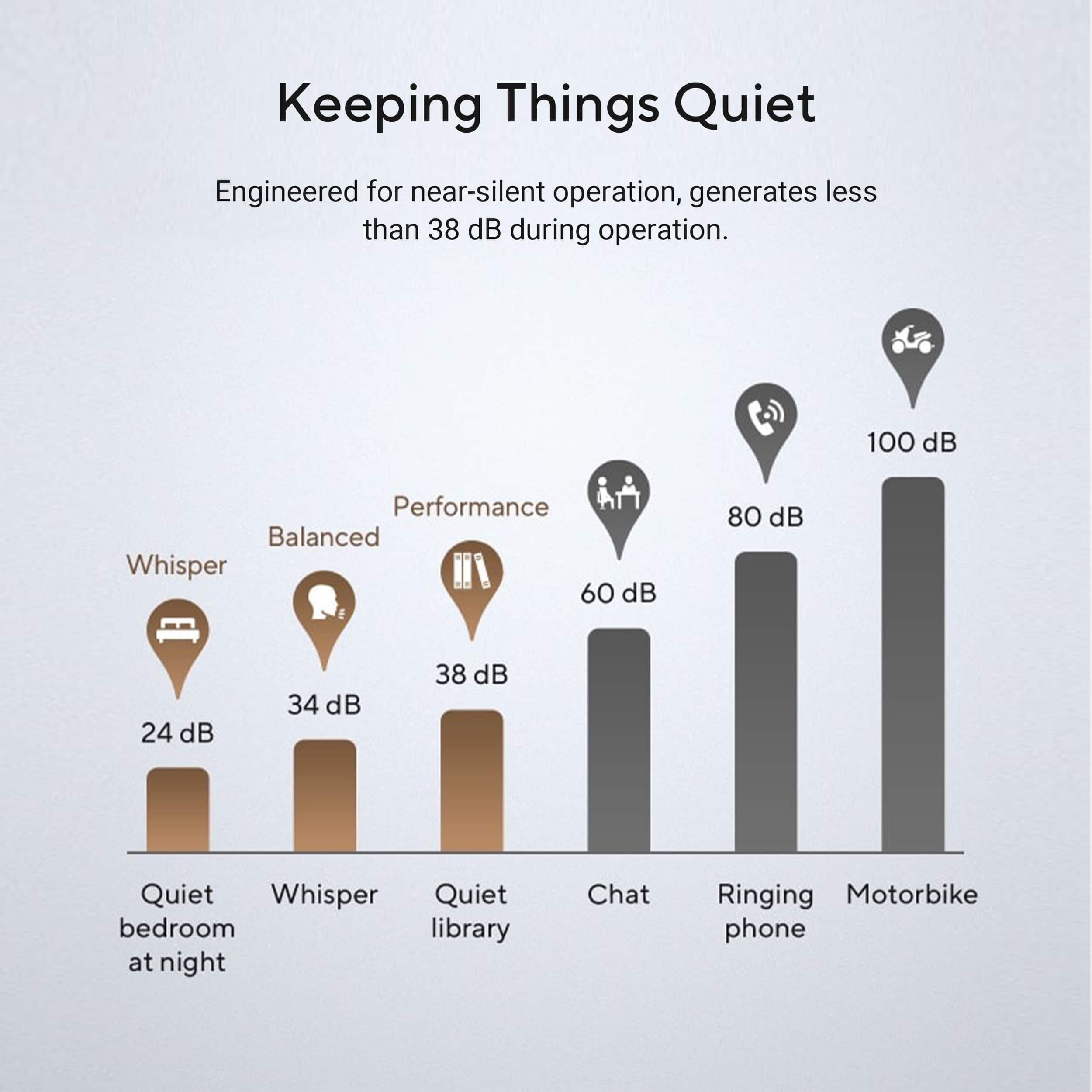
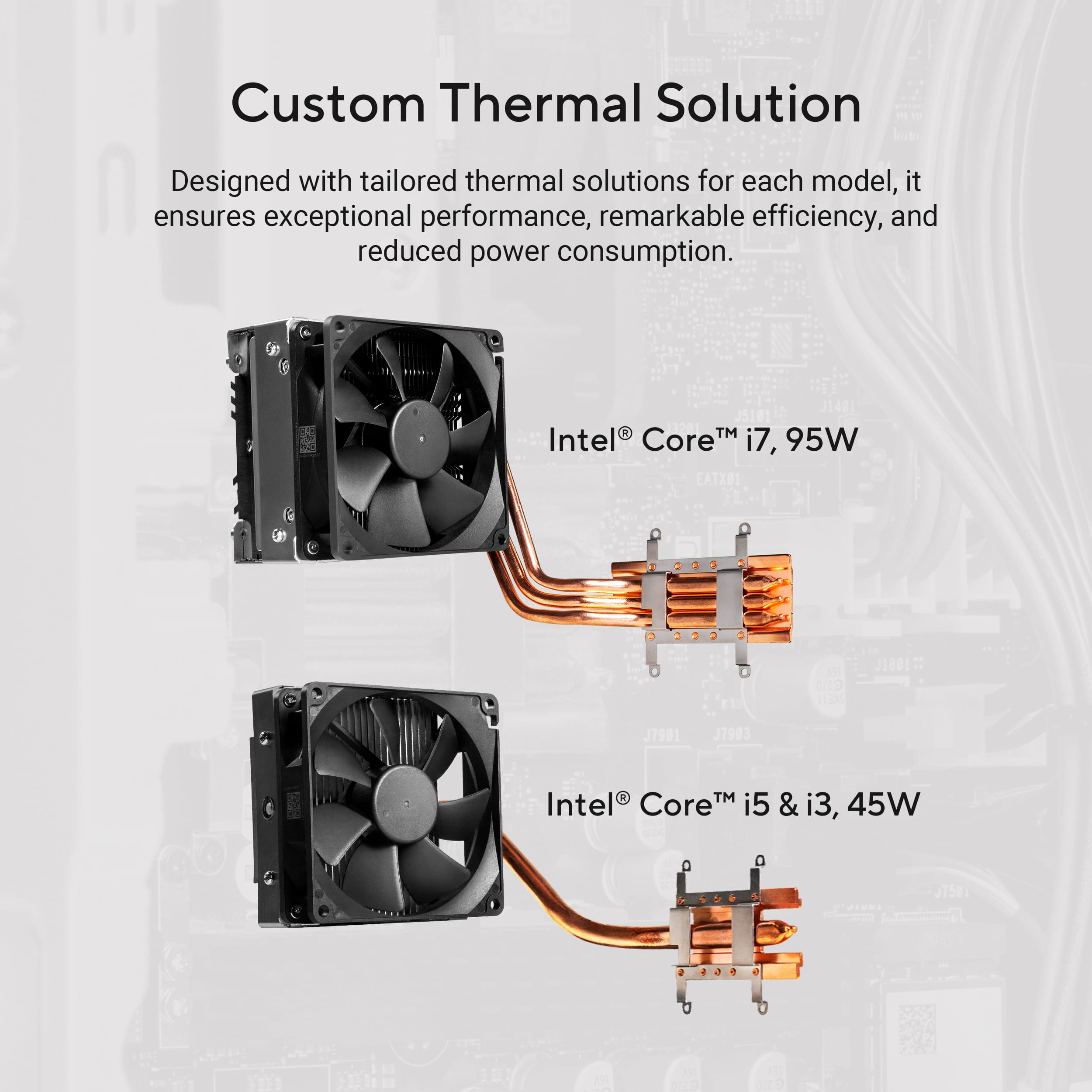
|Posted .This reviewer received promo considerations or sweepstakes entry for writing a review.The Asus V500 has got to be one of the best personal pc in my opinion. It is compact and has pretty much all the inputs most people would need. Unboxing this pc, the first thing I noticed and was quite happily surprised at was it's compact size. I'm from the old school so my initial first thought was, how can this small thing do all that I would need it to do. Well it did all I wanted it to do and with the 1tb of ssd, plenty of space so I won't have to worry about adding storage for awhile. I also noticed how absolutely quiet this unit is. Where is the fan noise? This is going to get hot. LOL. So I read they do some kind of thermal cooling and I don't know what that is, but I gotta tell you, hours of use, this thing was still whisper quiet. I hooked up 2 monitors and that worked flawlessly without any additional steps. The I5 processor and 16gb of memory has let me run multiple things at once without any hiccups. I can't remember the last time I was so impressed with a personal computer I bought and at this price point, I tell anyone who needs an upgrade to get one. Best home office computer ever
I would recommend this to a friend Moms PC
||Posted . Owned for 2 weeks when reviewed.This reviewer received promo considerations or sweepstakes entry for writing a review.Love it. I had to rplace a old windows 10 dell box and was able to get this one up and running for my mom in less than 30 minutes
I would recommend this to a friend- Pros mentioned:Noise level, Overall performance, Size
Quiet and compact with great everyday performance
|Posted .This reviewer received promo considerations or sweepstakes entry for writing a review.The V500 is a solid mid-tier desktop system that effortlessly handles normal work or home task. The newer processor and RAM are a good combo for multi-tasking and light media editing. It boots quickly, doesn't lag, runs quiet, has room for upgrades, and doesn't take up much desk space. ASUS is a good brand; I have owned a lot of their products (motherboards, computers, and monitors) and never had an issue. Pros - Intel Core i5 (13th gen) processor and 16-GB of DDR5-5600MHz RAM offer great performance. Don't be fooled into thinking this is just a Core i5, the generation matters. This combo actually performs better than older Core i7 models (especially those with slower RAM). - Quiet even under heavy load. There was no fan noise at all while encoding HD videos for 30 minutes at 100% CPU utilization (with a peak temperature of only 70C). - 1TB SSD storage with great performance (tested using DiskMark at 5100MB/s read, 3895MB/S write) and there is a minimal amount of preinstalled software (~71GB) leaving 881GB of free space to start. - Convenient front USB ports and a headphone jack - 7 USB ports (total) with 3 high-speed (5-Gbps) on the front (4 standard USB-A ports on the back, 2 USB-A and 1 USB-C on the front) - Compact size makes it easy to fit on my desk to one side of the monitor - Dual display support (1 display port and 1 HDMI) - Wi-Fi 6 that works well with no external antenna - Easy to open case that is secured with 2 thumb screws - Room for upgrades as you go. There is an open RAM slot, an open spot for a second M2 SSD, and the board has a PCIe x16 cards slots that would allow for a wide variety for video cards. - Asus includes as few useful apps. I regularly use the MyAsus app to adjusting settings and monitor system performance; it also offers basic support, Asus update notifications, and product registration options. There is also the Asus ExpertPanel app, which adds a screen recorder, AI meeting notes, AI subtitle translation, noise cancelling, and a screen watermark overlay (to prevent unauthorized screen captures when sharing a display). - Includes a solid, but basic matching USB keyboard (full-sized w/ number pad) and mouse. Things to Consider - The integrated Intel UHD graphics has up 8Gb of shared video memory and performed well under normal use with my HD/QHD monitors, but it is not meant for graphic intensive computer games or heavy video editing. As a future upgrade, I might consider finding an affordable graphics card on sale since there is an open PCIe slot.
I would recommend this to a friend - Pros mentioned:Noise level, Overall performance, Size
Great if what's needed is here-no upgrade path
|Posted .This reviewer received promo considerations or sweepstakes entry for writing a review.Overall The Asus V500 is a compact and dependable desktop computer suitable for both personal and professional users. It features a small footprint, smooth performance, and efficient heat dissipation with it's whisper quiet cooling system. The case gives the impression that it is very versatile with various configuration options with the multiple mount options inside, which seem to not be the case. This ultimately lead me to believe the case may be used with other configuration/product lines as there didn't appear to be any indications of various configurations from the manufacturer. *** Highlights *** Features * Intel Core I5-13420H processor * 1x 16 GB of DDR5 RAM * 1TB NVMe Gen 4 SSD (expandable with a second NVMe M2 slot) * Quiet and efficient heat dissipation Design * Compact and space-saving design * Modern * Mesh side panel Connectivity * Four USB-A 2.0 ports * Two USB-A 3.2 ports * One USB-C port * HDMI port * Display port * Audio jacks * Wi-Fi 6 and Bluetooth connectivity Performance * Superior multitasking capabilities * Integrated Intel graphics capabilities (suitable for typical office functions and 4K video playback) * Smooth performance with photo-editing programs and applications (not to be confused with professional editing software) Cons * Limited upgrade options due to chassis size and 180W power supply * No dedicated video card (may affect gaming or graphical work) * 2x SATA ports available but no SATA power. Other Considerations * No bloatware, MyAsus is the only application needed for system info/troubleshooting. * Second NVMe M2 slot available for additional storage (placement leads me to believe an afterthought in design) * Variations of the Asus V500, including the model on Best Buy, may offer additional expansion slots for 2.5" (Mentioned on this specific model) and 3.5" drives. However, this is not mentioned in the documentation, and third-party add-ons for these slots may not be available. Meaning, the 2.5" mentioned, does not exist in this configuration. Conclusion The Asus V500 is a great desktop for those looking for smooth performance and a space-saving design. It's well-designed, operates quietly, and dissipates heat easily under heavy load. With its dependable reputation and easy setup process, this product is sure to appease a range of customers for years to come. However, it may not be the best choice for gaming or heavy graphical work due to the lack of a dedicated video card. Additionally, buyers should be aware that some variations of the product may offer different features or upgradability options. This is worth 4-stars.
I would recommend this to a friend - Pros mentioned:Noise level, Overall performance, Size
GPU upgrades not quite possible out of the box
|Posted .This reviewer received promo considerations or sweepstakes entry for writing a review.TL:DR - It is a great little desktop, has expansion slots, and punches above its weight somehow. Super quiet performer and isn’t that bad to look at. However it doesn’t have a beefy power supply, and NO you can’t upgrade the GPU without some modifications to the unit. It has a PCI slot, but you’d have to upgrade the PSU because A) it’s super low power, and B) it doesn’t have any extra power ports to support any GPU unless the GPU can be powered by the PCI slot itself. BUT you might be able to get a SFF PSU and get it in there to accommodate the PSU and mainboard. It’s small and doesn’t take up much space. It has a tool-less case with just two little screws to get into the case, and has plenty of expansion slots. It has an additional RAM slot (though it’s SO-DIMM), PCI Slot, etc. You “CAN” add a new GPU to it, but keep in mind the power supply is pretty lean and doesn’t have a lot of headroom for anything too powerful. But the bigger issue is how would you power the GPU? It doesn’t have any extra GPU power connectors to the PSU so unless you get a GPU that can be powered by the PSU itself then you’re out of luck. It does look like you may be able to swap the PSU with a SFF one, but I don’t know for sure. Assuming that is the case though, that you can swap PSUs, I would stick to a 4060 or 4050 because it does have some things in the way so chances are you’d have to stick with something really small. I would imagine a 5060 might work too, but not sure exactly. It’s super quiet and runs Geekbench and Cinebench under full load without much noise. I barely heard the fans and it scored higher than the average for the i5 13th gen. I get it, the CPU is a laptop grade processor, and with it being in a desktop there are way more cooling opportunities. But still, it performs better than most laptops in that ragneNot sure what Asus did, but it performs really well all things considered. I also love that you can install Linux on it. I went with Fedora with this system. However before I did that, I spent a bunch of time on Windows 11 before switching. Windows is Windows, it performed well, the keyboard itself has a CoPilot button if you care about that. Speaking of the keyboard and mouse, they both felt pretty cheap! Definitely not the end of the world, but I imagine most people will switch out of the keyboard and mouse for something better. I almost would recommend Asus to not include a keyboard and mouse and just include the tower and power cable. Who’s this computer for? Anyone really! I don’t see many situations where this thing can’t perform well doing most day to day tasks. However the main issue I have with it is its claim to upgradability and though it is possible, it’s not quite as upgradeable as I’d like especially when it comes to the GPU. I wish it came with a modular PSU, and more space for GPUs. Imagine being able to simply plop a 5070/4080/5080/9070XT in here! It’d be amazing and crazy good value.
I would recommend this to a friend - Pros mentioned:Size, Speed, Storage capacityCons mentioned:Port selection
Back to school special
|Posted .This reviewer received promo considerations or sweepstakes entry for writing a review.Computers can be expensive...especially quality PC computers. The Asus V500 is a quality PC computer from a quality company delivering exactly what needed for the masses, nothing more, nothing less. The size of this thing is relatively small, which is great. While the overall design is pretty plain, it's plain in a good way. Lowkey...and small...in a good way. You can fit it anywhere, and, if you had to take it somewhere, it's incredibly light. In regards to features, for the most part, this has everything the average user could ask for. With so many people adapted to cloud storage, 1 tb SSD is pretty solid for the average user. 16 gigs of ram is going to get it done for most work/school software. Add in the 13th gen i5 processor, and you're smoking school/work software. The integrated graphics are going to keep you from doing any real gaming, but if you purchase this you know what you're getting in to. One thing I would have wished for is more USB C ports. Most of my stuff operates off USB C, having one USB C port in modern times is kind of a let down. Adding in the keyboard and mouse, all one would need to get to work would be a monitor. Yes, the keyboard and mouse are kind of meh, but for someone needing a computer to immediately get to work, this is a total package. I'd strongly recommend this for someone looking for a work/school computer.
I would recommend this to a friend - Pros mentioned:Noise level, Overall performance, Speed
Laptop disguised as a desktop
|Posted .This reviewer received promo considerations or sweepstakes entry for writing a review.TLDR: This is a low-power laptop housed inside a desktop SFF chassis. While speed is decent, the system is limited by its weak graphics. PROS 16GB DD5 RAM, expandable to 96GB 1TB Gen 4 SSD Extremely Quiet – (Quietest PC I have) Plenty of Expansion Ports CONS Laptop power in a desktop chassis Extremely weak graphics chips Realtek Wi-Fi and Bluetooth chipset KEY SPECS / PORTS Intel i5-13420H Processor 8C/12T (4P / 4E Cores) 16GB DDR-5 5600 MHz RAM 1TB Phison Gen 4 nVME SSD 4 x USB 2.0 2 x USB 3.0 1 x USB-C 1 x RJ45 1 x HDMI 1.4 1 x DP 1.4 1 x PCI-E x16 Expansion Slot (SFF Case will not fit a full-size graphics card) 3.5mm Mic & Headphone Input/Outputs FIRST IMPRESSIONS The Asus V500 is a basic, entry-level desktop. This is a perfect computer for parents that use an external monitor and don’t want a laptop. It does day-to-day tasks with no fuss or fanfare and does so in near silence. The V500 is, by far, the quietest desktop I’ve used to date. Even running extensive Passmark CPU tests, the desktop had just a hint of fan noise trying to cool the processor. Once the tests were complete, the fan idled down in a few seconds and the V500 was back to near silence. Even sitting at the desk next to me, the fan is barely audible. Much quieter than any desktop I’ve used to date, and far quieter than a laptop. How does the V500 remain so quiet? It is a laptop inside of a desktop chassis. The i5-13420H is a low power Intel CPU designed specifically for laptops. Placing it inside a desktop chassis with a big heatsink and the V500 has plenty of overhead for cooling, keeping noise down. USE With such a low-power computer, how does it handle daily tasks? If you aren’t asking a great deal from the graphics card, the V500 serves as a silent companion. It handles all Office tasks with ease. Emails, videos, music, etc. are easily performed on the V500. Where the V500 comes up way short is in its underpowered GPU. The 13th gen i5 has an extremely limited GPU. It has substantially less power than my desktop 14th gen i5-14400. How much less? My i5-14400 will drive my 1440p monitor at 120Hz with 12-bit HDR. The little i5-13420H will drive the monitor at 1440p, but at only 60Hz and 8-bit HDR, same with my LG UltraGear 4k OLED. It will output 4k @ 60Hz, but without HDR. However, I feel the text and refresh rate hinder the output at 4k. Text isn’t as crisp and clear as it is with a more powerful GPU. Some text has odd artifacts and rainbowing. The experience isn’t nearly as enjoyable as it is at 1440p and 1080p. You can tell the GPU is struggling. The GPU in the V500 is efficient and low power, but it is also low performance. This probably won’t be a huge deal for most folks, but it is concerning for my use. Should you have a basic 1080p monitor, the V500 is able to drive it at 120Hz with HDR. Again, I know it is being picky, as I’m assuming the intended audience for this desktop could care less about high refresh rates. But those that may be using a 4k monitor, will realize the weak GPU’s limitations. Aside from the weak graphics, there isn’t much else to dislike about this entry-level computer. It comes spec’d with a generous 1TB nVME SSD and 16GB of DDR5 RAM. Plenty of space for the most demanding workloads. It is nice to see an entry-level machine with 16GB of RAM, even if it is limited to only being on one stick. 16GB gives a nice performance boost over the basic 8GB making for a much more enjoyable experience. NEGATIVES I’ve already mentioned the graphics, so I won’t go into it here. The only other negative I can ding the V500 on is the Realtek Wi-Fi / Bluetooth chipset. Its performance has always been spotty. It struggles to reliably connect to my Asus ZenWi-Fi routers upon boot up. It often takes several attempts to finally obtain a connection. I would love Asus to start using the Intel AX chipsets for WiFi & Bluetooth. They are much more reliable. FINAL THOUGHTS The V500 is a fine companion for “lightweight” desktop work. It is super quiet and has enough power to do most routine tasks. Emails, Word docs, PDF’s, YouTube, etc. all work fine on the V500. Even with a laptop processor, the i5-13420H compares favorably to its newer and slightly more powerful i5-14400 desktop sibling. Passmark scores of 21053 compare favorably to its desktop-spec sibling, the i5-14400 which clocks in at 24637. Both fairly weak, but decent for a low-power, efficient desktop. The only real limitation is the weak GPU. Users with high resolution displays will severely tax the GPU. However, it is perfectly capable at 1080p and passable at 1440p. Don’t expect to game, unless it is something like solitaire. RECOMMENDED
I would recommend this to a friend Bad experience with computers and Laptop.
||Posted . Owned for 1 month when reviewed.This reviewer received promo considerations or sweepstakes entry for writing a review.I purchased this computer at the Melbourne store. It was GeekSquad certified. When I got home, the conputer wasn't properly reset back to factory settings. I couldn't set it up for my son. I ended up going to the Orlando store and getting a different computer for him. I spoke to the manager there, he told me that unless the box showed being damaged he will provide me with a 10% discount. I didn't inspect the new PC untill I got home. Surprise, the new PC box had visible damgae. I call customer service, because I had place another order for a laptop, that they canceled without calling me, and that it was during tax free month. I got a representative to refund me the rewards I used and extra $5 dollars, plus another $5 dollars dor driving all over the place which that barely covers two gallons of diesel. Funny enough, I never got the other $5. Needless to say, I am considering purchasing from Bestbuy in the future. I returned as a customer after being treated this way before, but I guess nothing has changed.
No, I would not recommend this to a friendBrand response from ASUS Answers
Posted .Dear Maddog0331,
Thank you for your feedback.
We do understand your dissatisfaction with the quality of the product you received and your recent customer service experience from your vendor, and the inconvenience this may have caused. If you need further assistance with the product, please email me at cl-rodel@asus.com and I would be more than happy to help. Or you are most welcome to call Product Support Hotline at: 1(888) 678-3688. Also, you can chat with an ASUS live support agent from the link: https://www.asus.com/us/support/article/1135/.
Thank you for choosing an ASUS product.
Regards,
Rodel
ASUS Customer Loyalty
- Pros mentioned:Noise level, Overall performance, Storage capacity
Great for home users and for businesses
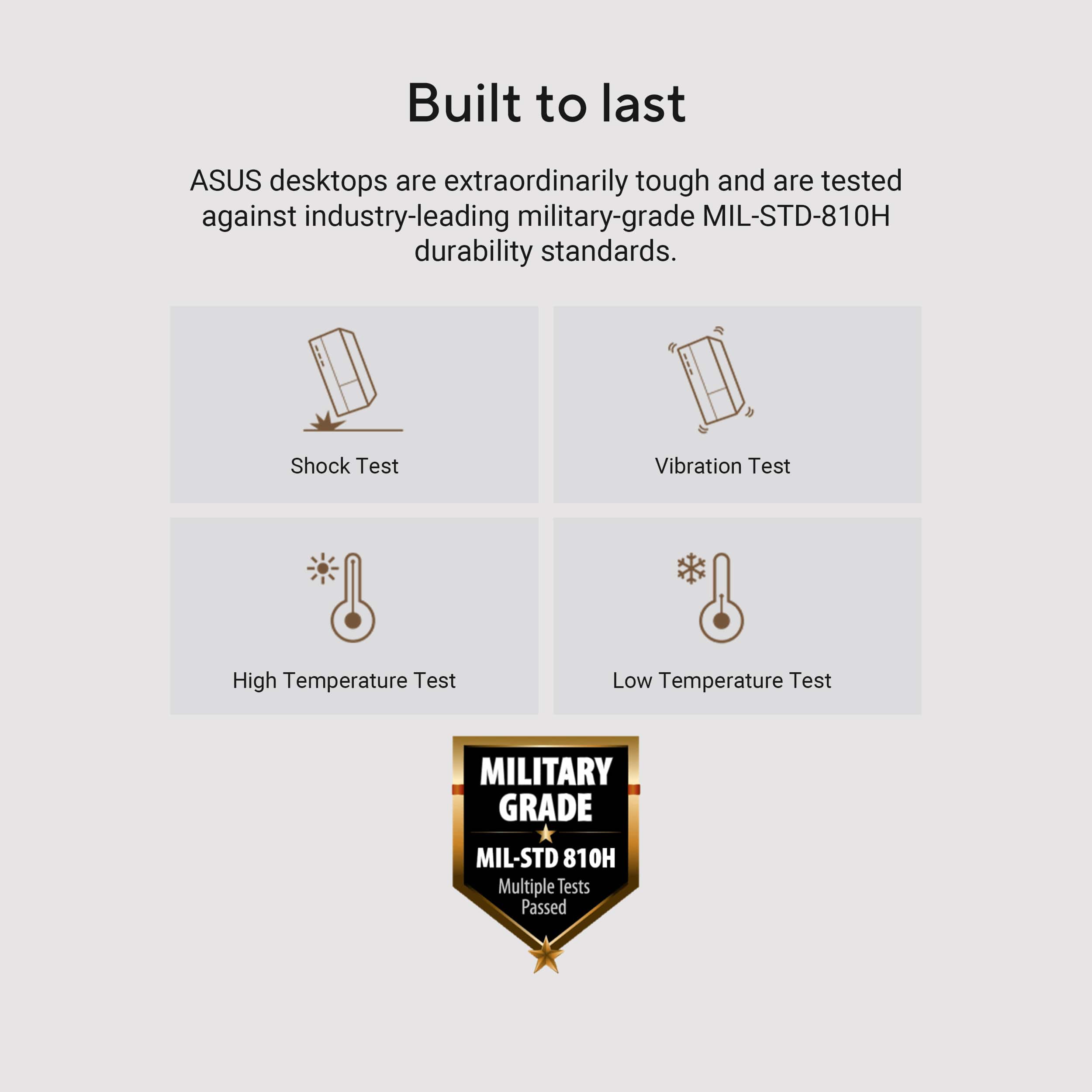
|Posted .This reviewer received promo considerations or sweepstakes entry for writing a review.Verdict: This ASUS V500 Desktop performs well for office and home requirements, easily supporting multitasking of word processing, browsing, and content watching. The budget conscious package is well priced and includes a keyboard and a mouse. Overall, this is a solid choice for households and small businesses if you already have a monitor or plan on buying one separately. First impressions. The tower is medium size. It looks fine. It comes with a basic keyboard, a basic mouse, and integrated Wi-Fi 6 adapter. It has two USB connectors, audio jack, and USB-C on the front panel for convenience. The tower also has a display port and HDMI port for monitors. Setup. Setup was straight forward, including a 15 min software update. Generally, ASUS does not include junk software, which I appreciate. Performance. Normal operation is smooth with the Intel 13th Gen Core I5 processor. Startup is fast, thanks to the SSD drive, which has ample storage at 1TB. Multitasking is quite good with the 16 gigabytes of DDR5 RAM (expandable to 64 GB). The integrated graphics card can support basic gaming, basic graphic tasks, and any video content streaming, but not medium to heavy gaming / graphic processing. The computer is remarkably quiet; I don’t really hear the fan. Things I love. - 13th Gen Intel Core i5 performs well for everyday tasks - 1TB SSD allows for fast startup and ample space - 16GB RAM is perfect for this setup; allows for significant multitasking and endless browser tabs - Built to last! Military grade (tested for shock, vibration, and low/high temperatures) - It includes a basic corded mouse and corded keyboard - Very quiet and effective cooling - No bloatware. It comes with Windows and MyAsus. Things I don’t love. - The tower is not big, but also not small; probably best if installed under a desk so it doesn’t take too much desk space Overall, the ASUS V500 Desktop provides great value for home and businesses. I like this computer package a lot. It has great components and you only pay for what you need; in our case, we don’t want to pay for a monitor since we already have some at home. Pair with your existing monitor and you are good to go. We love it!
I would recommend this to a friend - Pros mentioned:Noise level, Size
Small and Silent, but Still Mighty
|Posted .This reviewer received promo considerations or sweepstakes entry for writing a review.The ASUS V500 desktop with an Intel Core i5, 16GB Memory with 1TB SSD in dark grey is very mighty for every day use while computing, but just as important is the fact that it is compact and virtually makes no sound. One wonders if the machine is literally on and engaged because it is so silent. As I have stated in prior reviews, by trade I am a CPA and I need numerous desktops at various locations within my office to make my life easier so that access to the necessary programs, used in my day to day business, is easy and efficient. When I consider putting a system together, I try to use the largest monitors possible because of severe eye fatigue, so the less real estate that I have to dedicate for the actual desktop the better. However, at the same time I am not willing to sacrifice either strength or speed considering that I have always have numerous work-related tabs open in addition to constantly streaming something such as network news in the background. My system has to handle all of that at a time. While I am not an IT wizard nor a technical guru, I do have the presence of mind to put these systems together, and I am pleased to say that this is also easy to achieve with this unit. Clearly, no matter how good something might be, reliability and ease of use must be a priority. There are plenty of clearly marked ports, front and back, to attach your peripheral devices such as the monitor(s), wired or wireless keyboard and mouse, microphone, webcam, etc. I noticed that there is plenty of room for expansion within this case and there are several slots on the back that one could use to insert additional hardware for their own necessity. Please remember that I am not a gamer, but use my desktop for tax return preparation, payroll, other accounting functions, streaming Netflix, Prime, talk radio, and things of that nature, as well as the day to day nature of email and online searching. For the buck, this is a good and reliable choice for the day to day user.
I would recommend this to a friend