Customer Ratings & Reviews
- Model:
- V500MVC-I51TB
- |
- SKU:
- 6613706
Customer reviews
Rating 4.6 out of 5 stars with 181 reviews
(181 customer reviews)Rating by feature
- Value4.7
Rating 4.7 out of 5 stars
- Quality4.7
Rating 4.7 out of 5 stars
- Ease of Use4.7
Rating 4.7 out of 5 stars
Customers are saying
Customers are delighted by the V500 Desktop's smooth performance, compact size, and quiet operation. Many appreciate its easy setup and ample storage, along with strong wireless connectivity. The lightweight design is also frequently praised. While some users noted a limited port selection, the positive feedback on other features outweighs this concern.
This summary was generated by AI based on customer reviews.
Rated 2 out of 5 stars
Annoyingly slow
||Posted .This reviewer received promo considerations or sweepstakes entry for writing a review.I expected this computer to be much faster than it is. Major disappointment. My 10 year old HP desktop running Windows 7 was faster than this. It's especially painful waiting for files to load in File Explorer.
No, I would not recommend this to a friendBrand response from ASUS Answers
Posted .Dear BlaineH,
Thank you for sharing your experience with the ASUS V500MVC desktop. We're truly sorry to hear that the performance has not met your expectations, and we understand how frustrating slow file access can be.
To help improve system responsiveness, we recommend reviewing the steps in our system troubleshooting guide linked below. If the issue continues, please contact our support team at https://www.asus.com/us/support/CallUs so we can assist you further or arrange repair service if necessary.
We stand behind our products and continuously strive to improve our products and processes to achieve customer service excellence. For more information, email us at customerloyalty@asus.com and include the case number "N2508004623-0005" as a reference. We will do our best to resolve your case quickly. Your feedback is very important to us and enables us to improve our support channels. Thank you for choosing ASUS.
Best Regards,
Chantae
ASUS Customer Loyalty US Support
[Windows 11/10] Troubleshooting - System is running slowly -  https://www.asus.com/support/faq/1042398/
- Pros mentioned:Connectivity, Noise level, Speed
Rated 5 out of 5 stars
Smooth, Quiet, and Fast
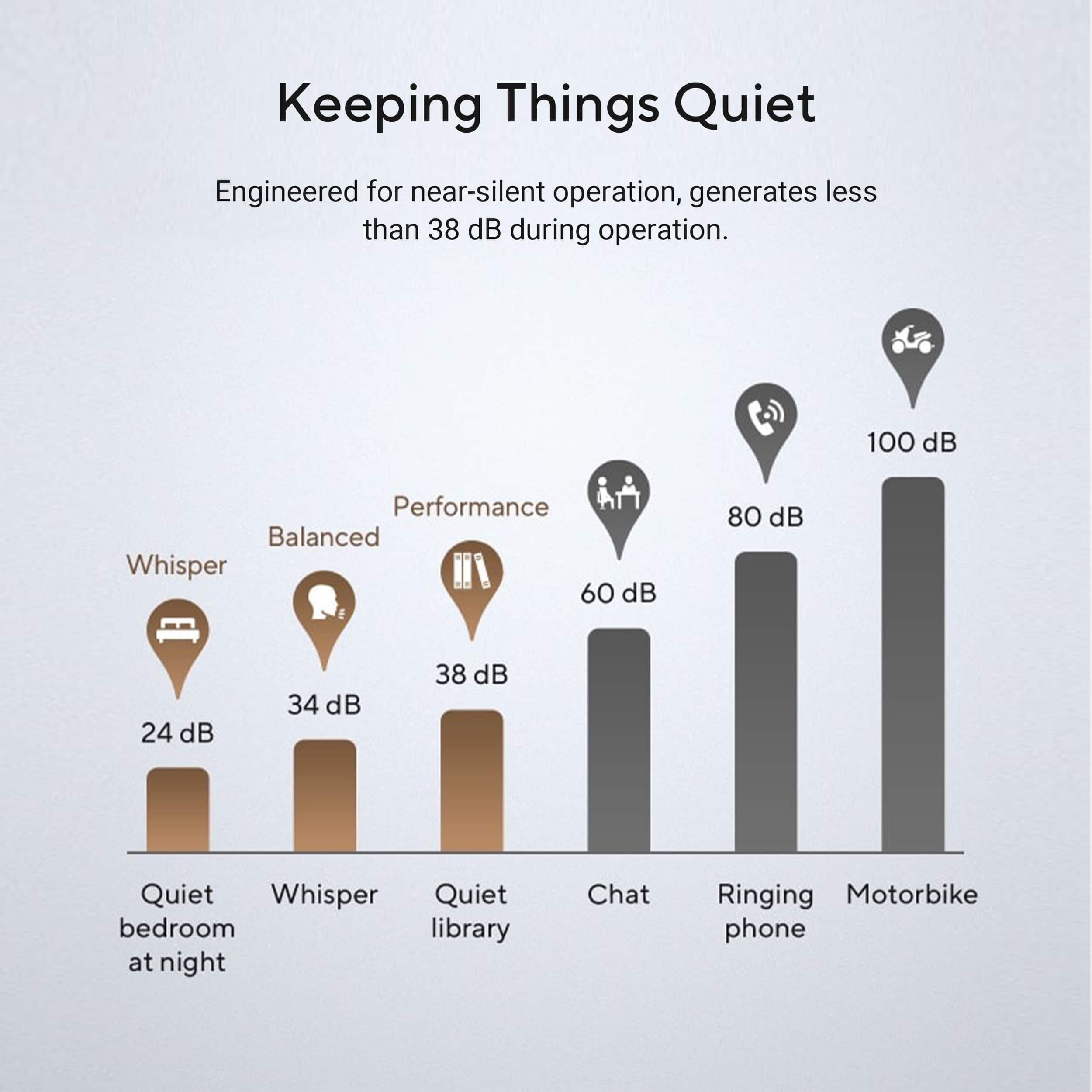
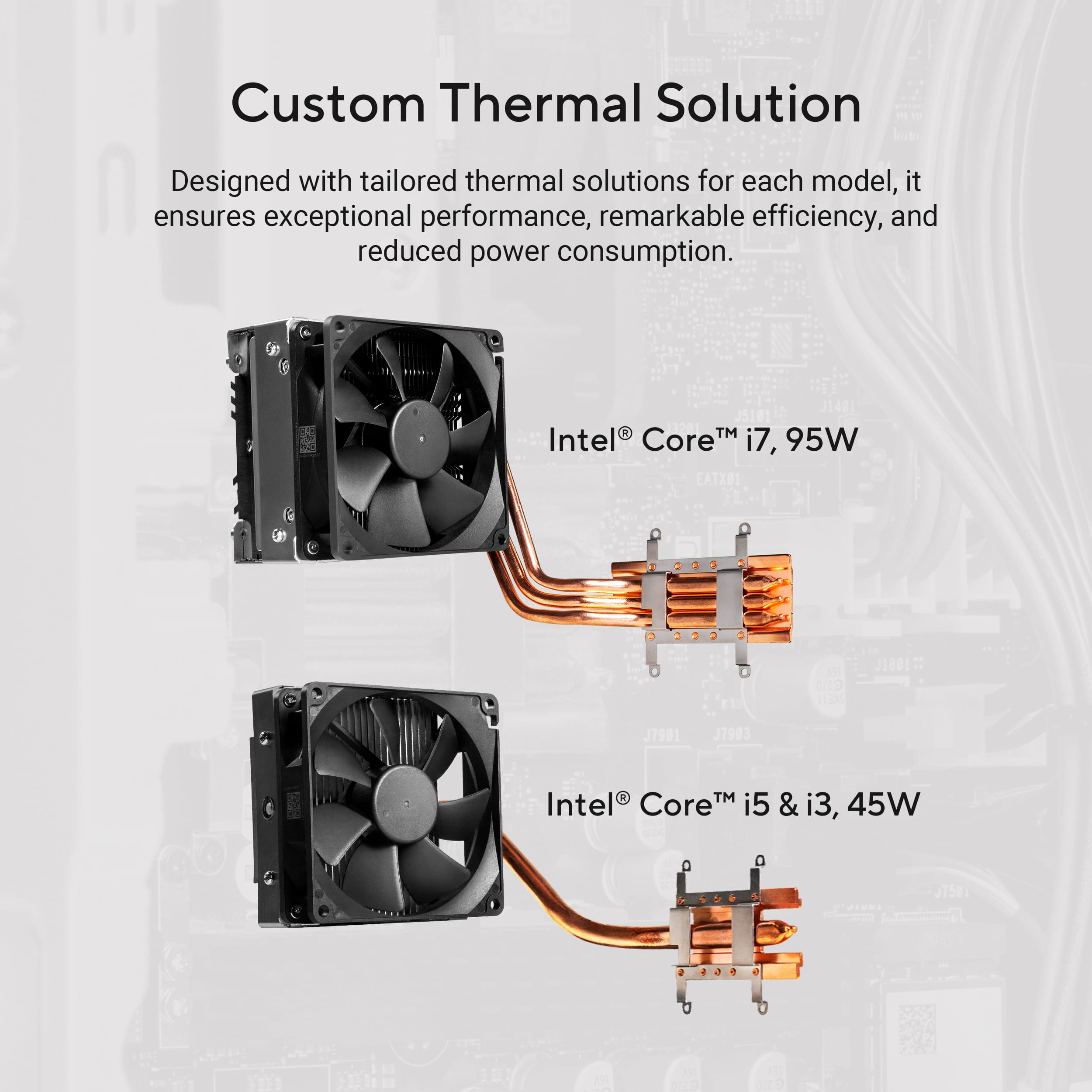
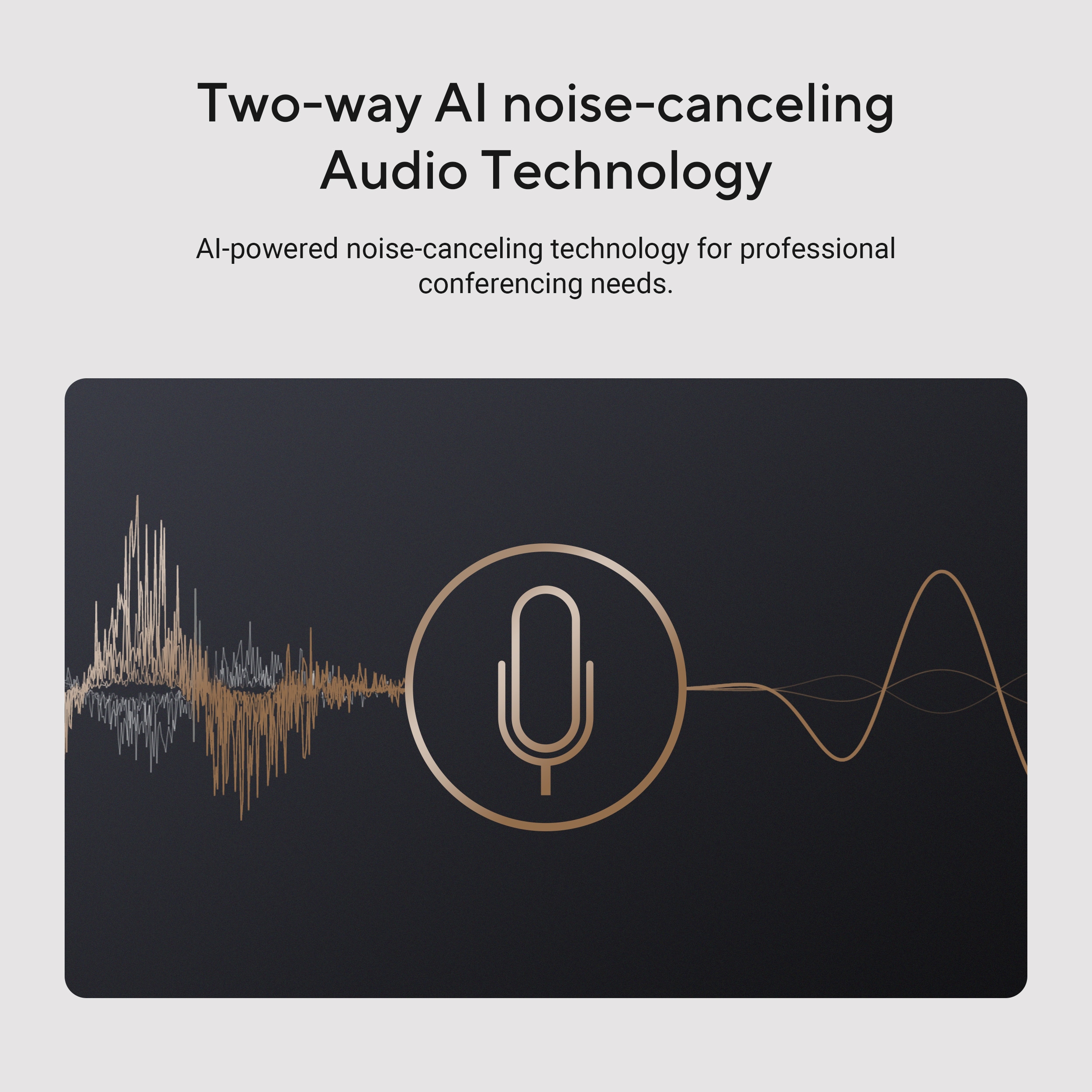
|Posted .This reviewer received promo considerations or sweepstakes entry for writing a review.I've been using the ASUS V500 desktop for work and personal computing, and overall it has delivered exactly what I expected for a mid-range computer. The 13th Gen Intel Core i5 processor and 16GB of DDR5 RAM keep up with my multitasking demands with multiple programs, browser tabs, and light media editing without any lag. The 1TB SSD gives me nearly instant start up time, and responsiveness to my commands has been excellent. Some standout features of this desktop is how quiet it is. Even when I have heavier workloads with video calls or data analysis, the fan can barely be heard. And I have not heard it run completely silent, during my lighter workloads and the fan can be stopped. It stays surprisingly cool, which means the design for thermal management is solid. The AI noise canceling feature is nice feature, during video calls it can cut out back group sounds really well. Connectivity options are very good; multiple USB ports, HDMI, Display port outputs including USB-C for modern hardwear. If you need a compact desktop that does not take up much space but will has good performance, this computer fits the bill. It isn't a gaming rig, but for Office tasks, streaming, and daily computing it is fast, quiet, and reliable.
I would recommend this to a friend Rated 1 out of 5 stars
Worst PC I ever owned
||Posted . Owned for 2 months when reviewed.This reviewer received promo considerations or sweepstakes entry for writing a review.Nothing but problems. Screen randomly blacks out, crashes for no apparent reason, does mot handle jpeg or photoshop documents well. And it is only 3 months old. I purchased it to save a few dollars. What a mistake. This is the first and last ASUS I will ever own.
No, I would not recommend this to a friendBrand response from ASUS Answers
Posted .Dear Valued Customer,
We’re sorry to hear about the issues you’re experiencing with your ASUS V500MVC desktop. This is not the level of performance we aim to deliver. To help resolve the screen blackouts and crashes, we recommend reviewing the steps in our system troubleshooting guide linked below. If the issue continues, please contact our support team at https://www.asus.com/us/support/CallUs so we can assist you further or arrange repair service if necessary.
We stand behind our products and continuously strive to improve our products and processes to achieve customer service excellence. For more information, email us at customerloyalty@asus.com and include the case number "N2507006742-0001" as a reference. We will do our best to resolve your case quickly. Your feedback is very important to us and enables us to improve our support channels. Thank you for choosing ASUS.
Best Regards,
Chantae
ASUS Customer Loyalty US Support
[Windows 11/10] Troubleshooting - Resolving System Error Messages or Unresponsiveness (Freeze/Black Screen/White Screen during usage) -  https://www.asus.com/support/faq/1038855/
- Pros mentioned:Overall performance, SizeCons mentioned:Port selection
Rated 5 out of 5 stars
Light, small power house
|Posted .This reviewer received promo considerations or sweepstakes entry for writing a review.The ASUS V500 Desktop is the perfect powerful mini desktop i needed. It is small and petite yet light and powerful as I needed it to be. The memory capacity it comes with is perfect for today demand and the solid state drive make it that much more secure and up to date. I wish i could say it looked great with all lights and extra accessories, but this is a workhorse, and it may not look pretty but it gets the job done. Overall set up was very simple, it came with a working mouse and keyboard that I will soon be upgrading. It comes with Windows 11 as needed to be. It does not have too many ports but it does what I need it to do. I am able to do minimal gaming and as much web surfing and video watching as my heart desires on this desktop. It is very light weight so mounting to a standing desk bracket wont be an issue for when the desk has to go up or down. I would totally recommend this desktop to anyone looking for a decent yet reliable computer to get their everyday things done. I am completely satisfied with what ASUS has done with this amazing laptop.
I would recommend this to a friend Rated 2 out of 5 stars
Open Box-Screen Locks Up and Went Black Repeatedly
||Posted .This reviewer received promo considerations or sweepstakes entry for writing a review.Purchase an open box item, The installation and transfer of files went fine. Unfortunately the cursor would lock and the screen would go black. It would reset after 5 seconds. This repeatedly happened. I was unable to resolve with driver updates, so had return the unit.
No, I would not recommend this to a friendBrand response from ASUS Answers
Posted .Dear DOUGM,
I'm truly sorry to hear that the unit you received wasn't functioning properly. At ASUS, we take pride in the rigorous quality control, testing, and inspection processes that every product undergoes. What you experienced is certainly not reflective of the standards we strive to uphold.
I understand you've already returned the unit for a replacement, and I appreciate you taking that step. I've also shared your feedback with our product team so they can review and learn from your experience.
If you have any further questions—technical or general—please don’t hesitate to reach out to us at customerloyalty@asus.com. Be sure to reference your case number (N2508004623-0003) so we can assist you more efficiently.
Thank you for choosing ASUS. We value your trust and look forward to serving you better.
Warm regards,
Schottky
ASUS Customer Loyalty US Support
Rated 1 out of 5 stars
Will not power on after 1 week.
||Posted . Owned for 1 week when reviewed.This reviewer received promo considerations or sweepstakes entry for writing a review.Worked fine for about 5 days and will no longer power on after the power button flashed red. I have owned computers for well over 20 years and I have never ever had an issiue like this. Do not waste your money.
No, I would not recommend this to a friendBrand response from ASUS Answers
Posted .Dear JJ174,
Thank you for your comment.
We do understand your disappointment and the inconvenience this may have caused if the PC will not bootup or power on suddenly. Usually, you will do the following to resolve the issue. Verify if the unit is connected to a working monitor using known good video cable and the correct input source from the monitor's OSD menu was selected correctly. Check the AC adapter was properly connected from the unit to a working surge protector or AC outlet and the power button is being pressed all the way down to trigger a power on signal. Also, try to disconnect the power cable to reset and clear the memory. After doing this, reconnect your AC the power cord then power on the unit.
If you need further assistance, please email me at cl-rodel@asus.com and I will be more than happy to help. Or you are most welcome to call Product Support Hotline at: 1(888) 678-3688. Also, you can chat with an ASUS live support agent from the link: https://www.asus.com/us/support/article/1135/.
Thank you for choosing an ASUS product.
Regards,
Rodel
ASUS Customer Loyalty
Rated 1 out of 5 stars
asus desktop
||Posted . Owned for 3 weeks when reviewed.This reviewer received promo considerations or sweepstakes entry for writing a review.i wanted all in one wireless with no tower, salesman pushed me to buy this. After i got home i was not happy how pushy he was so when it arrived by mail i returned it. he also told me i would need to buy mouse and key board so i did. It came with both.returned everything
No, I would not recommend this to a friendBrand response from ASUS Answers
Posted .Dear Tamtam,
Thank you for sharing your experience with the ASUS V500MVC desktop PC. We’re sorry to hear that the product did not align with your expectations and that your purchasing experience was less than satisfactory. We understand how important it is to feel confident and informed when selecting a device that suits your needs.
We appreciate you taking the time to provide this feedback, and it will be passed along to our product and customer experience teams for further review.
We stand behind our products and continuously strive to improve our products and processes to achieve customer service excellence. If you require any further assistance, please email us at customerloyalty@asus.com and include the case number "N2507006742-0007" as a reference. We will do our best to resolve your case quickly. Your feedback is very important to us, and it enables us to improve our support channels. Thank you for choosing ASUS.
Best Regards,
Chantae
ASUS Customer Loyalty US Support
- Pros mentioned:Connectivity, Size, Speed
Rated 5 out of 5 stars
fast setup, well-equipped, nice size
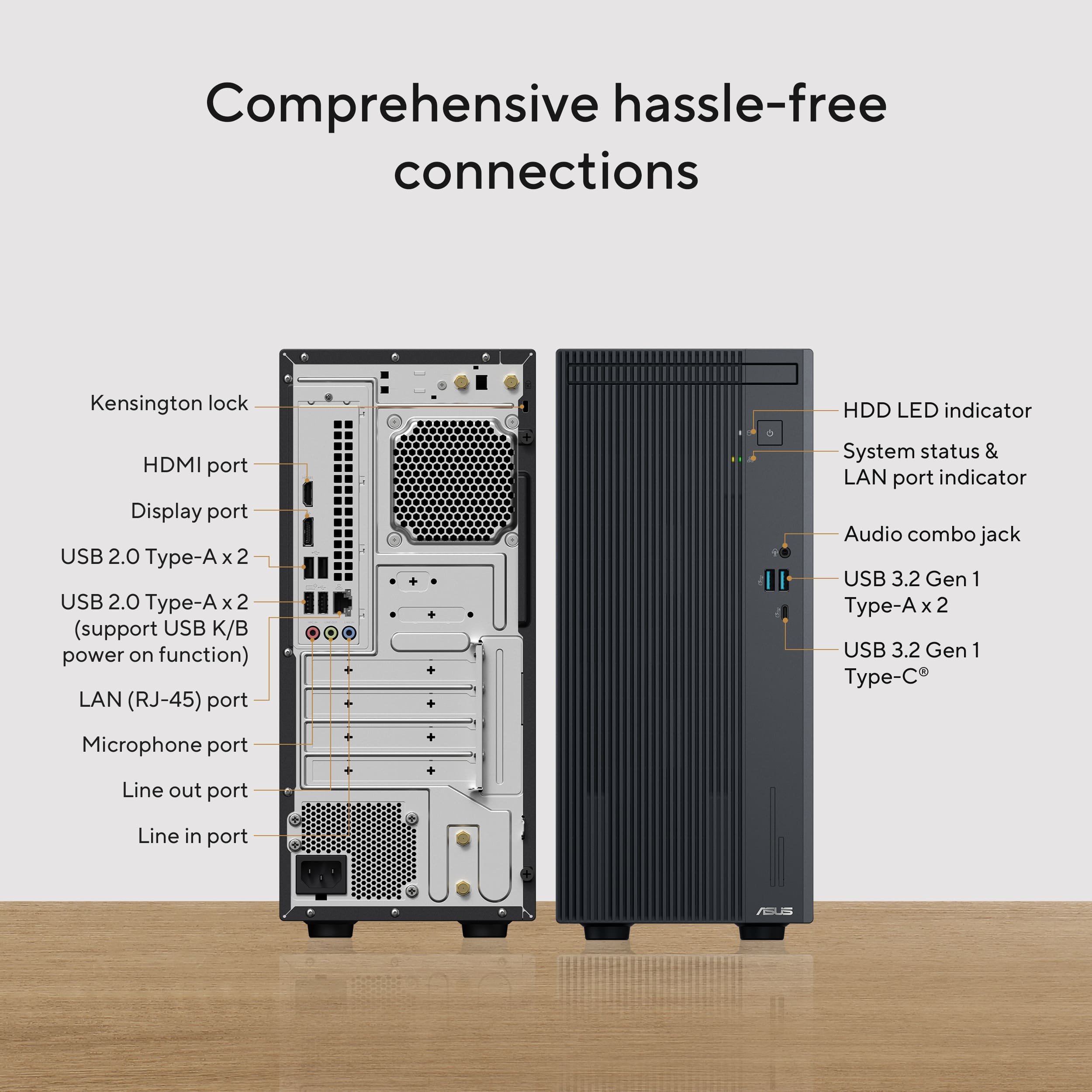
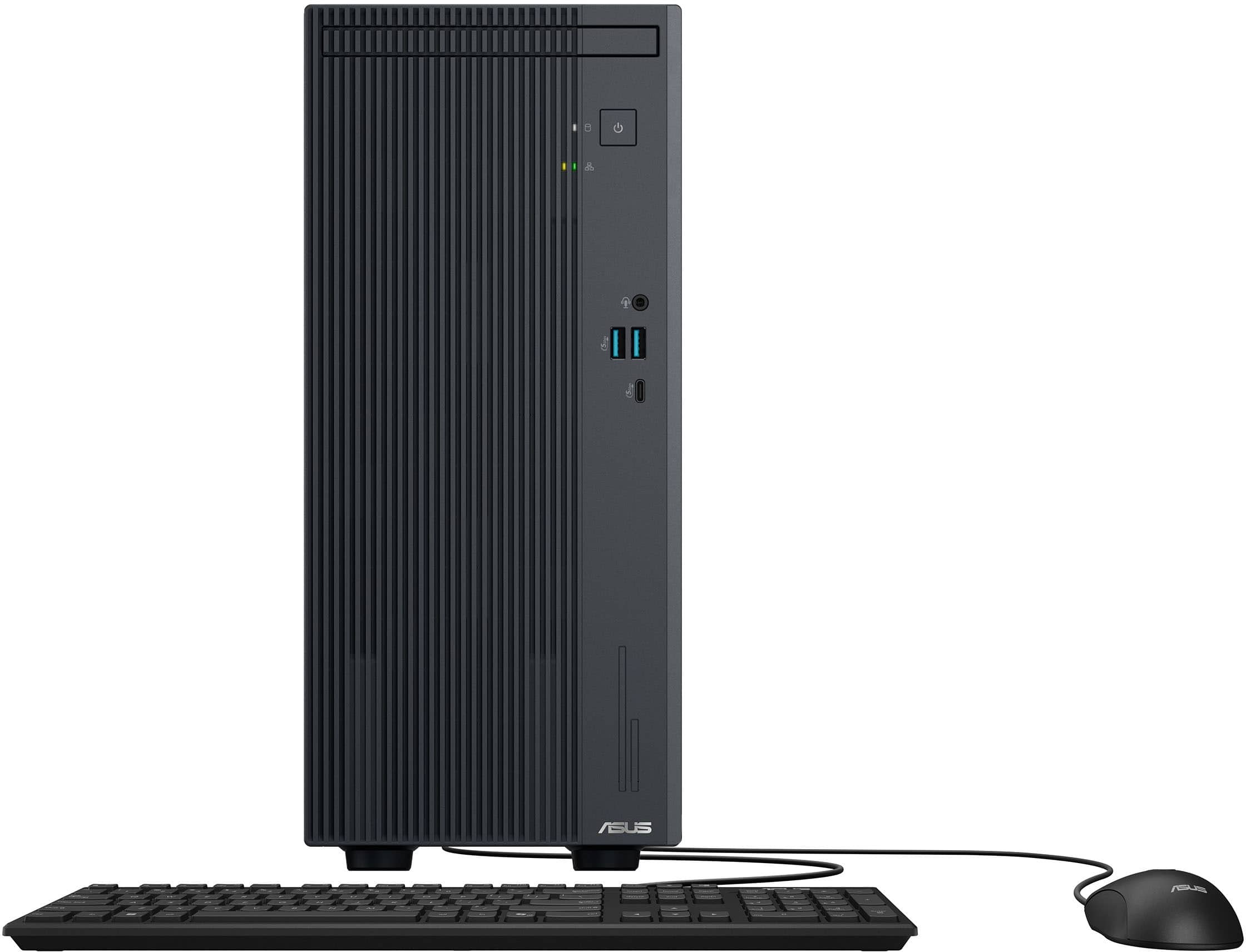
|Posted .This reviewer received promo considerations or sweepstakes entry for writing a review.This is a very nice desktop-replacement computer. At least, that’s what I would call it. It has a tower configuration, but it is not as large as a typical, full-size tower computer. This computer measures 13.5 inches high, 6 inches wide, and 12 inches deep. That’s larger than the typical “small form-factor” desktop that is only about 4 inches wide and cannot accept full-height expansion cards. This computer can, and it has four openings in the rear panel for such cards. The typical, full-size tower computer can be about 9 inches wide, so this Asus will fit into spaces that a full-size tower cannot. It can be the best of both worlds—smaller size for easier placement but large enough to accept full-size expansion cards. The computer is well-equipped, port-wise. On the front are a headphone jack, two USB-3 ports (the kind with the blue tab inside), and one USB-C port, plus the power switch, of course. The back has an HDMI port, a displayport port (so two monitors can be connected), four USB-2 ports, line in, line out, and microphone audio jacks, and an ethernet port. There are also blankout spaces for what appear to fit old-style serial and parallel ports. I have not confirmed that these openings are really meant for this purpose. I’m just mentioning that they’re there. Wireless capability is, as is standard nowadays, built-in. In addition to the computer itself and a power cable, the box also contains a USB keyboard and a USB 2-button mouse with scroll wheel. You will need to provide your own monitor (and speakers, should you want them). Setup is typical for a new Windows computer. Hook everything up, turn it on, and go through the setup process. You’ll have to provide answers to various queries like what keyboard layout to use, and you’ll be asked both to connect to the internet and to create or log in to your Microsoft account. As the process proceeds, the computer checks for Windows updates, and the time from pushing the power button and a fully-booted, functioning desktop was about 30 minutes. But you’re still not done because then Windows immediately takes you to the Windows Update page in Settings, and I noted that there were about a dozen more updates that needed to be downloaded and installed. This took another 15 minutes, so it was about 45 minutes total from first power-up to fully booted and updated. Not bad, really. The computer has 16 GB of RAM and a 1 TB solid-state drive, and it works well. It’s plenty fast for internet surfing, video viewing, office applications, and pretty much anything else you might want to do on a desktop computer these days. I’m very pleased with it, and I expect to get much use out of it.
I would recommend this to a friend - Pros mentioned:Noise level, Size
Rated 5 out of 5 stars
Great Mini Desktop Computer…Great Space Saver
|Posted .This reviewer received promo considerations or sweepstakes entry for writing a review.This desktop computer is great for family use and people working from home. The size of tower is about 13 inches high, 11 inches deep and about 6 inches wide. It doesn’t take up a lot of space like other computers. I really appreciate the mini size. I live in an apartment, use two monitors for work and have limited space available. The tower comes with a 1 TB SSD hard drive, so you will have plenty of space and it has 16 Gigs of memory for all the multi tasking you may do. On the back of the computer are 4 USB-A ports your keyboard, mouse and other gadgets. You are able to hook your monitor up either by a display port or HDMI cable. Along with that, on the back you also have an Ethernet port, microphone jack and the line in and out ports for speakers. The front of the computer has 2 more USB-A ports, a USB-C port and an audio jack for your headphones. I was a bit surprised not to see a SD card reader built in, but since you can get one cheap enough to plug into the USB-A port, this really wasn’t a problem. I have tried a number of things on this computer, such as using Office, browsing the web, watching videos and even played a few non-graphic intense games and everything seems to work well. It amazed me how quiet the tower runs, even with the fan going. A nice feature is the 2-way AI noise canceling technology built into the computer for video conferencing. I tried this and had a bit of noise in the background, but the person on the other end didn’t hear the TV going quietly nearby or anything else. The mouse and keyboard that comes with this computer are wired and seem well made. The mouse is a basic one and the keyboard is simple and thin. This is a great computer for most everyone. This mini-computer does not have an outstanding graphics card or amazing audio. However, if you are using this for everyday work and simple gaming, this is great. The speed to start up is quick, the size is small, it comes with plenty of ports, runs smoothly for all that I tried with it and is a winner in my book. I feel that for the price, you can’t go wrong.
I would recommend this to a friend - Pros mentioned:Connectivity, Size
Rated 4 out of 5 stars
Small but mighty
|Posted .This reviewer received promo considerations or sweepstakes entry for writing a review.Everyone doesn't need a laptop, sometimes a desktop is the right solution Everyone doesn't need a mega gaming rig Sometimes you just need an updated computer, to do the daily job. This is that machine. Small, light, doesn't use a lot of power, perfect solution for the daily desktop user at the office, small business, or home user. Runs Windows 11, 1000's of reviews out there on Windows 11. I will only mention that it does seem to seamless support it, but you will need to run updates for about 2 hours after you take it out of the box, to get all the patches and latest versions. From an out of box point of view, the included keyboard and mouse... these are your very basic wired versions. They do the task, but most likely you are going to want to upgrade them to maybe something wireless, or at least a little more robust. Regular power cord connection , with enough length to allow this to be on the desk or on the floor in most installation. Very light, which lend itself to be mounted on a small shelf, but also a little to big to be mounted "hidden", but there are options. One downside to it being so light, you can probably knock it over pretty easily, so be cautious where you put it. Plenty of the standard USB and USB-C connections, fast WiFi connectivity. I don't really care for protruding external card mount on the back, but it isn't terrible. Inside though: - Uses "laptop" style memory, easily upgradable - Uses Nvram storage, and there is room to add another chip, or you can easily replace the one if you need more storage. There is a single expansion port, BUT... not sure what it is going to be used for given the next point. This is a CUSTOM power supply, and by it size, it is not rated to power any modern large graphics card. So if you decide you need to update or add an expansion card, verify that you are not going to draw to much power. A custom heat solution for the processor and mother board... so this case will not be used for any upgrading, but if you are considering that... then this probably isn't the unit for you. However, if you are going to install these at scale (like an entire office), this will be a good solution, but make sure you know your warranty/service solutions, and if you will be able to get parts. The inclusion of a DisplayPort connection was GREAT!!!! as I was able to connect it to my 49" monitor and it worked PERFECTLY a very nice solution. If there was a way to give this a 4.5 I would, just a few minor things keep it from a perfect score/option
I would recommend this to a friend - Pros mentioned:Overall performance, Speed
Rated 4 out of 5 stars
Competent mixed-use daily driver
|Posted .This reviewer received promo considerations or sweepstakes entry for writing a review.The Asus V500 mini desktop is a really solid daily driver computer for general use with a really nice small footprint to boot. It packs a very capable Intel Core i5 13420H central processor which sports 8 cores, 12 threads, a 12 megabyte cache and a 2.1 gigahertz base clock speed that can turbo up to 4.6 gigahertz when an extra boost is needed. I also appreciate that this machine comes preconfigured with 16 gigabytes of DDR5 memory. I appreciate even more that that memory is in the form of actual, replicable, and more importantly, UPGRADABLE memory modules and that the machine will actually support up to 64 gigabytes, should I even need to expand. What is a little unfortunate is the choice to populate both available memory slots with 8 gigabyte modules instead of using one 16 gigabyte stick, but I'll cop to nitpicking on that one. I'm also happy to report that this machine comes with a 1 terabyte non-volatile memory express (NVMe) drive which will provide more than enough storage for the average user to start. Too many off-the-shelf systems tend to cheap out here by tossing in a 512 or ever na 256 gigabyte drive these days and in 2025, that's kind've inexcusable. Good on you there Asus! I do like that there is an included internal pci express expansion port available, however, I'm a bit non-plussed at the inclusion of a 180 watt power supply. If one wants to expand the system with some additional graphics oomph to do some gaming, your options will be very limited unless you also upgrade the power supply to something that can handle a lot more wattage. That said, Intel's integrated graphics processing has come a long way and I have found that I can run a few non-graphically intense games pretty well for casual entertainment. All in all, this is a quite capable machine that should last you a while. I'd definitely recommend if for my parents or to friends that want a share family machine that'll get the job done at a decent price.
I would recommend this to a friend - Pros mentioned:Connectivity, Noise level, Size
Rated 5 out of 5 stars
Nice Midlevel Desktop Option, So Quiet!
|Posted .This reviewer received promo considerations or sweepstakes entry for writing a review.Over the last several years Asus has really impressed me. From beautiful monitors, an impressive gaming lap top and now a nice high value mid tier desktop. We needed something to replace an aging desktop for our business and this PC fits the bill perfectly. The case is smaller than a typical desktop making it easy to find a space for. Perhaps what stands out most to me is how incredibly quiet it is. I think this is the quietest desktop I have ever used. The full size keyboard and mouse are very basic but both work quite well. It has all the modern ports I need including 2 USB ports, headphone jack and a usb-c in the front which I always appreciate. It boots up fast and the wifi connection is solid. As far as computing power it seems to fit all our needs. It can run our massive database just fine on one monitor while having an unreasonable amount of browser tabs (I admit I have a problem here, don’t judge me) open on the other. Outside of its limited graphic capabilities (compared to modern gaming rigs) I’m impressed with what this machine can actually handle. Beyond the work related stuff I tested a simulation style baseball game with a league save that had over 60 years of baseball stats saved in it and it ran smooth. All in all I feel this is a really nice high value PC that should be able to handle most any non graphic intensive task. I can’t emphasize enough how much I love how quiet it is. If I knew someone looking for a low to mid priced PC and wanted to do most anything other than high end gaming I would recommend this PC to a friend.
I would recommend this to a friend - Pros mentioned:Connectivity, Noise level, Overall performance
Rated 5 out of 5 stars
Nice expandable home computer
|Posted .This reviewer received promo considerations or sweepstakes entry for writing a review.Unboxing was pretty simple. Included was just the tower, keyboard, mouse and power cord. I liked the power supply being on the bottom vs the top of the tower which is normally in more premium towers. I found the setup pretty straight forward as with standard Win 11. Once logged in the Asus software was minimal and the computer was very responsive. I ran through all the updates quickly and found that the tower was very quiet. In fact, I feel like my laptop is louder. This is nice since you can hardly notice it is there. I also like the fact that it has the major display connections such as hdmi and Display port. I needed a Display port for my monitor and this is not always an option on home computers. The included keyboard/mouse where just ok. I connected my wireless mouse/keyboard and found the experience better. I know the expectations are not high for included keyboard/mice combos. I do like the included Wireless since I was able to connect this to my network without an ethernet cable for a cleaner desk. Performance was great given the specs. I found the average web/Office use to be nice and fast. I did load Adobe Photoshop and found it to work ok for this even though I know that is not the purpose. I found it usable just for minor edits. I however do not plan on gaming since the computer would require a dedicated gpu and I am not sure of any low powered one’s that would work with this power supply. In Summary I think this is a great all around tower for home use with options for upgrades if needed.
I would recommend this to a friend - Pros mentioned:Noise level, Overall performance, Size
Rated 5 out of 5 stars
Small and Mighty
|Posted .This reviewer received promo considerations or sweepstakes entry for writing a review.It's been a while since I acquired a traditional desktop computer as I mainly use my laptop for work however I do have a desktop at my office desk since we can securely access our data in the cloud. My previous Lenovo desktop finally bit the dust so I decided to give the ASUS V500 desktop a try. I have been nothing but satisfied with my ASUS laptop so I thought how could I go wrong. The first thing that surprised me was how compact the tower was in comparsison with my previous towers. The V500 desktop features a 13th generation Intel i5 processor with 16 gb of DDR5 ram and a 1TB SSD. One thing you definitely notice is how quiet this desktop is when running. Gone are the days when you hear the loud fan running in order to keep the computer running cool. There is no shortage of ports on the computer as you will find 2 USB type A ports a USB C port as well as an audio jack so you can plug in your headphones. The rear of the desktop has a HDMI port, a display port, 4 USB type A ports, a LAN port, a microphone port, a line in port and a line out port. The desktop comes with Windows 11 home but I upgraded to Windows 11 pro for work. I put the desktop through it's paces and not once did it stutter. The integrated Intel UHD graphics card also does a great job at handling any graphic work I did on the computer. Overall I would recommend this desktop to anyone in the market for a compact powerful desktop that won't let you down.
I would recommend this to a friend Rated 2 out of 5 stars
Too slow
||Posted . Owned for 1 week when reviewed.This reviewer received promo considerations or sweepstakes entry for writing a review.It lags too much with multitasking. The Intel 5 should have been better than this
No, I would not recommend this to a friendBrand response from ASUS Answers
Posted .Dear Russell1215,
Thank you for your comment.
We do understand your disappointment with this laptop and the inconvenience this may have caused if you are experiencing slow system speed or performance issue. To resolve this issue, check if Windows, drivers, BIOS and applications are up to date. Updates for this Desktop PC are posted at:  https://www.asus.com/us/displays-desktops/tower-pcs/asus-desktop/asus-v500-mini-tower-v500mv/helpdesk_download?model2Name=V500MV . While accessing web applications, ensure this PC has access to an established router and internet service is working properly since poor and unstable internet connection will affect system stability and performance. Keeping this PC always updated will maintain optimum system stability and performance. If these steps were performed to no avail, please try to run a diagnostics or optimization test using the "MyASUS" utility software or application. If this is not pre-installed on the laptop, please download the application at the Microsoft Store. For details on how to use "My ASUS", please go to: https://www.asus.com/support/FAQ/1041686/.
If you need further assistance, please email me at cl-rodel@asus.com and I would be happy to help. Or you are most welcome to call Product Support Hotline at: 1(888) 678-3688. Also, you can chat with an ASUS live support agent from the link: https://www.asus.com/us/support/article/1135/.
Thank you for choosing an ASUS product.
Regards,
Rodel
ASUS Customer Loyalty
- Pros mentioned:Noise level, Overall performance
Rated 4 out of 5 stars
Solid PC, Great Price
|Posted .This reviewer received promo considerations or sweepstakes entry for writing a review.The tower is actually bigger than I was expecting it to be, with that expectation being 'mini'. But it is still sized that it can fit on a desk rather than under it without much trouble. Plus, its built-in noise cancellation technology ensures that even on top of desk without anything to dampen the sound, you're barely going to hear this thing making any noise, even with multiple taskings. Setup was quick, easy, and painless, and depending on your internet speed, the updates might take longer than setup. Startup is fast with the included 16 gigabytes of RAM (easily upgradeable with quick access slots) and the machine can run multiple tasks without missing a beat. A 1TB SSD handles storage, and there are slots inside to upgrade that if you want as well. A good PC for this price, you have to wonder where it takes the hit; that would have to be the integrated GPU. While this could also likely be upgraded, the power supply might give issues finding something compatible. For standard at home usage, the graphics aren't going to be a problem. The heavier you get into content creation and video editing, though, it could start becoming noticeable. It comes with a wired optical mouse, and a wired num-pad keyboard, nothing special in either case. Important to note, this does NOT include a monitor, so you'll need to provide that yourself. Despite having the cutouts and markings for an optical drive and SD card readers, these are non-functional on this version of the device, but are listed as optional through ASUS documentation. Overall, a solid PC, especially for the price, and the GPU shortcomings likely won't be noticed by most people looking to get this specific machine.
I would recommend this to a friend - Pros mentioned:Overall performance, Size
Rated 5 out of 5 stars
100% Recommended!
|Posted .This reviewer received promo considerations or sweepstakes entry for writing a review.Simply put, professionals and ordinary home users will appreciate this compact computer. Asus has consistently offered my household super dependable products, and this item should be no exception. The tower has a small footprint and saves those precious inches when you are trying to maximize tight placements. After initial set up of the computer, which basically equated to hooking up my monitor, there were several Microsoft updates that had to be installed. The update process was seamless and in a few short minutes I was ready for my new computer. I didn't encounter any issues and updates ran smoothly. Included with the tower, is a basic keyboard, and mouse. This product comes standard with an Intel Core I5 processor coupled with 16 GB of RAM and 1TB SSD. The product contains the following ports: USB 3.2, HDMI, Ethernet and USB-C. Overall, it is a very decent computer delivering superior multitasking while using some of my photo-editing programs and various applications. The computer’s processor easily handled any task presented to it. There was no bog-down and it was always smooth as silk. The unit booted up quickly and ran cool. The ASUS V500 is a great desktop for those looking for smooth performance and it is also a space saving product. Storage is not huge, and for everyday tasks ASUS shouldn't disappoint. It's modern looking, operates quietly and dissipates heat easily under heavy usage. I haven't had a single ASUS computer go bad on me in past years. This product is a basic computer which is well designed and should make you very happy for years to come. Buy one and enjoy smooth computing.
I would recommend this to a friend - Pros mentioned:Connectivity, Overall performance
Rated 5 out of 5 stars
Nice Practical Desktop PC
|Posted .This reviewer received promo considerations or sweepstakes entry for writing a review.I recently got an ASUS V500 desktop computer. it comes with an Intel Core I5 processor, 16 gigabytes of memory, and a one terabyte SSD. Most computers these days are coming with only 256GB or 512gb of SSD so it’s nice that this one includes a full TB. Its also nice that it has 16gb of memory. Entry level computers typically only have 8gb. It has the video capabilities built into the motherboard so don’t expect to play any high level games. the computer has one HDMI port and one display port on the back of the machine, along with an Ethernet port, 2 USB-C, 3 USB-A connections, and ports for you microphone and audio out connections.There are two more USB-A ports and 1 USB-C port on the front of the computer. I’m running the system with two monitors. It would have been nice to have two HDMI ports to hook up the second monitor but at least I was able to hook it up with the display port. I’m using it a lot on the Internet and I use Microsoft Office on it as well. It handles streaming video flawlessly and it doesn't interfere with work being done on the other display. The computer comes with a keyboard and a mouse but I find the keyboard to be very cheap. It would have been nice if the keyboard would have had backlit keys. Overall I think that this is a great system for your typical home user or even a small business user. There’s nothing fancy about it, but it does a good job at doing what it's supposed to do. I can highly recommend this machine and it will be used a lot at my home.
I would recommend this to a friend - Pros mentioned:Speed
Rated 5 out of 5 stars
ASUS Desktop Computer
Posted .This reviewer received promo considerations or sweepstakes entry for writing a review.This is an upgrade to SSD & so much faster than our old computer that wouldn’t allow an upgrade to Windows 11. It fit our budget and needs. Computer doesn’t have audio or disk drive & needed to purchase so that can be added.
I would recommend this to a friend Rated 5 out of 5 stars
tower
Posted .This reviewer received promo considerations or sweepstakes entry for writing a review.Had to upgrade so we could get Windows 11, and this is the unit we picked, and we are really happy with what we got. Everything we buy from Best Buy, has always been exceptional and we don't go anywhere else.
I would recommend this to a friend