Skip to contentGo to Product Search
Gift Ideas
Main Content

Customer Ratings & Reviews
$1,123.79

Customer reviews

Rating 4.8 out of 5 stars with 165 reviews

Rating Filter

Rating by feature

  • Battery Life

    Rating 4.7 out of 5 stars

  • Speed

    Rating 4.7 out of 5 stars

  • Display

    Rating 4.8 out of 5 stars

95%
would recommend
to a friend
The vast majority of our reviews come from verified purchases. Reviews from customers may include My Best Buy members, employees, and Tech Insider Network members (as tagged). Select reviewers may receive discounted products, promotional considerations or entries into drawings for honest, helpful reviews.
Page 8 Showing 141-160 of 165 reviews
  • Rated 5 out of 5 stars

    14 inch laptop- very responsive

    |
    |
    Posted . Owned for 1 week when reviewed.
    This reviewer received promo considerations or sweepstakes entry for writing a review.

    Excellent. Good value- the laptop was less than 1k which was my goal. Checks all boxes

    I would recommend this to a friend
  • Rated 5 out of 5 stars

    Asus Zenbook

    |
    |
    Posted . Owned for 1 month when reviewed.
    This reviewer received promo considerations or sweepstakes entry for writing a review.

    Overall experience has been great. A bit of getting used to but was great.

    I would recommend this to a friend
  • Rated 2 out of 5 stars

    Not that good

    |
    |
    Posted .
    This reviewer received promo considerations or sweepstakes entry for writing a review.

    Pros: Build Quality, Keyboard Cons-Screen is dim and looks blurry due to it being a touch screen OLED. The speaker's sound awful

    No, I would not recommend this to a friend
    • Brand response from ASUS Answers
      Posted .

      Dear Valued Customer,

      Thank you for sharing your experience with the ASUS UX3405CA Laptop. We’re glad to hear that you are satisfied with the build quality and keyboard design. However, we sincerely apologize for the concerns regarding the screen brightness, display clarity, and speaker performance.

      To help improve your experience, we recommend following the steps outlined in our FAQ guide linked below. If the issue continues, please contact our support team at https://www.asus.com/us/support/CallUs so we can assist you further or arrange repair service if necessary.

      We stand behind our products and continuously strive to improve our products and processes to achieve customer service excellence. For more information, email us at customerloyalty@asus.com and include the case number "N2509015349-0008" as a reference. We will do our best to resolve your case quickly. Your feedback is very important to us and enables us to improve our support channels. Thank you for choosing ASUS.

      Best Regards,
      Chantae
      ASUS Customer Loyalty US Support

      [Windows 11/10] Troubleshooting - Main (Internal) Display problem -  https://www.asus.com/support/faq/1015072/
      [Windows 11/10] Troubleshooting - Sound (Speakers/Microphones) problems -  https://www.asus.com/support/faq/1015070/ Asus

  • Rated 5 out of 5 stars

    Great PC

    |
    |
    Posted .
    This reviewer received promo considerations or sweepstakes entry for writing a review.

    Fast computer. Great for working on the go and playing games.

    I would recommend this to a friend
  • Rated 5 out of 5 stars

    Laptop

    |
    |
    Posted . Owned for 1 week when reviewed.
    This reviewer received promo considerations or sweepstakes entry for writing a review.

    Easy to set up Fast Internet response Store associate very helpful

    I would recommend this to a friend
  • Tech Insider Network Member

    Rated 5 out of 5 stars

    Great for daily tasks but capable of much more.

    |
    Tech Insider Network Member
    Posted .
    This reviewer received promo considerations or sweepstakes entry for writing a review.

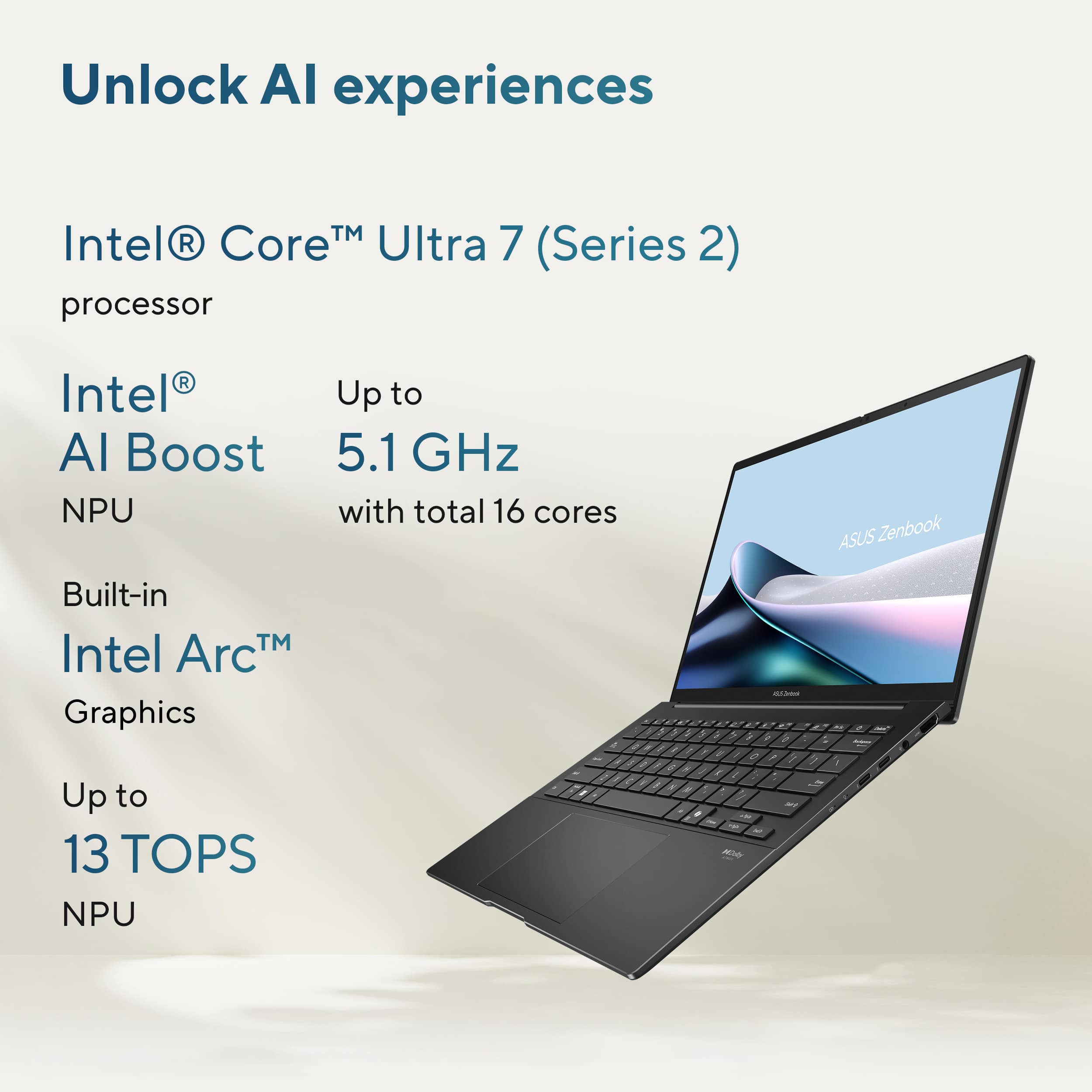
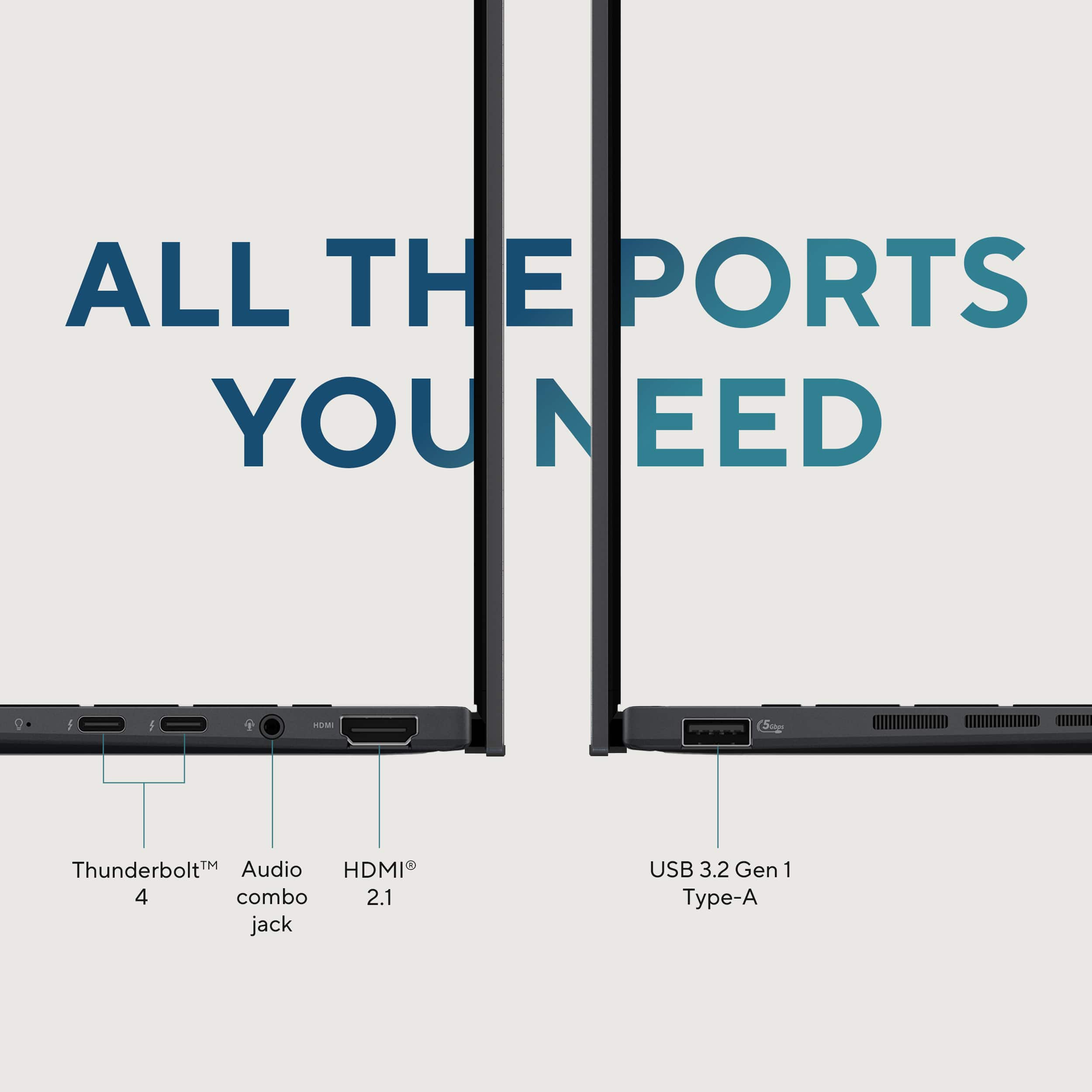
    I've been putting the ASUS Zenbook 14 (Intel Core Ultra 7, 16GB RAM, 512GB SSD) through its paces mainly for work. So far, I've been using Microsoft Edge, Adobe Acrobat, Clip champ, and hopping on Teams & Zoom calls. It handles all my daily tasks wonderfully. No lag, no loud fans. I just runs smooth sailing day in & day out. I haven't tried gaming on it, so I can't comment on that front, but for productivity? It's definitely up to the task. Display The OLED screen is a standout. The colors are vibrant, the blacks are deep, and everything just looks so much sharper. For anyone pressed on seeing fine image details on a laptop, 2K OLED beats 4K LCD any day of the week. I find myself enjoying even the dullest tasks simply because the display is that good. While I haven't pushed it to any graphic extremes, for presentations, watching media, or just browsing, it’s more than capable. Movies on the "TV & Movies" app look great with HDR display settings turned off or on. Camera Toggle: What I really appreciate is the handy physical camera toggle switch at the top. No need for tape or sticky notes, just flick it and you’re good to go. The webcam itself is surprisingly good too. It evens out your skin tone without turning you into a plastic doll, which is a relief if you’re jumping on an 8am video calls without any makeup or prep. Keyboard & Trackpad: Typing on this laptop is a admittedly more comfortable than typing with my mechanical keyboard used on my desktop. The keys are backlit and feel just right. It also has a dedicated Co-Pilot button. Quiet but not too soft. The trackpad is spacious, responsive, and those shortcut gestures for brightness and volume are lifesavers when you’re in the thick of work and don’t want to dig through settings. CoPilot Key & Features: There’s a special CoPilot key right on the keyboard that lets you launch Microsoft’s AI assistant with just a single tap. I’ve found it super handy for summarizing documents, whipping up quick messages, and tackling small tasks while I’m juggling multiple things at once. If you’re someone who’s always balancing a ton of responsibilities, having Co-Pilot saves a ton of time. Design & Portability: This thing is practically weightless compared to say an iPad with a Magic Keyboard. I'd say it feels as light as a composition notebook. It’s slim but sturdy, fitting snugly in my work backpack. Even the charger is lightweight and compact with no awkward blocks or bulky mess to lug around. Connectivity & Wi-Fi: The Asus Zenbook come with (2) Thunderbolt 4 inputs, a USB-A, HDMI, and a headphone jack (No need for a 3.5mm to USB-C dongle). Wi-Fi 7 connected to my home and work networks quickly and even held strong from a couple of rooms away. Battery Life: The battery life has been fantastic. It's always become instinct to plug it up to the charger but between operation task at work and working on sales, I've gotten 2 days without it EASILY! Granted, I am not plays games or doing labor intensive tasks like video editing...yet. It's mainly Zoom calls, file uploads, and all the usual work stuff going on. Final thoughts: I've really enjoyed using this laptop. It has a sleek design, runs smoothly, and comes with a bunch of little features that genuinely make a difference, like the webcam toggle and the lightweight charger. For both work and everyday tasks, it’s been reliable with absolutely no complaints from me so far. I am also really excited to utilize the Co-Pilot feature on the near future. 4.5/5

  • Tech Insider Network Member

    Rated 5 out of 5 stars

    Sleek, Portable, Powerful

    |
    Tech Insider Network Member
    Posted .
    This reviewer received promo considerations or sweepstakes entry for writing a review.

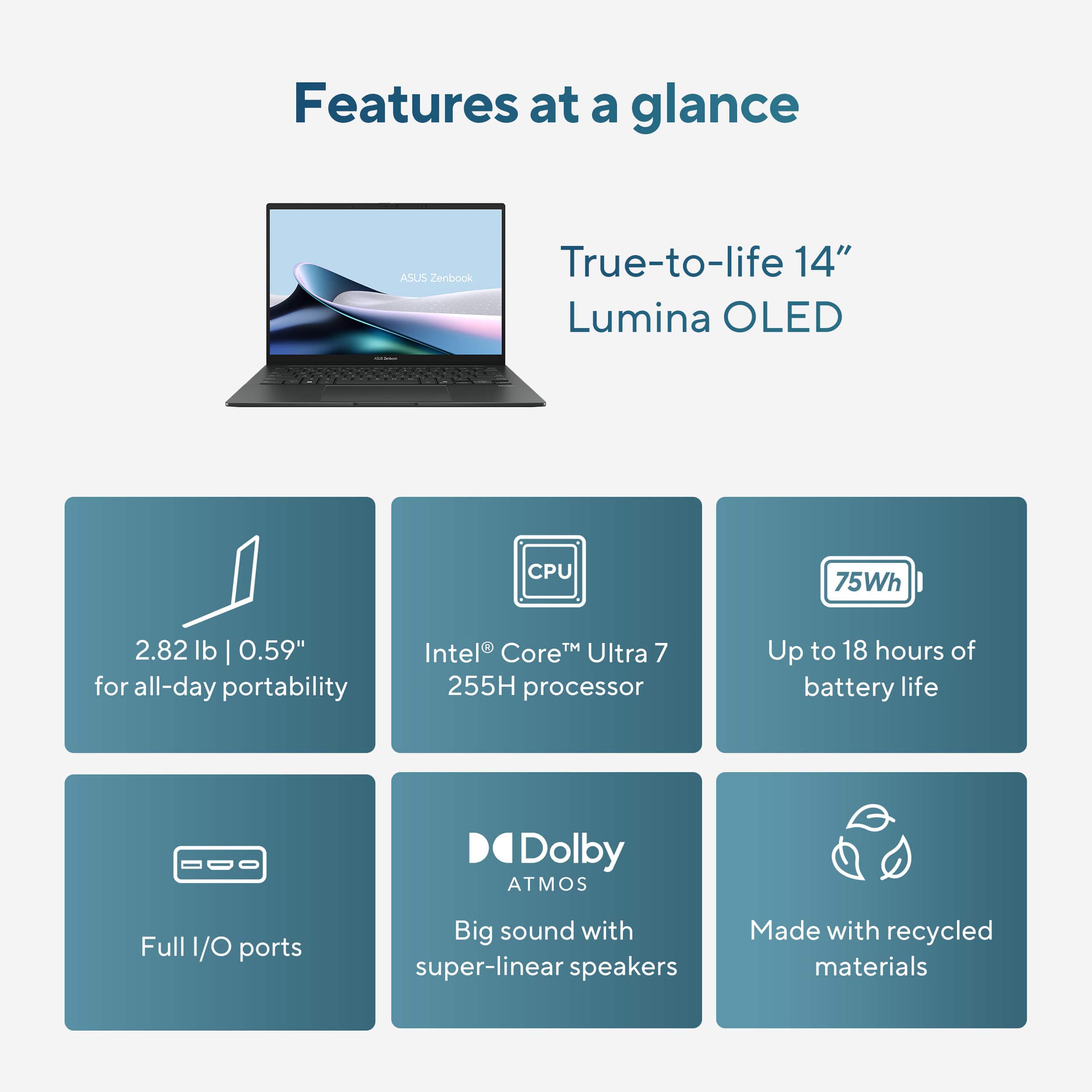
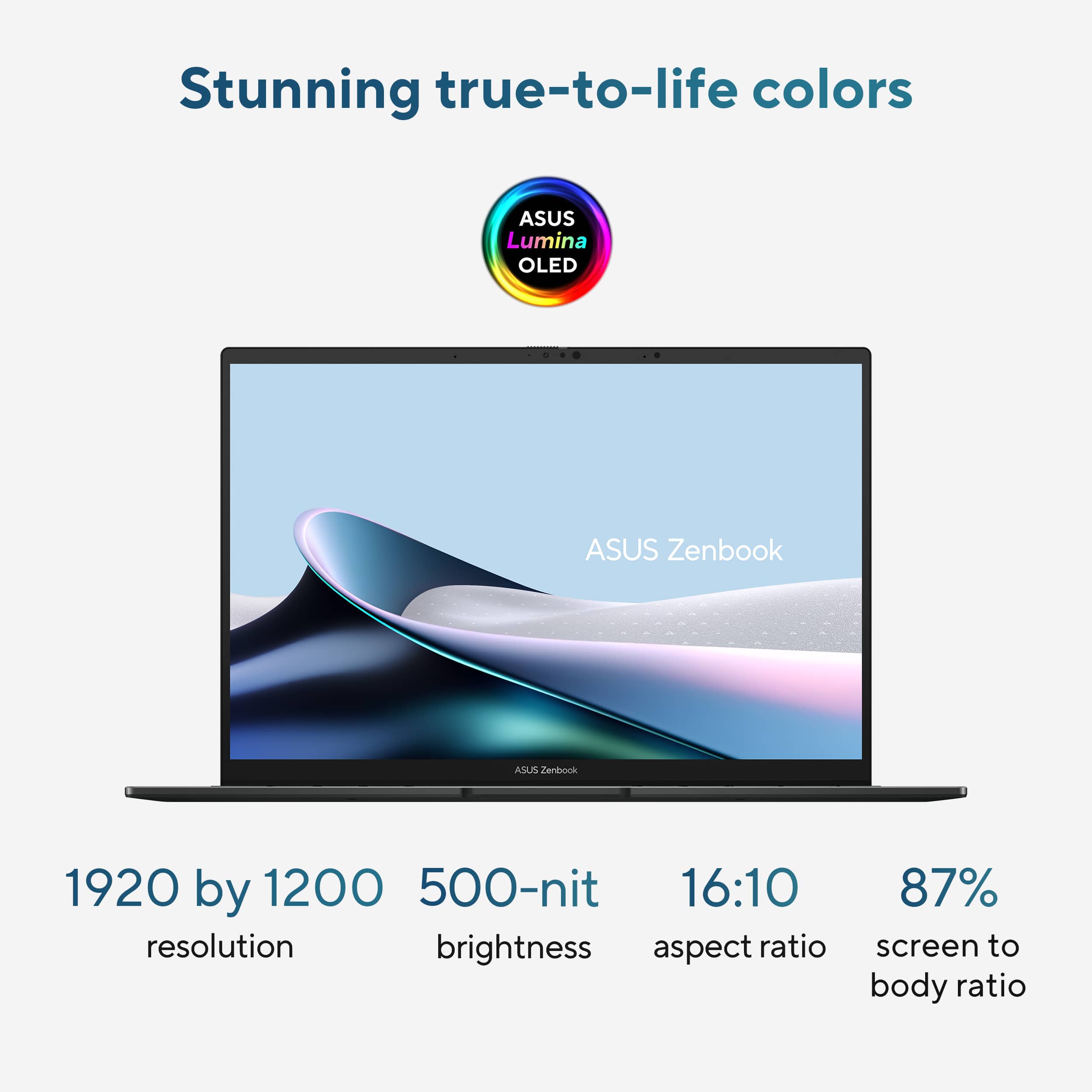
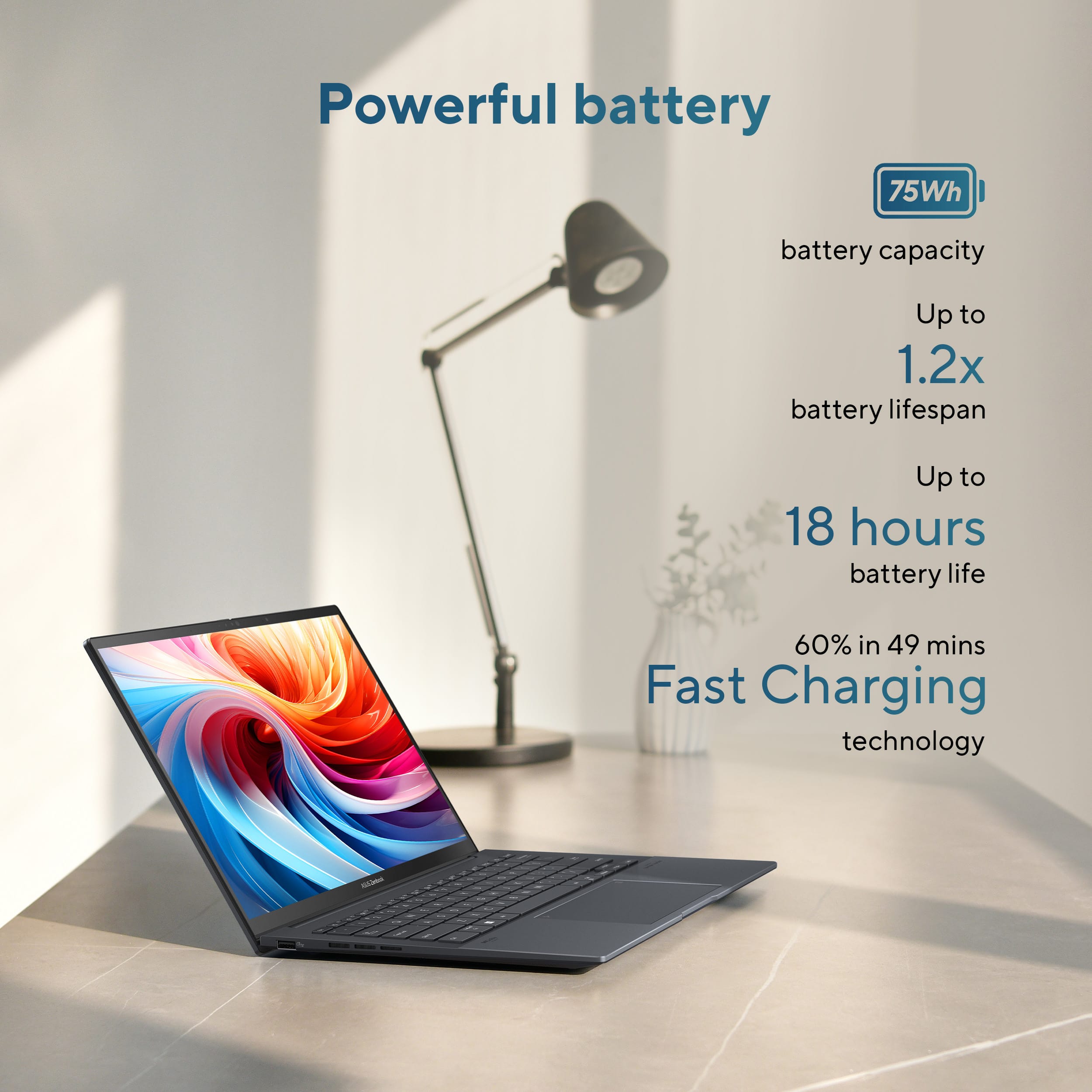
    This laptop is elegant. It’s super thin and the screen is basically the entire width and length of the clamshell. While I did not do any durability tests, Asus mentions this laptop meets the MIL-STD 810H military standards so that’s very promising. The keyboard is satisfyingly clicky but not loud. The keyboard is also backlit which is great if you are using it in a dark environment. The touchpad is huge which is super convenient and it feels really responsive to my inputs. There is a built in camera you can use for video chatting or recording. It has windows hello built into it which allows you to unlock your computer with your face which is super convenient. The battery life is a claimed 18 hours which is excellent for all day use. It charges quickly and I had no issues with battery life while I was using it. Speaking of design and the screen, this display is great. It has a 14-inch screen which I found to be plenty large for this type of device. It’s OLED which offers great contrast. It’s also touchscreen which helps with ease of use. It has 1920 x 1200 resolution which is great for the display’s size. It has 500 nit peak brightness which allows it to be operable in basically all indoor lighting conditions and some outdoor lighting conditions. Also, it has a 60hz refresh rate which makes the screen look good for high motion things (like videos). In terms of input/output, It has Thunderbolt 4, USB 3.2, and HDMI 2.1, which are all modern standards. Side note, I appreciate that the laptop is charged using Thunderbolt 4 as it’s really quick and also offers flexibility for charging with a universal standard. The speakers are Harman/Kardon and are Dolby Atmos speakers. They sound great and offer a wide range of sound considering their form factor. This laptop is powerful. It has an Intel Core 7 Ultra processor, an Intel Arc GPU, and 16 gb of memory. The processor and GPU support performed any tasks I threw at it. Productivity applications like web-based applications, photo editing, and music production all had no issues running. The 16gb of memory is enough to have a number of tabs open in a web browser, or to run multiple applications. (side note: it's worth noting based on my googling the RAM is not user-upgradable as it is soldered onto the motherboard). The laptop includes 512gb of storage which I found to be more than enough for the data I wanted to store locally. It's fast storage too so read/write/load was all very quick. There seems to be a lot of co-pilot integration for this laptop, so between the powerful specs and the copilot button, this seems like it will be good for a while to use AI features. Overall this is a great computer that I would recommend to anyone looking of a portable and powerful device.

    I would recommend this to a friend
  • Tech Insider Network Member

    Rated 5 out of 5 stars

    PERFECT for Home or Business Use

    |
    Tech Insider Network Member
    Posted .
    This reviewer received promo considerations or sweepstakes entry for writing a review.

    AMAZING….. This laptop is incredible. The screen is bright and I love that it is an OLED touchscreen. I am a realtor and I can use this in the field with my clients to demonstrate homes and homesites using the touchscreen. It is lightweight and easy to pack in my backpack, I barely notice it is there. Super thin yet feels very durable. I love all the ports as well for added flexibility. Unboxing…. Was super easy. Plug it in (hello USB C Charging….) and power it on. You will go through several standard set up screens and once it is set up you will have a few system restarts while it catches up to software updates. This is typical and expected in my experience. Once you get through all those you are ready to rock and roll. The backlit keyboard is great and a must for me. It comes with Co Pilot and I have not used it that much as of the time of this review but so far I have found it to be a nice addition to my workflow. This laptop will handle all your personal and work applications like Word, Excel and Powerpoint. It is super fast and the wifi connections are incredible. I absolutely love the screen. It is vibrant and full of color, really helps me to show off home features to clients when I show them videos and pictures on this display. The keys feel great, not bulky and they have a nice response and feel when typing. The trackpad has some added features… you can directly control the sound level and brightness levels by swiping left or right or up and down on the edges of the trackpad. SUPER HELPFUL. Great design feature in my opinion. You can set up face detection to security and logging in… I found this to be EXTREMELY quick when recognizing me. So the camera is excellent. I also set up a pin as back up for logging in. If you are looking for a personal laptop for home or business use this is it.

    I would recommend this to a friend
  • Tech Insider Network Member

    Rated 5 out of 5 stars

    Love Asus and love this laptop

    |
    Tech Insider Network Member
    Posted .
    This reviewer received promo considerations or sweepstakes entry for writing a review.

    I have always been pleased with Asus products. This laptop is no exception. It's light. It's fast. It feels like a quality built machine. Whenever I get a new device, I always charge it first and do any available updates. My next step is install a different browser than edge. This time I decided to give edge a chance. It's really not a bad browser. I'm quickly becoming a fan of copilot. It makes me more productive. Let's talk about the hardware though. The RAM is 16GB and is adequate for most situations. The SSD is 512GB. It's also enough in most situations but there's cloud storage available everywhere. The display is bright and crisp. Colors are vibrant. The CPU is Intel Core Ultra 7. It's plenty fast for most for daily work and multitasking. I can't recommend this laptop for gaming but if you want to use this for work, you won't be disappointed. The keyboard is very responsive and I love that it's backlit. The touchpad is also very responsive. I love that when unpacking, there was a sticker on it with tips of new shortcuts. Volume on the left side scroll, brightness on the right. The top right diagonal swipe down and to the left opens ScreenXpert which is like a submenu with many computer settings easily accessed. I think my favorite part of this however is the battery life. I've used this laptop for hours and hours and have rarely charged it. I can take this to the shop and use it all day without having to take the charger. I also love how lightweight it is and it still feels like a well built, quality laptop. I've had zero issues with this laptop to this point and would definitely recommend to anyone looking for an all day work laptop.

    I would recommend this to a friend
  • Rated 3 out of 5 stars

    Decent laptop

    |
    |
    Posted . Owned for 1 week when reviewed.
    This reviewer received promo considerations or sweepstakes entry for writing a review.

    Overall good laptop, I personally returned it because OLED screen was not for me and text appeared blurry.

    I would recommend this to a friend
    • Brand response from ASUS Answers
      Posted .

      Dear James,

      Thank you for sharing your experience with the ASUS UX3405CA laptop. We're glad to hear you found it to be a good device overall, but we're sorry that the OLED display and text clarity didn’t meet your expectations. We appreciate your feedback and will pass it along to our product team for further review.

      To help improve text sharpness on OLED screens, we recommend reviewing the steps in the FAQ guide linked below. If the issue continues, please contact our support team at https://www.asus.com/us/support/CallUs so we can assist you further.

      We stand behind our products and continuously strive to improve our products and processes to achieve customer service excellence. For more information, email us at customerloyalty@asus.com and include the case number "N2505019960-0014" as a reference. We will do our best to resolve your case quickly. Your feedback is very important to us and enables us to improve our support channels. Thank you for choosing ASUS.

      Best Regards,
      Chantae
      ASUS Customer Loyalty US Support

      [Windows 11/10] Troubleshooting - Main (Internal) Display problem -  https://www.asus.com/support/faq/1015072/ Asus

  • Rated 2 out of 5 stars

    Better to pay more than settle on bad performance

    |
    |
    Posted . Owned for 1 week when reviewed.
    This reviewer received promo considerations or sweepstakes entry for writing a review.

    Slow. Horrible resolution and display and bulky. Only upside what it’s cheaper than a normal i7 processor laptop

    No, I would not recommend this to a friend
    • Brand response from ASUS Answers
      Posted .

      Dear Jishi,

      Thank you for your feedback regarding the ASUS UX3405CA laptop. We're sorry to hear that the performance and display did not meet your expectations. We appreciate your comments and will share them with our product team for future improvement.

      To help improve your experience, we recommend reviewing the steps in the troubleshooting guide linked below. If the issue continues, please contact our support team at https://www.asus.com/us/support/CallUs so we can assist you further or arrange repair service if necessary.

      We stand behind our products and continuously strive to improve our products and processes to achieve customer service excellence. For more information, email us at customerloyalty@asus.com and include the case number "N2509015349-0001" as a reference. We will do our best to resolve your case quickly. Your feedback is very important to us and enables us to improve our support channels. Thank you for choosing ASUS.

      Best Regards,
      Chantae
      ASUS Customer Loyalty US Support

      [Windows 11/10] Troubleshooting - System is running slowly -  https://www.asus.com/support/faq/1042398/
      [Windows 11/10] Troubleshooting - Main (Internal) Display problem -  https://www.asus.com/support/faq/1015072/ Asus

  • Rated 3 out of 5 stars

    Overheating issue

    |
    |
    Posted .
    This reviewer received promo considerations or sweepstakes entry for writing a review.

    My laptop got so hot while charging that it went into thermal shutdown. But everything else was fine except for the overheating issue.

    No, I would not recommend this to a friend
    • Brand response from ASUS Answers
      Posted .

      Dear XunluL,
      We regret to learn that you are experiencing overheating issues. To troubleshoot this issue, we recommend following the steps in the FAQ below. Should the issue persist, please contact our support team at https://www.asus.com/us/support/CallUs to further investigate the problem or assist with repairing the device.
      We stand behind our products and continuously strive to improve our products and processes to achieve customer service excellence. For more information, email us at customerloyalty@asus.com and include the case number "N2505019960-0011" as a reference. We will do our best to resolve your case quickly. Your feedback is very important to us and enables us to improve our support channels. Thank you for choosing ASUS.
      Best Regards,
      Schottky
      ASUS Customer Loyalty US Support
      FAQ-Troubleshooting - Overheating and Fan issues  https://www.asus.com/us/support/faq/1015064/ Asus

  • Rated 3 out of 5 stars

    Responsiveness

    |
    |
    Posted . Owned for 3 weeks when reviewed.
    This reviewer received promo considerations or sweepstakes entry for writing a review.

    The computer is slow in response otherwise it is a nice laptop.

    I would recommend this to a friend
    • Brand response from ASUS Answers
      Posted .

      Dear Rhonda J,

      Thank you for sharing your experience with the ASUS UX3405CA. We’re glad to hear you’re enjoying the laptop overall, and we sincerely apologize for the performance issues you’ve encountered.

      To help improve responsiveness, we recommend reviewing the steps in our system troubleshooting guide linked below. If the issue continues, please contact our support team at https://www.asus.com/us/support/CallUs so we can assist you further.

      We stand behind our products and continuously strive to improve our products and processes to achieve customer service excellence. For more information, email us at customerloyalty@asus.com and include the case number "N2505019960-0008" as a reference. We will do our best to resolve your case quickly. Your feedback is very important to us and enables us to improve our support channels. Thank you for choosing ASUS.

      Best Regards,
      Chantae
      ASUS Customer Loyalty US Support

      [Windows 11/10] Troubleshooting - System is running slowly -  https://www.asus.com/support/faq/1042398/ Asus

  • Tech Insider Network Member

    Rated 4 out of 5 stars

    Middle of the road in every aspect

    |
    Tech Insider Network Member
    Posted .
    This reviewer received promo considerations or sweepstakes entry for writing a review.

    I got the new Asus Zenbook 14 as a replacement for my travel laptop, and for the last few weeks I have been using it while working on the go. It took the place of my 3 year old 13” ultralight laptop and surprisingly the Zenbook offered an even slimmer and lighter form factor than that. But it’s not all sunshine and rainbows - it has compromises, and definitely the overall experience can be said to be a mixed bag. From the moment I pulled it out of the box, I was struck by its looks. That Jasper Gray finish is undeniably sleek and feels quite sophisticated in my hands. It's incredibly light and thin, which means slipping it into my backpack is effortless. I've been carrying it everywhere without feeling weighed down, and for someone like me who's always on the move, that's a huge plus. Now, let's talk about the display – because, honestly, this is where the Zenbook 14 truly shines, but also where some of my frustrations crept in. The 14-inch Full HD OLED touch screen is, simply put, gorgeous. Watching videos, editing photos, or just browsing the web, the colors just pop, and those true blacks are stunning. The touch functionality is super responsive, which I found surprisingly handy for quick scrolls or tapping on things. However, I couldn't shake the feeling that at 14 inches, Full HD felt a little less crisp than I'm used to on some other premium laptops, especially in this day and age. It’s not terrible by any means, but when you've seen higher-resolution OLEDs, this one just doesn't quite hit that same level of pixel density. And here's my biggest beef with it: the 60Hz refresh rate. In a world where smoother, more fluid 90Hz or even 120Hz screens are becoming common, the 60Hz on an otherwise beautiful OLED felt like a missed opportunity. It makes scrolling and animations just a little less buttery than I'd prefer. Oh, and yes, while the risk is low, the thought of potential OLED burn-in still lingers in the back of my mind, especially for productivity work with static elements on screen. Asus provided some tools to counter that in the MyAsus app, so please be sure to utilize that. Powering this machine is the Intel Core Ultra 7 processor, which actually is quite a confusing name. In essence it’s an Arrow Lake CPU (255H to be specific), with 6 performance cores and 8+2 efficiency cores, which brings a total core/thread count to 16. For my daily grind – managing multiple browser tabs, jumping between documents, and video calls – it handled everything with ease. The 16GB of LPDDR5X RAM meant I could keep plenty of apps open without a hitch. However, this is where I hit a personal snag: the RAM is soldered. That means no upgrading it down the line. For me, someone who tends to hold onto laptops for a while and whose needs might grow, this felt like a significant limitation. I wish I had the option to throw in more memory later if I needed to. The 512GB NVMe SSD is fast, no complaints there on speed, As for the integrated Intel Arc graphics, they're definitely better than older Intel integrated solutions. I could dabble in some light photo editing and even play a few less demanding games, but don't mistake this for a serious gaming or video editing machine. It’ll do in a pinch, but it's not designed for heavy lifting. Typing on the Zenbook 14 has been a generally positive experience. The keys have a comfortable travel, and I found myself getting into a good rhythm pretty quickly. It's not the absolute best keyboard I've ever used, but it's far from the worst. The glass trackpad is smooth and responsive, which is always a relief. As for audio, ASUS worked with Harman Kardon, and the speakers are actually quite decent for a laptop of this size. They get surprisingly loud and clear, but let's be realistic, it's still laptop audio – don't expect a concert hall experience. And the AI noise cancellation for calls? It's a nice touch that sometimes helps, though it's not a magic bullet for noisy environments. In terms of ports, it's a mixed bag. I appreciate having two Thunderbolt 4 USB-C ports and a full-sized HDMI 2.1 – those are great. But honestly, where's the SD card reader, ASUS? For anyone who regularly deals with cameras, having to carry a dongle is a persistent annoyance. Battery life on the 75Wh battery is solid. I typically get 8-9 hours of light to moderate use, which usually gets me through a workday. However, when I push it with more demanding tasks or crank up that beautiful OLED display, the battery drains noticeably faster. It's decent, but it doesn't quite reach the all-day-and-then-some endurance that some of its competitors offer, especially those running on ARM chips. I still find myself looking for an outlet by late afternoon if I'm pushing it hard. So, after living with the ASUS Zenbook 14 for a while, I'd say it's a laptop with distinct charms and clear limitations. The OLED screen good, and its portability is fantastic. But the non-upgradable RAM, relatively small base storage, the 60Hz display, and merely "good" battery life prevent it from being a truly exceptional, future-proof device for me. It's a very capable laptop for daily use, especially if you prioritize screen quality and lightweight design, but for the price, I can't help but feel some of these compromises hold it back from being a true standout.

    I would recommend this to a friend
  • Tech Insider Network Member

    Rated 5 out of 5 stars

    A Gaming Surprise in an Ultraportable Package

    |
    Tech Insider Network Member
    Posted .
    This reviewer received promo considerations or sweepstakes entry for writing a review.

    The ASUS Zenbook 14 OLED with Intel Core Ultra 7 155H isn't marketed as a gaming laptop, but don't let that fool you - this sleek ultraportable just became my go-to PC gaming machine. At $1,099, you get a Core Ultra 7, 16GB of RAM and a 512GB SSD, which is a great value for these specs. - Intel Core Ultra 7 processor - 16GB RAM - 512GB SSD - 14" FHD+ OLED touchscreen (2880 x 1800, 120Hz) - Intel Arc integrated graphics - 2.82 pounds Setup was an absolute breeze - probably one of the easiest laptop installations I've ever done. Windows 11 walked me through everything, and within 30 minutes I had Steam installed and was downloading games from my library. The MyAsus software that comes pre-installed is actually useful (shocking, I know). It gives you easy access to performance modes - I immediately switched to Performance mode for gaming. Here's where this laptop completely blew my expectations out of the water. I bought this specifically because I wanted a PC for gaming while keeping my Mac workflow, and I was not prepared for how well this thing handles games. Jagged Alliance (Classic): Ran perfectly at max settings - smooth as butter and looked fantastic. No surprises here since it's an older title. Baldur's Gate 3: This is where I was really impressed. I cranked everything up to Ultra settings and honestly expected to have to dial things back. Instead, I got mind-blowing graphics and buttery smooth gameplay with zero frame drops or hesitation. The graphics requirements of Baldur's Gate 3 turn out to be quite moderate. More powerful GPUs, such as the Radeon 680M, are already good enough to run the game at 1080p and the lowest settings, but the Intel Arc graphics in this Zenbook punch well above it's weight in my experience. The sound output during gaming sessions was spectacular - way better than I expected from a thin laptop. The audio really enhanced the immersive experience, especially in Baldur's Gate 3's epic combat sequences. It feels incredibly well-built and is easy to carry around, thanks to its compact design. The build quality is solid - this thing feels premium and substantial without being heavy. The OLED display is gorgeous with vibrant colors and deep blacks that make games pop. The laptop comes in a darker gray tone, which looks professional enough for work (almost looks like my MacBook Air) but doesn't scream "gamer" if you're using it in meetings. The all-metal chassis feels great, too. The keyboard feels great for both typing and gaming. The trackpad is responsive, but I obviously used a mouse for gaming. The 14" form factor hits that sweet spot - big enough for productivity but portable enough to actually want to carry around. Pros: - Exceptional gaming performance for an ultraportable - Outstanding OLED display quality - Great audio output + Lightning-fast setup - Excellent build quality and premium feel - Reasonable price for the specs included Cons: - Due to a laptop's limited cooling system, I expect it to throttle significantly under heavy, sustained loads - though I didn't notice this in my gaming sessions - Gets warm during intensive gaming (but not uncomfortably so) Bottom Line: If you're looking for a laptop that can handle surprisingly capable gaming in a portable package, the ASUS Zenbook 14 OLED is a fantastic choice. I went into this purchase thinking I was getting a decent ultraportable that could maybe handle some light gaming. Instead, I got a laptop that runs modern AAA games at Ultra settings. For anyone wanting to dip their toes into PC gaming without committing to a bulky gaming laptop, this is an easy recommendation. Just don't expect it to replace a dedicated gaming rig for the most demanding titles or marathon gaming sessions.

    I would recommend this to a friend
  • Rated 1 out of 5 stars

    Worse Service

    |
    |
    Posted .
    This reviewer received promo considerations or sweepstakes entry for writing a review.

    Really worse service. Did not help me get my product delivered nor gave me refund

    No, I would not recommend this to a friend
    • Brand response from ASUS Answers
      Posted .

      Dear Srinivas D,

      Thank you for sharing your experience with the ASUS UX3405CA laptop. We're truly sorry to hear about the difficulties you've faced with delivery and support through the retailer. While ASUS does not handle direct sales or refunds for purchases made through Best Buy, we recommend reaching out to their customer service team at 1-888-237-8289 with your order details for further assistance.

      We stand behind our products and continuously strive to improve our products and processes to achieve customer service excellence. If you require any further assistance, please email us at customerloyalty@asus.com and include the case number "N2505026894-0009" as a reference. We will do our best to resolve your case quickly. Your feedback is very important to us, and it enables us to improve our support channels. Thank you for choosing ASUS.

      Best Regards,
      Chantae
      ASUS Customer Loyalty US Support Asus

  • Tech Insider Network Member

    Rated 5 out of 5 stars

    Great laptop for work

    |
    Tech Insider Network Member
    Posted .
    This reviewer received promo considerations or sweepstakes entry for writing a review.

    Design and Build: Sleek, lightweight, and aesthetically pleasing. JUST WOW! Keyboard: Exceptional typing experience. AMAZING!!! Screen: High-quality display, very reflective though (but can be fixed by buying a matte screen protector) Battery Life: Reliable and long-lasting. Touchpad and Keypad: Both are highly responsive, though the keypad sees less use. (FANCY KEYPAD lights up on trackpad) CPU: Extremely powerful, suitable for intensive computational tasks. RAM: 16GB, which can be a limiting factor for heavy multitasking or memory-intensive applications. Connectivity: Excellent WiFi and Bluetooth performance. Software and Drivers: Occasional issues resolved through driver updates. Pros Sleek and Light: The design is both stylish and practical, making it easy to carry around. Amazing Keyboard: Typing is a pleasure, encouraging productivity. High-Quality Screen: The display is clear and vibrant, although quite reflective. Great Battery Life: Reliable for extended periods of use without needing a charge. Responsive Touchpad: Provides a smooth navigation experience. Powerful CPU: Handles complex computational tasks efficiently. Connectivity: Strong and reliable WiFi and Bluetooth performance. Cons Reflective Screen: While the screen quality is excellent, its reflectiveness can be a distraction in bright environments. RAM Limitation: 16GB of RAM is sufficient for most tasks but can be a bottleneck for more memory-intensive applications. Noise and Heat: The fan can become noisy under heavy load, indicating heat management could be better. Couldn’t be happier with this work laptop

  • Tech Insider Network Member

    Rated 5 out of 5 stars

    Thin, light and packs a punch

    |
    Tech Insider Network Member
    Posted .
    This reviewer received promo considerations or sweepstakes entry for writing a review.

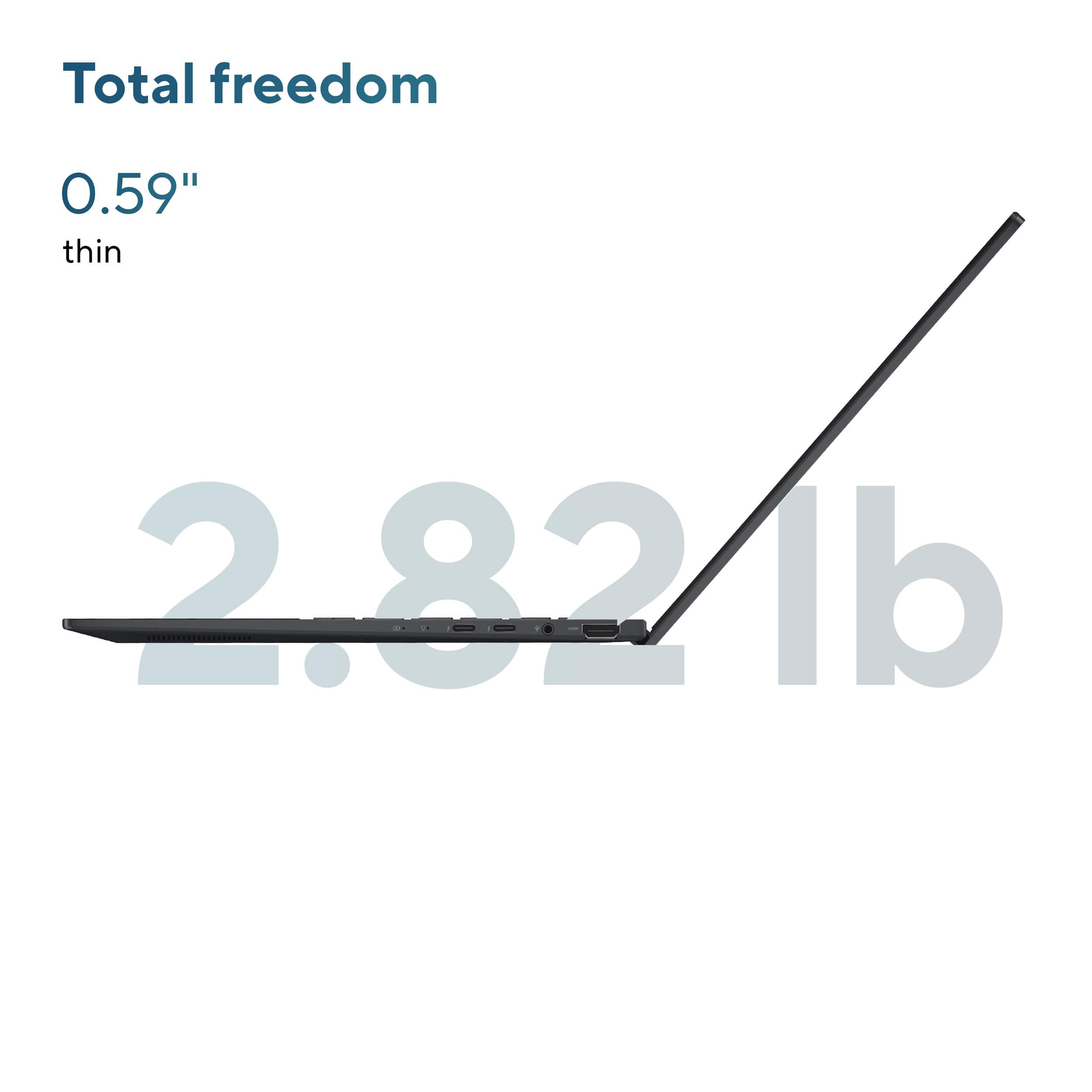
    For starters, the laptop is beautiful as well as super thin and light. The port selection is good sir a thin and light laptop. It has 2-USB-C ports, a headphone jack, a full HDMI, and a full size USB-A. The only thing missing that I would have liked to see is a SD card reader, but there are other ways to connect one. The keyboard has a decent feel and brightly backlit. The addition of the copilot button and the emoji button are nice features. The trackpad is great and has these super useful sections where with just one motion you can adjust brightness, volume, and playback for videos or music. The screen is one of the best on the market in my opinion for this price and device category. It’s a beautiful 14” OLED display with plenty of brightness. One improvement could be in the refresh rate for extra smoothness, but it s generally unnoticeable. As to performance, it is a big improvement from light laptops in he past. The webpages load quickly and that games run surprisingly well. The battery life is incredible. I was able to get over 13 hours straight of YouTube playback at half brightness. The standby time seems to be significantly improved. I’m generally impressed with the Intel Core Ultra 7’s performance. Overall, I’d say it’s a very good laptop for most people. This should be a serious consideration for anyone looking for a thin and light windows laptop in the price bracket.

    I would recommend this to a friend
  • Tech Insider Network Member

    Rated 5 out of 5 stars

    Great laptop!

    |
    Tech Insider Network Member
    Posted .
    This reviewer received promo considerations or sweepstakes entry for writing a review.

    Alright, so I finally got my hands on the ASUS Zenbook 14, the one in Jasper Gray that looks fancy enough to fool people into thinking I'm organized. First impressions? This thing's an absolute stunner, that OLED touch screen is so vibrant I almost tried to pet the desktop background. Performance-wise, the Intel Core Ultra 7 and 16GB RAM are no joke; it zips through tasks like a caffeinated squirrel on a mission. Seriously, I've thrown everything at it, from a gazillion browser tabs to some light video editing, and it just shrugs it off. It's like it's saying, "Is that all you got?" As for the battery, it's pretty good, definitely gets me through most of my day without scrambling for a charger, but if it could last just a little longer, I'd probably write it a love letter. Still, for the price, you're getting a whole lot of bang for your buck. ASUS really nailed the sweet spot on this one, proving that you don't need to sell a kidney to get a seriously capable and gorgeous laptop. I would definitely recommend this to anyone that is looking for a decent laptop priced correctly with a lot of value.

    I would recommend this to a friend
  • Rated 5 out of 5 stars

    Convenient, Lightweight & Powerful!

    Posted .
    This reviewer received promo considerations or sweepstakes entry for writing a review.

    The ASUS Zenbook 14 is a powerhouse! The OLED touchscreen looks amazing, super bright and sharp. With the Intel Core Ultra 7 and 16GB RAM, it handles everything I need to when I am working on the go. The 512GB SSD is fast and has more than enough storage for what I need to do on the go. Plus, it looks pretty sleek in Jasper Gray.

    I would recommend this to a friend