Customer Ratings & Reviews
![The text on the image reads:
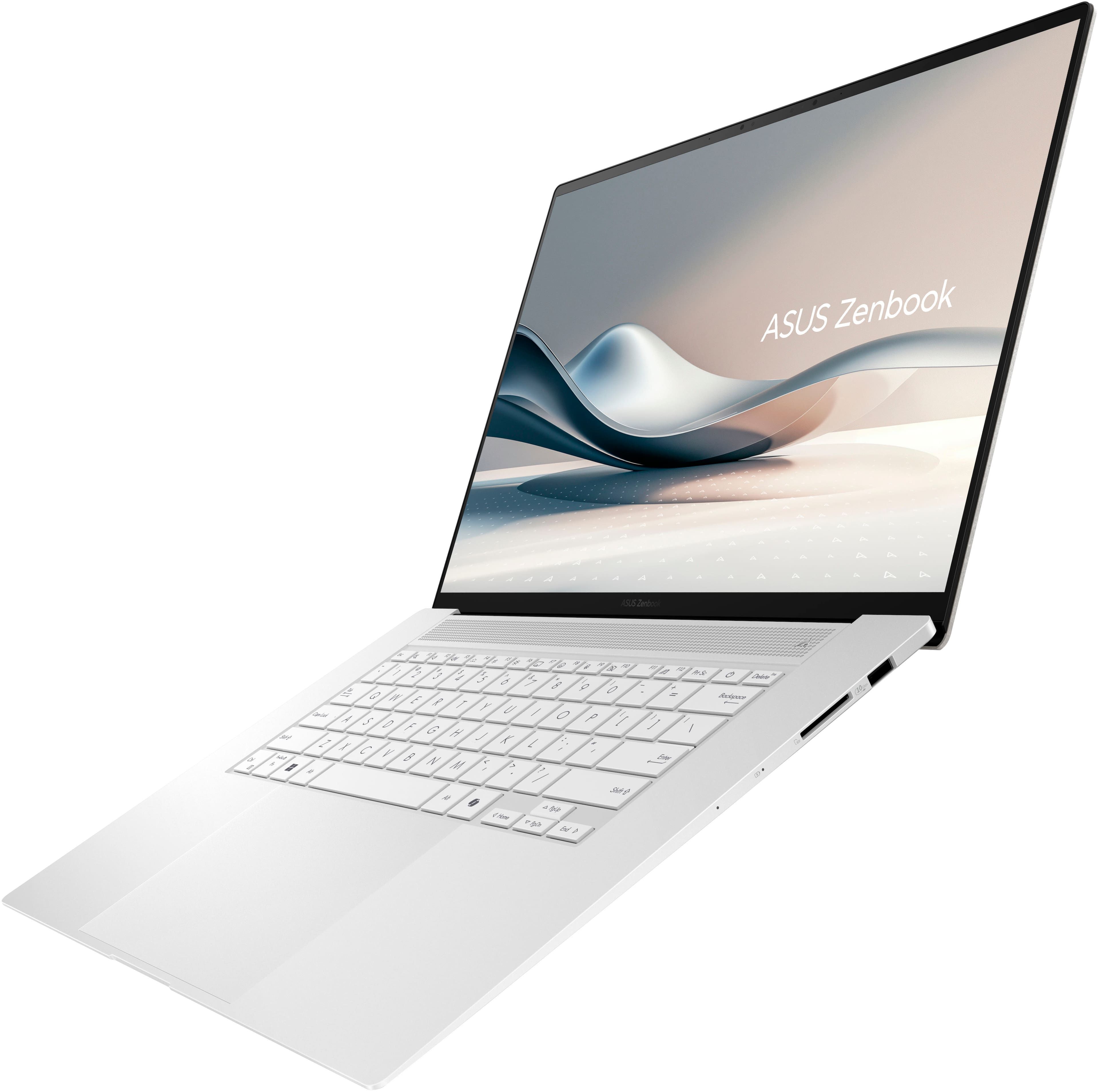
ASUS Zenbook Flip 11 4 2 13 - F4 x 5 6 17 TE PV FI0 F11 U 12 PHSc - Delete 1 . I 1 a 2 . 3 5 4 5 A 6 & 7 8 - 9 I 0 ee + = Blockspace lob Q W E R T Y U | O P : I I ] | I Cops Lock A S D F G H J K L . - - Enter Shift 9 Z X C V B N M < 1 > ? ! Shift 9 Cal hauh Fn Alt & Home J Pglp 1 and 5
The text is a combination of various symbols and letters, which are likely shortcuts or keys on a keyboard. It is not a coherent sentence or text, but rather a collection of symbols and letters that represent different functions on a keyboard.](https://pisces.bbystatic.com/image2/BestBuy_US/images/products/c5f8af13-7644-4e2f-86dc-a7e1122291ef.jpg)











- Model:
- UM5606WA-S16.R3651TB
- SKU:
- 12140317
Rating by feature
- Battery Life
Rating 4.5 out of 5 stars
- Speed
Rating 4.6 out of 5 stars
- Display
Rating 4.7 out of 5 stars
Awesome Team
||Posted . Owned for 2 weeks when reviewed.This reviewer received promo considerations or sweepstakes entry for writing a review.Service was awesome. Team was attentive. Got a great deal and associate had my new system ready to pick up after transferring my data from old computer ahead of schedule.
I would recommend this to a friend- Pros mentioned:Overall performance
Asus Zenbook Computer
||Posted . Owned for 2 months when reviewed.This reviewer received promo considerations or sweepstakes entry for writing a review.Excellent performance at a good price when bought during a sale
I would recommend this to a friend - Cons mentioned:Heat dissipation
Overheating
||Posted . Owned for 2 weeks when reviewed.This reviewer received promo considerations or sweepstakes entry for writing a review.Just started using this new laptop for a week. I have noticed overheating issue which led to screen going black out and I just could not turn it back on. My previous ASUS laptop lasted for 13+ years without any major issues which is the reason why I purchased my 2nd ASUS laptop but it is a bit disappointing.
I would recommend this to a friendBrand response from ASUS Answers
Posted .Dear Tofu,
We sincerly apologize that your device is currently unable to reboot due to overheating. This is not the kind of quality to expect from our products and it's not the norm. Based on the issue described, we recommend performing a Hard Reset.
Hard Reset
1. Remove the AC adapter.
2. Press and hold the power button for 60 seconds.
3. Reconnect AC adapter.
4. Turn on the power of the device.
Should the issue persist, we recommend contacting the place of purchase for an exchange or return if you are still within the window. Please rest assured that if you cannot gain resolution when contacting the place of purchase, we will be glad to provide further assistance.
We stand behind our products and continuously strive to improve our products and processes to achieve customer service excellence. For more information, email us at customerloyalty@asus.com and include the case number "N2408003491-0015" as a reference. We will do our best to resolve your case quickly. Your feedback is very important to us and enables us to improve our support channels. Thank you for choosing ASUS.
Best Regards,
Chantae
ASUS Customer Loyalty US Support
Asus laptop
||Posted . Owned for 2 months when reviewed.This reviewer received promo considerations or sweepstakes entry for writing a review.Overall a very good laptop has a great response time, very light-weight and manageable.
I would recommend this to a friendHappy with item
||Posted . Owned for 1 month when reviewed.This reviewer received promo considerations or sweepstakes entry for writing a review.As expected, no complaints so far. Overall would recommend
I would recommend this to a friend- Pros mentioned:Screen quality
Great laptop - better than Mac IMO
||Posted .This reviewer received promo considerations or sweepstakes entry for writing a review.This laptop is great - from how quiet the keys are, the graphics, to its ability to maintain speed while running multiple software simultaneously, it's worth the price.
I would recommend this to a friend - Pros mentioned:Screen quality
Great laptop for everyday activities.
||Posted . Owned for 1 week when reviewed.This reviewer received promo considerations or sweepstakes entry for writing a review.Great screen, fast boot-up, nice keyboard, very reflective screen, however, windows install errors are the actual problem.
I would recommend this to a friend - Pros mentioned:Portability
Perfect
||Posted . Owned for 1 month when reviewed.This reviewer received promo considerations or sweepstakes entry for writing a review.I love my new laptop. It is smaller and lighter weight. So easy to use.
I would recommend this to a friend Great for light work, beautiful display
||Posted . Owned for 3 weeks when reviewed.This reviewer received promo considerations or sweepstakes entry for writing a review.Don't get me wrong, this is a great laptop if you're using it for relatively non-demanding tasks. It's beautiful in every way and works great, but because of how thin it is, the thermal restrictions prevent it from being used effectively for most demanding tasks. A base of 24 gb is better than 16 gb, however.
I would recommend this to a friendBrand response from ASUS Answers
Posted .Dear Daniel K,
Thank you for sharing your feedback on the laptop. We understand that it didn't meet your full expectations, and we sincerely apologize for that as we do understand your concerns. At ASUS, we take quality control, testing, and inspections seriously to ensure our products meet high standards. Our goal is to ensure that our customers receive the best products and services when it comes to making their purchase decisions. Providing our customers with a high level of satisfaction is our top priority, and we'll forward your feedback to our team for review. In the meantime, It is recommended to download and update the BIOS to version 309 for system performance optimization. The update takes a few minutes, please do not turn off your computer during the process to avoid a critical problem that may cause the system to not be able to turn on.
BIOS Update for Windows: https://www.asus.com/us/laptops/for-home/zenbook/asus-zenbook-s-16-um5606/helpdesk_bios?model2Name=UM5606WA
If you require any further assistance, don't hesitate to get in touch with our support team at https://www.asus.com/us/support/CallUs.
We stand behind our products and continuously strive to improve our products and processes to achieve customer service excellence. For more information, email us at customerloyalty@asus.com and include the case number "N2408003491-0005" as a reference. We will do our best to resolve your case quickly. Your feedback is important to us and enables us to improve our support channels. Thank you for choosing ASUS.
Best Regards,
Chantae
ASUS Customer Loyalty US Support
- Pros mentioned:Portability
Laptop
||Posted . Owned for 1 week when reviewed.This reviewer received promo considerations or sweepstakes entry for writing a review.Great buy! This laptop is sleek , light and has a good size screen. Would buy again if needed
I would recommend this to a friend - Pros mentioned:Processor speed
Great Laptop!
||Posted .This reviewer received promo considerations or sweepstakes entry for writing a review.Very pleased with this laptop. Very fast. Great graphics. Love the 16 inch screen!
I would recommend this to a friend My Review
||Posted . Owned for 2 weeks when reviewed.This reviewer received promo considerations or sweepstakes entry for writing a review.The computer is fast and has many neat features. The graphics are unbelievable.
I would recommend this to a friendDisappointing
||Posted . Owned for 2 weeks when reviewed.This reviewer received promo considerations or sweepstakes entry for writing a review.Had issue with HP and returned exchanged for this one. Less than 2 weeks already started having issues. Shuts down while using it. It was a gift so I have to wait till I can get it back to take it in for replacement.
No, I would not recommend this to a friendBrand response from ASUS Answers
Posted .Dear JillB,
Thank you for sharing your feedback regarding the ASUS UM5606WA Laptop. We sincerely apologize for the difficulties you have experienced, particularly with the device shutting down unexpectedly within such a short period of use. This is not the quality of product performance we aim to provide, and we regret that your experience did not reflect our standards.
To assist with troubleshooting, we recommend following the steps outlined in our FAQ guide linked below. If the issue persists after completing these steps, please contact our support team directly at https://www.asus.com/us/support/callus/ so we can assist with further diagnostics or provide warranty service if necessary.
We stand behind our products and continuously strive to improve our products and processes to achieve customer service excellence. For more information, email us at customerloyalty@asus.com and include the case number "N2408003491-0038" as a reference. We will do our best to resolve your case quickly. Your feedback is very important to us and enables us to improve our support channels. Thank you for choosing ASUS.
Best Regards,
Chantae
ASUS Customer Loyalty US Support
[Windows 11/10] Troubleshooting - Automatic Shutdown/Restart Issues: https://www.asus.com/support/faq/1046480/
- Pros mentioned:Screen quality
Asus Zenbook S16 review.
||Posted .This reviewer received promo considerations or sweepstakes entry for writing a review.Nice machine have had no issues with it. Fantastic screen. Would buy again.
I would recommend this to a friend - Pros mentioned:Overall performance
My ASUS
||Posted . Owned for 1 month when reviewed.This reviewer received promo considerations or sweepstakes entry for writing a review.Excellent for daily use and of course gaming. Love it
I would recommend this to a friend zenbook s16
||Posted . Owned for 2 weeks when reviewed.This reviewer received promo considerations or sweepstakes entry for writing a review.great product better than i expected it to be great display and performance.
I would recommend this to a friend- Pros mentioned:Overall performance
Laptop
||Posted . Owned for less than 1 week when reviewed.This reviewer received promo considerations or sweepstakes entry for writing a review.This is a nice laptop and does what it's supose to do
I would recommend this to a friend - Pros mentioned:Overall performance
great laptop
||Posted . Owned for 2 weeks when reviewed.This reviewer received promo considerations or sweepstakes entry for writing a review.This is a great laptop. I have had no issues. Very Happy with my purchase.
I would recommend this to a friend Defective
||Posted . Owned for 1 year when reviewed.This reviewer received promo considerations or sweepstakes entry for writing a review.Purchased for my son as a gaming laptop, It did not hold up well at all. It was sent off twice due to malfunctioning fans and finally on the 3rd time, Best Buy let me do a return and I used it to purchase him a PC. Best Buy Total Protection was worth the purchase because this laptop was not worth the money.
No, I would not recommend this to a friendBrand response from ASUS Answers
Posted .Dear HannahC,
Thank you for sharing your experience with the ASUS UM5606WA laptop. We sincerely apologize for the repeated fan malfunctions you encountered and the inconvenience of multiple service attempts. Your feedback is important to us, and we will ensure it is shared with our product and quality assurance teams for review. We are glad to hear that Best Buy was able to assist with a return and that you were able to purchase a PC instead. We hope the new system provides stable and reliable performance.
We stand behind our products and continuously strive to improve our products and processes to achieve customer service excellence. If you require any further assistance, please email us at customerloyalty@asus.com and include the case number "N2407040629-0028" as a reference. We will do our best to resolve your case quickly. Your feedback is very important to us, and it enables us to improve our support channels. Thank you for choosing ASUS.
Best Regards,
Chantae
ASUS Customer Loyalty US Support
- Cons mentioned:Heat dissipation
Save your money, do not buy Asus S16
||Posted .This reviewer received promo considerations or sweepstakes entry for writing a review.Overheating is a problem. Great specs in a very poor case. Touchscreen stopped working after 4 months, then the camera, and after all, the screen. I believe these problems are all due to the extreme overheating. I noticed a BURN MARK on the casing near the screen hinge. Yes, that is how bad the laptop is designed!!!! Now, a $1,400-Zenbook laptop has a dead screen and lies as a desktop pc connected to a monitor. Save your money and do not buy Asus S16
No, I would not recommend this to a friendBrand response from ASUS Answers
Posted .Dear DanA,
We apologize for the inconvenience you have encountered withyour notebook. Our commitment to quality ensures that all our products undergo rigorous testing to meet the highest standards. The issues you’ve faced were certainly not intentional.To assist you promptly, kindly provide us with your case number. We will thoroughly investigate this matter and work towards a resolution. You can reach out to us via email at customerloyalty@asus.com, and please include the link to this review for reference.Your feedback is invaluable as it contributes to continuous improvements in our support channels. For your convenience, here’s the case number: N2408005206-0046.
Thank you for choosing ASUS!
Best Regards,
Anya M.
ASUS Customer Loyalty US Support