Customer Ratings & Reviews
- Model:
- BB-02-W-S
- SKU:
- 11617563
Rating by feature
- Value
Rating 4.4 out of 5 stars
- Quality
Rating 4.6 out of 5 stars
- Ease of Use
Rating 4.5 out of 5 stars
- Cons mentioned:Connection
Poor quality
||Posted . Owned for 1 month when reviewed.This reviewer received promo considerations or sweepstakes entry for writing a review.Bad quality doesn’t connect Would not recommend And BBuy doesn’t want to take it back as open box
No, I would not recommend this to a friend - Pros mentioned:Buttons

Backbone handily superior to the Kishi!
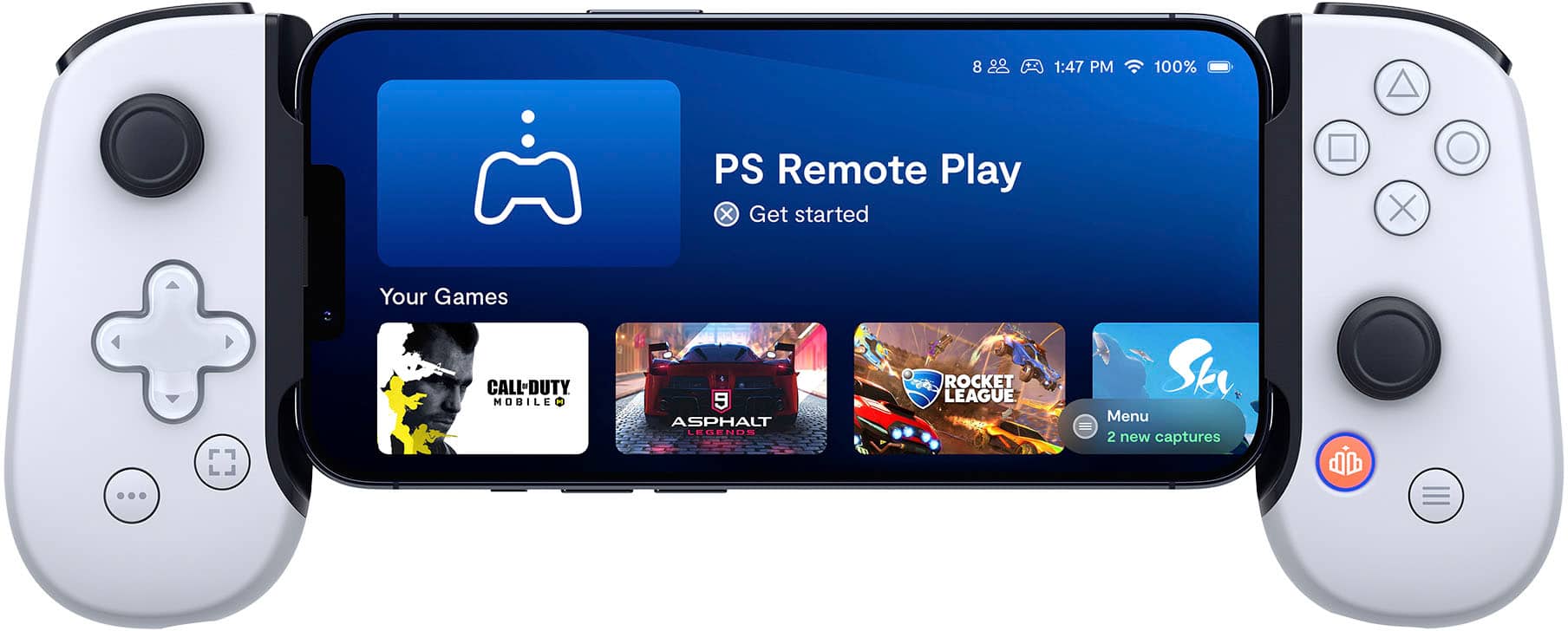
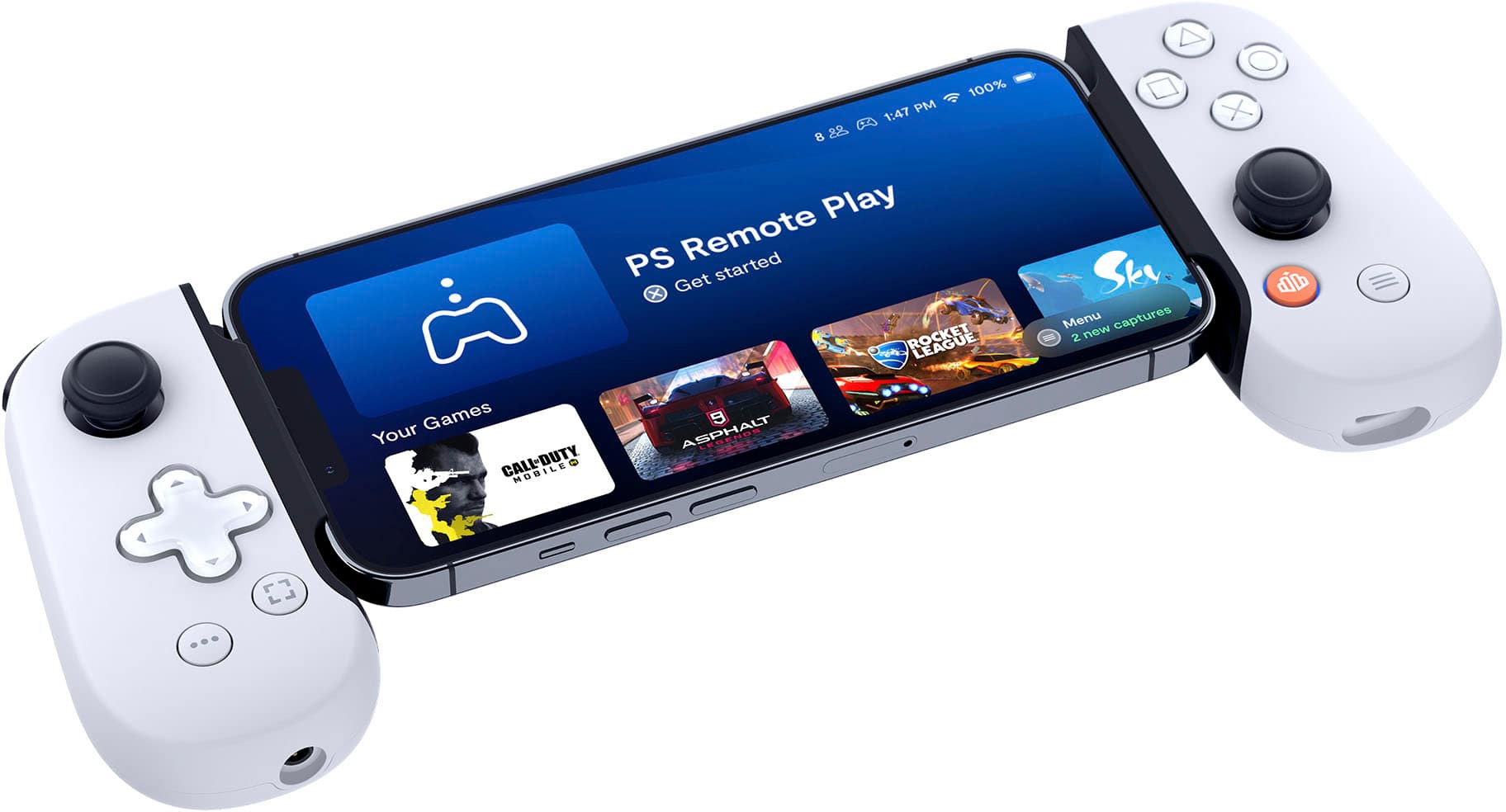
|Posted .This reviewer received promo considerations or sweepstakes entry for writing a review.I am not much of a phone gamer at all. I have tried and tried but I could never really get into phone games. I own all the consoles and I play hundreds of games yearly but the phone thing? Well I never bought in. Until Diablo Immortal. Then I knew I would game on my phone, at least for that one game. Well it came out and lo and behold I was right. I had become a phone gamer. But now I need to find some sort of joystick with a phone cradle or something I thought. Enter the Backbone. But wait, Razer has an offering too. Theirs is called the Kishi and it's cheaper, in some cases half the price of a Backbone. Well there's a reason for that. The primary reason from what I've read is the Kishi has smushy buttons. If you're a gamer you already know what smushy buttons means. It's muddy, non-tactile feedback, or lack of feedback when you hit a button. Razer makes a lot of great products but the only reason I could see anyone should ever buy a Kishi over the Backbone is simply because you do not have the funds to purchase a Backbone, it's just that simple. Now we have that out of the way we can move on to this fine product. Opening it up reveals a very simple and yet elegant display of a gorgeous new bone white Backbone for the PS5. Which I admit is a little confusing because it's really not just for a PS5 but marketing has made this one the PS5 version and branded it Sony. So in case you're wondering, you do NOT need a PS5 to use this product. You can choose to ignore all the Sony stuff on this product and still get a terrific product. I just want to make it clear, yes this Backbone works fantastic with the PS App and streaming PS5 games, it does, but I also want to let everyone know that it's marketing that makes this Backbone a "Playstation thing" more than any real narrowing of the product support to be primarily that of a Sony product. Which brings me back to..Diablo Immortal. Diablo Immortal is made by Activision Blizzard and is a phone and PC based game that has nothing at all to do with Sony or Playstation. And it is what I primarily play on my Backbone. I play it when my wife is clothes shopping (especially then), when I am waiting at the doctor's office, I play it everywhere I go pretty much and boy does it make life nice to be able to kill time easily. The other day I was at my doctor's in fact and had to wait about 45 minutes. With the Backbone it was just a great time running rifts in Diablo Immortal though and when the nurse came out to call me back I almost asked "can I get another 10 minutes" but I didn't, heh. The buttons and the feel of the Backbone is perfect. There is no smushy or muddy buttons. The buttons are clear, do not stick and give perfect tactile feedback. The Backbone is made very, very sturdy, heavy duty plastic and while I'm sure you could break it if it dropped wrong I get the feeling that short of running this thing over with a car you'll be just fine. So it looks great, plays great and is durable. What about the idea you have to subscribe to an app to use Backbone though? I see this all the time on social media because people are ignorant. You can subscribe to Backbone but it is not required to use Backbone. The subscription just gives you access to their app which offers some in game things like recording and such, all things you can do on your phone if you don't want to spend the extra money. But just to be clear, you do NOT need to subscribe to anything to use this product. Once you buy it then it will work with your phone now and always without any subscription. With that in mind I do think the subscription is worth it because it does provide a really nice, clear cut home screen with all your apps arranged by logical order and sorted by most recently used. It also provides an easier way to record screenshots and video rather than using your phones software. I said easier, which it is, but again all of this can be done from most modern phones, especially if you have a phone that is recent, or within the last few years. I will say that using this the way it is marketed, towards Sony and Playstation fans, that it also works fantastic. I used the PS App and got connected very quickly to my Playstation 5. I had already set up the correct options on my PS5 to do so. I'm on a 1Gb fiber connection and using a modern, Wifi 6 Router (An ASUS) just for reference. I was able to play MLB The Show 22 for a significant amount of time using my created pitcher. Pitching and hitting requires very little to zero lag and so I thought it was an excellent test of using the Backbone the way that Sony would like and I am happy to say that although even on my modern, very fast setup that although there was a smidgeon of lag, I was able to pitch just fine after a few pitches acclimating myself. I was actually really amazed it played as well as it did. As I said, I saw a tiny bit of lag but it was so miniscule I was able to adjust quickly and although I did this entire little experiment more for the purposes of this review I am not going to lie when I say, wow, I can just play MLB The Show and other of my PS5 games pretty much anywhere here in the house and so maybe marketing will have converted me once this is all said and done. Here's the bottom line, Backbone is not a cheap product but it is the absolute best product in this category. There is no real competition in my view. Yes the Kishi by Razer would be what many folks consider the primary competition but it's not from where I stand because this is a premium product and the Razer Kishi is a value product. If you are in the market to play some games on your phone, and your wallet gives you permission, there is no need to do any further research or reading, simply go buy a Backbone! HIGHLY RECOMMENDED. Note: There is no real need to go online and request a free Iphone Max adapter from Backbone (something they offer on their site, you do have to pay $5 shipping though) because every Backbone now comes with a small adapter which makes for a better fit using the modern, big iPhones. Yes you can most certainly use it without the adapter so no worries there. It's just a more snug, better fit with the adapter. The adapter is in the box on the top flap in a special compartment.
I would recommend this to a friend - Cons mentioned:Fit
Not for the latest iphone maxe version
||Posted . Owned for 1 week when reviewed.This reviewer received promo considerations or sweepstakes entry for writing a review.Doesnt fit 14 pro max properly, does mot work great for ps remote play either
No, I would not recommend this to a friend Turn your iPhone into a mobile gaming powerhouse
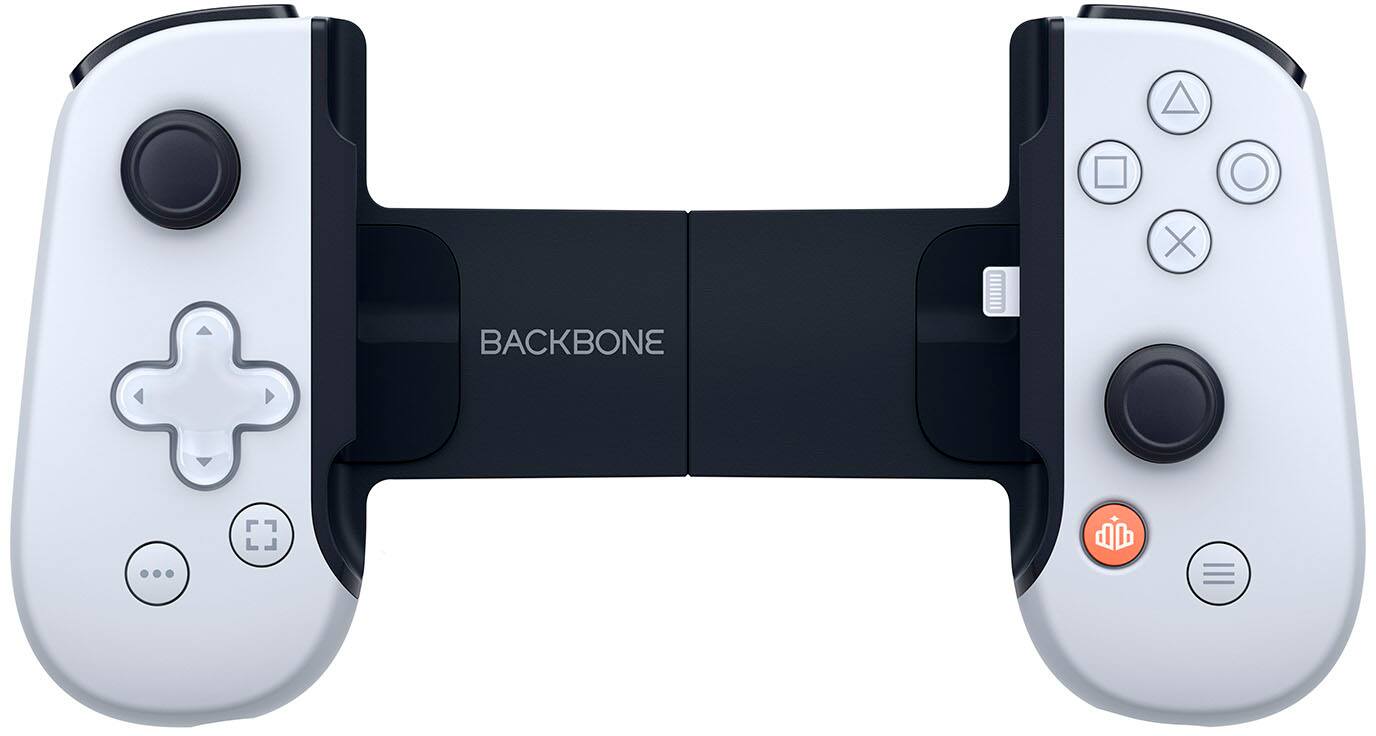
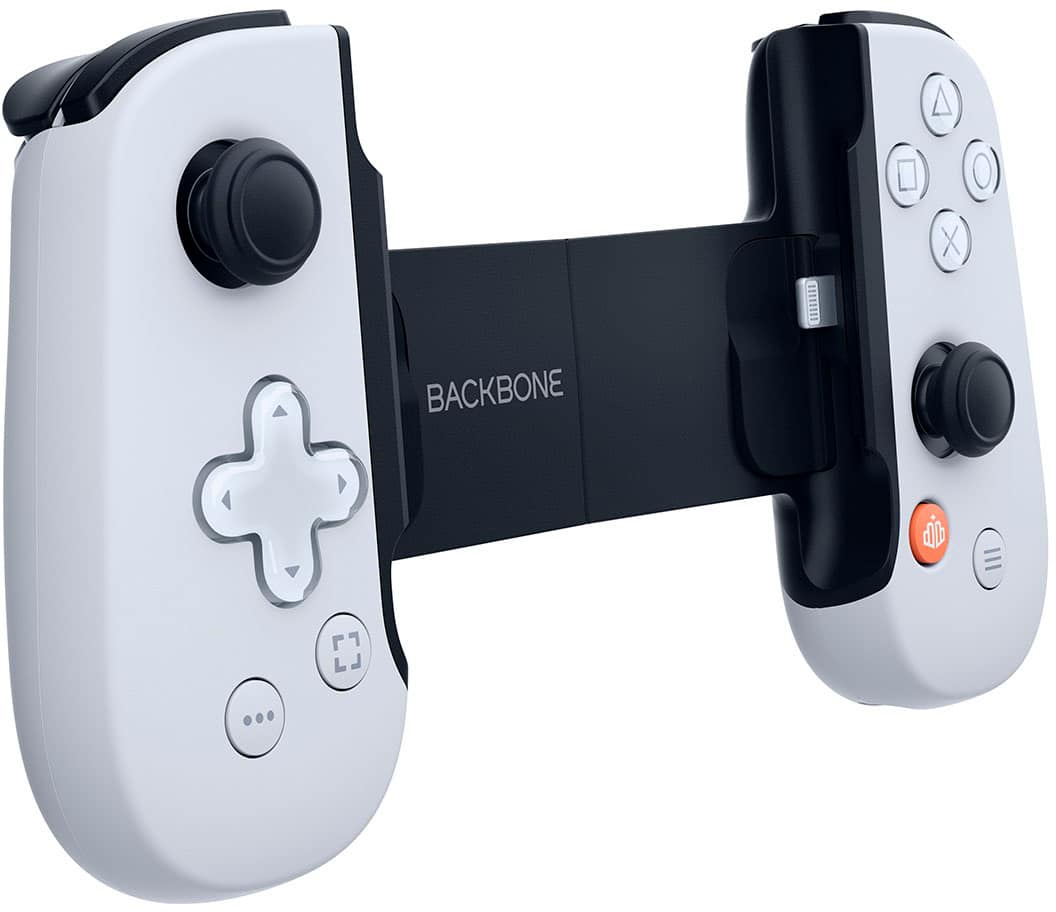
|Posted .This reviewer received promo considerations or sweepstakes entry for writing a review.The Backbone PlayStation Edition makes me wish I bought the larger iPhone Pro Max for the extra screen size and battery life for mobile gaming. I hadn’t really paid attention to mobile gaming because I have a PC and PS5 and I didn’t have much interest in mobile games but the Backbone paired with PS Remote Play had opened my eyes to completely different remote gaming capabilities. Please note, your remote gameplay experience is going to be largely determined by both your internet speed/quality at home as well as where you are currently trying to play from. Anywhere you have LTE (4G or 5G) you should be fine. Setup for Backbone and PS Remote Play was simple. You download the Backbone app and then walk through setup. A subscription allows you to access Backbone’s library of remote game catalogs. If you don’t want to use subscription games, you can use PS Remote Play which grants you access to any digital games in your PSN library, or any games with a disc in your PS4/5. Setup was again simple, you login to your PSN account on both the Backbone and your PS. Then you open the PS Remote Play app on your iPhone and it will search and remember your PS and find it anywhere on the internet later. Once connected, the quality and lack of latency is stunning as the phone and console are almost perfectly in sync by just a few frames. If you were in a different room I’m not sure if you would even notice any latency. Build quality is excellent on the Backbone and the white look and clear number and dpad caps match the PS5 DualSense controller aesthetic almost perfectly. The haptic feedback is great but obviously not as good as the best in industry DualSense. Some additional cool features is that the phone connects directly using lightning port so it connects quickly with minimal latency. You can also connect a lightning cable to the Backbone for pass through power while gaming so you can minimize battery drain while gaming during longer sessions. You can also connect wireless BT headsets to your phone but you can also use 3.5mm mini Jack headsets to the Backbone. In terms of PS Remote Play, it takes about 60 seconds to remotely connect to and start playing games from your PS5. Your PS5 must be on standby mode, connected to the internet, and have the game disc of the installed game you want to play. If you have a digital copy that will work too. All buttons for all games are mapped natively and perfectly without additional confit. A few things of note: 1. It’s rumored iPhone 14 or 15 will switch to USB-C which will necessitate a Backbone v2. 2. The Backbone will NOT work with a case so make sure you are willing to take your case off each time you use it. 3. The $55/yr subscription can be cancelled but is not optional for initial setup of Backbone app, which is annoying. I’ve really enjoyed the Backbone, it helped me get through a recent unexpected hospital stay which is quite possibly the most boring place on the planet.
- Pros mentioned:Remote play
Allowed Me To Catch Up On My Gaming Backlog
|Posted .This reviewer received promo considerations or sweepstakes entry for writing a review.THE APP: It comes with a year subscription of Backbone+ for new subscribers which costs $49.99 a year after that. If you happened to have been apart of this when it originally launched (the original Backbone) then you have a lifetime membership for free which I totally respect. But if you are reading this then you aren’t in that boat. The App really is the bread and butter of this device that separates it from the competition. As it transforms your phone into a console. No joke the moment I hook it up and launch it I forget I’m holding my phone and immediately believe I’m holding the power of not only my PlayStation but also my PC and Mobile game catalogue in the palms of my hands. As the app is like a hub that updates the firmware, allows you to open downloaded games, search for new games, socialize with friends, create parties, stream, make recordings, play games on PC, Mac, and iPad, among other things. The device works perfectly fine without it. And all you’d have to do is find those apps individually like you normally would. But it is a serious quality of life improvement. But still have a hard time justifying that $49.99 a year cost. But maybe I’m missing something. REMOTE PLAY: Is truly magical. It completely blows my mind that I can be somewhere else (as long as I have a strong internet connection) and play my PlayStation and PC games (as long as my console or PC is on and connected to a strong connection). The latency is nearly imperceptible. HOW IT WORKS: This controller plugs into your iPhone which then adds controller support to mobile games. You also gain the ability to connect to PlayStation, Xbox, Stadia, PC, etc. remotely. As your console of choice will take the brunt of the processing power by playing the game. It will then “stream” that to your phone/backbone controller so you can play remotely. When doing this the latency is almost non-existent. Everything does run through the Backbone+ app. But you can also just go to those apps directly on your phone without the app. Additionally, you can use those features even without the Backbone and with a normal controller. But this simplifies things tremendously. PROS: - Controller is well built, responsive, and feels great in the hand. Very comfortable to use for long periods. - Remote play feels great and is ultra-responsive. The fact I can take my entire gaming library with me on vacation, to a friends house, to work, or on the go is amazing. - When playing mobile games with a controller it makes you feel like a boss as most other people aren’t using controllers giving you the competitive edge. - Mobile games are seriously impressive these days. The power behind the iPhone is also impressive leading to a very satisfying gaming experience. As you have an incredibly powerful chip, with a beautiful screen, paired with a great controller, and plenty of gaming options to choose from. - Backbone doesn’t require power to run. As it goes off your iPhones battery. - The controller has a 3.5 mm jack on the left side for headphones. Your phone has Bluetooth for wireless earbuds. And you have a USB-C port on the right to charge your phone while playing, or to connect it to PC, MacOS, or iPadOS for a bigger screen experience. - Color and branding is spot on for PlayStation. But still supports Stadia, Xbox, and Steam Link. Along with possible others I didn’t try. - Putting your phone in, opening the app, and navigating around feels great. - Feels like a futuristic device. - Very lightweight and easy to travel with. CONS: - Joysticks are very short. I would prefer them to be a bit longer for more granular control. Perhaps adding some control stick extenders would work. - Cost (both for the device and for the software) seems high. But it all works flawlessly so perhaps I’m wrong. - Remote play can be limited as if you don’t have a strong connection both at home and wherever you are it doesn’t work. Also, if you forget to turn on your console or PC it also doesn’t work. - Buttons are loud and can be annoying for others in the room. - Controls take some getting used to. Also, remembering that a lot of the inputs are still touch. - R1/L1 don’t feel the best. But the others feel solid/great like a normal controller. But would prefer the other buttons to perhaps be quieter and mushier like traditional controllers. - Having the ability to connect it to a monitor via USB C would be EPIC. - Doesn’t come with a protective case for travel. Which to me is strange seeing as that is the main selling point. - This isn’t an actual con but an FYI. If you are playing a game and have the sound turn up on your device but aren’t getting sound make sure you iPhone isn’t set to mute as if it is it won’t play any sound. - Technically, you can do almost all of these things (remote play, mobile gaming, but not social features/recording) natively with your stock PS5 controller. Making this device redundant. However, your normal controller isn't as easy to travel with and doesn't plug direction into your phone. So, this is still superior from a travel point of view. And the Backbone+ App serves as a great hub to launch from.
I would recommend this to a friend - Cons mentioned:Lag
PlayStation Portable Reincarnated
|Posted .This reviewer received promo considerations or sweepstakes entry for writing a review.TLDR; the Backone One is a brilliant product that turns your iPhone into a portable gaming machine. Fast internet is a must for PS Remote Play or Xbox Remote Play. The only regret I have now is that I didn’t buy the Max version of the iPhone 13 Pro! The Backbone One has helped me rediscover my PS5 again. Being busy with work and family, it has been hard to find time to actually sit down and go through my backlog of games. What I've learned about myself is that I've been playing more games on phones and portable gaming systems as it's more convenient and can be taken along with me wherever I go. Now, the Backbone One didn't solve remote play on PS5. The PS Remote Play has been around for some time now, and the Backbone One made it more relevant than it already is. It gave me the ability to play games without relying on touch screen controls. So now I can play Horizon, God Of War and The Last Of Us on my phone as long as I have ample internet connectivity. Remember, Backbone can't solve your internet problems, but it can solve having physical controls so you have the look and feel of a real handheld gaming system. Since the Backbone One is directly connected to the iPhone, there are no worries of connectivity or latency issues between the two. The Backbone One allows your iPhone to dock into it using its lightning connector and hugs your iPhone in place. If you have a Pro Model, the Backbone comes with an adapter that allows better fitment due to the very large camera bumps. I own an iPhone 13 Pro and found the dock with adapter to be both safe and secure. Once docked, you won’t be able to use the controller to navigate through iOS and only through the Backbone app and apps within it. Need to charge the iPhone? No problem, as it has a Lightning port built into the right hand grip and you’ll be able to charge while docked. The Backbone One even brings back the good ‘ole headphone jack, which can be found on the left hand grip. Now there are others like the Backbone One, but the Backbone One stands out with its integrated design and seamless user experience using the Backbone app. Here I learned that Backbone will allow Xbox Remote Play as well as Apple Arcade and Apple App Store games. Similarly, you'll be able to launch Stadia games. If you signed up for Xbox Cloud gaming, the Backbone One will be recognized by the service. But this Backbone One is styled with the branding of PlayStation 5, as evident by the PS logo on the back of it, as well as the button symbols (square, circle, triangle, x). The overall layout of the controller buttons matches those of an XBOX/Switch. Two buttons are missing from Backbone One with respect to the PS5 controller: one is the TouchPad, and can only be accessed using the opaque touch controls, with a double to activate. The other is the PS Home button, also only attainable using the opaque touch controls. I was always skeptical of streaming games, and I’ve tried Xbox Cloud as well as Stadia and those services were just a tad bit slow in terms of latency. It was not something I could get used to. But remote play from your PS5 is like being at home playing directly from your console, and it shocked me how responsive my inputs were. I tried two ways: one being connected to my local network, and another using a friend’s Wi-Fi and the thing just works. Again, a big caveat is the quality of internet connecting as well as the Wi-Fi chipset in your phone. As far as using the controller for other games other than the PS Remote app, it’s always hit and miss with regards to what games support an external controller in general. For instance, playing CoD Mobile worked for the most part, but I couldn't do things like sprint or throw a grenade. Other Apple Arcade apps just don’t have any controller support. No, I didn’t try Diablo Immortal.
I would recommend this to a friend - Pros mentioned:Remote play
Excellent iPhone controller with extra features!
|Posted .This reviewer received promo considerations or sweepstakes entry for writing a review.The Backbone One for iPhone - Playstation Edition is a great controller for your iPhone gaming as well as having the ability to play games remotely using PS Remote Play, Xbox Remote Play, and Steam Link (for controller supported games). When using the Backbone One+ App additional features are unlocked such as the ability to save/create screenshots or videos and the fact that the app serves as a hub for your games/apps allowing you to quickly launch and play your games from one easy to use dashboard. While there is a subscription required to use the Backbone One+ App, it does include one year free, and if you only intend to use the Backbone One as a controller, the app or subscription are not required to play controller supported games on your iPhone. The fact that you can quickly and easily launch and play your games from the Backbone One+ app either directly from your phone or when using remote play games on either Playstation, Xbox, or Steam makes this an amazing controller for anyone who wants to take their gaming mobile. The controller itself has amazing support for your iPhone, with support all the way back to the iPhone 6s and all the way up to the current iPhone 13 Pro Max, the only caveat is for the 13 Pro and Pro Max an included adapter is necessary to make your device fit properly. I personally tested this controller using the iPhone XS Max and had no issues at all with the fit and quality of the controller, the only thing to keep in mind is the fact that the controller is not compatible with cases on your phone so you will have to remove your case anytime you want to use this controller. One small issue that I had with the controller itself is the fact that the right side buttons, (square, triangle, x, circle), are very loud and could cause issues if you are gaming at night with your partner nearby. Speaking of the right side buttons, one thing to keep in mind is the fact that the iPhone was built with support for the Xbox controller and since this specific controller was designed with the Playstation in mind the buttons will not match up to what is shown on your display in most instances, the controller is fully compatible so that is not the issue, it is just you will see Xbox controls on screen and will have to know what they map to on the Playstation controller. This is an excellent controller for the iPhone with a ton of extra features that make it much more useful than just a traditional controller and I would fully recommend this to anyone looking for an iPhone controller.
I would recommend this to a friend - Pros mentioned:Compatibility, Ease of use
Great Gameplay but Overpriced Subscription Fee
|Posted .This reviewer received promo considerations or sweepstakes entry for writing a review.The Backbone Controller is a great idea and helps to provide smooth gameplay for anyone used to playing on either a PlayStation or Xbox. The initial setup was very easy and once logged in I was able to download a couple games onto my iPhone so I could test everything. First off, in the hands, the controller feels nice. Not too different from a normal a console controller. I would compare it more to the Xbox controller physically but close enough to either one. I really like this concept especially for when you are traveling and want to have gameplay with you. You can’t easily take your console with you when out and about but with your mobile device, you have so much at your fingertips If you have the iPhone 13 Pro Max, there is a small adapter that helps it fit into place properly due to the camera. There is an accessory that either comes in the box or can be ordered for free depending on when you purchase it. My only issue with this is that you have to sign up for a yearly subscription in order for it to have full functionality of the software and controller which is not cheap. At $99 for the device and another $49 per year to keep it all working well, this will get expensive. The membership is in fact optional but you will lose some of the software bonuses that make the total experience that much better. Overall, good hardware and great addition to console gaming but I’m already paying for other services and this puts things over the budget.
I would recommend this to a friend - Pros mentioned:Buttons
Great portable controller
|Posted .This reviewer received promo considerations or sweepstakes entry for writing a review.The backbone one gaming controller for your iPhone is an interesting proposition for mobile gaming. The PlayStation theme to the controller is great. It matches my PS5 exactly and looks like a PlayStation controller. I tested a number of games with this device and it worked great. Currently, the only way to use this device with PlayStation (PS4 / PS5 is to connect via remote play. Performance of the game is dependent on your system and home network and has nothing to do with the controller. It’s worth noting that from a latency perspective, this controller plugs in directly via lightning so controller latency should not be a concern. Although this controller is designed with playstation in mind (it has a customized app specially formulated for Playstation content), it can be used with other gaming as well, though depending on the game the face button prompts may not match up. I was able to fire up xbox game pass ultimate cloud streaming with no issue and the controller worked without incident. Installation of the phone into the controller is a piece of cake. Put in the top of your phone to the controller, pull the controller out, and snap into place. One caveat is that you have to take your phone out of the case which is a slightly annoying but is a fair tradeoff to be able to include the lightning connector. Considering how this is designed with portability in mind, I thought that the controller buttons were really great. The buttons are very clicky. The L2 and R2 buttons are really small triggers and not just buttons which is really nice. The controller has a headphone jack which is a super nice feature if you have a corded headset. It also has passthrough charging via USB C port. It would be cool in a future iteration if the backbone had a built in battery. It would also be cool if the device utilized MagSafe instead of tension to keep the phone in place.
I would recommend this to a friend - Cons mentioned:Lag
Best handheld gaming experience yet!
|Posted .This reviewer received promo considerations or sweepstakes entry for writing a review.The Backbone is a fantastic mobile gaming companion. I used this during layovers in various airports across the US and it made traveling so much more enjoyable. Ergonomically it feels like your holding a more substantial Nintendo Switch. All of the control surfaces feel like a JoyCon on steroids. The layout is reminiscent of the Xbox controller with joysticks at different levels. Coming from the PS5 this setup takes a bit to get used to. The triggers have the same feel as the DualShock 4, no haptic feedback in PS5 titles. The shoulder buttons are responsive and provide a soft click when pressed. The face buttons have little travel and offer a tactile click when activated. The sticks seem a bit too overly sensitive. This seemed to improvise the most issue with inputs during remote gaming, local games in IOS did not suffer from this issue. PlayStation remote play is pretty amazing. I was expecting the streaming to be pretty lackluster, poor FPS, latency issues with button presses, potato quality. I could not have been more wrong. The resolution was always crisp and looked amazing. The frame rates kept up nicely, I did not experience any slowdowns and there was no real latency during button presses. Moving the camera/character did have some issues with sensitivity that made movement a little wonky, but I did get used to it. This shines if you have a lot of digital games installed on your PS5, as you can easily switch between different games while far from home. Game Pass Ultimate cloud streaming is also a huge benefit with this system. Anywhere you can get online, you can game, which is simply amazing. This is the best mobile gaming device. I had it paired with my iPhone 13 Pro Max. It was a good size for my mobile gaming needs, it also came with the necessary adapter to fit the camera bump. I would definitely recommend this to the gamer on the go.
I would recommend this to a friend - Pros mentioned:Buttons
Great alternative to a Steam Deck
|Posted .This reviewer received promo considerations or sweepstakes entry for writing a review.This controller is amazing for it does and how easily it does it. Setup is very simple snap in your iphone to the lightning port, download the backbone app and off you go. Although this is marketed at PS user's you can actually use this controller to stream xbox and steam to your phone as well. I tested out the PS remote play with it to play a couple games and it worked well very smooth and very little input lag. Of course this will all vary on your home internet setup for how smooth your streaming experience is. Where this controller really shines in my opinion is as a steam/emulation option. Download steam link on your phone, link up your phone to your pc account and you can pretty much do what the steam deck can do for a fraction of the cost. I setup retro arch on steam and before long I had a great little emulation handheld with the controller. The buttons all feel well made and very responsive. It came with an adapter for my iphone 13 pro max, take note you will need to pop out your phone from a case if you use one. I have not been able to find a case that's slim enough to properly fit the controller. Small point of contention for what you get. Couple other cool things you don't need to charge the controller it does all the connection through the lightning port. If you need to charge your phone there is a pass through lightning port on the bottom of the controller so you could even charge your phone while playing. You also get a 3.5mm headphone jack on the controller if that's your thing as well. If you don't want to pay several hundred dollars for a steam deck and want a cheaper option to stream to a handheld I'd strongly consider this. As I mentioned above you can stream PS5/ XBox and Steam all with the right phone apps to this making it the ultimate on the go option for the price point.
I would recommend this to a friend - Pros mentioned:Buttons
Good on its own, Great with subscriptions
|Posted .This reviewer received promo considerations or sweepstakes entry for writing a review.This product works well as a controller accessory to the iPhone. No more touch screen games to smudge up my phone. The buttons are responsive and fluid to the movement of the character of any game I play. Obviously I need to invest in getting free or paid gaming apps on my phone to better utilize the device. However, if I have a cloud gaming subscriptions service like Xbox or Stadia, I save important space on my phone while still playing the latest games on the go. The product comes with trials to all the current subscriptions, so I'm ok for now. If you don't want to worry about the subscriptions, the BackBone One can be used as a controller peripheral for the Remote play feature on the Xbox or Playstation. The product comes equipped with a lightning cable charge port so as to charge the phone while attached, or to have a wired connection to any tablet or laptop that has USB ports. The BackBone App serves as a store hub to host all games of all services. Once you pick a game it takes you to the appropriate app store to buy or download and play. There is a paid service in the app that offers in-games items and perks but personally I don't think it's worth it. Definitely a good purchase for the traveling gamer (With subscriptions)
Future of mobile Gaming!
|Posted .This reviewer received promo considerations or sweepstakes entry for writing a review.This backbone controller is the future of mobile gaming.This is only 1 small step away from never needing to own a console system but still be able to enjoy high quality console games. This playstation edition backbone really feels great, it gives me Playstation Portable (PSP) and Playstation Vita vibes. But the best part is that its my cellphone. This isn't just a plug-in gaming controller. Its also capable of other features like a quick access screen recording and broadcasting. If your other friends have a Backbone account, it easily shows you what friends you have online and what they are playing. This social aspect really makes the iPhone feel like its very own standalone system. You need a decent WIFI or data connection to really play "flawlessly" but thats even the case when it comes to a giant bulky console, right? Overall, this backbone has renewed my love for playstation and the few games they currently offer with their mobile gaming features. I look forward to many hours of gaming.
I would recommend this to a friendJunk
||Posted .This reviewer received promo considerations or sweepstakes entry for writing a review.Broke the first day in use. Also, a piece is stuck inside on my sons phone. Do not purchase
No, I would not recommend this to a friendGreat controller, Meh software
|Posted .This reviewer received promo considerations or sweepstakes entry for writing a review.This was too cool to pass up - I mean, come on turning my phone into a PS5 remote play controller?! I have an iPhone 12 Pro that work issued me, so I fired up my personal iPhone XS and used it in the controller. Overall, it's a great controller experience, but it's hampered by the BackBone software. Out of the box, you basically get the controller and an adapter for fitting the newer iPhone 13's. First thing you should know is that this won't work with any kind of case, slim or otherwise, if it adds depth to the edges of the phone. BackBone made this thing to fit a phone snugly, so no cases. Their website even says that cases won't work and they believe people will pop their phones out of the case to use their controller. A nice feature of the controller is that it doesn't need to be charged - it runs off the phone's battery when connected. There's also a lightning port on the right control stock which enables pass thru charging. I've played games on it and then plugged it in to charge overnight by going through the BackBone's port. The other stock has a 3.5 headphone jack. I haven't tested the lightning port to see if it works with the newer lightning wired earbuds. The overall build and style of the controller is very nice - it does feel like you're holding a smaller version of a PS4 / PS5 controller. I've tested the controller with the following services and it's worked great: - PS5 Remote Play - Steam Remote Play - Apple Arcade (Castlevania Grimoire of Souls) I was honestly not really impressed with the lag of remote playing my PS5 or Steam games on my older iPhone XS. It could be a limitation of that older phone, but even on a mesh WiFi network with my PS5 and laptop running an ethernet connection, there was really bad delays, pixelations, and overall lag. Plus, it just feels odd to be playing a PS5 game remotely on this thing when it fires up my PS5 and big screen TV to engage remote play - if I'm going to play a game, I might as well play it on the big screen. But that's not who BackBone's targeting with this thing. BackBone is targeting people who want to engage in a community and live stream their playing from this device. As a grown adult who doesn't play a lot, if any, online games these features are nice, but not really interesting for me. Plus, it also really irks me that BackBone essentially gates almost all of the app's functionality behind a paywall. That's right, after buying this thing, you have to sign up for an annual subscription to access anything other than basic functionality on the controller. That was a deal breaker for me. As much as I like the controller, and have fun playing Apple Arcade games with it, I just don't see much use for it other than a novelty item. I keep my phones in cases, I play my PS5 on my big screen and there's no lag. If BackBone really wanted to make this product work for me, they would've opened up more functionality in their companion app... or been more clear about what I would get for my $100 annual subscription. The controller does come with a free year of the service, but I was so disenchanted with it, that I never even activated it.
I would recommend this to a friendI love this thing!
|Posted .This reviewer received promo considerations or sweepstakes entry for writing a review.The Backbone One for iPhone is an absolutely fantastic device, with virtually no flaws. I was very excited to get a chance to try out the Backbone One, and I was not disappointed. To begin, there’s not a whole lot that comes in the package. You have the backbone itself, and then a little rubber adapter for the iPhone 13 Pro and Pro Max. I’m not so sure what the adapter actually does, my 13 fits just fine without the adapter. I think the adapter just gives your camera lenses a little more space or something. Anyways, beside that, there isn’t anything else in the box. To get started, you just pop your iPhone in and press the orange Backbone button, which, if you don’t already have the app, will take you to the app store to download it. Once downloaded, the same button will just open the app. The first time you open it, you’ll have to create an account and everything. Keep in mind, you can use the Backbone without ever downloading the app or creating an account or anything. If you want to go that route, you just pop your phone in and open whatever app you want to use your controller with. However, the app I think offers some nice features. It acts as a central hub where all your games and gaming apps can be gathered and launched in one place. Because, if you’re anything like I am, you have a ton of apps on your phone and sometimes finding your games can be a hassle. It’s nice to have one central place where they all go. And one nice feature is if your game isn’t showing up in the app by default, just open the game manually and then press the Backbone button on the controller, and it will add the game to your hub. Once you’re all set up and ready to go, how does this thing actually perform? I think it’s fantastic. I tested it in multiple different types of games, both native and streamed. It did wonderful on all types. First I tried some racing and platforming games I have installed from Apple Arcade. It worked perfectly and everything was automatically detected, there was no setup or anything. Same thing for streaming. Getting your gaming apps/consoles setup for streaming takes a little bit of time and effort, but that’s separate from the Backbone controller or app, and something you may have already done. Using the controller is a real pleasure. It really turns your phone into a true gaming device. I feel like I never really embraced smartphone gaming outside of the occasional puzzle game. Having a real controller allows me to play so many games that I never gave a chance because I didn’t care for touch screen controls. This controller is really comfortable and feels like console controllers that you are already used to. It even features analog triggers for things like racing games. Although, the travel distance is a bit short for my taste, so it’s a little difficult to get as precise inputs as I would like, but outside of games like Gran Turismo, it’s not really a huge deal. The D-Pad is really comfortable, and actually one of the best d-pads I have used recently. Using the controller to play Playstation and Xbox games streamed through those apps feels really great. The performance will really depend on your internet, but in my case, everything worked really well and I was just playing console games on my phone. One of the biggest drawbacks with streaming has nothing to do with the Backbone but is worth mentioning. With Xbox, there is no iOS app to play streaming games, you have to do it through a browser. And with Playstation, there currently is no way to play their streaming games on iOS. Hopefully these things get corrected in the future. For now, the best option for streaming, especially for Playstation, is to stream directly from the console, which as mentioned earlier, works wonderfully. Lastly, I will mention the one actual flaw I found with the device, and that is that it will not work with your phone in a case. Not even the thinnest case I have. Any kind of case just makes the phone too bulky and it will not fit. So you have to remove your phone from its case any time you want to use this. While this is annoying, it’s a small price to pay for having such a good gaming experience. In conclusion, I think this is an absolute must-have for any gamer with an iPhone. It brings console quality gaming to your phone. It is really simple to use and works as good as any modern console controller. While streaming games from the cloud still needs some work, streaming from console works wonderfully, and you can always play games natively on your phone itself. And it’s nice to have such a great controller for when native cloud streaming iOS apps finally drop. You’ll have to remove your phone case anytime you want to use it, but it’s not as big of a hassle as I thought it was going to be. Overall, if you are at all interested in the Backbone, do not hesitate. You will be happy with the purchase.
I would recommend this to a friend** WOW ** Handheld Next-Gen Gaming
|Posted .This reviewer received promo considerations or sweepstakes entry for writing a review.Wow, what a fantastic mobile accessory this product truly is. It converts virtually any recent iPhone into a handheld gaming device. Once I hooked my iPhone 11 Pro Max into it I barely recognized it as my phone. I was pleased to find not just PlayStation games, but also Xbox, as well as Apple Arcade. Most of which feel as if they were designed for the Backbone One. Once absorbed into PS Astro’s Playroom it was awkward receiving a (spam) call that brought me back to reality, oh wait, this is on my phone. Setup is quite straight forward, download the backbone app, subscribe to your 1-year free trial, $49.99 auto-renew annually. I set a reminder for next year to decide if I use the service enough to renew or cancel (at any time) Launching various games I was surprised the sound was so good, and looked for an integrated speaker on the Backbone One. I guess it’s just using your phone for yet another form of entertainment that made the gaming experience fresh and new. After playing Apple Arcade Star Trek, I then tested the handheld on Xbox Cloud gaming service. The process navigates you to Safari, where you Share Arrow , add to home page, and launch Xbox Cloud to login. Forza Horizon 5, Cool. The service synchronizes with your game progress before launching. Once complete you’re playing your same console game on your phone without the need to be near your console, or take over the family TV. The driving experience wasn’t nearly as FPS fluid, and responsiveness seemed somewhat sluggish so I performed fewer high-speed features and chose more exploratory tasks, though that’s no fault of the Backbone as a controller, and this review is not based on Xbox Cloud’s beta service. Syncing to the PlayStation had a “gotcha”. First you enable Share Play from Settings / System menu, then link. Despite being on the same network, I realized both console and iPhone had to be on same WIFi network. Unplugging the hardwired ethernet cable resolved that and was quickly up an running. The PS Backbone One feels natural, though R1/2 and L1/2 front index finger buttons feature approximately ⅓ of the travel as dedicated PS5 controllers, and slightly smaller buttons, and joysticks, all of which worked flawlessly. Remote play seems well implemented, using Backbone to control what’s also on the console screen. Launching Astro’s Playroom was seamless, and easy to get into gameplay, forgetting you’re using your phone. My only slight niggle was realized at a point in that one particular game where you have to use the PS5 controllers gyroscope to advance. Perhaps the iPhone motion sensor data is not (yet?) implemented or possible future enhancement. Since very few games likely support that its a minuscule issue at most. Pros + fits most (all?) iPhones + expandable base + ultra low-latency + left side headphone jack + single controller for multiple systems + Xbox, PlayStation, Stadia, even Apple Arcade support + record and edit game clips (photo and video) + iPhone 13 Pro Max adapter (14 too?) + No need for a dedicated handheld now Cons -front button travel could have more resistance -buttons slightly small for large hands Conclusion Let me jump right to the chase. This Backbone One so easily integrates with various gaming platforms, I no longer have the desire to purchase a dedicated handheld gaming device. Recommended BUY
A good way to play play PS5 on your iPhone
|Posted .This reviewer received promo considerations or sweepstakes entry for writing a review.As someone who has never been a fan of the touch controls for gaming on the iPhone, I was excited to try out the Backbone One, especially one that was designed for Playstation Remote Play. Setup: Setup is very easy, just slide the controller open and insert your iPhone, so the lightning cable port connects. NOTE: the backbone does not work properly with an iPhone 13 Pro out of the box. If you try to use it right away the phone will not be secure. However, they include an adapter that attaches to the left side of the controller. After using the adapter, the phone fits perfectly. The adapter is packaged at the top of the box, so just look out for it. The good: The controller just seems to work with PS Remote Play. Both analog sticks feel natural and they function well. The experience feels very similar to the native controller. However, there are two missing buttons. The first is the PS button. I personally feel that this is a big miss on the controller. There is an orange button that could have easily mapped to the PS button, but instead is only used to launch the Backbone app. The second is the missing touchpad. While i understand it wouldn't be feasible to have a full touchpad, i wish there was a way to have a physical button that maps to when you push it down (I am currently playing Elden Ring and the touch button is used extensively.) The bad: I really don't like they way they have the backbone app. I downloaded only to find out that the app is only used as part of a yearly subscription. There is very little information about what the subscription is for and why I would need to subscribe. They include a free year, but I don't want to start a subscription for something that I don't know what it is. Other tidbits: I really wanted to use the controller with PS Remote Play app on my iPad. I used a Lighting to USB-C cable to attach the controller to the iPad, but it didn't work. The list of iOS games that support the controller seem out of date. I had a hard time finding native iOS games to use it with. It says it supports some fps games like Apex Legends, but that game does not support a controller (at least when I tried). Overall, the controller itself is pretty nice. If you have a game that supports controllers then you will be pretty happy. I just wish they didn't try to push you to a subscription service without at least giving you more info on what you are signing up for.
I would recommend this to a friend- Pros mentioned:Compatibility
Yooooo nice
Posted .This reviewer received promo considerations or sweepstakes entry for writing a review.Its so nice with the COD MOBILE i use this for that only so far….its so good i got kicked out and accused of cheating in the game, thats how good i was ppwhahahahahahahahahaha “they reported” me but im pretty sure i wont be band bcuz im a regular paying customer anywayz i put money into the COD MOBILE game so im good. Thats how good this controller is for the iphone 13 pro max, yes it comes with the adapter and hopefully works with the iphone 14 pro max, and yes u can use it with out the subscription….im selling my black one if anyone wants it….juz hit me up
I would recommend this to a friend - Pros mentioned:Ease of use, Overall performance
Great Product
Posted .This reviewer received promo considerations or sweepstakes entry for writing a review.Works great with my iPhone. Glad I can play when I’m away from home.
I would recommend this to a friend