Customer Ratings & Reviews
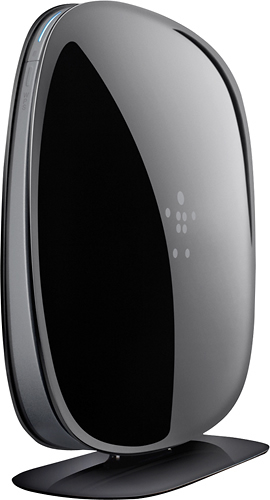
- Model:
- F9K1116
- SKU:
- 7478383
Rating by feature
- Ease of Use
Rating 4.4 out of 5 stars
Customers are saying
Customers are satisfied with the AC750 Dual-Band Wi-Fi Router's ease of use, performance, and range. Many appreciate its affordable price and strong signal, resulting in reliable connectivity and good coverage throughout their homes. Positive feedback also highlights the router's simple setup and compact size. While some users experienced compatibility issues or occasional lag with multiple devices, the overwhelmingly positive reviews praise its overall performance and value.
This summary was generated by AI based on customer reviews.
Horrible signal
||Posted .This reviewer received promo considerations or sweepstakes entry for writing a review.I have small house and was told this router would work great. However it was worse than my old router from 3 years ago.
No, I would not recommend this to a friendBrand response from BelkinStaff
Posted .Hi BobbyO954,
We value the time you spent in sharing your experience with us. We would be grateful to get more details from you about what happened so we can provide possible solutions. Please send us an email at Belkincares@belkin.com with your contact details, location, and the link to this review for reference.
Looking forward to helping you out.
Regards,
Belkin Support
http://www.belkin.com/us/support
Router
||Posted .This reviewer received promo considerations or sweepstakes entry for writing a review.I was told that a router could possibly speed up my internet. I personally did not see any difference in the speed.
No, I would not recommend this to a friendBrand response from BelkinStaff
Posted .Hi Bonnie,
The time you spent for writing a review on this product is valuable to us and thank you for sharing your feedback. There are a lot of factors that could've affected the speed. One reason could be the adapter of the device. If you have devices that has a wireless-AC adapter, you can take advantage of the maximum speed that this router can operate. Another could be due to wireless interference which can be prevented by adjusting the wireless channel of the router.
If you have also noticed this challenge with the wired devices, you may try using another Ethernet cable/s for further isolation.
Should you need our assistance, you may contact us via email at BelkinCares@belkin.com. We'd be happy to assist you.
Sincerely,
Linksys Support
http://www.linksys.com
No better than my 10 year old Netgear router.
||Posted .This reviewer received promo considerations or sweepstakes entry for writing a review.I thought I was upgrading but its no better. I was hoping to get better at streaming movies (Netflix) and for my kids' XBox (1, 360) and for better wifi for all our smart phones in the house, but it seems the Netgear was better at wifi covering a wider range.My daughter started complaining of a weak signal in her room upstairs. never did before! Hope its not too late to return this item ($80.00).
No, I would not recommend this to a friendBrand response from BelkinStaff
Posted .Hi Barryt. We appreciate the time you spent in sharing your experience with us. We would take this opportunity to provide assistance. You may adjust the wireless settings of the router to maximize its capability to provide a stronger wireless signal. Access the router's Dashboard by accessing 192.168.2.1 using an internet browser > Go to 'Advance Settings' > click 'Wi-Fi' > For 2.4 GHz, you may test channels 1, 3, 6, 9, and 11. For 5 GHz connection, test channels 40, 140, and 161. Should you need further assistance, you may email us your complete contact details, location, and the link to this review at BelkinCares@belkin.com, so our team may provide more possible solutions.
Had to buy as a replacement for wifi service
||Posted .This reviewer received promo considerations or sweepstakes entry for writing a review.I decided to buy instead of paying cable company monthly for the wifi service. No complaints..seems to be working fine.
I would recommend this to a friendBrand response from BelkinStaff
Posted .Hi gma5,
We are glad to know that it is working fine. In case you'll encounter some challenges with the router, feel free to send us an email at BelkinCares@belkin.com. We'll surely be of help!
Regards,
Belkin Support
www.belkin.com/support
Signal is not that strong
||Posted .This reviewer received promo considerations or sweepstakes entry for writing a review.The signal drops a bar when a door is closed. Easy to install. Would be nice if the unit color was white
No, I would not recommend this to a friendbetter than model N450?
||Posted .This reviewer received promo considerations or sweepstakes entry for writing a review.The wifi signal is bad payed more money for a more expensive one for nothing because the range is still horrible.
No, I would not recommend this to a friendBasic
||Posted .This reviewer received promo considerations or sweepstakes entry for writing a review.Easy set up but very inconsistent coverage. System shuts off and on very often. Not best idea for a work situation.
No, I would not recommend this to a friendgood for really small house
||Posted .This reviewer received promo considerations or sweepstakes entry for writing a review.my house is 3 bedroom and this router don't reach the bedrooms.don't buy this router i have to return this router.
No, I would not recommend this to a friendReally easy to set up
||Posted .This reviewer received promo considerations or sweepstakes entry for writing a review.I recommend this product if you dont have more than 5 devices to connect.
I would recommend this to a friendso so router
||Posted .This reviewer received promo considerations or sweepstakes entry for writing a review.it doesn't give you a good signal if you are not near the router, the signal is weak if I am in the basement
No, I would not recommend this to a friendIt's ok for a first time user
||Posted .This reviewer received promo considerations or sweepstakes entry for writing a review.I was told that my wifi would work upstairs in my house but it goes in and out poor connection
No, I would not recommend this to a friendGreat features if they only worked
||Posted .This reviewer received promo considerations or sweepstakes entry for writing a review.I experience a speedy internet but some of the child safety features didn't work as I had planned.
No, I would not recommend this to a friendBrand response from BelkinStaff
Posted .Hi, Matt.
Thanks for taking the time to assess our product. We want to make sure you get the most of the AC750 router. We'd like to help you out with regard to the child safety features you planned to use on the router. Kindly send us an email with a brief description of your concern, your contact details (full name, phone number, and email address), and the link to this review to BelkinCares@belkin.com. We look forward to hearing from you.
Regards.
Sincerely,
Belkin Support
http://www.belkin.com/us/support
Performance does not measure up
||Posted .This reviewer received promo considerations or sweepstakes entry for writing a review.This router seems like it would be a great value. But it doesn't perform to the levels you'd expect. The range of the wifi is sporadic at best. I've had devices just drop the network on numerous occasions (sometimes within the same room). When it works it's good, not stellar. But it doesn't work often enough to warrant me returning for a different brand.
No, I would not recommend this to a friendOk if your near it
||Posted .This reviewer received promo considerations or sweepstakes entry for writing a review.It works just fine within about 20 ft anything passed that it has trouble picking up signal
I would recommend this to a friendBrand response from BelkinStaff
Posted .Hi Manny,
We appreciate your feedback about the Belkin AC750 router. There are some factors that would affect the wireless signal from the router. These are:
· Distance problems
· Physical obstructions
· Wireless interferences
· Outdated firmware on the router
· Power outage
To improves the connection, make sure to place the router on a higher location. Or in a less interference area. You may also adjust the wireless channels to avoid any possible wireless coflict. Here's how: http://www.belkin.com/us/support-article?articleNum=8340
If you need further assistance, you may contact us by sending an email at BelkinCares@belkin.com.
Regards,
Belkin Support
www.belkin.com/support
Not as good as we thought it would be
||Posted .This reviewer received promo considerations or sweepstakes entry for writing a review.Sometimes it dont work for the ipad and it is slow
No, I would not recommend this to a friendBrand response from BelkinStaff
Posted .Hi Gigi. We value the time you spent in providing our product a review. One way to have a stable connectivity from the router is to set up a permanent wireless channel. Use a computer and open a browser > type 192.168.2.1 in the address bar > once you're in the setup page of the router, click Dashboard > go to Advanced Settings > click WiFi > Change the 2.4 GHz channel to 1, 3, 6, 9, or 11 (whichever channel can provide the strongest signal). Should you need further assistance, you may contact us via email at BelkinCares@belkin.com. include your complete contact details, location, and the link to this review. Our team would be more than happy to be of service to you.
Not easy to sync up with current internet
||Posted .This reviewer received promo considerations or sweepstakes entry for writing a review.Not easy to setup and online setup does not work. I would not recommend this product.
No, I would not recommend this to a friendThe router is very slow
||Posted .This reviewer received promo considerations or sweepstakes entry for writing a review.This router is very slow. It is better to spend money on a product that works.
No, I would not recommend this to a friendpoor strength
||Posted .This reviewer received promo considerations or sweepstakes entry for writing a review.Recommended in store for two story home. Not a strong enough signal for that
No, I would not recommend this to a friendBrand response from BelkinStaff
Posted .Hi, BCBC,
We appreciate the time that you've spent in posting this review. We would like to assist you in improving the performance of your Belkin Dual-Band wireless router. There are some factors that we need to consider as well. These include the router's location, metal objects, appliances and thick walls that will cause interference of the signal. We may need to modify the channel for the 2.4 GHz frequency using channels 1, 6 and 11. If this will not work, you may email us at BelkinCares@belkin.com along with your contact details and the link of this post.
Regards,
Belkin Support
www.belkin.com/support
Not amused
||Posted .This reviewer received promo considerations or sweepstakes entry for writing a review.Boasts about it's amazing speed, but I only get half of my 200 Mbps. Disappointed!
No, I would not recommend this to a friendBrand response from BelkinStaff
Posted .Hi Coopdaloop,
We appreciate your valuable feedback with our Belkin AC750 Dual Band AC Router. May we know if the 200 Mbps is your wireless or internet speed? Are all the devices behind the network experiencing slow internet speed? These and more questions needs to be answered so that we can properly troubleshoot this case.
You may check this link:
How to resolve inconsistent, slow, or weak wireless connection
http://www.belkin.com/us/support-article?articleNum=8131
Should you need any assistance from us, you may shoot us an email at BelkinCares@belkin.com. Kindly include your contact information and the link to this review.
Regards,
Belkin Support
www.belkin.com/support
no reach
||Posted .This reviewer received promo considerations or sweepstakes entry for writing a review.good price but had to return for ac 1750 this didn't get it done.
No, I would not recommend this to a friend