Customer Ratings & Reviews
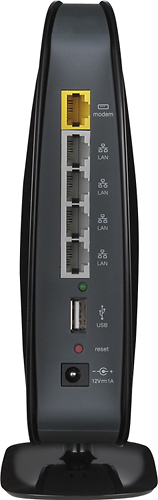
- Model:
- F9K1102
- SKU:
- 2089307
Rating by feature
- Ease of Use
Rating 4.2 out of 5 stars
Customers are saying
Customers have good things to say about the N600 Dual-Band Wi-Fi Router's ease of use, performance, and range. Many appreciate its affordable price and straightforward setup process, noting positive experiences with signal strength and coverage. While some users reported occasional difficulties with streaming, the overwhelmingly positive feedback highlights the router's overall value and effectiveness.
This summary was generated by AI based on customer reviews.
Stopped working
Posted .This reviewer received promo considerations or sweepstakes entry for writing a review.product worked great for 8 months. Now, it drops the internet connection 5-10 times per hour. My old basic linksys router (about 10 years old) still works. After reading many review, I don't think I'll buy another Belkin.
No, I would not recommend this to a friendDay 1 lost connection
Posted .This reviewer received promo considerations or sweepstakes entry for writing a review.I've had this router for 7 hours and already have 1 dropped connection. My old Belkin G router that I replaced with this one had like 5 dropped connections in its 4 year lifetime. Not good, will be returning.
No, I would not recommend this to a friendnot a good product
Posted .This reviewer received promo considerations or sweepstakes entry for writing a review.I have had this for only 45 days. It will drop devices from the wireless network all the time and today it won't even work at all. Tried calling the company and have yet yo get through. I have been disconnected 5 timed from their customer support.
No, I would not recommend this to a friendBrand response from BelkinStaff
Posted .Hi fuznutz,
We would like to take this opportunity to get our team to assist given your experience with our support as well as using our product. We apologize for the delayed response since we are swamped out right now.
Here are the possible solutions that you may do:
* Place your router as high off the ground as possible, leave a distance of two feet between the router antenna tips, ceiling, and wall.
*Change the wireless channel on your router to avoid interference. The recommended channels for the 2.4 GHz network are 1, 6, 9 and 11 since they are considered non-overlapping channels. For the 5 GHz network, channels 36, 40, 44 and 48 are recommended to less likely suffer interference.
If the internet connection remains unstable after performing the above steps, you may need to upgrade your router’s firmware.
Should you need further assistance, you are always welcome to contact us via email at BelkinCares@belkin.com. Include your contact details, location, and the link to this review, so we may assist you properly.
Regards,
Belkin Support
www.belkin.com/support
Terrible Quality and terrible configuration
Posted .This reviewer received promo considerations or sweepstakes entry for writing a review.Product died after two days. Configuration requires a reboot after every setting change making configuration process lengthy. No button to shut off radio. Product feels flimsy. Runs a little warm. Does not support multiple keys, just one key per channel.
No, I would not recommend this to a friendOutdated technology, overpriced
Posted .This reviewer received promo considerations or sweepstakes entry for writing a review.My mistake for thinking an 80$ router wouldn't be using 15 year old Ethernet standards. 100base-T? talk about shaving money off your bottom line. I have a 5 year old Belkin54G that supports gigabit Ethernet that I got for 40$. Returning ASAP
No, I would not recommend this to a friendVery poor performance
Posted .This reviewer received promo considerations or sweepstakes entry for writing a review.After i bought this router the installation was quick but it created problems like the connectivity looses every now and then and you have to remain connected to the guest account.
No, I would not recommend this to a friendBrand response from BelkinStaff
Posted .Hi, Manish,
It's odd that the router is behaving intermittently as it should provide a stable connection once it's set up. We can try setting fixed channels on both networks and checking if the unit's firmware is updated.
Please email us your contact information at BelkinCares@belkin.com so we can get you over to our Escalation Engineers. They'll check the product and ensure that it will perform at its best. Indicate your contact information and the link to this review for our reference.
Regards,
Kristine
Belkin Support
Don't call tech support!
Posted .This reviewer received promo considerations or sweepstakes entry for writing a review.I called tech support and they spent most of the time trying to sell me antivirus help on a new computer. It was a scam. If it stopps working again I'll recycle this and buy a new one - a different brand.
No, I would not recommend this to a friendA Disapointment
Posted .This reviewer received promo considerations or sweepstakes entry for writing a review.Started out fair, but suddenly found myself restarting the router more than I was on the internet....:(. I returned it shortly there after. NetGear? I should have known.
No, I would not recommend this to a friendUSB port supports max 1 TB
Posted .This reviewer received promo considerations or sweepstakes entry for writing a review.I bought this router exclusively for the USB port it had. Belkin customer support confirmed that it can detect external hard drives on USB port upto a maximum of 1 TB !! Shame ..
No, I would not recommend this to a friendGarbage
Posted .This reviewer received promo considerations or sweepstakes entry for writing a review.Won't go over 25mbps on 5g or 10mbps on 2.4 with a 100mbps connection. Even knocked the wired connection down to 85 when it usually is well over 110
No, I would not recommend this to a friendBrand response from BelkinStaff
Posted .Hi, Kevin,
Based on the results that you've got on both wired and wireless connections, there's possibility that the router's firmware needs to be updated.
Please reach out to us at BelkinCares@belkin.com so that our Escalation Engineers can further check the product and help you achieve the unit's expected speed. Indicate your contact information or the link to this review for our reference.
Regards,
Kristine
Belkin Support
Terrible product
Posted .This reviewer received promo considerations or sweepstakes entry for writing a review.I bought 2 of these because of the great sale price. One went bad after 2 weeks of use, the other one lasted only 3 weeks. I replaced them both with Netgear products.
No, I would not recommend this to a friendConnection drop
Posted .This reviewer received promo considerations or sweepstakes entry for writing a review.The connection for this router keeps dropping and Belkin provided no support.
No, I would not recommend this to a friendBrand response from BelkinStaff
Posted .Hi Denise. Thank you for taking the time to let us know of the situation. We have a 24/7 tech and chat support that can help you anytime you want. We are also here to provide the assistance that you need. To have stability of the wireless connection, setting up a permanent wireless channel is one of the solutions. Enter http://router or 192.168.2.1 in your browser's address bar. It will bring you to the advance configuration page. Once you're in the Dashboard, click 'Advanced Settings'. Under 'Wi-Fi' click on 'Network Name'. Look for 'Wireless Channel' and test channels 1, 3, 6, 9, and 11. Should you need further assistance, you may email us your complete contact details, location, and the link to this review at BelkinCares@belkin.com, so our team may provide more possible solutions.
terrible produce - crashes constantly
Posted .This reviewer received promo considerations or sweepstakes entry for writing a review.replaced a linksys modem/router with belkin. belkin fails more frequently than the linksys did. wish i never bought it.
No, I would not recommend this to a friendHaven't been able to install it yet
Posted .This reviewer received promo considerations or sweepstakes entry for writing a review.Purchased it but then ran into problems with my computer and haven't been able to find time to install it.
No, I would not recommend this to a friendnot good at all
Posted .This reviewer received promo considerations or sweepstakes entry for writing a review.I got this for only a week and I have to reset my IP Adress and after that it wont work no more
No, I would not recommend this to a friendAbsolute Garbage
Posted .This reviewer received promo considerations or sweepstakes entry for writing a review.Product wouldn't power on out of the box. The staff were rude and unhelpful.
No, I would not recommend this to a friendBrand response from BelkinStaff
Posted .Hi Matteo,
We're sorry about what happened. When and where was the router purchased? Give us a chance to extend our assistance and review the case. We'd appreciate if you'll email us at BelkinCares@belkin.com with the case number from the support team or with your email address, full name, phone number and location. We'll be waiting for your response.
Sincerely,
Belkin Support
www.belkin.com/support
1 amp supply worked only 3 days using seagate 1tb
Posted .This reviewer received promo considerations or sweepstakes entry for writing a review.Traded for 750 Belkin with 2 amp power supply. Works great.
No, I would not recommend this to a friend