Customer Ratings & Reviews



- Model:
- 988-000103
- SKU:
- 11411886
Rating by feature
- Value
Rating 4.6 out of 5 stars
- Quality
Rating 4.8 out of 5 stars
- Ease of Use
Rating 4.7 out of 5 stars
- Pros mentioned:Sensitivity
I Love My Yeti! Multiple Modes to Meet All My Reco
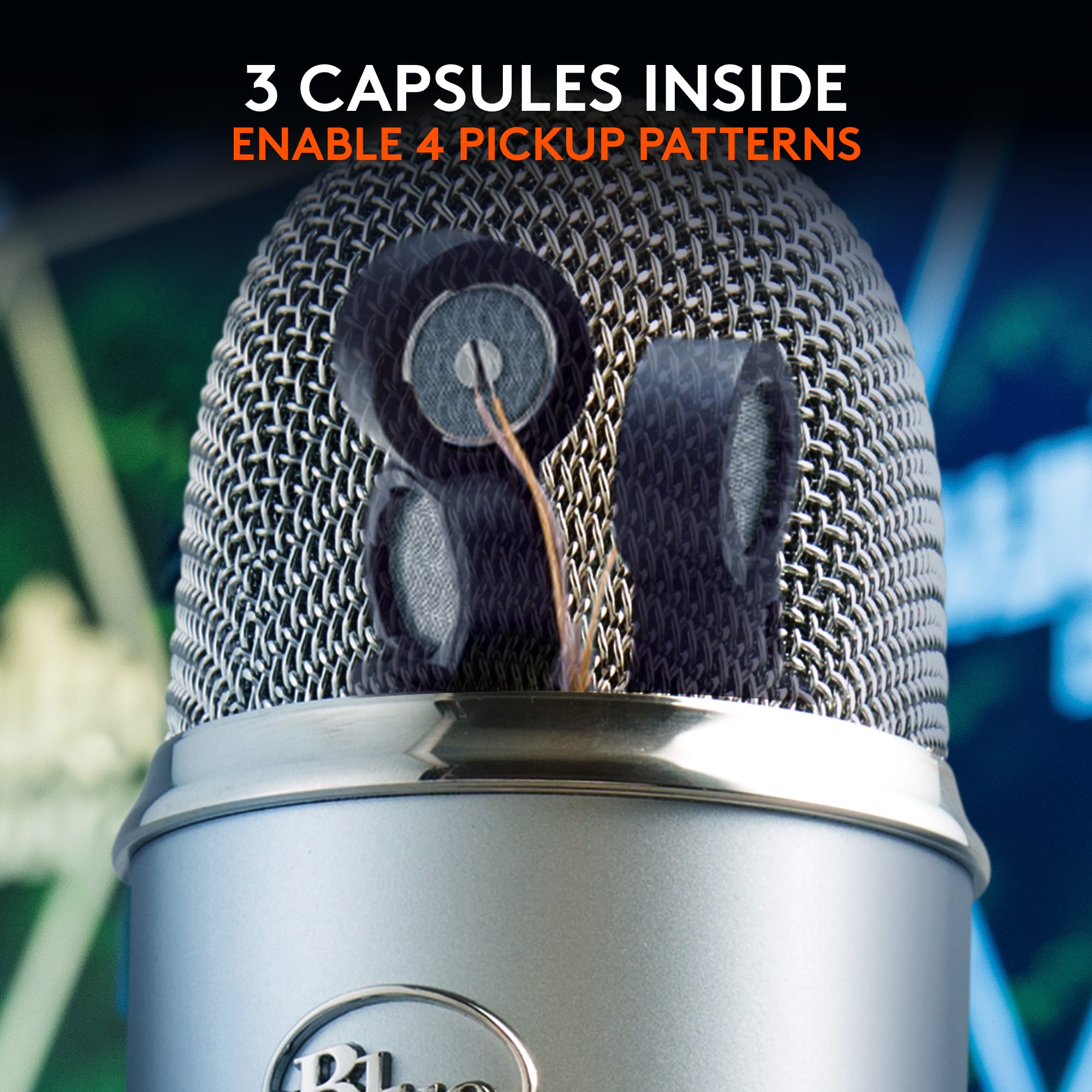
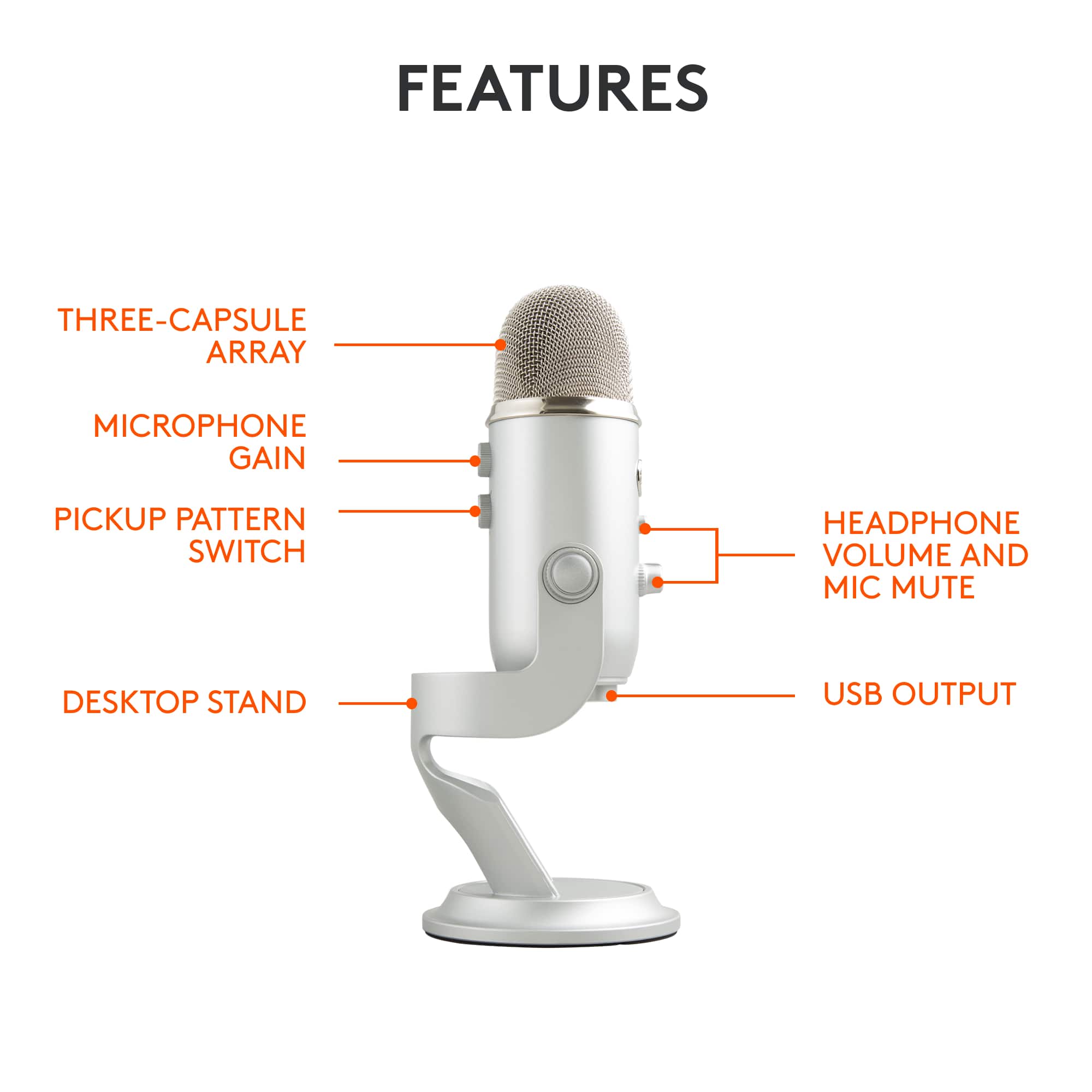
||Posted .This reviewer received promo considerations or sweepstakes entry for writing a review.I do a lot of audio recording so I needed to have something more focused on vocal work. My Snowball was great but due to being omni-directional it wasn't best suited to individual sound sources. This Yeti has 4 different modes; omni-directional, stereo, cardioid, and bi-directional. It's so easy to switch between the different modes with the built in dial. I love how the most important features are built into the hardware of the mic so I don't have to do a lot in my audio software. There are additional controls on the mic for gain, volume, and mute. The mute button is lit with a red led. It's easy to install. All I had to do is plug the micro USB into the bottom and into my laptop. It installed itself to my internet connected Windows 8 system within minutes. The only thing I had to tweak was the input/output settings of my pc audio. This is something I'm accustomed to, otherwise you can find tutorials online on how to do this. I was recording within minutes of opening the box. It's incredibly sensitive as well. I have to say; Blue makes some darn good mics. I think it's worthwhile to invest in a wind screen after using it and seeing the input in my audio program. I'll be getting a wind screen for it next. This mic cuts back on a lot of the work I had to do with the other mic by recording precisely in the directions I need it to. Sometimes I want the ambient sound that omnidirectional recording provides, and other times I can save time I would have spent in editing by using cardioid, stereo, or bidirectional, not having to edit out/eliminate the background sound. The design of the mic also allows you to adjust it in the stand or turn it facing down when it's not in use. The pegs on the side twist to tighten and hold it in the desired position. I noticed, like many others, that the upright position puts some minor stress on the micro USB port. It's not enough stress for me to see it as an issue but I'll certainly treat it with care and unplug the cord when it's not in use to reduce stress on the port. The swivel design of the mic makes it really easy to get to the USB and headphone jack. It can also be taken off the base and screwed into a boom stand because there's a screw port on the bottom. Placing it in a boom stand would likely reduce some of the bending of the cords but I will be using it as came, in its original stand, as a tabletop mic. I love the Blue Yeti and highly recommend it to others. With the 4 different directional recording modes it's appropriate for just about any type of audio recording; I can't think of anything else I could possibly need. I'm all set now... Although I love my Snowball and got a ton of use out of it, I should have just saved up for the Yeti right off the bat. I wasn't sure before, but now having used it, I feel it's well worth it for both hobbyists and professionals alike. It's great for podcasts, voice overs, interviews, music, and more. If I have any issues with it over time, I will certainly update my review, but my Yeti has been working great for all my audio needs.
I would recommend this to a friend - Pros mentioned:Ease of use, Sound quality
Great versatile mic for speech and music.
||Posted . Owned for 1 month when reviewed.This reviewer received promo considerations or sweepstakes entry for writing a review.Using this at our church during COVID. Remarkably versatile. Improvement in sound of speech was immediately noticeable. Much stronger and clearer than the laptop mic or phone mics. Used it for recording some music, with singers sitting 5 feet in front, and me playing guitar 5 feet back to stay socially distanced. Took a few takes for us to get the adjustments right, but with a simple gain knob right on the microphone, and 4 different mic patterns selectable just as easily, we figured out the perfect balance pretty quickly. Then we recorded a song using a backing track coming over a sound system. Took us two tries to get the settings right, but excellent quality in the end. My Martin sounds great through this mic. Got us into the neighborhood of recording studio quality while being super simple and easy. If you remember to bring some over ear headphones, getting the settings right is much quicker and easier. Great value for the price, I feel like we got about 6 different setups in one package.
I would recommend this to a friend - Pros mentioned:Sound qualityCons mentioned:Size
Yeti is just ok, Hyper X Quadcast S is better!
||Posted . Owned for less than 1 week when reviewed.This reviewer received promo considerations or sweepstakes entry for writing a review.Overall review/pro and con at bottom Ok I'm not a mic expert but I am wrting this to help people make an informed decision on buying Mics. So I bought he Yeti along with 2 other mics and compared them all using Nvidia Geforce Experience recording and obs studio w/ and w/out the standard obs filter plugins. I even tested them out with the third party reaper filter plugins for obs studio. The Samson Meteor Mic ($70)and the Hyper X Quadcast S ($160) are the other mics I compared to the yeti. I'm going to tell you how each mic did in comparison then give you the reason why I gave the Yeti a 3 star rating. Also keep in mind I am using a gaming laptop with an occasional loud fan. The Meteor says its for streaming, gaming and practical means. However it picks up a lot of background noise even with the obs stuio plugins. Even the reaper plugins didnt make much difference. I can hear keyboard sounds, my pc's fan, my chair, faint echos of family down the hall. I think this mic was intended for a regular laptop (no fan) in a quiet place. The yeti was the one mic I kept seeing every where for gaming and practical means. Unlike the samson metoer, it has 4 polar modes knob and a gain control know. The polar modes helps the mic best suit the situation like for interviews, streaming, multi voices, and instruments. All this means is the mic only picks up audio from either one or multiple sides. For example the streaming option only picks up from one side greatly helping reducing background noise. I tested it w/out any plugins and it does okay. Its much better than the Samson Meteor. Then I tested the mic w/ the standard obs plugins and then the reaper. The reaper plugins helped the audio the most especially with the noisegate plugin which doesnt let audio record unless it it reachess a certain loudness. It minimize the background sounds even more so. I even tested the mic up closer with the mic tilted it sounds really good, but you have to adjust the gain knob so you are not too loud. The test with Geforce Experience has no filter plugin, but the audio still sounded really warm had some base. I was still able to hear some background noise though. The last mic I test and compared ws the Hyper X Quadcast S. This mic is intended for gaming but can be used for other means use as interviews, podcast etc. I found this mic to be more forgiving than the other two mics. So this mic has the same 4 polar options knob, gain knob, and mute button. However, there is a few things that this mic does different that is noticeable. Buttons/knobs are smooth and quiet. Its lighter and slightly smaller than the yeti. Its has rgb lighting that the yeti does not. In relation to the mute button, you just tap the top of the mic and them mic mutes and at the same time the rgb lights turn off indicating the mic is mute. Yeti just has a light for mute indication. The Hyper X has an anti shaking mechnism which reduces sounds and unwanted noise. Yeti has no such thing. The hyper x even has an internal pop filter inside of it. Yeti does not. Upon testing in obs, the hyper x does really great at reducing background noise. I think better than the yeti. The reaper plugins have to be re-adjusted. For instance there is a reaper plugin filter called reapfir that you can use to subtract noise when you pc is at idle such pc fans. You have to let what ever mic currently plugin record idle sound without doing anything in order for it to work. With the gain knob all the way up, the hyper x didn't pickup the fan what so ever unless you put it really close to my pc's fan like touching. The yeti I notice was able to pick up my pc's fan without being close. I dont know if this has to do the yeti not having a pop filter or slightly being worse at filtering background noise or what. This is when I noticed the gain knob on the yeti was better than the hyper x but that can also be a bad thing filtering out sounds. Then I noticed the noisegate reaper plugin had to be re-adjusted because the hyper x wasnt picking audio as senstive as the yeti. Which is good because I dont want the background noise but I had to adjust the noise gate so my voice can be heard. When I test it out with the Nvidia Geforec experience recording, it sounded like a studio recording like a youtube content creator. Keep in mind the geforce experience has no filters. Overall give the 3 stars because although it has better gain control, the hyper x quadcast s does a better job at filtering out background noises even without plugin filters. The yeti lacks a pop filter, and anti-shaking mount. Despite being able to tilt foward, the hyper x quadcast s picks up audio better. Pros/cons Samson Meteor Pro -portable -for practical uses like interviews -basic mute button -basic gain knob -light Con -not for gaming/fan audio gets recorded -no polar modes -no anitshake mount -no rbg light Yeti Pro -polar modes -tilt mic -grain control knob Con -heavy -no rgb lighting -polar mode knob on back/makes sounds adjusting -no pop filter -no anti shake mount Hyper x quadcast s Pro -light -rbg lights/works with mute -knobs/buttons are super quiet/ visibly in front -gain knob -polar mode knob -antishake mount -internal popfilter -better at reducing background noise than yeti -more forgiving with audio Con -can tilt but only back -gain knob not as loud as yeti
I would recommend this to a friend - Pros mentioned:Ease of use, Sound quality
Perfect
||Posted . Owned for 3 weeks when reviewed.This reviewer received promo considerations or sweepstakes entry for writing a review.The Blue Yeti microphone stands out as an exceptional piece of audio equipment in its price range. With its robust build quality, sleek design, and versatile polar patterns, it caters to both beginners and experienced users. The sound clarity and depth it delivers are truly impressive, making it a popular choice for podcasters, streamers, and musicians. Its plug-and-play usability is a bonus, eliminating the need for complicated setups. Overall, the Blue Yeti offers outstanding value for its cost, solidifying its reputation as a top-tier microphone in the market.
I would recommend this to a friend - Pros mentioned:Sound quality
Awesome looks. Excellent quality.
||Posted . Owned for 3 weeks when reviewed.This reviewer received promo considerations or sweepstakes entry for writing a review.Excellent audio quality. I was thinking that I may need to install drivers etc. but it was a simple plug and play set up on my windows laptop.
I would recommend this to a friendBrand response from Logitech
Posted .Thank you for your kind words! We’re delighted the product is performing well for you. Your feedback inspires us to keep pushing forward.

- Pros mentioned:Ease of use, Sound qualityCons mentioned:Size
Great sound quality!
||Posted .This reviewer received promo considerations or sweepstakes entry for writing a review.Sound quality is very good and the microphone has multiple options for picking up sound: stereo, bidirectional, omnidirectional and "cardioid" making it very versatile. The one negative thing is it is a rather large and heavy microphone, but that also means it isn't going to tip over or fall with just a slight bump, like some smaller microphones might do.
I would recommend this to a friend - Pros mentioned:Ease of use, Price, Sound quality
Great podcasting mic!
||Posted . Owned for 6 months when reviewed.This reviewer received promo considerations or sweepstakes entry for writing a review.I bought this for my son who wanted to get into podcasting. It's simple to use, sounds great, and was a much easier 'Step 1' solution for him than having a separate audio interface, microphone, monitoring, etc. He also uses it for things like VOIP call and online gaming and it seems to work well for those to.
I would recommend this to a friend - Pros mentioned:Ease of use, Sound qualityCons mentioned:Size
large but effective
||Posted . Owned for 3 weeks when reviewed.This reviewer received promo considerations or sweepstakes entry for writing a review.hook up is easy. this is fairly large as far as peripherals on desktop. I use mine as mic but speakers as direct connect from monitor to pc (and this occasionally causes problems because the yeti "speaker" setting tries to take primary in some applications). will likely try to swap that connection and see if it resolves the issue. pickup is good so I don't have to yell to be heard in my meetings anymore
I would recommend this to a friend - Pros mentioned:Ease of use, Sound quality
Buy Blue and You Won't Get the Blues
||Posted .This reviewer received promo considerations or sweepstakes entry for writing a review.Blue Microphones and Headphones are the "go to" for quality and performance. Prior to this purchase, I splurged on a pair of Blue headphones and have never regretted my decision. Unlike many headphones on the market, these were made to last. I needed to do some high quality voice recording and I tried a musician level microphone and a analog/digital converter. This set-up is complicated and I wasn't happy with the results. I decided to go with a USB microphone and Blue was the obvious choice. It's well made, metal housing not plastic, and has a variety of features. One the is really handy is the pattern selection switch. It makes the microphone very versatile. The mic is hooked up and I use for all applications from Zoom to recording. In addition to upgrading my microphone, I also upgraded my camera. Zoom calls look and work much better if you upgrade from the standard laptop cameral/microphone. Pick Blue for your microphone.
I would recommend this to a friend - Pros mentioned:Sound quality
Awesome microphone
||Posted . Owned for 7 months when reviewed.This reviewer received promo considerations or sweepstakes entry for writing a review.Awesome microphone. Between the gain switch and audio shape options, (cardioid etc) this mic picks up my voice even when I'm far away and whispering. Works with G hub software too.
I would recommend this to a friendBrand response from Logitech
Posted .Thanks for the kind words! We’re proud to know our product is making a difference. Your feedback keeps us moving forward.
- Pros mentioned:Sound quality
Best Microphone ever!
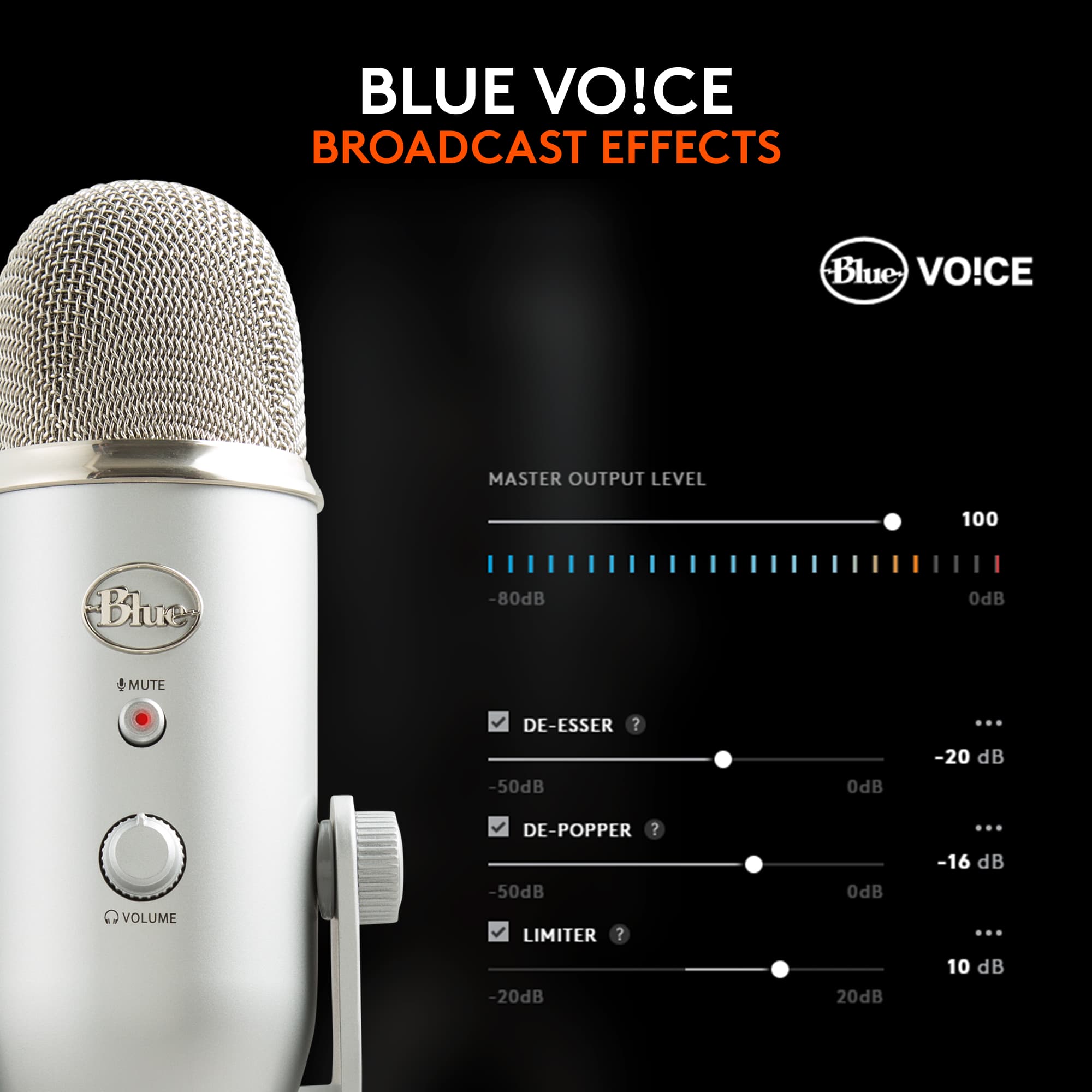
||Posted . Owned for 2 weeks when reviewed.This reviewer received promo considerations or sweepstakes entry for writing a review.I recently purchased the Blue Yeti USB Microphone from Best Buy, and it's been an absolute game-changer for my recording setup. The microphone boasts an array of impressive features that cater to both beginners and seasoned creators alike. The standout feature for me is its versatility in recording. With multiple pickup patterns, including cardioid, bidirectional, omnidirectional, and stereo, the Yeti adapts effortlessly to various recording scenarios. Whether I'm recording podcasts, vocals, instruments, or interviews, this microphone consistently delivers excellent audio quality. The integration of Blue VO!CE filters add another layer of professional-grade customization to my recordings. These filters allow for fine-tuning and enhancing my voice or instrument to achieve a more polished and studio-like sound, elevating the overall quality of my content. The custom mic capsule ensures crisp and clear audio reproduction, capturing nuances and subtleties in sound with impressive accuracy. Additionally, the intuitive studio controls make adjusting settings on the fly incredibly easy, allowing me to focus more on my content and less on technicalities. The inclusion of a headphone output directly on the microphone is a practical feature. It enables real-time monitoring, ensuring that what I'm recording is precisely what I want, without any unwanted surprises during post-production. Lastly, the internal components of the Blue Yeti USB Microphone work harmoniously, resulting in a reliable and durable device that has become an integral part of my recording setup. In summary, the Blue Yeti USB Microphone from Best Buy is a top-notch choice for content creators, podcasters, musicians, and anyone seeking high-quality audio recording. Its blend of versatility, customizable features, and ease of use make it a standout product in its category.
I would recommend this to a friend - Pros mentioned:Ease of use, Sound quality
Overall reliable USB microphone
||Posted . Owned for 10 months when reviewed.This reviewer received promo considerations or sweepstakes entry for writing a review.Overall a great USB microphone for creators and those looking for better quality audio on zoom calls and webinars. The build quality is great, and the microphone is a well-designed addition to my setup. The Yeti Blue Microphone is easy to use straight out of the box, and can be configured further using the Logitech G Hub software. I am experiencing a bug with the software across all of my devices where it shows the microphone being stuck in the setup process, but the configuration works regardless. I have noticed the audio feels a bit thin/hollow, but the quality you get out of this microphone really depends on how far away you are from it. For best results, try to position it 6-8 inches from your face, and speak into the front of the microphone, not the top.
I would recommend this to a friend What I needed and more
||Posted . Owned for 1 month when reviewed.This reviewer received promo considerations or sweepstakes entry for writing a review.I needed a new mic cause the one I had was muffling me unless I projected; which wasn’t an option with the thin walls in my room. The gain feature on this microphone was a lifesaver. All I needed was a bit of fiddling with the built in dials and some sound proofing and I could speak at my normal volume without worrying about being too quiet for my online calls or too loud for my housemates
I would recommend this to a friendBrand response from Logitech
Posted .Thank you for sharing your experience! We’re so glad the Blue Yeti microphone has made such a difference with its gain feature and ease of adjustment. Your feedback truly highlights its value and means a lot to us!
Great Produch
||Posted .This reviewer received promo considerations or sweepstakes entry for writing a review.Great product!! Bought this for my daughter that kept buying headphones with mics that would always break. We give this 5 stars
I would recommend this to a friendBrand response from Logitech
Posted .It’s always a pleasure to hear from satisfied users. Thanks for sharing your experience—it helps us keep doing what we love.
- Pros mentioned:Ease of use, Sound quality
1st Mic but GREAT for my uses
||Posted .This reviewer received promo considerations or sweepstakes entry for writing a review.This thing is easy to instal, easy to set to the correct settings. Works well with Garage Band which is great because it is free with macs. Again, not technically equipped to compare it to anything but it works super well for me. Did a voice over for a video we produced.
I would recommend this to a friend - Pros mentioned:Ease of use, Sensitivity
The ONE mic to rule them all?
||Posted . Owned for 1 month when reviewed.This reviewer received promo considerations or sweepstakes entry for writing a review.Best Buy had the best price for the Blue Yeti at the time purchased. I have two Blue Yeti mics. We use them for music instruction over Zoom, podcasts, as well as making orchestral recordings. This is a very versatile microphone with a low noise floor and fantastic sensitivity. With four polar patterns (cardioid, stereo, omnidirectional and b-directional) you can do a lot with this; table interviews, podcasting/vlogging, instrument recording, and full frequency room recording. This mic is a no-brainer for content creators, musicians and music educators. I don't think that there is a more versatile mic at this price point.
I would recommend this to a friendBrand response from Logitech
Posted .Hello CelloGoodBuy,
Thank you for choosing the Yeti by Blue microphones, and for taking the time to write this review. We are glad that you have been pleased with the Yeti, and appreciate your feedback. I have attached a link to the support page for your reference. Enjoy.
Best regards,
John at Blue/Logitech
https://support.bluedesigns.com/hc/en-us/articles/360033969774
- Pros mentioned:Ease of use, Sound quality
Easiest USB Microphone to use on the Market!
||Posted . Owned for 1 month when reviewed.This reviewer received promo considerations or sweepstakes entry for writing a review.Purchasing this product from Best Buy was a piece of cake and ultimately easy. The product it self requires practically no set up, all you have to do is plug it into a USB port and you’re good! The quality of the sound is easily noticeable and the microphone has different audio settings depending on how you plan to use the microphone. I’ve noticed that putting a pop filter or a sock over the microphone helps smoothen out the sound so I definitely recommend getting a pop filter if your money allows. When purchasing this product you should take some time to mess around with the settings to find out what settings work best for you. I recommend watching a YouTube tutorial if you don’t have much time. The quality is perfect if you’re trying to start making videos for YouTube, or just plan on talking to people online a lot.
I would recommend this to a friend - Cons mentioned:Connectivity
Great Value, should include a USB-C dongle
||Posted . Owned for 1 week when reviewed.This reviewer received promo considerations or sweepstakes entry for writing a review.Cannot compete for the price! Easy to setup, only one massive complaint. This mic should include a USB-C dongle at this point everyone with a newer laptop, Mac, or tablet will scream in frustration when they realize they will need to get an additional item.
I would recommend this to a friendBrand response from Logitech
Posted .It’s wonderful to hear that our product is meeting your needs. Your feedback is incredibly valuable and helps us continue to innovate. Thanks for being part of the Logitech community.
- Pros mentioned:Sound qualityCons mentioned:Weight
High quality and very sensitive
||Posted .This reviewer received promo considerations or sweepstakes entry for writing a review.This microphone produces nice high quality audio, but it is very very sensitive. It will pick up every sound within a mile. Takes a lot of tweaking and trial and error to find a nice volume setting where your voice or instrument records nicely without picking up much background noise. Has 4 recording settings for recording 1 person in front of the mic, one for 2 people on each side of the mic, a setting for all around the mic, and a stereo setting. You can plug in headphones and listen to the audio in real time, such a nice feature. Definitely the best USB microphone I have used, but leaves a slight white noise hissing in the background of everything I record. Audio editing software usually removes it with ease with a noise removal plugin. Has a bit of weight to it, so using it with a cheaper mic stand may cause it to fall, so I recommend a decent more expensive mic stand if You prefer to use a different stand than the included one.
I would recommend this to a friend blue yeti
||Posted .This reviewer received promo considerations or sweepstakes entry for writing a review.The Blue Yeti is one of those mics that just works. Setup is super easy, and the sound quality is way better than you’d expect for the price. It picks up your voice clearly without much tweaking, and it’s great for gaming, streaming, or calls. Solid, reliable, and worth it.
I would recommend this to a friend