Customer Ratings & Reviews
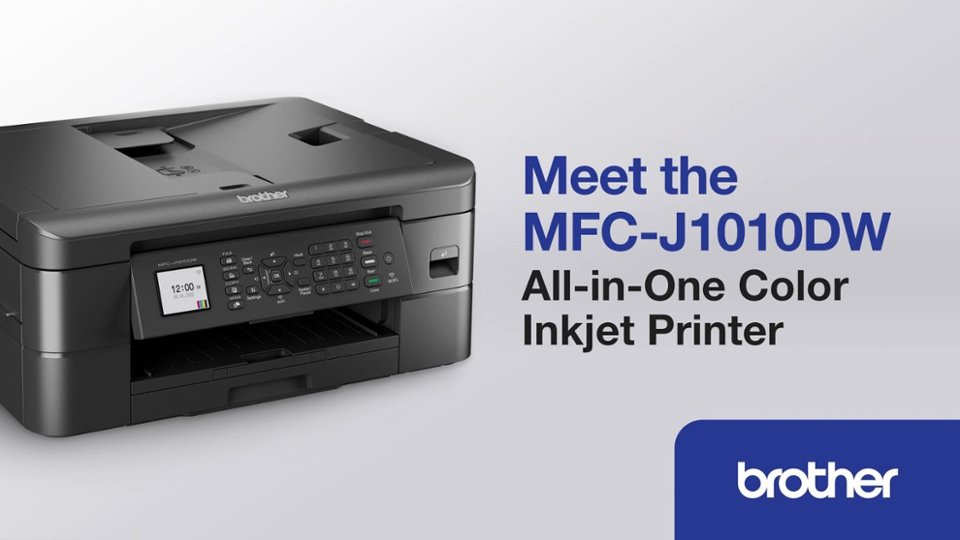
- Model:
- MFCJ1010DW
- SKU:
- 10752985
Rating by feature
- Value
Rating 4.6 out of 5 stars
- Quality
Rating 4.5 out of 5 stars
- Ease of Use
Rating 4.5 out of 5 stars
to a friend
Reliable printer
Posted .This reviewer received promo considerations or sweepstakes entry for writing a review.Great printer if like me you only print a few pages a month
I would recommend this to a friendDoes the job!
Posted .This reviewer received promo considerations or sweepstakes entry for writing a review.Does the job. Setup was a bit challenging, but I like that it is easy to print anything from your phone.
I would recommend this to a friendBrand response from Brother
Posted .We would like to take this opportunity to thank you for your feedback. At Brother, customer satisfaction is something we take seriously. We would love to hear from you about the challenges you experienced with the setup. Our Brother Customer Support Team is available to assist you direct: www.brother-usa.com/brother-support

Brother printer MFC-J1010DW
Posted .This reviewer received promo considerations or sweepstakes entry for writing a review.Love the printer and its features. Have used HP in the past, the Brother system takes a little time to get used to, but it's well worth it.
I would recommend this to a friendBrother printer
Posted .This reviewer received promo considerations or sweepstakes entry for writing a review.This printer works well with my new Lenovo laptop but not good with my old HP laptop. A good printer for the money
I would recommend this to a friendGood until the ink runs low, then you will scream
Posted .This reviewer received promo considerations or sweepstakes entry for writing a review.Decent printing etc. at a reasonable price. So far so good. After you print enough pages to use up about 3/4 of any of the ink cartridges, it displays an "Ink Low" message on its LCD. Sounds reasonable, right? There's still enough ink to make a few copies. Press the "Copy" button and...it beeps. Press "Cancel" and...it beeps. Start pressing buttons at random and it rewards you with more beeps. Eventually by sheer luck you will have uncovered the secret button press sequence required of its human servants to put it in a mood to print a copy. But in your eagerness to please the machine you have forgotten exactly which of the many buttons you had to press, so the next time you try to copy - same thing. After several repetitions of this exercise in frustration, you will want (safety permitting) to throw it out a window and buy a less demanding printer. Summary: Designed by engineers for use by other engineers.
No, I would not recommend this to a friendBrand response from Brother
Posted .We would like to take this opportunity to thank you for your feedback. We are sorry to hear that you are not satisfied with your Brother MFCJ1010DW. At Brother, customer satisfaction is something we take seriously. Your feedback is important to us and will be reviewed to help us improve our future products.
You are a valued customer to us. We would love to hear from you with more details to be able to better assist you. Our Brother Customer Support Team is available to assist you direct: www.brother-usa.com/brother-support
Geek squad ***** five star’s …
Posted .This reviewer received promo considerations or sweepstakes entry for writing a review.Love my printer. Geek Squad set it up. Would purchase & setup again with Geek Squad.
I would recommend this to a friendBrothers Printer
Posted .This reviewer received promo considerations or sweepstakes entry for writing a review.Good little printer. We have used it to scan and copy for personal use and not business.
I would recommend this to a friendGreat "All in One" printer for the price.
Posted .This reviewer received promo considerations or sweepstakes entry for writing a review.Great "All in One" printer for the price. Best Buy had the best price.
I would recommend this to a friendMh50
Posted .This reviewer received promo considerations or sweepstakes entry for writing a review.I am very pleased about my new printer.This is a brand that I never had before.
I would recommend this to a frienddecent printer
Posted .This reviewer received promo considerations or sweepstakes entry for writing a review.ok for the price but it looks much cheaper made and even worse than our old pixma mg6200. it only has 1 tray not 2 like our old printer. It seems printers have gone backwards .... I am also worried about the cost of ink too
I would recommend this to a friendBrand response from Brother
Posted .We would like to take this opportunity to thank you for your feedback. We are sorry to hear that you are not satisfied with your Brother MFCJ1010DW. At Brother, customer satisfaction is something we take seriously. Your feedback is important to us and will be reviewed to help us improve our future products.
Thank you for being a Brother customer. Please know that we will be here, should you need to contact us in the future. Our Brother customer service is available to assist you directly at www.brother-usa.com/brother-support.
brother mackne
Posted .This reviewer received promo considerations or sweepstakes entry for writing a review.ity is an excellent producty would recommend to anyone
I would recommend this to a friendGarbage, Pay More and Get a Cheap Laser Printer.
Posted .This reviewer received promo considerations or sweepstakes entry for writing a review.Garbage not even good for casual use. Wifi disconnects after 10 minutes. Initial toner is depleted after printing 10 pages. The printer stops working when it detects any low toner regarless of all others being full. You cannot just switch to greyscale if black toner is full. Menu interface is difficult to use to clear errors. I told myself do not buy a cheap inkjet and I did. Stupid me!!!
No, I would not recommend this to a friendBrand response from Brother
Posted .Thanks for taking the time to review your experience with the Brother MFCJ1010DW. We appreciate your feedback. I’m sorry to hear that you are having some issues with the Brother MFCJ1010DW. I sincerely apologize for any inconvenience this issue may have caused you. We’d like an opportunity to help. Please contact us directly at:
https://www.brother-usa.com/support/MFCJ1010DW
Scam product
Posted .This reviewer received promo considerations or sweepstakes entry for writing a review.I have only printed in B&W ever, only for the printer to tell me I am out of yellow and blue ink. Full on black ink, but it refused to let me print anything. I inserted a new yellow ink cart just for the printer to tell me to insert a non-subscription cart to proceed(same carts that came with the printer I never had the subscription). What a useless printer, waste of money.
No, I would not recommend this to a friendGood A-I-O
Posted .This reviewer received promo considerations or sweepstakes entry for writing a review.1 month old. So far very good. Easy installation. Very nice wifi features. Seems to be a good all around home (maybe small office) AIO,
I would recommend this to a friendWorst printer I have ever owned.
Posted .This reviewer received promo considerations or sweepstakes entry for writing a review.I have owned an HP, Cannon, and Zerox printer and I seriously regret buying this printer. If one of the color ink cartridges is empty it will not printer and receive annoying notices that the yellow is out even though I have not used it. I've tried sending a document without color and to a monochrome but it still won't print. You also can't turn off the printer when it has the message up about needing ink. If you want it off, you have to unplug it and it still will not print. Printer won’t stay connected to Wi-Fi. Not user friendly.
No, I would not recommend this to a friendBrand response from Brother
Posted .Thanks for taking the time to review your experience with the Brother MFCJ1010DW. We appreciate your feedback.
Your Brother MFCJ1010DW is designed to stop ALL printing operations when any of the ink cartridges have reached their end-of-life. This is to ensure the life of the printhead and to maintain premium print quality. Some ink from all the ink cartridges is used in periodic cleaning cycles. This helps to prevent issues such as printhead clogs and poor print quality. There is no way to bypass this feature.
If one or more color ink cartridges are low but not at the end of their usable life and you want to minimize the use of color ink, change the settings in the Brother software to print with black ink only (grayscale). If you print with black ink only, the other ink cartridges must have ink for the printer to print. When an ink cartridge is depleted, you must replace it before you can print.
If you print with black ink only, the printer may still use small amounts of ink from all the ink cartridges for occasional servicing tasks. Brother recommends that you replace any low ink cartridges to avoid any interruptions in printing.
Below is a link with more information on black and white printing.
Answer Link: https://help.brother-usa.com/AgentWeb/api/contextmanager/v.32406210003/workspaceContext/workspace/processedPrint/Answer/176522
I’m sorry to hear that you are having connectivity issues with the Brother MFCJ1010DW. I sincerely apologize for any inconvenience this issue may have caused you. We’d like an opportunity to help. Please contact us directly at:
https://www.brother-usa.com/support/MFCJ1010DW
Never buy this product with ink, the ink drys
Posted .This reviewer received promo considerations or sweepstakes entry for writing a review.Never buy this product with ink, the ink drys if you are even not using it and it will not allow you to scan and print with nlack n white ink, its a rip off
No, I would not recommend this to a friendBrand response from Brother
Posted .Thanks for taking the time to review your experience with the Brother MFCJ1010DW. We appreciate your feedback. I’m sorry to hear that you are having Ink issues with the Brother MFCJ1010DW. I sincerely apologize for any inconvenience this issue may have caused you. We’d like an opportunity to help. Please contact us directly at:
https://www.brother-usa.com/support/MFCJ1010DW
NOTE: Your printer is designed to stop ALL printing operations when any of the ink cartridges have reached their end-of-life. This is to ensure the life of the printhead and to maintain premium print quality. Some ink from all the ink cartridges is used in periodic cleaning cycles. This helps to prevent issues such as printhead clogs and poor print quality. There is no way to bypass this feature.
If one or more color ink cartridges are low but not at the end of their usable life and you want to minimize the use of color ink, change the settings in the Brother software to print with black ink only (grayscale). If you print with black ink only, the other ink cartridges must have ink for the printer to print. When an ink cartridge is depleted, you must replace it before you can print.
If you print with black ink only, the printer may still use small amounts of ink from all the ink cartridges for occasional servicing tasks. Brother recommends that you replace any low ink cartridges to avoid any interruptions in printing.
Below is a link with more information on black and white printing.
Answer Link: https://help.brother-usa.com/AgentWeb/api/contextmanager/v.32409130002/workspaceContext/workspace/processedPrint/Answer/176522
Make sure ink is available before purchasing
Posted .This reviewer received promo considerations or sweepstakes entry for writing a review.Chanllenging to connect to my classroom's computer at work. No black ink available right now. I wish I hadn't bought this.
No, I would not recommend this to a friendGuzzles ink like an old car guzzles gas!
Posted .This reviewer received promo considerations or sweepstakes entry for writing a review.I own one of these. I have had it for barely over a year and don't remember where I bought it. It initially seemed like a good investment, but now I regret buying it. The printer's automatic printhead cleaning cycles cause it to guzzle ink like an old car guzzles gas. These cycles are common to all Brother printers and can't be disabled. I need to buy new cartridges for this gas guzzling piece of junk every two to three months on average, and it's all because of those printhead cleaning cycles. I am not going to spend money on ink for this thing much longer. I intend to replace it with one that not from Brother, and this thing is going in the garbage where it belongs!
No, I would not recommend this to a friendBuyer Beware for Replacement Black Ink!
Posted .This reviewer received promo considerations or sweepstakes entry for writing a review.There appears to be a significant shortage of reasonable priced LC401 Black Ink for this printer!
No, I would not recommend this to a friendBrand response from Brother
Posted .We would like to take this opportunity to thank you for your feedback. At Brother, customer satisfaction is something we take seriously. We understand you are experiencing issues finding LC401 cartridges for your Brother machine. We are working hard to get this item back in stock as soon as possible. If you have any questions, our Brother Customer Support Team is available to assist you direct: www.brother-usa.com/brother-support
A new Brother owner.
Posted .This reviewer received promo considerations or sweepstakes entry for writing a review.I was expecting a more basic printer, copier, scanner. I am getting used to it but has too many bells and whistles.
No, I would not recommend this to a friendBrand response from Brother
Posted .We would like to take this opportunity to thank you for your feedback. At Brother, customer satisfaction is something we take seriously. We would love to hear from you with more details to be able to better assist you. Our Brother Customer Support Team is available to assist you direct: www.brother-usa.com/brother-support