Customer Ratings & Reviews

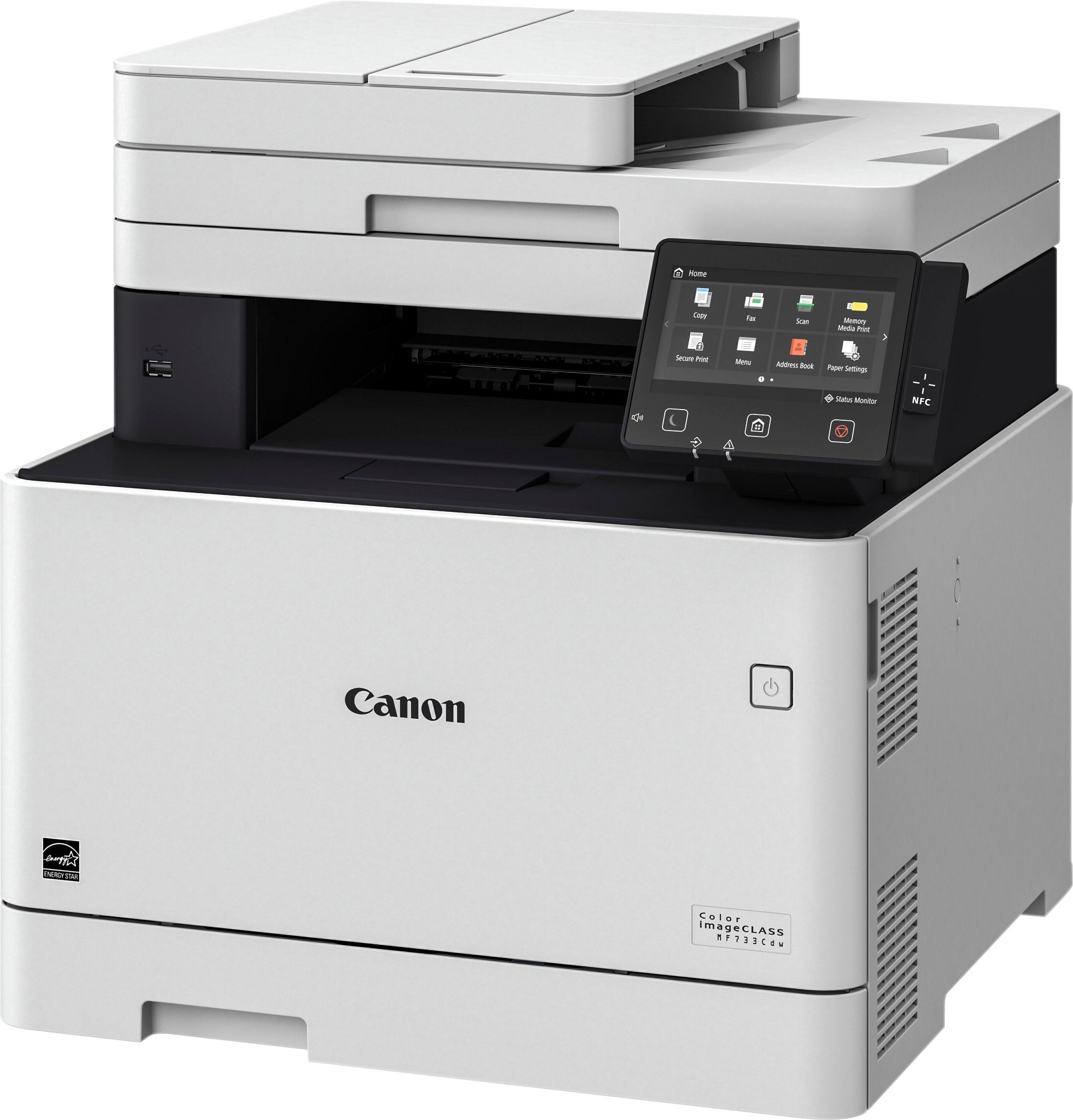
- Model:
- 1474C009AA
- |
- SKU:
- 5746101
Customer reviews
Rating 4.6 out of 5 stars with 948 reviews
(948 customer reviews)Rating by feature
- Value4.4
Rating 4.4 out of 5 stars
- Quality4.5
Rating 4.5 out of 5 stars
- Ease of Use4.2
Rating 4.2 out of 5 stars
Customers are saying
Customers find value in the Color imageCLASS MF733Cdw Wireless Color All-In-One Printer for its easy setup, superb print quality, and affordable price. Many users appreciate the convenience of wireless printing and the quiet operation of the printer. However, some users have concerns about the high cost of toner cartridges, the large size and weight of the printer, and issues with the scanning software.
This summary was generated by AI based on customer reviews.
- Pros mentioned:Ease of use, Print quality
Rated 5 out of 5 stars
Great value
Posted .This reviewer received promo considerations or sweepstakes entry for writing a review.After doing a lot of research between HP, Brother, and Canon, I decided on the MF733 and was really happy I did. It looks like it just came out so reviews were limited. It featured print, copy, scan, fax with duplex function for all the above, the the Best Buy price at the time was lower than any other comparable printer. It also comes with toner cartridges which yield 2200 BW and 1200 color pages according to the Canon website. That alone accounted for almost the cost of the printer. Setup was a breeze with a Mac. The printer was turned on, the startup screens took me through connecting with my wireless network, and my Mac found the printer immediately. Setting up Google cloud print then took a couple of minutes. No additional software was needed other than Mac OS. PC setup took a bit longer and needed software on an included CD. Our router is an Apple Airport extreme. Not sure how long this will last but the Best Buy price was 309.99
I would recommend this to a friend Rated 2 out of 5 stars
Bad printer
||Posted .This reviewer received promo considerations or sweepstakes entry for writing a review.No ink in it you will have to buy the cartridge very soon after buying printer
I would recommend this to a friendRated 2 out of 5 stars
complicated to use.
||Posted .This reviewer received promo considerations or sweepstakes entry for writing a review.Just bought it. Software Errors, Poor customer service.
No, I would not recommend this to a friendRated 1 out of 5 stars
Cannon has issues stay away
||Posted . Owned for 7 months when reviewed.This reviewer received promo considerations or sweepstakes entry for writing a review.This printer will not stay connected to the computer. I have Apple computer product. Tech support is at least an hour so they must be having major issues. They sent me a new model MF743 and the same issue. Don’t not waste your money and valuable time.
No, I would not recommend this to a friendRated 1 out of 5 stars
Expensive, useless
||Posted .This reviewer received promo considerations or sweepstakes entry for writing a review.This item CANNOT print mirror image!!! For such an expensive printer how is it possible that it does not have such a simple feature!!! This will go back to the store right away. It really stinks as the quality of prints are excellent but I only need it for mirror image.
No, I would not recommend this to a friend- Pros mentioned:Print quality
Rated 5 out of 5 stars
Really Nice AIO
Posted .This reviewer received promo considerations or sweepstakes entry for writing a review.I just purchased the Canon MFC733CDW to replace a 10 year old Brother (MFC9840CDW) that finally expired. This Canon is extremely nice. A little smaller, $200 less expensive, and it seems to be an improvement on all fronts. The touch screen is a very welcome upgrade. Getting this AIO completely configured has been a bit frustrating (mix of Mac, Windows10, IOS & Android) but once you find your way through the less than ideal documentation, it's pretty user friendly. Adjusting to the new user interface will just take some time. Printing is excellent and very fast. Especially the 1st page - it comes out without any delay (even over 2.4GHz WiFi). Text is excellent. Picture quality is vastly better than my old device. It's no inkjet but it's surprisingly good for a laser, particularly at this price point. I haven't tried copying or scanning yet so I'll defer on those functions, but based on what I've seen so far I think that I'll be very happy with this device. I can only hope that it's anywhere near as reliable as my old device.
I would recommend this to a friend - Pros mentioned:Ease of use, Print quality
Rated 5 out of 5 stars
Superb Color Laserjet
Posted .This reviewer received promo considerations or sweepstakes entry for writing a review.Great printer all around. Replaced a HP LaserJet and the Canon imageclass is far superior in printing color, b&w, as well as speed from PC and Phone. Very very quiet compared to the HP model 277dw. More features, single pass duplex, NFC, etc. I believe I hit a home run with this model and very satisfied all around. Setup was straight forward (geek), and I purchased while on sale
I would recommend this to a friend Rated 1 out of 5 stars
Not a good printer
||Posted .This reviewer received promo considerations or sweepstakes entry for writing a review.This printer has a slow connection when printing wirelessly plus it didn't even come with a USB cable to begin with.
No, I would not recommend this to a friendRated 1 out of 5 stars
Printed Unwanted Stripes on the Paper
||Posted .This reviewer received promo considerations or sweepstakes entry for writing a review.Had to return as Canon help desk could not repair. Fortunately Best Buy allowed a straight swap for a new printer.
No, I would not recommend this to a friend- Pros mentioned:Print qualityCons mentioned:Touch screen
Rated 4 out of 5 stars
Good if you don't need to connect wirelessly
Posted .This reviewer received promo considerations or sweepstakes entry for writing a review.I bought the Canon - Color imageCLASS MF733Cdw on 11/26/2018 (Cyber Monday) from Best Buy. It arrived on the 28th ahead of schedule. During set up, I tried to connect via wireless connection. After entering the access point & password it displays, Connecting with the busy icon which never finishes. I waited about 15 minutes & it still was Connecting. I pressed the cancel button which displayed, Canceling with the busy icon which never finishes. After 15 to 20 minutes I turned the printer off, plugged it directly into the router, turned it back on and configured it for wired LAN. I tested most of the features, which appeared to function. A day or two later I tried again to switch to wireless (after unplugging the LAN). Same problem! After shutting down, plugging into the router again, restarting & reconfiguring to wired LAN, it displays, configuring settings with the busy icon which never finishes. After 15 to 20 minutes I turned the printer off & back on again. Everything appears to function. I have a degree in Computer Science & have set up numerous wireless devices for friends and family. I set up my MG5220 canon inkjet on this very same network; no problem. This printer refused to connect even when the router was 6 inches from the printer! If you don't need to connect wirelessly then this is a good printer. Good print & scan resolution/quality/speed. I'll keep it because I have a spot for it next to the router, but I am disappointed. ***Some people complain about the touch screen being unresponsive. Did you guys remove the protective film over the display? ***
I would recommend this to a friend Rated 1 out of 5 stars
Get the warranty
||Posted . Owned for 1.5 years when reviewed.This reviewer received promo considerations or sweepstakes entry for writing a review.Get the warranty. Mine did not last two years. Frustrating
No, I would not recommend this to a friend- Pros mentioned:Print qualityCons mentioned:Software
Rated 4 out of 5 stars
Tired Software
Posted .This reviewer received promo considerations or sweepstakes entry for writing a review.Nice output and color photos look nice. Followed the recommended start up instructions for wireless LAN use. No problem, however, disappointed with outdated 2015 software. Unified drivers for my wireless Canon IP MF inkjet and the MF laser would have streamlined installs across the LAN. The quick install instructions left me hanging on which driver to install so just installed both. Annotated on disk instructions would have helped. I had to get both paper trays configured before I could print from sleeping printer. We use Legal paper. The lower tray now sticks out 3 inches and topped off with cheap dust cover. The engineer who designed this marvel will now spend eternity removing dust cover, add paper, replace dust cover. Repeat. My 20 year old HP B&W laser had this part figured out. Had to look for a downloadable PDF manual, nothing on disk but a link...what's up Canon? LOL, one user used up all his starter tanks printing this out! Well, lets see if this last 20 years!
I would recommend this to a friend - Pros mentioned:Print quality
Rated 3 out of 5 stars
Good with Problems
Posted .This reviewer received promo considerations or sweepstakes entry for writing a review.I want to like this printer and I suspect I may just have a bad one. It's about 20 days from purchase. I've printed less than 40 pages. Issue 1: Upon initial setup, it had difficulty communicating with my wi-fi network. It indicated it was connected, but printing failed. I spent about 1/2 hour looking at different settings, etc., and then it magically started working with no changes made by me. It sits about 6 feet from the wi-fi router. Since then it's never failed. Issue 2: After every document prints, be it one or many pages, the LCD reports "Correcting... Please wait a moment". I put a message on the Canon forums and it's been viewed with no response in a day and a half. I emailed Canon support with the same message and received instructions about how to correct gradation. I doubted it would solve my problem, and it did not. If one types in the word "correcting" in the Canon knowledge base, the article I was directed to, is the first in the hit list... Hmm. Also the article never mentions the LCD message. I downloaded the newest firmware after that, and still no change. While I'm impressed with print speed, quality, and startup time (7 seconds from dead cold - power on - to printing), I'm unhappy that I'll likely have to return this item,
No, I would not recommend this to a friend Rated 1 out of 5 stars
This is the worst item
||Posted .This reviewer received promo considerations or sweepstakes entry for writing a review.This is the worst item at where I purchased Canon printer
No, I would not recommend this to a friend- Pros mentioned:Print quality
Rated 4 out of 5 stars
Great so far
Posted .This reviewer received promo considerations or sweepstakes entry for writing a review.I am unable to scan direct to a computer folder with a USB cable on this unit. However WIN FAX/SCAN works on Win 10 64 bit. Also scan to USB stick works fine. Multi-sheet single pass scan works great. Printing quality is excellent. Still trying to figure out all the set up requirements for a wireless LAN.
I would recommend this to a friend - Pros mentioned:WirelessCons mentioned:Size
Rated 5 out of 5 stars
Excellent Color Laser Printer
Posted .This reviewer received promo considerations or sweepstakes entry for writing a review.This printer is heavy but it comes in nice package and is very easy to open and setup in minutes. It occupies quite some space as it is laser printer (as seen in image on corner of my computer table) 1. Instruction manual is very concise and easy to understand. 2. Took only 5 mins to hook to wireless network and able to print from mobile. 3. Scanning is quick and quite fast. 4. Able to detect it with windows Laptop and install drivers in few mins and do duplex print.
I would recommend this to a friend - Pros mentioned:Print qualityCons mentioned:Size
Rated 5 out of 5 stars
Great printer
Posted .This reviewer received promo considerations or sweepstakes entry for writing a review.I got this printer on sale for $269 and I love it it is very heavy and large so you will need a friend to help you with it so fast printing for a color laser printer for this price at $330 it is still worth it great printer for a great price
I would recommend this to a friend - Pros mentioned:Wireless
Rated 4 out of 5 stars
Good printer, but don't lose the Manager Id/Pin
Posted .This reviewer received promo considerations or sweepstakes entry for writing a review.We really like this printer, and have owned it for about 3 months with very light usage. I got a new network router today and tried to change its network settings. Unfortunately, i have forgotten the numeric manager id and numeric pin. I searched around the Internet for almost three hours without luck. I finally found my id/pin in a file that I had saved on my network drive. Pheeew! Now I have the id/pin on a sticky note on the printer. Please don't give me that look. I have 15+ devices on my network (router, PCs, laptops, iPad, Access points, NAS, virtual machines, etc.) and the Canon MF733Cdw gave me the most trouble. You cannot reset it; there is no factory reset pinhole or button. Their online forum said the default id and password are 7654321, but I had changed mine. What a ridiculous design. They rather you use a sledgehammer to it than to reset it. Canon, are you listening?
I would recommend this to a friend Rated 5 out of 5 stars
BOSS
Posted .This reviewer received promo considerations or sweepstakes entry for writing a review.LOVE IT .......................................
I would recommend this to a friend- Pros mentioned:Print quality
Rated 5 out of 5 stars
Excellent Printer - Highly recommended!
Posted .This reviewer received promo considerations or sweepstakes entry for writing a review.Bought this about a month ago on reviews. So many options but decided on this one. Extremely pleased with the printer so far. Toner reservoir that came with the printer is a lot bigger than I expected! The printer communicates with the Imac very quickly and consistently - never a long delay (like so many other printers). Scanner function was a little involved at first but after a couple uses, is a breeze. The quality of the output is excellent - both for manuals and letters but also for pictures.
I would recommend this to a friend