Customer Ratings & Reviews

- Model:
- BBY-HNR45FX
- SKU:
- 5657412
to a friend
Customers are saying
Customers are enthusiastic about the XPS Desktop's performance, citing its ability to handle demanding tasks and meet diverse computational needs. Many appreciate its power and reliability, finding it suitable for both current and future requirements. The positive feedback highlights the computer's capability to exceed expectations. There were no negative customer comments reported.
This summary was generated by AI based on customer reviews.
- Pros mentioned:Performance
My new computer is exactly what I needed
||Posted .This reviewer received promo considerations or sweepstakes entry for writing a review.This computer has already demonstrated capabilities that I never thought I would need.
I would recommend this to a friend - Pros mentioned:Processor speed
Easy to setup, easy to use, lots of USB ports
||Posted .This reviewer received promo considerations or sweepstakes entry for writing a review.I found the computer to be very easy to setup, easy to operate, and a lot of extras. Very good processor, and functions better than my previous computer. I have always liked the Dell brand of products.
I would recommend this to a friend - Pros mentioned:Processor speed
Quick Machine!!!!
||Posted .This reviewer received promo considerations or sweepstakes entry for writing a review.I bought this computer because of the speed and hard drive space. Also, it was time for an upgrade!
I would recommend this to a friend - Pros mentioned:Performance
Good PC for all around use
||Posted .This reviewer received promo considerations or sweepstakes entry for writing a review.This pc was easy to set up and powerful enough for all my needs. Very pleased with it.
I would recommend this to a friend - Pros mentioned:Performance
Excellent computer for research
||Posted .This reviewer received promo considerations or sweepstakes entry for writing a review.I purchased this computer to perform research, specifically for computational fluid dynamics (CFD) and hydrodynamics simulations. Highly-recommend this to anyone needing a little more kick to their computational power.
I would recommend this to a friend - Pros mentioned:Processor speed
Great product, fast and reliable
||Posted .This reviewer received promo considerations or sweepstakes entry for writing a review.It's come with windows pro, fast and reliable and with expansion possibility
I would recommend this to a friend - Pros mentioned:Performance
MY SECOND DELL
||Posted .This reviewer received promo considerations or sweepstakes entry for writing a review.My old Dell is still going and will become a second computer for the family. I bought the new Dell due to the great service of the old one. Almost no problems related to the computer itself.
I would recommend this to a friend - Pros mentioned:Processor speed
great computer
||Posted .This reviewer received promo considerations or sweepstakes entry for writing a review.excellent office computet for a great very reasonable price
I would recommend this to a friend Have been pleased so far
||Posted .This reviewer received promo considerations or sweepstakes entry for writing a review.Bought this unit after the TWO gold models with the one terabyte I had purchased failed miserably. So far I haven't encountered any issues with unit. Fangers crossed.
I would recommend this to a friendAwesome
||Posted .This reviewer received promo considerations or sweepstakes entry for writing a review.I found it at the store as a open item... and it’s been a few months and no a single problem, truly happy
I would recommend this to a friendWorks great!
||Posted .This reviewer received promo considerations or sweepstakes entry for writing a review.Boots so fast, so glad I stepped up and bought a new computer!
I would recommend this to a friendWorse computer in 20 years I've purchased
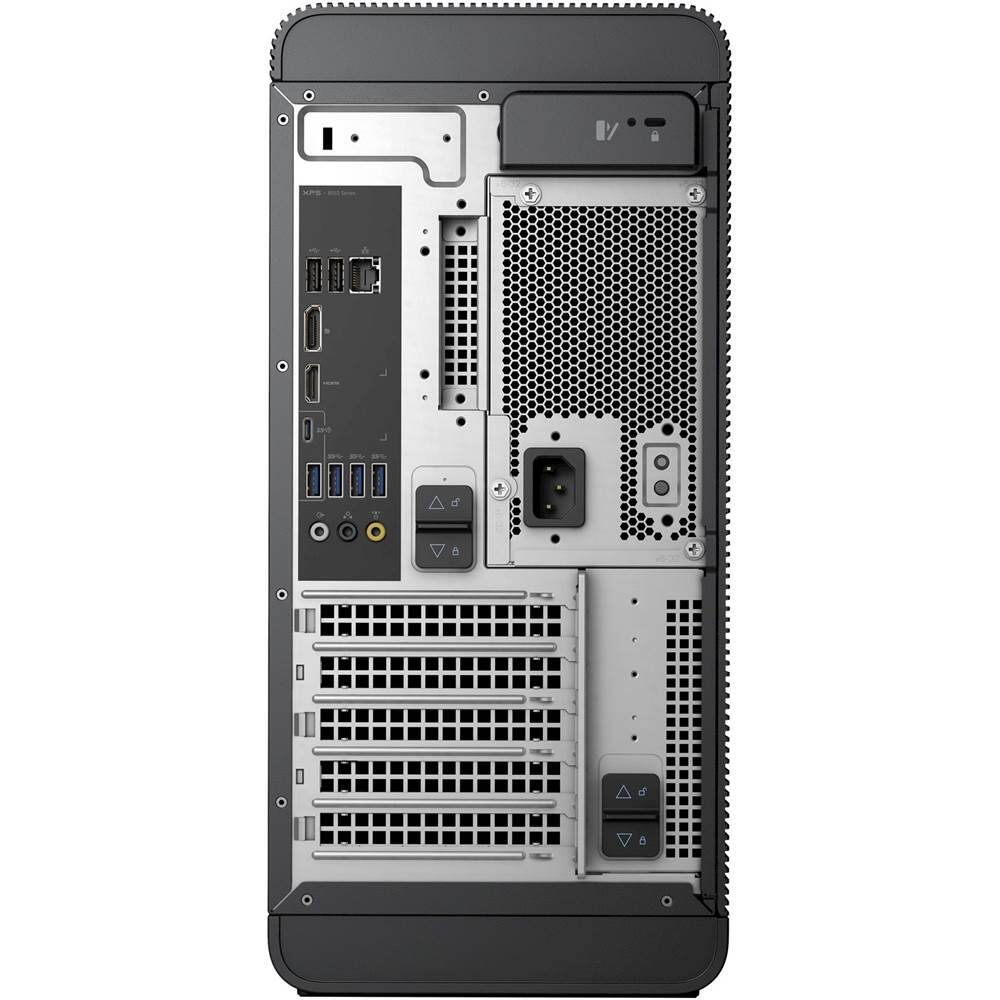
Posted .This reviewer received promo considerations or sweepstakes entry for writing a review.Nothing about this purchase has been pleasant so far. To start with, I had to drive across town to buy an adapter to fit the VGA cable to the tower. A big aberration from the norm, in my experience. I spend a full day uploading and organizing my old windows based software, something I've done countless times before. I was psyched to get supposedly great photo/video editing computing power only to find to it is the worse of any computer that I've ever owned. Simple standard Canon video editing software that I frequently use is so slow, especially using layers and will crash after only editing a few photos. Even typing in file names to open a file is soooo slow and often fails. I'm taking it in and leaving it with the Geek Squad today. I hope and pray that they'll provide a solution. A software conflict seems odd to me since I ran the same OS on my previous computer.
No, I would not recommend this to a friendBrand response from YourDellTeam
Posted .@Victor, Thank you for your recent Dell XPS purchase. We're sorry to hear that you've been having problems with your new device. We'd like to recommend a few tips to help with the slowness on your device: Delete temporary files and directories 1. Click Start, then in the search bar type "disk". Disk Cleanup should appear on the menu above the search box. 2. Run disk cleanup and eliminate unneeded temporary files (Search results, Internet Cache and other windows temp files you may no longer need) 3. Select files you want to delete then click OK to start the cleanup process. Uninstall applications you no longer use 1. Open the Programs and Features application in Control Panel. 2. Scan the list of applications installed for ones that you no longer use. 3. Highlight any application you no longer use and the click the uninstall button at the top of the list. Follow the prompts to uninstall. 4. Repeat for each application you want to uninstall. 5. Move large files and/or seldom used files to backup media (Photos, Music you seldom listen to, application downloads after the application has been installed etc.). 6. Empty the Recycle Bin. We hope these tips help you when you do get your device back. For additional slowness troubleshooting tips you can read this article - http://dell.to/2tSulGV.

disappointed
Posted .This reviewer received promo considerations or sweepstakes entry for writing a review.Hard drive is noisy, running is very slow without personal data, late response, I can not make a Wired Broadband Connection. So I was disappointed.By the way I have been using Dell Desktop since 2003.
No, I would not recommend this to a friendBrand response from YourDellTeam
Posted .@Jimmy, Thanks for your recent Dell XPS Desktop purchase. We're sorry to hear that it's not running at the speed you'd like it to. We'd recommend that you try the following:
Delete temporary files and directories
1. Click Start, then in the search bar type "disk". Disk Cleanup should appear on the menu above the search box.
2. Run disk cleanup and eliminate unneeded temporary files (Search results, Internet Cache and other windows temp files you may no longer need)
3. Select files you want to delete then click OK to start the cleanup process. Uninstall applications you no longer use 1. Open the Programs and Features application in Control Panel. 2. Scan the list of applications installed for ones that you no longer use. 3. Highlight any application you no longer use and then click the uninstall button at the top of the list. Follow the prompts to uninstall.
4. Repeat for each application you want to uninstall.
5. Move large files and/or seldom used files to backup media (Photos, Music you seldom listen to, application downloads after the application has been installed etc.).
6. Empty the Recycle Bin.
For additional support, you can refer to - http://dell.to/2tSulGV.
With regards to the connectivity concerns that you have, we'd recommend that you try this:
1. Run the Network Troubleshooter. a) Touch and hold or right-click the network icon (Available Networks or Network Icon, located in the lower right-hand corner). b) Touch or click Troubleshoot problems and then follow the prompts. For additional connectivity troubleshooting, you can visit - http://dell.to/2sLtwRh.
We hope these tips will help your desktop run the way you intended it to.