Customer Ratings & Reviews
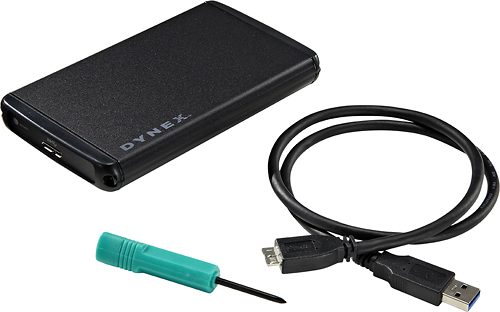
- Model:
- DX-HD302513
- |
- SKU:
- 5190553
Customer reviews
Rating 4.3 out of 5 stars with 334 reviews
(334 customer reviews)to a friend
Customers are saying
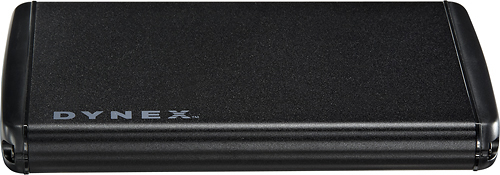
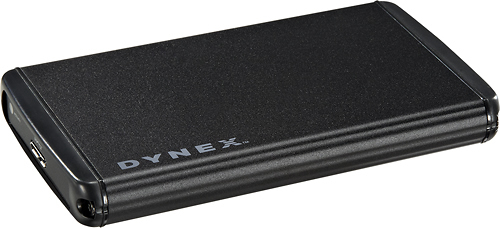
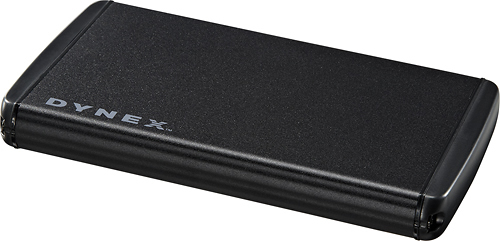
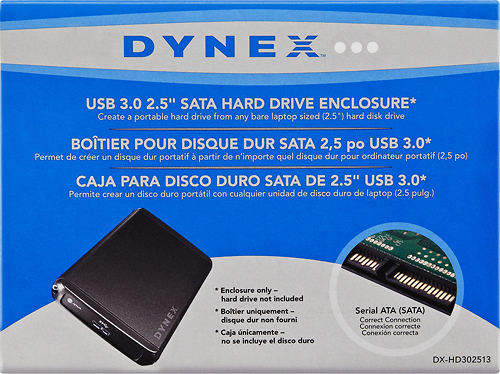
Customers appreciate the 2.5" Serial ATA Hard Drive Enclosure for its user-friendly design, making it simple to use and set up. It is also valued for its data recovery capabilities, allowing users to retrieve old files from hard drives onto new computers. While some customers have concerns about compatibility with certain devices, many find the price reasonable for the functionality it offers. Additionally, the inclusion of USB 3.0 is seen as a positive feature.
This summary was generated by AI based on customer reviews.
Rated 1 out of 5 stars
Returned item- it wouldn't power up
||Posted .This reviewer received promo considerations or sweepstakes entry for writing a review.I was defective and wouldn't power up, had to return it.
No, I would not recommend this to a friendRated 1 out of 5 stars
Didn't work as advertized.
||Posted .This reviewer received promo considerations or sweepstakes entry for writing a review.Only works when plugged into a USB 2.0 port and not 3.0 (continues to reset). Plug it in multiple computers with USB 3.0 ports and produced the same results.
No, I would not recommend this to a friendRated 1 out of 5 stars
This item did not work. Defective. Had to be retur
||Posted .This reviewer received promo considerations or sweepstakes entry for writing a review.This was a nice size and everything about it was attractive except that it did not work and had to be returned. Defective.
No, I would not recommend this to a friendRated 1 out of 5 stars
Supposed to work with USB 3 - doesn't for the MAC
||Posted .This reviewer received promo considerations or sweepstakes entry for writing a review.Description says it is compatible with MAC USB 3.0. It's not. Even a MAC expert complained that it failed after about 30 seconds each time he tried to use it!
No, I would not recommend this to a friendRated 1 out of 5 stars
Would not read any of my drives
||Posted .This reviewer received promo considerations or sweepstakes entry for writing a review.After a few seconds of being plugged into my Macbook or my PC the drives would eject themselves.
No, I would not recommend this to a friend- Pros mentioned:Ease of use, Speed, Usb
Rated 5 out of 5 stars
Superfast, great looking, very portable!!!!
Posted .This reviewer received promo considerations or sweepstakes entry for writing a review.I bought this to use a spare laptop drive as a portable HD to carry media with me wherever I go. I love how easy it was to put together. It is a very good looking enclosure and it is so convenient that you do not need an additional power supply to power the drive. USB 3.0 is so fast to transfer large files as long as your computer has 3.0 ports. Great purchase.
I would recommend this to a friend - Pros mentioned:Speed, Usb
Rated 5 out of 5 stars
A great USB 3.0 enclosure
Posted .This reviewer received promo considerations or sweepstakes entry for writing a review.The fact this is a USB 3.0 external hard drive enclosure for 30.00USD is awesome! Nice and fast and great cable that came with the unit
I would recommend this to a friend - Pros mentioned:Usb
Rated 4 out of 5 stars
Works Great
Posted .This reviewer received promo considerations or sweepstakes entry for writing a review.Retrieved all data without issue from a friends totally dead dual drive laptop. Friend now has a new laptop and handy external drive. Two screws to disassemble, attach the drive, plug in via USB. I did not even bother to reassemble the case till I had all the data off both drives and onto the new laptop. You might want a screwdriver with a heftier handle than the free one supplied. I didn't even bother with it. (I am not a "Builder" or "Upgrader". I just try to repair or keep mine running and occasionally a friend/family member in distress) : )
I would recommend this to a friend - Pros mentioned:Usb
Rated 4 out of 5 stars
A Steal Compared to Others
Posted .This reviewer received promo considerations or sweepstakes entry for writing a review.Great deal for an enclosure that requires no AC adapter with USB 3.0. Has a nice metal finish One con that almost ruined the whole thing. I couldn't unscrew the screws to insert the drive. I had 2 people try to open it before we finally got it.
I would recommend this to a friend - Cons mentioned:Compatibility
Rated 3 out of 5 stars
Does NOT Work With OS X 10.9 (Mavericks)
Posted .This reviewer received promo considerations or sweepstakes entry for writing a review.As others have indicated, this enclosure will not work with OS X 10.9. It will connect, disconnect, and get stuck in some sort of loop where it never connects again. I tried the USB 2 trick but that was not successful, and neither was restarting with it remaining connected. So, since the product claims to be generally compatible with OS X but is not, and since Dynex provides no way to make it compatible with the latest version of OS X despite the fact that developers could test for months upon months before releasing any hardware or software for OS X 10.9, I have taken away two stars. That being said, I plugged it into my work computer running Windows 7 to fix and format it and wipe it (via CMD, invoke: cipher /w:DriveLetter:\), and all is well on the Windows front. I also tested it on the latest release of the horrendous Windows 8 and it works there, too. I am using an old MBP's SATA 6 Hybrid 7200 RPM HDD to build my sister and niece a portable drive full of movies and music and for whatever else they want to put on it. So, it works for Windows, it's meant to be used by my sister and niece that have a Windows 8 PC, and that is what matters. However, it really would have been nice to format it as exFAT and secure wipe using Disk Utility on one of my Macs and transfer files to it that way rather than do all that using my work Windows 7 laptop and a bunch of transfers from my NAS. It also would have been nice to test the transfer rate as I had planned on using rsync to put stuff on it... Oh well. Summary: If you're using Windows, it's a good, inexpensive enclosure. If you keep your version of OS X current, then this is not a product you want to get even if it's just to see if I and all the other reviewers are wrong. I cannot attest to the actual transfer rate using SuperSpeed USB 3 it claims to support, so caveat emptor there... Tip: It's aluminum and may dissipate heat to some degree. I use the soft (fuzzy) side of self-adhesive Velcro strips to add a little bit of padding to the bottom of it (it has several relatively sharp edges that may scrape up a desk if moved around) and maybe add a little extra space for cooler air to move around all sides of the enclosure. It still gets really warm, but not incredibly hot after a few hours of continuous use.
No, I would not recommend this to a friend - Pros mentioned:Speed
Rated 4 out of 5 stars
Works with Windows 8
Posted .This reviewer received promo considerations or sweepstakes entry for writing a review.Had to wait for local BB to get these drives in again, and I am glad I waited. Previous laptop motherboard went out and needed to pull hard drive out . Popped the hard drive in this case, connected it to new laptop and Windows 8 picked it up right away. Now have an additional 300GB for music, photos, and web design!
I would recommend this to a friend - Pros mentioned:Ease of use
Rated 5 out of 5 stars
Lifesaver
Posted .This reviewer received promo considerations or sweepstakes entry for writing a review.I picked up this unit at my local Best Buy store when my wife's computer died. I needed to download some data from her hard drive, and this unit was the only one available for pickup in the entire city. The enclosure worked fine, it was simple to take apart, put the drive in, and reassemble. It also transferred the data quickly. The price is a little more than some other enclosures available online, but overall it is a good price.
I would recommend this to a friend - Cons mentioned:Compatibility
Rated 5 out of 5 stars
Worked well for my needs
Posted .This reviewer received promo considerations or sweepstakes entry for writing a review.Needed a drive enclose that would hold a slightly thicker 2.5 drive, this worked. only had to add a gasket between the outer cover and inner case, and replaced the 2 5 mm screws with slightly longer ones, worked out great. couldn't have done it with the normal rigid aluminum cases most drives come with.
I would recommend this to a friend Rated 5 out of 5 stars
Used to recover data from a crashed laptop
Posted .This reviewer received promo considerations or sweepstakes entry for writing a review.I bought this to house the 640 GB hard drive from a crashed Dell laptop (that had to be entirely disassembled, btw, to get the drive out!) and recover zillions of pics and work files. Though the user manual is only available on line, setup was so simple (screwdriver is included) I never accessed the manual. I simply popped the drive in the enclosure, and connected it to a USB 3 port on my new laptop. Windows found it instantly, and showed me the complete directory. Fast USB 3 enabled quick transfer of 14K hi res photos and thousands of documents in just a few minutes. I will now use this drive as a back-up to my new computer.
I would recommend this to a friend- Pros mentioned:Ease of use
Rated 5 out of 5 stars
Great hard drive enclosure
Posted .This reviewer received promo considerations or sweepstakes entry for writing a review.My laptop's motherboard fried and I needed to retrieve critical files from the hard drive, so I got this. I was pleasantly surprised to open it up and find a screwdriver enclosed - it made the job that much easier. Easy to follow instructions were included. Plugged it into my USB port and was able to reclaim all of my files off the hard drive. Very happy.
I would recommend this to a friend Rated 3 out of 5 stars
Works better with USB 2.0
Posted .This reviewer received promo considerations or sweepstakes entry for writing a review.I bought this to make a file transfer disk between my old computer (USB 2.0, Windows XP) and my new computer (USB 3.0, Windows 8.0) using a 160 GB HDD I had from an even older computer.. It was simple to put together, 2 screws and a handy screwdriver included. Copying small files via USB 3.0 worked fine; however, when trying to copy some very large files the write would fail with a "delayed write" error. I have the hard drive set for no write caching, so this should not happen. When I tried a USB 2.0 port it copied all the files, at a much slower rate of course. There is nothing wrong with my USB 3.0 port, I use another external drive on it and it always runs fine. It's as if the USB 3.0 is just too fast for the HDD. The manual says that speed will be limited to the speed of the HDD, but that does not seem to be the case. Maybe if I used a different HDD it would work better, but the one I have is the one I have. It will still fulfill my needs, but it will be slower to copy the files than I thought. In the future I may be able to use it for USB 3.0, but for now I'm stuck with USB 2.0 speeds. Nice looking enclosure. Your results my vary, but for me it's not a perfect fit.
I would recommend this to a friend- Pros mentioned:Ease of use
Rated 5 out of 5 stars
Excellent
Posted .This reviewer received promo considerations or sweepstakes entry for writing a review.My laptop was not working anymore and data transfer to a new one was at least 100 dollars . Got the Dynex enclosure and in 5 minutes had all my data again. Very easy to use!
I would recommend this to a friend - Pros mentioned:Ease of use
Rated 5 out of 5 stars
great for its use
Posted .This reviewer received promo considerations or sweepstakes entry for writing a review.Good for use as portable drive enclosure for backing up my computer files.
I would recommend this to a friend Rated 1 out of 5 stars
3 Failed Enclosures (drive verified working)
Posted .This reviewer received promo considerations or sweepstakes entry for writing a review.I've generally had very good luck with Dynex products considering their price point but after 3 failed enclosures I gave up trying to use this Dynex product. Background: I pulled a 750gb toshiba drive out of my brand new laptop (replaced with SSD) and wanted to be able to use it as a backup drive. The Toshiba drive worked flawlessly using the SATA to USB3 cable that came with the SSD drive, and still does, but i wanted an external enclosure to help protect the drive. First Enclosure: Computer recognized the drive and was able to write files to it; however, trying to write large amounts of data (such as backing up my computer) caused the drive to un-mount and power down. After about 30 seconds the drive would spin back up and mount in Windows again but as soon as I tried copying over large amounts of data the process would repeat itslef. Second and Third Enclosures: Windows recognizes the enclosure but the hard drive doesn't spin up. Tried different USB ports and computers but the result was always the same. Conclusion: While it appears many people have had luck with this drive enclosure; after 3 attempts I've given up. Based on the problems I experience the enclosure isn't providing enough power to the hard drive in order to get it to spin. This problem may not affect every type of hard drive but at the very least this shows that this particular Dynex product is not compatible with my Toshiba 750gb drive. Great Alternative: Apricorn EZ Upgraded 3.0 Serial ATA Kit. It's carried by Best Buy. Better build quality and I've had great success with it.
No, I would not recommend this to a friendRated 2 out of 5 stars
About $20 over priced
Posted .This reviewer received promo considerations or sweepstakes entry for writing a review.Save yourself about $20.00 and get another unit for $9.99 that does the same exact thing that this does. This unit is not worth $30.00. No interior padding and the connector is loose after owning it for 2 months. I needed an enclosure ASAP so I purchased this. If I were patient I could have got the same thing at 1/3 of the price. Look around and do not spend $30.00 on this.
No, I would not recommend this to a friend