Customer Ratings & Reviews



- Model:
- R010311
- SKU:
- 6495773
Rating by feature
- Setup
Rating 4.8 out of 5 stars
- Range
Rating 4.7 out of 5 stars
- Signal Strength
Rating 4.7 out of 5 stars
to a friend
Customers are saying
Customers recognize the 6+ Dual-band Mesh Wi-Fi 6 Router (1-pack) for its ease of use, overall performance, and impressive speed. Many users appreciate the Wi-Fi coverage, easy setup, and reliable range and signal strength. Some customers have noted issues with compatibility and consider the price to be a bit high. However, users report minimal issues with buffering, lag, and dead spots.
This summary was generated by AI based on customer reviews.
EERO is my HERO!
||Posted . Owned for 3 weeks when reviewed.This reviewer received promo considerations or sweepstakes entry for writing a review.After trying several wifi extenders with miserable results my son in law told me about the Eero. Set up quickly and gets us great wifi on both levels of our home and the garage! Highly recommend!
I would recommend this to a friendEero
||Posted . Owned for 1 month when reviewed.This reviewer received promo considerations or sweepstakes entry for writing a review.My internet works much slower and the devices dont stay connected.
No, I would not recommend this to a friendBrand response from Amazon Devices Customer Support
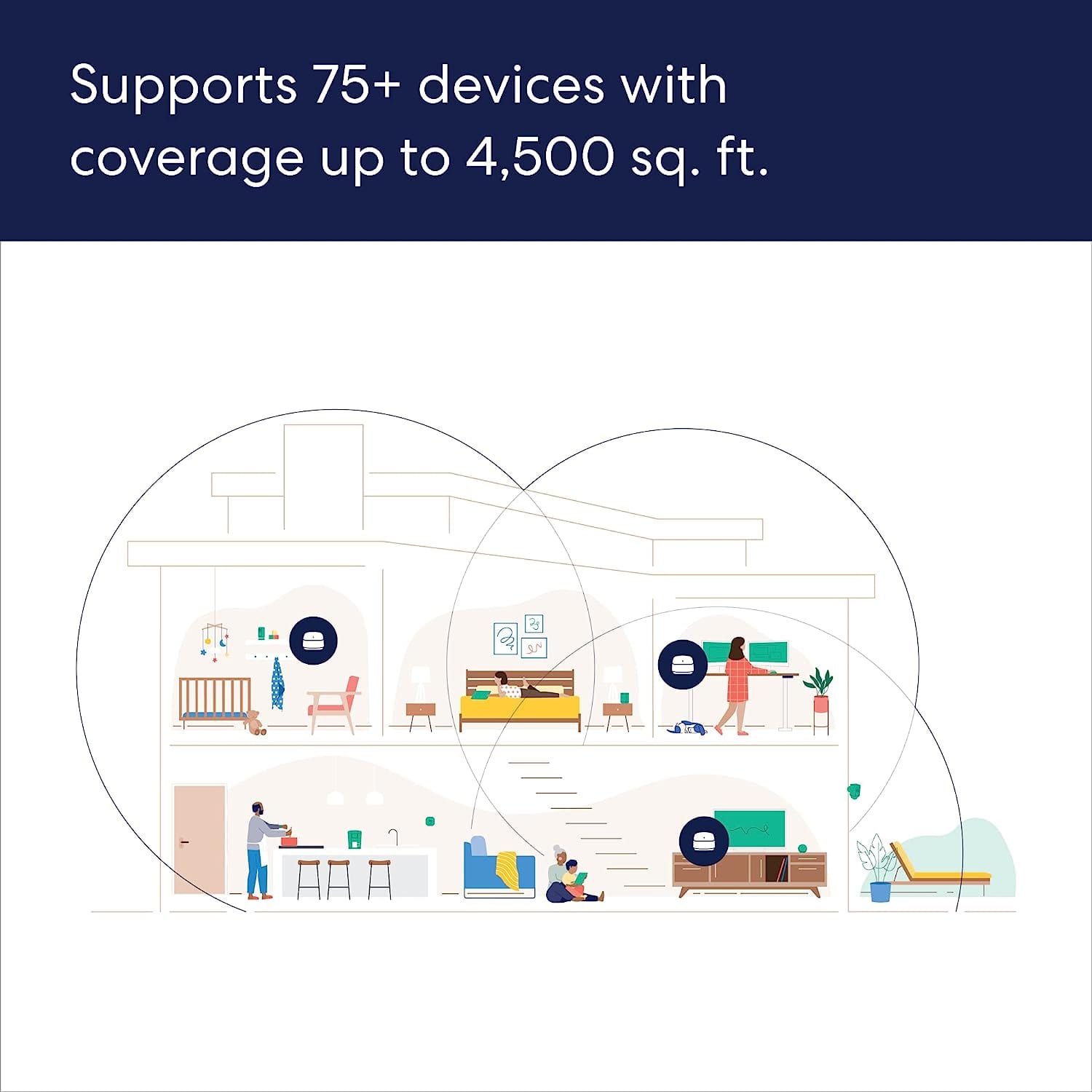
Posted .Hi PatriceJ. Thank you for your feedback on the eero 6+ system. I'm sorry to hear that some of your devices have had trouble maintaining a signal. Each eero 6+ node provides coverage up to 1,500 sq. ft. Depending on the layout of your home and the materials used in its construction, more eeros could be needed. For now, here are some troubleshooting steps that may remedy your issue: 1. If you're noticing signal drops on a particular eero node, power cycle your eero. If the signal drops on all eeros on the network, power cycle all of your eeros. You'll do this by unplugging the power cable from the back of your eero, waiting 30 seconds, and plugging it back in. This step can sometimes fix connectivity issues. 2. Unplug the power cable from your modem, wait 30 seconds, then plug it back in. If this information doesn’t resolve your issue, call eero customer service at (877) 659-2347. They’re available Monday-Sunday 6am-8pm PT. I hope this helps. Have a great day!

Eero
||Posted . Owned for 2 weeks when reviewed.This reviewer received promo considerations or sweepstakes entry for writing a review.Great. Best service! Technician highly professional
I would recommend this to a friendPro models are better
||Posted . Owned for 1 month when reviewed.This reviewer received promo considerations or sweepstakes entry for writing a review.Okay product, but wish I had bought the pro model like I have in a larger house and garage apt on the coast. This product works but range is much shorter than on the pro model u bought for the other house where it covers main house and garage apt at the back of the lot. Both were 3 packs.
I would recommend this to a friendBrand response from Amazon Devices Customer Support
Posted .Hi WilliamS. Thank you for your feedback on the eero 6+ system. The 3-pack eero 6+ system is designed to cover up to 4,500 sq ft while a 3 pack pro system would cover up to 6,000 sq ft. If you have a larger home, thicker walls, etc., a Pro system would be a better solution. I hope this helps. Have a great day!
Gsry cash
||Posted . Owned for 3 weeks when reviewed.This reviewer received promo considerations or sweepstakes entry for writing a review.Works well. Great professional service And instsllayoon
I would recommend this to a friendMesh system
||Posted . Owned for 3 weeks when reviewed.This reviewer received promo considerations or sweepstakes entry for writing a review.Easy set up. Great connection. Stylish and looks good.
I would recommend this to a friendGood
||Posted . Owned for 2 weeks when reviewed.This reviewer received promo considerations or sweepstakes entry for writing a review.Works very well. Wish it had more ports on the back.
I would recommend this to a friendBest for small space
||Posted . Owned for 2 weeks when reviewed.This reviewer received promo considerations or sweepstakes entry for writing a review.This mesh network system is best suited for a small apartment.
I would recommend this to a friendGreat coverage
||Posted . Owned for 3 weeks when reviewed.This reviewer received promo considerations or sweepstakes entry for writing a review.Coverage in a 2 story 2500 sq foot house is great.
I would recommend this to a friendJust OK
||Posted . Owned for 3 weeks when reviewed.This reviewer received promo considerations or sweepstakes entry for writing a review.Worked OK, would like a little longer range. Otherwise, does the job.
I would recommend this to a friendPLEASED
||Posted . Owned for 1 month when reviewed.This reviewer received promo considerations or sweepstakes entry for writing a review.Very good product! But, does not directly plug into an outlet.
I would recommend this to a friendBetter signal
||Posted . Owned for 1 month when reviewed.This reviewer received promo considerations or sweepstakes entry for writing a review.Some times is very slow, but is much better then before. I like it. Thank you. And so, sorry for my late respond
I would recommend this to a friendJust Ok
||Posted . Owned for 3 weeks when reviewed.This reviewer received promo considerations or sweepstakes entry for writing a review.Not bad. I was expecting a little better performance being the plus edition. I get 700 down at the main router and between 50-100 from the satellites. I ended up buying an extra satellite to get the range I needed. I’ll keep this system for 2 - 3 years and then upgrade with a system with a Wi-Fi 6 back haul. I recommend it only if you can catch it on sale.
I would recommend this to a friendEERO Extenders
||Posted . Owned for 1 month when reviewed.This reviewer received promo considerations or sweepstakes entry for writing a review.They work fine but ser up and relocating them took longer then expected.
I would recommend this to a friendSeems OK.
||Posted . Owned for 1 month when reviewed.This reviewer received promo considerations or sweepstakes entry for writing a review.Still having problems with signal around the house.
I would recommend this to a friendEero
||Posted . Owned for 1 month when reviewed.This reviewer received promo considerations or sweepstakes entry for writing a review.Very good router, but the range not quite well overall fine choice
I would recommend this to a friendgreat product!
||Posted . Owned for 1 month when reviewed.This reviewer received promo considerations or sweepstakes entry for writing a review.Definitely helped better our internet coverage throughout our home.
I would recommend this to a friendGreat but limited
||Posted . Owned for 3 weeks when reviewed.This reviewer received promo considerations or sweepstakes entry for writing a review.I would give this a 4 or 5 star rating if you could control which node a device connects to. Right now most of my devices are connecting to the main node with only a couple connecting to the other nodes. For better throughput would prefer to balance the devices connecting to each node.
I would recommend this to a friendIt is what it is
||Posted . Owned for 1 month when reviewed.This reviewer received promo considerations or sweepstakes entry for writing a review.This product is okay. I was told it was life changing but honestly speeds are the same as the router that came with my Spectrum equipment.
No, I would not recommend this to a friendGreat for wi-fi dead spots, but wi-fi calling fail
||Posted . Owned for 1 month when reviewed.This reviewer received promo considerations or sweepstakes entry for writing a review.Wi-fi dead spots solved after our dismal experience with Verizon; however a new problem emerged, wi-fi calling feature is now a complete failure with this product. Want to love this for solving our wi-fi across our home (3k sq ft), but cant rate higher until this is resolved.
I would recommend this to a friend