Customer Ratings & Reviews




- Model:
- K010111
- SKU:
- 6433424
Rating by feature
- Setup
Rating 4.8 out of 5 stars
- Range
Rating 4.7 out of 5 stars
- Signal Strength
Rating 4.7 out of 5 stars
Customers are saying
Customers are delighted by the Pro 6 AX4200 Tri-Band Mesh Wi-Fi 6 Router's ease of use, impressive Wi-Fi coverage, and strong performance. Many appreciate the straightforward setup and extended range, resulting in a significantly improved home Wi-Fi experience. However, some users find the price to be high and note that the device can get warm during operation. A few also mention a limited number of Ethernet ports as a drawback.
This summary was generated by AI based on customer reviews.
- Pros mentioned:Ease of use, Speed
Worth it, 40 Devices Connected
Posted .This reviewer received promo considerations or sweepstakes entry for writing a review.This solution delivers. Had over 40 devices with two modems and two extenders. Tired of rebuffering and dead spots with over a 1gb FIOS. Easy to install, full signal strength across three floors. Speed test is off the chart. Wish I did this sooner.
I would recommend this to a friend No improvement in internet speed
||Posted . Owned for 3 weeks when reviewed.This reviewer received promo considerations or sweepstakes entry for writing a review.Waste of money. It did. It improve my speed and reception of internet.
No, I would not recommend this to a friendA WASTE OF MONEY - DON'T ALSO WASTTE YOUR TIME!!!
||Posted . Owned for 1 month when reviewed.This reviewer received promo considerations or sweepstakes entry for writing a review.I had better reception with Tenda. i have no mes anything with Eero.
No, I would not recommend this to a friendExpensive for an average mesh system.
||Posted . Owned for 1 month when reviewed.This reviewer received promo considerations or sweepstakes entry for writing a review.Performance was average so I switched to a Linksys Velop mesh system.
No, I would not recommend this to a friend- Pros mentioned:Wi-fi coverageCons mentioned:Ethernet ports

Great Coverage but needs more Output Jacks
|Posted .This reviewer received promo considerations or sweepstakes entry for writing a review.I have had multiple routers in the 19 years that I have lived in my house and no matter what I tried, there were always dead spots in various rooms. I tried extenders and even a different mesh system but apparently they just weren't strong enough. This Eero system blankets every inch of my house with full strength WiFi on all my devices. One thing I didn't account for is the fact that there is only 1 input Ethernet jack from the cable modem (same as on all routers) but only 1 output jack to a device and that's where I ran into a problem. On all the other routers I have owned, there were always 4 jacks. I need one to go around the room to connect to another switch to connect to my TV and audio equipment, one Ethernet cable to connect to my Mac, one to my PC and one to my Raspberry Pi. No matter how fast WiFi is, it's never as fast as a hardwired connection. So after hooking up the eero Pros I had to run out and buy an eight port switch. No big deal as it was under $20 but I should have realized I would need one. A word of advice - when setting up a new router, remember to use the exact same name for your SSID, capitalization counts as I learned. I stuck with the same password with the same capitalization so I figured the transfer should go smoothly. Not really. Some devices connected automatically and with others I had to delete the devices from their apps and start from scratch. As I have around 35 WiFi enabled light switches, doorbell, garage door opener, Alexas and Google Assistants and other devices, it took hours to go to each one and re-configure them. I'm still not finished but I'll get to them when I have time. The eero app has lots of great features such as telling me how much data usage I used for the week and It will even block threats if I decide to pay for the various additional services eero offers after the 30 day free trial expires. I am getting the fastest full strength WiFi connection I have ever seen on my iPhone and iPad from all corners of my front lawn and back yard and that's the most important thing and the main reason for upgrading the router. It's wonderful.
I would recommend this to a friend Chesterfield
||Posted . Owned for less than 1 week when reviewed.This reviewer received promo considerations or sweepstakes entry for writing a review.Could not get the system to pick up my router. Need professional install
No, I would not recommend this to a friendBad
||Posted .This reviewer received promo considerations or sweepstakes entry for writing a review.Not greater or faster than my old apple time capsule. Need improvement
No, I would not recommend this to a friendDisappointed
||Posted . Owned for 1 month when reviewed.This reviewer received promo considerations or sweepstakes entry for writing a review.Does not work. I don’t have a big house and the wifi does not work in my bedroom.
No, I would not recommend this to a friend- Pros mentioned:Ease of use
Great Router, Easy Setup
|Posted .This reviewer received promo considerations or sweepstakes entry for writing a review.I got the Eero to replace a popular mesh router I was previously using. This was, by far, the easiest router I have ever set up. I have FIOS so I basically use it for wifi access with my current gateway but setup was super easy and quick. All you have to do is download the app and follow the directions. It guides you through the process. Setup took less than 15 minutes. Another great feature is the small compact size of the units. They blend in much better than my previous one. The app give you your internet speed and can alert you when devices connect.. Additionally, it links with Alexa and connects to all you smart devices. It has basic features like a guest network that you would expect. Two petty issues I have, it doesn't have a web interface and they try to sell you a security subscription. You have to use a smart device and only one can be logged in at a time. I prefer using my computer to make adjustments but it is rare adjustments are needed. I like this much better than the other brands I have used in the past and would strongly recommend.
I would recommend this to a friend Poor coverage
||Posted . Owned for 1 month when reviewed.This reviewer received promo considerations or sweepstakes entry for writing a review.Dose not perform as described. Geeksquad has been out 3 times.
No, I would not recommend this to a friend- Pros mentioned:Performance, Speed
The Gold Standard in WiFi Mesh!!
|Posted .This reviewer received promo considerations or sweepstakes entry for writing a review.I have heard a lot of great things about Eero’s WiFi such as it being super-fast, reliable, and over all top-notch! As a first-time user of the product, I have found all to be resoundingly TRUE! Setup of this product was truly a plug and play experience as all I had to do was in my case, plug into my existing modem and from there I was in business! At this time, I am only using one router because of the fact, I have downsized my living quarters as a result, adding additional nodes would be over-kill! However, I do have a lot of connected devices to Eero and so far, so good. Suffice to say, I was glad to know that this WiFi system can handle up to 75 devices. I will note, I have not experienced any dead spots or lagging from this product, only smooth internet surfing and connections. I am super elated to have this WiFi system which is the gold standard in WiFi Mesh in my home. Hopefully, with continued usage, I’ll experience only great WiFi experiences from this product.
I would recommend this to a friend Not iPhone compatible. Wifi wont connect to your i
||Posted . Owned for 2 weeks when reviewed.This reviewer received promo considerations or sweepstakes entry for writing a review.After 2 weeks none of our iPhones are reconnecting. Looked for solutions and this is a very common issue with no solution. (Exactly at the time our return window closed. Ugh.) ****Not iPhone compatible.
No, I would not recommend this to a friend- Pros mentioned:Ease of use, Performance, Speed
Amazing and super reliable router
Posted .This reviewer received promo considerations or sweepstakes entry for writing a review.Amazing router. Super fast and very reliable. These devices are also incredibly easy to set up.
I would recommend this to a friend - Pros mentioned:Setup
Amazing!
|Posted .This reviewer received promo considerations or sweepstakes entry for writing a review.I have had this Eero Pro 6 mesh wifi system for one week and we absolutely love the wifi coverage it provides. Let's start with the aesthetics of the Eero devices. This system has 3 low profile routers that are rounded squares. Next, let's talk about the all important setup. Every system out there claims that it is simple to install, but with this Eero Pro 6, they are not exagerating when they say you can be up and running in 10 minutes. I have owned a variety of wifi systems and they weren't all very easy to setup. The first step to getting you started is to download the Eero 360 app. The box comes with setup instructions, but I recommend that you follow the the step-by-step instructions in the app. Once you have everything setup you can customize the settings that you want for your system on the app. The app will tell you about your download and upload speeds,data usage, help you setup guest access to your wifi and it also offers you security on a trial basis. One of my favorite features is the Amazon smart hub. This allows you to instantly connect supported devices to your network when you save your Eero credentials with Amazon Frustration-Free Setup. So this Eero comes with nice features, but what is truly amazing about this product is the coverage and speed it provides wifi throughout my home. We live in a 3,000+ sq foot home with over 25 devices that require wifi and everyone in the family agrees that the wifi reception and speeds have never been better. I have yet to find a dead spot while having this Eero Pro 6. If want wide coverage and high speeds, then I highly recommend this Eero 6 mesh wifi system. Your family will love it!
I would recommend this to a friend - Pros mentioned:Performance
Good But Expensive
|Posted .This reviewer received promo considerations or sweepstakes entry for writing a review.Super easy setup. It’s almost plug and play with the exception of changing a few things on my modem/router combo from AT&T. I have the 3 pack so setting up the other two was as simple as plugging in and waiting. The app guides you through the process and is very easy to navigate. It allows you to see every device that’s connect to your network and gives you the ability to block. It also sends notifications of when someone joins. I love the control it gives. Now as far as WiFi 6, I’m not sure if ISP’s are up to date with it, but the speeds seem the same to me. I ran a test on Speedtest and I’m getting the same speeds as before. I will gladly update my review if the speed changes. The connectivity and range is great. Spots that were weak in my home are no longer weak. I love the reliability though. Streaming hasn’t dropped yet whereas before it would happen frequently. I have 30 plus connections to my wifi at any given time and this router can handle it. I have AT&T Fiber 1G.
I would recommend this to a friend - Pros mentioned:Speed
Yep! Simply Outstanding!
|Posted .This reviewer received promo considerations or sweepstakes entry for writing a review.Unboxing – love the minimalistic packaging – has the three main system units, three power cords and three network cables. The quick start guide is easy to use and understand and you can have this up and running in under 15 minutes. I had a little difficulty with transferring my current SSID to the new router but that was completely my own fault as I bypassed googles network box (which is not very good) with the On-Hub router. Once I figured out the issue, the system recognized the Eero system quickly. Coming from an internet with gigabit speed – google fiber – and google Wifi set up that has a main router (Asus Google On-hub) with 4 additional mesh “hockey pucks”, I have to say – I am quite amazed that this Eero system outperformed my current set up – with 2 less access points! I have approximately 60 connected devices in my smart home set up including lighting, sprinkler system and everything in between in addition to my families phone, video gaming and computer needs. Pre eero – was getting 890 gb/sec download speed hardwired and my latest computer was getting 410 gb/sec download. Upload speed was 390gb/sec with my best computer. Post eero – am getting 930gb/sec download hardwired and 645 gb/sec wireless with the same equipment as pre eero. Upload speed was 430 with eero. My household has three teenagers who are constantly on the network as all are and even with 4 TV’s streaming a show and another gaming online with this thing called an xbox, I was receiving the same speeds. I am not often impressed with new tech offerings but this system is simply incredible. I tested speeds all the way to the end of my cul-de-sac – approximately 1.5 football fields and I could still connect easily with my phone. Covering the internet needs of my home and backyard entertainment area was not an issue – approx. 5000 sq feet. Overall – I would have to say this is likely the best system out there for heavy users. Expensive – Yes, worth every penny – Yes! You will not be disappointed!
I would recommend this to a friend Good equipment, BAD TOTALTECH SERVICE
||Posted . Owned for 1 month when reviewed.This reviewer received promo considerations or sweepstakes entry for writing a review.This is about Total Tech install of the Eero. Bought these under Total Tech so Best Buy would install, found they did not resolve the issue with what appears to be a used defective SimpliSafe base Best Buy installed a few weeks earlier. Even tho BB claims we can return them, the installer took the box and manual, BB now will not take them back because we don't have the box.
No, I would not recommend this to a friendBe wary
||Posted . Owned for 2 weeks when reviewed.This reviewer received promo considerations or sweepstakes entry for writing a review.Not a fan. Throughput on wifi was mediocre at best and the system would frequently slow to a crawl. Did all the recommendations of eero online help with no change. Actual tech support was nonexistent. Returned it for an Orbi system and that works great!
No, I would not recommend this to a friendPromising Router, But...
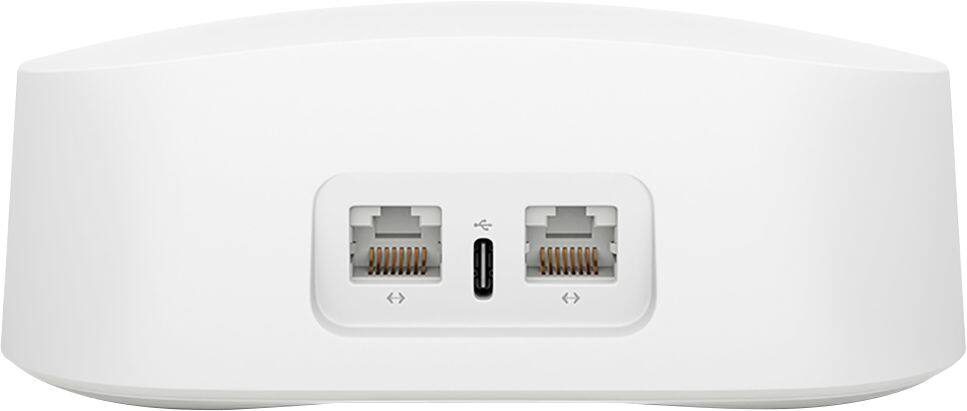
|Posted .This reviewer received promo considerations or sweepstakes entry for writing a review.The Eero Pro 6 mesh router 3-pack is just at the beginning of it's product cycle, promising gigabit routing speeds, both wired and wireless. It also includes a ZigBee home hub which can be used with a large and growing number of home automation devices. It sounded perfect for the new pandemic induced, live at home reality. Ultimately however, I was a bit disappointed both with its performance and feature set. Setup was easy. Download the app (Android in my case, but also available for IOS) and place the three nodes where you want them for best (guess) coverage, connect the ethernet cable between the modem and gateway Eero, and power it up. This is where I ran into the first problem. The power brick has a permanently wired 4 ft USB-c cable. 6ft would have been much better, or better yet, use a USB-c to USB-c cable for power from the brick to the Pro 6. Use the app to do some minimal configuration, then power up the other two nodes (again, within 4 feet of a AC power socket!) and repeat the minimal configuration. Pretty easy, peasy! This is where things kind of came apart. I was replacing a (WPA2) network, setup the same SSID and password, dhcp address and range. EVERY device in my house (I have about 40) assumed it was joining a new network and had to be reconfigured. PC's and phones are easy, but every home automation device had to be reprogrammed; it took about two hours to navigate the configuration apps for thermostat, vacuums, smart plugs, smart bulbs, tv's, etc, and 'add a new network'. Prepare for this, and have a list, I found one or two devices the next day. Uggh! There are two 'security' add-ons, at a monthly subscription fee. The first provides some minimal increase in application type security along with dashboard items for scans, threat blocks, ad blocks, and content filters. The basic security consists of a built in (basically non-configurable) firewall, guest network, wireless device blocking, and 'profiles' that allow hours to be set. The lower tier add-on adds content filtering to the profile, and the higher tier adds some host based security clients. None of them provide the kind of logging that actually allow threat detection and forensics, which in this day and age is kind of necessary. Eero, if you're reading this, here is your next service offering:^) Now comes the performance part. I have a relatively sophisticated pc based wireless network analyzer, so I could look at signal strength at various locations and position the wireless Eero nodes where the backhaul wireless was strong. I don't understand why a very expensive, high performance solution like the Eero 6 Pro doesn't have something based in the app to help position the wireless nodes. Even a speedtest between the gateway node and the wireless nodes would help provide an estimate of the backhaul connectivity would be useful. The 'gateway' node (the one wired to the cable modem) provided wired routing up to the cable speed, about half a gigabit, which is very impressive performance for a home router. The wireless was less capable, although the signal strength was much improved throughout the house and yard. I have a wifi 6 gaming laptop with very high performance wifi, which should have been able to saturate the cable network; the best speedtest on any device seemed to top out at between 300Mb and 400Mb when connected to the wireless nodes. When connected (wirelessly) to the gateway node, I could saturate the cable network (500Mb). I set up a local game server wired to the gateway node and repeated the test. Similar results, although the speed when wirelessly connected to the gateway node improved to about 600Mb. Hopefully an update will address the wireless performance issues I experienced. Each node has two Ethernet ports, the 'gateway' node requires one for the modem, the wireless nodes can use both to attach wired devices. The gateway node automagically senses the Internet, so there are no dedicated ports. If you need more Ethernet ports, a gigabit hub is $15 and far more versatile than adding port to the router; kudos to Eero for not trying to overbuild their routers. The 'built in ZigBee home hub' was also a little disappointing. It is really a only a gateway to the Alexa skill for that device, but many of the apps provide additional capabilities over the Alexa skills. And while I realize that Eero is an Amazon company, it would be nice to have some support for additional home automation providers. Overall, I found myself somewhat disappointed with the Eero Pro 6, especially at the price point which can only be described as 'premium'. I can live with the Alexa limitations, and the setup grief, but the wireless performance is really disappointing, especially given the promise of WiFi 6. Hopefully that will improve with updates over time and Eero will improve the functionality.
I would recommend this to a friendTry it out first but keep eye on signal
||Posted . Owned for 4 months when reviewed.This reviewer received promo considerations or sweepstakes entry for writing a review.Had lots of dropped signal issues. It does the job but keep an eye out with mesh issues.
No, I would not recommend this to a friend