Customer Ratings & Reviews

.](https://pisces.bbystatic.com/image2/BestBuy_US/images/products/b5569c02-8627-4a03-9957-b063abecb45b.jpg)

. 1 Most features require a Internet connection to the printer, as well as an Internet- and/or email-enabled device. For a list of Epson Connect enabled printers and compatible devices and apps, visit [www.epson.com/connect](http://www.epson.com/connect).](https://pisces.bbystatic.com/image2/BestBuy_US/images/products/f1212168-027b-4ffa-9155-e0532bbc2ece.jpg)

- Model:
- C11CJ63201
- SKU:
- 6470009
Rating by feature
- Value
Rating 4.5 out of 5 stars
- Quality
Rating 4.5 out of 5 stars
- Ease of Use
Rating 4.5 out of 5 stars
Customers are saying
Customers find value in the EcoTank ET-2850's print quality and ease of use. Many appreciate its overall performance, easy setup, and compact size. However, some customers have reported occasional paper jams and connectivity issues. A few have also noted that the printer can be quite noisy.
This summary was generated by AI based on customer reviews.
Great product
||Posted . Owned for 1 week when reviewed.This reviewer received promo considerations or sweepstakes entry for writing a review.Got this as a gift for my wife she loved it super easy to set up
I would recommend this to a friendGreat printer.
||Posted . Owned for 1 month when reviewed.This reviewer received promo considerations or sweepstakes entry for writing a review.Great quality. Would definitely recommend to my friends.
I would recommend this to a friendInk Jet fails
||Posted . Owned for 8 months when reviewed.This reviewer received promo considerations or sweepstakes entry for writing a review.Very poor when it comes to reliability. I had to keep cleaning the nozzles to get consistent print quality. I hoped the inkjet tech was better - I was wrong. I will be going back to a color laser.
No, I would not recommend this to a friendNice printer
||Posted . Owned for 1 month when reviewed.This reviewer received promo considerations or sweepstakes entry for writing a review.I like the printer so far. Quick setup. And good priced
I would recommend this to a friendCarmen
||Posted . Owned for 11 months when reviewed.This reviewer received promo considerations or sweepstakes entry for writing a review.I don’t like the print quality of this product. It doesn’t have a photo setting that is good either
No, I would not recommend this to a friendBrand response from Epson
Posted .Hi Carmen S, we are sorry to hear that you are having issues with your Epson printer. Your ET-2850 includes free technical support for the life of your product. Our Epson Support Team would be happy to help you optimize your print settings and can be reached at (562) 276-4382; Hours: Monday – Friday, 7 a.m. to 4 p.m. (PT). Sincerely, Joseph – The Epson Team.

Jordan Pounder
||Posted . Owned for 1 month when reviewed.This reviewer received promo considerations or sweepstakes entry for writing a review.The employee was extremely courteous. I really felt good
I would recommend this to a friendGood product
||Posted . Owned for 1 month when reviewed.This reviewer received promo considerations or sweepstakes entry for writing a review.Would recommend this product Love that the ink won’t dry up
I would recommend this to a friendSo far so good.
||Posted . Owned for 1 month when reviewed.This reviewer received promo considerations or sweepstakes entry for writing a review.So far so good… Hope to see the savings with ink, tbd
I would recommend this to a friendVery happy
||Posted .This reviewer received promo considerations or sweepstakes entry for writing a review.Very happy with my new printer scanner and copy product
I would recommend this to a friendDoes not work with card stock
||Posted . Owned for 3 weeks when reviewed.This reviewer received promo considerations or sweepstakes entry for writing a review.I'm sure this printer would be good for someone who only prints documents. I didn't try printing photos. It definitely does not print greeting cards. The 3 questions I asked before purchasing were if it printed greeting cards, photos and documents. I was told it did. The first time I tried printing a card, it crinkled the paper and left black ink spots all over it. I contacted Epson and was told this printer does not support card stock. I returned the printer.
No, I would not recommend this to a friendBrand response from Epson
Posted .Hi Tabbie68, we're sorry to hear about your trouble with the ET-2850 printer. Epson considers all feedback to improve the performance and quality of our products. We'll forward this information to the appropriate department for review. If we can help you with anything else, our support team can be reached by phone at (562) 276-4382; Hours: Monday - Friday, 7 am - 4 pm PT. Hopefully, we can assist you with a future product.
Sincerely, Sam - The Epson Team.
Spickermann
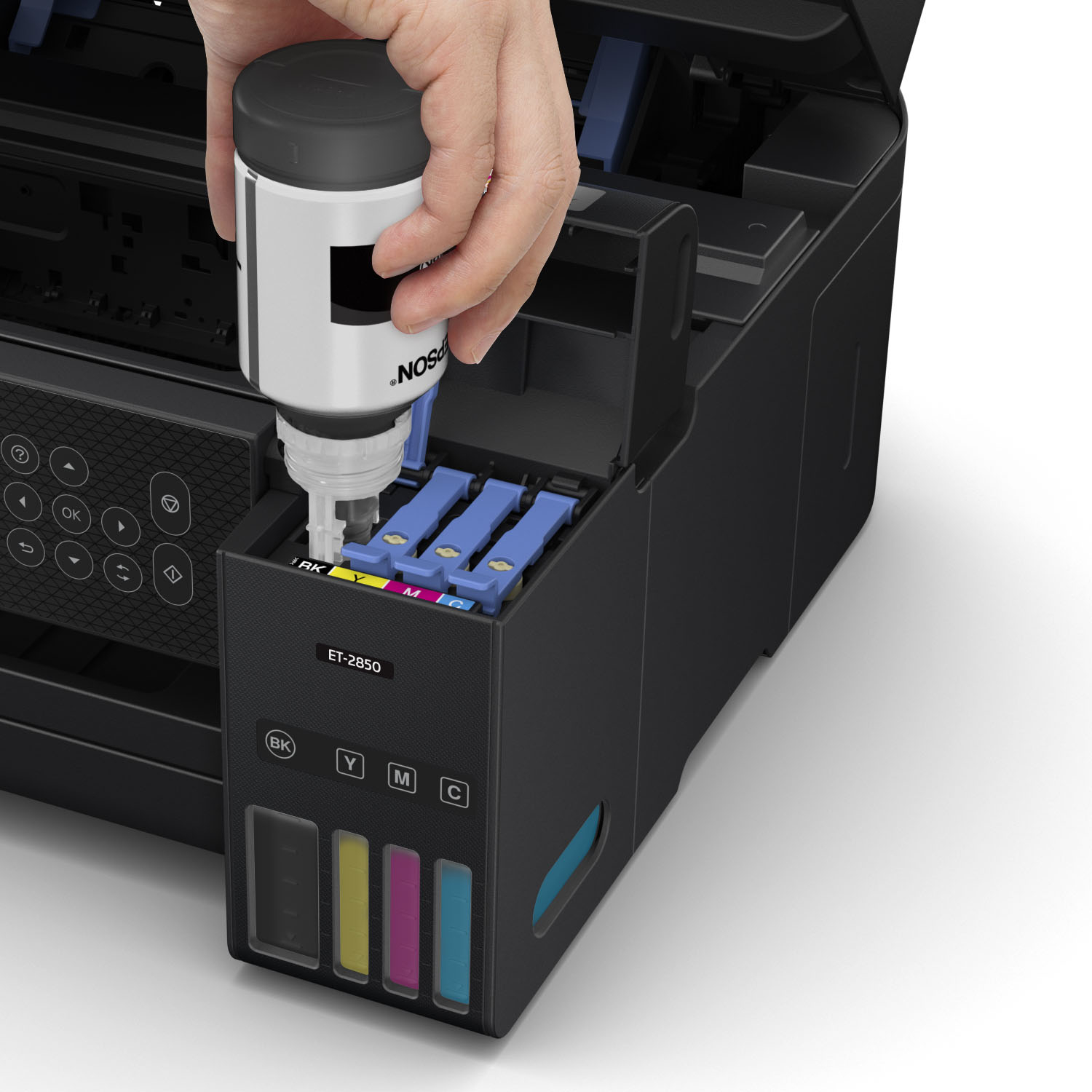
||Posted .This reviewer received promo considerations or sweepstakes entry for writing a review.Have not used it very much, but it seems Ok. Easy ink fill.
I would recommend this to a friendBig wireless printing problems!!
||Posted . Owned for 1 month when reviewed.This reviewer received promo considerations or sweepstakes entry for writing a review.NO-No-No!!! I have had Epson printers for years, both for home and business. This printer is horrible! It keeps dropping wi fi and you cannot print wirelessly. It will show a full wi fi signal yet will not print wirelessly. I am not going to keep calling Epson support and working on this problem for an hour and half each time. Problem will be fixed, works for a hour or day then same problem happens over and over. We are currently using a 3 year old wireless printer that works great. We purchased this printer so we can refill the ink to cut back on buying so many cartridges. I am so disappointed this is not working out and has been such a pain! This is not a wi fi in house problem. This is an Epson ET-2850 problem. I only gave one star for everything because I can’t judge quality and value of something that will not work correctly. We will be returning this copier to the store tonight.
No, I would not recommend this to a friendBrand response from Epson
Posted .Hello Hillduck, we're sorry to hear about the Wi-Fi issue with the ET-2850 printer. Epson considers all feedback to improve the performance and quality of our products. Epson also offers helpful information, including FAQs and self-help tools, on the product support web page at https://epson.com/Support/Printers/All-In-Ones/ET-Series/Epson-ET-2850/s/SPT_C11CJ63202#questions. Your EcoTank printer includes a 1-year Limited Warranty, plus free lifetime technical support. If you need assistance, our Epson Support Team would be happy to help you and can be reached at (562) 276-4382; Hours: Monday - Friday, 7 am - 4 pm PT; Sincerely, Sam - The Epson Team.
Printer in great price
||Posted . Owned for 1 month when reviewed.This reviewer received promo considerations or sweepstakes entry for writing a review.My Internet wasn’t working on it, very frustrating
No, I would not recommend this to a friendBrand response from Epson
Posted .Hello WilliamC, we apologize for the disappointing experience you’ve encountered with your Epson printer's wireless connection. Your ET-2850 includes free technical support for the life of your product. Please call and let our Epson Support Team assist. Our support number is (562) 276-4382. Our support hours of operation are Monday – Friday, 7 a.m. to 4 p.m. (PT). We’re here to help. Sincerely, Joseph– The Epson Team.
Love it!
||Posted . Owned for 1 month when reviewed.This reviewer received promo considerations or sweepstakes entry for writing a review.Love this new evolution of printers! Easy refill process!
I would recommend this to a friendMaudie1051
||Posted . Owned for 1 month when reviewed.This reviewer received promo considerations or sweepstakes entry for writing a review.Ordering and pickup was a breeze. The printer is awesome
I would recommend this to a friendET-2850 DON’T DO IT
||Posted .This reviewer received promo considerations or sweepstakes entry for writing a review.Epson ET-2850 Just don’t do it! I researched and researched! This by far was the most difficult printer I have ever had to set up. I spent an hour on the phone with Epson to set up. That support person had to ask another support person for help. The little quick guide with QR code? garbage, the app doesn’t communicate. I have a new iPad and new iPhone, fiber optic internet, so connecting shouldn’t have been a problem. The app wouldn’t even connect to the printer. Now it’s all connected (manually) and guess what, this expensive printer will not feed heavy cardstock. This is my fault for not checking, but when I can buy a $50 printer that has no problem with it, never crossed my mind to even check! I am so beyond frustrated with this garbage. I shouldn’t have to spend a ridiculous amount to have a printer that can handle basic things. Just don’t! Save the headache and buy something else.
No, I would not recommend this to a friendBrand response from Epson
Posted .Hello SherrieS, we apologize for your disappointing experience with the ET-2850 printer. Epson considers all feedback to improve the performance and quality of our products. Epson also provides helpful information on FAQs and self-help tools on the product support web page at https://epson.com/Support/Printers/All-In-Ones/ET-Series/Epson-ET-2850/s/SPT_C11CJ63202#questions. Your printer also includes a 1-year Limited Warranty plus free lifetime technical support. Please contact our support team directly at (562) 276-4382 between 7 am - 4 pm (PT), Monday - Friday, if you need further assistance.
Sincerely, Sam - The Epson Team
Awesome little printer
||Posted . Owned for 3 weeks when reviewed.This reviewer received promo considerations or sweepstakes entry for writing a review.Took out 2 stars since it’s so hard to connect to wifi. Work around was to create a 2.4Ghz network and assign DHCP ip reservation for this printer.
I would recommend this to a friendBrand response from Epson
Posted .Hello Nandika, thank you for sharing your experience with your new Epson EcoTank ET-2850. If you have any other issues, please reach out to our Epson Support Team at (562) 276-4382; Hours: Monday – Friday, 7 a.m. to 4 p.m. (PT). Kind Regards, Dylan – The Epson Team.
Started fine... but no longer works after 2 years
||Posted . Owned for more than 2 years when reviewed.This reviewer received promo considerations or sweepstakes entry for writing a review.I have had this printer for 2 years now. It started printing out decently but now what I thought. Over the past few months the printing has not good anymore. In the last month the printer has been giving an error with connecting to wifi so I can no longer print because I print from my phone and laptop. I have restarted everything and the printer does not work.
No, I would not recommend this to a friendto much instructions in my mobile
||Posted . Owned for 1 month when reviewed.This reviewer received promo considerations or sweepstakes entry for writing a review.a little bit complicated to install on my smart phone
I would recommend this to a friendGreat at First
||Posted . Owned for 11 months when reviewed.This reviewer received promo considerations or sweepstakes entry for writing a review.Printer was solid for the first 6-8 months. Went about 2-3 months of not using it and I’m not sure if the ink dried up or got stuck in the cartridge but multiple colors do not print despite being full.
No, I would not recommend this to a friendBrand response from Epson
Posted .Hello ErnieW, we apologize for your disappointing experience with the ET-2850 printer. Epson considers all feedback to improve the performance and quality of our products. Epson also provides helpful information on FAQs and self-help tools on the product support web page at https://epson.com/Support/Printers/All-In-Ones/ET-Series/Epson-ET-2850/s/SPT_C11CJ63202#questions. Additionally, your printer includes a 1-year Limited Warranty plus free lifetime technical support. Please contact our support team directly at (562) 276-4382 between 7 am - 4 pm (PT), Monday - Friday, if you need further assistance.
Sincerely, Sam - The Epson Team