Customer Ratings & Reviews

.](https://pisces.bbystatic.com/image2/BestBuy_US/images/products/b5569c02-8627-4a03-9957-b063abecb45b.jpg)
. 1 Most features require a Internet connection to the printer, as well as an Internet- and/or email-enabled device. For a list of Epson Connect enabled printers and compatible devices and apps, visit [www.epson.com/connect](http://www.epson.com/connect).](https://pisces.bbystatic.com/image2/BestBuy_US/images/products/f1212168-027b-4ffa-9155-e0532bbc2ece.jpg)

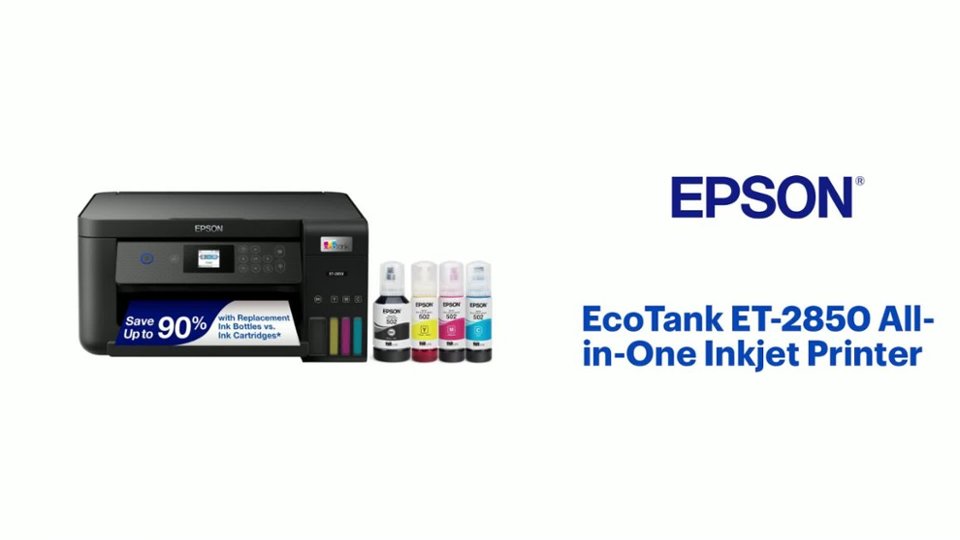
- Model:
- C11CJ63201
- SKU:
- 6470009
Rating by feature
- Value
Rating 4.5 out of 5 stars
- Quality
Rating 4.5 out of 5 stars
- Ease of Use
Rating 4.5 out of 5 stars
Customers are saying
Customers find value in the EcoTank ET-2850's print quality and ease of use. Many appreciate its overall performance, easy setup, and compact size. However, some customers have reported occasional paper jams and connectivity issues. A few have also noted that the printer can be quite noisy.
This summary was generated by AI based on customer reviews.
Epson ET2850-never again
||Posted . Owned for 1.5 years when reviewed.This reviewer received promo considerations or sweepstakes entry for writing a review.Worked when new, basically needed head cleaning every use after warranty expired. And head cleaning used dozens of pages. Junked it
No, I would not recommend this to a friendBrand response from Epson
Posted .Hi MichaelM, Epson provides useful information at www.epson.com/support/et2850 that can help you clear nozzle clogs. Your Epson ET-2850 includes free technical support for the life of your product. Our Epson Support Team would be happy to help you select the proper settings for optimal performance and can be reached at (562) 276-4382; Hours: Monday – Friday, 7 a.m. to 4 p.m. (PT). Kind Regards, Joseph – The Epson Team.

Worst Printer EVER
||Posted . Owned for 1.5 years when reviewed.This reviewer received promo considerations or sweepstakes entry for writing a review.How we let the guy talk us into this piece of crap I have no idea, he said it was the best one. Thankfully we kept our other printer. This jams continuously. Maybe printers just aren’t made like they used to be.
No, I would not recommend this to a friend- Pros mentioned:Print quality
Good printer
||Posted . Owned for 1 month when reviewed.This reviewer received promo considerations or sweepstakes entry for writing a review.Easy to set up, prints faster than my old printer, the app is also very useful
I would recommend this to a friend Good but not great
||Posted . Owned for 3 weeks when reviewed.This reviewer received promo considerations or sweepstakes entry for writing a review.Nice printer not the greatest setup is a pain not pure print
I would recommend this to a friendBrand response from Epson
Posted .Hello Michael, thank you for sharing your experience with your new Epson ET-2850. If you experience any other issues, please reach out to the Epson Support Team at (562) 276-4382; Hours: Monday – Friday, 7 a.m. to 4 p.m. (PT). Kind Regards, Dylan – The Epson Team.
- Pros mentioned:Ease of use
Printer
||Posted . Owned for 1 month when reviewed.This reviewer received promo considerations or sweepstakes entry for writing a review.Easy to set up have only used it a few times and am happy so far.
I would recommend this to a friend Okay printer
||Posted . Owned for 1 month when reviewed.This reviewer received promo considerations or sweepstakes entry for writing a review.Simple but no instructions. Sometimes it helps to have p;aperwork to refer to
No, I would not recommend this to a friendBrand response from Epson
Posted .Hello JaydeeB, we appreciate your feedback on the Epson EcoTank ET-2850. Epson considers all feedback to improve the performance and quality of our products. Epson also provides helpful information on FAQs and self-help tools on the product support web page at https://epson.com/Support/Printers/All-In-Ones/WorkForce-Series/Epson-WorkForce-WF-2850/s/SPT_C11CG31201#questions. Your printer also includes a 1-year Limited Warranty plus free lifetime technical support. Please contact our support team at (562) 276-4382 between 7 am - 4 pm (PT), Monday - Friday, if you need further assistance. Sincerely, Tony - The Epson Team
- Pros mentioned:Print quality
Great economical product.
||Posted . Owned for 10 months when reviewed.This reviewer received promo considerations or sweepstakes entry for writing a review.Wonderful!! I was replacing cartages weekly. Now I never have to add ink.
I would recommend this to a friend Could be better
||Posted . Owned for 4 months when reviewed.This reviewer received promo considerations or sweepstakes entry for writing a review.Its ok, but it has a hard time and struggles printing anything on card stock
No, I would not recommend this to a friendBrand response from Epson
Posted .Dear Jay1, we are sorry to hear that you are disappointed with your Epson printer. When printing on cardstock, for optimum results, please ensure the paper you are using is less than 79lbs. If we can help you with anything else, please contact Epson Support at (562) 276-4382; Hours: Monday – Friday, 7am – 4pm PT. Sincerely, Tony – The Epson Team.
- Pros mentioned:Print quality
Printer
||Posted .This reviewer received promo considerations or sweepstakes entry for writing a review.Perfect for what I was needing to print like pictures and craft things
No, I would not recommend this to a friend Did not work
||Posted .This reviewer received promo considerations or sweepstakes entry for writing a review.Did not work...........................................,.................................................................
No, I would not recommend this to a friendBrand response from Epson
Posted .Hello Didnotwould9ooopppppppo, we're sorry to hear about your disappointing experience with your Epson ET-2850 printer. Epson considers all feedback to improve the performance and quality of our products. Our Epson Support Team would like to hear more about the issue you are experiencing and can be reached at (562) 276-4382. Hours: Monday - Friday 7 am - 4 pm PT. We look forward to your call. Sincerely, Sam - The Epson Team.
- Pros mentioned:Ease of use
Love my printer!
||Posted . Owned for 3 weeks when reviewed.This reviewer received promo considerations or sweepstakes entry for writing a review.Love my printer!! Easy to setup and use. Like the bottles of ink.
I would recommend this to a friend GOOD CONCEPT CHINZY QUALITY
||Posted . Owned for 5 months when reviewed.This reviewer received promo considerations or sweepstakes entry for writing a review.PRINTER IS KIND OF CHEAPLY MADE THE REDEEMING VALUE IS THE TONER IS RESONABLY AND U CAN SEE HOW MUCH IS LEFT
I would recommend this to a friendBrand response from Epson
Posted .Hello steelmon, we're sorry about your disappointing experience with the ET-2850 printer. Epson considers all feedback to improve the performance and quality of our products. Epson provides helpful information, including FAQs and self-help tools, on the product support web page at https://epson.com/Support/Printers/All-In-Ones/ET-Series/Epson-ET-2850/s/SPT_C11CJ63202#questions. Additionally, your printer includes a 1-year Limited Warranty, plus free lifetime technical support. Please contact our support team directly at (562) 276-4382 between 7 am - 4 pm (PT), Monday - Friday if you need assistance.
Sincerely, Sam - The Epson Team
- Pros mentioned:Print quality
Great printer
||Posted . Owned for 3 weeks when reviewed.This reviewer received promo considerations or sweepstakes entry for writing a review.Great prinyer with fantastic resolution. Very inexpesnive ink.
I would recommend this to a friend Terrible
||Posted . Owned for 3 months when reviewed.This reviewer received promo considerations or sweepstakes entry for writing a review.I have no idea why this printer is so highly recommended. I did a lot of research and ended up purchasing a few months ago. It is a terrible printer. When it actually prints the ink is so light but most times it doesnt finish a job or worse restarts it so i end up with multiples of the same few pages. I would never recommend this printer. I tried to return after 3 weeks to find out I only had 2 weeks to retutn it. It is also super slow when it prints. There really are no positives.
No, I would not recommend this to a friendBrand response from Epson
Posted .Hi Erica, thank you for sharing your experience. Epson takes into consideration all feedback to improve the performance and quality of our products. We will forward your feedback to the relevant Epson department, as we are always looking to make future Epson products better. Your product includes a 1-year warranty. Our Epson Support Team would be happy to help you and can be reached at (562) 276-4382; Hours: Monday – Friday, 7 a.m. to 4 p.m. (PT). Once again, thank you. Regards, Joseph – The Epson Team.
Review
||Posted . Owned for 1 month when reviewed.This reviewer received promo considerations or sweepstakes entry for writing a review.I ended up returning this printer and purchasing an HP. The Epson was hard to set up and I kept getting error messages for paper size. I’m not tech savvy at all, so someone else may not have the problems I had.
I would recommend this to a friendBrand response from Epson
Posted .Hi Kruser, we're sorry to hear you were not satisfied with your Epson EcoTank ET-2850 printer. Epson takes into consideration all feedback to improve the performance and quality of our products. We appreciate your time in sharing your experience and hope you have a nice day. Kind Regards, Tony – The Epson Team.
Difficult installation
||Posted . Owned for 2 weeks when reviewed.This reviewer received promo considerations or sweepstakes entry for writing a review.I took best buy 4 attempts to instal printer. Not happy
No, I would not recommend this to a friendBrand response from Epson
Posted .Hello Mike, we apologize for the disappointing experience you had installing your Epson EcoTank ET-2850. If you have any other issues our Epson Support Team would be happy to assist. Just call (562) 276-4382; Hours: Monday – Friday, 7am – 4pm PT. Sincerely, Dylan – The Epson Team.
Mutiple sheet paper feeder NOT
||Posted . Owned for 2 months when reviewed.This reviewer received promo considerations or sweepstakes entry for writing a review.Once I got this Epson Printer running (instructions on printer didn’t work) I was very happy. Works great but where is the multiple sheet paper feeder. Would not have bought if I’d known, but then I’m long retired and no longer a computer expert and probably don’t need to print so many sheets anyway.
No, I would not recommend this to a friendFirst refillable printer
||Posted . Owned for 3 weeks when reviewed.This reviewer received promo considerations or sweepstakes entry for writing a review.We are still learning how the printer works. Learning curve.
I would recommend this to a friendTerrible Print Quality
||Posted . Owned for less than 1 week when reviewed.This reviewer received promo considerations or sweepstakes entry for writing a review.Real cleaned the heads every 5 prints and then quickly the print quality declined. Had it for three days before returning. For home office use it would be fine enough but for any creative uses you will be disappiinted.
No, I would not recommend this to a friendBrand response from Epson
Posted .Epson provides useful information, including FAQs, that may help you avoid clogged nozzles at https://epson.com/Support/Printers/All-In-Ones/WorkForce-Series/Epson-WorkForce-WF-2850/s/SPT_C11CG31201#questions
Worst printer EVER!
||Posted . Owned for more than 2 years when reviewed.This reviewer received promo considerations or sweepstakes entry for writing a review.I've had several printers (HP, Canon, Epson). Epson was always my favorite and I've loyally had Epson for the last 3 or 4 printers. This one is HORRIBLE! Nothing but problems since I got it and now, after 2 years of VERY LIGHT use, it has had software failure and is shot. Furthermore, the closest service center to me in North Jersey is in Farmingdale, NY! 76 miles away. Terrible option for a terrible printer. Trashing it....and Epsons.
No, I would not recommend this to a friendBrand response from Epson
Posted .Hi MariaM, we're sorry to hear you were not satisfied with your Epson ET-2850 printer. Epson takes into consideration all feedback to improve the performance and quality of our products. Hopefully we can assist you with a future product. Sincerely, Joseph – The Epson Team.