Customer Ratings & Reviews

.](https://pisces.bbystatic.com/image2/BestBuy_US/images/products/b5569c02-8627-4a03-9957-b063abecb45b.jpg)

. 1 Most features require a Internet connection to the printer, as well as an Internet- and/or email-enabled device. For a list of Epson Connect enabled printers and compatible devices and apps, visit [www.epson.com/connect](http://www.epson.com/connect).](https://pisces.bbystatic.com/image2/BestBuy_US/images/products/f1212168-027b-4ffa-9155-e0532bbc2ece.jpg)


- Model:
- C11CJ63201
- SKU:
- 6470009
Rating by feature
- Value
Rating 4.5 out of 5 stars
- Quality
Rating 4.5 out of 5 stars
- Ease of Use
Rating 4.5 out of 5 stars
Customers are saying
Customers find value in the EcoTank ET-2850's print quality and ease of use. Many appreciate its overall performance, easy setup, and compact size. However, some customers have reported occasional paper jams and connectivity issues. A few have also noted that the printer can be quite noisy.
This summary was generated by AI based on customer reviews.
Printer is the worst!
||Posted . Owned for 1 month when reviewed.This reviewer received promo considerations or sweepstakes entry for writing a review.This printer is my 3rd attempt with an Epson Printer and I continue to be disappointed. The staff at Manchester BB has been great. However this product is horrible!
No, I would not recommend this to a friendBrand response from Epson
Posted .Hi SusanM, we are sorry to hear you are having issues with your Epson printer. Your ET-2850 includes free technical telephone support for the life of your product. Our Epson Support Team would be happy to help you and can be reached at (562) 276-4382; Hours: Monday – Friday, 7 a.m. to 4 p.m. (PT). Sincerely, Joseph – The Epson Team.

Set up nightmare.
||Posted . Owned for 1 month when reviewed.This reviewer received promo considerations or sweepstakes entry for writing a review.I'm giving this printer a one for set up as it took me over 11 hours to get it to connect to my wifi. Why does Epson make it so hard to use their products? I hate the tiny display screen too. Really? I had to use a magnifying glass to read it.
No, I would not recommend this to a friendBrand response from Epson
Posted .Hi sah1109, Epson takes into consideration all feedback to improve the performance and quality of our products. We will forward your feedback to the relevant Epson department, as we are always looking to make future Epson products better. Regards, Joseph – The Epson Team.
Garbage that’s expensive
||Posted . Owned for 1 year when reviewed.This reviewer received promo considerations or sweepstakes entry for writing a review.This never worked since I purchased it. I had to get the geek squad to connect it. Which it did. There great. But this year I found out the defect is it clogging ink heads. To power clean would kill it . I’m done with Epson products!
No, I would not recommend this to a friendBrand response from Epson
Posted .Hello nan01, thank you for sharing your experience with your Epson EcoTank ET-2850. If the issue continues, please reach out to our Epson Support Team at (562) 276-4382; Hours: Monday – Friday, 7 a.m. to 4 p.m. (PT). Kind Regards, Dylan – The Epson Team.
Horrible Printer
||Posted . Owned for 10 months when reviewed.This reviewer received promo considerations or sweepstakes entry for writing a review.Horrible printer. I’ve had this printer for about 9 months. Printer doesn’t print. Have to constantly clean the printer heads. Screen is hard to read. Instructions don’t make sense. Not worth the money
No, I would not recommend this to a friendDo not buy it
||Posted . Owned for 2 weeks when reviewed.This reviewer received promo considerations or sweepstakes entry for writing a review.The worst printer ever, i am go I ng to return it and back to HP again. Do not buy is . It jammed paper, asks contact support every time.
No, I would not recommend this to a friendEpson ECOtank ET -2850
||Posted . Owned for 1 week when reviewed.This reviewer received promo considerations or sweepstakes entry for writing a review.Old Epson printer used for 6 years and brought new one it's awesome new Ink and test work so Nice !!
I would recommend this to a friendunreliable
||Posted . Owned for 1 year when reviewed.This reviewer received promo considerations or sweepstakes entry for writing a review.ive always had hp printers and tried the epson. regret it. the color is not as crisp. I've only had it for one year and it won't print in color.
No, I would not recommend this to a friendBrand response from Epson
Posted .Hi TaliaO, we are sorry to hear that you are having issues with your Epson printer. Your ET-2850 includes free technical support for the life of your product. Our Epson Support Team would be happy to help you optimize your print settings and can be reached at (562) 276-4382; Hours: Monday – Friday, 7 a.m. to 4 p.m. (PT). Sincerely, Alissa A. – The Epson Team.
Very disappointed
||Posted . Owned for 2 months when reviewed.This reviewer received promo considerations or sweepstakes entry for writing a review.Won’t print after not being used for 1 week. When printing several pages starts out ok then can barely read it is so oight
No, I would not recommend this to a friendNot the right printer for me.
||Posted . Owned for 3 weeks when reviewed.This reviewer received promo considerations or sweepstakes entry for writing a review.Now the printer is leaving white unprinted lines across the whole sheet of paper. Don't like that I have to keep loading sheets of paper in the back rack.
No, I would not recommend this to a friendBrand response from Epson
Posted .Dear HerbertM, we are sorry to hear that you are experiencing issues with your Epson printer. We want to make sure you reach to our Support Team. Please contact us at (562) 276-4382; Hours: Monday – Friday, 6am – 8pm PT. Sincerely, Dylan – The Epson Team.
WORST Printer!
||Posted . Owned for 1 year when reviewed.This reviewer received promo considerations or sweepstakes entry for writing a review.Worst printer ever. Stopped printing within 2 months. Black color jammed and will not refill. Tried the autoclean etc Also can't scan more than 1 document at a time!
No, I would not recommend this to a friendPrinter doesn’t work
||Posted . Owned for 1 month when reviewed.This reviewer received promo considerations or sweepstakes entry for writing a review.We cannot get the printer to initialize. The app doesn’t work well and we currently haven’t found a way to use the wireless printer.
No, I would not recommend this to a friendBrand response from Epson
Posted .Hi Kevin, we’re sorry to hear you’re having issues with your Epson ET-2850. Your product includes a 1-year limited warranty and free lifetime tech support. The Epson Advanced Support Team would be happy to help get your printer set up and resolve any issues. Please call us at 1-800-241-5794 between 7 a.m. – 4 p.m. (PT), Monday – Friday. Sincerely, Joseph – The Epson Team.
no cord
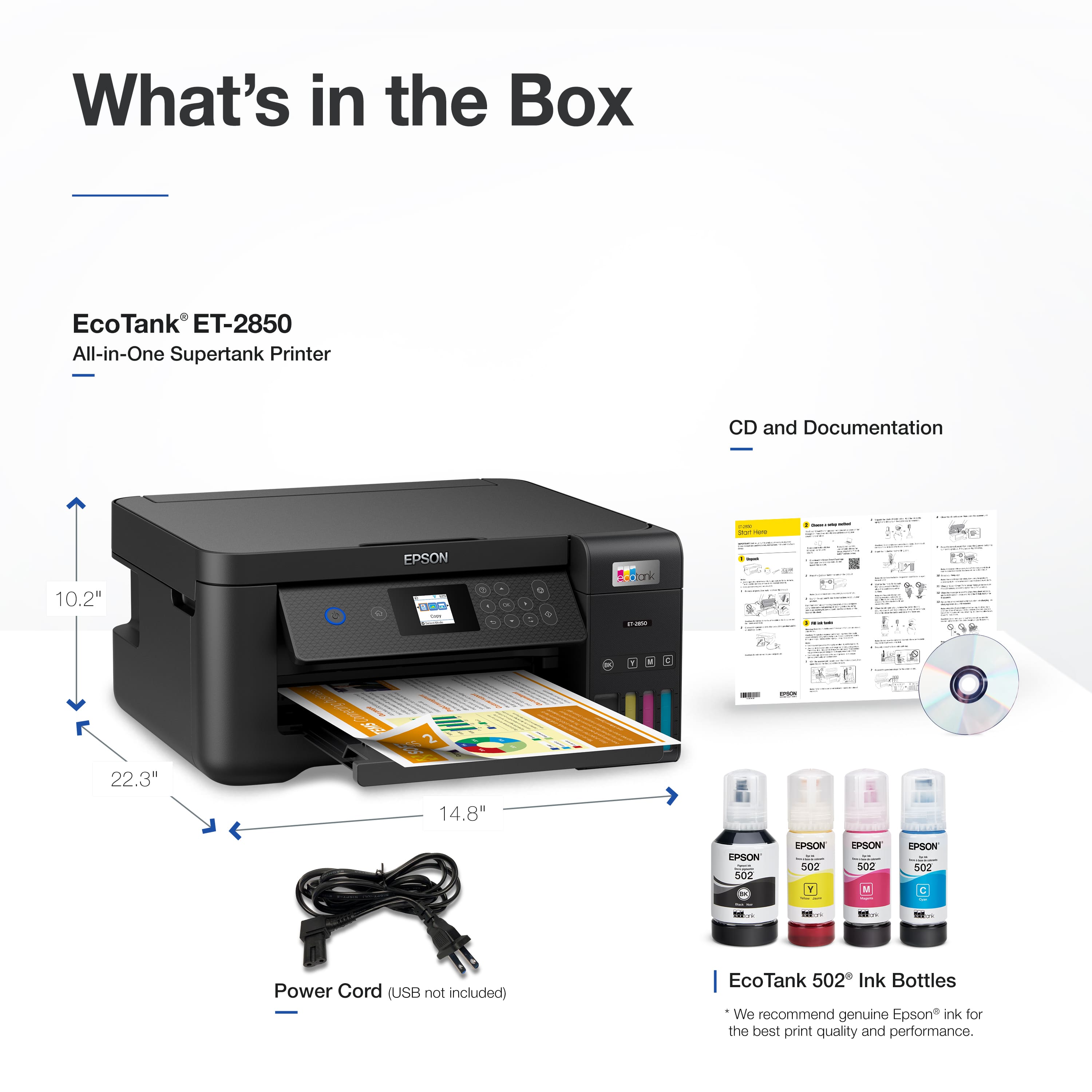
||Posted . Owned for 1 month when reviewed.This reviewer received promo considerations or sweepstakes entry for writing a review.Epson ET-2850 does not include the cheap cord to and from Mac
No, I would not recommend this to a friendBrand response from Epson
Posted .Hello RayV, to offer high-quality products with the latest technology and sell them at the most competitive prices, we must choose which components are necessary and which may be redundant. Many customers already own USB cables, so we eliminate the costs of including them in every box and use those savings to improve product features. If you need any assistance setting up your printer, please call Epson Support at (562) 276-4382 between 7 a.m. and 4 p.m. (PT). We appreciate your feedback and will ensure it's passed on to our product teams. Kind Regards, Joseph- The Epson Team.
Disappointed
||Posted . Owned for 1 year when reviewed.This reviewer received promo considerations or sweepstakes entry for writing a review.So it’s been a year… I loved this until now. Trouble connecting not only through WIFI direct but also through cable. It’s basically junk now and will have to buy new one.
No, I would not recommend this to a friendBrand response from Epson
Posted .Hello Juan H, we apologize for the disappointing experience you’ve encountered with your Epson printer's wireless connection. Your ET-2850 includes free technical support for the life of your product. Please call and let our Epson Support Team assist. Our support number is (562) 276-4382. Our support hours of operation are Monday – Friday, 7 a.m. to 4 p.m. (PT). We’re here to help. Sincerely, Joseph – The Epson Team.
What's up with ink
||Posted . Owned for 1 month when reviewed.This reviewer received promo considerations or sweepstakes entry for writing a review.Overall rating is in question. Looked on Epson website "where to buy ink". It said couldn't find a place (even on line)???? Great if i can get ink.
No, I would not recommend this to a friendBrand response from Epson
Posted .Hi DuaneG, We appreciate your time in sharing your experience. We will be sure to pass your feedback along to our product teams. Epson 502 ink bottles for your EcoTank ET-2850 are available at major retail outlets like Best Buy, Dylan – The Epson Team.
Didn't last me long.
||Posted . Owned for 9 months when reviewed.This reviewer received promo considerations or sweepstakes entry for writing a review.The feeder messed up after 6 months of use. Bought and converted to sublimation printer. Didn't use more than a couple times each month then the feeder went out.
No, I would not recommend this to a friendBrand response from Epson
Posted .Hello Sandrag, we apologize for your disappointing experience with the ET-2850 printer. Epson considers all feedback to improve the performance and quality of our products. Epson also provides helpful information on FAQs and self-help tools on the product support web page at https://epson.com/Support/Printers/All-In-Ones/ET-Series/Epson-ET-2850/s/SPT_C11CJ63202#questions. Additionally, your printer includes a 1-year Limited Warranty plus free lifetime technical support. Please get in touch with our support team directly at (562) 276-4382 between 7 am - 4 pm (PT), Monday - Friday, if you need further assistance
. Sincerely, Sam - The Epson Team
Don't waste your time.
||Posted . Owned for 1 month when reviewed.This reviewer received promo considerations or sweepstakes entry for writing a review.Returned the item. It was extremely difficult to install and during the installation process I was bombarded with attempts to enroll in other software items.i
No, I would not recommend this to a friendBrand response from Epson
Posted .Hi OLEDLover, we're sorry to hear you were not satisfied with your Epson EcoTank ET-2850 printer. Epson takes into consideration all feedback to improve the performance and quality of our products. We appreciate your time in sharing your experience and hope you have a nice day. Kind Regards, Tony – The Epson Team.
Very Disappointed
||Posted . Owned for 1 month when reviewed.This reviewer received promo considerations or sweepstakes entry for writing a review.I had a Cannon MG3620 Printer/Scanner. It Scanned, Copied and Printed Great with no issues. The only complaint I had was I was spending a lot on Ink printing photos. So I decided to spend a little extra and get this Epson which had good reviews. I haven't had it long enough to tell how much it will save me on ink. The things I don't like are: It seems slow...... compared to my old Cannon, especially the scanner. On my old Cannon, everything was done on the computer. You never had to punch buttons on the printer, except unless it was out of paper. I cant print anything on the Epson without it having to press a button for OK or proceed. I also get this error saying printing is suspended due to paper mismatch, do I want to continue. I used to print all kinds of cards and envelopes in the Cannon. When I tried printing some cards and envelopes in the Epson, I had paper jams and inked smeared on the envelopes. I wish I had tried the Cannon MegaTank instead.
No, I would not recommend this to a friendBrand response from Epson
Posted .Hello JABrown, we apologize for your disappointing experience with the ET-2850 printer. Epson considers all feedback to improve the performance and quality of our products. Epson also provides helpful information on FAQs and self-help tools on the product support web page at https://epson.com/Support/Printers/All-In-Ones/ET-Series/Epson-ET-2850/s/SPT_C11CJ63202#questions. Additionally, your printer includes a 1-year Limited Warranty plus free lifetime technical support. Please contact our support team directly at (562) 276-4382 between 7 am - 4 pm (PT), Monday - Friday, if you need further assistance.
Sincerely, Sam - The Epson Team
Do not buy!
||Posted . Owned for more than 2 years when reviewed.This reviewer received promo considerations or sweepstakes entry for writing a review.Garbage. I bought this thing 2 years ago and it won't even take the paper into the machine to print anymore.
No, I would not recommend this to a friendBrand response from Epson
Posted .Hi GabrielaC, we are sorry to hear you are having issues with your Epson printer. Your ET-2850 includes free technical telephone support for the life of your product. Our Epson Support Team would be happy to help you and can be reached at (562) 276-4382; Hours: Monday – Friday, 7 a.m. to 4 p.m. (PT). Sincerely, Jacob – The Epson Team.
Was hard to set up
||Posted . Owned for 3 weeks when reviewed.This reviewer received promo considerations or sweepstakes entry for writing a review.Called company direct, got some things fixed screen 2 smal hard 2 see
No, I would not recommend this to a friendPaper Stuck
||Posted . Owned for 4 months when reviewed.This reviewer received promo considerations or sweepstakes entry for writing a review.Since I bought this until now I’m getting hard time for the paper. Every time I print something, the paper always stuck inside.
No, I would not recommend this to a friendBrand response from Epson
Posted .Hi Marianita, Epson provides useful information on paper loading and clearing paper jams in the product User’s Guide at www.epson.com/support/ET2850 . If you continue to have problems with your printer, our Epson Support Team would be happy to help you and can be reached at (562) 276-4382; Hours: Monday – Friday, 7 a.m. to 4 p.m. (PT). Sincerely, Joseph – The Epson Team.