Customer Ratings & Reviews


- Model:
- B11B226201
- |
- SKU:
- 5689001
Customer reviews
Rating 4.7 out of 5 stars with 558 reviews
(558 customer reviews)Rating by feature
- Value4.6
Rating 4.6 out of 5 stars
- Quality4.7
Rating 4.7 out of 5 stars
- Ease of Use4.7
Rating 4.7 out of 5 stars
Customers are saying
Customers frequently mention the Workforce ES-400 Document Scanner's impressive scan speed and ease of use. Its compact size and reliable performance are also frequently praised, while some users point out occasional software issues and concerns about paper handling. A few customers also noted the lack of wireless functionality.
This summary was generated by AI based on customer reviews.
- Pros mentioned:Scan speed
Rated 5 out of 5 stars
Owned for 2 1/2 years - Worth the Buy
||Posted . Owned for more than 2 years when reviewed.This reviewer received promo considerations or sweepstakes entry for writing a review.I have had this product for 2 1/2 years. It still works amazingly and does not give me any problems. I use this regularly. I love the front and back scanning functionality, and it works snappy. It is worth 5 stars!
I would recommend this to a friend Rated 5 out of 5 stars
I am NOT disappointed!
||Posted . Owned for 3 weeks when reviewed.This reviewer received promo considerations or sweepstakes entry for writing a review.What can I say? This scanner is so close to perfect. It does not have wireless capability but I didn't really need that function. I am so happy with the quality of my scans and oh boy, how fast it is. I was using an all in one that would take ages to activate the scanner. I am literally IN LOVE!!! Super fast setup! Compact! Perfect. Get you one!!
I would recommend this to a friend- Pros mentioned:Scan speed, Size
Rated 5 out of 5 stars
Compact, Fast and user friendly scanner
Posted .This reviewer received promo considerations or sweepstakes entry for writing a review.This is a nice compact and a really fast scanner. I have used many scanners but this one is a piece of art loaded with technology. It is compact, takes space and best thing I like is the flaps close inside it. And according to my HR it is cute. It took me less than 5 minutes to open the box install and get my first 10 scans. The instructions are so well written, I was able to install it by just using the illustrations (did not read the entire instructions when installing, but did go through them later). It is really easy to setup and install. In fact this was the fastest I ever installed. It uses a USB3.0 cable and can operate on both USB3.0 and USB2.0. I tired installing the software on windows 8 pro, windows 10 and windows 7. It worked really fine and the software installation was also really simple. After the software was installed it did update the firmware which took additional 30 seconds (really fast; and this happened only once). This is small but a beast, it scanned documents really fast and the best part was it is a duplex scanner which mean you insert the page once and both sides are scanned. I scanned all the bill (crushed, crumpled receipts from food joints, gas station etc. that are really thin) at lightning fast speed without a paper jam!! And believe me this is the first time I was able to scan without a paper jam. I also scanned my passport, driver’s license and credit cards which was really easy to because of this scanner. The software is easy to use and understand. The application is not fancy which I love, it user friendly (not fancy) and has a few drop downs which are simple to understand and work with. I used the custom mode to have it work according to my wish. It worked pretty well, and the output was awesome. Since there was no paper jam, I deliberately jammed to test the pause button, which is another amazing feature of this scanner. This button is like the extra brain, so in a paper jam we need to start scanning from scratch, but this button take that pain away from us and now we just need to re-scan the paper which is stuck and can resume the scan from there. Conclusion: It is a nice compact scanner which take really less space and is really easy to use. User friendly interface, fast and awesome picture quality or in short ‘Cute’. This is a review for the Epson ES-400 Duplex Document Scanner that I received free of charge to do a beta test and review.
I would recommend this to a friend - Pros mentioned:Scan speed, Size
Rated 5 out of 5 stars
Awesome Scanner
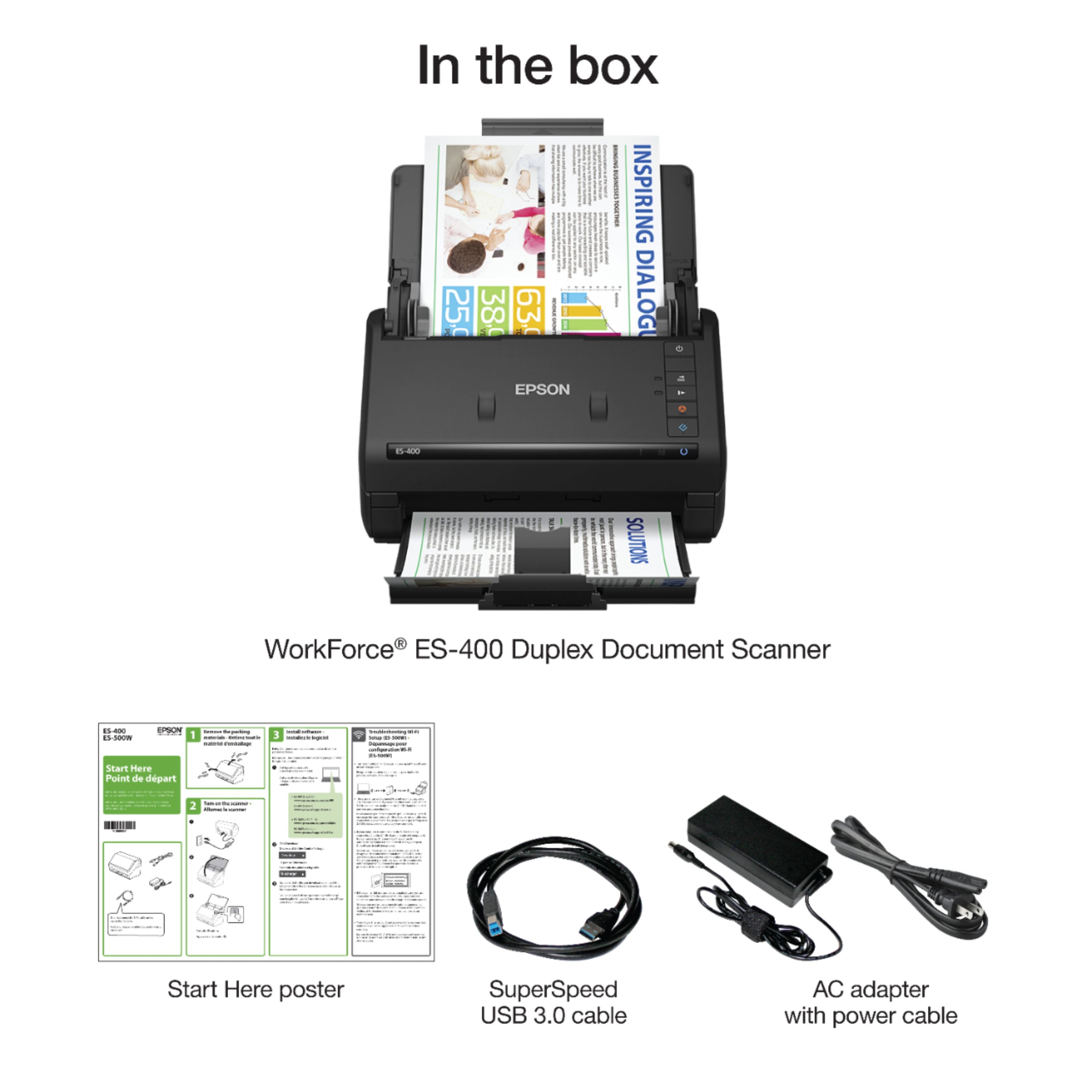
Posted .This reviewer received promo considerations or sweepstakes entry for writing a review.The scanner was very secure in the box and it was a little difficult for me to get the scanner out. I like how the parts for the scanner though are very minimal and it ships with the USB Cable and power cord. The set up for the scanner was very easy. The instructions for setting up the scanner were also very clear and with a simple download, the scanner was up and running. I love the size of the scanner and how perfectly it fits on my computer desk. The document capture software included in the download is very responsive. Scanning my first document was easy and the scanner was quick and quite silently. The bottom tray can be extended to many different positions and I scanned many separate documents within seconds. Scanning multiple documents was simple as well and the scanner has a button to slow down the scan for delicate documents like receipts. Overall I am very happy with this scanner. The set up was quick, the software was easy to download and I am very excited to try the other software that is included and to scan more documents! This scanner will definitely help to keep all those important documents organized and the quality of the scan is very good too. My only drawback is the cost. I think the price seems a bit high. This is a review for the Epson ES-400 Duplex Document Scanner that I received free of charge to do a beta test and review.
I would recommend this to a friend - Pros mentioned:Ease of use, Reliability, Scan speed
Rated 5 out of 5 stars
Excellent Scanner
||Posted .This reviewer received promo considerations or sweepstakes entry for writing a review.I have purchased close to 50 of these for my clients. They are very reliable, easy to install, and compatible with medical software. You can either install just the drivers or the extra software. Very easy to operate and very easy to configure. Very fast and can scan on both side at one time. It can also scan insurance and driver's license cards. I highly recommend this product and will continue to buy more in the future.
I would recommend this to a friend - Pros mentioned:Reliability, Scan speedCons mentioned:Software
Rated 5 out of 5 stars
EXACTLY what I needed!
||Posted . Owned for 2 months when reviewed.This reviewer received promo considerations or sweepstakes entry for writing a review.This scanner is a true “work horse”! I was drowning in paper! My office was just overflowing with stacks of paper everywhere and I didn’t have any more room to store it! This scanner helped me scan everything and save electronic copies on my computer, and helped completely declutter my office! It does an excellent job! It is very fast and reliable! As others might have already noted, the software could use some refinement. Some of its shortcomings: - you can only drag and drop a page within the screen, in order to relocate it. The list of pages does not scroll automatically as you drag - tabbing does not automatically go to next row. It goes from far-right to far-left page/image (or reverse) and that’s it. - some of its error messages should be more specific. E.g. it stopped letting me save “Searchable PDF” (OCR-based) files. The message kept saying “File too large”, even though it was only one page. I had to call their tech support and they helped me determine it was because my resolution was set to too low. It needs to be minimum 200 dpi and mine was set to 150 dpi. Other than that it really does a great job!
I would recommend this to a friend - Pros mentioned:Scan speed
Rated 5 out of 5 stars
Fast, efficient, high quality images
||Posted .This reviewer received promo considerations or sweepstakes entry for writing a review.The ES400 EPSON Scanner was purchased as a replacement for an older system (different company) to make copies of articles, papers, documents, photos, and receipts. The unit does single images in jpeg format, does multiple pages as a single document in pdf format, does double sided scanning, eliminates blank pages, enhances images, and gives you a variety of size and layout formats. It is a little tricky to start, and it takes some study of the user guides and some practice to get the types of images and final product that you want. Since scanned images are accepted by the IRS as verification of purchase or expenditure, I've used my systems for years as a documentation source. The only problem I've had so far is that it doesn't handle oversize images (images larger than an 8.5 x 15 page, or receipts longer than 15 inches). The scanner jams and indicates a paper jam on the error code. After clearing, it works well again. Cost was a little more than I expected, especially compared to my previous scanner from another company, but production so far is making it worthwhile. I've scanned articles for my digital record, done color and black/white jobs, did a 40 page legal document, and successfully handled more than 35 receipts at once. I am satisfied with the production and the unit.
I would recommend this to a friend - Pros mentioned:Ease of use, Scan speed
Rated 4 out of 5 stars
Super fast
||Posted .This reviewer received promo considerations or sweepstakes entry for writing a review.Formerly used an HP Photosmart, which worked great but was very slow when compared to the Epson ES400. The Epson was extremely easy to set up and use, and runs the pages through so fast it makes your head spin, even when scanning both sides of the page. Works great with smaller sheets of paper like store receipts, and also for plastic wallet-size cards.
I would recommend this to a friend - Pros mentioned:Size
Rated 5 out of 5 stars
If you need a scanner you might wanna get this
Posted .This reviewer received promo considerations or sweepstakes entry for writing a review.This is a review for the Epson ES-400 Duplex Document Scanner that I received free of charge to do a beta test and review. The first thing you'll receive is the box.. obviously lol. its easy to unpack age and everything is neatly packaged inside with proper instructions on how to remove the scanner. i will not that the start up manual is located underneath the scanner at the bottom of the box so make sure you grab that. the scanner is surprisingly compact and i doubt in most situations it would be hard to store. its a nice shade of black and the cables and buttons are non-obtrusive. the tray to catch paper is neatly stored beneath the scanner as well but please do be gentle as you extend it because the gray stopper can detach. so the first thing you'll need is the software you'll have to download, the instructions on where to find it can be located in the the manual so MAKE SURE YOU KEEP IT( i didn't lose mine) its a fairly decent sized file to download as it comes with everything you'll need to start your scanning adventure. after that, if you have any issues getting things to work , all you need is a quick restart of your laptop or desktop computer and everything will be gravy. In my personal experience,setup for me was around 5-10 minutes ( had to restart to get it to work, took me a while to figure that out) but the first test with it cleared with no issue. and it does have double sided scanning. its pretty good, and i suspect it has multi-loading but i haven't tested this yet. my conclusion? Its a pretty good scanner if you want to save space while being efficient.
I would recommend this to a friend - Pros mentioned:Scan speedCons mentioned:Software
Rated 4 out of 5 stars
Fast Scanner
||Posted .This reviewer received promo considerations or sweepstakes entry for writing a review.This scanner is really fast. It actually surprised me the first time I saw it feed a scan. Software seems to be a little bloated, but there are options for business cards and making searchable PDFs. This only connects through USB, and does not have a wireless internet connection like most current scanners.
I would recommend this to a friend - Pros mentioned:Scan speedCons mentioned:Software
Rated 4 out of 5 stars
Nice scanner
||Posted .This reviewer received promo considerations or sweepstakes entry for writing a review.Easily set up but the software is a nightmare in my opinion. Had to call Epson for technical assistance. I love Epson products and this one does not fail in how quickly and accurately it scans. But, the software would make me reconsider if I had to do it again. Epson needs to do better here. Has only once grabbed multiple pages at one time during a scan and that was a problem with the pages. I have not hooked this up over wifi, however.
I would recommend this to a friend - Pros mentioned:Ease of use, Scan speed
Rated 5 out of 5 stars
Be careful you don't buy another brand!
||Posted .This reviewer received promo considerations or sweepstakes entry for writing a review.We were ripped off by the company that sold us our former scanner. They did not update our 2005 scanner driver when Windows 10 was installed on July 31, 2016 on our computer. We made the mistake of buying another scanner of the same brand. It did not interact well with Nuance, the company that provides Paperport. Before you buy a scanner, google the leading brands and model and find the trail of unhappy customers from other brands. Best Buy specifications for scanners did not answer important questions, but we learned from the Epson ES-400 buyers' huge articles on the Best Buy website, how great this Epson scanner is. You can google a manual online, but we learned through trial and error how to use this scanner. It is user friendly. If you want to edit, you have to right click Image Class first. We happen to have bought Paperport years ago and liked it, but it doesn't work with the scanner brand we had. After the scan with Epson, we open up Paperport and edit, but it seems different. We are either using both the Epson program and the Paperport program to edit, or we are using one of them to edit. We don't know how this scanner would work if we didn't open it in Paperport. Since the scanning steps are different (and easier) we may actually be editing with Epson's program. I don't know and I don't care. One tip: Right click "select article," use your mouse to surround an item, and you can delete that part of the document. We avoid multifunction printer/scanners/etc because when one part breaks, you need to buy another one. What are the odds that you are going to get the best printer, best scanner, best whatever in one multifunctional device. It's also a space saver on your desk, but if you have a small dog or cat, it doesn't have a flat surface for them to sit when you're not using it. It is not pet friendly like my b/w Samsung printer. Our pet likes to make copies by pushing the button, and he likes to turn on the phone messages and even tried to change our phone recording. If you need this, buy a flat top printer to go with this Epson ES-400.
I would recommend this to a friend - Pros mentioned:Ease of use, Reliability, Size
Rated 5 out of 5 stars
Time saver
||Posted . Owned for 3 weeks when reviewed.This reviewer received promo considerations or sweepstakes entry for writing a review.At first a little disappointed no WiFi but soon realized it folded down so small that it could sit behind my monitor. Now I have used it for 3 weeks and it is simply the best purchase and time saver i have ever bought for my office. No jams and then lets you decide what to do from the scan. I t even names and automatically dates the file but great to send off a quick email. The OCR mode lets you do a word search for any document scanned. Thrilled with this product.
I would recommend this to a friend - Pros mentioned:Scan speed
Rated 5 out of 5 stars
Fast, Easy, Consistent
||Posted . Owned for less than 1 week when reviewed.This reviewer received promo considerations or sweepstakes entry for writing a review.Unboxing: As expected. There was a lot of tape holding everything in place. It's very adhesive, so remove it slowly, or it might break something. Setup: A few people have noted difficulty in setup, but I didn't have any problems. You take all the tape and packaging off the scanner, plug it into the adapter, and turn it on (don't plug in the USB cable until it is requested in the installation process). Next, you go to the website they list, and download software. There are multiple options. You want the bundle that puts the driver and software together in one download. You have to make a few choices during installation. The bundle includes a third-party business card add-on you can also choose to install. Once the software is installed, you have a lot of settings options to choose from (e.g. where to save, what resolution to use, etc.). The longest part of the installation for me, was dealing with the tangled wires at the back of my computer, and rearranging things to make room for the scanner. If not for that, the whole process probably would have taken around five minutes. Scanning: As expected. You put the documents face down, with the top of the document at the bottom, so it scans fist. Scan speed is very fast at lower resolutions (200-300), where it does around 20-25 pages per minute. Note, that OCR requires a resolution of 200 or greater, in order to work. When I set it at 600 dpi, it slowed down noticeably (around 10 pages per minute), but it was still reasonably fast. Compared to my old, manual, flatbed scanner, it takes only a fraction of the time to get through a stack of documents. Pro Tip: When scanning legal documents that have holes in the top or bottom, you have to put the holed edge in first, or it will jam every single time. It took me a while to figure this out, but it worked fine after making the adjustment. If you do this, you may have to manually rotate pages on the scanning software, so they're facing the right direction after you scan them. Software: Disclaimer: My previous scanner was an all-in-one flatbed from around 2009, so I'm somewhat comparing it to that, rather than newer options. The scan software interface is very basic. The initial interface is just a box that asks you whether you want to do a two-sided scan or a single-side scan. Scanning begins immediately, when you select one of those two options. Once scanned, the toolbar just has the options for "Delete", "Rotate right", "Crop", "Stitch Images", "Include back sides", "Help", and "Settings"). In fact, it had fewer options than my decade old software. This is not necessarily bad, as a lot of the options that used to require manual attention, are now handled automatically (e.g. contrast levels). After scanning, if you want to delete a page, you simply select it, and hit the delete button, or use the delete button on the tool bar. There are no right-click or short-cut options for deleting pages, that I can see. It also can automatically detect and delete blank pages. Rather than having options to rotate right, or left, they just have "Rotate right". I guess this is more simple, but it may require a little more clicking. To rearrange pages, you just select them and drag them where you want them. When cropping, it opens a new window that is not maximized. It's too small to see what you're doing, and has to be manually maximized every single time. Doesn't seem to be any contrast adjustment. Uploading your scans is very easy, and you have many options (file on your PC, Dropbox, Onedrive, Google Drive, etc.). You can even do dual save, where it saves both online and on your PC at the same time. I didn't notice that it had an option to create a new folder on the storage drive. This would be a nice addition, if it doesn't already have it somewhere. The only reason I gave this four stars on value, is because they jacked the price up a hundred dollars, since the same time I checked a year ago. Because this is an older model, I was expecting the price to go down, not up. Fortunately, they had it on sale, so it was only $40 more than before. Disclaimer: I scanned hundreds of documents with this machine for around 7 or 8 hours, over a period of two days. I was going to wait a couple months before reviewing, but after the number and variety of documents, I feel confident in how it performs. Also, since it's an older model, I don't want to wait till it's no longer being sold, to review it. I cannot speak to durability.
I would recommend this to a friend - Pros mentioned:Reliability, Scan speed
Rated 5 out of 5 stars
Great scanner
||Posted .This reviewer received promo considerations or sweepstakes entry for writing a review.It has done a good job scaning 5 drawers in my file cabinet. Maybe jammed twice with all this paper. I am impressed. This machine much faster than two others I tried.
I would recommend this to a friend - Pros mentioned:Ease of use, Scan speed
Rated 5 out of 5 stars
Excellent Product
||Posted .This reviewer received promo considerations or sweepstakes entry for writing a review.I was pleased with this product overall. I found it to be user friendly and economical. The quality of the scans is satisfactory. I would recommend this scanner.
I would recommend this to a friend Rated 5 out of 5 stars
Fast and Accurate Business and Home Scanner
Posted .This reviewer received promo considerations or sweepstakes entry for writing a review.Packaging: The Epson Workforce ES-400 Document Scanner in black came in a compact box tightly packed with all cables properly bagged and taped down so they did not move about in the product box. The actual scanner was packaged between two sturdy styrofoam ends and placed in a protective bag to avoid scratches. The scanner had no room for movement and traveled via FedEx very well. Once the scanner is removed from the protective bag every single moving part was properly taped down and protected so that movement from transit would not damage or break the product. Setup: Included in the box was a simple Start Here guide which identified all the proper parts that should have been included in the box as well as how to properly remove the protective tape. Step 2 simply involved going directly to the Epson support site to download the Driver and Software Utility to install and setup the scanner. The website easily detected the correct version of Windows (including 64 bit) I was using and provided the direct download link. Once downloaded the setup file was super quick and easy and walks you through setup which literally took less than 5 minutes. Once the setup was complete the Epson Software Updater checked the firmware version of the scanner and instructed that an update was available. The Epson Software Updater does look a little outdated as far as software goes these days but it quickly downloaded and installed the firmware update for the scanner in about 2 minutes. Once the software and firmware were installed and updated the scanner was ready to go. Operation: The Epson Workforce ES-400 Document Scanner has a really small footprint especially when closed up and not in use. Once installed I tested various documents and scan settings resulting in better than expected results. Not only was this thing fast but the quality of the scans were amazing and really provided the detail needed to archive documents. I love the ability to scan both sides of a document at once as this not only speeds up your scanning but makes the process so much easier as you do not have to constant flip paper and try to remember what side you already scanned such as use with a flatbed scanner (my previous scanner). Controls were simple to figure out and the included software made it easy to start scanning in the file formats you want right out of the box with no hassle whatsoever. Conclusion: If you're in the market for a stand alone scanner or scan many documents day to day, take a serious look at the Epson Workforce ES-400 Document Scanner as it is fast, accurate and easy to setup while taking up little space when in use and especially when not. This is a review for the Epson ES-400 Duplex Document Scanner that I received free of charge to do a beta test and review.
I would recommend this to a friend- Pros mentioned:Scan speedCons mentioned:Jamming
Rated 5 out of 5 stars
Perfect Desktop Scanner
||Posted .This reviewer received promo considerations or sweepstakes entry for writing a review.Everything about this scanner is great. It's extremely fast, doesn't jam, has tons of options, great packaged software, and was priced well.
I would recommend this to a friend - Pros mentioned:Scan speed, Setup, Size
Rated 5 out of 5 stars
Excellent scanner at a good price
||Posted . Owned for 1 month when reviewed.This reviewer received promo considerations or sweepstakes entry for writing a review.Since purchasing the ES-400 scanner it has been a reliable work horse for me. Set-up was easy. Scan quality is excellent. I've scanned up to 20 pages at a time (max is 35) without issue. With limited workspace its compact size is a bonus. I highly recommend this product.
I would recommend this to a friend - Pros mentioned:Ease of use, Scan speed
Rated 5 out of 5 stars
Awesome scanner
||Posted .This reviewer received promo considerations or sweepstakes entry for writing a review.It was so easy to hook up and does an amazing job scanning all types of documents and photos. It is super fast too!
I would recommend this to a friend