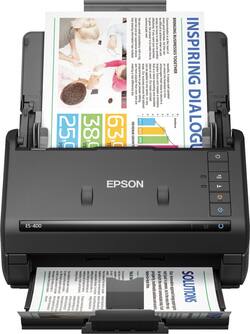
Epson - Workforce ES-400 Document Scanner - Black
- Key Specs
- Networking: Not Applicable
- Scan (Color) Speed: 35 copies per minute (The number of color pages able to be scanned per minute.)
- Scan Method: Single pass
- Duplex Scan Function: true
- General
- Brand: Epson
- Model Number: B11B226201
- Product Name: Workforce ES-400 Document Scanner
- Color: Black
- Connectivity
- Scanner Connectivity: USB 3.0
- Minimum System Requirements: Microsoft Windows 7 / 8 / 8.1 / 10, Apple MacOS X 10.6.8 - 10.11.x
- Dimensions
- Product Height: 6.9 inches (The out of box height of the item. Height is measured as the vertical distance from the bottom of the item to the top as it would be primarily used or placed.)
- Product Width: 6.6 inches (The out of box width of the item. Width is measured as the horizontal distance from one side of the item to the other as it would be primarily used or placed.)
- Maximum Document Length: 240 inches
- Maximum Document Width: 8.5 inches
- Product Weight: 8.09 pounds (The out of box weight of the item.)
- Features
- Automatic Document Feeder Capacity: 50 sheets
- Automatic Document Feeder Included: true
- Scanner Type: Other
- Scanner Resolution: Up to 600 x 600 (Refers to the number of pixels/dots, both horizontally and vertically, of the image produced by the scanner. Generally, the higher the resolution, the sharper and cleaner the produced image.)
- Document Size: Legal
- Image Scanner Type: Contact Image Sensor (CIS)
- Scanner Info
- Scan (Monochromatic) Speed: 35 copies per minute (The number of monochromatic grayscale pages able to be scanned per minute.)
- Included
- Included Software: ABBYY FineReader Sprint, EPSON Scan, NewSoft Presto! BizCard, EPSON Document Capture
- Certifications Listings & Approvals
- ENERGY STAR Certified: true (Devices carrying the ENERGY STAR service mark, such as computer products and peripherals, kitchen appliances, and other products, generally use 20% to 30% less energy than required by federal standards.)
- TWAIN Compliant: true (Products with this label are compliant with standards set by the TWAIN Working Group for regulating communication between software and digital imaging devices. Devices that are TWAIN compliant are compatible for use with each other without requiring additional software, even if they have different capabilities.)
- Other
- UPC: 010343920309
Stay organized and on schedule with this Epson WorkForce document scanner. Compatible with DropBox, Google Drive and other cloud storage apps, this scanner lets you send documents directly to shared files. This Epson WorkForce document scanner scans up to 35 pages per minute and can handle everything from plastic ID cards to legal-sized documents.
- Up to 600 x 600 dpi optical resolution (1200 x 1200 dpi interpolated resolution): To capture every word and image detail with clarity.
- 8.5" x 240" maximum scan size: Enables you to capture entire pages.
- Up to 35 ppm scan speeds*: For rapidly preserving a variety of files. Duplex scanning helps you get the job done quickly.
- Easily scan a variety of documents: Including business card and plastic card.
- Contact image sensor (CMOS CIS): Provides high-quality visuals.
- 3-color RGB LEDs: Enable fast scanning with no warm-up time.
- 50-sheet automatic document feeder: Helps you quickly complete your scanning tasks.
- High-speed USB 3.0 interface: Offers easy connectivity.
- ENERGY STAR certified: Designed to use less energy and meets strict energy efficiency guidelines set by the Environmental Protection Agency and U.S. Department of Energy.
Whats Included
- ABBYY FineReader Sprint, EPSON Scan, NewSoft Presto! BizCard, EPSON Document Capture
- Epson Workforce ES-400 Document Scanner
- SuperSpeed USB cable
A: My scanner was able to do this - scanned mix of letter size and legal size and produced them as letter and legal size. I've scanned receipts in various widths and lengths and it scans and records them in the size they were scanned.
A: Yes it scans color and front and back.
A: There is no special feeder for photos but I have loaded a stack of photos with the adjustable paper size tabs and scanned without problems. The speed is exceptionally fast. Less than 1 second per photo or color document. In fact the scan speed is so fast, there is a Slow Scan button that can be activated. The scanner is supposed to be 35 PPM but since most photos are about 4X6 it goes about 3 times faster or 100 images a minute. There is a software interface where you can change the image quality and specify the format such as PDF, JPG, BMP, TIFF The included software allows directly uploading to Cloud Accounts. You have to sign in to your Cloud Account to allow uploads. Speed is a function of your ISP & bandwidth. I'm using a Microsoft PC so I can not comment about MAC. Checking the MFG specs for compatibility. It appears to be MAC Compatible to many versions. The software on the PC install automatically updated itself from Epson. The scanner has the unique ability to scan super long documents and historical photos up to 240 inches long and scans BOTH Sides simultaneously in 1 pass.
Q: Can this scanner be used for photos. I need to scan multiple photos.
A: Yes, I scan Quilt Magazine pages to save color photos and instructions. I scanned in my old 1950's photos to keep family albums.
A: Absolutely! They scan directly to your PC, no extra software and no cloud scanning. This is why we purchase so many of these because they work great in medical offices scanning insurance papers, insurance cards, etc. I know some scanners offer scanning to the cloud but that solution does not work for my clients.
Q: can you scanner wireless or does it have to be connected to the computer
A: It must be connected. The Epson ES-400 does not scan wireless.
A: You can tell it where to go in the Scanner App. It defaults to your Documents file. It’s very user friendly. Kevin
A: Yes. I have done this. Blank sides are skipped. In the Epson Scan 2 software, Advanced Settings tab, Skip Blank Pages. Select from various levels.